Category Archives: How to Fix

Pychar install paddlex error Microsoft Visual C ++ fourteen . 0 is required

Microsoft Visual C + + 14.0 is required

Solution 1

Install Microsoft Visual C + + build tools
directly by default. After the installation, install paddlex in pychar, and no error will be reported

Solution 2

After installing with PIP command, import pychar
and open pychar’s view – & gt; tool windows – & gt; Terminal (or use the shortcut key Alt + F12)
in the command window, enter PIP install padding
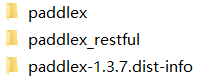
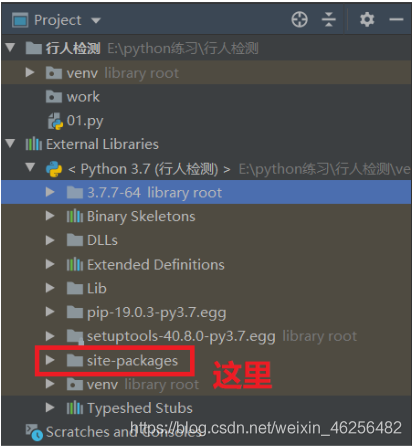
PIP command. By default, it is installed in the directory of Python's site packages (for example, my file is f:: (Python), 3.7.7-64, lib, site packages)
copy these files in the directory to pychar's external directory In site packages under libraries, you can import paddlex to use
Android 11 toast error

Using toast with pictures on Android 11, toast.getView () is null. After checking, the API has banned some methods in Android 11.

The solution is as follows:

    public static void showCenter(Context context, String text) {
        Toast toast = Toast.makeText (context, text, Toast.LENGTH_ Short);
// in the upper left corner. If you want to move to the right, set the second parameter to & gt; 0; move down and increase the third parameter; the last two parameters only have pixels
if( Build.VERSION.SDK_ INT < Build.VERSION_ CODES.R) {
            toast.setGravity ( Gravity.CENTER , 0, 0);
            LinearLayout layout = (LinearLayout) toast.getView ();
            ImageView image = new ImageView(context);
            image.setImageResource (R. mipmap.icon_ success);
            layout.addView (image, 0);
        }
        toast.show ();
    }

Solution to a Jenkins serious error recorded by automation platform

Error message: when Jenkins slave, the provided port 50000 is not reachable exception is reported, which leads to the serious problem that slave cannot be mounted

terms of settlement:

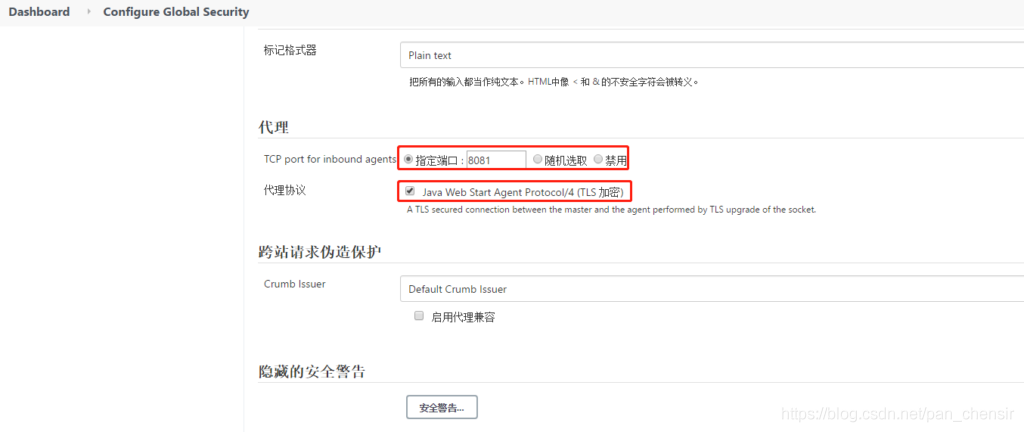
Step 1: modify the configuration in Jenkins, and specify that the port to boot from the node is 8081

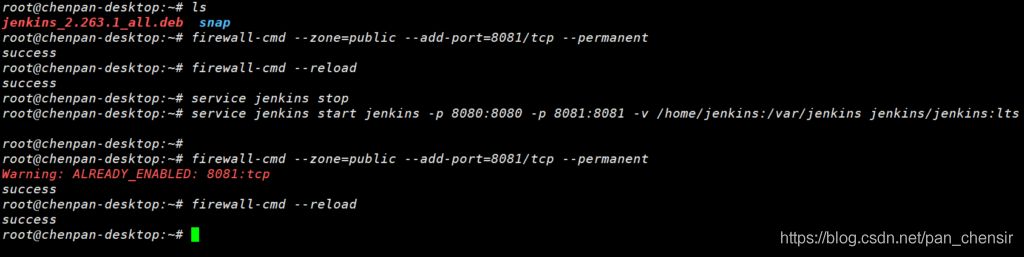
Step 2: close the Jenkins service (service Jenkins stop), and then permanently open the specified port (firewall CMD – zone = public – add port = 8081/TCP – permanent), overload the firewall information (firewall CMD – reload), and start Jenkins (service Jenkins start Jenkins – P 8080:8080 – P 8081:8081 – v/home/Jenkins/var/Jenkins) on the specified port (8080 and 8081) jenkins/ jenkins:lts )

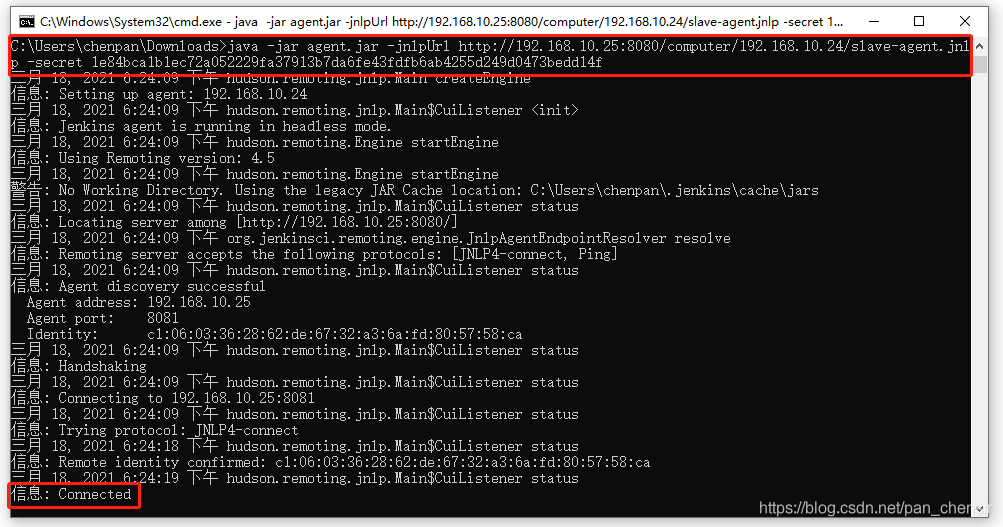
It is also important to note that when CMD starts slave, it is necessary to enter CMD from the specified jar path, and then execute the startup command

This is a serious error in system integration, which will probably be encountered later. It took a long time to solve this problem. It can be recorded for subsequent reference

Error handling when ABP specifies map object during map operation

Error handling in map operation of ABP

When mapping an entity object into dto in ABP, the entity defines an object of type long. In dto, there is an object with the same name, but the type is guid,

// StudentEntity
public class StudentEntity
{
		public Guid RelatedStudentId
		{
				get; set;
		}
}

// StudentDto
public class StudentDto
{
		public Guid StudentId
		{
				get;  set;
		}
		
		public Long RelatedStudentId
		{
				get; set;
		}
}

Take studententity and studentdto for example. Due to the change of business, when the back-end modifies the database and does not change the front-end code for the time being,

Directly map the relatedpatientid in entity to the studentID in dto , In this way, an error will occur when mapping, indicating that the type conversion error is wrong, and the data of the guid cannot be assigned to long,

CreateMap<StudentEntity, StudentDto>()
            .ForMember(d => d.StudentId, map => map.MapFrom(o => o.RelatedStudentId))

At this time, the entity’s guid type relatedpatientid will be mapped to the long type relatedpatientid in dto,

This kind of data definition should be avoided in map operation.

When configuring ROS distributed / Error report solution and command requirements encountered in the process of master-slave computer

    Error: SSH: connect to host * * port 22: network is unreachable
    cause: network is disconnected
    solution: restart virtual machine or manually connect or command to restart network connection

    sudo service network-manager restart
    

      Error: Unit network.service Not found.
      reason: wrong command

        Error: ROS error: the window cannot be opened remotely qxcbconnection: could not connect to display
        qxcbconnection: could not connect to display
        reason: the graphical window cannot be opened remotely

          Error: under Ubuntu 16.04, the terminal input sudo The problem of sudo: unable to resolve host Ubuntu: connection timed out occurs
          cause: this problem is caused by the inconsistency between the host name (localhost) in hosts and the host name in the “etc” folder of the system disk.
          Solution: set hosts to be consistent

            Requirements: view the SSH connection of Linux
            command:

            ps aux | grep sshd
            

              Requirements: use the service command to start the SSH service. The command execution is as follows.
              Command:

              service sshd start
              

                Requirement: how to view the Pi of the host connected through SSH in Ubuntu
                command:

                who
                

                  Requirements: how to modify user password in Ubuntu
                  command:

                  usrname@usrname-laptoppasswd:~$passwd usrname