Preface
In the installation vue, when scaffolding errorError: EACCES: permission denied
# install Vue CLI 3.x
npm i -g @vue/cli
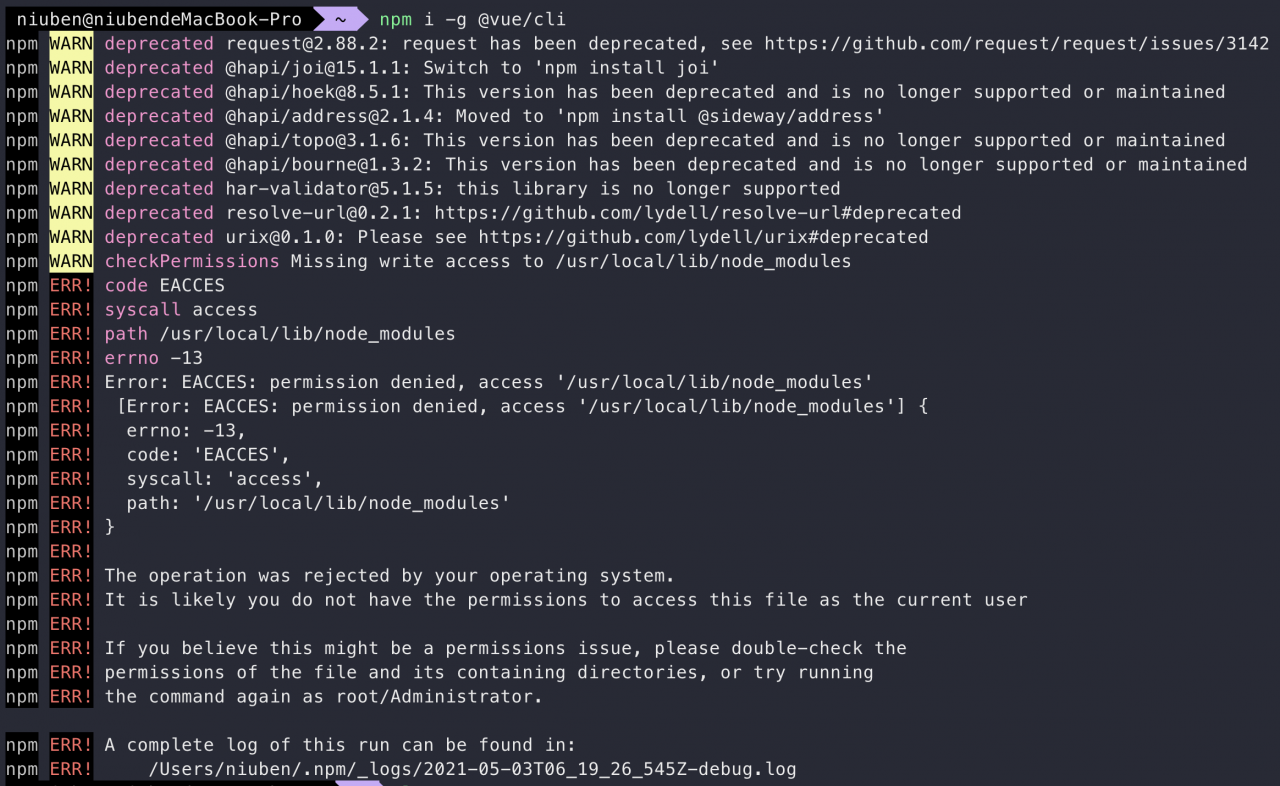
solve
It can be solved by executing the following command
sudo npm install -g --unsafe-perm=true --allow-rootIn the installation vue, when scaffolding errorError: EACCES: permission denied
# install Vue CLI 3.x
npm i -g @vue/cli
It can be solved by executing the following command
sudo npm install -g --unsafe-perm=true --allow-root[Vue warn]: Unknown custom element: did you register the component correctly? For recursive components, make sure to provide the "name" option.
The cause of the problem is: related components are used, but not introduced
First find the relevant code caused the error, see if there is use similar components, such as the use radio-groupand radioassembly, but not introduced, this time above error occurs
 <el-form-item label="状态:">
      <el-radio-group v-model="formData.status">
            <el-radio :key="item.value"
            :label="item.value"
            v-for="item in statusOptions" >{{item.label}}</el-radio>
      </el-radio-group>
</el-form-item>
Found in the project directory main.js, and then import {} fromintroduced into related components, re- Vue.use()use. For example:
import {
    Radio,
    RadioGroup,
} from 'element-ui';

Vue.use(Radio);
Vue.use(RadioGroup);
This completes the global introduction of components
1. The screenshot of error report is as follows:
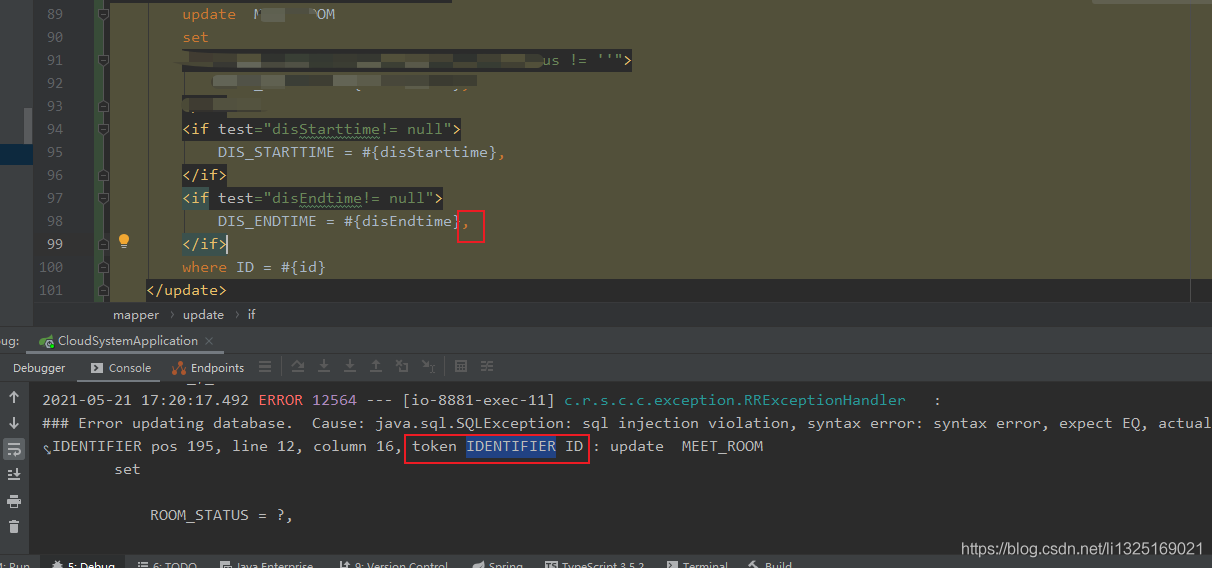
2. According to the error report output, check the position after the token, which appears near the ID field. The reason is that after LZ updates the last attribute of the statement, there is an extra comma in front of the where keyword.
3. Solutions
Remove the comma in the red box in the screenshot of step 1.
Error starting vue project
These dependencies were not found:
* @/views/md/TemplateSetting/create in ./src/router/modules/md.js
* @/views/md/TemplateSetting/index in ./src/router/modules/md.js
To install them, you can run: npm install –save @/views/md/TemplateSetting/create @/views/md/TemplateSetting/index
This is because the create page of the vue project is defined in md.js but the create.vue page is missing so it reports an error
Xcode is upgraded to 12.4. When you run iPhone 12 online, you will be prompted with errors were accounted while preparing your device for development. Please check the devices and simulators window.
Error message:
container_ linux.go:235: starting container process caused “process_ linux.go:258: applying cgroup configuration for process caused “Cannot set property TasksAccounting, or unknown property.””
/usr/bin/docker-current: Error response from daemon: oci runtime error: container_ linux.go:235: starting container process caused “process_ linux.go:258: applying cgroup configuration for process caused “Cannot set property TasksAccounting, or unknown prop
After the system is rebooted, the docker cannot be started. After the docker is reloaded, the startup container will report an error, as shown above
reason:
The docker version is not compatible with the operating system version. Upgrade the docker version
I use Yum to install docker. By default, I can only pull to a lower version, so I downloaded RPM docker from the Internet.
summary
The OS. Removedirs () method is used to recursively delete a directory. Like rmdir (), if the subfolders are successfully deleted, removedirs () does not try their parent folder until an error is thrown (it is basically ignored because it generally means that your folder is not empty).
Grammar
The syntax format of the removedirs() method is as follows:
os.removedirs(path)Parameters
path — Directory path to remove
Return value
The method has no return value
example
The following example demonstrates the use of the removedirs() method:
import os,sys

import shutil

dstPath="test/"


print "Before directory deletion: %s" % os.listdir(dstPath)

# Recursively delete directories and files

# shutil.rmtree('test/aa')

# The following two functions are used to delete empty directory files

os.rmdir("test/aa")

#os.removedirs("test/aa")

print "After directory deletion: %s" % os.listdir(dstPath)
Shutil module
shutil.copyfile( src, dst) # Copy from source src to dst. If the current dst already exists it will be overwritten

shutil.move( src, dst) # move the file or rename it

shutil.copymode( src, dst) #just copies its permissions, nothing else is copied

shutil.copystat( src, dst) #copy permissions, last access time, last modified time

shutil.copy( src, dst) #Copy a file to a file or a directory

shutil.copy2( src, dst) # copy the file last access time and modification time on top of the copy also copied over, similar to something like cp -p

shutil.copy2( src, dst) # if the two locations of the file system is the same then it is equivalent to rename operation, just change the name; if it is not in the same file system then it is to do the move operation

shutil.copytree( olddir, newdir, True/Flase) #Copy olddir to newdir, if the 3rd argument is True, then the symbolic link under the folder will be maintained when copying the directory, if the 3rd argument is False, then a physical copy will be generated in the copied directory instead of the symbolic Connections

shutil.rmtree( src ) # recursively delete a directory and all its contentsGit pull and git pull origin master report the following warning
hint: Pulling without specifying how to reconcile divergent branches is
hint: discouraged. You can squelch this message by running one of the following
hint: commands sometime before your next pull:
hint:
hint:   git config pull.rebase false  # merge (the default strategy)
hint:   git config pull.rebase true   # rebase
hint:   git config pull.ff only       # fast-forward only
hint:
hint: You can replace "git config" with "git config --global" to set a default
hint: preference for all repositories. You can also pass --rebase, --no-rebase,
hint: or --ff-only on the command line to override the configured default per
hint: invocation.
terms of settlement:
$ git config pull.ff false
$ git config --global pull.rebase false
Warning copy disappears
Reason: after MAC is upgraded to MacOS Big Sur system version 11.1, the old version of homebrew is not suitable for the new system, and the message “in ` initialize ‘: version value must be a string” is sent; Got a nilclass() error
Solution:
just update to the latest version of homebrew
$ brew update-reset
Check the version again, OK
$ brew --version
Homebrew 3.1.5-101-gd3013fc