Category Archives: Error

[MAC] How to Solve zsh Error: command not found: umi

Global installation of UMI

$ tarn global add umi
$ umi -v
[email protected]

When running UMI - V times Zsh: command not found: UMI error, the solution is as follows:

1. Get global bin path

$ yarn global bin
/Users/*****/.yarn/bin

2. Run the open command to open. Bash_ Profile file

$ open ~/.bash_profile

3. In. Bash_ Add the following line to the profile file and save it

export PATH="YOUR global bin FLODER:$PATH"

4. Run the following command to make the modification effective

source ~/.bash_profile

5. Run again and solve the problem

$ umi -v
[email protected]

[Solved] Build Error Ineffective mark-compacts near heap limit Allocation failed – JavaScript heap out of memory

The web background yard build built by react + ant design + UMI reported the following error:

FATAL ERROR: Ineffective mark-compacts near heap limit Allocation failed - JavaScript heap out of memory
 1: 0x1011c2ff5 node::Abort() (.cold.1) [/usr/local/bin/node]
 2: 0x10009fbc9 node::Abort() [/usr/local/bin/node]
 3: 0x10009fd2f node::OnFatalError(char const*, char const*) [/usr/local/bin/node]
 4: 0x1001e3907 v8::Utils::ReportOOMFailure(v8::internal::Isolate*, char const*, bool) [/usr/local/bin/node]
 5: 0x1001e38a7 v8::internal::V8::FatalProcessOutOfMemory(v8::internal::Isolate*, char const*, bool) [/usr/local/bin/node]
 6: 0x1003695e5 v8::internal::Heap::FatalProcessOutOfMemory(char const*) [/usr/local/bin/node]
 7: 0x10036ae3a v8::internal::Heap::RecomputeLimits(v8::internal::GarbageCollector) [/usr/local/bin/node]
 8: 0x1003678be v8::internal::Heap::PerformGarbageCollection(v8::internal::GarbageCollector, v8::GCCallbackFlags) [/usr/local/bin/node]
 9: 0x100365670 v8::internal::Heap::CollectGarbage(v8::internal::AllocationSpace, v8::internal::GarbageCollectionReason, v8::GCCallbackFlags) [/usr/local/bin/node]
10: 0x10037149a v8::internal::Heap::AllocateRawWithLightRetry(int, v8::internal::AllocationType, v8::internal::AllocationOrigin, v8::internal::AllocationAlignment) [/usr/local/bin/node]
11: 0x100371521 v8::internal::Heap::AllocateRawWithRetryOrFail(int, v8::internal::AllocationType, v8::internal::AllocationOrigin, v8::internal::AllocationAlignment) [/usr/local/bin/node]
12: 0x1003418eb v8::internal::Factory::NewRawTwoByteString(int, v8::internal::AllocationType) [/usr/local/bin/node]
13: 0x1005a70ab v8::internal::String::SlowFlatten(v8::internal::Isolate*, v8::internal::Handle<v8::internal::ConsString>, v8::internal::AllocationType) [/usr/local/bin/node]
14: 0x10020170d v8::String::Utf8Length(v8::Isolate*) const [/usr/local/bin/node]
15: 0x10007e96b node::Buffer::(anonymous namespace)::ByteLengthUtf8(v8::FunctionCallbackInfo<v8::Value> const&) [/usr/local/bin/node]
16: 0x10024f438 v8::internal::FunctionCallbackArguments::Call(v8::internal::CallHandlerInfo) [/usr/local/bin/node]
17: 0x10024e9f9 v8::internal::MaybeHandle<v8::internal::Object> v8::internal::(anonymous namespace)::HandleApiCallHelper<false>(v8::internal::Isolate*, v8::internal::Handle<v8::internal::HeapObject>, v8::internal::Handle<v8::internal::HeapObject>, v8::internal::Handle<v8::internal::FunctionTemplateInfo>, v8::internal::Handle<v8::internal::Object>, v8::internal::BuiltinArguments) [/usr/local/bin/node]
18: 0x10024e162 v8::internal::Builtin_Impl_HandleApiCall(v8::internal::BuiltinArguments, v8::internal::Isolate*) [/usr/local/bin/node]
19: 0x1009d3ab9 Builtins_CEntry_Return1_DontSaveFPRegs_ArgvOnStack_BuiltinExit [/usr/local/bin/node]
20: 0x100959364 Builtins_InterpreterEntryTrampoline [/usr/local/bin/node]

The solution is as follows: put node_ Delete the modules and package lock.json files, Re yarn install , and then yarn build , the package is successful
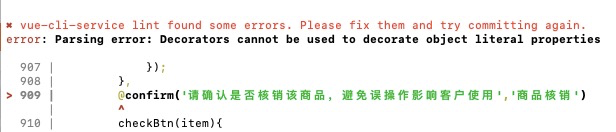
Error reported with decorator in vue: Parsing error: Decorators cannot be used to decorate object literal properties

Error message: error: parsing error: decorators cannot be used to decorate object literal properties

solution:
Add legacydecorators: true to the. Eslintrc.js file to support decorator writing

parserOptions: {
    parser: 'babel-eslint',
    ecmaFeatures:{
      legacyDecorators: true
    }
  },

If you still report an error after modifying the file, just run it under NPM install in the project directory

Solution: from. Import ft2font importerror: DLL load failed: the specified module cannot be found

    1. This is an error in matplotlib. Win +R opens a command prompt;

PIP install matplotlib Open Anaconda Prompt and activate the environment you want to apply. a>ate tensorflow-gpu
nd install :>
PIP install matplotlib not yet, just to the IDE to terminal, there

pip install matplotlib
# If it doesn't work, it's in the terminal
conda install matplotlib

Springboot Error: There was an unexpected error (type = internal server error, status = 500)

There was an unexpected error (type=Internal Server Error, status=500).
This error was found in running springboot.

There was an unexpected error (type=Internal Server Error, status=500).
Authentication failed for token submission [org.apache.shiro.authc. UsernamePasswordToken – null, rememberMe=false]. Possible unexpected error?(Typical or expected login exceptions should extend from AuthenticationException).
I had to rewrite it and found out that it was caused by Maven and the Thymeleaf dependency was added incorrectly.
Maybe I wrote it and @{} didn’t work correctly, so I took one from the internet and got the wrong one.
The original dependency was this

<dependency>
   <groupId>org.springframework.boot</groupId>
   <artifactId>spring-boot-starter-thymeleaf</artifactId>
</dependency>

I ended up with this

<!-- https://mvnrepository.com/artifact/org.thymeleaf/thymeleaf -->
<dependency>
    <groupId>org.thymeleaf</groupId>
    <artifactId>thymeleaf</artifactId>
    <version>3.0.12.RELEASE</version>
</dependency>

Git Pull Error: RPC failed; curl 56 OpenSSL SSL_read: SSL_ERROR_SYSCALL, errfno 10054

The following error occurs when git pull

error: RPC failed; curl 56 OpenSSL SSL_read: SSL_ERROR_SYSCALL, errfno 10054
fatal: The remote end hung up unexpectedly
fatal: early EOF
fatal: unpack-objects failed

Execute the pull command again after the following Settings

git config http.postBuffer 524288000

This command sets the size of the communication cache. The previous error was caused by too much synchronized data.
The config parameters here can be seen in the config file in the file directory

[core]
	repositoryformatversion = 0
	filemode = false
	bare = false
	logallrefupdates = true
	symlinks = false
	ignorecase = true
[remote "origin"]
	url = 

https://github.com/…….


	fetch = +refs/heads/*:refs/remotes/origin/*
[branch "master"]
	remote = origin
	merge = refs/heads/master
[gui]
	wmstate = normal
	geometry = 841x483+111+65 321 218
[http]
	postBuffer = 524288000


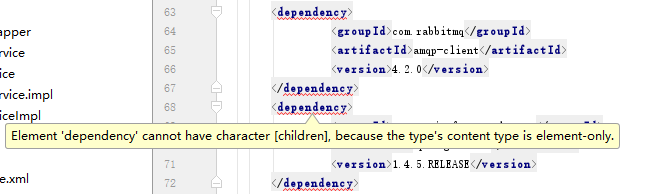
How to Solve Error: Element ‘dependency’ cannot have character [children], because the type’s content type is element-

The phenomenon is as follows:

The reason:
It’s when you copy it, you bring some special symbols.
Solution:
Copy that string of code to NotPad ++ or text, and then copy it into your compiler, and you’ll solve the problem

maven Error: Element ‘dependency’ cannot have character [children], because the type’s content type is

The IDEA pom.xml file reported an error
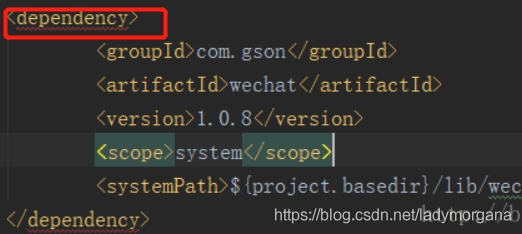
Element ‘dependency’ cannot have character [children], because the type’s content type is element-onThe picture effect

The reason:
Introduction & lt; dependency> . < /dependency> Invalid format

Solution:
1. Remove all carriage returns and line feeds from the part with the wrong format
2. Format (Ctrl + Alt + L)

Servlet.service() for servlet [dispatcherServlet] in context && Whitelabel Error Page

ERROR 8040 – O.A.C.C.C. [nio – 8080 – exec – 1]. [[. [/] [dispatcherServlet] : Servlet.service() for servlet [dispatcherServlet] in context with path [] threw exception [Request processing failed; nested exception is java.lang.NullPointerException] with root cause

to find for a long time, found and @autowired didn’t add question
service plus, didn’t add mapper

Error reported when springboot connects to redis nested exception is redis.clients.jedis . exceptions.JedisConnectionException

The error message is as follows.
Severe :Servlet.service() for servlet [dispatcherServlet] in context with path [] threw exception [Request processing failed; nested exception is org.springframework.data.redis. RedisConnectionFailureException: Cannot get Jedis connection; nested exception is redis.clients.jedis.exceptions. JedisConnectionException: Could not get a resource from the pool] with root cause
Because the ip address on the linux system in the virtual machine has changed, the configuration file in springboot has forgotten to change it.
Enter [root@localhost bin]# ip addr to see the ip address
Just change the configuration file
spring.redis.host=