Use lombok @Data annotation in class, IDEA smart prompt does not support it, install lombok plugin to solve it.
File-> Settings-> Plugins
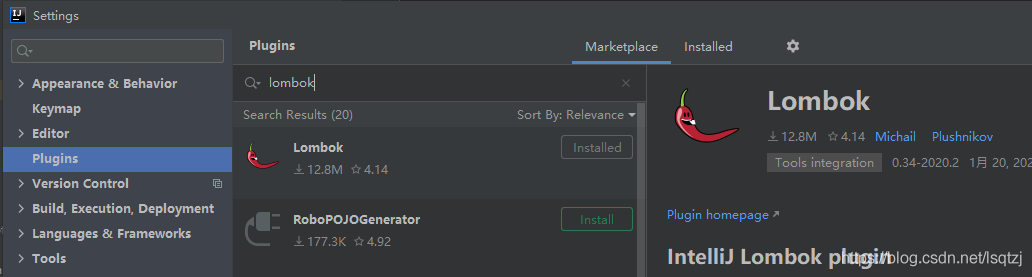
Use lombok @Data annotation in class, IDEA smart prompt does not support it, install lombok plugin to solve it.
File-> Settings-> Plugins
# You need to add -DCMAKE_CXX_STANDARD=11 when compiling abseil, otherwise it will compile with an error

$ mkdir -p third_party/abseil-cpp/cmake/build
$ pushd third_party/abseil-cpp/cmake/build
$ cmake -DCMAKE_INSTALL_PREFIX=$MY_INSTALL_DIR \
      -DCMAKE_POSITION_INDEPENDENT_CODE=TRUE \
      -DCMAKE_CXX_STANDARD=11 \
      ../..
$ make -j
$ make install
$ popd
“
Recently, a project requirement is to click the question mark to display the prompt window. The window is fixed, does not scroll with the scroll bar, and can be dragged within the scope. It does not affect the lower form input.
I think of using anti card combined with react draggable. Record the implementation code here:
import React from 'react';
import { Modal, Button, Card, Icon } from 'antd';
import Draggable from 'react-draggable';

export default class App extends React.Component {

    constructor(props) {
        super(props);
        this.state = {
            cardShow: false,
            disabled: true,
            bounds: { left: 0, top: 0, bottom: 0, right: 0 }, // Initialize drag boundary
        };
        this.draggleRef = React.createRef();
    }

    onStart = (event, uiData) => {
        const { clientWidth, clientHeight } = window.document.documentElement;
        const targetRect = this.draggleRef.current.getBoundingClientRect();
        this.setState({
            // Set the drag boundary to limit the dragging distance from the top, bottom, left and right of the initial position, the following setting is draggable in the browser window
            // If the page has a fixed display header, it must be draggable below the header, you can set top: -targetRect.top + uiData.y + height of the header.
            bounds: {
                left: -targetRect.left + uiData.x,
                right: clientWidth - 300,
                top: -targetRect.top + uiData.y,
                bottom: clientHeight - (targetRect.bottom - uiData.y),
            },
        });
    };

    onClickShow = () => {
        this.setState({
            cardShow: true,
        })
    }

    onClickClose = () => {
        this.setState({
            cardShow: false,
            bounds: { left: 0, top: 0, bottom: 0, right: 0 },
        })
    }

    render() {
        const {disabled, bounds, cardShow} = this.state;
        return (
            <div style={{width: '100%'}}>
                <Draggable
                    disabled={disabled}
                    bounds={bounds}
                    onStart={(event, uiData) => this.onStart(event, uiData)}
                >
                    <div ref={this.draggleRef}>
                        {cardShow &&
                        <Card
                            title={
                                <div
                                    style={{
                                        width: '100%',
                                        cursor: 'move',
                                    }}
                                    onMouseOver={() => {
                                        this.setState({
                                            disabled: false,
                                        });
                                    }}
                                    onMouseOut={() => {
                                        this.setState({
                                            disabled: true,
                                        });
                                    }}
                                    onFocus={() => {}}
                                    onBlur={() => {}}
                                >
                                    {'Title'}
                                </div>
                            }
                            extra={
                                <span onClick={() => this.onClickClose()}>
                                    <Icon type={'close'} style={{fontSize:'16px'}}/>
                                </span>
                            }
                            style={{ width: 300, position: 'fixed', zIndex: 999 }}>
                            <p>Conetent</p>
                        </Card>}
                    </div>
                </Draggable>
                <span >{'Help'}</span><Icon onClick={() => this.onClickShow()} type="question-circle" />
            </div>
        );
    }

}
FileZilla Server You have to use FTP over TLS”, you can check the message when you use “530 This server does not allow plain FTP.
The message is: 530 This server does not allow plain FTP. You have to use FTP over TLS
Solution:
Click EDit –> Settings –> FTP over TLS setting, uncheck **Enable FTP over TLS support(FTPS)** and it will be OK (so that the encryption method does not use explicit FTP over TLS)
When the MAC system uses ADB for the first time, it reports an error because it needs to configure tools,
When using the MAC for development, you use the ADB instruction to perform some operations. If you have not configured the Android environment variables, you will encounter the problem of ADB: command not found. You need to configure the Android environment variables on the Mac
Operation steps:
1. Open the terminal terminal of the Mac and enter Cd ~/[enter the home directory of the current user]
2. Enter touch. Bash_ Profile [if not. Bash_ Profile, create a file]
3. Enter open. Bash_ Open the file we created and a text edit box will pop up. If the environment is configured for the first time, the text edit box will be blank.
4 . export ANDROID_ HOME=/Users/haijunren/Library/Android/sdk
export PATH=${PATH}:${ANDROID_ HOME}/tools
export PATH=${PATH}:${ANDROID_ Home}/platform tools
note: Android in 4_ Home should be filled in according to its own SDK path, and the rest can be copied directly. As for the SDK path, you can open Android studio and search the SDK in preference (Windows setting) to view it
Enter source. Bash in the terminal_ Profile [make our changes effective]
Enter ADB [verify whether the configuration is complete, if the ADB: command not found is not displayed, the configuration is complete]
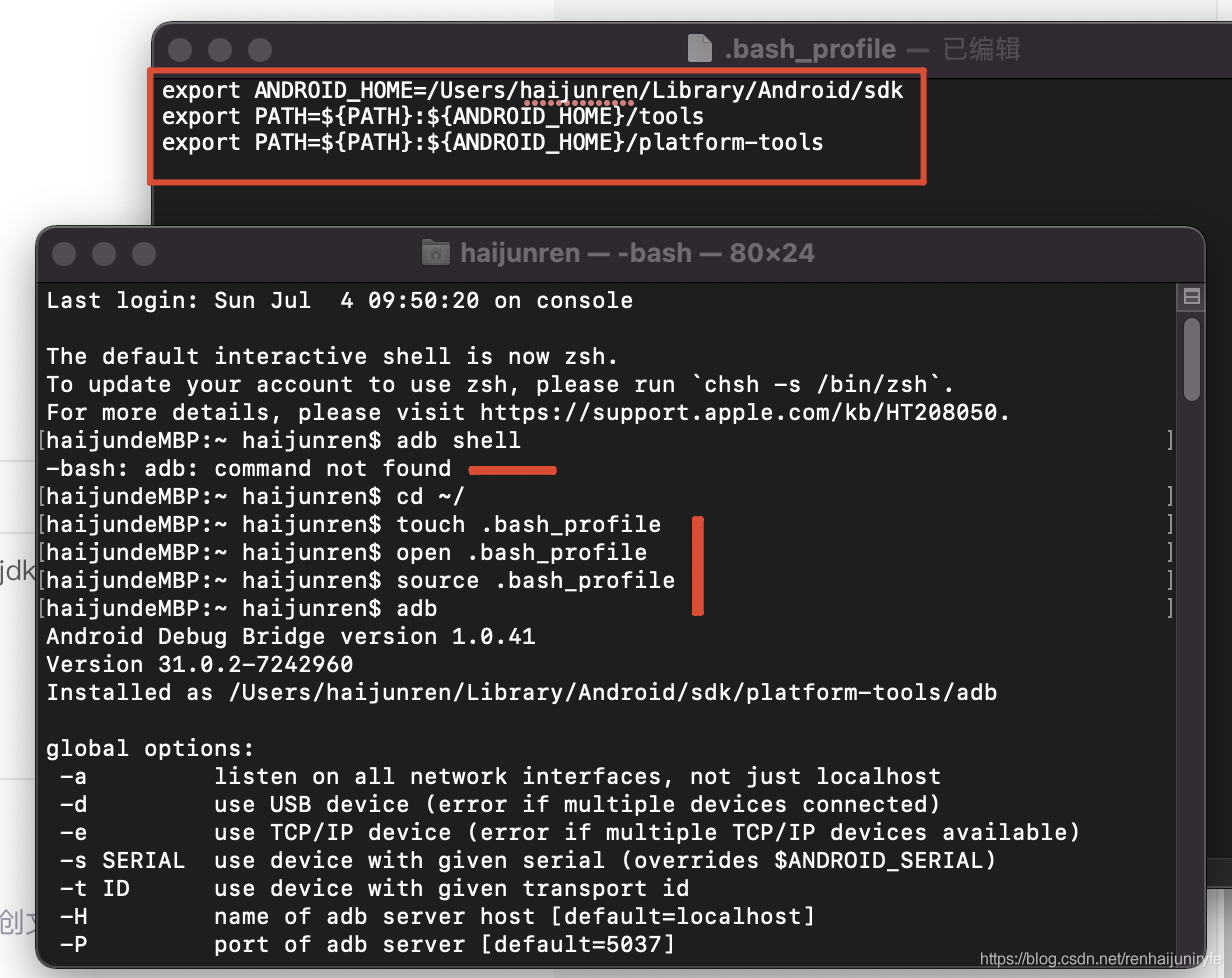
Solution:
Use tensor. Detach(). Numpy() when turning numpy:
a = torch.ones(5)
b = a.detach().numpy()
print(b)
Problem analysis
When the tensor conversion in calculation, because it has gradient value, it cannot be directly converted to numpy format, so it is better to call . Detach(). Numpy() no matter how
Recently, when using pip to install the plug-in, the following warning message appears:
WARNING: Ignoring invalid distribution -ip (e:\python\python_ dowmload\lib\site-packages)
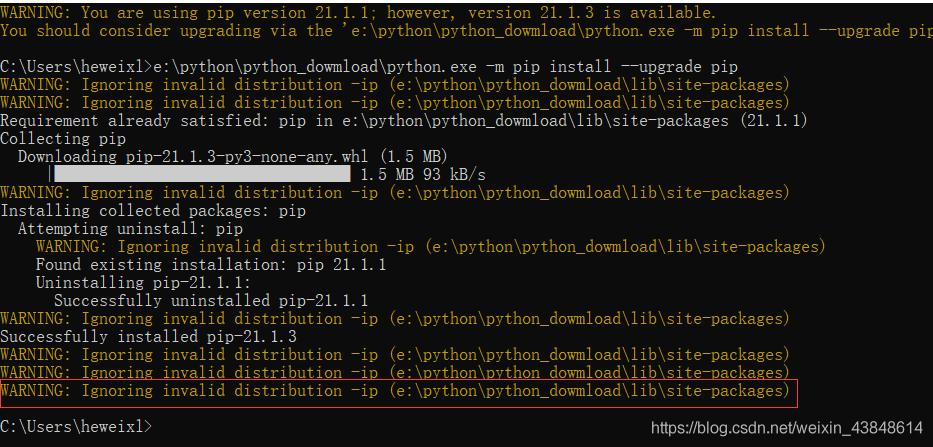
resolvent:
Find the directory where the error is reported in the warning message, and then delete the folder at the beginning of ~. That kind of thing is caused by the plug-in installation failure/Midway exit, which leads to the plug-in installation exception. Although the warning message does not affect, it has obsessive-compulsive disorder. Just delete the folder:
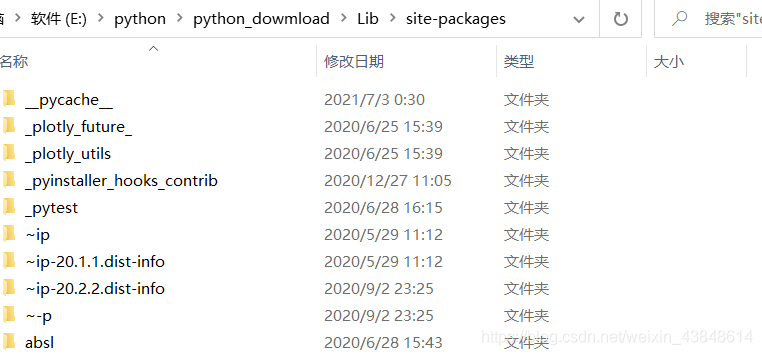
As for why the above problems appear?
Because a few days ago, when I was using Python 3.9 to build the robot framework environment, I needed to install wxPython, and then when the latest fashion was installed, later when the robot framework ride was installed,
One of the components it depends on does not support the latest version, and the component it depends on does not support Python 3.9, so there was an exception when installing the plug-in.
1. Demand and error reporting
Requirements: the scenarios are: component a refers to component B, uses V-model to pass parameters to B, B uses props: {value} to receive content, directly modifies and assigns value according to logic in B, and sees error report in browser console after event triggering, as follows:
Avoid mutating a prop directly since the value will be overwritten whenever the parent component re-renders.
Instead, use a data or computed property based on the prop's value. Prop being mutated: "value"
2. Analyze the reasons
In terms of the content of the error report, we have changed the variables of the parent component referenced in the child component, that is, the data in props; From the prompt information, is it feasible to use mutated ?In vue2, the data in the component props can only flow in one direction, that is, it can only pass props from the parent component through the component’s DOM attribute to the child component, and the child component can only passively receive the data from the parent component, and in the child component, the props data from the parent component cannot be modified. The value of props cannot be modified in the component, and the modified value will not be synchronized to the outer layer of the component, that is, the calling component does not know what the current state is inside the component
2.1 what causes this?
In the vue1. X version, the props binding modifiers twoway and . Sync can be used to realize the bidirectional data binding of props . Remove the bidirectional data binding function of props in vue2.0 . If bidirectional binding is needed, you need to implement it yourself
in vue2.0 , the data flow of component’s props is changed to only one-way flow, that is, it can only be transferred from (parent component) to (child component) through component’s v-bind: attributes , and the child component can only passively receive the data from the parent component, The props data passed by the parent component cannot be modified in the child component. Official document explanation:
Prop is unidirectional: when the properties of the parent component change, it is passed to the child component, but not vice versa. This is to prevent the child component from unintentionally modifying the state of the parent component – which makes the data flow of the application difficult to understand
although abandoning the two-way binding of props is beneficial and correct for the whole project, we do need to modify the requirements of props from within the component at some times
In vue2.0 , the following methods can be used to realize the bidirectional binding mode of component attributes (not binding, but asynchronous modification)
The V-model instruction or . Sync modifier will transfer the method of modifying attributes to the subcomponent call through v-bind . The subcomponent can directly use the method to transfer the method of modifying attributes to the subcomponent call through v-on , and use $emit() to implement callback modification or use this. $parent to modify
3. Solution: use v-on to realize the modification mode
It’s also for code readability
do not directly modify the props data passed from the parent component, redefine a variable in the data function, assign the props data value to the data variable, and then modify the data variable. As follows:
Component B accepts the parameters of component A
name: "B",
props: {
	father: {
		type: String,
		default: null
	}
}
data(){
  return{
    father_a : this.father
  }
}
If you want to listen to the variables passed in the a component to modify a data in the b component, you can use the watch listening function to listen. As follows:
name: "B",
props: {
	father: {
		type: String,
		default: null
	}
}
data(){
  return{
    father_a: this.father
    son: ''
  }
}
//Listening function, whenever the father variable passed from the parent component changes,
// the son variable defined in the child component will be assigned the value "son"
watch:{
  father(val, valOld){
    this.son = "Son"
  }
}
If b wants to modify the attributes passed by a , you can use $emit to modify the attributes
A
<B :father="a" @change="changeA" />

<script>
export default {
	name: 'A',
	data() {
		return {
			a: 'Variables of A'
		}
	},
	methods: {
		changeA(val) {
			this.a = val
		}
	}
}
</script>
B
<script>
export default {
	name: 'B',
	props: {
		father: {
			type: String,
			default: null
		}
	},
	data() {
	},
	watch:{
	  father(val, valOld){  // Here you can also define the variable in data and assign the father to it, and monitor the variable here
	    // This is the logic that the child component needs to handle if the father variable changes
	  }
	}, the
	methods: {
		changeAFather() { // Who calls it? It's the child component's business operation
			this.$emit('change', val)
		}
	}
}
</script>
So far, the data in the child component and the data in the parent component are bound Bi directionally, and the data inside and outside the component are synchronized: when the internal component changes, the external component decides whether to change
vue1.0 data bidirectional binding is abandoned in vue2.0 version?Through the case, it can also be found that there are many bidirectional binding props codes, which is not conducive to the data state management between components, especially in complex business. It is not easy to understand and read the logic, so we try not to use this way of bidirectional binding, and use vuex for data management in too complex data processing.
Reason: the cmakelists.txt file does not specify the DNN module, so the statement
find_package(OpenCV 4 REQUIRED opencv_core opencv_imgproc opencv_highgui opencv_calib3d opencv_videoio opencv_imgcodecs )To be amended as follows:
find_package(OpenCV 4 REQUIRED)It can be compiled.
Some people on the Internet recommend changing the content of the. Condar file, but I failed
Some people may recommend re installing anaconda, but that would be too cumbersome
CONDA update CONDA the problem can be solved immediately by updating the CONDA version
I wrote a download box. Relative layout for layout files I wrote it. It is found that the width cannot be set on Android 11 devices. The layout controls are stacked together.
Solution:
1. Wrap the outermost layer with FrameLayout and match the width and height_ parent
 <FrameLayout xmlns:android="http://schemas.android.com/apk/res/android"
    android:orientation="vertical" android:layout_width="match_parent"
    android:layout_height="match_parent">
    <RelativeLayout
        android:id="@+id/bg"
        android:layout_width="600dp"
        android:layout_height="wrap_content"
        android:background="@drawable/bg"
        >

		Other sub-controls
</RelativeLayout>
</FrameLayout>I made this mistake when:
Laravel version 5.8, need to introduce tcpdf, in the run
composer require tecnickcom/tcpdfI found two answers, both of which were caused by the composer upgrade, but I don’t remember that I was promoted. I learned from one of the methods and successfully introduced the tcpdf extension. Now I integrate the two methods:
1. Change the source code
Positioning error:
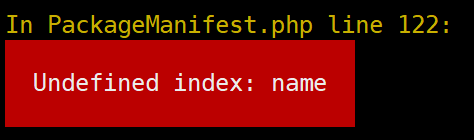
vendor/laravel/framework/src/Illuminate/Foundation/PackageManifest.php122 line prompt does not have the key name, according to the code prompt to find
/vendor/laravel/framework/src/Illuminate/Support/Collection.phpOf Mapwithkeys method. Add a compatible method to cover the original method
 public function mapWithKeys(callable $callback)
    {
        $result = [];
        $item = $this->items;
        if(isset($item['packages'])){
            $item = $item['packages'];
        }
        foreach ($item as $key => $value) {
            $assoc = $callback($value, $key);

            foreach ($assoc as $mapKey => $mapValue) {
                $result[$mapKey] = $mapValue;
            }
        }

        return new static($result);
    }
2. Composer level
# composer Downgrade (if you can't downgrade, you can try to run with root privileges)
composer self-update --1

# Re-install and It's Done!!!
composer install
The above two methods are effective