Author Archives: Robins

[Solved] Linux C++ warning: ISO C++ forbids converting a string constant to ‘char*‘ [-Wwrite-strings]

In C + +,

char* p = "abc";  // valid in C, invalid in C++

warning: ISO C++ forbids converting a string constant to ‘char*’ [-Wwrite-strings]
Change to the following warning disappears

char* p = (char*)"abc";  // OK

perhaps

char const *p = "abc";  // OK

Reason analysis:

When learning C or C + +, we all know that if the types of variables on both sides of the equal sign are different during the assignment operation, the compiler will perform an operation called implicit conversion to make the variables be assigned.

In the above expression, “ABC” to the right of the equal sign is an invariant constant, which is called string literal in C + +, type is const char *, and P is a char pointer. What happens if you force the assignment?That’s right. We convert the constant coercion type on the right to a pointer. As a result, we are modifying a const constant. The result of compilation will be determined by the compiler and the operating system. Some compilers will pass, some will throw exceptions, and even if they pass, they may be killed because of the sensitivity of the operating system.

This kind of operation of directly assigning string literal to pointer is considered as deprecated by developers, but because many codes have this habit in the past, it is preserved for compatibility

[Solved] ‘build.plugins.plugin.version‘ for org.springframework.boot:spring-boot-maven-plugin is missing.


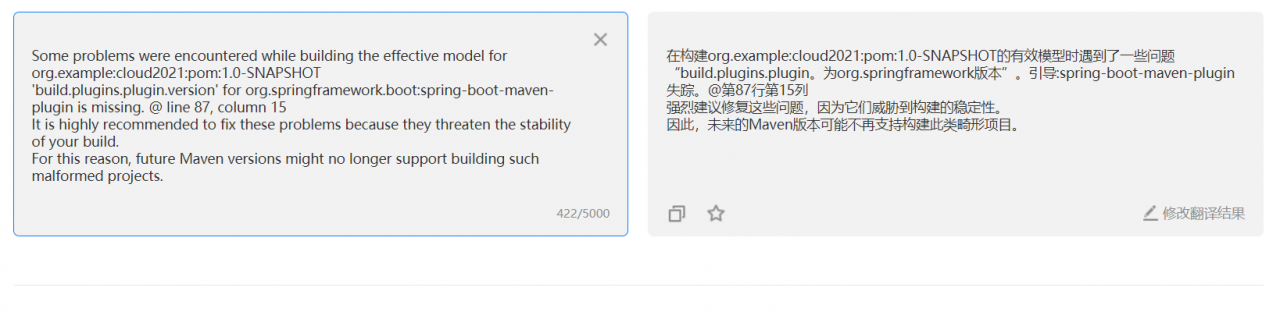
Some problems were encountered while building the effective model for org.example:cloud2021:pom:1.0-SNAPSHOT
'build.plugins.plugin.version' for org.springframework.boot:spring-boot-maven-plugin is missing. @ line 88, column 15
It is highly recommended to fix these problems because they threaten the stability of your build.
For this reason, future Maven versions might no longer support building such malformed projects.

Use idea to create spring boot project when some of the pits encountered, record

In the pom.xml file, the “spring boot Maven plugin” is red, and not found is displayed

Let’s look at a translation first

Go to line 87 and find the problem configuration

<plugin>
 <groupId>org.springframework.boot</groupId>
 <artifactId>spring-boot-maven-plugin</artifactId>
</plugin>

I also saw some other people’s solutions on the Internet. Finally, I successfully solved them by specifying the version of spring boot Maven plugin. It is revised as follows:

<plugin>
	<groupId>org.springframework.boot</groupId>
	<artifactId>spring-boot-maven-plugin</artifactId>
	<version>2.2.6.RELEASE</version>
</plugin>

solve!!!

[Solved] TS Error: Could not find a declaration file for module

Some NPM packages have no problem using native JS, and some packages will report “could not find a declaration file for module” error after changing ts.

There are two ways to solve this problem

1. Download the @ type/error reporting package (some package developers may not upload their own. D.ts code to the NPM branch, then they will report an error saying that they can’t find this package, don’t worry about the next step)

2. The most direct, simple and effective solution: create a new shims-vue.d.ts file in the root directory of the project

//declare declaration declares an ambient module (i.e., a module declaration without internal implementation) 
declare module '*.vue' {
  import Vue from 'vue'
  export default Vue
}
 
 
declare module 'XX'
// xx is the name of the package that your package cannot find declared

The only thing to note is that after the first creation of the file with vscode, it should be restarted to see the effect, and then it will take effect. After the declaration is saved, the error will disappear immediately.

[Solved] PyTorch Caught RuntimeError in DataLoader worker process 0和invalid argument 0: Sizes of tensors mus

The error is as follows:

Traceback (most recent call last):
  File "/home/jiang/miniconda3/envs/Net/lib/python3.6/site-packages/tqdm/std.py", line 1178, in __iter__
    for obj in iterable:
  File "/home/jiang/miniconda3/envs/Net/lib/python3.6/site-packages/torch/utils/data/dataloader.py", line 819, in __next__
    return self._process_data(data)
  File "/home/jiang/miniconda3/envs/Net/lib/python3.6/site-packages/torch/utils/data/dataloader.py", line 846, in _process_data
    data.reraise()
  File "/home/jiang/miniconda3/envs/Net/lib/python3.6/site-packages/torch/_utils.py", line 369, in reraise
    raise self.exc_type(msg)
RuntimeError: Caught RuntimeError in DataLoader worker process 0.
Original Traceback (most recent call last):
  File "/home/jiang/miniconda3/envs/Net/lib/python3.6/site-packages/torch/utils/data/_utils/worker.py", line 178, in _worker_loop
    data = fetcher.fetch(index)
  File "/home/jiang/miniconda3/envs/Net/lib/python3.6/site-packages/torch/utils/data/_utils/fetch.py", line 47, in fetch
    return self.collate_fn(data)
  File "/home/jiang/miniconda3/envs/Net/lib/python3.6/site-packages/torch/utils/data/_utils/collate.py", line 75, in default_collate
    return {key: default_collate([d[key] for d in batch]) for key in elem}
  File "/home/jiang/miniconda3/envs/Net/lib/python3.6/site-packages/torch/utils/data/_utils/collate.py", line 75, in <dictcomp>
    return {key: default_collate([d[key] for d in batch]) for key in elem}
  File "/home/jiang/miniconda3/envs/Net/lib/python3.6/site-packages/torch/utils/data/_utils/collate.py", line 65, in default_collate
    return default_collate([torch.as_tensor(b) for b in batch])
  File "/home/jiang/miniconda3/envs/Net/lib/python3.6/site-packages/torch/utils/data/_utils/collate.py", line 56, in default_collate
    return torch.stack(batch, 0, out=out)
RuntimeError: invalid argument 0: Sizes of tensors must match except in dimension 0. Got 8 and 16 in dimension 1 at /pytorch/aten/src/TH/generic/THTensor.cpp:689

In __ getitem__ function does get the data, so the problem lies in torch. Utils. Data. Dataloader

analysis

In fact, there are two mistakes

RuntimeError: invalid argument 0: Sizes of tensors must match except in dimension 0. Got 8 and 16 in dimension 1 at /pytorch/aten/src/TH/generic/THTensor.cpp:689

Prompt for inconsistent data dimensions, jump toFile "/home/jiang/miniconda3/envs/Net/lib/python3.6/site-packages/torch/utils/data/_utils/collate.py", line 56, in default_collate return torch.stack(batch, 0, out=out) Source file at :

  if isinstance(elem, torch.Tensor):
   out = None
   if torch.utils.data.get_worker_info() is not None:
       # If we're in a background process, concatenate directly into a
       # shared memory tensor to avoid an extra copy
       numel = sum([x.numel() for x in batch])
       storage = elem.storage()._new_shared(numel)
       out = elem.new(storage)
   return torch.stack(batch, 0, out=out)

It can be found that the dataloader needs to merge at the end. If the batchsize is set, then this is the process of batch merging. If the dimensions are not unified, an error will be reported.

Another error is to enable multi threading (Num)_ workers!= 0) prompt which thread has a problem. Because the dimensions of batch merge are different, the first thread will hang (worker process 0), so runtimeerror: caught runtimeerror in dataloader worker process 0. will be prompted

Solution:

Since the dimensions are not unified, it’s good to ensure that the dimensions are the same. You can set a large enough array or tent in advance, and mark the unfilled part. When you read the data, you can determine the valid data according to the mark.

[Solved] Ubuntu 20.04 LTS Install k8s Error: The connection to the server localhost:8080 was refused

After Ubuntu 20.04 LTS is successfully added to the cluster on the node, the following prompt will appear:

This node has joined the cluster:
* Certificate signing request was sent to apiserver and a response was received.
* The Kubelet was informed of the new secure connection details.

Run 'kubectl get nodes' on the control-plane to see this node join the cluster.

Verify the success of adding by kubectl get nodes command. The following error occurs:

The connection to the server localhost:8080 was refused - did you specify the right host or port?

This error has also occurred on the master node. The solution gives the answer after successful installation

To start using your cluster, you need to run the following as a regular user:

  mkdir -p $HOME/.kube
  sudo cp -i /etc/kubernetes/admin.conf $HOME/.kube/config
  sudo chown $(id -u):$(id -g) $HOME/.kube/config

Alternatively, if you are the root user, you can run:

  export KUBECONFIG=/etc/kubernetes/admin.conf

I use the root account, so I need to execute the following command:

export KUBECONFIG=/etc/kubernetes/admin.conf

After the command is executed, verify it:

root@k8s-master-03:/etc/kubernetes# kubectl get nodes
W0706 10:27:55.181115   22817 loader.go:221] Config not found: /etc/kubernetes/admin.conf
The connection to the server localhost:8080 was refused - did you specify the right host or port?

The key information of the error report is that the configuration is not found

Config not found: /etc/kubernetes/admin.conf

Let’s go to the /etc/kubernetes/ Directory:

root@k8s-master-03:/etc/kubernetes# ls -l
total 12
-rw------- 1 root root 1910 Jul  6 09:52 kubelet.conf
drwxr-xr-x 2 root root 4096 Jul  6 09:41 manifests
drwxr-xr-x 2 root root 4096 Jul  6 09:52 pki

The results show that only kubelet. Conf (master node has admin. CONF), so we need to execute the following command:

export KUBECONFIG=/etc/kubernetes/kubelet.conf

[Solved] Matplotlib ERROR: MatplotlibDeprecationWarning: Adding an axes using the same arguments…

Matplotlib error: MatplotlibDeprecationWarning: Adding an axes using the same arguments…
matpltlib error:

MatplotlibDeprecationWarning: Adding an axes using the same arguments as a previous axes currently reuses the earlier instance.  In a future version, a new instance will always be created and returned.  Meanwhile, this warning can be suppressed, and the future behavior ensured, by passing a unique label to each axes instance.
  self.axes = self.fig.add_subplot(111)  # Create a subgraph

The reason is to add subgraphs repeatedly, for example, self.axes = self.fig.add has been used_ Subplot (111) adds a subgraph, and then adds it repeatedly to report an error.

Solution:

Delete the subgraph of figure and add it again. Clear() is the method of figure class. Examples (the following are all examples in the class)

self.fig = plt.figure()
self.axes = self.fig.add_subplot(111)  # Create a subgraph
self.fig.clear() # Clear the subplot first
self.axes = self.fig.add_subplot(111) # Create a subplot

[Solved] Vue Project Start Error: Support for the experimental syntax ‘jsx‘ isn‘t currently enabled

The project is built with Vue scaffold

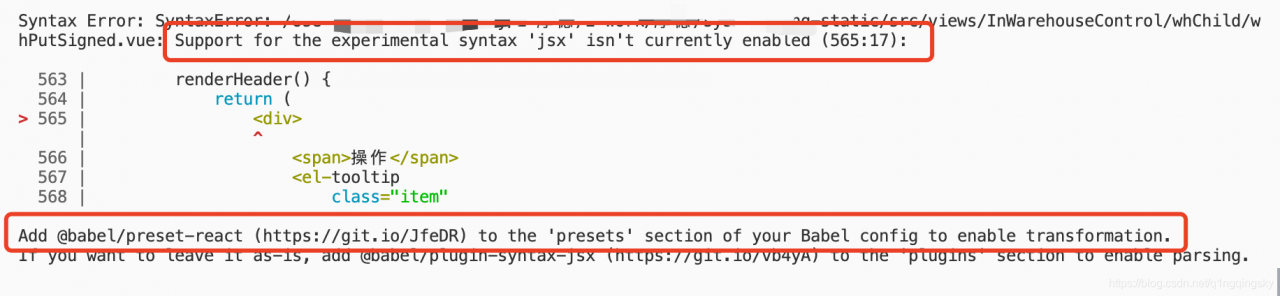
As shown in the figure:

According to the prompt in the red box in the figure:

I need you in. Babelrc   Just add @ Vue/Babel preset JSX to the configuration file

{
  "presets": [
    ["@babel/preset-env", { "modules": false }],
    "@vue/babel-preset-jsx" 
  ],
  "plugins": [
    "@babel/plugin-proposal-class-properties", 
    "syntax-dynamic-import",
    [
      "component",
      {
        "libraryName": "element-ui",
        "styleLibraryName": "theme-chalk"
      }
    ]
  ]

}

The problem has been solved.

Solution warning: userwarning: fixedformatter should only be used together with fixedlocator (illustrated version)!)

Resolve warning

Error information problem code problem analysis and solution

Error information

• When we draw the edge histogram, the following warning will appear when we use the conventional method to convert the x-axis scale of the scatter plot to floating-point number!!!

UserWarning: FixedFormatter should only be used together with FixedLocator
  ax_main.set_xticklabels(xlabels)

Problem code

xlabels = ax_main.get_xticks().tolist() # Convert scale values to floating point numbers
ax_main.set_xticklabels(xlabels) # Set the scale value to floating point
plt.show()

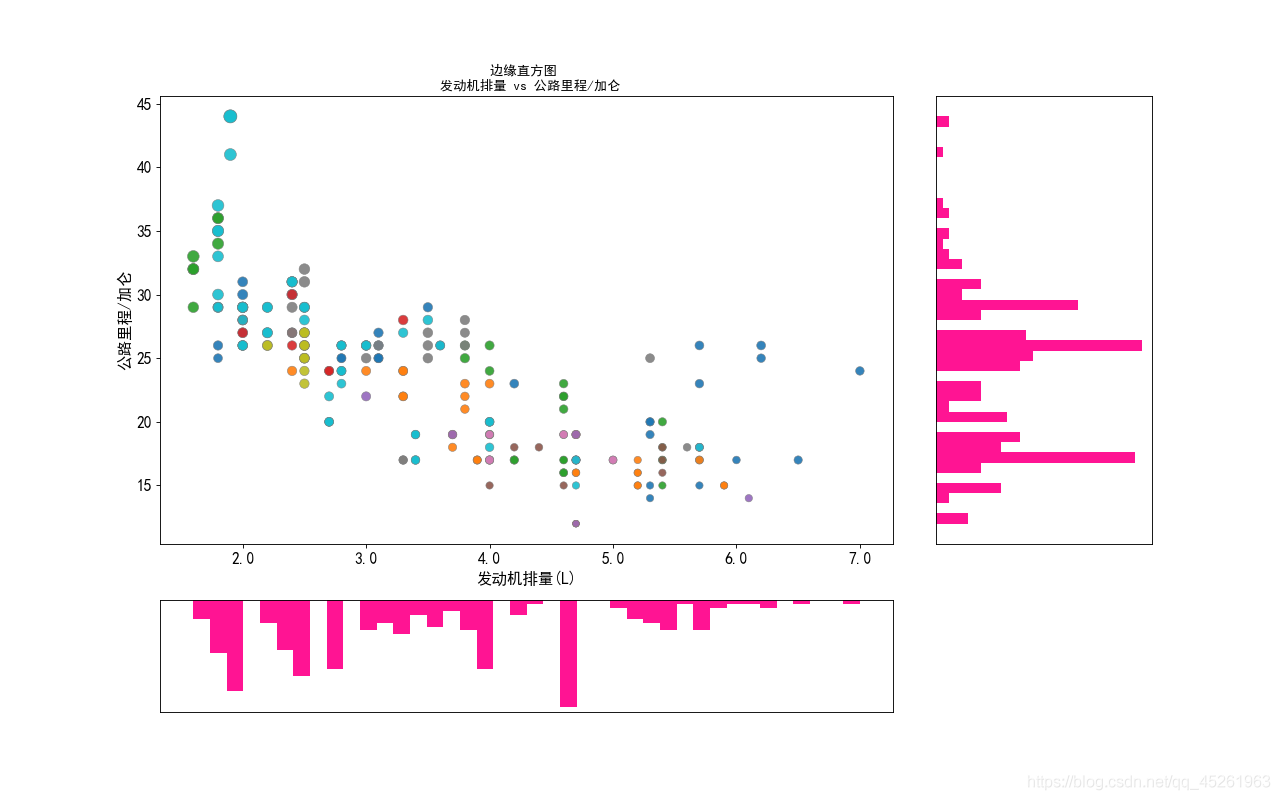
• When you use the above code to convert the scale value to floating-point number, the same warning as the title will appear, but the x-axis scale of the scatter image displayed has been successfully converted to floating-point number, as shown in the figure below
Problem analysis

• Problem Description: This is a user warning: it is a warning caused by our nonstandard operation. It tells us that fixedformatter (scale form) can only be used with fixedlocator , but can’t use other methods to change the scale form!!!

solve the problem

• In the above we analyzed the causes of the warning, we should use the fixedlocator locator to change the fixedformatter (scale form), rather than directly convert the scale format, leading to the warning
• First, import the ticker module in Matplotlib library, and the code is as follows:

import matplotlib.ticker as mticker

label_format = '{:,.1f}'  # Create floating point format .1f one decimal
xlabels = ax_main.get_xticks().tolist()
ax_main.xaxis.set_major_locator(mticker.FixedLocator(xlabels)) # locate to the x-axis of the scatter plot
ax_main.set_xticklabels([label_format.format(x) for x in xlabels]) # Convert scales to floating point numbers using a list derivative loop
plt.show()

Image display:
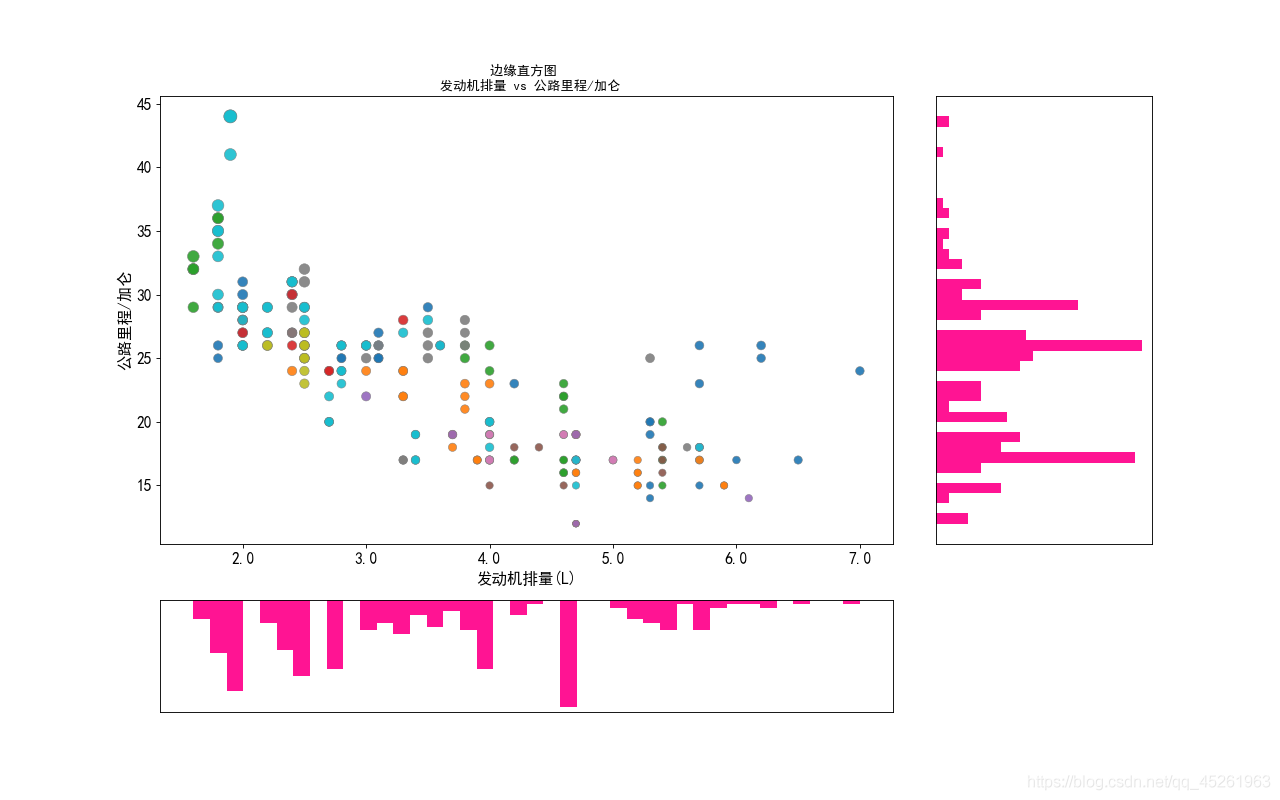
• The complete code for drawing the above image is:

import matplotlib.pyplot as plt
import matplotlib.ticker as mticker
import pandas as pd

# Get the data
df = pd.read_csv(r'D:\9\mpg_ggplot2.csv')

# Create a canvas and split it into a grid
fig = plt.figure(figsize=(16, 10), dpi=80, facecolor='white')
grid = plt.GridSpec(4, 4, hspace=0.5, wspace=0.2)

# Add subgraphs
ax_main = fig.add_subplot(grid[:-1, :-1])
ax_right = fig.add_subplot(grid[:-1, -1], xticklabels=[], yticklabels=[])
ax_bottom = fig.add_subplot(grid[-1, :-1], xticklabels=[], yticklabels=[])

# Plot the bubble in the center

ax_main.scatter('displ', 'hwy'
                , s=df.cty * 4
                , data=df
                , c=df.manufacturer.astype('category').cat.codes
                , cmap='tab10'
                , edgecolors='gray'
                , linewidth=.5
                , alpha=.9)
# Plot the bottom histogram
ax_bottom.hist(df.displ, 40, histtype='stepfilled', orientation='vertical', color='deeppink')
ax_bottom.invert_yaxis() # make the y-axis inverse

# Plot the right histogram
ax_right.hist(df.hwy, 40, histtype='stepfilled', orientation='horizontal', color='deeppink')

# decorate the image
plt.rcParams['font.sans-serif'] = ['Simhei']
ax_main.set(title='Edge histogram \n engine displacement vs highway miles/gallon'
            , xlabel='Engine displacement (L)'
            , ylabel='Highway miles/gallon')
ax_main.title.set_fontsize = (20)

for item in ([ax_main.xaxis.label, ax_main.yaxis.label] + ax_main.get_xticklabels() + ax_main.get_yticklabels()):
    item.set_fontsize(14)

for item in [ax_bottom, ax_right]:
    item.set_xticks([])
    item.set_yticks([])

label_format = '{:,.1f}'  # Create floating point format .1f one decimal
xlabels = ax_main.get_xticks().tolist()
ax_main.xaxis.set_major_locator(mticker.FixedLocator(xlabels)) # locate to the x-axis of the scatter plot
ax_main.set_xticklabels([label_format.format(x) for x in xlabels]) # Convert scales to floating point numbers using a list derivative loop
plt.show()


[Solved] AttributeError: ‘openvino.inference_engine.ie_api.IENetwork‘ object has no attribute ‘input_info‘

[openvino] Problem Description: attributeerror: ‘openvino. Information’_ engine.ie_ api.IENetwork‘ object has no attribute ‘input_ Info ‘
this is due to the version problem. I use 2020.3.355, which is different from that on station B

next(iter(net.input_info))
Change to
next(iter(net.inputs))

There is also a small pit

n, c, h, w = net.inputs[input_blob].input_data.shape
Change to
n, c, h, w = net.inputs[input_blob].shape

[How to Solve] ImportError: No module named typing

python version 2.7
Error
This error occurs when using pip

Traceback (most recent call last):
File “C:\Python27\Scripts\pip-script.py”, line 9, in
load_entry_point(‘pip==21.1.3’, ‘console_scripts’, ‘pip’)()
File “C:\Python27\lib\site-packages\pkg_resources_init_.py”, line 542, in load_entry_point
return get_distribution(dist).load_entry_point(group, name)
File “C:\Python27\lib\site-packages\pkg_resources_init_.py”, line 2569, in load_entry_point
return ep.load()
File “C:\Python27\lib\site-packages\pkg_resources_init_.py”, line 2229, in load
return self.resolve()
File “C:\Python27\lib\site-packages\pkg_resources_init_.py”, line 2235, in resolve
module = import(self.module_name, fromlist=[‘name’], level=0)
File “C:\Python27\lib\site-packages\pip_init_.py”, line 1, in
from typing import List, Optional
ImportError: No module named typing

The solution is to update python to 3, but I want to use 2.7, so this method does not work
Solution
I found that the version of pip is too high, and it is not compatible with python2, my version is pip21.1.3, so I need to set back the version of pip, the solution is as follows, just run it in order

curl -O https://bootstrap.pypa.io/pip/2.7/get-pip.py
python get-pip.py
python -m pip install --upgrade "pip < 21.0"

Perfect solution, PIP version back, install again without error correction