Author Archives: Robins

Using the TP framework, an error is reported sqlstate [08004] [1040] too many connections

Use
when MySQL inserts a large amount of data and needs to compare and duplicate          Db($table)-> where($where)-> find();

In this case, an error will be reported: sqlstate [08004] [1040] too many connections

This is mainly due to too many database connections

resolvent:

        Introduce DB class

                 use think\Db;

        The query statement is changed to:

                 Db::table($table)-> where($where)-> find();

That’s it

Solution to the problem of failure to elect leaders when offline service is reported in Nacos

Problem description

When there are multiple instances of a micro service in the Nacos registry, click an instance to go offline and report an error

caused: errCode: 500, errMsg: do metadata operation failed ;
caused: com.alibaba.nacos.consistency.exception.ConsistencyException: com.alibaba.nacos.core.distributed.raft.exception.NoLeaderException: The Raft Group [naming_instance_metadata] did not find the Leader node;
caused: com.alibaba.nacos.core.distributed.raft.exception.NoLeaderException: The Raft Group [naming_instance_metadata] did not find the Leader node;

Solution

Nacos uses the raft algorithm to calculate the leader and will record the cluster address started last time. Therefore, when the IP address of our own server changes (especially the students started locally when we study, because sometimes our network environment will change… WiFi, so the IP address often changes), the cluster address recorded by raft will become invalid, If there is a problem with the selected leader, just delete the protocol folder under the data folder under the root directory of Nacos.

The Vue project is packaged and deployed to tomcat, and an Error 404 is reported as soon as it is refreshed

The reason is that the history mode is used   HTML5 history mode | Vue router

I didn’t find a solution

So we changed the routing to hash mode

I use cli3

It was

import {createRouter, createWebHistory} from 'vue-router'

const router = createRouter({
    history: createWebHistory(process.env.BASE_URL),
    routes
})

Change to

import {createRouter, createWebHashHistory} from 'vue-router'

const router = createRouter({
  model:'hash',
  history: createWebHashHistory(),
  routes
})

It’s normal after modification

Vs2019 + QT parses the XML file and reports an error at doc.setcontent (& file)

Vs2019 + QT parses the XML file and reports an error at doc.setcontent

Made a very low-level mistake. Record the process.

A QT project was established long ago. Now to add a function of parsing XML files using the qdom class, there is always an error in the sentence doc.setcontent (& amp; file) , and there is no error message. The relevant C + + codes are as follows:

QString error;
int line, column;
if (doc.setContent(&file, &error, &line, &column)) {
    qDebug() << doc.toString(4);
}
else {
    qDebug() << "Error:" << error << "in line " << line << "column" << column;
}
file.close();

When doc.setcontent (& amp; file, & amp; error, & amp; line, & amp; column) , critical error detected c00000374 is displayed

The first reaction is that the XML file is incorrectly written. For example, there is no space in the space, Chinese punctuation is entered, or the two sides of the tag are inconsistent
after repeatedly confirming that the XML file is correct, the stackoverflow search said that the relative path cannot be used, but the absolute path must be used… Another attempt of the absolute path is useless.

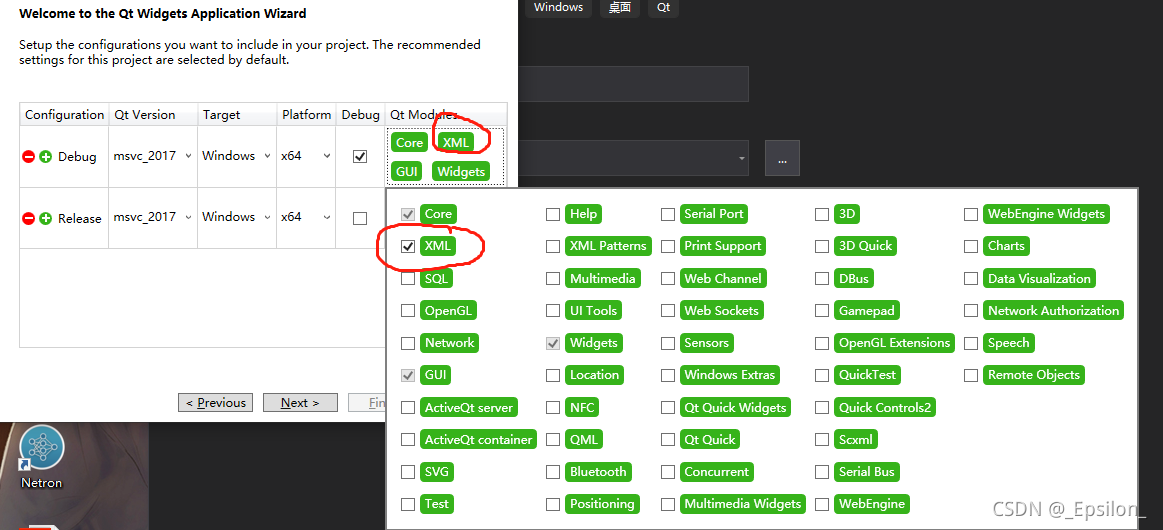
Create a new project and run it with the same code without error. Through careful comparison, it is found that in the new project, I added the XML class library

but not in the original project!

So far, add $(qtdir) \ include \ qtxml in the C/C + + include directory, add qt5xmld.lib [debug mode] and qt5xml. Lib [release mode] in the linker, and the operation is successful!

Finally, I found that if the XML file is written incorrectly, the above program can locate the error location. Direct reporting of fatal error/critical error or unresolved external symbols like this__ declspec(dllimport) public: __ Cdecl , the probability is that the Lib file link is wrong rather than the code problem. You need to check whether the environment is configured correctly.

A simple question has been wordy for a long time… Mainly to warn yourself that you must think more and think more about ways to expose the problem when you encounter a problem that has no solution on the Internet!

This dependency was not found:* vue-editor-bridge

Error reporting result:

When the project is running, a compilation error occurs suddenly and the dependency cannot be found. Follow the prompt to execute NPM install — save Vue editor bridge, or an error is reported

This dependency was not found:

* vue-editor-bridge in ./node_modules/cache-loader/dist/cjs.js??ref--12-0!./node_modules/babel-loader/lib!./node_modules/cache-loader/dist/cjs.js??ref--0-0!./node_modules/vue-loader/lib??vue-loader-options!./src/components/Test.vue?vue&type=script&lang=js&

To install it, you can run: npm install --save vue-editor-bridge
Error from chokidar (C:\): Error: EBUSY: resource busy or locked, lstat 'C:\DumpStack.log.tmp'

Cause finding:

After finding similar error reports, it is found that vscode automatically adds a line of import, as if it entered func when entering function, and vscode imported func as a component by default (you don’t have to be so smart?)

import func from 'vue-temp/vue-editor-bridge'

Solution:

Just delete this line of code

Apktool back compilation error [How to Solve]

report errors

error: No resource identifier found for attribute 'XXX' in package 'XXX'

Solution:

Save the XML file to “ http://schemas.android.com/apk/res-auto " changed to " http://schemas.android.com/apk/lib/com.app.chasebank "

other

I directly used Android killer for back compilation. There were more than 10 errors at once. It was too troublesome to change one by one, so I simply wrote a python script:

import os
import re

file = "error.txt"

def change_content(file):
    if os.path.exists(file):
        with open(file) as f:
            content = f.read()
        if "http://schemas.android.com/apk/res-auto" in content:
            print(file+":已修复")
            content = content.replace("http://schemas.android.com/apk/res-auto","http://schemas.android.com/apk/lib/com.app.chasebank")
            with open(file,"w") as f:
                f.write(content)

with open(file,encoding='utf8') as f:
    data = f.read()

result = re.findall(">W: (.*?):\d+: error: No resource identifier found for attribute",data)
for file in result:
    change_content(file)

Copy the error to the error.txt file, and then run the script to modify the XML file directly.

Sometimes, such errors will appear in the back compilation. You may need to copy the errors again and then execute the script. That is to say, some errors are not reported because the previous errors have not been solved, and all such errors cannot be reported at one time.

How to Solve Jetpack room use error


When building the room, there are several small problems. Record them. Basically, it is a configuration problem:

There is a problem with the query: [SQLITE_ERROR] SQL error or missing database (no such table: simple_student)。
an error is reported during compilation and the table cannot be found
you need to set the corresponding indication in the declared entity.

//Wrong
@Entity
data class StudentEntity
//Right
@Entity(tableName = "student_table")
data class StudentEntity

Not sure how to convert a Cursor to this method’s return type (kotlinx.coroutines.flow.Flow<?extends java.util.List<com.zxf.jetpackrelated.room.liveDataOrFlow.StudentEntity>>).

When the Dao layer declares the return value as livedata, an error is reported. After a long investigation, it was found that the corresponding function was declared as a suspended function
correct use should remove the corresponding suspend modifier.

//Wrong
@Query("select * from $STUDENT_TABLE_NAME")
suspend fun obtainStudentAll(): LiveData<List<StudentEntity>>
//Right
@Query("select * from $STUDENT_TABLE_NAME")
fun obtainStudentAll(): LiveData<List<StudentEntity>>

Not sure how to convert a Cursor to this method’s return type (androidx.lifecycle.LiveData<java.util.List<com.zxf.jetpackrelated.room.liveDataOrFlow.StudentEntity>>)
Similarly, it cannot be converted to flow, and the corresponding suspend modifier is removed.

//Wrong
@Query("select * from $STUDENT_TABLE_NAME")
suspend fun obtainStudentAll(): Flow<List<StudentEntity>>
//Right
@Query("select * from $STUDENT_TABLE_NAME")
fun obtainStudentAll(): Flow<List<StudentEntity>>

If you do not need to declare the return type as livedata or flow, you can directly declare suspend.

Zeppelin reported an error. The JDK version is low

Error message

org.apache.zeppelin.interpreter.InterpreterException: java.io.IOException: Fail to launch interpreter process:
Apache Zeppelin requires either Java 8 update 151 or newer
  at org.apache.zeppelin.interpreter.remote.RemoteInterpreter.open(RemoteInterpreter.java:134)
  at org.apache.zeppelin.interpreter.remote.RemoteInterpreter.getFormType(RemoteInterpreter.java:298)
  at org.apache.zeppelin.notebook.Paragraph.jobRun(Paragraph.java:433)
  at org.apache.zeppelin.notebook.Paragraph.jobRun(Paragraph.java:75)
  at org.apache.zeppelin.scheduler.Job.run(Job.java:172)
  at org.apache.zeppelin.scheduler.AbstractScheduler.runJob(AbstractScheduler.java:130)
  at org.apache.zeppelin.scheduler.RemoteScheduler$JobRunner.run(RemoteScheduler.java:159)
  at java.util.concurrent.Executors$RunnableAdapter.call(Executors.java:511)
  at java.util.concurrent.FutureTask.run(FutureTask.java:266)
  at java.util.concurrent.ScheduledThreadPoolExecutor$ScheduledFutureTask.access$201(ScheduledThreadPoolExecutor.java:180)
  at java.util.concurrent.ScheduledThreadPoolExecutor$ScheduledFutureTask.run(ScheduledThreadPoolExecutor.java:293)
  at java.util.concurrent.ThreadPoolExecutor.runWorker(ThreadPoolExecutor.java:1142)
  at java.util.concurrent.ThreadPoolExecutor$Worker.run(ThreadPoolExecutor.java:617)
  at java.lang.Thread.run(Thread.java:745)
Caused by: java.io.IOException: Fail to launch interpreter process:
Apache Zeppelin requires either Java 8 update 151 or newer

Solution

Step 1: upgrade JDK to JDK1.8

Step 2: modify the Java of Hadoop and other services

Step 3: modify the Java of zeppelin-env.sh

Step 4: modify the JDK path in the common.sh file in the bin directory of Zeppelin (important!!!)

function check_java_version() {
//Modify JAVA PATH to: /opt/modules/jdk1.8.0_202
    java_ver_output=$("${JAVA:-/opt/modules/jdk1.8.0_202}" -version 2>&1)
    
    jvmver=$(echo "$java_ver_output" | grep '[openjdk|java] version' | awk -F'"' 'NR==1 {print $2}' | cut -d\- -f1)
    JVM_VERSION=$(echo "$jvmver"|sed -e 's|^\([0-9][0-9]*\)\..*$|\1|')
    if [ "$JVM_VERSION" = "1" ]; then
        JVM_VERSION=$(echo "$jvmver"|sed -e 's|^1\.\([0-9][0-9]*\)\..*$|\1|')
    fi

    if [ "$JVM_VERSION" -lt 8 ] || { [ "$JVM_VERSION" -eq 8 ] && [ "${jvmver#*_}" -lt 151 ]; } ; then
        echo "Apache Zeppelin requires either Java 8 update 151 or newer"
        exit 1;
    fi
}

[Solved] Unity Error: ‘BuildPipeline‘ does not contain a definition for ‘GetBuildTargetName‘

@[TOC] (error: Library \ packagecache \ com. Unity. XR [email protected] \Editor\XRGeneralBuildProcessor.cs(83,52): error CS0117: ‘BuildPipeline’ does not contain a definition for ‘GetBuildTargetName’)

Problem Description:

when unity develops oculus quest, it will report an error library \ packagecache \ com.unity.xr [email protected] \Editor \ xrgeneralbuildprocessor.cs (83,52): error cs0117: ‘buildpipeline’ doors not contain a definition for ‘getbuildtargetname’
my unit version is 2019.4


Cause analysis:

the version of the plug-in matches the version of the unity step, resulting in </ font>


Solution:

delete ar foundation, downgrade XR plug-in management to 3.2.16, downgrade ar foundation and arkit XR plug-ins to 4.1.1, and reinstall ar foundation
record the pit encountered and it has been solved

[Solved] Docker compose error: ERROR: Encountered errors while bringing up the project.

Error running docker compose file:

ERROR: for yingxue_mysql_1  Cannot create container for service mysql: invalid volume specification: 'yingxue_data:var/lib/mysql:rw': invalid mount config for type "volume": invalid mount path: 'var/lib/mysql' mount path must be absolute

ERROR: for mysql  Cannot create container for service mysql: invalid volume specification: 'yingxue_data:var/lib/mysql:rw': invalid mount config for type "volume": invalid mount path: 'var/lib/mysql' mount path must be absolute
ERROR: Encountered errors while bringing up the project.

Docker compose original file

version: "3.3"

networks:
  yingxue_network:

volumes: 
  data:

services:
  nacos:
    image: nacos/nacos-server:2.0.2
    ports:
      - "8848:8848"
    environment:
      - "JVM_XMS=256m"
      - "JVM_XMX=256m"
      - "MODE=standalone"
    networks:
      - yingxue_network

  mysql:
    image: mysql:5.7
    ports:
      - "3306:3306"
    networks:
      - yingxue_network
    volumes:
      - data:var/lib/mysql
      - ./yingxue.sql:/docker-entrypoint-initdb.d/yingxue.sql
    environment:
      - "MYSQL_ROOT_PASSWORD=root"
      - "MYSQL_DATABASE=yingxue"

The problem description shows that the path is wrong. After careful inspection, it is found that the data volume data: var/lib/MySQL is missing /, which should be:

    volumes:
      - data:/var/lib/mysql
      - ./yingxue.sql:/docker-entrypoint-initdb.d/yingxue.sql

Android 10: How to Solve Systemui Error

1、 The following error is reported in the single compilation systemui:

eworks/base/packages/SystemUI/SystemUI-tests/android_common/javac/srcjars"
frameworks/base/packages/SystemUI/tests/src/com/android/systemui/statusbar/phone/KeyguardBouncerTest.java:382: Error: Symbol not found
        when(mUnlockMethodCache.isUnlockingWithFacePossible()).thenReturn(true);
                               ^
  Symbol: method isUnlockingWithFacePossible()
  Location: Variable of type UnlockMethodCache mUnlockMethodCache
frameworks/base/packages/SystemUI/tests/src/com/android/systemui/utils/leaks/FakeHotspotController.java:22: Error: FakeHotspotController is not abstract, and does not override the abstract method isHotspotEnabling() in HotspotController
public class FakeHotspotController extends BaseLeakChecker<Callback> implements HotspotController {
       ^
Note: Some input files use or override deprecated APIs.
Note: For more information, please recompile with -Xlint:deprecation.
Note: Some input files use unchecked or unsafe operations.
Note: For more information, please recompile with -Xlint:unchecked.
2 errors
16:19:16 ninja failed with: exit status 1

Reason:
the error in tests may be the reason why Google has not updated it, so the whole system will not prompt an error during compilation. This error does not affect the subsequent use of
solutions:
error 1: isunlockingwithfacepossible() directly modifies the place where the method is called to false
error 2: the method is not rewritten ishhotspotenabling()
fakehotspotcontroller rewrites the ishhotspotenabling() method in this class

 @Override
    public boolean isHotspotEnabling() {
        return false;
    }