Author Archives: Robins

Tomcat cross server upload error 403forbidden [How to Solve]

HTTP Status [500] – [Internal Server Error]
Type Exception Report

Message Request processing failed; nested exception is com.sun.jersey.api.client.UniformInterfaceException: PUT http://localhost:9090/loads/2441068f057c4c7fa87e406837bd08f9_ returned a response status of 403 Forbidden

Description The server encountered an unexpected condition that prevented it from fulfilling the request.

Exception

org.springframework.web.util.NestedServletException: Request processing failed; nested exception is com.sun.jersey.api.client.UniformInterfaceException: PUT http://localhost:9090/loads/2441068f057c4c7fa87e406837bd08f9_ returned a response status of 403 Forbidden
	org.springframework.web.servlet.FrameworkServlet.processRequest(FrameworkServlet.java:986)
	org.springframework.web.servlet.FrameworkServlet.doPost(FrameworkServlet.java:881)
	javax.servlet.http.HttpServlet.service(HttpServlet.java:661)
	org.springframework.web.servlet.FrameworkServlet.service(FrameworkServlet.java:855)
	javax.servlet.http.HttpServlet.service(HttpServlet.java:742)
	org.apache.tomcat.websocket.server.WsFilter.doFilter(WsFilter.java:53)
	org.springframework.web.filter.CharacterEncodingFilter.doFilterInternal(CharacterEncodingFilter.java:200)
	org.springframework.web.filter.OncePerRequestFilter.doFilter(OncePerRequestFilter.java:107)
Root Cause

com.sun.jersey.api.client.UniformInterfaceException: PUT http://localhost:9090/loads/2441068f057c4c7fa87e406837bd08f9_ returned a response status of 403 Forbidden

Reason: the default configuration readonly of Tomcat web.xml is true, which makes it impossible to read and write data to the server across servers

The solution is: configure in xeb.xml under config in the local folder of Tomcat

<servlet>
        <servlet-name>default</servlet-name>
        <servlet-class>org.apache.catalina.servlets.DefaultServlet</servlet-class>
        <init-param>
            <param-name>debug</param-name>
            <param-value>0</param-value>
        </init-param>
		
		 <!--New-->
        <init-param>
            <param-name>readonly</param-name>
            <param-value>false</param-value>
        </init-param>
		
        <init-param>
            <param-name>listings</param-name>
            <param-value>false</param-value>
        </init-param>
        <load-on-startup>1</load-on-startup>
    </servlet>
QGC Error: Fail: No CPU load information [How to Solve]

It is said that because the bootloader does not match the Px4 firmware version, it is necessary to modify the parameters in the QGC so that it can be updated to the matching version of bootloader when installing the firmware

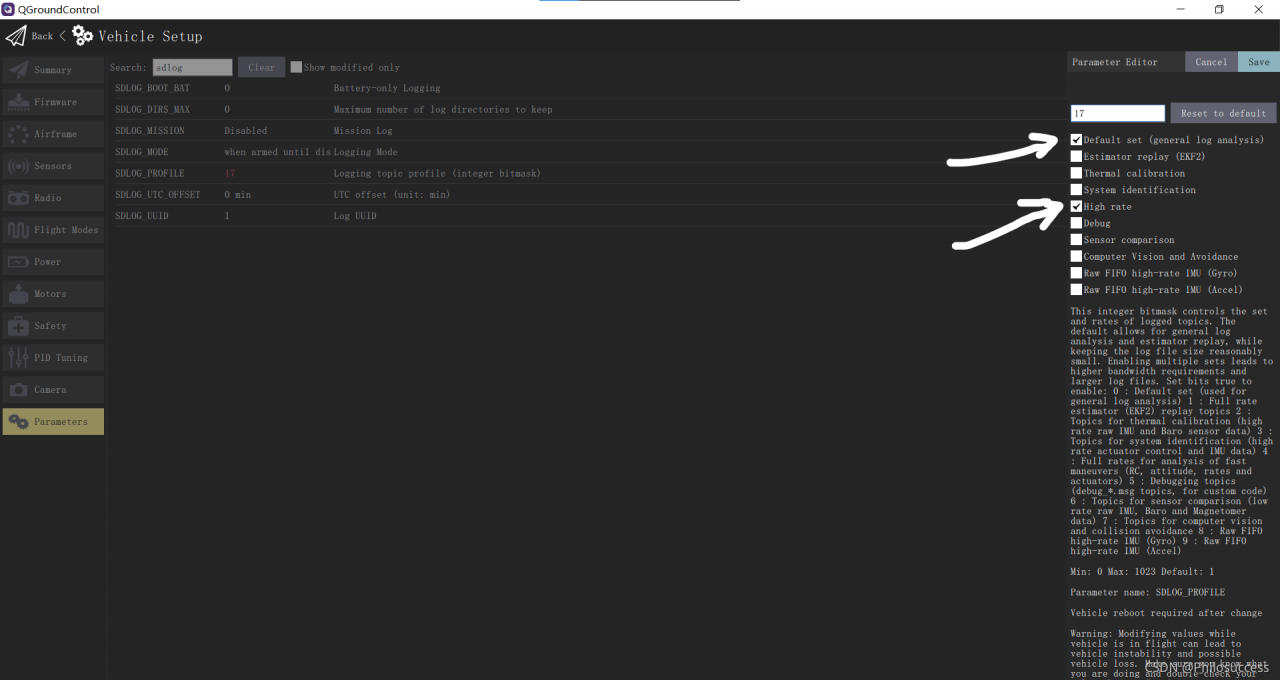
Step 1: modify  SDLOG_PROFILE   Parameters from “default” to “default” and “high rate.”   As shown in the figure:

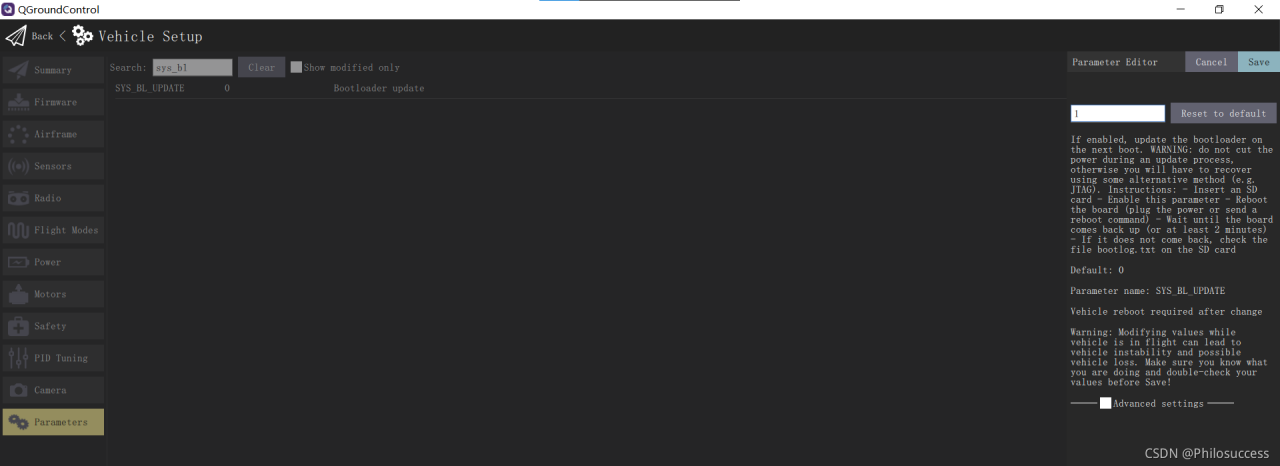
Step 2:   Modification SYS_BL_Update parameter to 1  As shown in the figure:

Step 3: format the SD card and download the firmware again

Problem solving!!!!!

The index.nvue page of uniapp reports an error about CSS

The console of uniapp reports an error:
reportJSException >>>> exception function:createInstanceContext,
exception:white screen cause create instanceContext failed,
check js stack ->Uncaught Error: Cannot find
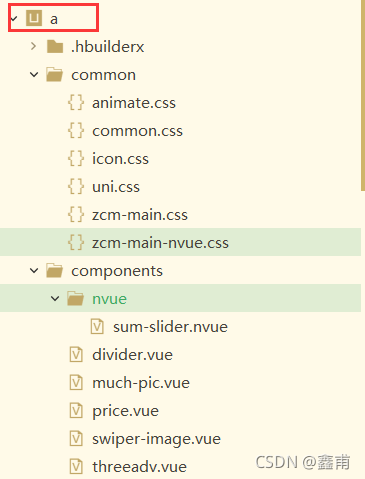
module ‘…/…/…/…/…/…/…/common/zcm-main-nvue.css?vue&type=style&index=0&lang=css&mpType=page’
The console reports an error because the index.nvue page does not add @, to add @ to not report an error
Note: @ stands for the outermost a folder

[Solved] openstack4j Startup Error: java.net.UnknownHostException: controller

When calling OpenStack using openstack4j connection, an error is reported
Specific part of the error reported:

Exception in thread "main" ConnectionException{message=RESTEASY004655: Unable to invoke request, status=0}
    at org.openstack4j.connectors.resteasy.HttpExecutorServiceImpl.invoke(HttpExecutorServiceImpl.java:57)
    at org.openstack4j.connectors.resteasy.HttpExecutorServiceImpl.execute(HttpExecutorServiceImpl.java:31)
    at org.openstack4j.core.transport.internal.HttpExecutor.execute(HttpExecutor.java:51)
    at org.openstack4j.openstack.internal.BaseOpenStackService$Invocation.execute(BaseOpenStackService.java:213)
    at org.openstack4j.openstack.internal.BaseOpenStackService$Invocation.execute(BaseOpenStackService.java:207)
    at
.............................
Caused by: java.net.UnknownHostException: controller
    at java.net.Inet6AddressImpl.lookupAllHostAddr(Native Method)
    at java.net.InetAddress$2.lookupAllHostAddr(InetAddress.java:928)
    at java.net.InetAddress.getAddressesFromNameService(InetAddress.java:1323)
    at java.net.InetAddress.getAllByName0(InetAddress.java:1276)
    at java.net.InetAddress.getAllByName(InetAddress.java:1192)
    at java.net.InetAddress.getAllByName(InetAddress.java:1126)

OpenStack environment: Through the OpenStack environment built on two virtual machines, the hostnames of the two virtual machines are controller, compute. and here the error is reported as unknown host.

Solution:
(1) Open windws/system32/driver/etc/hosts under Windows and add the following content

        Virtual Machine IP controller
        Virtual Machine IP compute

(2) Linux server

       vi  /etc/hosts

[Solved] Ubuntu Update source error: Certificate verification failed: The certificate is NOT trusted.

Updating the Ubuntu source today always reports an error

Ign:1 https://mirrors.tuna.tsinghua.edu.cn/ubuntu focal InRelease
Ign:2 https://mirrors.tuna.tsinghua.edu.cn/ubuntu focal-updates InRelease
Ign:3 https://mirrors.tuna.tsinghua.edu.cn/ubuntu focal-backports InRelease
Ign:4 https://mirrors.tuna.tsinghua.edu.cn/ubuntu focal-security InRelease
Err:5 https://mirrors.tuna.tsinghua.edu.cn/ubuntu focal Release
  Certificate verification failed: The certificate is NOT trusted. The certificate chain uses expired certificate.  Could not handshake: Error in the certificate verification. [IP: 101.6.15.130 443]
Err:6 https://mirrors.tuna.tsinghua.edu.cn/ubuntu focal-updates Release
  Certificate verification failed: The certificate is NOT trusted. The certificate chain uses expired certificate.  Could not handshake: Error in the certificate verification. [IP: 101.6.15.130 443]
Err:7 https://mirrors.tuna.tsinghua.edu.cn/ubuntu focal-backports Release
  Certificate verification failed: The certificate is NOT trusted. The certificate chain uses expired certificate.  Could not handshake: Error in the certificate verification. [IP: 101.6.15.130 443]
Err:8 https://mirrors.tuna.tsinghua.edu.cn/ubuntu focal-security Release
  Certificate verification failed: The certificate is NOT trusted. The certificate chain uses expired certificate.  Could not handshake: Error in the certificate verification. [IP: 101.6.15.130 443]
Reading package lists... Done
E: The repository 'https://mirrors.tuna.tsinghua.edu.cn/ubuntu focal Release' does not have a Release file.
N: Updating from such a repository can't be done securely, and is therefore disabled by default.
N: See apt-secure(8) manpage for repository creation and user configuration details.
E: The repository 'https://mirrors.tuna.tsinghua.edu.cn/ubuntu focal-updates Release' does not have a Release file.
N: Updating from such a repository can't be done securely, and is therefore disabled by default.
N: See apt-secure(8) manpage for repository creation and user configuration details.
E: The repository 'https://mirrors.tuna.tsinghua.edu.cn/ubuntu focal-backports Release' does not have a Release file.
N: Updating from such a repository can't be done securely, and is therefore disabled by default.
N: See apt-secure(8) manpage for repository creation and user configuration details.
E: The repository 'https://mirrors.tuna.tsinghua.edu.cn/ubuntu focal-security Release' does not have a Release file.
N: Updating from such a repository can't be done securely, and is therefore disabled by default.
N: See apt-secure(8) manpage for repository creation and user configuration details.

Finally, refer to the method of online leaders, change HTTPS in the software source to HTTP, and solve it successfully.

# The source image is commented by default to improve the speed of apt update, you can uncomment it if needed
deb http://mirrors.tuna.tsinghua.edu.cn/ubuntu/ focal main restricted universe multiverse
# deb-src https://mirrors.tuna.tsinghua.edu.cn/ubuntu/ focal main restricted universe multiverse
deb http://mirrors.tuna.tsinghua.edu.cn/ubuntu/ focal-updates main restricted universe multiverse
# deb-src https://mirrors.tuna.tsinghua.edu.cn/ubuntu/ focal-updates main restricted universe multiverse
deb http://mirrors.tuna.tsinghua.edu.cn/ubuntu/ focal-backports main restricted universe multiverse
# deb-src https://mirrors.tuna.tsinghua.edu.cn/ubuntu/ focal-backports main restricted universe multiverse
deb http://mirrors.tuna.tsinghua.edu.cn/ubuntu/ focal-security main restricted universe multiverse
# deb-src https://mirrors.tuna.tsinghua.edu.cn/ubuntu/ focal-security main restricted universe multiverse

About JS error uncaught syntax error: invalid shorthand property initializer

Sometimes when typing JS code, you will often encounter such errors:

This is due to careless typing of code, resulting in grammatical format errors.

If the object literal is used to define the object, the relationship between the attribute name and the attribute value:

<script>
var province = [{
            id: 1002,
            name: 'Heibei',
            city: [{
                    id: 1,
                    name= 'Shijiazhuang' // use object literals to define objects with attribute names separated from attribute values by:.
                },
                {
                    id: 2,
                    name: 'Handan'
                }
            ]
        }];
</script>

Grammar norms are very important. Try not to make mistakes that can be avoided.

Docker: How to Solve MYSQL8 & Navicat remote connection error

1. Download Image

docker pull mysql:8.0.26

2. Operation container

docker run -p 3306:3306 --restart=always -e MYSQL_ROOT_PASSWORD=ang123 --name mysql -d mysql:8.0.26

3. At this time, an error will be reported when using Navicat to log in, because the encryption methods of mysql8 and 5 are different, and the encryption method needs to be modified

4. Enter MySQL container

docker exec -it mysql bash

5. Log in to MySQL and modify the encryption method

mysql -uroot -pang123;

use mysql;

#Modify encryption method
alter user 'root'@'%' identified with mysql_native_password by 'root';

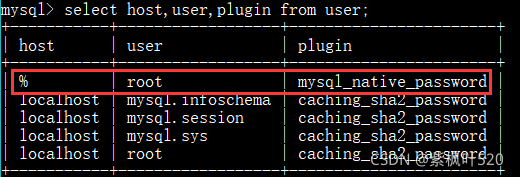
#View modified data
select host,user,plugin from user;

Revised as follows:

6.At this time, the local Navicat remote connection to MySQL in Linux still reports an error 1045, but the password is correct, and the grant authorization does not solve the problem

The final solution is as follows. Just change the password again. The password is still the original password

ALTER USER 'root'@'%' IDENTIFIED WITH MYSQL_NATIVE_PASSWORD BY 'ang123';

#Make changes effective
flush privileges;

7. At this time, Navicat can be used for remote connection

[Mac M1] How to Solve import wordcloud Error: ModuleNotFoundError: No module named ‘wordcloud‘

My computer is a MacBook Pro M1 chip, which is the most difficult computer to configure. Ah, humble MAC people can cry every time.

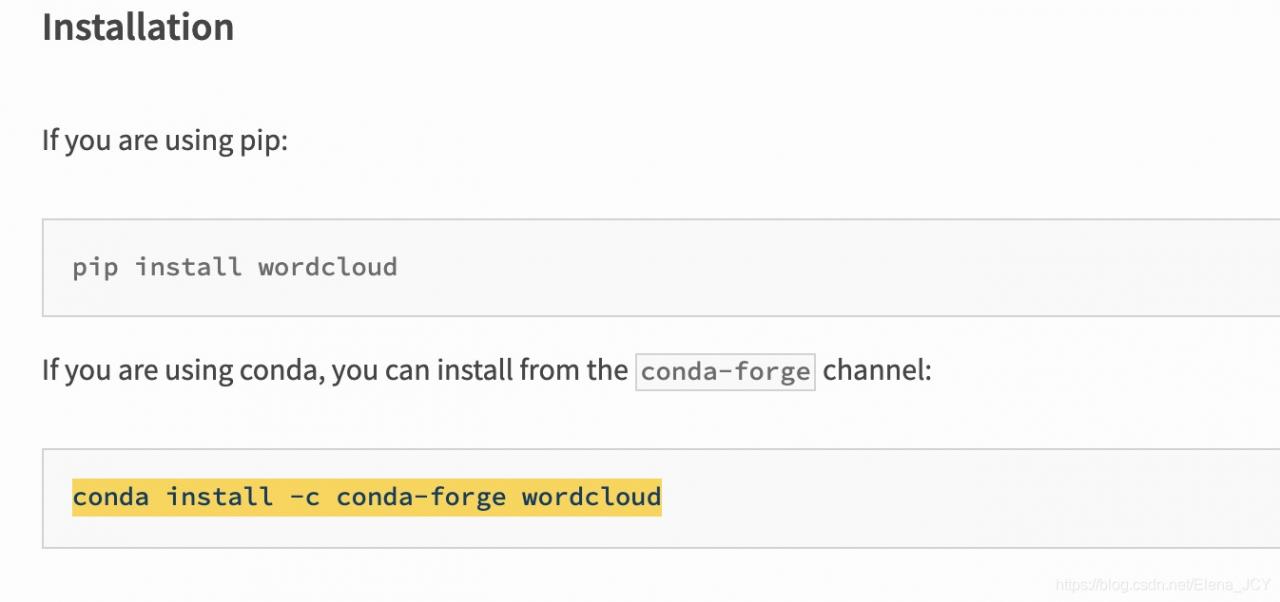
I downloaded the wordcloud package in Anaconda and reported errors after import. I tried all the methods found in CSDN to deal with this error again. No one is successful, all kinds of problems. Later, I found a solution on the Internet, and the address is here: https://pypi.org/project/wordcloud/

In fact, it’s very simple. If you have tried PIP install on the terminal and failed, first enter Xcode select — install to ensure that you have downloaded this. If you have downloaded it like me, there will be

Just enter this
CONDA install – C CONDA forge wordcloud
to run it. When this appears, enter y

After running in the terminal, reopen your Spyder or pycham and re import wordcloud to stop reporting errors!

Python Error: Failed to establish a new connection: [Errno -2] Name or service not known

Error Messages:

Traceback (most recent call last):
File "/usr/local/python3/lib/python3.7/site-packages/ddt.py", line 192, in wrapper
return func(self, *args, **kwargs)
File "/usr/hxy/auto-test/interface/test_start.py", line 49, in test
result = RequestsHandle().httpRequest(method, reparam.uri, data=reparam.data, headers=reparam.headers)
File "/usr/hxy/auto-test/common/request_handle.py", line 32, in httpRequest
headers=headers, verify=False, proxies=proxies)
File "/usr/local/python3/lib/python3.7/site-packages/requests/sessions.py", line 542, in request
resp = self.send(prep, **send_kwargs)
File "/usr/local/python3/lib/python3.7/site-packages/requests/sessions.py", line 655, in send
r = adapter.send(request, **kwargs)
File "/usr/local/python3/lib/python3.7/site-packages/requests/adapters.py", line 516, in send
raise ConnectionError(e, request=request)
requests.exceptions.ConnectionError: HTTPSConnectionPool(host='sync-test.helianhealth.com', port=443): Max retries exceeded with url: /sync-channel/channel/admin/hsp/template/isOnline (Caused by NewConnectionError('<urllib3.connection.HTTPSConnection object at 0x7fd369b643c8>: Failed to establish a new connection: [Errno -2] Name or service not known'))

I don’t get the error locally, but when I deploy the project on a Linux server, I get the error.
This is because there are other technicians using the server besides me, and the version of the request is outdated.
Solution: Update requests with the command: pip install -U requests

If the following error occurs.

ERROR: Cannot uninstall ‘requests’. It is a distutils installed project and thus we cannot accurately determine which files belong to it which would lead to only a partial uninstall.
After installing a package with distutils, you need to uninstall it with distutils. Unfortunately distutils does not contain an uninstall command, so “uninstall using distutils” means that you have to remove the package manually.

cd /usr/lib/python2.7/site-packages/
mkdir /opt/pylib_backup/
mv requests* /opt/pylib_backup/

PIP list sees that the requests package has been unloaded

[root@bareos_server site-packages]# pip list |grep request
DEPRECATION: Python 2.7 reached the end of its life on January 1st, 2020. Please upgrade your Python as Python 2.7 is no longer maintained. pip 21.0 will drop support for Python 2.7 in January 2021. More details about Python 2 support in pip can be found at https://pip.pypa.io/en/latest/development/release-process/#python-2-support pip 21.0 will remove support for this functionality.
[root@bareos_server site-packages]#