Author Archives: Robins

[Solved] JS Error: Uncaught TypeError: Cannot set properties of null (setting ‘innerHTML‘)

Many students have encountered this problem when writing JS code:

Cannot set properties of null (setting ‘innerHTML’). This error means that the null property “innerHTML” cannot be read, which means that the place where you want to insert the written HTML code cannot be found.

Solution: put the script of the read part of the DOM behind the body. Or add window.onload in the script tag and execute this part of the code after the page is loaded.

Reason: when the browser loads the HTML document, it will parse the HTML document into a tree structure called DOM tree. The code is executed from top to bottom. When the innerHTML line of code is executed, it does not load into the following DOM structure, and an error will be reported that the HTML cannot be read.

Example:

<!DOCTYPE html>
<html lang="en">
<head>
    <meta charset="UTF-8">
    <meta http-equiv="X-UA-Compatible" content="IE=edge">
    <meta name="viewport" content="width=device-width, initial-scale=1.0">
    <title>Document</title>
    <script>
        function showTime() {
            var today = new Date;
            var year = today.getFullYear();
            var month = checkNum(today.getMonth() + 1);
            var data = checkNum(today.getDate());
            var hour = today.getHours();
            var minute = checkNum(today.getMinutes());
            var second = checkNum(today.getSeconds());
            var day = today.getDay();
            var a = ['Sunday', 'Monday', 'Tuesday', 'Wednesday', 'Thursday', 'Friday', 'Saturday'];
            var tip = 'PM'
            if (hour > 12) {
                hour -= 12;
                tip = 'AM'
            }
            var time = year + 'Year' + month + 'Month' + data + 'date' + ' ' + tip + ' ' + hour + ':' + minute + ':' +
                second + ' ' + a[day];
            document.getElementById('time').innerHTML = time;
        }

        function checkNum(num) {
            if (num < 10) {
                return '0' + num;
            }
            return num;
        }
        setInterval(showTime, 1000);
    </script>
</head>

<body>
    <div id="time"> </div> 
</body>
</html>

Solution: will setInterval(showTime, 1000); Put this line of code after the body:

<body>
    <div id="time"> </div>
</body>
<script>
    setInterval(showTime, 1000);
</script>
</html>

Or add window.onload to the original script tag

        window.onload = function () {
            setInterval(showTime, 1000);
        }
    </script>

This can be solved perfectly!

OpenCV4 Error: imread(argv[1], CV_LOAD_IMAGE_COLOR);

Imread (argv [1], cv_load_image_color) in opencv4 reports an error
view the imread() function description. The second parameter

enum ImreadModes {
       IMREAD_UNCHANGED            = -1, //!< If set, return the loaded image as is (with alpha channel, otherwise it gets cropped). Ignore EXIF orientation.
       IMREAD_GRAYSCALE            = 0,  //!< If set, always convert image to the single channel grayscale image (codec internal conversion).
       IMREAD_COLOR                = 1,  //!< If set, always convert image to the 3 channel BGR color image.
       IMREAD_ANYDEPTH             = 2,  //!< If set, return 16-bit/32-bit image when the input has the corresponding depth, otherwise convert it to 8-bit.
       IMREAD_ANYCOLOR             = 4,  //!< If set, the image is read in any possible color format.
       IMREAD_LOAD_GDAL            = 8,  //!< If set, use the gdal driver for loading the image.
       IMREAD_REDUCED_GRAYSCALE_2  = 16, //!< If set, always convert image to the single channel grayscale image and the image size reduced 1/2.
       IMREAD_REDUCED_COLOR_2      = 17, //!< If set, always convert image to the 3 channel BGR color image and the image size reduced 1/2.
       IMREAD_REDUCED_GRAYSCALE_4  = 32, //!< If set, always convert image to the single channel grayscale image and the image size reduced 1/4.
       IMREAD_REDUCED_COLOR_4      = 33, //!< If set, always convert image to the 3 channel BGR color image and the image size reduced 1/4.
       IMREAD_REDUCED_GRAYSCALE_8  = 64, //!< If set, always convert image to the single channel grayscale image and the image size reduced 1/8.
       IMREAD_REDUCED_COLOR_8      = 65, //!< If set, always convert image to the 3 channel BGR color image and the image size reduced 1/8.
       IMREAD_IGNORE_ORIENTATION   = 128 //!< If set, do not rotate the image according to EXIF's orientation flag.
     };

Change the second parameter to imread_Grayscale is enough.

The second method:
Add header file:

#include <opencv2/imgcodecs/legacy/constants_c.h>

At this time, the parameter CV_LOAD_IMAGE_Color will not report an error.

[Solved] Wepy build watch Error: ERR! Parse WePY config failed. Are you trying to use

The specific error is
[22:54:56] err! Parse WePY config failed. Are you trying to use WePY 2 to build WePY 1 project?
[22:54:56] ERR! Unexpected type: plugins expect a Array

This is because
the version of wepy used in the current project is 1. X, while the version of wepy on the computer is 2, X

NPM install wepy cli – G command installs version 1. X
NPM install @wepy cli – G command installs version 2. X
the difference is@

Solution:

Locate C:\users\XX\appdata\roaming\NPM\node_Modules folder
delete the @wepy folder, and then execute NPM install wepy cli – G

Ali easyexcel error: org.apache.poi.ss.usermodel.font.setbold (z) V

public class TestEasyExcel {
	public static void main(String[] args) throws Exception {
		String filepath = "D:/LDT/测试easyExcel.xlsx";
		Sheet sheet = new Sheet(1, 0);
		sheet.setSheetName("xxxx");
		List<List<String>> header = new ArrayList<List<String>>();
		header.add(Lists.newArrayList("Number"));
		header.add(Lists.newArrayList("Name"));
		header.add(Lists.newArrayList("Age"));
		sheet.setHead(header);
		
		List<List<Object>> data = new ArrayList<List<Object>>();
		data.add(Lists.newArrayList("1001","Zhangsan",13));
		data.add(Lists.newArrayList("1002","Lisi",23));
		data.add(Lists.newArrayList("1003","Wangwu",33));
		
		OutputStream out = new FileOutputStream(new File(filepath));
		ExcelWriter writer = EasyExcelFactory.getWriter(out, ExcelTypeEnum.XLSX, true);
		System.out.println(writer);
		writer.write1(data, sheet);
		writer.finish();
	}
}

Error message: org.apache.poi.ss.usermodel.font.setbold (z) V

Cause: there is a conflict between Maven version and poi jar package. The following is Maven version. If POI version is 3.8 or 3.9, this exception message will appear.

        <dependency>
            <groupId>com.alibaba</groupId>
            <artifactId>easyexcel</artifactId>
            <version>1.1.2-beta4</version>
        </dependency>

Solution: this exception will not occur in version 3.17 and above.

        <dependency>
			<groupId>org.apache.poi</groupId>
			<artifactId>poi</artifactId>
			<version>4.1.1</version>
		</dependency>
		<dependency> 
		    <groupId>org.apache.poi</groupId>
		    <artifactId>poi-ooxml</artifactId>
		    <version>4.1.1</version>
		 </dependency>

Vue Project Error: Expected indentation of 2 spaces but found 4,Newline required at end of file but not found

Several error messages were encountered when learning Vue project was packaged

★   Extra semicolon

The first is that there is an additional semicolon. The error query found that main.js does have a semicolon. After we deleted it, the error disappeared

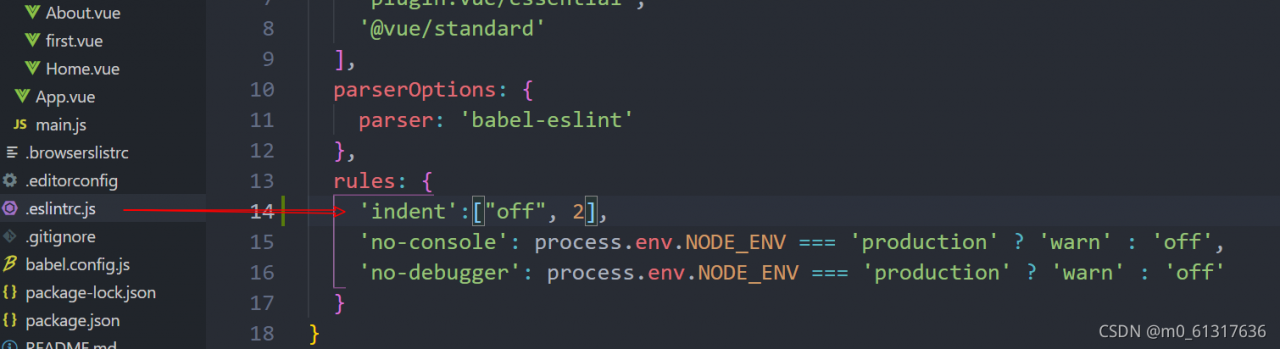
★   Expected indentation of 2 spaces but found 4

The second one is “expected to indent 2 spaces, but found 4”. After Baidu search, it is found that this is not an error, but a check rule. Find this file in the project and add this configuration. See the figure below

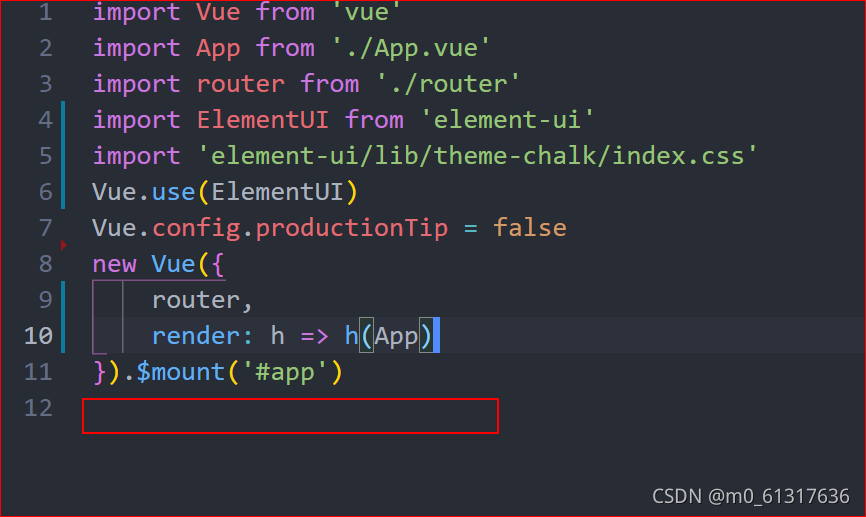
★   Newline required at end of file but not found

The third one is more wonderful. It means that “line breaks are required at the end of the file, but they are not found”. Then we go to the error file, that is, main.js. We can solve the error by typing enter at the end. See the figure below

Adding a blank line here can solve the problem of error reporting

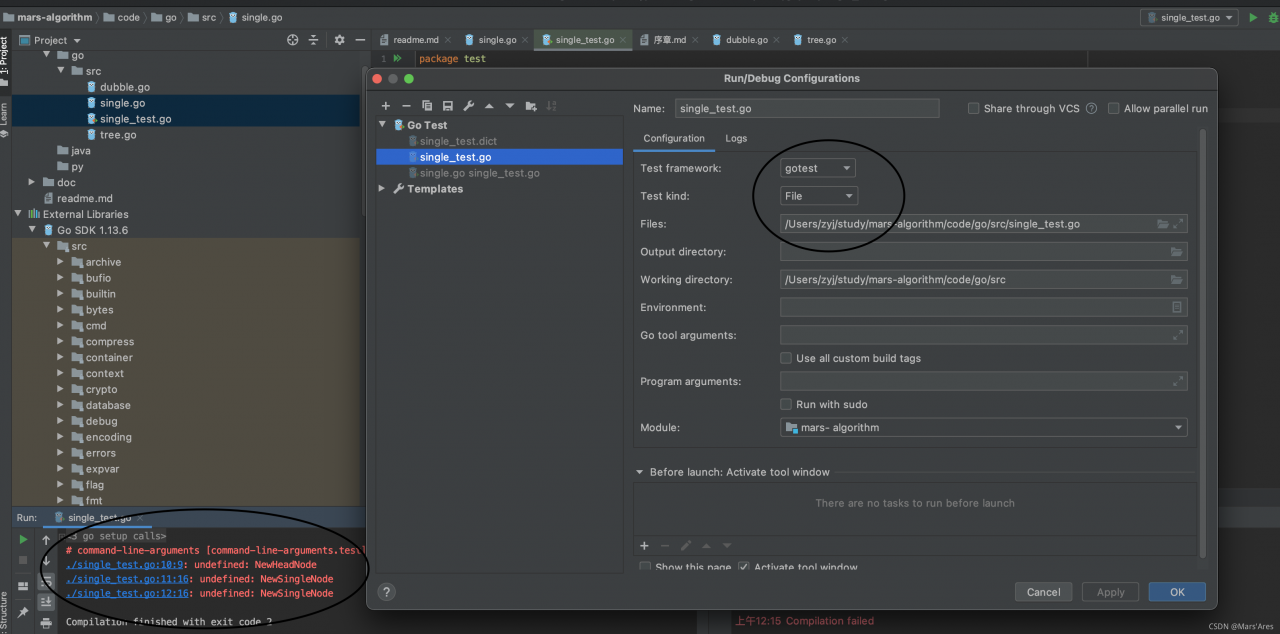
How to Solve golang test Error: # command-line-arguments [command-line-arguments.test]

Project scenario:

xxx.go xxx_unit test and code of test.go are open. The code is not in gopath and the project root set by idea.

Background:

Gopath:/users/ZYJ/go project root:/users/ZYJ/study/demogo source file:/users/ZYJ/study/demo/go/SRC/xxx_ test.go


Problem Description:

xxx.go xxx_test.go is stored separately   xxx_test.go compilation error

command-line-arguments [command-line-arguments.test]

Cause analysis:

Go test XXX executed by golang IDE_test.go runs as file by default and does not import dependent files. You need to actively import dependencies

Usually: the project is in gopath or project root directory, and the dependency can be found normally


Solution:

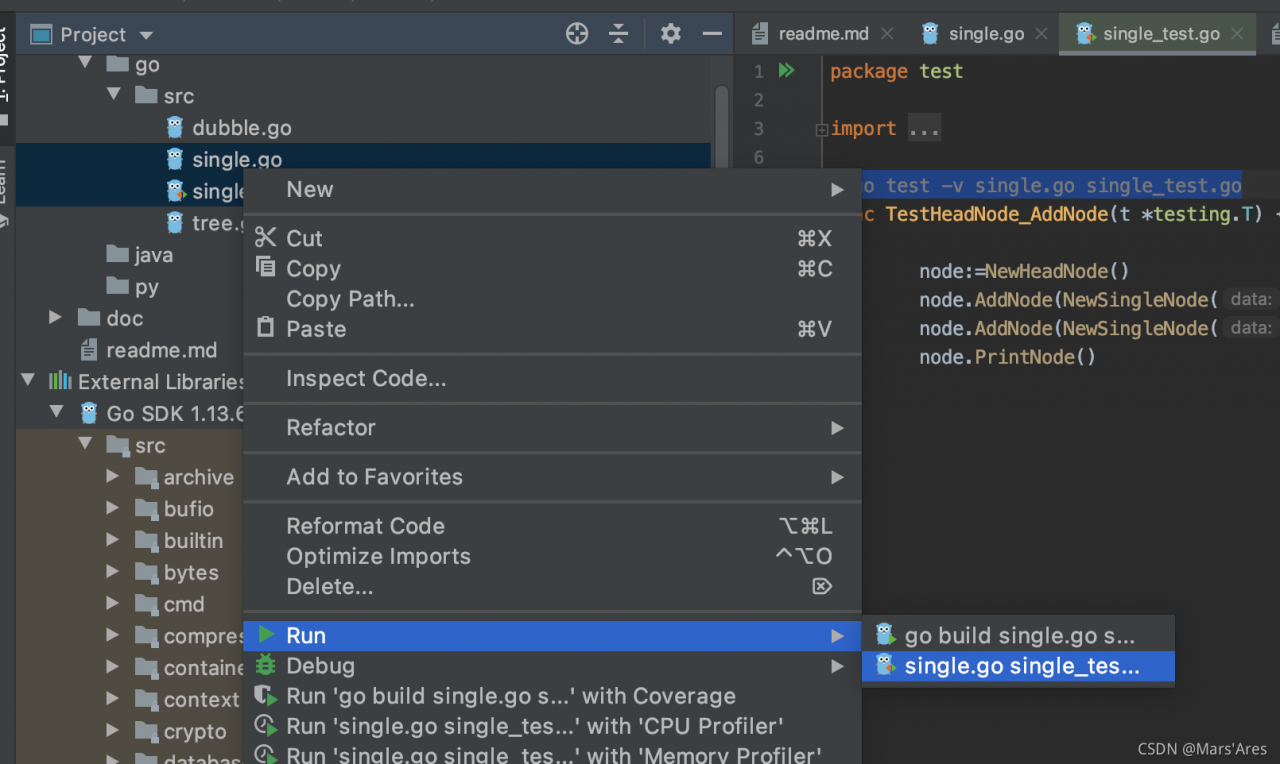
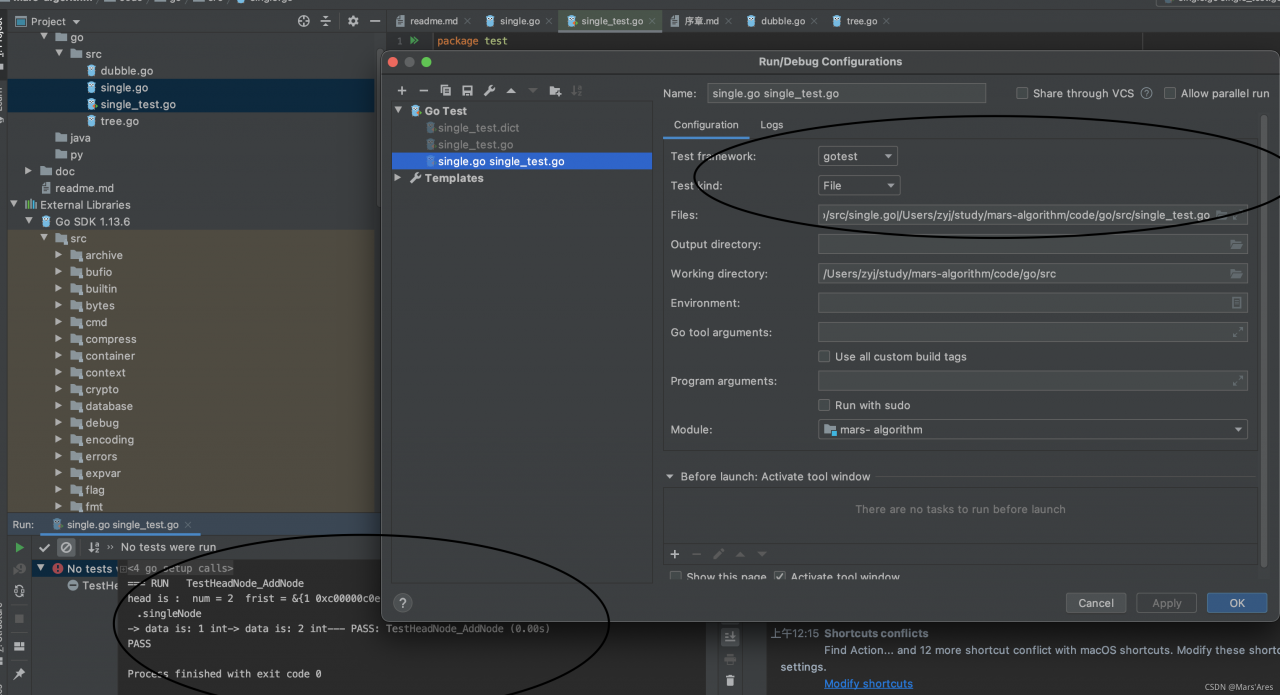
go test -v xxxx.go xxxx_test.go

Golang ide multiple selections for quick operation

Nginx Error: Swap file “/etc/nginx/.nginx.conf.swp“ already exists

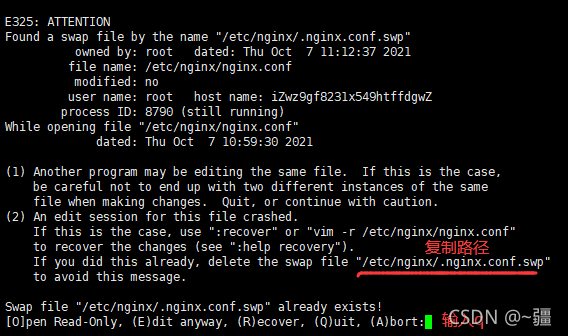
The error information is as follows:

reason

In the process of writing, unexpected power failure, link failure, SSH client abnormal shutdown, etc. the server backed up the write operation, but did not write to the real file.

Editing a file with VIM is actually copying a temporary file and mapping it to memory for you to edit,   Editing is a temporary file,   Save the temporary file to the original file only after executing: W, and delete the temporary file only after executing: Q.

Each time you start editing, you will retrieve whether this file already exists as a temporary file,   If someone asks how to deal with it, the above situation will appear.

Workaround – delete temporary files

Select the temporary file path and right-click copy.

Enter Q again to exit

Delete temporary files. Execute the following command:

rm -rf /etc/nginx/.nginx.conf.swp