Author Archives: Robins

Manifest merger failed with multiple errors, see logs

This problem is commonly encountered in Android Development:

Manifest merger failed with multiple errors, see logs

Generally, there is an error in merging resources in manifest. At this time, enter the following command on the Android studio command console:

gradlew processDebugManifest –stacktrace

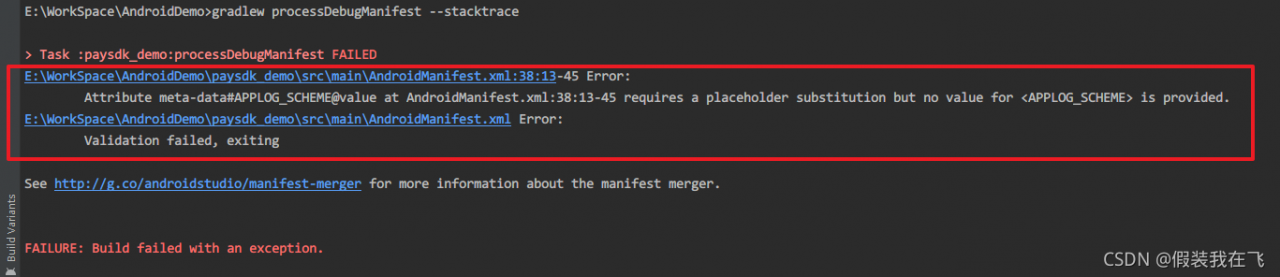
Press enter to view the error log, similar to the following prompts:

E:\WorkSpace\AndroidDemo>gradlew processDebugManifest --stacktrace

> Task :paysdk_demo:processDebugManifest FAILED
E:\WorkSpace\AndroidDemo\paysdk_demo\src\main\AndroidManifest.xml:38:13-45 Error:
        Attribute meta-data#APPLOG_SCHEME@value at AndroidManifest.xml:38:13-45 requires a placeholder substitution but no value for <APPLOG_SCHEME> is provided.
E:\WorkSpace\AndroidDemo\paysdk_demo\src\main\AndroidManifest.xml Error:
        Validation failed, exiting

See http://g.co/androidstudio/manifest-merger for more information about the manifest merger.

Modify the error code at the corresponding position.


How to Solve Flick operate Error: not serialized

An error is reported related to flick serialization

Problem solving run code error reporting content solution custom implementation serialization re-execute code

The problem goes deep into why the error is thrown, why the source of the error needs to be serialized, and why the closure needs to be cleaned up

Problem-solving

Run code

public class JavaSourceEx {

    public static void main(String[] args) throws Exception {

        StreamExecutionEnvironment env = StreamExecutionEnvironment.getExecutionEnvironment();

        // 1)use fromCollection(Collection) to read datas
        //ArrayList<String> list = new ArrayList<>();
        //list.add("hello");list.add("word");list.add("cctv");
        //DataStreamSource<String> stream01 = env.fromCollection(list);

        // 2)use fromCollection(Iterator, Class) to read datas
        Iterator<String> it = list.iterator();
        DataStreamSource<String> stream02 = env.fromCollection(it, TypeInformation.of(String.class));

        stream02.print().setParallelism(1);
        env.execute();
    }
}

Error content

Exception in thread "main" org.apache.flink.api.common.InvalidProgramException: java.util.ArrayList$Itr@a1cdc6d is not serializable. The implementation accesses fields of its enclosing class, which is a common reason for non-serializability. A common solution is to make the function a proper (non-inner) class, or a static inner class.
	at org.apache.flink.api.java.ClosureCleaner.clean(ClosureCleaner.java:164)
	at org.apache.flink.api.java.ClosureCleaner.clean(ClosureCleaner.java:132)
	at org.apache.flink.api.java.ClosureCleaner.clean(ClosureCleaner.java:69)
	at org.apache.flink.streaming.api.environment.StreamExecutionEnvironment.clean(StreamExecutionEnvironment.java:2053)
	at org.apache.flink.streaming.api.environment.StreamExecutionEnvironment.addSource(StreamExecutionEnvironment.java:1737)
	at org.apache.flink.streaming.api.environment.StreamExecutionEnvironment.fromCollection(StreamExecutionEnvironment.java:1147)
	at Examples.JavaSourceEx.main(JavaSourceEx.java:30)
Caused by: java.io.NotSerializableException: java.util.ArrayList$Itr
	at java.io.ObjectOutputStream.writeObject0(ObjectOutputStream.java:1184)
	at java.io.ObjectOutputStream.writeObject(ObjectOutputStream.java:348)
	at org.apache.flink.util.InstantiationUtil.serializeObject(InstantiationUtil.java:624)
	at org.apache.flink.api.java.ClosureCleaner.clean(ClosureCleaner.java:143)
	... 6 more

Process finished with exit code 1

Solution

If reading data from an internal container:
1) the official flick also provides the following methods: from collection (Collection) , you can replace the method of reading data from the iterator with this method
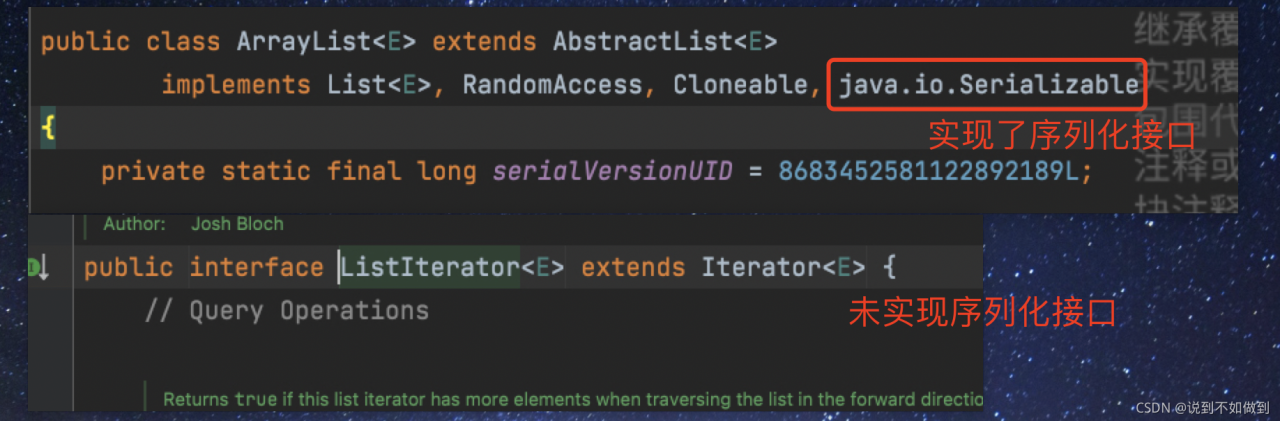
2) the reason for the error is that the iterator does not implement the serial machine interface. The container has implemented serialization, but the iterator has not been implemented. Therefore, if you want to use it, you need to customize the iterator and implement the serialization interface. This operation is redundant, so it is recommended to solve it according to the first method
Custom implementation serialization

package Examples.Utils;

import com.sun.org.apache.xpath.internal.functions.WrongNumberArgsException;
import com.sun.tools.jdi.EventSetImpl;

import java.io.Serializable;
import java.util.Arrays;
import java.util.Iterator;

public class MyListItr<T> implements Serializable{

    private static int default_capacity = 10;
    private int size = 0;
    private Object[] elements;

    public MyListItr(){
        this.elements = new Object[default_capacity];
    }
    public MyListItr(int capa){
        this.default_capacity = capa;
        this.elements = new Object[default_capacity];
    }

    public int size(){
        return this.size;
    }

    public T get(int index) throws MyException {
        if(index<0){
            throw new MyException("Index given cannot be less than 0");
        }
        if(index>=size){
            throw new MyException("Index given cannot be larger than or equal to the collection size");
        }
        return (T)elements[index];
    }

    public T add(T ele){
        if(size == default_capacity){
            elements = Arrays.copyOf(elements,default_capacity*2);
            default_capacity *=2;
            elements[size++] = ele;
        }else{
            elements[size++] = ele;
        }
        return (T)ele;
    }

    public Iterator iterator(){
        return new Itr();
    }

    private class Itr implements Iterator<T>, Serializable {

        int cursor;
        Itr(){}
        @Override
        public boolean hasNext() {
            return cursor!=size();
        }

        @Override
        public T next() {
            return (T)elements[cursor++];
        }


    }

    public static void main(String[] args) throws MyException {
        MyListItr<Integer> obj = new MyListItr<>();
        obj.add(1);
        obj.add(2);
        System.out.println(obj.get(0));
        obj.add(3);
        Iterator it = obj.iterator();
        while(it.hasNext()){
            System.out.println(it.next());
        }

    }

}


class MyException extends Exception implements Serializable{
    public MyException(String message) {
        super(message);
    }
}

Re execute the code

	MyListItr<Integer> myList = new MyListItr<>();
	myList.add(1);myList.add(2);myList.add(3);
	Iterator<Integer> it02 = myList.iterator();
	DataStreamSource<Integer> stream02 = env.fromCollection(it02, TypeInformation.of(Integer.class));
	stream02.print().setParallelism(1);
	env.execute();

Can run:

Problem depth

Why is this error thrown

To put it in-depth, Java needs to run on the JVM platform and be interpreted and run by the JVM in the form of bytecode. Because Flink is a distributed computing, the data in map and other operators will be distributed among various network nodes for computing. In addition, after the source code of Flink is compiled into a bytecode file, you can see from the bytecode file of the operator that the read object enters the operator, and all objects entering the operator must be serialized. If there is no serialization, an error is thrown.

Why serialization

In distributed computing, such as spark, MapReduce, Flink and other computing prerequisites, the serializability of computing objects needs to be realized. Serialization is to reduce the delay, loss and resource consumption caused by data transmission and exchange in network nodes. Objects that are not serialized will not be distributed in network nodes.

The error is thrown from the source

This error is caused by the error when Flink executes closure cleanup logic. The specific logic is in this class: org. Apache. Flink. API. Java. Closurecleaner .

Why clean up closures

Many times, anonymous classes or nested subclasses are used for convenience and quickness. When class a needs to be serialized for transmission, it also needs internal subclasses to be serialized. However, some unnecessary classes or unnecessary variable information may be referenced in general nested classes, so it is necessary to clean up Flink to save the cost of serialization.
How to Solve Oracle startup monitoring error

Solve the error of Oracle startup monitoring

On the Linux virtual machine, start the Oracle listening service:

[oracle@localhost ~]$ lsnrctl start

As a result, a listening error message appears, as follows:

TNS-12537: TNS:connection closed
 TNS-12560: TNS:protocol adapter error
  TNS-00507: Connection closed
   Linux Error: 29: Illegal seek

After many attempts and data access, it is found that the error is caused by the default hostname. At this time, the following steps can be taken to solve the above error reporting problem:

    1. modify hostname
[root@localhost oracle]# hostname oracle

Add “host IP oracle” in the/etc/hosts file

[root@oracle oracle]# vim /etc/hosts
...
localhost ip oracle

Add “hostname = oracle” in the etc/sysconfig/network file

[root@oracle oracle]# vim /etc/sysconfig/network
...
hostname=oracle

Restart listening

[root@oracle oracle]# lsnrctl start

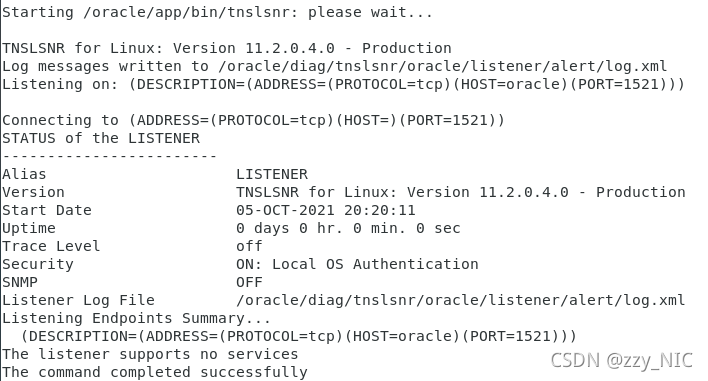
After a wave of configuration, monitoring is successfully enabled:

Maven compiles Scala and reports an error stackoverflowerror

Error during Maven compilation: java.lang.stackoverflowerror

preface

Most of this error is caused by the java thread stack, but it is not caused by this reason. I don’t know if I’ve heard of [in scala-2.10. X version, when there are more than 22 elements of case class, an error will be reported after compilation]. I really do this because there are more than 130 member variables in a case class, But mine is Scala_ 2.11 so I don’t think the problem is caused by the version. During the experiment, when the membership is limited to about 100, it’s OK. Of course, I’m lazy to disassemble the case class

Online solution (my solution)

Another problem on the Internet is to solve my problem. This method is to add the configuration parameters directly to the POM file

<plugin>
    <groupId>net.alchim31.maven</groupId>
    <artifactId>scala-maven-plugin</artifactId>
    <version>3.4.0</version>
    
    <!-- Add-->
    <configuration>
        <displayCmd>true</displayCmd>
        <jvmArgs>
            <jvmArg>-Xss20m</jvmArg>
        </jvmArgs>
    </configuration>
    
    
    <executions>
        <execution>
            <goals>
                <goal>compile</goal>
                <goal>testCompile</goal>
            </goals>
        </execution>
    </executions>
</plugin>

How to Solve Cocos creator label text is too many error

Cocos creator label text is too many and an error is reported

There are thousands of lines of legal entries such as user agreements and privacy terms

That’s what it said

let labelNode = new Node('labelNode')
let label = labelNode.addComponent(Label)
label.cacheMode = Label.CacheMode.CHAR
label.string = '....' 

In this way, it can be loaded at once, and the protocol can be closed. When loading other protocols, an error of too long font size will be reported

After a long toss, the characters here are too long to keep the cache. Change the cachemode to none, but even none can’t load so much. Just write in several paragraphs

let a1 = ""
let a2 = ""
let a3 = ""
this.addLabel('a1', 0, a1)
this.addLabel('a2', -2000, a2)
this.addLabel('a3', -4000, a3)
addLabel(name:string, y: number, text:string){
	let labelNode = new Node(name)
	labelNode.layer = Layers.BitMask.UI_2D
	labelNode.setPosition(0, y)
	let label = labelNode.addComponent(Label)
	label.cacheMode = Label.CacheMode.NONE
	label.string = text
	this.node.addChild(labelNode)
}

How to Solve Ogg start error message ogg-00014

preface

recently, when configuring Ogg two-way replication, due to improper parameter settings, an error was reported at startup. The processing methods are summarized as follows


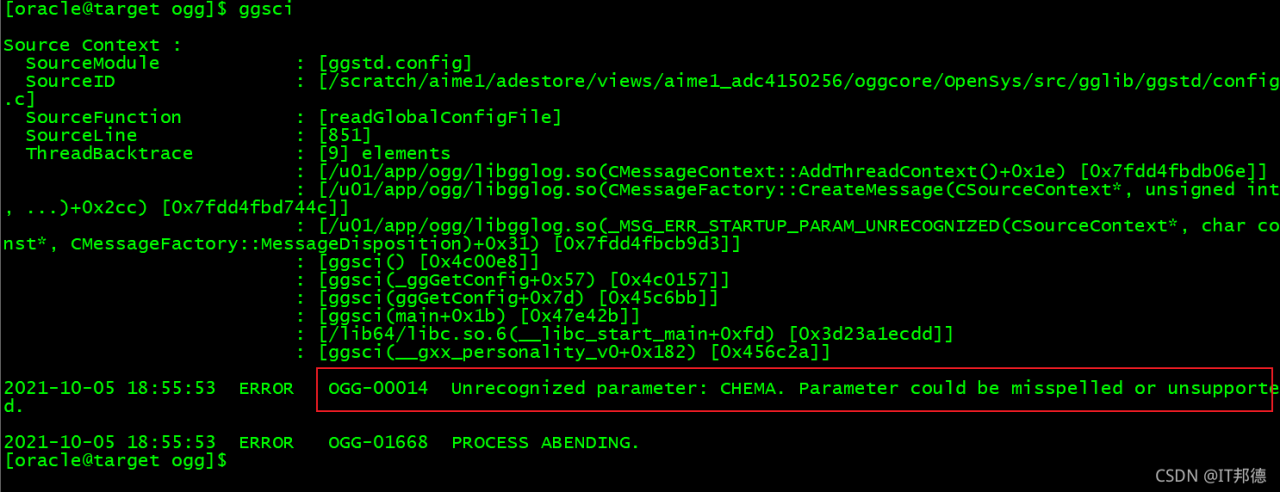
1. Startup error

[oracle@target ogg]$ ggsci
Explanation: According to the error message, the parameter is not set properly

2. Treatment method

[oracle@target ogg]$ more ./GLOBALS
CHEMA ogg
checkpointtable ogg.rep_demo_ckpt

Switch to OGG root directory, here CHEMA ogg error, should be GGSCHEMA ogg, modify can

[oracle@target ogg]$ ggsci
Login again, everything is OK

[Solved] Android Room: Database Common Error ‘missing database’

Common error 1:

D:\AndroidProjectsDemo\JetpeckTest\app\build\tmp\kapt3\stubs\debug\com\example\jetpecktest\room\BookDao.
java:15: error: There is a problem with the query: [SQLITE_ERROR] 
SQL error or missing database (no such table: BookEntity)
public abstract java.util.List<com.example.jetpecktest.room.BookEntity> loadAllBooks();

**Solution: * * the error report mentions no such table: bookentity , so first check whether your class is added to the database, that is, check the entities =?In the
annotation in your database class
did you add your entity class.

@Database(version = 2, entities = [BookEntity::class])
abstract class DataBase:RoomDatabase() {

[Solved] Azkaban Error: Missing required property ‘azkaban.native.lib’

Missing required property ‘azkaban.native.lib’

When Azkaban is used to submit a workflow, an error is reported: missing required property ‘Azkaban. Native. Lib’

reason:

The reason for this is that I didn’t switch to the exec directory or web server directory of Azkaban first, and directly use commands like “/ opt/module/Azkaban/azkaban-exec-server-3.84.4/bin/start-exec.sh” to start Azkaban. As a result, some Azkaban libraries cannot be found because of the path, and various problems due to insufficient packages will occur.

Solution:

First stop Azkaban, use the CD command to switch to the parent directory of the bin directory, and then use a command similar to “bin/start-exec.Sh” to start Azkaban’s executor and web service.

SSM project interceptor infinite loop error [How to Solve]

Question:

In the SSM project, the implementation of non login interception has been endless loop and does not jump to the page

Solution:

Page not intercepted is not configured in the configuration file, resulting in an infinite loop

<!-- Configure interceptors -->
    <mvc:interceptors>
        <mvc:interceptor>
            <! -- Intercept all pages under the directory -->
            <mvc:mapping path="/**"/>
            <! -- mvc:exclude-mapping is another kind of interception that allows you to unintercept a page in your later tests, so that you don't have to use it in the
                LoginInterceptor's preHandler method inside to get the unintercepted request uri address (preferred)-->
            <mvc:exclude-mapping path="/login.html" />
            <bean class="org.westos.interceptor.LoginInterceptor"></bean>
        </mvc:interceptor>
    </mvc:interceptors>

Because a page may consist of multiple pages and JS, it must be intercepted correctly

[Solved] Hadoop Error: HADOOP_HOME and hadoop.home.dir are unset.

catalogue

Solutions to error messages 1. Download apache-hadoop-3.1.0-winutils-master 2. Unzip to the host 3. Add environment variables 4. Restart idea or eclipse

Error message

java.lang.RuntimeException: java.io.FileNotFoundException: java.io.FileNotFoundException: HADOOP_HOME and hadoop.home.dir are unset.

java.lang.RuntimeException: java.io.FileNotFoundException: java.io.FileNotFoundException: HADOOP_HOME and hadoop.home.dir are unset. -see https://wiki.apache.org/hadoop/WindowsProblems

	at org.apache.hadoop.util.Shell.getWinUtilsPath(Shell.java:737)
	at org.apache.hadoop.util.Shell.getSetPermissionCommand(Shell.java:272)
	at org.apache.hadoop.util.Shell.getSetPermissionCommand(Shell.java:288)
	at org.apache.hadoop.fs.RawLocalFileSystem.setPermission(RawLocalFileSystem.java:840)
	at org.apache.hadoop.fs.RawLocalFileSystem$LocalFSFileOutputStream.<init>(RawLocalFileSystem.java:239)
	at org.apache.hadoop.fs.RawLocalFileSystem$LocalFSFileOutputStream.<init>(RawLocalFileSystem.java:219)
	at org.apache.hadoop.fs.RawLocalFileSystem.createOutputStreamWithMode(RawLocalFileSystem.java:318)
	at org.apache.hadoop.fs.RawLocalFileSystem.create(RawLocalFileSystem.java:307)
	at org.apache.hadoop.fs.RawLocalFileSystem.create(RawLocalFileSystem.java:338)
	at org.apache.hadoop.fs.ChecksumFileSystem$ChecksumFSOutputSummer.<init>(ChecksumFileSystem.java:401)
	at org.apache.hadoop.fs.ChecksumFileSystem.create(ChecksumFileSystem.java:464)
	at org.apache.hadoop.fs.ChecksumFileSystem.create(ChecksumFileSystem.java:443)
	at org.apache.hadoop.fs.FileSystem.create(FileSystem.java:1118)
	at org.apache.hadoop.fs.FileSystem.create(FileSystem.java:1098)
	at org.apache.hadoop.fs.FileSystem.create(FileSystem.java:987)
	at org.apache.hadoop.fs.FileUtil.copy(FileUtil.java:414)
	at org.apache.hadoop.fs.FileUtil.copy(FileUtil.java:387)
	at org.apache.hadoop.fs.FileUtil.copy(FileUtil.java:337)
	at org.apache.hadoop.fs.FileSystem.copyToLocalFile(FileSystem.java:2434)
	at org.apache.hadoop.fs.FileSystem.copyToLocalFile(FileSystem.java:2403)
	at org.apache.hadoop.fs.FileSystem.copyToLocalFile(FileSystem.java:2379)
	at cn.itcast.hdfs.HDFSClientTest.getFile2Local(HDFSClientTest.java:71)
	at java.base/jdk.internal.reflect.NativeMethodAccessorImpl.invoke0(Native Method)
	at java.base/jdk.internal.reflect.NativeMethodAccessorImpl.invoke(NativeMethodAccessorImpl.java:62)
	at java.base/jdk.internal.reflect.DelegatingMethodAccessorImpl.invoke(DelegatingMethodAccessorImpl.java:43)
	at java.base/java.lang.reflect.Method.invoke(Method.java:564)
	at org.junit.runners.model.FrameworkMethod$1.runReflectiveCall(FrameworkMethod.java:59)
	at org.junit.internal.runners.model.ReflectiveCallable.run(ReflectiveCallable.java:12)
	at org.junit.runners.model.FrameworkMethod.invokeExplosively(FrameworkMethod.java:56)
	at org.junit.internal.runners.statements.InvokeMethod.evaluate(InvokeMethod.java:17)
	at org.junit.internal.runners.statements.RunBefores.evaluate(RunBefores.java:26)
	at org.junit.internal.runners.statements.RunAfters.evaluate(RunAfters.java:27)
	at org.junit.runners.ParentRunner$3.evaluate(ParentRunner.java:306)
	at org.junit.runners.BlockJUnit4ClassRunner$1.evaluate(BlockJUnit4ClassRunner.java:100)
	at org.junit.runners.ParentRunner.runLeaf(ParentRunner.java:366)
	at org.junit.runners.BlockJUnit4ClassRunner.runChild(BlockJUnit4ClassRunner.java:103)
	at org.junit.runners.BlockJUnit4ClassRunner.runChild(BlockJUnit4ClassRunner.java:63)
	at org.junit.runners.ParentRunner$4.run(ParentRunner.java:331)
	at org.junit.runners.ParentRunner$1.schedule(ParentRunner.java:79)
	at org.junit.runners.ParentRunner.runChildren(ParentRunner.java:329)
	at org.junit.runners.ParentRunner.access$100(ParentRunner.java:66)
	at org.junit.runners.ParentRunner$2.evaluate(ParentRunner.java:293)
	at org.junit.runners.ParentRunner$3.evaluate(ParentRunner.java:306)
	at org.junit.runners.ParentRunner.run(ParentRunner.java:413)
	at org.junit.runner.JUnitCore.run(JUnitCore.java:137)
	at com.intellij.junit4.JUnit4IdeaTestRunner.startRunnerWithArgs(JUnit4IdeaTestRunner.java:68)
	at com.intellij.rt.junit.IdeaTestRunner$Repeater.startRunnerWithArgs(IdeaTestRunner.java:33)
	at com.intellij.rt.junit.JUnitStarter.prepareStreamsAndStart(JUnitStarter.java:230)
	at com.intellij.rt.junit.JUnitStarter.main(JUnitStarter.java:58)
Caused by: java.io.FileNotFoundException: java.io.FileNotFoundException: HADOOP_HOME and hadoop.home.dir are unset. -see https://wiki.apache.org/hadoop/WindowsProblems
	at org.apache.hadoop.util.Shell.fileNotFoundException(Shell.java:549)
	at org.apache.hadoop.util.Shell.getHadoopHomeDir(Shell.java:570)
	at org.apache.hadoop.util.Shell.getQualifiedBin(Shell.java:593)
	at org.apache.hadoop.util.Shell.<clinit>(Shell.java:690)
	at org.apache.hadoop.util.StringUtils.<clinit>(StringUtils.java:78)
	at org.apache.hadoop.fs.FileSystem$Cache$Key.<init>(FileSystem.java:3482)
	at org.apache.hadoop.fs.FileSystem$Cache$Key.<init>(FileSystem.java:3477)
	at org.apache.hadoop.fs.FileSystem$Cache.get(FileSystem.java:3319)
	at org.apache.hadoop.fs.FileSystem.get(FileSystem.java:479)
	at org.apache.hadoop.fs.FileSystem.get(FileSystem.java:227)
	at cn.itcast.hdfs.HDFSClientTest.connect2HDFS(HDFSClientTest.java:31)
	at java.base/jdk.internal.reflect.NativeMethodAccessorImpl.invoke0(Native Method)
	at java.base/jdk.internal.reflect.NativeMethodAccessorImpl.invoke(NativeMethodAccessorImpl.java:62)
	at java.base/jdk.internal.reflect.DelegatingMethodAccessorImpl.invoke(DelegatingMethodAccessorImpl.java:43)
	at java.base/java.lang.reflect.Method.invoke(Method.java:564)
	at org.junit.runners.model.FrameworkMethod$1.runReflectiveCall(FrameworkMethod.java:59)
	at org.junit.internal.runners.model.ReflectiveCallable.run(ReflectiveCallable.java:12)
	at org.junit.runners.model.FrameworkMethod.invokeExplosively(FrameworkMethod.java:56)
	at org.junit.internal.runners.statements.RunBefores.invokeMethod(RunBefores.java:33)
	at org.junit.internal.runners.statements.RunBefores.evaluate(RunBefores.java:24)
	... 18 more
Caused by: java.io.FileNotFoundException: HADOOP_HOME and hadoop.home.dir are unset.
	at org.apache.hadoop.util.Shell.checkHadoopHomeInner(Shell.java:469)
	at org.apache.hadoop.util.Shell.checkHadoopHome(Shell.java:440)
	at org.apache.hadoop.util.Shell.<clinit>(Shell.java:517)
	... 34 more

Soltuion:

1. Download apache-hadoop-3.1.0-winutils-master

Apache-hadoop-3.1.0-winutils-master GitHub address.
other versions can also be found on GitHub. I use this version to solve the problem here.

2. Unzip to the host

I unzip it here to the local windows
unzip it. The apache-hadoop-3.1.0-winutils-master folder contains the bin file

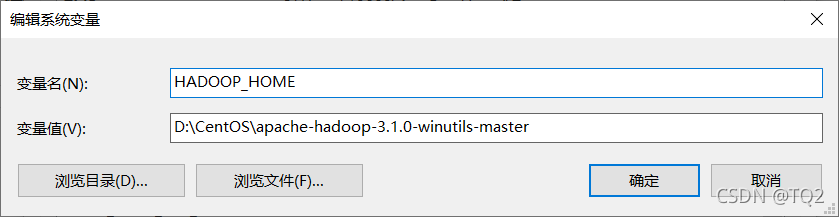
3. Add environment variables

Add the path of the parent folder of the bin folder to the environment variable

4. Restart idea or eclipse

Problem solving.