Author Archives: Robins

Could not find method causes verifyerror, which in turn causes crash

On Android 5.0 and below, sometimes the course not find method causes verifyerror, which leads to crash. The writing method is as follows:
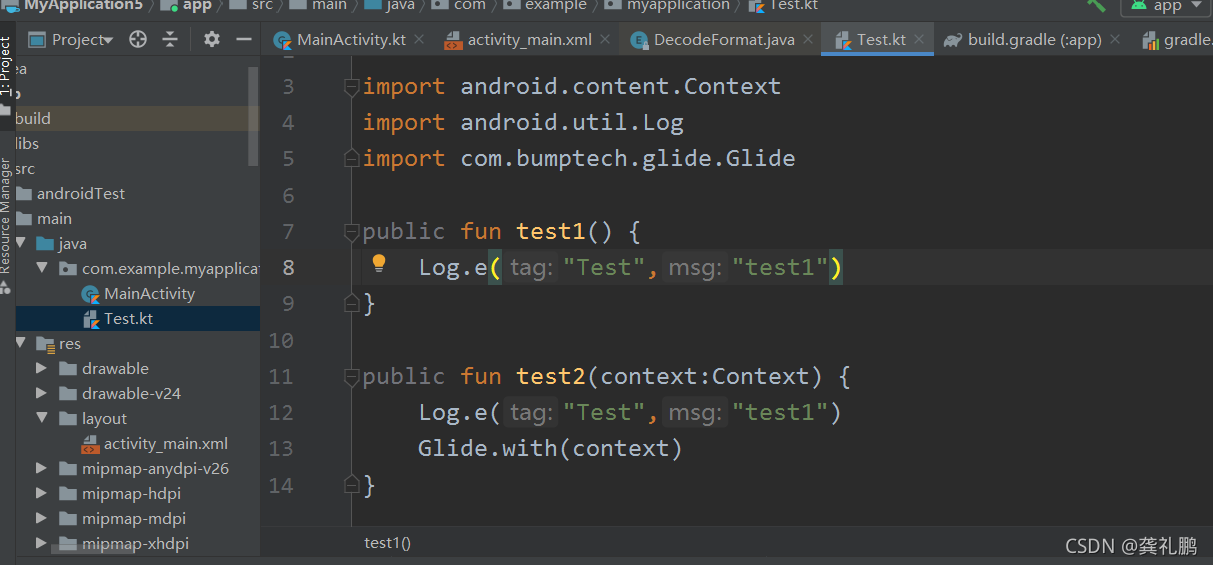

 

As shown in the figure above, calling static method test1 on Android 4.4 mobile phone will report the following error:

  10-28 16:02:40.913 2792-2792/com.example.myapplication I/dalvikvm: Could not find method com.bumptech.glide.Glide.with, referenced from method com.example.myapplication.TestKt.test2
10-28 16:02:40.913 2792-2792/com.example.myapplication W/dalvikvm: VFY: unable to resolve static method 4: Lcom/bumptech/glide/Glide;. with (Landroid/content/Context;)Lcom/bumptech/glide/RequestManager;

The reason is that Android 5 is a delvikvm virtual machine before, and then other static methods will be loaded when the static method is invoked. So when the test1 is called, the Glide in test2 will be loaded, but at this time it will be found that the with method can not find the method, so the problem can not be found, which will lead to the explosion of VerifyError error.

Solution: Although compileonly is intentionally written above, brand differentiation may occur on mobile phones of different brands, and then some brands do not rely on relevant classes to report errors. Therefore, you can change the places in test2 that need to be called to the dynamic loading mode, that is, the reflection mode, so that test2 will be loaded when test1 is called, However, the reflection method must be called to load the class, that is, the problem of calling test1 and then failing to find the method will not occur.

Examples of solutions are as follows:

public fun test2(context:Context) {
    try {
        Log.e("Test", "test1")
        val clazz = Class.forName("com.bumptech.glide.Glide")
        val getMethod: Method = clazz.getMethod("with", context.javaClass)
        getMethod.invoke(null, context)
    } catch (e: Exception) {
        Log.e("Test","test1 e "+e.message)
    }
}

Note: the above error is OK on Android 5.0 and above phones. It should be the difference between dalvikvm and artvm
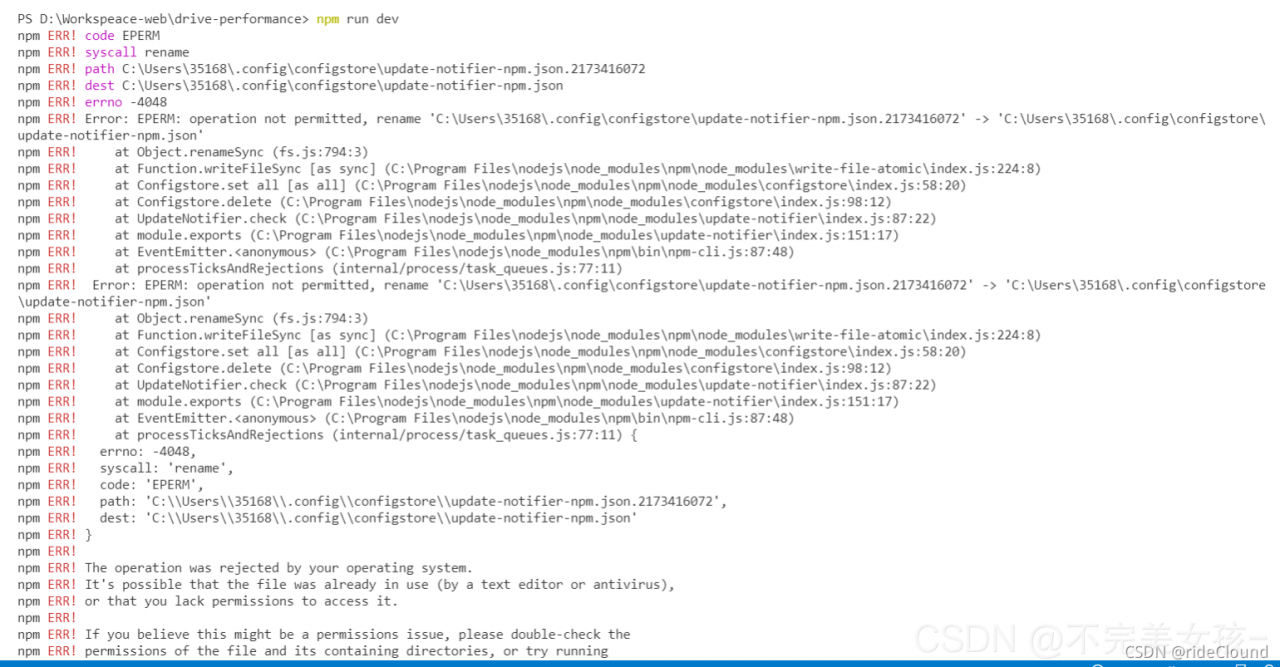
npm ERR Error: EPERM:operation not permitted, rename

npm ERR! Error: EPERM: operation not permitted, rename

Problem background: Recently, there was a problem with the packaging of the project. I thought it was caused by the node version problem, so I tossed and switched several versions, which led to the problem of NPM

    when NPM is installed, the following error is reported (the picture refers to someone else’s, infringed or deleted). There are many reasons for this error. The specific reason is that the node version and windows version are intertwined, which makes it impossible to find out exactly (I hope some big guys can find it)
    in addition, the time when this problem occurs is also different, some are during installation, Some are during run dev, and some are during packaging.
    after encountering problems, the first is a variety of search solutions. The commonly used solutions are probably the following:
    Run CMD as administrator

    Because the system prompts that the permission is not enough, I am now an ordinary user. Then I run as an administrator. The idea is feasible
    see: https://blog.csdn.net/Running_ Fe/article/details/81629330

    Delete the. Npmrc file in the user directory

    This scheme can solve some problems to a certain extent

    Clear cache + reinstall: NPM clear cache — force, NPM install

    see: https://www.cnblogs.com/maycpou/p/12080814.html

    Delete the file mentioned in the error message

    Some people say that this solution can solve the problem, but I can’t find the file
    see: https://blog.csdn.net/LJJONESEED/article/details/119926728

    Close all editors that reference the current project

    Because his error message says “the current file may be open in another editor”, close the editor, clear the cache, and then reload

    Finally, a post in stack overflow is attached. The discussion below this post is very intense. There are many schemes. If you are interested, you can look

    see: https://stackoverflow.com/questions/39293636/npm-err-error-eperm-operation-not-permitted-rename#

    Please note that
    I hope some big guys can give the real reason for this problem and hold their fists

error: XML error: target ‘vdb‘ duplicated for disk sources ‘aaa.img‘ and ‘bbb.img‘

On a Sunday morning when you want to learn, try adding a hard disk to the KVM virtual machine with the command line.
create a disk
#qemu-img create – F qcow2/home/KVM FS/sy-b80915disk1.qcow2 10g

Bind disk to domain: sy-b80915
#virsh attach disk sy-b80915/home/KVM FS/sy-b80915disk1.qcow2 VDB — live — config

Later, I tried to unbind the VDA of the main disk. As a result, I accidentally unbind the VDA of the main disk
#virsh detach disk sy-b80915 VDA — live — config

But I unbound VDB, namely sy-b80915disk1.qcow2
#virsh detach disk sy-b80915 VDB — live — config

The virtual machine can still be restarted and used normally later, but I think the name of sy-b80915disk1.qcow2 is not good. Delete and recreate sy-b80915vdb.qcow2
#rm – RF/home/KVM/sy-b80915disk1.qcow2
#qemu-img create – F qcow2/home/KVM FS/sy-b80915vdb.qcow2 10g

Then bind
#virsh attach disk sy-b80915/home/KVM FS/sy-b80915vdb.qcow2 VDB — live — config
the results are as follows:
error: XML error: target ‘VDB’ duplicated for disk sources’ sy-b80915disk1. Img ‘and’ sy-b80915vdb. Img ‘
the big idea is to bind repeatedly, but it has been unbound before.

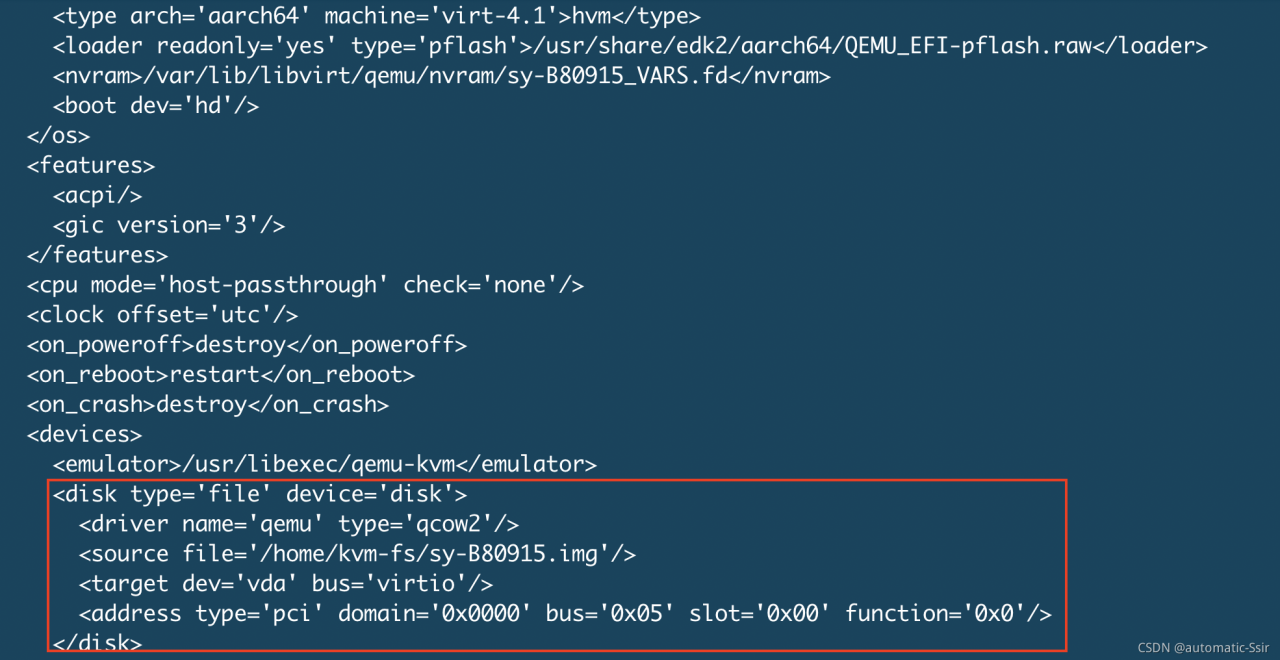
The only exception is that the main disk VDA is unbound accidentally, but the system can still run. So I checked the XML file. Compared with other virtual machines, I found that the XML file of SY – b80915 lacks the main disk VDA. When unbinding the VDA, the XML file is changed. So add VDA to the XML file again
execute the following command to edit the XML file:
#virsh edit sy-b80915
repair the XML definition of VDA, as shown in Figure 1:

Figure 1

Then bind sy-b80915vdb.qcow2 again. Success
#virsh attach-disk sy-B80915 /home/kvm-fs/sy-B80915vdb.qcow2 vdb –live –config

Error response from daemon: OCI runtime create failed: container_linux.go:380

Article catalog

The reasons for error reporting are as follows: error reporting solution: delete the new kernel

Self built multi GPU servers can refer to https://blog.csdn.net/landian0531/article/details/120242839

Error reporting reason

The unexpected power failure caused the Ubuntu server to restart, and the container in docker could not be started through the docker PS - AQ | xargs - I {} docker start {} command

Errors are reported as follows:

gpu@gpu-workstation:~$ docker ps -aq | xargs -I {} docker start {}
Error response from daemon: OCI runtime create failed: container_linux.go:380: starting container process caused: process_linux.go:545: container init caused: Running hook #1:: error running hook: exit status 1, stdout: , stderr: nvidia-container-cli: initialization error: nvml error: driver not loaded: unknown
Error: failed to start containers: 485f0e25b37c

Error reporting solution: delete the new kernel

View the existing system kernel dpkg -- get selections | grep Linux

gpu@gpu-workstation:~$ dpkg --get-selections | grep linux
binutils-x86-64-linux-gnu                       install
console-setup-linux                             install
libnvpair1linux                                 install
libselinux1:amd64                               install
libuutil1linux                                  install
libzfs2linux                                    install
libzpool2linux                                  install
linux-base                                      install
linux-firmware                                  install
linux-generic                                   install
linux-headers-5.4.0-88                          install
linux-headers-5.4.0-88-generic                  hold
linux-headers-5.4.0-89                          install
linux-headers-5.4.0-89-generic                  install
linux-headers-generic                           install
linux-image-5.4.0-88-generic                    hold
linux-image-5.4.0-89-generic                    install
linux-image-generic                             install
linux-libc-dev:amd64                            install
linux-modules-5.4.0-88-generic                  hold
linux-modules-5.4.0-89-generic                  install
linux-modules-extra-5.4.0-88-generic            hold
linux-modules-extra-5.4.0-89-generic            install
util-linux                                      install
zfsutils-linux                                  install

It is found that 5.4.0-89 is automatically installed in the system. Delete the kernel through the sudo apt get purge linux-image-5.4.0-89-generic command
there is a prompt in the middle and select Cancel (Note: deleting the kernel is risky and needs your own consideration.)

After deletion, restart the server

gpu@gpu-workstation:~$ sudo apt-get purge linux-image-5.4.0-89-generic
Reading package lists... Done
Building dependency tree
Reading state information... Done
The following packages were automatically installed and are no longer required:
  amd64-microcode intel-microcode iucode-tool libdbus-glib-1-2 libevdev2 libimobiledevice6 libplist3 libupower-glib3 libusbmuxd6 linux-headers-generic thermald upower usbmuxd
Use 'sudo apt autoremove' to remove them.
The following additional packages will be installed:
  linux-image-unsigned-5.4.0-89-generic
Suggested packages:
  fdutils linux-doc | linux-source-5.4.0 linux-tools
The following packages will be REMOVED:
  linux-generic* linux-image-5.4.0-89-generic* linux-image-generic* linux-modules-extra-5.4.0-89-generic*
The following NEW packages will be installed:
  linux-image-unsigned-5.4.0-89-generic
0 upgraded, 1 newly installed, 4 to remove and 39 not upgraded.
Need to get 9,011 kB of archives.
After this operation, 202 MB disk space will be freed.
Do you want to continue?[Y/n] y
Get:1 http://ca.archive.ubuntu.com/ubuntu focal-updates/main amd64 linux-image-unsigned-5.4.0-89-generic amd64 5.4.0-89.100 [9,011 kB]
Fetched 9,011 kB in 4s (2,522 kB/s)
(Reading database ... 113040 files and directories currently installed.)
Removing linux-generic (5.4.0.89.93) ...
Removing linux-image-generic (5.4.0.89.93) ...
Removing linux-modules-extra-5.4.0-89-generic (5.4.0-89.100) ...
Removing linux-image-5.4.0-89-generic (5.4.0-89.100) ...
W: Removing the running kernel
I: /boot/vmlinuz is now a symlink to vmlinuz-5.4.0-88-generic
I: /boot/initrd.img is now a symlink to initrd.img-5.4.0-88-generic
/etc/kernel/postrm.d/initramfs-tools:
update-initramfs: Deleting /boot/initrd.img-5.4.0-89-generic
/etc/kernel/postrm.d/zz-update-grub:
Sourcing file `/etc/default/grub'
Sourcing file `/etc/default/grub.d/init-select.cfg'
Generating grub configuration file ...
Found linux image: /boot/vmlinuz-5.4.0-88-generic
Found initrd image: /boot/initrd.img-5.4.0-88-generic
Adding boot menu entry for UEFI Firmware Settings
done
Selecting previously unselected package linux-image-unsigned-5.4.0-89-generic.
(Reading database ... 107660 files and directories currently installed.)
Preparing to unpack .../linux-image-unsigned-5.4.0-89-generic_5.4.0-89.100_amd64.deb ...
Unpacking linux-image-unsigned-5.4.0-89-generic (5.4.0-89.100) ...
Setting up linux-image-unsigned-5.4.0-89-generic (5.4.0-89.100) ...
I: /boot/vmlinuz is now a symlink to vmlinuz-5.4.0-89-generic
I: /boot/initrd.img is now a symlink to initrd.img-5.4.0-89-generic
(Reading database ... 107663 files and directories currently installed.)
Purging configuration files for linux-modules-extra-5.4.0-89-generic (5.4.0-89.100) ...
Purging configuration files for linux-image-5.4.0-89-generic (5.4.0-89.100) ...
I: /boot/vmlinuz is now a symlink to vmlinuz-5.4.0-88-generic
I: /boot/initrd.img is now a symlink to initrd.img-5.4.0-88-generic
/var/lib/dpkg/info/linux-image-5.4.0-89-generic.postrm ... removing pending trigger
rmdir: failed to remove '/lib/modules/5.4.0-89-generic': Directory not empty
Processing triggers for linux-image-unsigned-5.4.0-89-generic (5.4.0-89.100) ...
gpu@gpu-workstation:~$

Install additional stage package for streamsets – error in cdh6.3.0 package rest API call error: java.io.eofexception

Version
streamsets3.16.1 (core)
cdh6.3.2

1、 Question

The name of the streamsets installation package is streamsets-datacollector-core-3.16.1. Tgz , and an error is reported when downloading the package of cdh6.3 after installation

1 operation

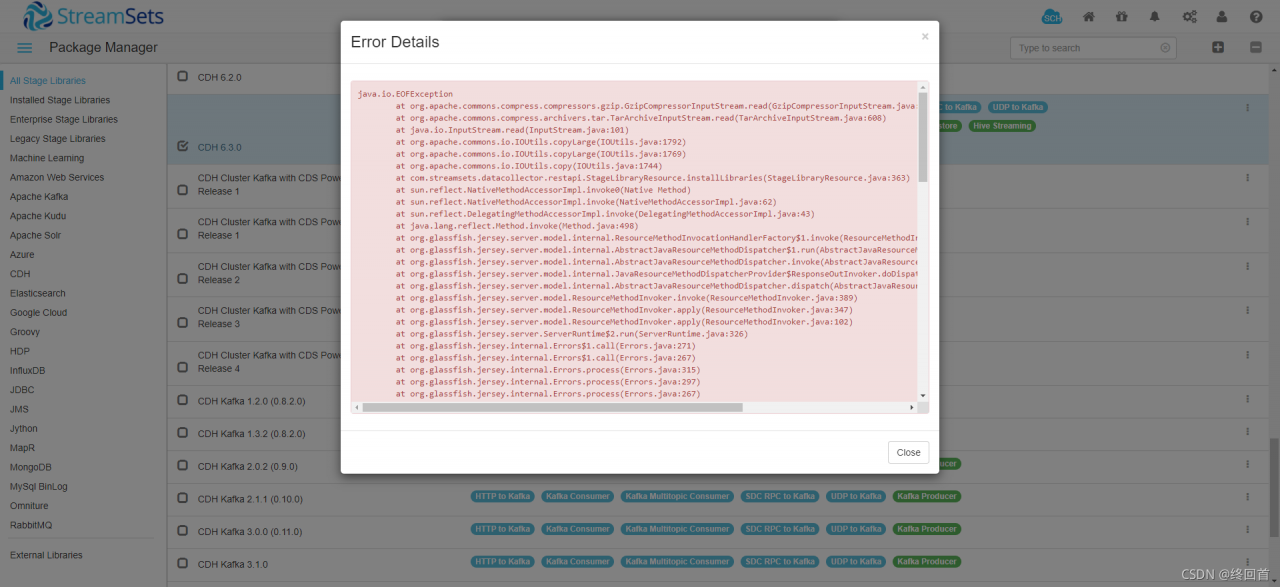
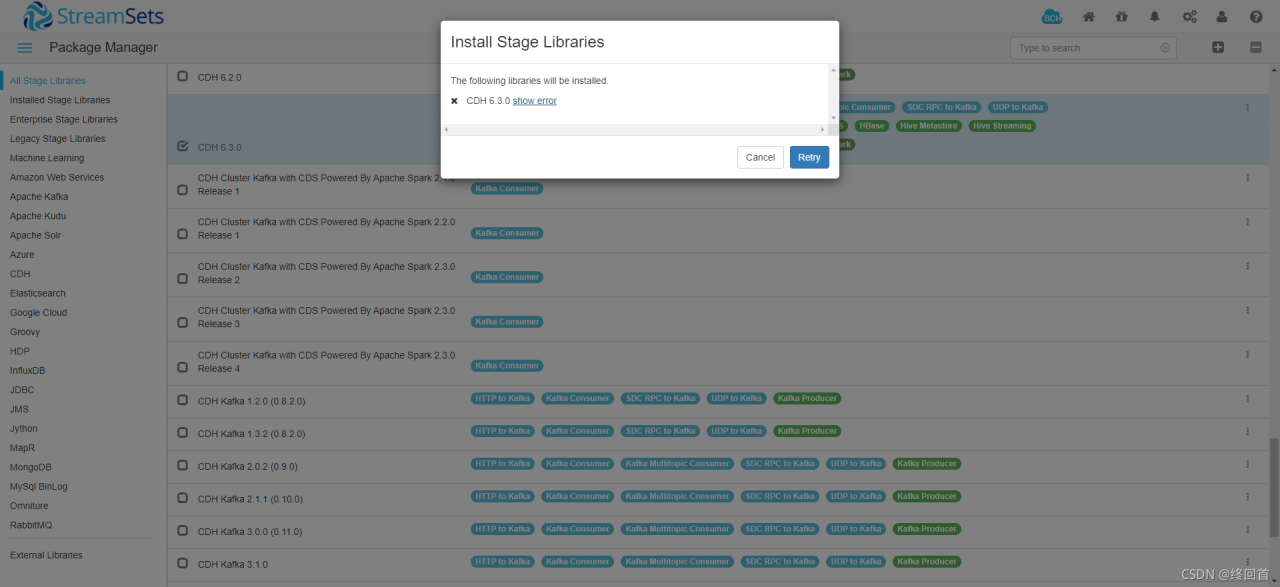
Install the package of cdh6.3.0 through the streamsets UI and report an error

click Show error

2. Complete error reporting contents

java.io.EOFException
	at org.apache.commons.compress.compressors.gzip.GzipCompressorInputStream.read(GzipCompressorInputStream.java:303)
	at org.apache.commons.compress.archivers.tar.TarArchiveInputStream.read(TarArchiveInputStream.java:608)
	at java.io.InputStream.read(InputStream.java:101)
	at org.apache.commons.io.IOUtils.copyLarge(IOUtils.java:1792)
	at org.apache.commons.io.IOUtils.copyLarge(IOUtils.java:1769)
	at org.apache.commons.io.IOUtils.copy(IOUtils.java:1744)
	at com.streamsets.datacollector.restapi.StageLibraryResource.installLibraries(StageLibraryResource.java:363)
	at sun.reflect.NativeMethodAccessorImpl.invoke0(Native Method)
	at sun.reflect.NativeMethodAccessorImpl.invoke(NativeMethodAccessorImpl.java:62)
	at sun.reflect.DelegatingMethodAccessorImpl.invoke(DelegatingMethodAccessorImpl.java:43)
	at java.lang.reflect.Method.invoke(Method.java:498)
	at org.glassfish.jersey.server.model.internal.ResourceMethodInvocationHandlerFactory$1.invoke(ResourceMethodInvocationHandlerFactory.java:81)
	at org.glassfish.jersey.server.model.internal.AbstractJavaResourceMethodDispatcher$1.run(AbstractJavaResourceMethodDispatcher.java:144)
	at org.glassfish.jersey.server.model.internal.AbstractJavaResourceMethodDispatcher.invoke(AbstractJavaResourceMethodDispatcher.java:161)
	at org.glassfish.jersey.server.model.internal.JavaResourceMethodDispatcherProvider$ResponseOutInvoker.doDispatch(JavaResourceMethodDispatcherProvider.java:160)
	at org.glassfish.jersey.server.model.internal.AbstractJavaResourceMethodDispatcher.dispatch(AbstractJavaResourceMethodDispatcher.java:99)
	at org.glassfish.jersey.server.model.ResourceMethodInvoker.invoke(ResourceMethodInvoker.java:389)
	at org.glassfish.jersey.server.model.ResourceMethodInvoker.apply(ResourceMethodInvoker.java:347)
	at org.glassfish.jersey.server.model.ResourceMethodInvoker.apply(ResourceMethodInvoker.java:102)
	at org.glassfish.jersey.server.ServerRuntime$2.run(ServerRuntime.java:326)
	at org.glassfish.jersey.internal.Errors$1.call(Errors.java:271)
	at org.glassfish.jersey.internal.Errors$1.call(Errors.java:267)
	at org.glassfish.jersey.internal.Errors.process(Errors.java:315)
	at org.glassfish.jersey.internal.Errors.process(Errors.java:297)
	at org.glassfish.jersey.internal.Errors.process(Errors.java:267)
	at org.glassfish.jersey.process.internal.RequestScope.runInScope(RequestScope.java:317)
	at org.glassfish.jersey.server.ServerRuntime.process(ServerRuntime.java:305)
	at org.glassfish.jersey.server.ApplicationHandler.handle(ApplicationHandler.java:1154)
	at org.glassfish.jersey.servlet.WebComponent.serviceImpl(WebComponent.java:473)
	at org.glassfish.jersey.servlet.WebComponent.service(WebComponent.java:427)
	at org.glassfish.jersey.servlet.ServletContainer.service(ServletContainer.java:388)
	at org.glassfish.jersey.servlet.ServletContainer.service(ServletContainer.java:341)
	at org.glassfish.jersey.servlet.ServletContainer.service(ServletContainer.java:228)
	at org.eclipse.jetty.servlet.ServletHolder.handle(ServletHolder.java:760)
	at org.eclipse.jetty.servlet.ServletHandler$CachedChain.doFilter(ServletHandler.java:1617)
	at com.streamsets.datacollector.http.GroupsInScopeFilter.lambda$doFilter$0(GroupsInScopeFilter.java:82)
	at com.streamsets.datacollector.security.GroupsInScope.execute(GroupsInScope.java:34)
	at com.streamsets.datacollector.http.GroupsInScopeFilter.doFilter(GroupsInScopeFilter.java:81)
	at org.eclipse.jetty.servlet.ServletHandler$CachedChain.doFilter(ServletHandler.java:1604)
	at com.streamsets.datacollector.restapi.rbean.rest.RestResourceContextFilter.doFilter(RestResourceContextFilter.java:42)
	at org.eclipse.jetty.servlet.ServletHandler$CachedChain.doFilter(ServletHandler.java:1604)
	at org.eclipse.jetty.servlets.CrossOriginFilter.handle(CrossOriginFilter.java:310)
	at org.eclipse.jetty.servlets.CrossOriginFilter.doFilter(CrossOriginFilter.java:264)
	at org.eclipse.jetty.servlet.ServletHandler$CachedChain.doFilter(ServletHandler.java:1604)
	at com.streamsets.datacollector.http.LocaleDetectorFilter.doFilter(LocaleDetectorFilter.java:39)
	at org.eclipse.jetty.servlet.ServletHandler$CachedChain.doFilter(ServletHandler.java:1604)
	at org.eclipse.jetty.servlets.HeaderFilter.doFilter(HeaderFilter.java:117)
	at org.eclipse.jetty.servlet.ServletHandler$CachedChain.doFilter(ServletHandler.java:1604)
	at com.streamsets.pipeline.http.MDCFilter.doFilter(MDCFilter.java:47)
	at org.eclipse.jetty.servlet.ServletHandler$CachedChain.doFilter(ServletHandler.java:1604)
	at org.eclipse.jetty.servlet.ServletHandler.doHandle(ServletHandler.java:545)
	at org.eclipse.jetty.server.handler.ScopedHandler.handle(ScopedHandler.java:143)
	at org.eclipse.jetty.server.handler.gzip.GzipHandler.handle(GzipHandler.java:717)
	at org.eclipse.jetty.security.SecurityHandler.handle(SecurityHandler.java:501)
	at org.eclipse.jetty.server.handler.HandlerWrapper.handle(HandlerWrapper.java:127)
	at org.eclipse.jetty.server.handler.ScopedHandler.nextHandle(ScopedHandler.java:235)
	at org.eclipse.jetty.server.session.SessionHandler.doHandle(SessionHandler.java:1592)
	at org.eclipse.jetty.server.handler.ScopedHandler.nextHandle(ScopedHandler.java:233)
	at org.eclipse.jetty.server.handler.ContextHandler.doHandle(ContextHandler.java:1296)
	at org.eclipse.jetty.server.handler.ScopedHandler.nextScope(ScopedHandler.java:188)
	at org.eclipse.jetty.servlet.ServletHandler.doScope(ServletHandler.java:485)
	at org.eclipse.jetty.server.session.SessionHandler.doScope(SessionHandler.java:1562)
	at org.eclipse.jetty.server.handler.ScopedHandler.nextScope(ScopedHandler.java:186)
	at org.eclipse.jetty.server.handler.ContextHandler.doScope(ContextHandler.java:1211)
	at org.eclipse.jetty.server.handler.ScopedHandler.handle(ScopedHandler.java:141)
	at org.eclipse.jetty.server.handler.HandlerWrapper.handle(HandlerWrapper.java:127)
	at org.eclipse.jetty.rewrite.handler.RewriteHandler.handle(RewriteHandler.java:322)
	at org.eclipse.jetty.server.handler.HandlerCollection.handle(HandlerCollection.java:146)
	at org.eclipse.jetty.server.handler.ContextHandlerCollection.handle(ContextHandlerCollection.java:221)
	at org.eclipse.jetty.server.handler.HandlerWrapper.handle(HandlerWrapper.java:127)
	at org.eclipse.jetty.server.Server.handle(Server.java:500)
	at com.streamsets.lib.security.http.LimitedMethodServer.handle(LimitedMethodServer.java:41)
	at org.eclipse.jetty.server.HttpChannel.lambda$handle$1(HttpChannel.java:386)
	at org.eclipse.jetty.server.HttpChannel.dispatch(HttpChannel.java:562)
	at org.eclipse.jetty.server.HttpChannel.handle(HttpChannel.java:378)
	at org.eclipse.jetty.server.HttpConnection.onFillable(HttpConnection.java:270)
	at org.eclipse.jetty.io.AbstractConnection$ReadCallback.succeeded(AbstractConnection.java:311)
	at org.eclipse.jetty.io.FillInterest.fillable(FillInterest.java:103)
	at org.eclipse.jetty.io.ChannelEndPoint$2.run(ChannelEndPoint.java:117)
	at org.eclipse.jetty.util.thread.strategy.EatWhatYouKill.runTask(EatWhatYouKill.java:336)
	at org.eclipse.jetty.util.thread.strategy.EatWhatYouKill.doProduce(EatWhatYouKill.java:313)
	at org.eclipse.jetty.util.thread.strategy.EatWhatYouKill.tryProduce(EatWhatYouKill.java:171)
	at org.eclipse.jetty.util.thread.strategy.EatWhatYouKill.run(EatWhatYouKill.java:129)
	at org.eclipse.jetty.util.thread.ReservedThreadExecutor$ReservedThread.run(ReservedThreadExecutor.java:388)
	at org.eclipse.jetty.util.thread.QueuedThreadPool.runJob(QueuedThreadPool.java:806)
	at org.eclipse.jetty.util.thread.QueuedThreadPool$Runner.run(QueuedThreadPool.java:938)
	at java.lang.Thread.run(Thread.java:748)

3 sdc.log key error

2021-11-02 11:02:04,278 [user:admin] [pipeline:] [runner:] [thread:webserver-48] [stage:] INFO  StageLibraryResource - Installing stage library streamsets-datacollector-cdh_6_3-lib from http://archives.streamsets.com/datacollector/3.16.1/tarball/streamsets-datacollector-cdh_6_3-lib-3.16.1.tgz
2021-11-02 11:21:13,324 [user:admin] [pipeline:] [runner:] [thread:webserver-48] [stage:] ERROR ExceptionToHttpErrorProvider - REST API call error: java.io.EOFException
java.io.EOFException
        at org.apache.commons.compress.compressors.gzip.GzipCompressorInputStream.read(GzipCompressorInputStream.java:303)
        at org.apache.commons.compress.archivers.tar.TarArchiveInputStream.read(TarArchiveInputStream.java:608)
        at java.io.InputStream.read(InputStream.java:101)
        at org.apache.commons.io.IOUtils.copyLarge(IOUtils.java:1792)
        at org.apache.commons.io.IOUtils.copyLarge(IOUtils.java:1769)

2、 Positioning

1 idea a

According to the log, it is from http://archives.streamsets.com/datacollector/3.16.1/tarball/streamsets-datacollector-cdh_ 6_ 3-lib-3.16.1. Tgz Download streamsets DataCollector CDH_ 6_ 3-lib
try the browser to visit this address and find that it can be downloaded. Try to manually download the package and put it in the target directory

SSH connects to the server and finds that the network is very slow. Try downloading this package on a PC. after decompression, you find streamsets-datacollector-3.16.1 \ streamsets LIBS \ streamsets DataCollector CDH_ 6_ There are jar packages in the 3-lib \ lib directory. Put these in the target directory of streamsets download streamsets-datacollector-3.16.1/streamsets-libs/streamsets-datacollector-cdh_ 6_ When looking at the installed packages in 3-lib/lib , it is found that there is still no

this method is not very good. It may be that some other configurations will be written in addition to the jar package during the installation process, which we can’t do manually. Change your mind

2 idea B (feasible)

The installation package of this version is the core version. Consider reinstalling the full version. Download streamsets-datacollector-all-3.22.3. Tgz the installation steps refer to the official documents

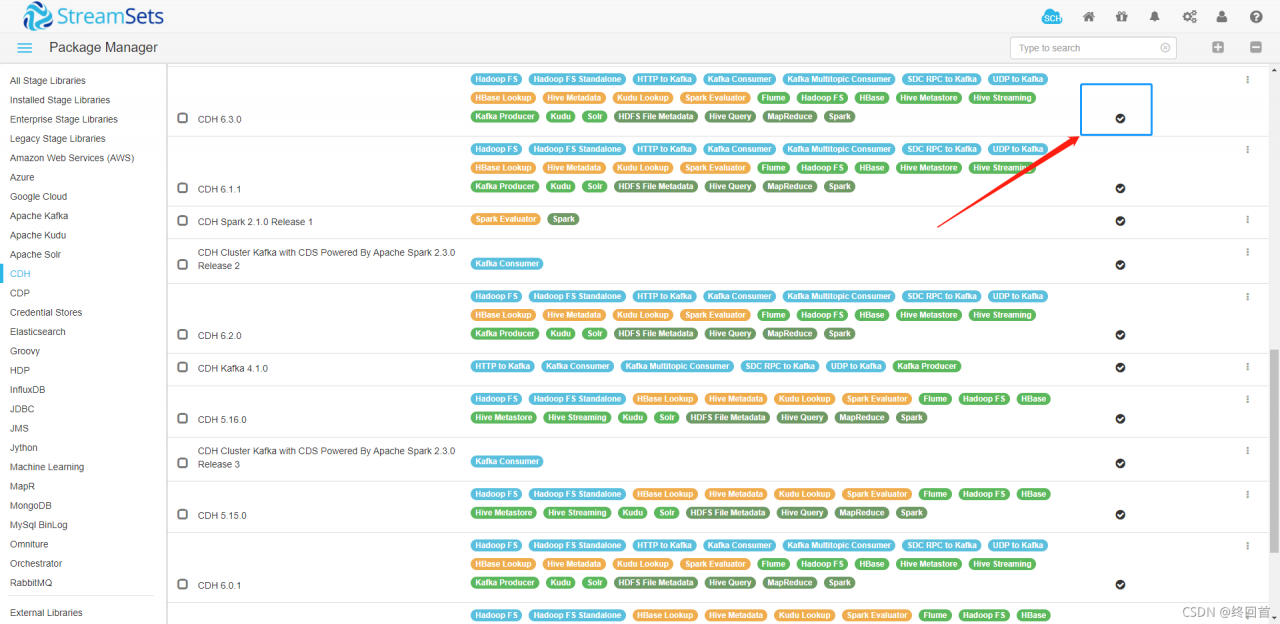
You can see that the required package is already installed after reinstallation

reference material

Official documents

Syntax Error: Error: Node Sass version 6.0.1 is incompatible with ^4.0.0.

Problem: version correspondence
solution:

    uninstall node sass

    npm uninstall node-sass
    
      install version 4.14.1

      npm install [email protected]
      
        network problems may occur during installation. Taobao image can be used. It is recommended to use the following methods. It is not recommended to permanently use Taobao image
        single use

        npm install --registry=https://registry.npm.taobao.org
        
          if you still cannot install, you can find the corresponding version number in the package.json file and modify it directly. The version number I use here is
          node sass: 4.14.1
          sass loader: 7.1.3
          generally, the idea will remind the update dependency in the lower right corner, otherwise the node will be deleted directly_ Download the modules folder again

          Reference link 1
          reference link 2

2021-10-30 .spi.CommandAcceptanceException: Error executing DDL


```java
org.hibernate.tool.schema.spi.CommandAcceptanceException: Error executing DDL "create table Books (bookId varchar(255) not null auto_increment, bName varchar(255), primary key (bookId)) engine=MyISAM" via JDBC Statement
	at org.hibernate.tool.schema.internal.exec.GenerationTargetToDatabase.accept(GenerationTargetToDatabase.java:67) ~[hibernate-core-5.4.32.Final.jar:5.4.32.Final]
	at org.hibernate.tool.schema.internal.AbstractSchemaMigrator.applySqlString(AbstractSchemaMigrator.java:562) [hibernate-core-5.4.32.Final.jar:5.4.32.Final]
	at org.hibernate.tool.schema.internal.AbstractSchemaMigrator.applySqlStrings(AbstractSchemaMigrator.java:507) [hibernate-core-5.4.32.Final.jar:5.4.32.Final]
	at org.hibernate.tool.schema.internal.AbstractSchemaMigrator.createTable(AbstractSchemaMigrator.java:277) [hibernate-core-5.4.32.Final.jar:5.4.32.Final]
	at org.hibernate.tool.schema.internal.GroupedSchemaMigratorImpl.performTablesMigration(GroupedSchemaMigratorImpl.java:71) [hibernate-core-5.4.32.Final.jar:5.4.32.Final]
	at org.hibernate.tool.schema.internal.AbstractSchemaMigrator.performMigration(AbstractSchemaMigrator.java:207) [hibernate-core-5.4.32.Final.jar:5.4.32.Final]
	at org.hibernate.tool.schema.internal.AbstractSchemaMigrator.doMigration(AbstractSchemaMigrator.java:114) [hibernate-core-5.4.32.Final.jar:5.4.32.Final]
	at org.hibernate.tool.schema.spi.SchemaManagementToolCoordinator.performDatabaseAction(SchemaManagementToolCoordinator.java:184) [hibernate-core-5.4.32.Final.jar:5.4.32.Final]
	at org.hibernate.tool.schema.spi.SchemaManagementToolCoordinator.process(SchemaManagementToolCoordinator.java:73) [hibernate-core-5.4.32.Final.jar:5.4.32.Final]
	at org.hibernate.internal.SessionFactoryImpl.<init>(SessionFactoryImpl.java:318) [hibernate-core-5.4.32.Final.jar:5.4.32.Final]
	at org.hibernate.boot.internal.SessionFactoryBuilderImpl.build(SessionFactoryBuilderImpl.java:468) [hibernate-core-5.4.32.Final.jar:5.4.32.Final]
	at org.hibernate.jpa.boot.internal.EntityManagerFactoryBuilderImpl.build(EntityManagerFactoryBuilderImpl.java:1259) [hibernate-core-5.4.32.Final.jar:5.4.32.Final]
	at org.springframework.orm.jpa.vendor.SpringHibernateJpaPersistenceProvider.createContainerEntityManagerFactory(SpringHibernateJpaPersistenceProvider.java:58) [spring-orm-5.3.12.jar:5.3.12]
	at org.springframework.orm.jpa.LocalContainerEntityManagerFactoryBean.createNativeEntityManagerFactory(LocalContainerEntityManagerFactoryBean.java:365) [spring-orm-5.3.12.jar:5.3.12]
	at org.springframework.orm.jpa.AbstractEntityManagerFactoryBean.buildNativeEntityManagerFactory(AbstractEntityManagerFactoryBean.java:409) [spring-orm-5.3.12.jar:5.3.12]
	at org.springframework.orm.jpa.AbstractEntityManagerFactoryBean.afterPropertiesSet(AbstractEntityManagerFactoryBean.java:396) [spring-orm-5.3.12.jar:5.3.12]
	at org.springframework.orm.jpa.LocalContainerEntityManagerFactoryBean.afterPropertiesSet(LocalContainerEntityManagerFactoryBean.java:341) [spring-orm-5.3.12.jar:5.3.12]
	at org.springframework.beans.factory.support.AbstractAutowireCapableBeanFactory.invokeInitMethods(AbstractAutowireCapableBeanFactory.java:1863) [spring-beans-5.3.12.jar:5.3.12]
	at org.springframework.beans.factory.support.AbstractAutowireCapableBeanFactory.initializeBean(AbstractAutowireCapableBeanFactory.java:1800) [spring-beans-5.3.12.jar:5.3.12]
	at org.springframework.beans.factory.support.AbstractAutowireCapableBeanFactory.doCreateBean(AbstractAutowireCapableBeanFactory.java:620) [spring-beans-5.3.12.jar:5.3.12]
	at org.springframework.beans.factory.support.AbstractAutowireCapableBeanFactory.createBean(AbstractAutowireCapableBeanFactory.java:542) [spring-beans-5.3.12.jar:5.3.12]
	at org.springframework.beans.factory.support.AbstractBeanFactory.lambda$doGetBean$0(AbstractBeanFactory.java:335) [spring-beans-5.3.12.jar:5.3.12]
	at org.springframework.beans.factory.support.DefaultSingletonBeanRegistry.getSingleton(DefaultSingletonBeanRegistry.java:234) ~[spring-beans-5.3.12.jar:5.3.12]
	at org.springframework.beans.factory.support.AbstractBeanFactory.doGetBean(AbstractBeanFactory.java:333) [spring-beans-5.3.12.jar:5.3.12]
	at org.springframework.beans.factory.support.AbstractBeanFactory.getBean(AbstractBeanFactory.java:208) [spring-beans-5.3.12.jar:5.3.12]
	at org.springframework.context.support.AbstractApplicationContext.getBean(AbstractApplicationContext.java:1154) ~[spring-context-5.3.12.jar:5.3.12]
	at org.springframework.context.support.AbstractApplicationContext.finishBeanFactoryInitialization(AbstractApplicationContext.java:908) ~[spring-context-5.3.12.jar:5.3.12]
	at org.springframework.context.support.AbstractApplicationContext.refresh(AbstractApplicationContext.java:583) ~[spring-context-5.3.12.jar:5.3.12]
	at org.springframework.boot.web.servlet.context.ServletWebServerApplicationContext.refresh(ServletWebServerApplicationContext.java:145) ~[spring-boot-2.5.6.jar:2.5.6]
	at org.springframework.boot.SpringApplication.refresh(SpringApplication.java:754) ~[spring-boot-2.5.6.jar:2.5.6]
	at org.springframework.boot.SpringApplication.refreshContext(SpringApplication.java:434) ~[spring-boot-2.5.6.jar:2.5.6]
	at org.springframework.boot.SpringApplication.run(SpringApplication.java:338) ~[spring-boot-2.5.6.jar:2.5.6]
	at org.springframework.boot.SpringApplication.run(SpringApplication.java:1343) ~[spring-boot-2.5.6.jar:2.5.6]
	at org.springframework.boot.SpringApplication.run(SpringApplication.java:1332) ~[spring-boot-2.5.6.jar:2.5.6]
	at com.example.library.LibraryApplication.main(LibraryApplication.java:10) ~[classes/:na]
Caused by: java.sql.SQLSyntaxErrorException: Incorrect column specifier for column 'bookId'
	at com.mysql.cj.jdbc.exceptions.SQLError.createSQLException(SQLError.java:120) ~[mysql-connector-java-8.0.27.jar:8.0.27]
	at com.mysql.cj.jdbc.exceptions.SQLExceptionsMapping.translateException(SQLExceptionsMapping.java:122) ~[mysql-connector-java-8.0.27.jar:8.0.27]
	at com.mysql.cj.jdbc.StatementImpl.executeInternal(StatementImpl.java:768) ~[mysql-connector-java-8.0.27.jar:8.0.27]
	at com.mysql.cj.jdbc.StatementImpl.execute(StatementImpl.java:653) ~[mysql-connector-java-8.0.27.jar:8.0.27]
	at com.zaxxer.hikari.pool.ProxyStatement.execute(ProxyStatement.java:94) ~[HikariCP-4.0.3.jar:na]
	at com.zaxxer.hikari.pool.HikariProxyStatement.execute(HikariProxyStatement.java) ~[HikariCP-4.0.3.jar:na]
	at org.hibernate.tool.schema.internal.exec.GenerationTargetToDatabase.accept(GenerationTargetToDatabase.java:54) ~[hibernate-core-5.4.32.Final.jar:5.4.32.Final]
	... 34 common frames omitted

When using JPA to create a table, crazy errors are reported. It is clear that it is copying the last configuration file. How to report errors
I’ve been Baidu for most of the day. The reason is that some fields use database keywords
but it’s obviously impossible

 @Id
    @GeneratedValue(strategy = GenerationType.IDENTITY)
    private String bookId;
    @Column(updatable = false)
    private String bName;

In fact, because the ID field should be of integer type, I wrote it as string. It’s really a sunny pig
just modify it

SignTool Error: An error occurred while attempting/Error information: “SignerTimeStamp() failed.“

Specific error

Done Adding Additional Store
Successfully signed: TPlayerCore.dll
SignTool Error: An error occurred while attempting to timestamp: TPlayer
Core.dll
SignTool Error: An unexpected internal error has occurred.
Error information: "SignerTimeStamp() failed." (-2147012889/0x80072ee7)

terms of settlement

Need to change timestamp URL

SET HTTP_TIMESTAMP=http://timestamp.digicert.com/scripts/timestamp.dll

Sparkcontext: error initializing sparkcontext workaround

Sparkcontext: error initializing sparkcontext workaround

Spark reports an error when configuring a highly available cluster
error sparkcontext: error initializing sparkcontext. Java.net.connectexception: call from Hadoop 102/192.168.10.102 to Hadoop 102: 8020 failed on connection exception: java.net.connectexception: connection rejected

This is because we configured spark logs to be stored in HDFS, but Hadoop was not opened after the spark cluster was started, resulting in an error when submitting tasks.

Solution:

    no longer store the event log
    find the spark installation directory/conf/spark-defaults.conf file, as shown in the figure, and comment out the corresponding event log part
    store the event log locally instead of in HDFS
    replace the directory in the second line in the figure above with the Linux local directory to start the Hadoop cluster (i.e. HDFS service)
    investigate the cause of the error, Or we configured the spark log to be stored in HDFS, but did not open HDFS, so start the Hadoop cluster

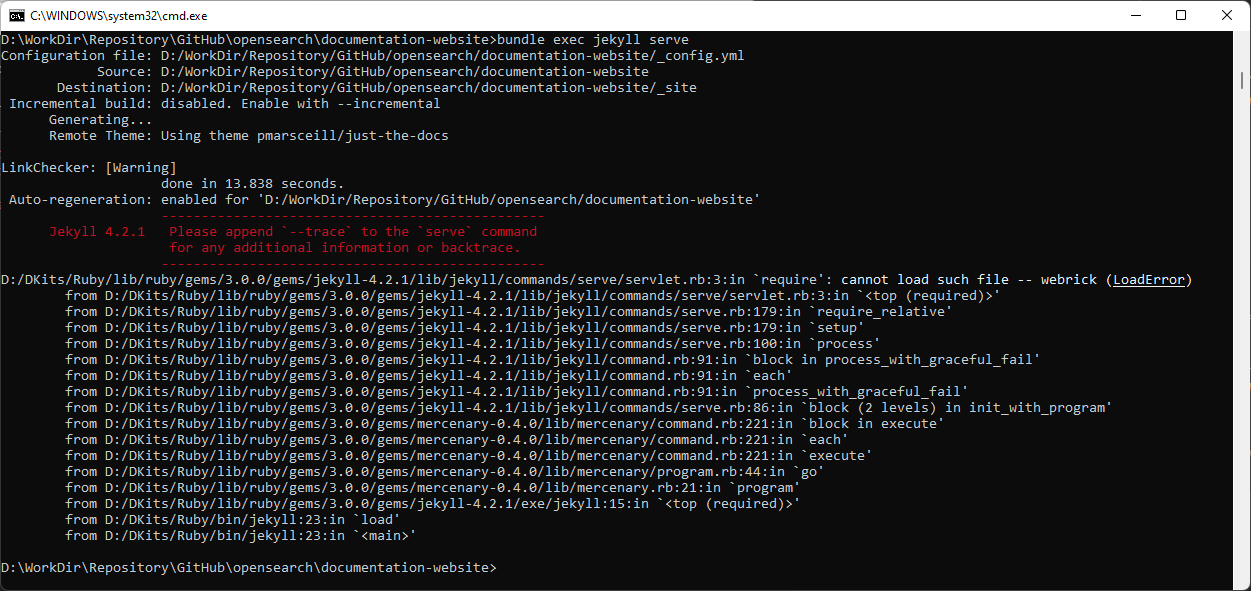
When Jekyll runs, it will prompt an error. Cannot load such file — webrick (LoadError)

The complete error message is as follows:

LinkChecker: [Warning]
                    done in 13.838 seconds.
 Auto-regeneration: enabled for 'D:/WorkDir/Repository/GitHub/opensearch/documentation-website'
                    ------------------------------------------------
      Jekyll 4.2.1   Please append `--trace` to the `serve` command
                     for any additional information or backtrace.
                    ------------------------------------------------
D:/DKits/Ruby/lib/ruby/gems/3.0.0/gems/jekyll-4.2.1/lib/jekyll/commands/serve/servlet.rb:3:in `require': cannot load such file -- webrick (LoadError)
        from D:/DKits/Ruby/lib/ruby/gems/3.0.0/gems/jekyll-4.2.1/lib/jekyll/commands/serve/servlet.rb:3:in `<top (required)>'
        from D:/DKits/Ruby/lib/ruby/gems/3.0.0/gems/jekyll-4.2.1/lib/jekyll/commands/serve.rb:179:in `require_relative'
        from D:/DKits/Ruby/lib/ruby/gems/3.0.0/gems/jekyll-4.2.1/lib/jekyll/commands/serve.rb:179:in `setup'
        from D:/DKits/Ruby/lib/ruby/gems/3.0.0/gems/jekyll-4.2.1/lib/jekyll/commands/serve.rb:100:in `process'
        from D:/DKits/Ruby/lib/ruby/gems/3.0.0/gems/jekyll-4.2.1/lib/jekyll/command.rb:91:in `block in process_with_graceful_fail'
        from D:/DKits/Ruby/lib/ruby/gems/3.0.0/gems/jekyll-4.2.1/lib/jekyll/command.rb:91:in `each'
        from D:/DKits/Ruby/lib/ruby/gems/3.0.0/gems/jekyll-4.2.1/lib/jekyll/command.rb:91:in `process_with_graceful_fail'
        from D:/DKits/Ruby/lib/ruby/gems/3.0.0/gems/jekyll-4.2.1/lib/jekyll/commands/serve.rb:86:in `block (2 levels) in init_with_program'
        from D:/DKits/Ruby/lib/ruby/gems/3.0.0/gems/mercenary-0.4.0/lib/mercenary/command.rb:221:in `block in execute'
        from D:/DKits/Ruby/lib/ruby/gems/3.0.0/gems/mercenary-0.4.0/lib/mercenary/command.rb:221:in `each'
        from D:/DKits/Ruby/lib/ruby/gems/3.0.0/gems/mercenary-0.4.0/lib/mercenary/command.rb:221:in `execute'
        from D:/DKits/Ruby/lib/ruby/gems/3.0.0/gems/mercenary-0.4.0/lib/mercenary/program.rb:44:in `go'
        from D:/DKits/Ruby/lib/ruby/gems/3.0.0/gems/mercenary-0.4.0/lib/mercenary.rb:21:in `program'
        from D:/DKits/Ruby/lib/ruby/gems/3.0.0/gems/jekyll-4.2.1/exe/jekyll:15:in `<top (required)>'
        from D:/DKits/Ruby/bin/jekyll:23:in `load'
        from D:/DKits/Ruby/bin/jekyll:23:in `<main>'

Problems and Solutions

According to the official project description:

This is because:
webrick has not been bound to Ruby since Ruby 3.0. Please refer to the link:   Ruby 3.0.0 Released   Description in.

Webrick needs to be added manually.

The added commands are:

bundle add webrick

Then we can solve the problem.

When Jekyll runs, it will prompt an error. Cannot load such file — webrick (LoadError) – Open Source – ossez

RuntimeError: Found dtype Double but expected Float”

RuntimeError: Found dtype Double but expected Float”

I made a mistake in finding the loss function,

resolvent:

target.float()

a=np.array([[1,2],[3,4]])
b=np.array([[2,3],[4,4]])

loss_fn = torch.nn.MSELoss(reduce=True, size_average=True)

input = torch.autograd.Variable(torch.from_numpy(a))
target = torch.autograd.Variable(torch.from_numpy(b))

loss = loss_fn(input.float(), target.float())

print(loss)