Error running tomcat: Can’t find catalina.jar
When idea deploys a web project, an error occurs: error running Tomcat: can’t find Catalina. Jar
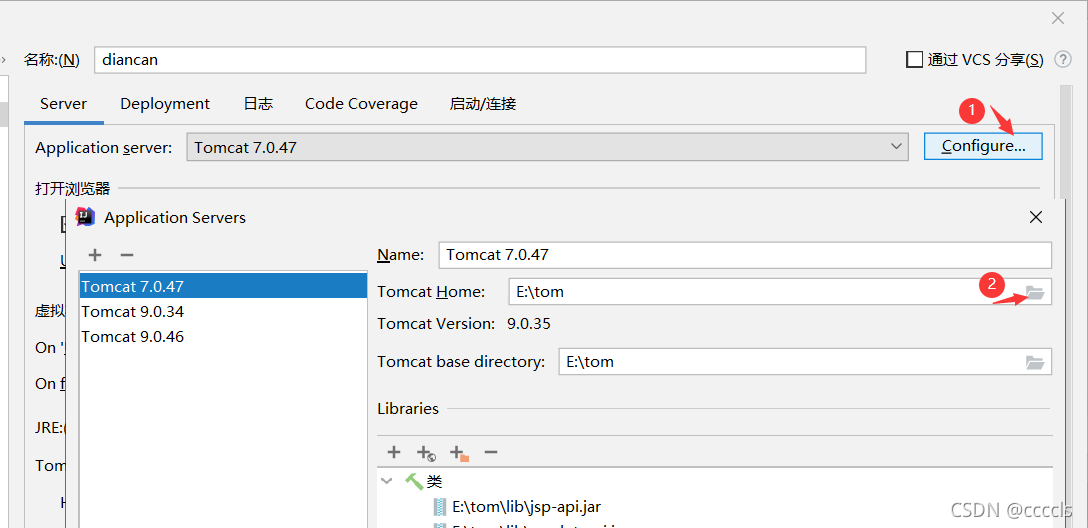
Solution: the path to configure Tomcat is wrong

just change it to the installation path of Tomcat
Error running tomcat: Can’t find catalina.jar
When idea deploys a web project, an error occurs: error running Tomcat: can’t find Catalina. Jar
Solution: the path to configure Tomcat is wrong
just change it to the installation path of Tomcat
Problem Description:
When moving a folder item or a copied item, run the error: cannot find module ‘xxx’
Solution:
Delete node_ In the modules folder, delete the package-lock.json file, then NPM install, and then run the project
The following is the complete error message
PS D:\test> npm run dev

> [email protected] dev D:\test
> vite

internal/modules/cjs/loader.js:883
  throw err;
  ^

Error: Cannot find module 'esbuild'
Require stack:
- D:\test\node_modules\[email protected]@vite\dist\node\chunks\dep-85dbaaa7.js
- D:\test\node_modules\[email protected]@vite\dist\node\cli.js
- D:\test\node_modules\[email protected]@vite\bin\vite.js
    at Function.Module._resolveFilename (internal/modules/cjs/loader.js:880:15)
    at Function.Module._load (internal/modules/cjs/loader.js:725:27)
    at Module.require (internal/modules/cjs/loader.js:952:19)
    at require (internal/modules/cjs/helpers.js:88:18)
    at Object.<anonymous> (D:\test\node_modules\[email protected]@vite\dist\node\chunks\dep-85dbaaa7.js:13:15)
    at Module._compile (internal/modules/cjs/loader.js:1063:30)
    at Object.Module._extensions..js (internal/modules/cjs/loader.js:1092:10)
    at Module.load (internal/modules/cjs/loader.js:928:32)
    at Function.Module._load (internal/modules/cjs/loader.js:769:14)
    at Module.require (internal/modules/cjs/loader.js:952:19) {
  code: 'MODULE_NOT_FOUND',
  requireStack: [
    'D:\\test\\node_modules\\[email protected]@vite\\dist\\node\\chunks\\dep-85dbaaa7.js',
    'D:\\test\\node_modules\\[email protected]@vite\\dist\\node\\cli.js',
    'D:\\test\\node_modules\\[email protected]@vite\\bin\\vite.js'
  ]
}
npm ERR! code ELIFECYCLE
npm ERR! errno 1
npm ERR! [email protected] dev: `vite`
npm ERR! Exit status 1
npm ERR!
npm ERR! Failed at the [email protected] dev script.
npm ERR! This is probably not a problem with npm. There is likely additional logging output above.
npm ERR! A complete log of this run can be found in:
npm ERR! C:\Users\xxx\AppData\Roaming\npm-cache\_logs\2021-11-01T02_40_03_715Z-debug.logRecently, if you want to use clion to replace keil for STM32 development, you need to install the following software and add the last two to the system path:
STM32CubeMX
Clion
MinGW
arm-none-eabi-gcc
After configuring toolchain and cmake, it is found that the simplest project cannot cmake and displays
CMake Error: CMake was unable to find a build program corresponding to “MinGW Makefiles”. CMAKE_ MAKE_ PROGRAM is not set. You probably need to select a different build tool.
After debugging for a long time, the final solution: do not use mingw64, download the installation tool of mingw32 on the official website: mingw-get-setup.exe, and configure it again. It may be that 64 bit MinGW is incompatible.
This article is a summary of my study. If there are copyright or knowledge errors or problems, please contact me directly. Please leave a message
PS: Based on the principle of knowledge sharing, this blog can be reproduced, but please indicate the source!
1. Problem description
The vivado error problem warning is as follows:
[DRC NSTD-1] Unspecified I/O Standard: 1 out of 9 logical ports use I/O standard (IOSTANDARD) value 'DEFAULT', instead of a user assigned specific value.
This may cause I/O contention or incompatibility with the board power or connectivity affecting performance, signal integrity or in extreme cases cause damage to the device or the components to which it is connected. To correct this violation, specify all I/O standards. This design will fail to generate a bitstream unless all logical ports have a user specified I/O standard value defined. To allow bitstream creation with unspecified I/O standard values (not recommended), use this command: set_property SEVERITY {Warning} [get_drc_checks NSTD-1].  NOTE: When using the Vivado Runs infrastructure (e.g. launch_runs Tcl command), add this command to a .tcl file and add that file as a pre-hook for write_bitstream step for the implementation run. Problem ports: SYS_CLK.
The IO setting interface is as follows:

The IO working voltage is not clearly defined, so the following operations are required;
2. Solution:
Create a new. TCL file and write the following contents:
set_property SEVERITY {Warning} [get_drc_checks NSTD-1]

set_property SEVERITY {Warning} [get_drc_checks UCIO-1]

set_property SEVERITY {Warning} [get_drc_checks RTSTAT-1]
Add in vivado setting:
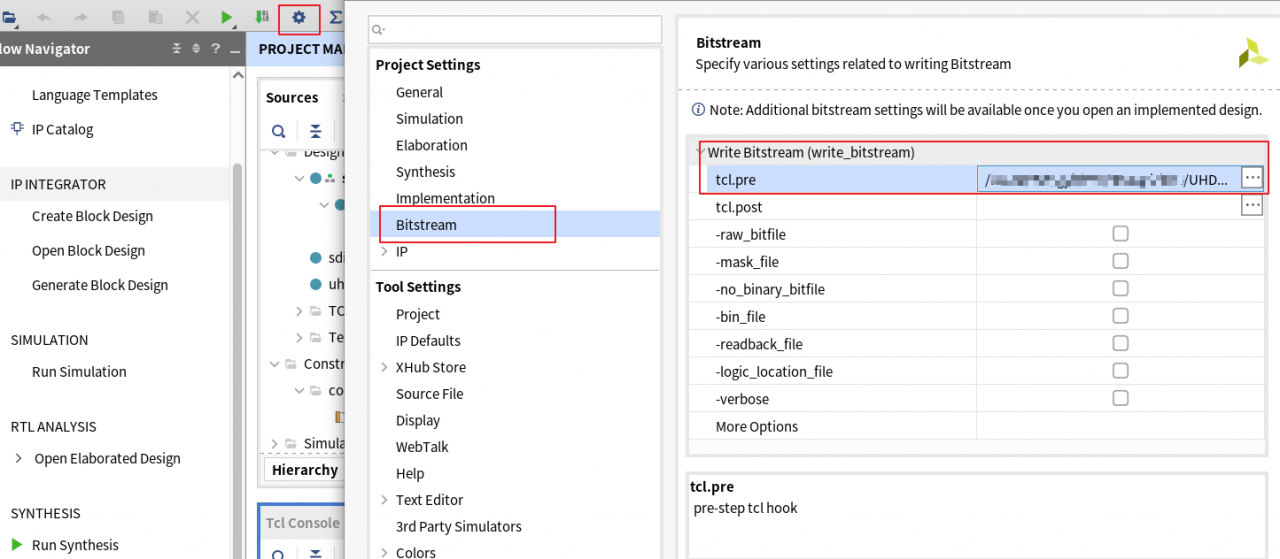
The error warning disappears after recompilation!
My environment:
EB 24.0.1
EB Administrator 1.4.0
davinci 5.20.41 SP1
Problem Description:
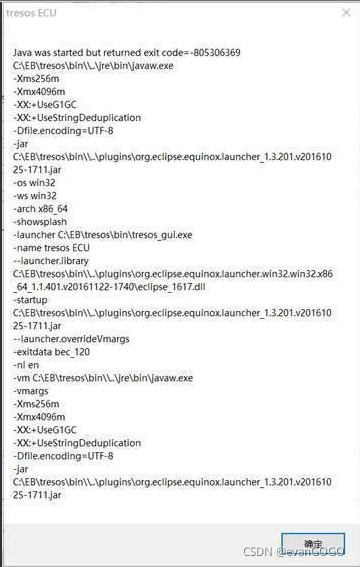
The process of opening EB is very slow and long. Calling EB interface with DaVinci for compilation prompts that EB workspace cannot be opened. Sometimes the opening process will prompt the error code: 805306369
Solution:
1. Download dreisoft.tresos.launcher2_jar_EB_tresos_Studio_V24.0.1_FNP11.16.5.1_HOTFIX.zip
2. Copy the file to the plugins folder under the EB installation directory, as shown below:
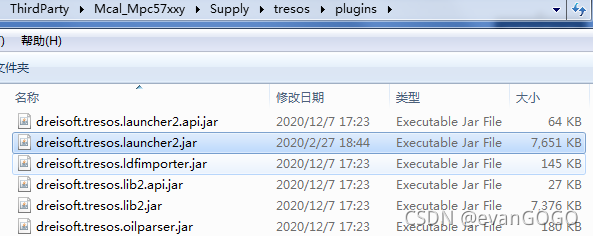
3. Open CMD and change to “<EB tresos v24.0.1 installation path> \bin” folder
Use the “- clean” option to call “tresos_gui. Exe” (“tresos_gui clean”)
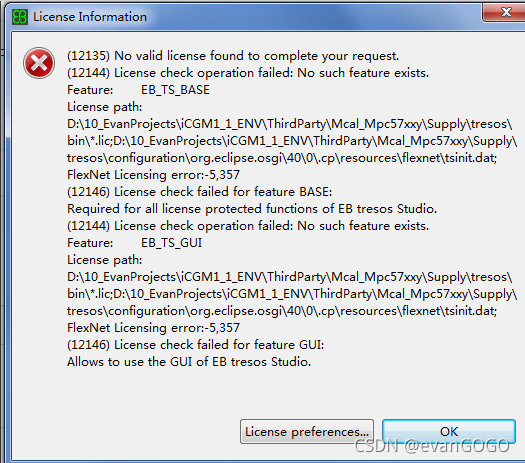
4. You should be able to use it normally here. If you are prompted that the license is invalid, you can upgrade EB administrator to version 1.4.0 or above
When viewing the. RC resource file, I don’t know what’s going on. After turning it off and opening it in the resource view, this error will be reported.
I don’t remember moving anything in the. RC file. It just can’t be opened anyway
It is said on the Internet that if the cursor is positioned to the error and the XXX code is added, but if my cursor is positioned to the first line, this method is invalid
https://blog.csdn.net/liuyi1207164339/article/details/47131833
Solution: copy from the old. RC file, delete all the. RC file and replace it with the old. RC file. This should be a bug in vs2013.
pip install absl
There was a problem installing the absl library
ERROR: Could not find a version that satisfies the requirement absl (from versions: none)
ERROR: No matching distribution found for absl
Should read
pip install absl-py
RuntimeError: Unable to find a valid cuDNN algorithm to run convolution
Preface solution
preface
Today, we use Yolo V5.6 training model and modify the batch size to 32. The following error occurred:
Starting training for 100 epochs...

     Epoch   gpu_mem       box       obj       cls    labels  img_size
  0%|                                                                                                                                                                         | 0/483 [00:04<?, ?it/s]
Traceback (most recent call last):
  File "train.py", line 620, in <module>
    main(opt)
  File "train.py", line 517, in main
    train(opt.hyp, opt, device, callbacks)
  File "train.py", line 315, in train
    pred = model(imgs)  # forward
  File "E:\Anaconda3\envs\yolov550\lib\site-packages\torch\nn\modules\module.py", line 1051, in _call_impl
    return forward_call(*input, **kwargs)
  File "D:\liufq\yolov5-6.0\models\yolo.py", line 126, in forward
    return self._forward_once(x, profile, visualize)  # single-scale inference, train
  File "D:\liufq\yolov5-6.0\models\yolo.py", line 149, in _forward_once
    x = m(x)  # run
  File "E:\Anaconda3\envs\yolov550\lib\site-packages\torch\nn\modules\module.py", line 1051, in _call_impl
    return forward_call(*input, **kwargs)
  File "D:\liufq\yolov5-6.0\models\common.py", line 137, in forward
    return self.cv3(torch.cat((self.m(self.cv1(x)), self.cv2(x)), dim=1))
  File "E:\Anaconda3\envs\yolov550\lib\site-packages\torch\nn\modules\module.py", line 1051, in _call_impl
    return forward_call(*input, **kwargs)
  File "D:\liufq\yolov5-6.0\models\common.py", line 45, in forward
    return self.act(self.bn(self.conv(x)))
  File "E:\Anaconda3\envs\yolov550\lib\site-packages\torch\nn\modules\module.py", line 1051, in _call_impl
    return forward_call(*input, **kwargs)
  File "E:\Anaconda3\envs\yolov550\lib\site-packages\torch\nn\modules\conv.py", line 443, in forward
    return self._conv_forward(input, self.weight, self.bias)
  File "E:\Anaconda3\envs\yolov550\lib\site-packages\torch\nn\modules\conv.py", line 440, in _conv_forward
    self.padding, self.dilation, self.groups)
RuntimeError: Unable to find a valid cuDNN algorithm to run convolution
terms of settlement
Modify the size of batchsize and make it smaller.
There are two reasons for this problem
first, the GPU computing power and the python version do not match
Second, the server uses a combination of graphics cards with different computing power
on the first point, pytorch no longer supports graphics cards with computing power less than 3.7 after 1.3.0. You can reinstall the lower version of pytorch. The corresponding version can be found in the following link:
torch, torchvision historical version download
common graphics card computing power is as follows
GPU	Compute Capability
NVIDIA TITAN RTX	7.5
Geforce RTX 2080 Ti	7.5
Geforce RTX 2080	7.5
Geforce RTX 2070	7.5
Geforce RTX 2060	7.5
NVIDIA TITAN V	7.0
NVIDIA TITAN Xp	6.1
NVIDIA TITAN X	6.1
GeForce GTX 1080 Ti	6.1
GeForce GTX 1080	6.1
GeForce GTX 1070	6.1
GeForce GTX 1060	6.1
GeForce GTX 1050	6.1
GeForce GTX TITAN X	5.2
GeForce GTX TITAN Z	3.5
GeForce GTX TITAN Black	3.5
GeForce GTX TITAN	3.5
GeForce GTX 980 Ti	5.2
GeForce GTX 980	5.2
GeForce GTX 970	5.2
GeForce GTX 960	5.2
GeForce GTX 950	5.2
GeForce GTX 780 Ti	3.5
GeForce GTX 780	3.5
GeForce GTX 770	3.0
GeForce GTX 760	3.0
GeForce GTX 750 Ti	5.0
GeForce GTX 750	5.0
GeForce GTX 690	3.0
GeForce GTX 680	3.0
GeForce GTX 670	3.0
GeForce GTX 660 Ti	3.0
GeForce GTX 660	3.0
GeForce GTX 650 Ti BOOST	3.0
GeForce GTX 650 Ti	3.0
GeForce GTX 650	3.0
GeForce GTX 560 Ti	2.1
GeForce GTX 550 Ti	2.1
GeForce GTX 460	2.1
GeForce GTS 450	2.1
GeForce GTS 450*	2.1
GeForce GTX 590	2.0
GeForce GTX 580	2.0
GeForce GTX 570	2.0
GeForce GTX 480	2.0
GeForce GTX 470	2.0
GeForce GTX 465	2.0
GeForce GT 740	3.0
GeForce GT 730	3.5
GeForce GT 730 DDR3,128bit	2.1
GeForce GT 720	3.5
GeForce GT 705*	3.5
GeForce GT 640 (GDDR5)	3.5
GeForce GT 640 (GDDR3)	2.1
GeForce GT 630	2.1
GeForce GT 620	2.1
GeForce GT 610	2.1
GeForce GT 520	2.1
GeForce GT 440	2.1
GeForce GT 440*	2.1
GeForce GT 430	2.1
GeForce GT 430*	2.1
GPU	Compute Capability
Tesla K80	3.7
Tesla K40	3.5
Tesla K20	3.5
Tesla C2075	2.0
Tesla C2050/C2070	2.0
On the second point, if you make an error in the mmcv framework, recompile mmcv according to the computing power of your graphics card. Take two graphics cards with computing power of 6.1 and 7.5 as examples to compile. The commands are as follows:
TORCH_CUDA_ARCH_LIST="6.1;7.5" pip install mmcv-full == {mmcv_version} -f https://download.openmmlab.com/mmcv/dist/{cuda version}/{pytorch version}/index.html
Among them, CUDA version and pytorch version are replaced by your version, such as cud101, torch 1.7.0
for specific corresponding information, please refer to GitHub of mmcv
Error: could not find function … in R
Question:
solve:
Full error:
Question:
> mytest.ax(lable,prediction)
Error in mytest.ax(lable, prediction) :
could not find function “mytest.ax”
Solution:
First, is the function name written correctly?R language function names are case sensitive.
Second, is the package containing the function installed?install.packages(“package_name”)
Third,
require(package_name)
library(package)
Require (package_name) (and check its return value) or library (package) (this should be done every time you start a new R session)
Fourth, are you using an old r version that does not yet exist?Or the version of R package; Or after the version is updated, some functions are removed from the original package;
Fifth, functions are added and removed over time, and the referenced code may expect an updated or older version than the package you installed. Or it’s too new. Cran doesn’t contain the latest version;
Full error:
> mytest.ax(lable,prediction)
Error in mytest.ax(lable, prediction) :
could not find function "mytest.ax"
The following error occurs mainly because the configuration of the resource server is added, but the service is not identified as a resource server.
org.springframework.beans.factory.BeanCreationException: Error creating bean with name 'org.springframework.security.oauth2.config.annotation.web.configuration.ResourceServerConfiguration': Post-processing of merged bean definition failed; nested exception is java.lang.TypeNotPresentException: Type javax.servlet.Filter not present
	at org.springframework.beans.factory.support.AbstractAutowireCapableBeanFactory.doCreateBean(AbstractAutowireCapableBeanFactory.java:579) ~[spring-beans-5.3.5.jar:5.3.5]
	at org.springframework.beans.factory.support.AbstractAutowireCapableBeanFactory.createBean(AbstractAutowireCapableBeanFactory.java:524) ~[spring-beans-5.3.5.jar:5.3.5]
	at org.springframework.beans.factory.support.AbstractBeanFactory.lambda$doGetBean$0(AbstractBeanFactory.java:335) ~[spring-beans-5.3.5.jar:5.3.5]
	at org.springframework.beans.factory.support.DefaultSingletonBeanRegistry.getSingleton(DefaultSingletonBeanRegistry.java:234) ~[spring-beans-5.3.5.jar:5.3.5]
	at org.springframework.beans.factory.support.AbstractBeanFactory.doGetBean(AbstractBeanFactory.java:333) ~[spring-beans-5.3.5.jar:5.3.5]
	at org.springframework.beans.factory.support.AbstractBeanFactory.getBean(AbstractBeanFactory.java:208) ~[spring-beans-5.3.5.jar:5.3.5]
	at org.springframework.beans.factory.support.DefaultListableBeanFactory.preInstantiateSingletons(DefaultListableBeanFactory.java:944) ~[spring-beans-5.3.5.jar:5.3.5]
	at org.springframework.context.support.AbstractApplicationContext.finishBeanFactoryInitialization(AbstractApplicationContext.java:918) ~[spring-context-5.3.5.jar:5.3.5]
	at org.springframework.context.support.AbstractApplicationContext.refresh(AbstractApplicationContext.java:583) ~[spring-context-5.3.5.jar:5.3.5]
	at org.springframework.boot.web.reactive.context.ReactiveWebServerApplicationContext.refresh(ReactiveWebServerApplicationContext.java:63) ~[spring-boot-2.4.4.jar:2.4.4]
	at org.springframework.boot.SpringApplication.refresh(SpringApplication.java:769) [spring-boot-2.4.4.jar:2.4.4]
	at org.springframework.boot.SpringApplication.refresh(SpringApplication.java:761) [spring-boot-2.4.4.jar:2.4.4]
	at org.springframework.boot.SpringApplication.refreshContext(SpringApplication.java:426) [spring-boot-2.4.4.jar:2.4.4]
	at org.springframework.boot.SpringApplication.run(SpringApplication.java:326) [spring-boot-2.4.4.jar:2.4.4]
	at org.springframework.boot.SpringApplication.run(SpringApplication.java:1313) [spring-boot-2.4.4.jar:2.4.4]
	at org.springframework.boot.SpringApplication.run(SpringApplication.java:1302) [spring-boot-2.4.4.jar:2.4.4]
	at com.zsh.GatewayApplication.main(GatewayApplication.java:16) [classes/:na]
Caused by: java.lang.TypeNotPresentException: Type javax.servlet.Filter not present
	at sun.reflect.generics.factory.CoreReflectionFactory.makeNamedType(CoreReflectionFactory.java:117) ~[na:1.8.0_261]
	at sun.reflect.generics.visitor.Reifier.visitClassTypeSignature(Reifier.java:125) ~[na:1.8.0_261]
	at sun.reflect.generics.tree.ClassTypeSignature.accept(ClassTypeSignature.java:49) ~[na:1.8.0_261]
	at sun.reflect.generics.visitor.Reifier.reifyTypeArguments(Reifier.java:68) ~[na:1.8.0_261]
	at sun.reflect.generics.visitor.Reifier.visitClassTypeSignature(Reifier.java:138) ~[na:1.8.0_261]
	at sun.reflect.generics.tree.ClassTypeSignature.accept(ClassTypeSignature.java:49) ~[na:1.8.0_261]
	at sun.reflect.generics.repository.ClassRepository.getSuperInterfaces(ClassRepository.java:108) ~[na:1.8.0_261]
	at java.lang.Class.getGenericInterfaces(Class.java:913) ~[na:1.8.0_261]
	at org.springframework.core.ResolvableType.getInterfaces(ResolvableType.java:502) ~[spring-core-5.3.5.jar:5.3.5]
	at org.springframework.core.ResolvableType.as(ResolvableType.java:450) ~[spring-core-5.3.5.jar:5.3.5]
	at org.springframework.core.ResolvableType.as(ResolvableType.java:451) ~[spring-core-5.3.5.jar:5.3.5]
	at org.springframework.core.ResolvableType.as(ResolvableType.java:456) ~[spring-core-5.3.5.jar:5.3.5]
	at org.springframework.core.ResolvableType.as(ResolvableType.java:456) ~[spring-core-5.3.5.jar:5.3.5]
	at org.springframework.core.ResolvableType.forMethodParameter(ResolvableType.java:1341) ~[spring-core-5.3.5.jar:5.3.5]
	at org.springframework.core.ResolvableType.forMethodParameter(ResolvableType.java:1324) ~[spring-core-5.3.5.jar:5.3.5]
	at org.springframework.core.ResolvableType.forMethodParameter(ResolvableType.java:1291) ~[spring-core-5.3.5.jar:5.3.5]
	at org.springframework.core.ResolvableType.forMethodParameter(ResolvableType.java:1281) ~[spring-core-5.3.5.jar:5.3.5]
	at org.springframework.core.BridgeMethodResolver.isResolvedTypeMatch(BridgeMethodResolver.java:157) ~[spring-core-5.3.5.jar:5.3.5]
	at org.springframework.core.BridgeMethodResolver.isBridgeMethodFor(BridgeMethodResolver.java:141) ~[spring-core-5.3.5.jar:5.3.5]
	at org.springframework.core.BridgeMethodResolver.searchCandidates(BridgeMethodResolver.java:120) ~[spring-core-5.3.5.jar:5.3.5]
	at org.springframework.core.BridgeMethodResolver.findBridgedMethod(BridgeMethodResolver.java:82) ~[spring-core-5.3.5.jar:5.3.5]
	at org.springframework.context.annotation.CommonAnnotationBeanPostProcessor.lambda$buildResourceMetadata$1(CommonAnnotationBeanPostProcessor.java:390) ~[spring-context-5.3.5.jar:5.3.5]
	at org.springframework.util.ReflectionUtils.doWithLocalMethods(ReflectionUtils.java:324) ~[spring-core-5.3.5.jar:5.3.5]
	at org.springframework.context.annotation.CommonAnnotationBeanPostProcessor.buildResourceMetadata(CommonAnnotationBeanPostProcessor.java:389) ~[spring-context-5.3.5.jar:5.3.5]
	at org.springframework.context.annotation.CommonAnnotationBeanPostProcessor.findResourceMetadata(CommonAnnotationBeanPostProcessor.java:347) ~[spring-context-5.3.5.jar:5.3.5]
	at org.springframework.context.annotation.CommonAnnotationBeanPostProcessor.postProcessMergedBeanDefinition(CommonAnnotationBeanPostProcessor.java:295) ~[spring-context-5.3.5.jar:5.3.5]
	at org.springframework.beans.factory.support.AbstractAutowireCapableBeanFactory.applyMergedBeanDefinitionPostProcessors(AbstractAutowireCapableBeanFactory.java:1098) ~[spring-beans-5.3.5.jar:5.3.5]
	at org.springframework.beans.factory.support.AbstractAutowireCapableBeanFactory.doCreateBean(AbstractAutowireCapableBeanFactory.java:576) ~[spring-beans-5.3.5.jar:5.3.5]
	... 16 common frames omitted
Caused by: java.lang.ClassNotFoundException: javax.servlet.Filter
	at java.net.URLClassLoader.findClass(URLClassLoader.java:382) ~[na:1.8.0_261]
	at java.lang.ClassLoader.loadClass(ClassLoader.java:418) ~[na:1.8.0_261]
	at sun.misc.Launcher$AppClassLoader.loadClass(Launcher.java:355) ~[na:1.8.0_261]
	at java.lang.ClassLoader.loadClass(ClassLoader.java:351) ~[na:1.8.0_261]
	at java.lang.Class.forName0(Native Method) ~[na:1.8.0_261]
	at java.lang.Class.forName(Class.java:348) ~[na:1.8.0_261]
	at sun.reflect.generics.factory.CoreReflectionFactory.makeNamedType(CoreReflectionFactory.java:114) ~[na:1.8.0_261]
	... 43 common frames omitted

2021-10-31 18:29:13.998  WARN 8204 --- [       Thread-8] c.a.n.common.http.HttpClientBeanHolder   : [HttpClientBeanHolder] Start destroying common HttpClient
2021-10-31 18:29:13.998  WARN 8204 --- [       Thread-8] c.a.n.common.http.HttpClientBeanHolder   : [HttpClientBeanHolder] Destruction of the end

Process finished with exit code 1
There are two main solutions to this problem
First: remove the configuration of the resource server
Second: add the @ enableresourceserver annotation on the startup class
Start again to succeed!
If you install DAZ studio through DAZ central and open it, you will be prompted with resource error
A valid PostgreSQL CMS connection could not be established. Several DAZ Studio features that require a valid PostgreSQL CMS connection,such as context aware content views and loading content installed using the Daz Connect service,will not be available.Check your network,anti-virus,and firewall settings for onflicts.
I solved it through the following methods. You can also try it
1. In dazcentral
Select uninstall to uninstall DAZ studio,

After the uninstall is successful, click Install to reinstall
2. After reinstallation, click open to open DAZ studio, and click the icon  on the left of the viewport
After clicking the icon, a menu will pop up,
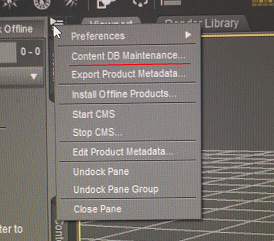
Then click the second item of the menu, content DB maintenance, and a small window will pop up, as shown in the following figure
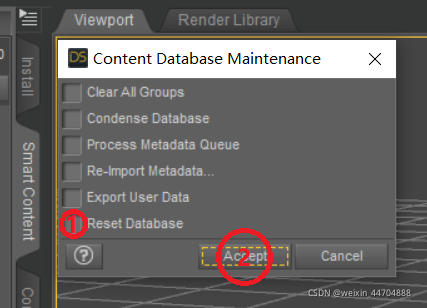
Then check the reset database item,
Then click accept to reset the database,
Close DAZ studio,
Reopen,
It will display the welcome window without login prompt before,
After logging in, click next in the lower right corner of the window
There will be no resource error prompt