Author Archives: Robins

[Solved] Pylink Windows Chinese path error: Specified file could not be opened

Solution:

Modify the jlink.py file under the pylink package path and find the flash_file method;

Find the self._dll.JLINK_DownloadFile line under this method, and modify the following parameter path.encode() to

path.encode(locale.getpreferredencoding()), Of course, you have to use the locale preamble package

[Solved] Failed to load config “prettier“ to extend from.?

In the project root directory

npm i eslint prettier-eslint eslint-config-prettier --save-dev

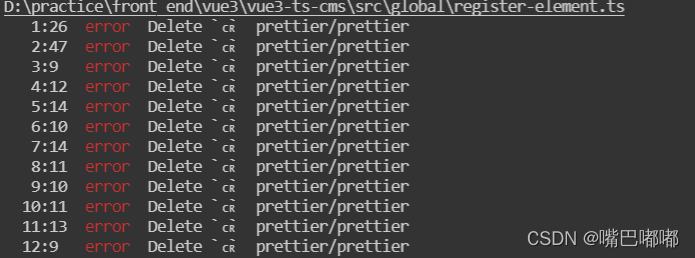
This error will appear after installation:

the culprit is a git configuration attribute: core.autocrlf

Due to historical reasons, the line breaks of text files under windows and Linux are inconsistent.

Windows uses both carriage return character Cr (carriage-return character) and line break LF (linefeed character) when wrapping a line

Mac and Linux systems only use the line break: LF

The old MAC system used the carriage return character CR

If it is a Windows system, the file code is UTF-8 and contains Chinese, it is best to set autocrlf to false globally

git config --global core.autocrlf false

[Solved] jupyter notebook Error: ModuleNotFoundError: No module named jupyter_nbextensions_configurator

Problem description

Platform: Windows 10 professional edition, anaconda3

When starting the Jupiter notebook, there is an error message, as follows:

ModuleNotFoundError: No module named  jupyter_nbextensions_configurator

Although the jupyter lab can still be used when it is opened, the error message is always a hidden danger. Therefore, after searching the data, the following solutions are found

Solution:

python -m pip install --user jupyter_contrib_nbextensions

#jupyter contrib nbextension install --user --skip-running-check

python -m pip install --user jupyter_nbextensions_configurator

#jupyter nbextensions_configurator enable --user

Only running the above two commands solves the problem of error reporting.

[Solved] waterdrop Import hive to clickhouse Error: Too many partitions for single INSERT block (more than 100).

1. Problem description

Use waterdrop to import data into the Clickhouse, and then the log reports an error:

Caused by: ru.yandex.clickhouse.except.ClickHouseException: ClickHouse exception, code: 252, host: 10.252.32.26, port: 8123; Code: 252, e.displayText() = DB::Exception: Too many partitions for single INSERT block (more than 100). The limit is controlled by 'max_partitions_per_insert_block' setting. Large number of partitions is a common misconception. It will lead to severe negative performance impact, including slow server startup, slow INSERT queries and slow SELECT queries. Recommended total number of partitions for a table is under 1000..10000. Please note, that partitioning is not intended to speed up SELECT queries (ORDER BY key is sufficient to make range queries fast). Partitions are intended for data manipulation (DROP PARTITION, etc). (version 20.3.10.75 (official build))

	at ru.yandex.clickhouse.except.ClickHouseExceptionSpecifier.specify(ClickHouseExceptionSpecifier.java:58)
	at ru.yandex.clickhouse.except.ClickHouseExceptionSpecifier.specify(ClickHouseExceptionSpecifier.java:28)
	at ru.yandex.clickhouse.ClickHouseStatementImpl.checkForErrorAndThrow(ClickHouseStatementImpl.java:680)
	at ru.yandex.clickhouse.ClickHouseStatementImpl.sendStream(ClickHouseStatementImpl.java:656)
	at ru.yandex.clickhouse.ClickHouseStatementImpl.sendStream(ClickHouseStatementImpl.java:639)
	at ru.yandex.clickhouse.ClickHousePreparedStatementImpl.executeBatch(ClickHousePreparedStatementImpl.java:382)
	at io.github.interestinglab.waterdrop.output.Clickhouse$$anonfun$process$1.apply(Clickhouse.scala:133)
	at io.github.interestinglab.waterdrop.output.Clickhouse$$anonfun$process$1.apply(Clickhouse.scala:115)
	at org.apache.spark.rdd.RDD$$anonfun$foreachPartition$1$$anonfun$apply$29.apply(RDD.scala:926)
	at org.apache.spark.rdd.RDD$$anonfun$foreachPartition$1$$anonfun$apply$29.apply(RDD.scala:926)
	at org.apache.spark.SparkContext$$anonfun$runJob$5.apply(SparkContext.scala:2069)
	at org.apache.spark.SparkContext$$anonfun$runJob$5.apply(SparkContext.scala:2069)
	at org.apache.spark.scheduler.ResultTask.runTask(ResultTask.scala:87)
	at org.apache.spark.scheduler.Task.run(Task.scala:108)
	at org.apache.spark.executor.Executor$TaskRunner.run(Executor.scala:338)
	at java.util.concurrent.ThreadPoolExecutor.runWorker(ThreadPoolExecutor.java:1149)
	at java.util.concurrent.ThreadPoolExecutor$Worker.run(ThreadPoolExecutor.java:624)
	at java.lang.Thread.run(Thread.java:748)
Caused by: java.lang.Throwable: Code: 252, e.displayText() = DB::Exception: Too many partitions for single INSERT block (more than 100). The limit is controlled by 'max_partitions_per_insert_block' setting. Large number of partitions is a common misconception. It will lead to severe negative performance impact, including slow server startup, slow INSERT queries and slow SELECT queries. Recommended total number of partitions for a table is under 1000..10000. Please note, that partitioning is not intended to speed up SELECT queries (ORDER BY key is sufficient to make range queries fast). Partitions are intended for data manipulation (DROP PARTITION, etc). (version 20.3.10.75 (official build))

2. Cause of problem

Clickhouse limit Max_partitions_per_insert_Block, that is, the partition of each inserted block. The solution is to modify this parameter and restart Clickhouse.

3. Solution

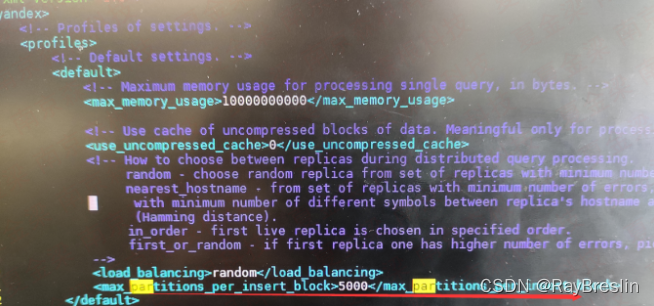
1. Modify users XML configuration

vi users.xml

add to

<max_partitions_per_insert_block>5000</max_partitions_per_insert_block>

2. Restart

sudo systemctl restart clickhouse-server

[Solved] flutter Project Error: ScrollController attached to multiple scroll views, Failed assertion: line 109 pos 12

1. Explain

Recently, I encountered an error when writing the shuttle project:

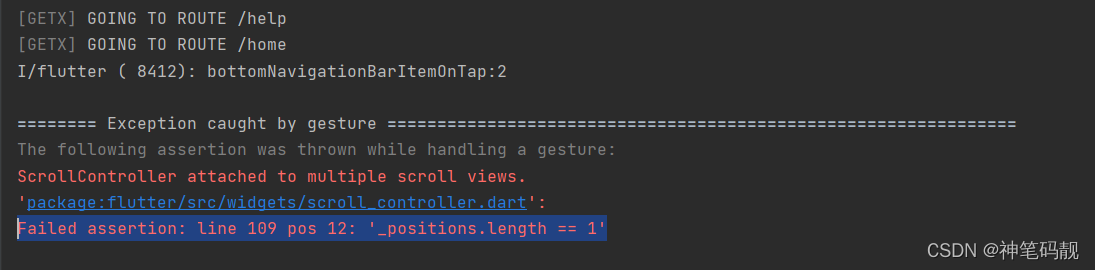
The following assertion was thrown while handling a gesture:
ScrollController attached to multiple scroll views.
'package:flutter/src/widgets/scroll_controller.dart':
Failed assertion: line 109 pos 12: '_positions.length == 1'

Reasons for error reporting:
1 The drawing function added to the project needs to navigate to different pages through the menu items of the drawing
2. A bottom navigation bar is added to the home page to navigate to different pages through the pagecontroller
3. The project manages routing and status through geTx.

Description of the problem: navigate to the settings or other pages through the drawer, and then re-navigate to the home page through the drawer. Click the item item item of the BottomNavigationBar, and will appear the error messages:

Failed assertion: line 109 pos 12: ‘_positions.length == 1’


2. Solution:

1. Drawer navigation uses Get.offAndToNamed(‘12313’); to jump.
2. You need to reinitialize the pageController every time you jump to the homepage. Through the build method of GetView, the controller is reinitialized every time the homepage interface is redrawn.

Specific operation:

code for the navigation part of the drawer:

class AppRouteProvide {
  Future onRouteTo(String routeName) {
    switch (routeName) {
      case Routes.Auth:
        Get.toNamed(Routes.Auth);
        break;
      case Routes.Home:
        Get.offAndToNamed(Routes.Home);
        break;
      case Routes.Help:
        Get.offAndToNamed(Routes.Help);
        break;
      case Routes.Splash:
        Get.toNamed(Routes.Splash);
        break;
      case Routes.Connect:
        Get.offAndToNamed(Routes.Connect);
        break;
      case Routes.Setting:
        Get.offAndToNamed(Routes.Setting);
        break;
    }
    return Future.value();
  }
}

Code of home page view:

class HomeScreen extends GetView<HomeController> {
  @override
  Widget build(BuildContext context) {
    // print('HomeScreen build');
    if (controller.pageController.hasClients) {
      controller.onClose();
      controller.onInit();
    }
    return AppbarWidgetScreen(
      body: _buildBody(context),
      bottomBar: _buildBottomNavigationBar(context),
    );
  }

Home page controller part code


class HomeController extends GetxController {
  final ApiRepository apiRepository;
  RxInt selectedIndex = 0.obs;

  late PageController pageController;
  RxList<Widget> widgetPage = <Widget>[
    HomeMainScreen(),
    HomeBuyScreen(),
    HomeCertScreen(),
    HomeSellScreen(),
    HomeMineScreen(),
  ].obs;

  HomeController({required this.apiRepository});

  @override
  void onReady() {
    super.onReady();
  }

  @override
  void onInit() {
    print('HomeController onInit()');
    pageController = PageController(
      initialPage: selectedIndex.value,
      keepPage: true,
    );
    super.onInit();
  }

  @override
  void onClose() {
    super.onClose();
  }
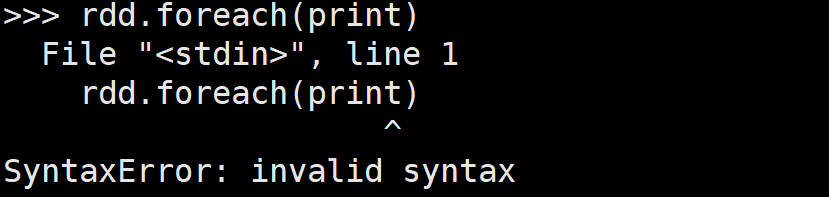

mac brew install mysql ‘/tmp/mysql.sock’ (2) [How to Solve]

the reason for the error is very simple: MySQL should be used instead of MySQL when starting the command server

mac brew install mysql

Install MySQL with homebrew on Mac to perfectly solve error 2002 (HY000):

Can’t connect to local MySQL server through socket ‘/tmp/mysql.Sock ‘(2) error

1. Start the command mysql server

the startup method of using MySQL command directly is wrong

This problem occurs when you directly call the MySQL command. It is said on the Internet that it is because of MySQL Caused by CNF configuration file.

the correct startup method is mysql server

➜  support-files mysql
ERROR 2002 (HY000): Can't connect to local MySQL server through socket '/tmp/mysql.sock' (2)
➜  support-files pwd
/opt/homebrew/opt/mysql/support-files
➜  support-files ls
mysql-log-rotate    mysql.server        mysqld_multi.server

2. my.CNF file location

my.CNF file location

➜  homebrew cd etc
➜  etc ls
bash_completion.d   ca-certificates     dump.rdb            my.cnf              [email protected]         
redis-sentinel.conf redis.conf
➜  etc pwd
/opt/homebrew/etc

3. MySQL installation location

➜  homebrew cd opt
➜  opt ls
ca-certificates jasper          libevent        libpng          lz4             [email protected]     pzstd           six
devil           jpeg            libjpeg         libtiff         mysql           protobuf        redis           zlib
icu4c           lcms2           libjpg          little-cms2     [email protected]       [email protected]   [email protected]       zstd
➜  opt cd mysql
➜  mysql ls
INSTALL_RECEIPT.json      LICENSE.router            README.router             homebrew.mxcl.mysql.plist lib                       support-files
LICENSE                   README                    bin                       homebrew.mysql.service    mysqlrouter-log-rotate
LICENSE-test              README-test               docs                      include                   share
➜  mysql pwd
/opt/homebrew/opt/mysql
➜  mysql

[Solved] Echart Error: Typeerror: axis Getaxesonzeroof is not a function

When using echart, it is clear that all parameters are passed in, but this. Is used in echart When init() initializes, it reports an error typeerror: axis Getaxesonzeroof is not a function. Through exclusion one by one, it is found that this error will occur when the data in the xaxis attribute is [].

Of course, my problem is not your problem, please analyze the specific problem!!!

My xaxis:

xAxis: {
    type: 'category',
    axisTick: {
      alignWithLabel: true
    },
    data: data
  }

Finally, my solution is:

if (this.data.length) {
  this.dom.setOption(option);
} else {
  this.dom.setOption({});   // Auto replace the first option
}

[Solved] MySQL Error: Can‘t find record in ‘order_form‘

Remember a mysql query problem, associated query the order table, Mysql ERROR 1032 (HY000): Can’t find record in order_form appeared, after checking the data, no problem was found.

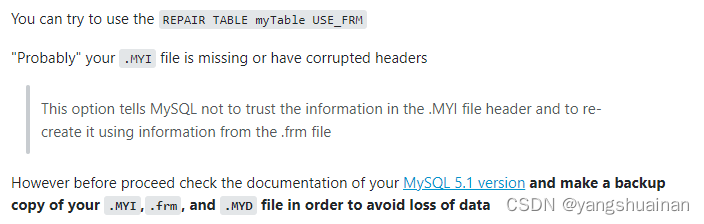
Execute: REPAIR TABLE order_form USE_FRM The problem is solved after the repair.

PS: Before repairing, please remember to back up the table to be repaired to prevent data loss, remember! !

[Solved] Pychar error: modulenotfounderror: no module named ‘requests_ HTML ‘solution

**About pychar’s error modulenotfounderror: no module named ‘requests_HTML ‘
code from requests_HTML import htmlsession is marked with red and an error is reported

Error reason

Pycharm did not import requests_HTML Library

Solution:

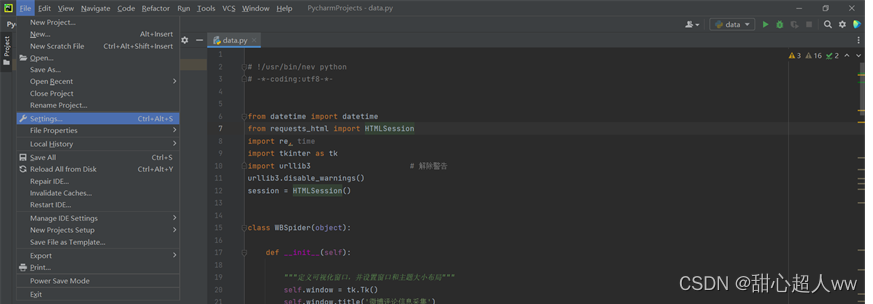
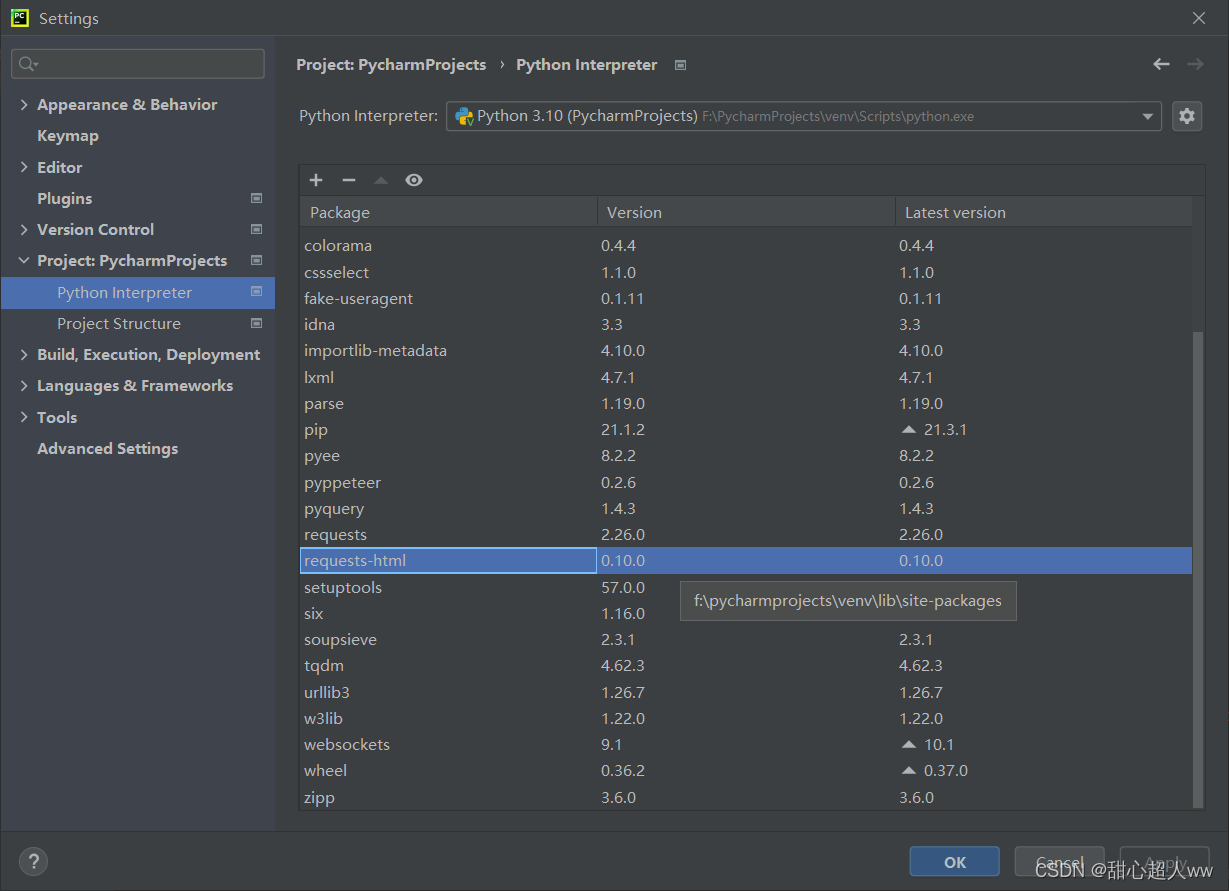
    1. 1.file — settings

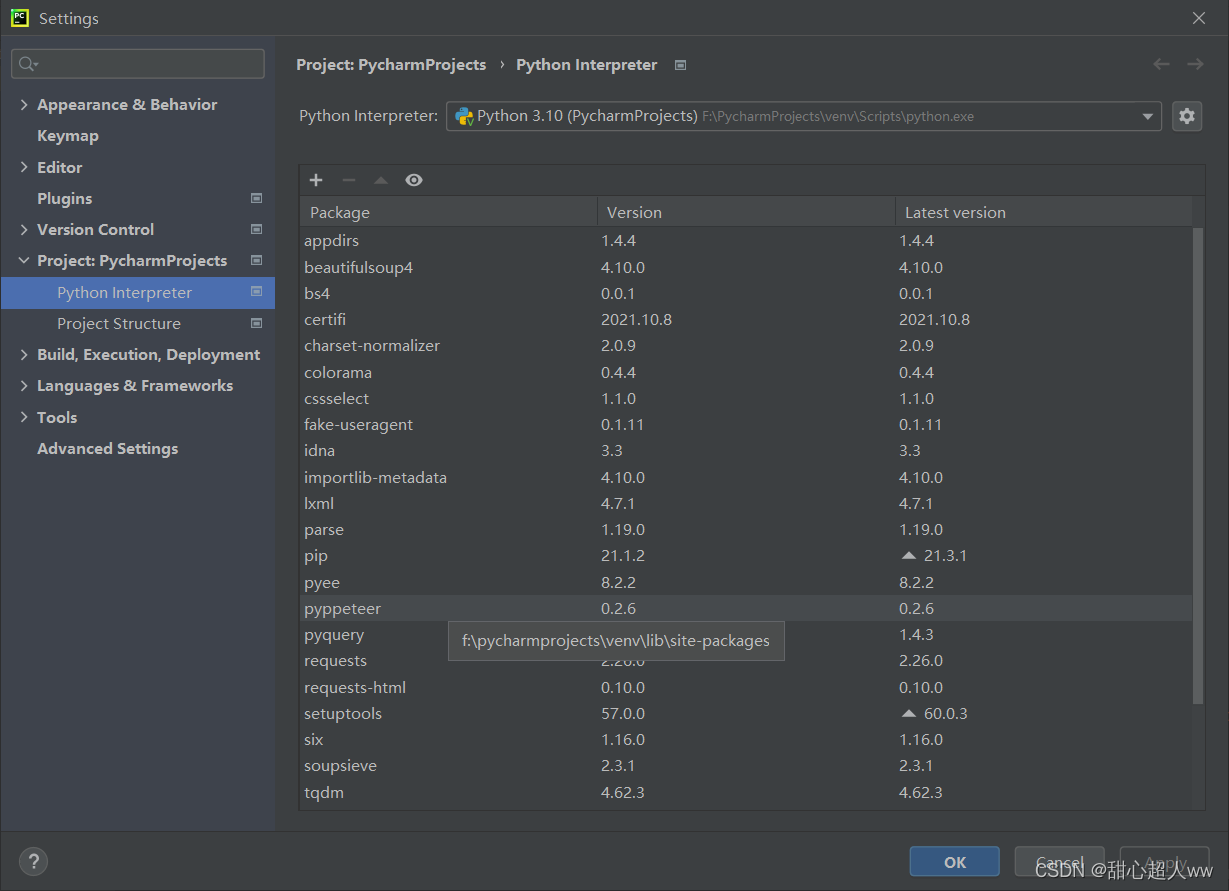
    1. 2.project: pycharmprojects — Python interpreter. Above a long list of libraries displayed on the right, there is a + – △ visual symbol. Click the + sign

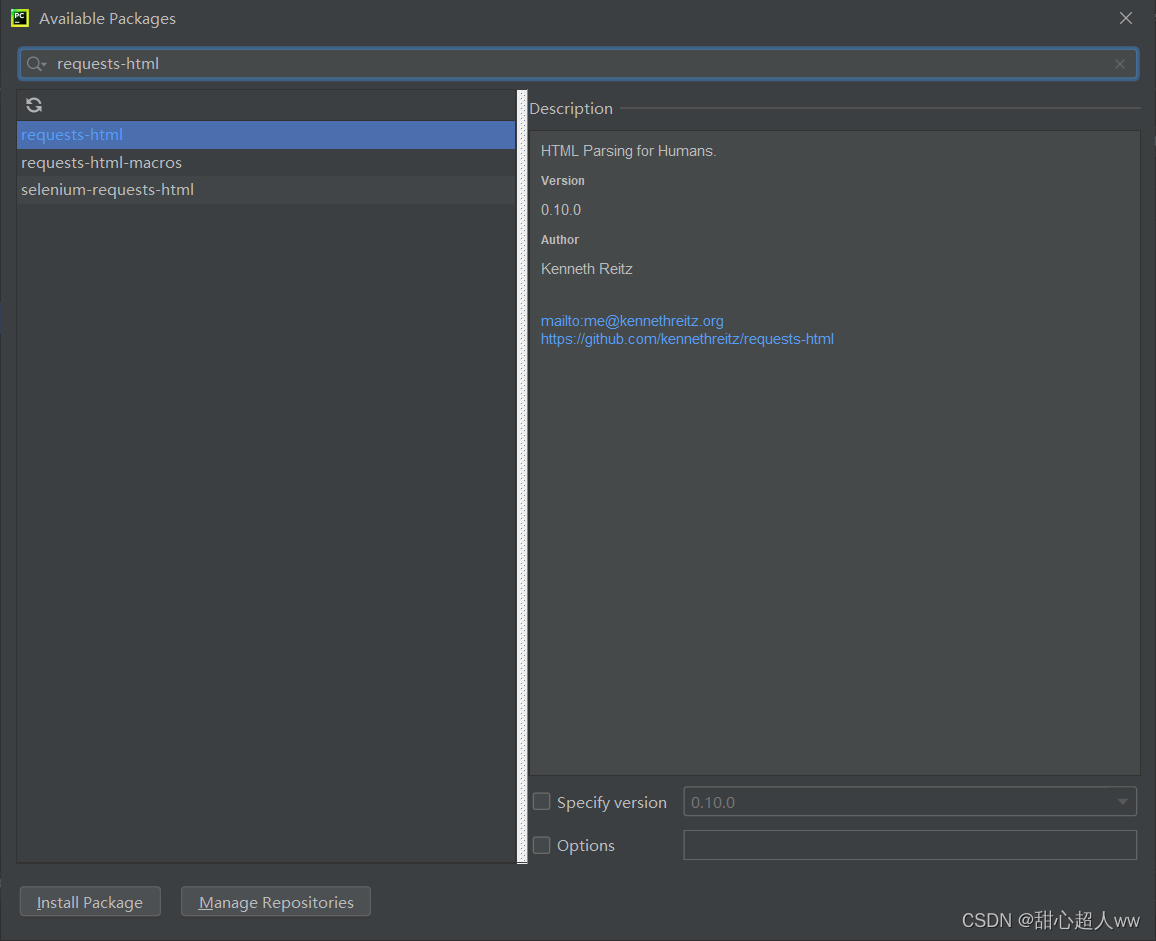
    1. 3.enter the added Library: requests HTML in the input box, and click Install Package in the lower left corner to install it. I have already installed it here, So the button turns gray

    1. 4.returns to the previous page. You can see the installed requests HTML package on the right. Click OK

    5. The code is not marked red yes