Author Archives: Robins

[Solved] Feign Error: -‘oauth-client.FeignClientSpecification‘ could not be registered

environment

<spring-boot.version>2.5.3</spring-boot.version>
<spring-cloud.version>2020.0.3</spring-cloud.version>
<spring-cloud-alibaba.version>2021.1</spring-cloud-alibaba.version>

report errors

Errors are reported during project startup, as follows:

2021-12-22 16:55:56.766  WARN 21922 --- [           main] ConfigServletWebServerApplicationContext : Exception encountered during context initialization - cancelling refresh attempt: org.springframework.beans.factory.support.BeanDefinitionOverrideException: Invalid bean definition with name 'oauth-client.FeignClientSpecification' defined in null: Cannot register bean definition [Generic bean: class [org.springframework.cloud.openfeign.FeignClientSpecification]; scope=; abstract=false; lazyInit=null; autowireMode=0; dependencyCheck=0; autowireCandidate=true; primary=false; factoryBeanName=null; factoryMethodName=null; initMethodName=null; destroyMethodName=null] for bean 'oauth-client.FeignClientSpecification': There is already [Generic bean: class [org.springframework.cloud.openfeign.FeignClientSpecification]; scope=; abstract=false; lazyInit=null; autowireMode=0; dependencyCheck=0; autowireCandidate=true; primary=false; factoryBeanName=null; factoryMethodName=null; initMethodName=null; destroyMethodName=null] bound.
2021-12-22 16:55:56.776  INFO 21922 --- [           main] ConditionEvaluationReportLoggingListener : 

Error starting ApplicationContext. To display the conditions report re-run your application with 'debug' enabled.
2021-12-22 16:55:56.799 ERROR 21922 --- [           main] o.s.b.d.LoggingFailureAnalysisReporter   : 

***************************
APPLICATION FAILED TO START
***************************

Description:

The bean 'xxx-client.FeignClientSpecification' could not be registered. A bean with that name has already been defined and overriding is disabled.

Action:

Consider renaming one of the beans or enabling overriding by setting spring.main.allow-bean-definition-overriding=true

reason

Multiple interfaces in a project use @ feignclient to call the same service, which means that a service can only be used once with @ feignclient.

Solution:

1) Distinguish with ContextID

But I don’t know why it didn’t work

@FeignClient(value = “xxx-server”, contextId = “oauth-client”)
public interface OAuthClientFeignClient {
@GetMapping("/api/v1/oauth-clients/{clientId}")
Result<SysOauthClient> getOAuthClientById(@PathVariable String clientId);
}

2) Add the following code to the application.properties file.

#Allow the existence of multiple Feign calls to the same Service interface
spring.main.allow-bean-definition-overriding=true

3) Add the following code to the application.yml file.

spring:
  main:
    #Allow the existence of multiple Feign calls to the same Service interface
    allow-bean-definition-overriding: true
        The above code enables multiple interfaces to call the same service using @FeignClient.

[Solved] cocopod Error: failed: undefined method `map‘ for nil:NilClass

――― MARKDOWN TEMPLATE ―――――――――――――――――――――――――――――――――――――――――――――――――――――――――――

### Command


/usr/local/bin/pod install


### Report

* What did you do?

* What did you expect to happen?

* What happened instead?


### Stack


   CocoaPods : 1.8.4
        Ruby : ruby 2.6.3p62 (2019-04-16 revision 67580) [x86_64-darwin18]
    RubyGems : 3.0.6
        Host : Mac OS X 10.14.5 (18F132)
       Xcode : 11.3.1 (11C504)
         Git : git version 2.19.0
Ruby lib dir : /Users/huanghaipo/.rvm/rubies/ruby-2.6.3/lib
Repositories : HPSpecs - git - https://github.com/HuangHaiPo/HPSpecs.git @ 87ca8ef48b56269780abb0e14211ca1f2e121217
               HuModularizationSpecs - git - [email protected]:HuModularizationLibrary/HuModularizationSpecs.git @ cd28555226d424e50e8e7454c3a8a5b287e4b9f2
               master - git - https://github.com/CocoaPods/Specs.git @ 061335ab06da5c1f542cdb56bc0d73f9af2d1984


### Podfile

ruby
source 'https://github.com/CocoaPods/Specs.git'

# Uncomment this line to define a global platform for your project
 platform :ios, '9.0'


――― TEMPLATE END ――――――――――――――――――――――――――――――――――――――――――――――――――――――――――――――――

[!] Oh no, an error occurred.

Search for existing GitHub issues similar to yours:
pe=Issues

If none exists, create a ticket, with the template displayed above, on:
https://github.com/CocoaPods/CocoaPods/issues/new

Be sure to first read the contributing guide for details on how to properly submit a ticket:
https://github.com/CocoaPods/CocoaPods/blob/master/CONTRIBUTING.md

Don't forget to anonymize any private data!

Looking for related issues on cocoapods/cocoapods...
Searching for inspections failed: undefined method `map' for nil:NilClass

Solution:

Execute the following command to update the local library. If the version is low, upgrade cocoapods

pod repo update
upgrade
sudo gem update --system
sudo gem install cocoapods
pod setup

[Solved] ValueError: row index was 65536, not allowed by .xls format

1. Cause analysis

Xlrd and xlwt are functions used to process XLS files in Python. The maximum number of rows in a single sheet is 65535. Therefore, this error occurs when the amount of read and write data exceeds: valueerror: row index was 65536, not allowed by xls format

2.Solution

1. Method 1

The xlwt library is still used for processing, but it limits the maximum number of 5W rows of data in each sheet

# Note: What needs to be written is the two-dimensional list target_data
# Write data into excel table
workbook = xlwt.Workbook()
sheet1 = workbook.add_sheet("Sheet1")
sheet2 = workbook.add_sheet("Sheet2")
sheet3 = workbook.add_sheet("Sheet3")
al = xlwt.Alignment()
al.horz = 0x02 # Set horizontal center
# Create a style object, initialize the style
style = xlwt.XFStyle()
style.alignment = al # set horizontal center

print(len(target_data)) # Look at the length of target_data data, by checking that there are actually 14W rows, so we split into 3 sheets

for i in range(0,50000):
    for j in range(0,len(target_data[i])):
     sheet1.write(i, j, target_data[i][j], style)

for i in range(50000,100000):
    for j in range(0,len(target_data[i])):
     sheet2.write(i-50000, j, target_data[i][j], style)

for i in range(100000,len(target_data)):
    for j in range(0,len(target_data[i])):
     sheet3.write(i-100000, j, target_data[i][j], style)

# Set the width of each column
sheet1.col(0).width=256*15
sheet1.col(1).width=256*15
sheet1.col(2).width=256*15
sheet1.col(3).width=256*15
sheet2.col(0).width=256*15
sheet2.col(1).width=256*15
sheet2.col(2).width=256*15
sheet2.col(3).width=256*15
sheet3.col(0).width=256*15
sheet3.col(1).width=256*15
sheet3.col(2).width=256*15
sheet3.col(3).width=256*15

workbook.save("target_data1220.xls") # 保存到target_data.xls

2. Method 2

Using openpyxl library, the maximum number of rows that can be processed reaches 1048576

# Description: need to write is a two-dimensional list target_data
# Write data to excel table
workbook = openpyxl.Workbook() 
sheet0 = workbook.create_sheet(index=0) # create sheet0
sheet0.column_dimensions['A'].width=15 # set the width of column A
sheet0.column_dimensions['B'].width=22 # Set the width of column B
sheet0.column_dimensions['C'].width=15 # Set the width of column C
sheet0.column_dimensions['D'].width=15 # Set the width of column D
# Write data in a loop, centered and aligned
for i in range(len(target_data)):
    for j in range(len(target_data[i])):
        sheet0.cell(i+1,j+1).value = target_data[i][j] # write data
        sheet0.cell(i+1,j+1).alignment = Alignment(horizontal='center', vertical='center') # center alignment
workbook.save('test.xlsx') # Save the file

[Solved] tomcat Startup Error: java.lang.SecurityException: Invalid signature file digest for Manifest main attributes

Error: invalid signature file digest for manifest main attributes

The project runs normally on the local machine, but it cannot be started when deployed to the Tomcat of the server. The following error is reported:

Caused by: java.lang.SecurityException: Invalid signature file digest for Manifest main attributes
        at sun.security.util.SignatureFileVerifier.processImpl(SignatureFileVerifier.java:239) [:1.6.0_30]
        at sun.security.util.SignatureFileVerifier.process(SignatureFileVerifier.java:193) [:1.6.0_30]
        at java.util.jar.JarVerifier.processEntry(JarVerifier.java:296) [:1.6.0_30]
        at java.util.jar.JarVerifier.update(JarVerifier.java:207) [:1.6.0_30]
        at java.util.jar.JarFile.initializeVerifier(JarFile.java:342) [:1.6.0_30]
        at java.util.jar.JarFile.getInputStream(JarFile.java:410) [:1.6.0_30]
        at org.jboss.vfs.spi.JavaZipFileSystem.getFile(JavaZipFileSystem.java:159) [jboss-vfs.jar:3.0.0.GA]
        at org.jboss.vfs.VirtualFile.getPhysicalFile(VirtualFile.java:262) [jboss-vfs.jar:3.0.0.GA]
        at org.jboss.web.deployers.AbstractWarDeployer$1.visit(AbstractWarDeployer.java:853) [:6.0.0.Final]
        at org.jboss.vfs.VirtualFile.visit(VirtualFile.java:408) [jboss-vfs.jar:3.0.0.GA]
        at org.jboss.vfs.VirtualFile.visit(VirtualFile.java:410) [jboss-vfs.jar:3.0.0.GA]
        at org.jboss.vfs.VirtualFile.visit(VirtualFile.java:410) [jboss-vfs.jar:3.0.0.GA]
        at org.jboss.vfs.VirtualFile.visit(VirtualFile.java:410) [jboss-vfs.jar:3.0.0.GA]
        at org.jboss.vfs.VirtualFile.visit(VirtualFile.java:396) [jboss-vfs.jar:3.0.0.GA]
        at org.jboss.web.deployers.AbstractWarDeployer.getExplodedWarUrl(AbstractWarDeployer.java:866) [:6.0.0.Final]
        at org.jboss.web.deployers.AbstractWarDeployer.deploy(AbstractWarDeployer.java:400) [:6.0.0.Final]
        ... 47 more

Almost all the Internet queries have problems. There are files in the meta-inf folder of the packaged jar or war.JBoss is trying to process these files or doesn’t want to process them there.

However, I found that my meta-inf folder was empty and there was no * RSA,*.DSA,*.SF and other documents are hard to understand
I have also tried to repackage and replace the Tomcat version, but this problem has not been solved.

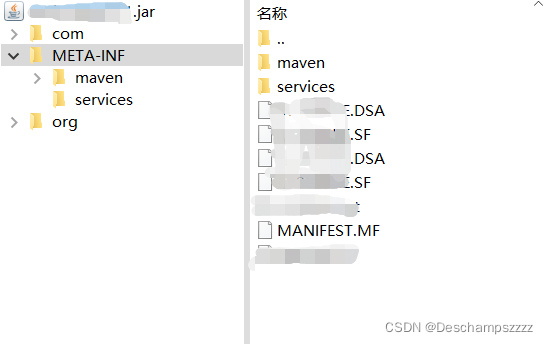
Finally, I thought that the project is divided into modules. Are there these files in the jar package generated by the referenced submodule? Finally, I checked one by one and finally found the problem:
there are these * RSA,*. DSA,*. SF files

remove these files from the jar package:

zip -d <jar file name>.jar META-INF/*.RSA META-INF/*.DSA META-INF/*.SF

But this is a temporary solution but not a permanent solution. The problem will still occur in the next packaging. Finally, go to the pom.xml file to exclude META-INF/*.SF and other files

<plugin>
	<groupId>org.apache.maven.plugins</groupId>
	<artifactId>maven-shade-plugin</artifactId>
	<version>3.1.1</version>
	<executions>
		<execution>
			<phase>package</phase>
			<goals>
				<goal>shade</goal>
			</goals>
			<configuration>
				<filters>
					<filter>
						<artifact>*:*</artifact>
						<excludes>
							<!-- Exclude the following files to prevent verification errors when the program is started  -->
							<exclude>META-INF/*.SF</exclude>
							<exclude>META-INF/*.DSA</exclude>
							<exclude>META-INF/*.RSA</exclude>
						</excludes>
					</filter>
				</filters>
			</configuration>
		</execution>
	</executions>
</plugin>

[Solved] internal compiler error Killed (program cc1plus)

g++: internal compiler error: Killed (program cc1plus)

g++: internal compiler error: Killed (program cc1plus)
Please submit a full bug report,
with preprocessed source if appropriate.
See <http://bugzilla.redhat.com/bugzilla> for instructions.
gmake: *** [cmGeneratorTarget.o] Error 4
---------------------------------------------
Error when bootstrapping CMake:
Problem while running gmake
---------------------------------------------
Log of errors: /root/cmake-3.22.0/Bootstrap.cmk/cmake_bootstrap.log
---------------------------------------------

The reason is insufficient memory. The solution is to increase swap partition

[root@ALiYunOgenes cmake-3.22.0]# free -h
              total        used        free      shared  buff/cache   available
Mem:           991M        465M        257M        1.1M        268M        379M
Swap:            0B          0B          0B
[root@ALiYunOgenes cmake-3.22.0]# dd if=/dev/zero of=/var/swap bs=1024 count=2048000  
2048000+0 records in
2048000+0 records out
2097152000 bytes (2.1 GB) copied, 19.0987 s, 110 MB/s

[root@ALiYunOgenes cmake-3.22.0]# mkswap /var/swap 
Setting up swapspace version 1, size = 2047996 KiB
no label, UUID=d5ede89f-d76a-4b53-9ec9-256a9370fcfe

[root@ALiYunOgenes cmake-3.22.0]# swapon /var/swap 
swapon: /var/swap: insecure permissions 0644, 0600 suggested.
[root@ALiYunOgenes cmake-3.22.0]# vi /etc/fstab 
…………
/var/swap swap swap defaults 0 0
…………

[root@ALiYunOgenes cmake-3.22.0]# free -m          
              total        used        free      shared  buff/cache   available
Mem:            991         466          58           1         465         374
Swap:          1999           0        1999
[root@ALiYunOgenes cmake-3.22.0]# 

[Solved] harbor Error: because it doesn‘t contain any IP SANs

Bloggers encounter an interesting error when using Harbor:

Error response from daemon: Get https://192.168.2.250:443/v2/: x509:

cannot validate certificate for 192.168.2.250 because it doesn’t contain any IP SANs

Error reporting means: error response from the daemon: G ethttps://192.168.2.250:443/v2/: X509: unable to validate 192.168 2.250 because it does not contain any IP SAN

Blogger Harbor Address 192.168.2.250, using 443 as the secure port.

[reason]:

Docker was unable to validate the certificate for the private repository.

[solution]:

Don’t panic when you encounter a problem. Just hit the king and you’ll know how to solve it. I solved it this way:

1. Edit the docker configuration file (/etc/docker/daemon.JSON)

2. Add “secure registers”: [“192.168.2.250:443”], and specify the address and port of the harbor image warehouse.

3. Restart the docker service and the problem can be solved.

If it still cannot be solved, leave a message in the comment area.

[Solved] Linux Kernel Compile Error: make menuconfig‘ requires the ncurses libraries

report errors

*** Unable to find the ncurses libraries or the
 *** required header files.
 *** 'make menuconfig' requires the ncurses libraries.
 *** 
 *** Install ncurses (ncurses-devel) and try again.
 *** 
make[1]: *** [scripts/kconfig/Makefile:202: scripts/kconfig/dochecklxdialog] Error 1
make: *** [Makefile:520: menuconfig] Error 2

Solution:
sudo apt-get install libncurses5-dev

[Solved] ubuntu makefile Cross-compilation error: file not recognized: file format not recognized

When compiling netkit-ftp on linux ubuntu an error is reported: file not recognized: file format not recognized

[root@ubuntu /arnold_test/20211219_ftpCrossCompile/netkit-ftp-0.17]24# make
(cd  ftp && make)
make[1]: Entering directory '/arnold_test/20211219_ftpCrossCompile/netkit-ftp-0.17/ftp'
arm-linux-gnueabihf-gcc -O2 -Wall -W -Wpointer-arith -Wbad-function-cast -Wcast-qual -Wstrict-prototypes -Wmissing-prototypes -Wmissing-declarations -Wnested-externs -Winline  glob.c -c
arm-linux-gnueabihf-gcc -O2 -Wall -W -Wpointer-arith -Wbad-function-cast -Wcast-qual -Wstrict-prototypes -Wmissing-prototypes -Wmissing-declarations -Wnested-externs -Winline  main.c -c
arm-linux-gnueabihf-gcc -O2 -Wall -W -Wpointer-arith -Wbad-function-cast -Wcast-qual -Wstrict-prototypes -Wmissing-prototypes -Wmissing-declarations -Wnested-externs -Winline  ruserpass.c -c
arm-linux-gnueabihf-gcc  cmds.o cmdtab.o domacro.o ftp.o glob.o main.o ruserpass.o  -o ftp
cmds.o: file not recognized: file format not recognized
collect2: error: ld returned 1 exit status
Makefile:14: recipe for target 'ftp' failed
make[1]: *** [ftp] Error 1
make[1]: Leaving directory '/arnold_test/20211219_ftpCrossCompile/netkit-ftp-0.17/ftp'
Makefile:7: recipe for target 'ftp.build' failed
make: *** [ftp.build] Error 2

Solution: make clean

Or manually delete the files generated by the previous compilation

[Solved] rabbitMQ: factory.newConnection() Error: com.rabbitmq.client.ShutdownSignalException

About rabbitmq: factory Newconnection() reported an error com rabbitmq. client.ShutdownSignalException
exception information

Exception in thread "main" java.io.IOException
	at com.rabbitmq.client.impl.AMQChannel.wrap(AMQChannel.java:129)
	at com.rabbitmq.client.impl.AMQChannel.wrap(AMQChannel.java:125)
	at com.rabbitmq.client.impl.AMQChannel.exnWrappingRpc(AMQChannel.java:147)
	at com.rabbitmq.client.impl.AMQConnection.start(AMQConnection.java:439)
	at com.rabbitmq.client.impl.recovery.RecoveryAwareAMQConnectionFactory.newConnection(RecoveryAwareAMQConnectionFactory.java:65)
	at com.rabbitmq.client.impl.recovery.AutorecoveringConnection.init(AutorecoveringConnection.java:160)
	at com.rabbitmq.client.ConnectionFactory.newConnection(ConnectionFactory.java:1216)
	at com.rabbitmq.client.ConnectionFactory.newConnection(ConnectionFactory.java:1173)
	at com.rabbitmq.client.ConnectionFactory.newConnection(ConnectionFactory.java:1131)
	at com.rabbitmq.client.ConnectionFactory.newConnection(ConnectionFactory.java:1294)
	at util.ConnectionUtil.getConnection(ConnectionUtil.java:40)
	at Foundation_auto ACK.Send.main(Send.java:27)
Caused by: com.rabbitmq.client.ShutdownSignalException: connection error; protocol method: #method<connection.close>(reply-code=530, reply-text=NOT_ALLOWED - vhost /kavito not found, class-id=10, method-id=40)
	at com.rabbitmq.utility.ValueOrException.getValue(ValueOrException.java:66)
	at com.rabbitmq.utility.BlockingValueOrException.uninterruptibleGetValue(BlockingValueOrException.java:36)
	at com.rabbitmq.client.impl.AMQChannel$BlockingRpcContinuation.getReply(AMQChannel.java:502)
	at com.rabbitmq.client.impl.AMQChannel.privateRpc(AMQChannel.java:293)
	at com.rabbitmq.client.impl.AMQChannel.exnWrappingRpc(AMQChannel.java:141)
	... 9 more

tools

public class ConnectionUtil {
    private static final String HOST = "127.0.0.1";
    /**
     * Here java access requires the use of 5672;
     * web access uses 15672;
     */
    private static final Integer PORT = 5672;
    private static final String VIRTUAL_HOST = "/kavito";
    private static final String USERNAME = "chen";
    private static final String PASSWORD = "a123";

    public static Connection getConnection() throws IOException, TimeoutException {
        // Define the connection factory
        ConnectionFactory factory = new ConnectionFactory();
        // Service address
        factory.setHost(HOST);
        // Port
        factory.setPort(PORT);

        // set account information, username, password, vhost
        // set virtual machine, one mq service can set multiple virtual machines, each virtual machine is equivalent to a separate mq
        factory.setVirtualHost(VIRTUAL_HOST);
        factory.setUsername(USERNAME);
        factory.setPassword(PASSWORD);

        // Get the connection through the factory
        Connection connection = factory.newConnection();
        return connection;
    }
}

problem-solving: my solution is not to use the online setting permission

Reference commands for setting permissions
rabbitmqctl set_permissions -p "/" username ".*" ".*" ".*"

My problem is caused by setting the virtual machine
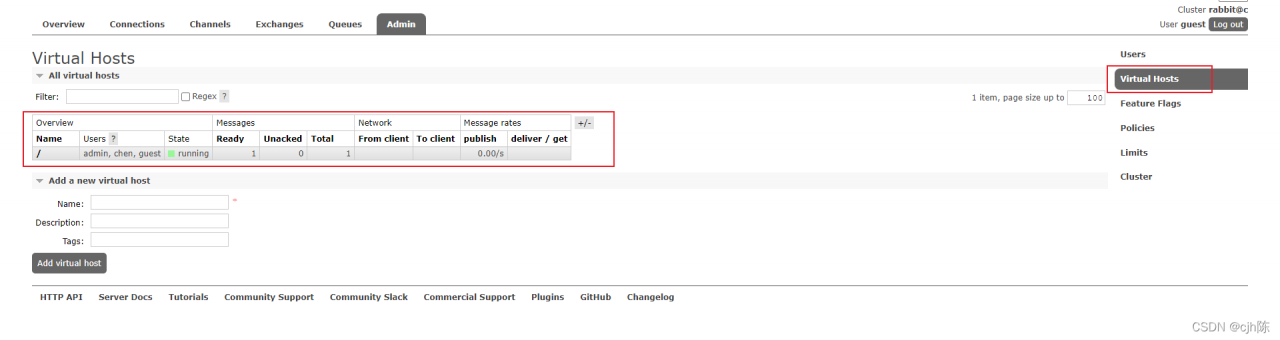
the default virtual machine on rabbitmq is

and the virtual machine set in my code is

Solution:
the first Change the virtual machine in the code to

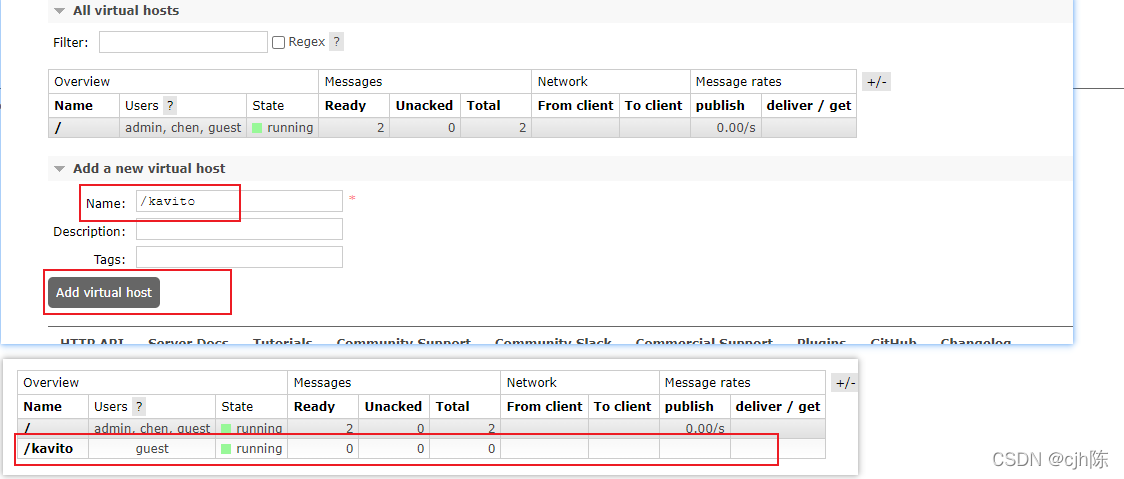
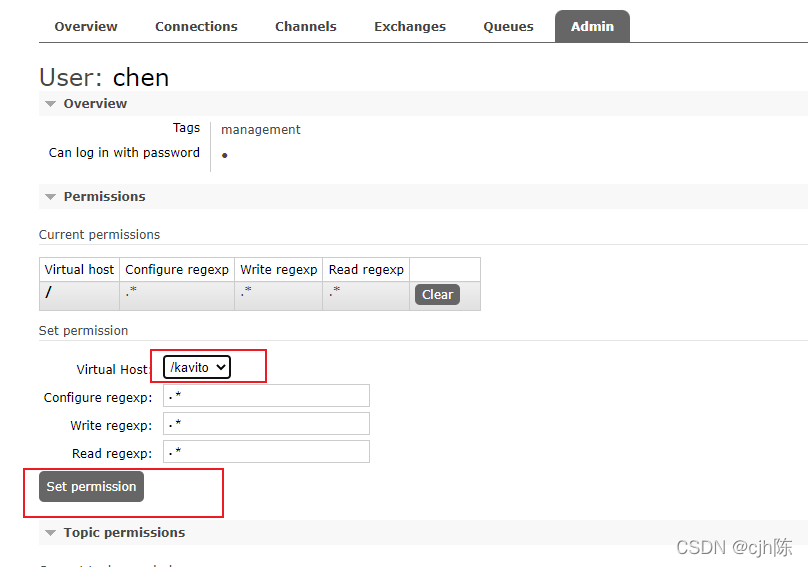
the second Create a new virtual machine named/kavito in rabbitmq (PS: the name here depends on your actual situation)

and set permissions for the corresponding user

[Solved] electron Use remote Error: Cannot read properties of undefined (reading ‘BrowserWindow‘)

Recently, I wrote a small demo of remote while learning electron. There is such a code:

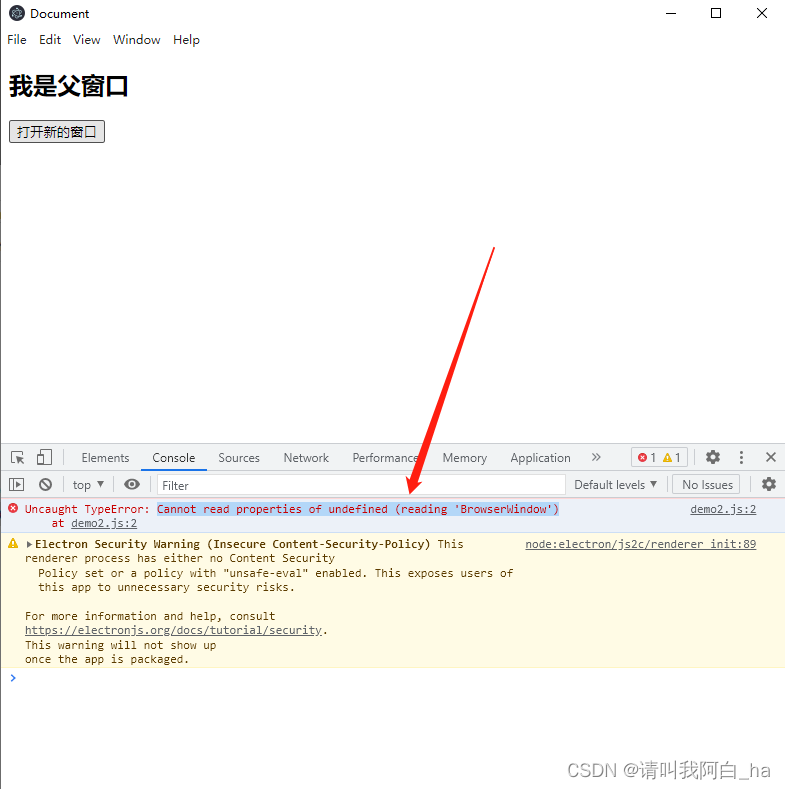
const BrowserWindow = require("electron").remote.BrowserWindow;

An error will be reported, as shown in the following figure:

Then I went to the Internet and looked at some articles. It seems to be a problem with the version. My electron is @V16.0.4, and remote abandoned the remote module in electron12, so we need to install the remote package ourselves.

1. First install the @electron/remote package under the project root directory:

npm install @electron/remote --save

2. Initialize in the main process:

require("@electron/remote/main").initialize();
require("@electron/remote/main").enable(mainWindow.webContents);

3. And set enableremotemodule and contextisolation in the main process webpreferences:

 webPreferences: {
    nodeIntegration: true,
    contextIsolation: false,
    enableRemoteModule: true, // use remote module
 },

4. Set in the rendering process

const BrowserWindow = require("@electron/remote").BrowserWindow;

Well, this is my overall Code:

Main process

var electron = require("electron");
var app = electron.app; // Reference app
var BrowserWindow = electron.
var mainWindow = null; // Specify the main window to open

// When electron has finished initializing and is ready to create a browser window
// This method is called
app.on("ready", () => {
  mainWindow = new BrowserWindow({
    width: 800,
    height: 800,
    webPreferences: {
      nodeIntegration: true,
      contextIsolation: false,
      enableRemoteModule: true, // use remote module
    },
  });

  require("@electron/remote/main").initialize(); // initialize
  require("@electron/remote/main").enable(mainWindow.webContents);
  mainWindow.loadFile("demo2.html"); // load the index.html page
  mainWindow.openDevTools(); // open developer tools

  mainWindow.on("closed", () => {
    mainWindow = null;
  });
});

Subprocess

const btn = this.document.querySelector("#btn");
const BrowserWindow = require("@electron/remote").BrowserWindow;

window.onload = () => {
  btn.onclick = () => {
    newWin = new BrowserWindow({
      width: 500,
      height: 500,
    });

    newWin.loadFile("load.html");
    newWin.on("closed", () => {
      newWin = null;
    });
  };
};

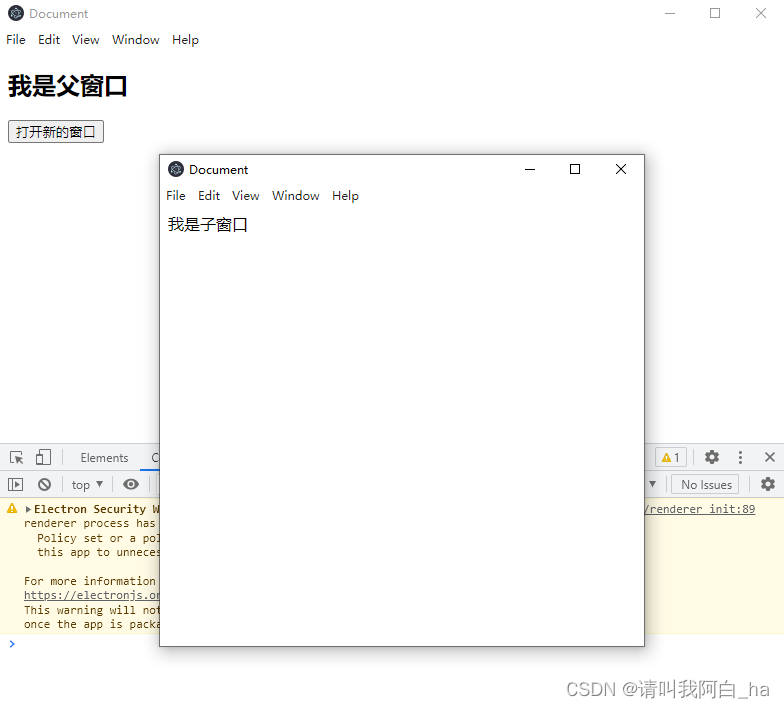
Result display