Tag Archives: python

Python Basics – python3 installing pyhook and pywin32 Libraries

<

pyHook installation/h6>
pyHook library to download their own.
pyHook library access:
lfd.uci.edu
small jujube resource warehouse extraction code: c7fq

When is installed, use PIP install and drag the WHL file directly into the CMD to generate the path.

pywin32 install

CMD PIP install pywin32 is ready to install.
pywin32 is installed and we can use both win32com and pythoncom.

import win32com
import pythoncom
like!

Python 3.7 pyGame download method


open https://www.lfd.uci.edu/~gohlke/pythonlibs/#pygame

download pygame 1.9.3 – cp37 – cp37m – win_amd64. WHL

PIP install pygame-1.9.3-cp37-cp37m-win_amd64.whl

test type import pygame in python IDLE. If no error is reported, the installation is successful, and then type pygame.ver to see the version number

Installing xgboost in anaconda is based on win10 32 / 64 bit system

Because the computer system is 32-bit, software that you want to press on 64 bits can be tricky. This article made a search on the net, think of Stack Overflow use https://stackoverflow.com/questions/35139108/how-to-install-xgboost-in-anaconda-python-windows-platform;
There are only three steps:
1. Anaconda is installed; That’s not a big deal
2. Enter anaconda Prompt; Anaconda Search-t Conda XgBoost enter; A big push of XgBoost is returned
3, select the appropriate XGBoost for your system; Anaconda/py-xgBoost; So enter Conda Install-c Anaconda XgBoost enter
4, ok!

206. Reverse Linked List [easy] (Python)

Topic link
https://leetcode.com/problems/reverse-linked-list/
The questions in the original

Reverse a singly linked list.

The title translation
Flip a one-way linked list
Thinking method
This topic is relatively basic, and there are many solutions to it, and there are also many solutions to AC. Here, only part of the ideas are sorted out for reference.
Thinking a
Using the stack structure, the contents of the linked list can be pushed onto the stack in turn, and then ejected from the stack in turn to construct the reverse order. The following code emulates the stack with ordinary arrays.
code

# Definition for singly-linked list.
# class ListNode(object):
#     def __init__(self, x):
#         self.val = x
#         self.next = None

class Solution(object):
    def reverseList(self, head):
        """
        :type head: ListNode
        :rtype: ListNode
        """
        p = head
        newList = []
        while p:
            newList.insert(0, p.val)
            p = p.next

        p = head
        for v in newList:
            p.val = v
            p = p.next
        return head

Idea 2
Similar to the idea of a stack, but directly in the original linked list operation, by iterating the node reorganization, the previous node moved to the back of the reorganized list. It’s actually an upside-down operation.
code

# Definition for singly-linked list.
# class ListNode(object):
#     def __init__(self, x):
#         self.val = x
#         self.next = None

class Solution(object):
    def reverseList(self, head):
        """
        :type head: ListNode
        :rtype: ListNode
        """
        new_head = None
        while head:
            p = head
            head = head.next
            p.next = new_head
            new_head = p
        return new_head

Thought three
Recursion. Notice the termination condition
code

# Definition for singly-linked list.
# class ListNode(object):
#     def __init__(self, x):
#         self.val = x
#         self.next = None

class Solution(object):
    def reverseList(self, head):
        """
        :type head: ListNode
        :rtype: ListNode
        """
        if not head or not head.next:
            return head

        p = head.next
        n = self.reverseList(p)

        head.next = None
        p.next = head
        return n

PS: The novice brush LeetCode, the new handwriting blog, write wrong or write unclear please help point out, thank you!
reprint please indicate the: http://blog.csdn.net/coder_orz/article/details/51306170

Unable to call numpy in pychar, module notfounderror: no module named ‘numpy’

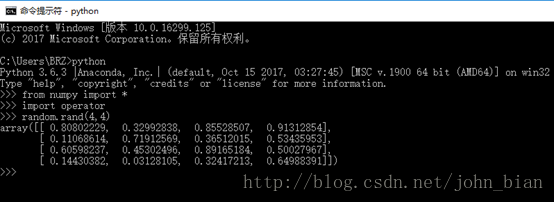
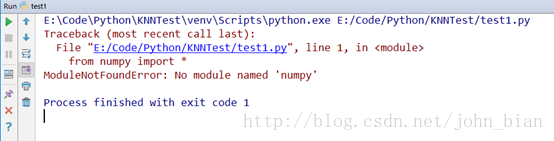
Python was installed before, and then Anaconda was installed because I was practicing using Python to write scientific calculations. However, after installing Anaconda, another problem occurred. When I wrote Python commands to call numpy on the command line, it could be used normally, but the call in PyCharm would report No module named ‘numpy’, that is, numpy could not be found, as shown below.
Numpy can be used normally on the command line:

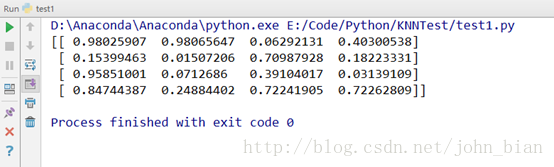
However, numpy cannot be used properly in PyCharm:

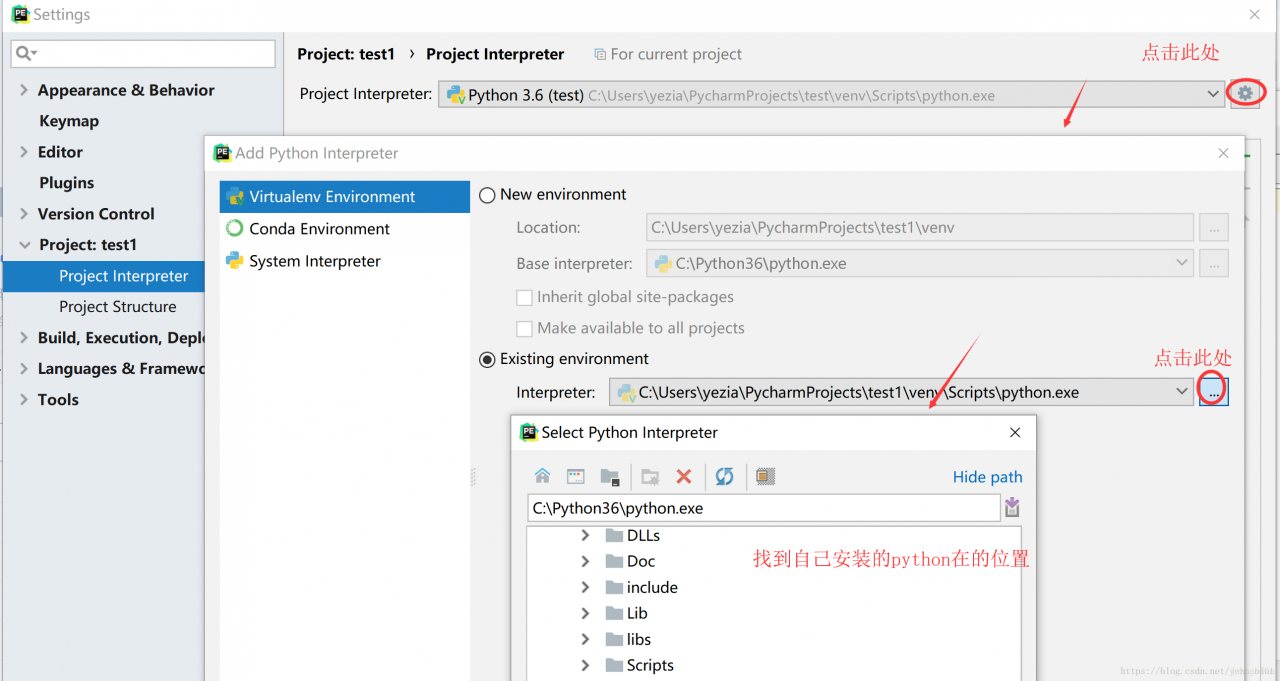
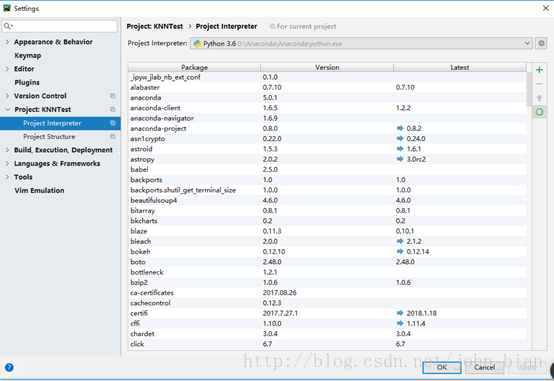
This problem occurs because the interpreter that Pycharm USES is not the installed Python 3.6, but comes with the Python.exe interpreter, and there are only two modules PIP and SetupTools, so that many third-party libraries cannot be used in Pycharm. Only the Settings on PyCharm (File-> settings-> Project: Current project name -& GT; Set Interpreter in the Project Interpreter. Set it to Anaconda, as shown in the figure below.


Then the program will run normally

The experimental procedure for this example is as follows

from numpy import *
import operator

a = random.rand(4,4)
print(a)

Idle line number setting and linenumbers modification

1. The most important idea came from the boss, but he made a mistake with one of the images. The Settings should have been modified in the config-Extensions.def but his image was changed to config-keys.def.
2.LineNumbers. Py file is downloaded from Baidu Experience
This is a dividing line between the two.
One, we can’t just use Daniel’s stuff, probably because they’re using a different version of Python than ours. I used the 3.7 version of Python. There was no Confighandler. py in lib, only config. py.
If you’re using version 3.7, you can just copy the following code instead of the first few lines of Linenumbers.py

from idlelib.config import idleConf
from idlelib.delegator import Delegator
from idlelib.percolator import Percolator

First, make sure LinEnumbers.py works
Generally there will be errors, basically can not find “model”,
the main reason is the case or file name problem, you can go to a similar file to see how the file is named, modify it can be solved.
4. Configure the Idle plug-in

File path\to\your\python\ idlelib\config-extensions.def
# add to bottom
[LineNumbers]
enable=True
enable=True
enable_shell=True
enable_editor=True
visible=True
[LineNumbers_cfgBindings]
linenumbers-show=< Control-Key-space>

Five, the fly in the ointment is that the border is white, and can not be changed with the background
You know the line number so that you can quickly locate the code,
, but in addition to adding the line number, you can also use the Alt+g shortcut to quickly reach the specified line.
also indicates the row and column where the cursor is located in the bottom right corner of the idle editor interface.
so, after a lot of hard work, there’s a better way to solve the problem of locating code quickly.

Mac python install PIL

1. sudo pip install PIL
But something goes wrong, it says No request or something,
Then I learned that the Pillow would be installed directly
2. sudo pip install Pillow
And then I’m going to look at terminal and I’m going to install whatever I need, right

Python packaged *. Exe is running os.popen (cmd)/ subprocess.Popen *. Exe crashes with invalid [winerror 6] handle

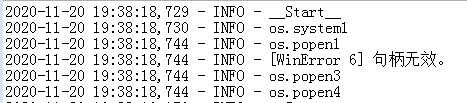
Summary of the problem: last week I used Python3.8.5 to write an upgrade script for a software running on Windows 7, and by printing and exception catching found that the script crashed when the script was executed to os.popen(CMD), the exception was [WinError 6] handle invalid

Part of the test code:

logging.info('__Start__')
logging.info('os.system1')
logging.info('os.popen1')
try:
    logging.info(os.popen('c:'))
    logging.info('os.popen2')
except Exception as a:
    logging.info(a)
    logging.info('os.popen3')
logging.info('os.popen4')

Effect :

After testing, it was found that the program and script could run normally on Win10, and the script was executed separately on Win7 without any problem, and the script was called with the program on Win7, even if the script was executed OS.popen (‘ c: ‘) would crash.

Because os.popen is actually the encapsulation of subprocess.Popen, so the title also carries subprocess.Popen
solution: to implement a function myPopen, or use subproce. popen0 will be 1 stdin = Subprocess. DEVNULL to modify, the code is as follows:

def myPopen(cmd):
    proc = subprocess.Popen(cmd,
                            shell=True,
                            stdout=subprocess.PIPE,
                            stdin=subprocess.DEVNULL)
    return proc.stdout.read().decode()

Python running as Windows Service: OSError: [WinError 6] The handle is invalid
Popen(

Python 3.4 compiler prompt error: unexpected indent

Problem description:
When compiling (well, “explain”) a Python program, it prompts a very special error:
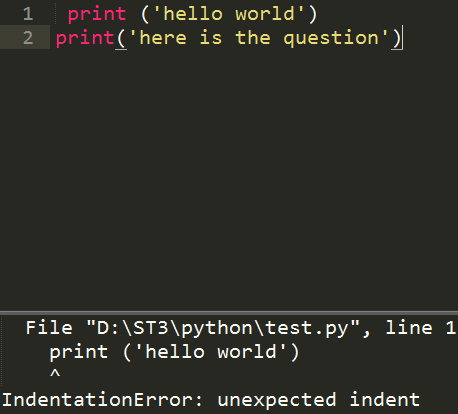
IndentationError: unexpected indent
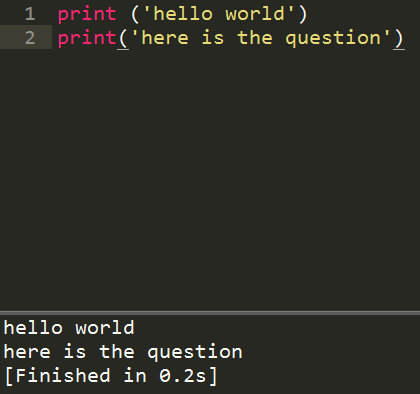
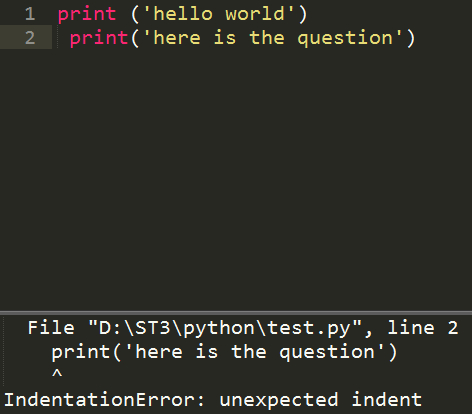
As shown in figure:

P: Print unexpected IndentationError p: Print unexpected indindent error p: Print unexpected indindent error
Indentation is actually indentation, which means indentation. Unexpected Indent means “p” is an “unexpected” indent. In other words, the problem here is that “p” is an unexpected indent. If you look at the source code, there are two lines of code. The first line is actually indented by a character bit. What happens when we indenting the sentence (the word “top” suddenly reminds me of my primary school Chinese class)?
Let’s experiment:

Now, the two lines of code are implemented in the “top” write, after the explanation is no problem.
To further prove that “every sentence must be written in the top space”, we keep the first sentence in the top space and indent the second sentence by one character. Explain.

It turns out that the second line is an IndentationError, an IndentationError.
At this point, we come to the conclusion that:
In python, code should thus write each sentence.

Exception ignored in: bound method basesession__ del__ Of

Error message

Exception ignored in: <bound method BaseSession.__del__ of <tensorflow.python.client.session.Session object at 0x000000001AB286D8>>
Traceback (most recent call last):
  File "python3.5.2\lib\site-packages\tensorflow\python\client\session.py", line xxx, in __del__
TypeError: 'NoneType' object is not callable

Reason: When the Python garbage collection mechanism collects the Session object, it finds that c_api_util or Tf_session has been collected, resulting in a null pointer. The following comment is the reason given when an exception is thrown in the source code of TensorFlow

# At shutdown, `c_api_util` or `tf_session` may have been garbage
# collected, causing the above method calls to fail. In this case,
# silently leak since the program is about to terminate anyway.

The solution
Method one:

import keras.backend as K

# your code

K.clear_session()

Method 2:

import gc

# your code

gc.collect()

reference
https://github.com/tensorflow/tensorflow/issues/3388
https://www.cnblogs.com/kaituorensheng/p/4449457.html

Python’s direct method for solving linear equations (5) — square root method for solving linear equations

The square root method solves systems of linear equations

import numpy as np


def pingfagenfa(a):
    n = a.shape[0]
    g = np.mat(np.zeros((n, n), dtype=float))
    g[0, 0] = np.sqrt(a[0, 0])
    g[1:, 0] = a[1:, 0]/g[0, 0]
    for j in range(1, n-1):
        g[j, j] = np.sqrt((a[j, j] - np.sum(np.multiply(g[j, 0:j], g[j, 0:j]))))
        for i in range(j+1, n):
            g[i, j] = (a[i, j] - np.sum(np.multiply(g[i, 0:j], g[j, 0:j])))/g[j, j]
    g[n-1, n-1] = np.sqrt((a[n-1, n-1] - np.sum(np.multiply(g[n-1, 0:n-1], g[n-1, 0:n-1]))))
    return g


if __name__ == "__main__":
    a = np.mat([[9, 18, 9, -27],
                [18, 45, 0, -45],
                [9, 0, 126, 9],
                [-27, -45, 9, 135]], dtype=float)
    print('G:')
    G = pingfagenfa(a)
    print(G)

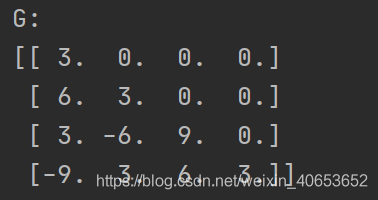
The solution results are shown in the figure below:

column
Python is the direct method of solving linear equations (1) — – gaussian elimination
Python the direct method of solving linear equations (2) — – gaussian column main element elimination
Python the direct method of solving linear equations (3) — – column if primary element gauss – when elimination
Python the direct method of solving linear equations (4) — – LU decomposition of the matrix
Python the direct method of solving linear equations (5) — –
square root method to solve linear equations Python direct method for solving systems of linear equations (6) — chase method for solving tridiagonal equations
Python direct method for solving systems of linear equations (7) — givens transformation based QR decomposition
Python direct method for solving systems of linear equations (8) — haushalde transformation based QR decomposition

Notes: Windows Python installation and removal error 2203 / 2502 / 2503

Error description
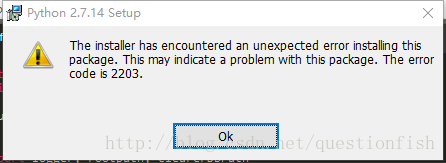
The installer has encounted an unexcepted error install this package. This may indicate a problem with this package. The error code is 2203/2503/2503.

The official definition of
2203 Database: [2]. Cannot open database file. System error [3].
2502 Called InstallFinalize when no install in progress.
2503 Called RunScript when not marked in progress.
Probable cause
Folder to be operated does not exist (2203)\ Insufficient permissions (2502, 2503)
The specific reason
C:\Windows\TEMP folder C:\Windows\TEMP file due to my careless operation of the temporary file, it became C:\Windows\TEMP file, the operation method of the folder could not be applied to the file.
To solve

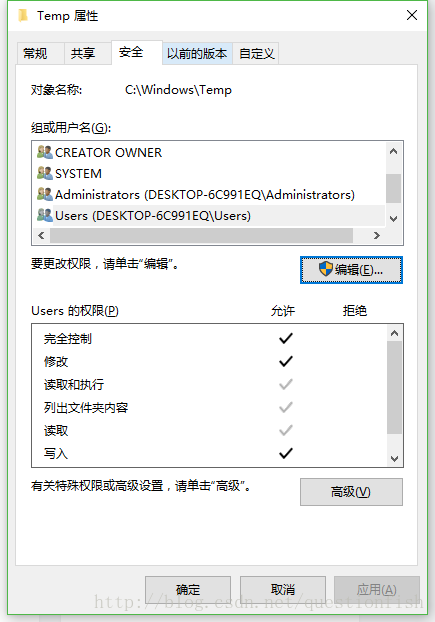
    delete the C:\Windows\Temp file and create the C:\Windows\Temp folder. Modify User User permissions to operate on the folder, add modify and write permissions.

reference

    Windows Installer Error Code Listhttp://blog.csdn.net/netsec_steven/article/details/52637088