Tag Archives: python

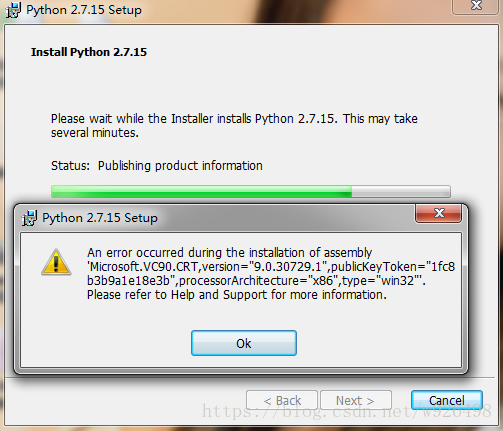
An error occurred during the installation of assembly

It is wrong to install Python. The detailed error information is shown in Figure 1.

Figure 1

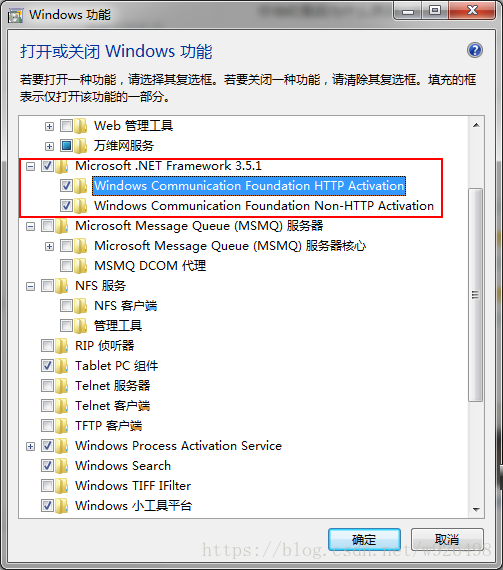
Find the control panel in my Windows 7 system -& GT; Procedures or functions -& GT; Turn Windows on or off
In the pop-up box, change the Microsoft.NET Framework 3.5.1 to check, that is, select all the functions of Microsoft.NET Framework, as shown in Figure 2

Figure 2


Reinstall Python, and you’re done!

Error syntax error: invalid syntax in PIP install XXX

Python — PIP Install XXX reporting SyntaxError: invalid Syntax
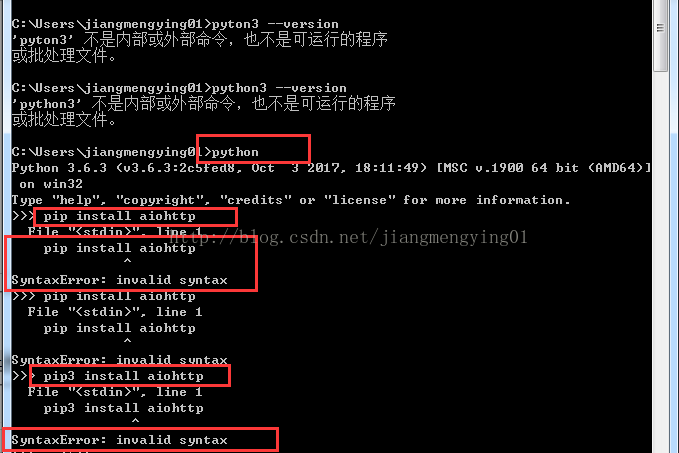
After installing python and entering the python runtime environment, I executed PIP install aiohttp because I was going to use PIP to install the third-party library needed for developing Web App. I found SyntaxError: invalid syntax. At first I thought it was a spelling or space problem or a python version problem, but the result was the same with pip3.


Then Baidu checked and found that the original PIP installation had to be started in the CMD command line, but it could not run in Python. Exit the Python runtime and execute PIP again.

> > > exit()

C:\Users\jiangmengying01>
Downloading aiohtt-2.3.6-cp36-cp36mwin_amd64. WHL (370kB)
35% | | █ █ █ █ █ █ █ █ █ █ █ █ ▍ eta 0:00:0 | 143 KB, 956 KB/s
41% | █ █ █ █ █ █ █ █ █ █ █ █ █ ▎ | 153 KB eta 0:00 1.0 MB/s:
.

Python problem: indenta tionError:expected an Error resolution of indented block

The original address: http://hi.baidu.com/delinx/item/1789d38eafd358d05e0ec1df
   
Python is a very sensitive language for indentation, causing confusion for beginners and even experienced Python programmers, who can fall into the trap. The most common situation is that mixing tabs and Spaces causes errors, or indenting incorrectly, which is impossible to distinguish with the naked eye.
This fault occurs on compile IndentationError: expected an indented block here need to indent, you as long as there is an error in the line, press the space or Tab (but you can’t mix) key indentation.
Often some people will question: I did not indent how or wrong, wrong, the place where the indent should be indent, not indent will be wrong, such as:
If XXXXXX:
(space) XXXXX
or
Def XXXXXX:
(space) XXXXX
There are
For XXXXXX:
(space) XXXXX
The next line of a sentence with a colon is often indented

[W xx:xx:xx.xxx NotebookApp] 404 GET/static/components/react/react-dom.production.min.js (::1)

I can’t open a jupyter notebook
Problem description
In do not know conda some strange installation package, there appeared jupyter can not open the error error code for the following.

[W xx:xx:xx.xxx NotebookApp] 404 GET/static/components/react/react-dom.production.min.js (::1)

Problem solving method
CSDN article read by a blogger, forget who it is, just type this under CMD

pip install --user --ignore-installed jupyter

Converting string object into datetime type in pandas

import pandas as pd


from pandas import DataFrame
from dateutil.parser import parse

data

data = DataFrame(columns=['date'], data=['2020-11-01','2020-11-05','2020-11-08','2020-11-11'])
data

data.info()

"""
<class 'pandas.core.frame.DataFrame'>
RangeIndex: 4 entries, 0 to 3
Data columns (total 1 columns):
 #   Column  Non-Null Count  Dtype 
---  ------  --------------  ----- 
 0   date    4 non-null      object
dtypes: object(1)
memory usage: 160.0+ bytes"""

conversion

data['date'] = data['date'].apply(parse)

data.info()
"""
<class 'pandas.core.frame.DataFrame'>
RangeIndex: 4 entries, 0 to 3
Data columns (total 1 columns):
 #   Column  Non-Null Count  Dtype         
---  ------  --------------  -----         
 0   date    4 non-null      datetime64[ns]
dtypes: datetime64[ns](1)
memory usage: 160.0 bytes
"""

An error 1064 is reported when pymysql accesses the image

An error has been reported while accessing images in the mysql database using Pymysql. The code is as follows
Error message: (1064, “You have an error in your SQL syntax; check the manual that corresponds to your MySQL server version for the right syntax to use near ‘\xff\xd8\xff\xe0\x00\x10JFIF\x00\x01\x01\x00\x00\x01\x00\x01\x00\x00\xff\xdb\x00′ at line 1”)
I found a lot of methods on the Internet, but I couldn’t solve the problem. Later, I tried again and again and finally solved it
Note that the size of the binary BLOB in mysql is smaller than the size of the binary BLOB when designing a table, change the binary data to mediumBLOB
The code is as follows:
import pymysql
from datetime import datetime
To create the database, first connect to the mysql database
Conn = Pymysql.connect (host=’127.0.0.1′, user=’root’, Database =’ smart_apartment_DB ‘,
password=’160507pcsd’, charset=’utf8′)
Create a cursor
cursor = conn.cursor()
The # ExCute () function can execute simple SQL statements
f = open(file=’./img/imageOne.jpg’, mode=’rb’)
dataimg = f.read()
f.close()
nowtime = datetime.now().strftime(“%Y-%m-%d, %H:%M:%S”)
argdata = pymysql.Binary(dataimg)
sqlone = “insert into img_pack(imgtime,imgdata) values(‘%s’,’%s’)” % (
nowtime, argdata)
try:
cursor.execute(sqlone)
conn.commit()
except Exception as e:
conn.rollback()
Print (” Error message: “, e)
Close the cursor first
cursor.close()
Close the database connection again
conn.close()
 
After many attempts, the problem was found
sqlone = “insert into img_pack(imgtime,imgdata) values(‘%s’,’%s’)” % (
Remove the ‘%s’ single quotation mark from nowtime, argdata and change to
sqlone = “insert into img_pack(imgtime,imgdata) values(%s,%s)”
Cursor. Execute (SQlone) changed to CURSOR. Execute (SQlone, (nowtime, argdata))
You can store images in a binary stream like mysql
The correct code is as follows
import pymysql
from datetime import datetime
 
To create the database, first connect to the mysql database
Conn = Pymysql.connect (host=’127.0.0.1′, user=’root’, Database =’ smart_apartment_DB ‘,
password=’160507pcsd’, charset=’utf8′)
Create a cursor
cursor = conn.cursor()
The # ExCute () function can execute simple SQL statements
 
f = open(file=’./img/imageOne.jpg’, mode=’rb’)
dataimg = f.read()
f.close()
nowtime = datetime.now().strftime(“%Y-%m-%d, %H:%M:%S”)
argdata = pymysql.Binary(dataimg)
 
sqlone = “insert into img_pack(imgtime,imgdata) values(%s,%s)”
 
try:
cursor.execute(sqlone, (
nowtime, argdata)
)
conn.commit()
except Exception as e:
conn.rollback()
Print (” Error message: “, e)
 
 
Close the cursor first
cursor.close()
Close the database connection again
conn.close()

Error: (2, ‘RegOpenKeyEx’, error resolution

Read the key values in the registry in Python as follows:

#coding:utf-8

import win32api, win32con
import os
key = win32api.RegOpenKeyEx(win32con.HKEY_CLASSES_ROOT, 'CLSID\\{01249E9F-88FF-45d5-82DB-A1BEE06E123C}\\Shell\Open\\Command', 0,  win32con.KEY_READ)
keyValue = win32api.RegQueryValue(key, '')


print keyValue

 
Then run it with the following error:

Traceback (most recent call last):
  File "D:\users\Desktop\yunpanAuto.py", line 8, in <module>
    key = win32api.RegOpenKeyEx(win32con.HKEY_CLASSES_ROOT, 'CLSID\\{01249E9F-88FF-45d5-82DB-A1BEE06E123C}\\Shell\Open\\Command', 0,  win32con.KEY_READ)
error: (2, 'RegOpenKeyEx', '\xcf\xb5\xcd\xb3\xd5\xd2\xb2\xbb\xb5\xbd\xd6\xb8\xb6\xa8\xb5\xc4\xce\xc4\xbc\xfe\xa1\xa3')

 
This depends on my own problem, because my Window system is 64-bit and Python is 32-bit, so I need to add another parameter:

key = win32api.RegOpenKeyEx(win32con.HKEY_CLASSES_ROOT, 'CLSID\\{01249E9F-88FF-45d5-82DB-A1BEE06E123C}\\Shell\Open\\Command', 0,  win32con.KEY_READ | win32con.KEY_WOW64_64KEY)

Just change the statement after the key above.
 

Error 13 when grub starts: solving the problem of invalid or unsupported executable

I’m using BT3 these days, and as for the USE of IT, we all know that I used GRUb4DOS as my desktop computer to launch recently. In recent days, I want to use my laptop to run BT3, but according to the general setting, GRUB shows Error 13: Invalid or unsupported Invalid on startup.
Looking around, it’s almost certain that the vmlinuz and BT3 cores don’t match, but it’s not clear why the same Settings worked on desktop computers.
The solution is as follows
After recompiling the kernel, restarting the system resulted in a GRUB boot error
Grub Error 13: Invalid or unsupported Invalid format
Error clause xp and FC co-existed when kernel/vmlinuzz-2.6.15 ro root= /dev/volgroup00 /LogVol00 RHGB quiet
installation. Restart the system again, enter xp, and search for the solution to Error 13.
use the rescue disk to enter the fc, check the Settings in /etc/grub.conf file, and check the filename in the Settings. It matches the file on your hard drive.
USES Google again to view the explanation of the vmlinuz file. On linuxidc.com, see
. Vmlinuz is the executable Linux kernel. It is located at /boot/vmlinuz and has two ways to build it. First, the kernel is created by “make zImage” when compiling, and then by:
“Cp/usr/SRC/Linux – 2.4/arch/i386/Linux/boot/zImage/boot/called”. ZImage is suitable for small kernels and exists for backward compatibility. The second is the kernel compile time through the command make bzImage created, then through: “cp/usr/SRC/Linux – 2.4/arch/i386/Linux/boot/bzImage/boot/called”.
Because vmlinuz is before compiling the kernel, the original system does not match the system after compiling the kernel, so it cannot be started
. Restart to enter grub, press e to modify, change vmlinuz-version to bzImage, press b to start Linux
to enter Linux. Go to/boot/ and delete the old vmlinuz, then rename the bzImage to vmlinuz-version
and everything will work fine.

appendix: Conf generated by anaconda
#
# Note that you do not have to rerun grub after making changes to this file
# NOTICE: you have a /boot partition. This means that
# all kernel and initrd paths are relative to /boot/, Eg.
# root (hd0, 8)
# kernel/called – version ro root =/dev/VolGroup00 LogVol00
# initrd /initrd-version. Img
#boot=/dev/sda
default=1
timeout=5
splashimage=(hd0,8)/grub/splash. Xpg.gz
hiddenmenu
title Fedora Core (2.6.15_FC5)
root (hd0,8)
kernel/vmlinuuz-2.6.15 ro root= /dev/volgroup00 /LogVol00 RHGB quiet
initrd /initrd-2.6.15. Img
title Other
rootnoverify (hd0,0)
chainloader +1

Ioerror: [errno 13] permission denied


>>> from libtiff import *
Generating '/usr/local/lib/python2.7/dist-packages/libtiff/tiff_h_4_0_6.py'
Traceback (most recent call last):
  File "<stdin>", line 1, in <module>
  File "/usr/local/lib/python2.7/dist-packages/libtiff/__init__.py", line 20, in <module>
    from .libtiff_ctypes import libtiff, TIFF, TIFF3D
  File "/usr/local/lib/python2.7/dist-packages/libtiff/libtiff_ctypes.py", line 102, in <module>
    f = open(fn, 'w')
IOError: [Errno 13] Permission denied: '/usr/local/lib/python2.7/dist-packages/libtiff/tiff_h_4_0_6.py'

(1) : Linux system permission, enter root mode, modify the permission

chmod 777 /usr/local/lib/python2.7/dist-packages/libtiff/tiff_h_4_0_6.py

(2) : Modify folder permissions in Win7 or Win10 systems.

Python TCP socket programming: send returns broken pipe error?

One of the most common mistakes in socket programming is the ECONNRESET error that I mentioned in this article. Another mistake that is rarely encountered is the EPIPE error that I will talk about today. This error can occur when sending data when the send function is called, and the program throws the following exception:

socket.error: [Errno 32] Broken pipe

Why this error?First, take a look at the official man 2 write document describing this error:

EPIPE
fd is connected to a pipe or socket whose reading end is closed. When this happens the writing process will also receive a SIGPIPE signal. (Thus, the write return value is seen only if the program catches, blocks or ignores this signal.)

Above, when writing data to a closed reader pipe or socket, the program receives a SIGPIPE signal. We have seen the example of a pipeline in this article.
Today, we’ll take a simple socket example to explore why this error occurs.
The client code is as follows:

import socket
import time

s = socket.socket(socket.AF_INET, socket.SOCK_STREAM)
s.connect(('127.0.0.1', 2222))

s.send('hello')
time.sleep(1)
s.send('hello')
s.send('hello')

s.close()

The server code is as follows:

import socket

s = socket.socket(socket.AF_INET, socket.SOCK_STREAM)
s.setsockopt(socket.SOL_SOCKET, socket.SO_REUSEADDR, 1)
s.bind(('127.0.0.1', 2222))
s.listen(5)

c, addr = s.accept()

c.recv(1024)

c.close()

After 1 second of running the client program, the Broken pipe error occurs:

[root@localhost python]# python client.py 
Traceback (most recent call last):
  File "client.py", line 10, in <module>
    s.send('hello')
socket.error: [Errno 32] Broken pipe

The results are as follows:

03:51:51.137047 IP 127.0.0.1.50870 > 127.0.0.1.2222: Flags [S], seq 2737957170, win 32792, options [mss 16396,sackOK,TS val 39403123 ecr 0,nop,wscale 5], length 0
03:51:51.137055 IP 127.0.0.1.2222 > 127.0.0.1.50870: Flags [S.], seq 2751472309, ack 2737957171, win 32768, options [mss 16396,sackOK,TS val 39403123 ecr 39403123,nop,wscale 5], length 0
03:51:51.137061 IP 127.0.0.1.50870 > 127.0.0.1.2222: Flags [.], ack 1, win 1025, options [nop,nop,TS val 39403123 ecr 39403123], length 0
03:51:51.137083 IP 127.0.0.1.50870 > 127.0.0.1.2222: Flags [P.], seq 1:6, ack 1, win 1025, options [nop,nop,TS val 39403123 ecr 39403123], length 5
03:51:51.137089 IP 127.0.0.1.2222 > 127.0.0.1.50870: Flags [.], ack 6, win 1024, options [nop,nop,TS val 39403123 ecr 39403123], length 0
03:51:51.137158 IP 127.0.0.1.2222 > 127.0.0.1.50870: Flags [F.], seq 1, ack 6, win 1024, options [nop,nop,TS val 39403123 ecr 39403123], length 0
03:51:51.139348 IP 127.0.0.1.50870 > 127.0.0.1.2222: Flags [.], ack 2, win 1025, options [nop,nop,TS val 39403137 ecr 39403123], length 0
03:51:52.140421 IP 127.0.0.1.50870 > 127.0.0.1.2222: Flags [P.], seq 6:11, ack 2, win 1025, options [nop,nop,TS val 39404140 ecr 39403123], length 5
03:51:52.140444 IP 127.0.0.1.2222 > 127.0.0.1.50870: Flags [R], seq 2751472311, win 0, length 0

It was observed that the error occurred as follows:

    client during sleep, the server has closed the connection normally. After the client is awakened, the first call to send to send data causes the socket to receive RST message. The second call send and then send the data causes the program to receive the SIGPIPE signal, and the Broken pipe error occurs.

Therefore, we can draw the conclusion that if the opposite end closes the connection normally and then RST message is received on the socket, then when send is called on the socket, the Broken pipe error will occur!
This error is usually caused by a bug in the program code, but it is not a serious error and can usually be avoided by ignoring the SIGPIPE signal.
python: HTTP Error 505: HTTP Version Not Supported

The urlliB2 module of Python is used to obtain the data code as follows:

Try:
    data = urllib2.urlopen(url).read()
except Exception,e:
    print e
return data

Url parameter is:

http://sms.gildata.com:8080/sms/sendSms.do?content=Hello world&msisdns=18373239087&user=gildata2&key=804

The following problems occurred while executing the code:
HTTP Error 505: the HTTP Version Not Supported
online are urllib2 module does Not support http1.1 agreement, must carry on the processing of one sort or another, but I later found out that seems to be the url does Not support Spaces, I will Hello world this parameter Spaces take out, can successfully send text messages to come out, if it is in space can be used to add escape character % 20 instead of Spaces, you can also use % 0 a instead of a newline.

Python custom class typeerror: ‘module’ object is not callable

When I was new to Python, I wanted to customize the Item and reference it when I was learning crawlers. The custom Item is shown below

import scrapy

​​​​​​​
class MyItem(scrapy.Item):
    title = scrapy.Field()
    pass

In the crawler file, the code is as follows:

# -*- coding: utf-8 -*-

import scrapy
from tutorial.items.MyItem import MyItem


class MySpider(scrapy.Spider):
    name = 'myitem.demo'
    allowed_domains = ['toscrape.com']

    def start_requests(self):
        yield scrapy.Request('http://toscrape.com/tag/humor/', self.parse)

    def parse(self, response):
        for h1 in response.xpath('//h1').getall():
            yield MyItem(title=h1).print_item()

        for href in response.xpath('//a/@href').getall():
            yield scrapy.Request(response.urljoin(href), self.parse)

Here, Tutorial.item.myItem needs to write the class file name