Tag Archives: java

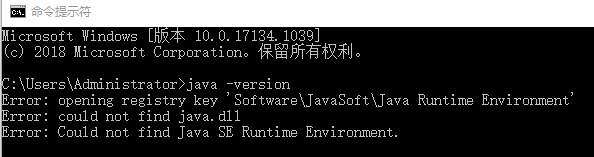
R language loading xlsx error error: JAVA_HOME cannot be determined from the Registry

OnLoad failed for ‘XLSX’ :
loadNamespace() calculate ‘rJava’; onLoad failed,
call: fun(libname, pkgname)
error: JAVA_HOME cannot be determined from the Registry
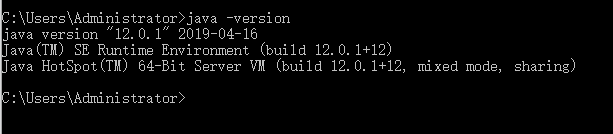
This is because my computer is not installed the JAVA environment, right now I need to download and install the JDK, website download address: https://www.oracle.com/java/technologies/javase-downloads.html, the website need to register account and download speed is slow, there are baidu network location 64 downloads: link: https://pan.baidu.com/s/1WQvo3UyVPtBypGcCLLCLzQ extracted code: wg5o
After downloading, which contains the method to install the JDK, introduce a public number, commonly used in all kinds of software download source and installation methods ~

After installing the JDK, first find the location of R installation package. Generally in the library document under R-4.0.2, delete the packages that were not installed successfully before. Here, I will delete RJava, Xlsxjars, and XLSX
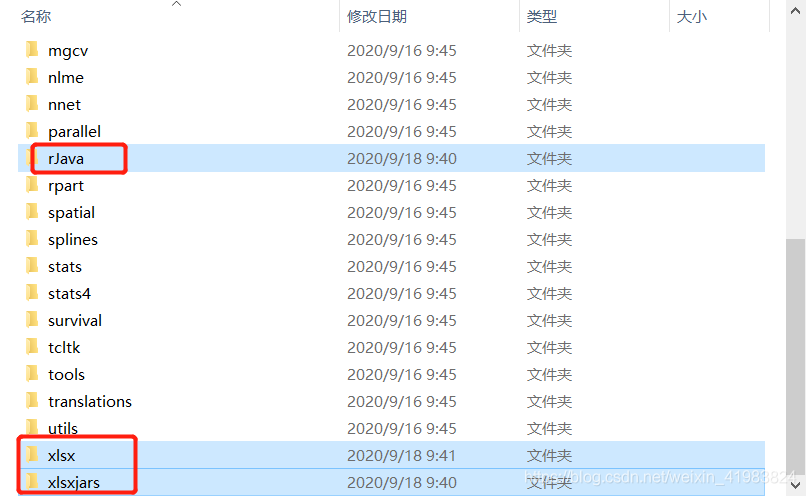
After you delete it, go back to the Rstudio window and install it in the order rJava, XlsXJars, and XLSX. There are two ways to install the Package of R, either way
Method 1: Run the script
Install. Packages (” rJava “)
install. Packages (” xlsxjars “)
install. Packages (” XLSX “)
Method 2:

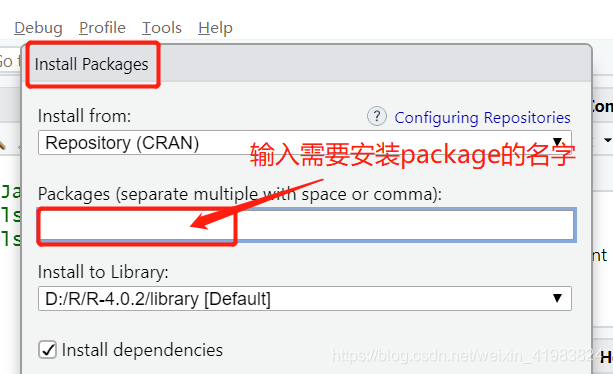
After installing library(XLSX), there will be no errors!!
OpenSSL SSL_connect: SSL_ERROR_SYSCALL in connection to github.com:443

The github project was suddenly unavailable with Git today, error reporting:
Fatal: unable to access “https://github.com/dmlc/xgboost.git/” : OpenSSL SSL_connect: SSL_ERROR_SYSCALL in connection to github.com: 443
It doesn’t work in all kinds of ways. I found many ways on the Internet:
https://blog.csdn.net/daerzei/article/details/79528153
 
https://stackoverflow.com/questions/49345357/fatal-unable-to-access-https-github-com-xxx-openssl-ssl-connect-ssl-error
 
If that doesn’t work, try switching to a network, such as a hotspot or your own broadband connection, because you may be using a company Intranet and have a proxy set up.
If not, I don’t know what to do

BO error Error: RWI 00200 FWM 01014

I recently encountered (Error: RWI 00200) and (FWM 01014) when Working with BO reports using Java

The server cannot be found in {0} and cluster {1} with type NULL for the Webiserver service. All such servers may be shut down or disabled by an administrator. (FWM 01014)
Unable to find servers in CMS {0} and cluster {1} with kind {2} and service {3}. All such servers could be down or disabled by the administrator. (FWM 01014)
The error.
It was found that the reason for this error is that the service address is configured as the system IP, and there is no configuration mapping in the hosts file
The service address is: 192.168.2.90:2888
The system address is: ABC01:2898
Hosts file
192.168.2.92 abc01
The system address originally matched with the server address caused the problem
The above BO server is a cluster environment, the above problem must find the system administrator to clarify the service address and system address.
 

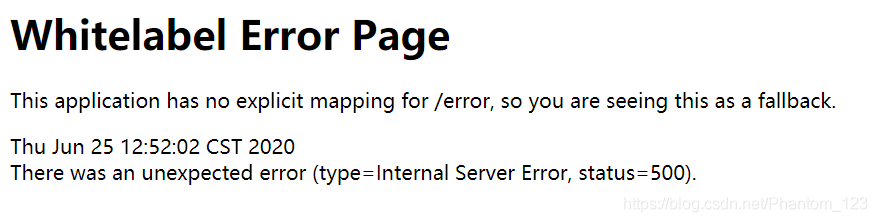
Solve the problem of There was an unexpected error (type=Internal Server Error, status=500) (using Thymeleaf to report an error)

Error details
Today, when I was watching a video and writing a small demo, I used the Thymeleaf framework to build the front end and started the SpringBoot project. I reported the error as shown in the figure below
Find the problem
Checked the database query and other code after a series of tests, found that there are no mistakes, then find a large number of blogs, online to tell you the truth, really didn’t find out how many useful things, perhaps because the problem is not the same, however, also good finally found two useful blog on their own, although the problem is a bit different, but it solved my problem.
the first blog is mainly about the problem of dependence
springboot+thymeleaf view mapping error: There was an unexpected error (type=Not Found, status=404)
the second blog mainly used the thymeleaf pit
to solve the thymeleaf There was an unexpected error (type=Internal Server error, status=500).
To solve
1. First of all, I checked my thymeleaf grammar problems, and after all of them were found, I started the project after deploying the project again or reported an error
2. Then I referred to the first blog and added the related dependence of thymeleaf (as shown below), there was no problem in starting the project again.

<dependency>
       <groupId>org.springframework.boot</groupId>
        <artifactId>spring-boot-starter-thymeleaf</artifactId>
</dependency>

= = = = = = = = = = = = = = = = = = = = = = = = = = = = = = = = = = = = = = = = =
if blogs have write wrong place, welcome to pointed out.
finally, I just want to make a silent joke, why the video did not add this dependency run project is no problem, then I have a problem???If there is any elder brother know, trouble points a ha.

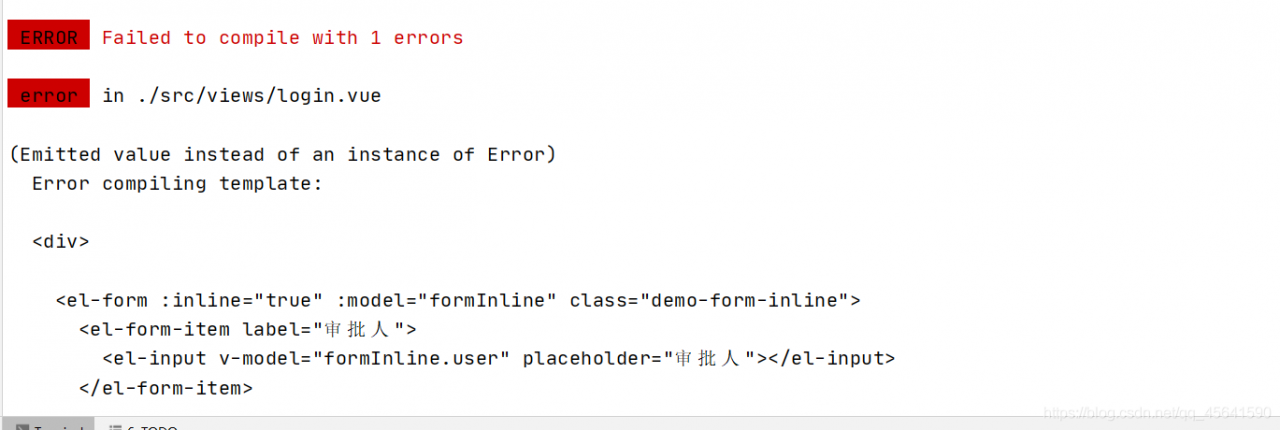
(Emitted value instead of an instance of Error) Error compiling template:

Conclusion: Find out if templent contains a script and remove it
Error: (Emitted value instead of an instance of Error)
Error compiling. template:
also has a paragraph Error:
Templates should only be responsible for mapping the state to the UI. Avoid placing tags with side-effects in your templates, such as

Reason: Error packaging vUE with elementUI for the first time

ERROR Unsupported method AndroidProject.getVariantNames().

ERROR: Unsupported method: AndroidProject.getVariantNames
Problem: Error cause: Solution:

Question:
Recently, the company asked me to connect to the function of one-button confidential-free login, and I also need to be familiar with client development. After opening the project with Android Studio, I reported an error, which was as follows:

ERROR: Unsupported method: AndroidProject.getVariantNames().
The version of Gradle you connect to does not support that method.
To resolve the problem you can change/upgrade the target version of Gradle you connect to.
Alternatively, you can ignore this exception and read other information from the model.

Translation:
Error: doesn’t support method: AndroidProject GetVariantNames (). The Gradle version to which
is connected does not support this method.
to solve this problem, you can change/upgrade the target version of the Gradle that you connect to.
or, you can ignore this exception and read additional information from the model.
Solutions:

    modify the build.gradle file under the project directory
classpath "com.android.tools.build:gradle:3.3.2" 
    project./gradle/wrapper/gradle-wrapper. Properties, see the address link
distributionUrl=https\://services.gradle.org/distributions/gradle-4.10.1-all.zip
    gradle sync once;

could not open `C:\Program Files\Java\jre1.8.0_191\lib\amd64\jvm.cfg’

Running Java prompt error in CMd.exe Could not open ‘C:\Program Files\Java\ Jre1.8.0_lib \amd64\ JVN.cfg’
Note: Consider the following if the environment variable is configured correctly.
Solution a:
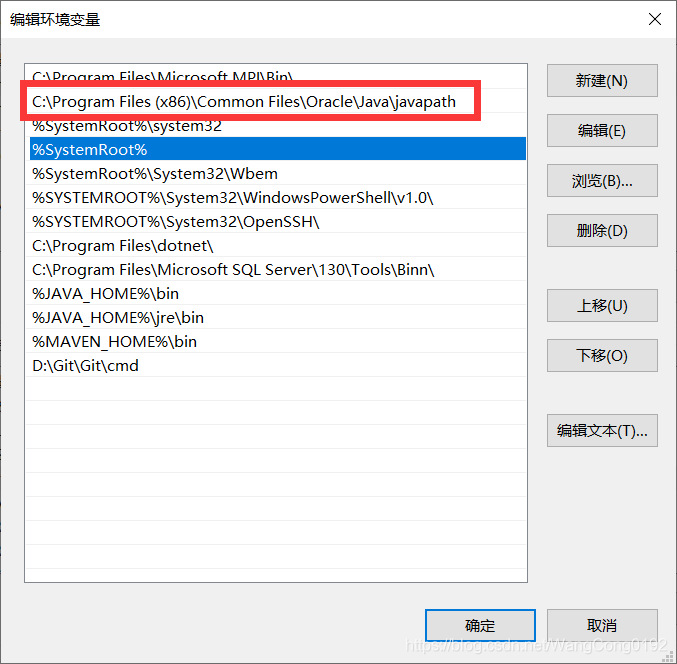
Find the following, my computer – properties – Advanced system Settings – environment variable – Path environment variable, above our %JAVA_HOME%\bin location, there is a C:\Program Files (x86)\Common Files\Oracle\Java\ Javapath, open this folder in the resource manager, there are three Files “Java.exe” “Javaw.exe” “Javaw.exe”, delete these three Files, Because they are high in the environment variables, the Java runtime finds them first and doesn’t go to our JAVA_HOME, so it reports an error.
Scheme 2:
Moving the two JAVA_HOMES up to the front will also solve the problem.
Problem: Probably caused by reinstalling the JDK.

Syntax error, insert “Finally” to complete TryStatem in Myeclipse in Java-

I. This kind of mistake occurs:

Multiple annotations found at this line: – Syntax error, insert “Finally” to complete TryStatement – Syntax error, insert “}” to complete ArrayInitializer – Syntax error on token(s), misplaced construct(s) – Syntax error on tokens, delete these tokens

Solution One:

It turns out there’s a “} “missing, so you can check out the JavaScript code you inserted into the JSP! There must be a brace missing somewhere!

Solution Two

JDK mismatch. If the other party’s JDK version is different from yours, or even between 1.6 and 1.7, this error is bound to occur. Just change it to your own JDK. Right-click on the item properties-& GT; The Java Build Path can be found later.

Solution 3:

If this isn’t the case, try Project-Clean. If it doesn’t, it’s probably code or something.

How to modify the JDK version used in the MyEclipse project

1. After opening, find our Java project

2. Then right click — “Build Path– > Confirgure Build Path”

3. From the interface that appears, select the “Libraries” TAB, select the “JRE System Libraries (VERSION of the JDK)”, and then click on the right “Edit… “Button

4. In the pop-up dialog, as shown below, select the version of the JDK that you want to modify, and click the “Finish” button

5. Return to the interface for modifying the JDK version, then select “Java Compiler” in the left menu, and select the version that matches the JDK version

6. The last step is critical; be sure to check (search Java Compiler)

Elasticsearch in Spring uses Spel to dynamically create Index of Documet class

1 Usage Scenario
In some projects, the index of ES needs to be dynamically generated according to the conditions in the program to achieve the purpose of data collation. For example, a system log with a large amount of data needs to be indexed, so index needs to be generated dynamically.
2 Spel generates Index dynamically
Here USES the spring - data - elasticsearch </ code> ElasticsearchRestTemplate </ code> es operation, version for 3.2.0.

<dependency>
	<groupId>org.springframework.data</groupId>
	<artifactId>spring-data-elasticsearch</artifactId>
	<version>3.2.0.RELEASE</version>
</dependency>

You can specify the static IndexName when identifying POJO objects using the @document annotation.

@Document(indexName = "indexName", type = "logger")

But how do you dynamically generate an index?So let’s say Spel.
Spel full name is Spring Expression Language, is a Spring Expression Language, function is very powerful, official website.
Using Spel, you can call the Bean’s methods through an expression in the annotation to assign values to parameters.
Therefore, the idea of dynamic generation is to create an index generator and call the generator method in @ducument to assign the attribute indexName.
Examples of generators are as follows:

@Component("indexNameGenerator")
public class IndexNameGenerator {
    public String commonIndex() {
        String date = LocalDate.now().format(DateTimeFormatter.ofPattern("yyyy-MM-dd"));
        return "collectlog_" + date;
    }
}

An instance of the Document class is as follows:

@NoArgsConstructor
@Data
@Document(indexName = "#{@indexNameGenerator.commonIndex()}", type = "logger")
public class ESDocument {
    @Field(analyzer = "ik_max_word", searchAnalyzer = "ik_max_word")
    private String content;
    private String cluster;
    private long date = LocalDateTime.now().toInstant(ZoneOffset.ofHours(8)).toEpochMilli();
    private String path;
    private String ip;
    private String level;
}

As you can see, in the @ the Document </ code> annotation, call the indexNameGenerator.com monIndex () </ code>, the method to obtain the Index of every day.
this method is called every time new data is added.
3. Some notes
Note that Spel USES context to get the corresponding Bean Resolver. If the project is running and an exception is reported,

org.springframework.expression.spel.SpelEvaluationException: 
EL1057E: No bean resolver registered in the context to resolve access to bean 'indexNameGenerator'

This reason is mainly caused by problems with the spring context used in Spel, you can break to the SpelExpression#getValue method debugging problem.

org.springframework.expression.spel.standard.SpelExpression#getValue(org.springframework.expression.EvaluationContext, java.lang.Class<T>) 

When used in ES, if is to manually create the ElasticsearchRestTemplate </ code>, must be set when creating the instance of ElasticsearchConverter </ code>, or you will quote the exception.
ElasticsearchConverter can use the generated Bean in springboot autoconfig, in which the correct ApplicationContext has been injected. The example is as follows:

@EnableConfigurationProperties(ESProperties.class)
@Service("elasticSearchHandlerFactory")
public class ElasticSearchHandlerFactory {
    @Resource
    ESProperties esProperties;

    @Resource
    ElasticsearchConverter elasticsearchConverter;

    public ElasticsearchRestTemplate getHandler() {
        ESProperties.DbConfig dbConfig = esProperties.getDbList().get("c1");
        final ClientConfiguration configuration = ClientConfiguration.builder()
                .connectedTo(dbConfig.getHostAndPort())
                .withBasicAuth(dbConfig.getUsername(), dbConfig.getPassword())
                .build();
        RestHighLevelClient client = RestClients.create(configuration).rest();
        return new ElasticsearchRestTemplate(client, elasticsearchConverter);
    }
}

The above content is a personal learning summary, if there is any improper, welcome to correct in the comments

When the fastJson tool class converts the installed list into JSONArray, the key whose value is null in the hashmap will also be lost.

Problems encountered: The fastJson utility class will have List&LT installed; HashMap> When converted to a JSONArray, the key with null value in the HashMap is also lost. Code:

JSONArray dataArray=JSONArray.parseArray(JSON.toJSONString(datalist))

 
Solutions:

JSONArray dataArray=JSONArray.parseArray(JSON.toJSONString(datalist,SerializerFeature.WriteMapNullValue))