Validation error: webpack dev server invalid options

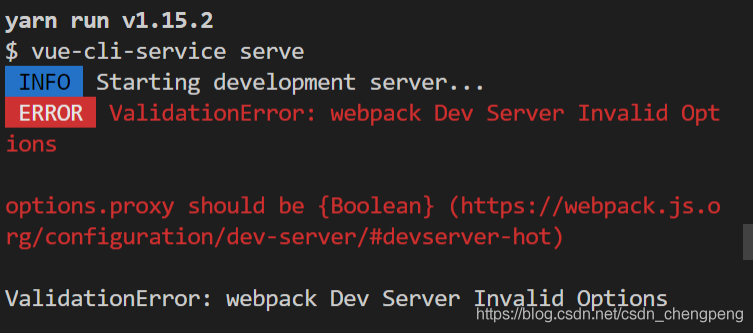
When Vue starts the project yarn serve or NPM run dev
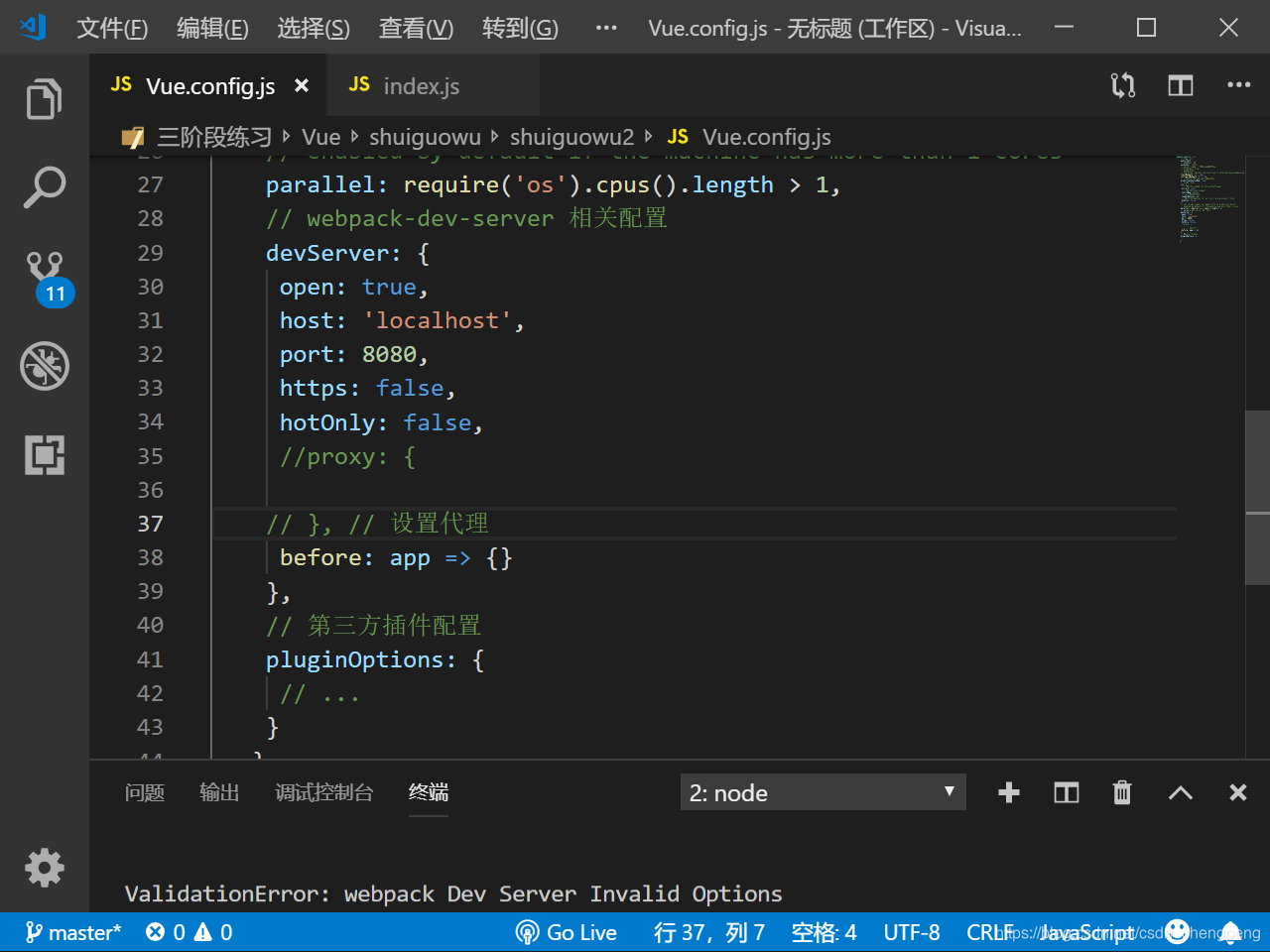
If an error message appears when Vue starts the project: validationerror: webpack dev server invalid options
cause of the problem:
the “proxy” object value used to solve the cross domain problem in the configuration file is empty

Solution:
find config.js Modify the contents of the document( webpack.config.js Or vue.config.js )
find devserver and comment out the proxy in it

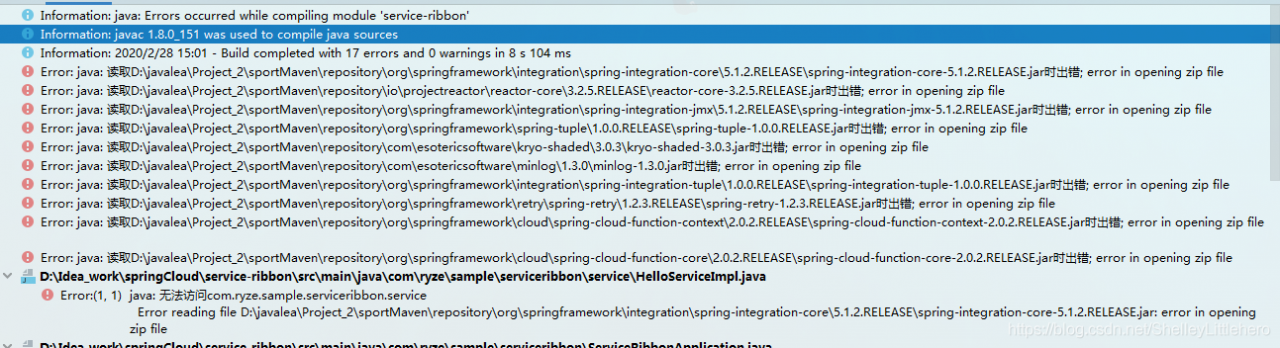
Idea introduces dependency and starts jar error in opening zip file

Question:

reason:

When Maven download is dependent, the jar may not be downloaded to the local normally due to network reasons. If you start the project reference, an error will be reported, and the local Maven jar cannot be used normally

terms of settlement:

There is a stupid way to find out which jars are open with errors. Find the corresponding jars in the local Maven repository and delete them, pom.xml After testing, no error will be reported

Mongodb — startup exception, error report ERROR:NUMBER 100

When doing sharding — replica set, I missed a port and wanted to restart one of mongod, but I always reported an error


[ root@centos mongodb]# mongod –port 28018 –shardsvr –replSet shard1 –dbpath=/usr/local/mongodb/shard1_ 3 –logpath=/usr/local/mongodb/shard1_ 3/shard1_ 3.log –logappend –fork
Fri Apr 11 13:24:48.136
Fri Apr 11 13:24:48.136 warning: 32-bit servers don’t have journaling enabled by default. Please use –journal if you want durability.
Fri Apr 11 13:24:48.136
about to fork child process, waiting until server is ready for connections.
all output going to: /usr/local/mongodb/shard1_ 3/shard1_ 3.log
forked process: 5281
ERROR: child process failed, exited with error number 100

I checked online and found that it seems that I used violence to shut down DB before, resulting in data locking.

You need to enter the database directory and delete it mongod.lock Then, restart. That’s it.


In addition, the correct way to close mongodb.

1.kill -2 PID

2.use admin;

  db.shutdownServer ()


More attention is paid to the official account “Python column”. The background reply to “Tencent architecture resource 1” gets the big data resources prepared by Tencent architects.

Kafka reported error shutdown broker because all log dirs in… Have failed

When using the Kafka tool, if there is one more topic to view topics, it will be deleted. Then the problem came, and Kafka service began to report an error:

ERROR Shutdown broker because all log dirs in E:\kafka\kafka_2.11-2.4.0\log have failed (kafka.log.LogManager)

Delete the topic log in the log in the directory where the error is reported, and restart Kafka to report an error. The original deletion of Kafka’s log directory can’t solve this problem, so we have to delete zookeeper zoo.cfg The dataDir directory configured in.


Note: if it is important data, be sure to back up!!!

Idea always reports errors when using “SVN” to associate projects Error:Cannot run Program “SVN” (in directory “path XXXXXX”): CreateProcess error = 2,


Using the new project tool idea interface to import SVN project, an error is reported

Error:Cannot run Program “SVN” (in directory “path XXXXXX”): CreateProcess error = 2 the system cannot find the specified file.

Error performing cleanup for cannot run program CreateProcess error = 2, cleanup/history/update all report errors.

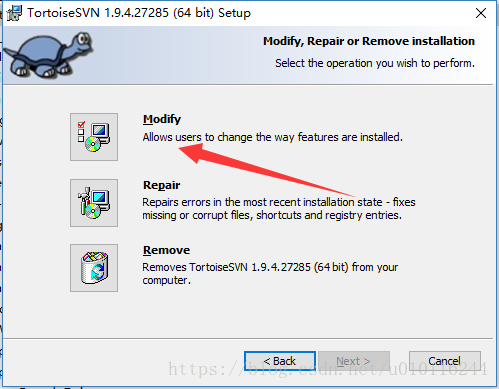
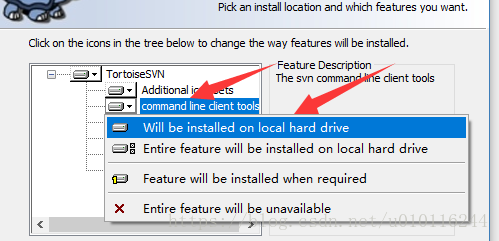
The main reason for the error is that I didn’t install the command command when installing SVN. Just re install it.

1. Open SVN installation tool


Just go to the next step to install.

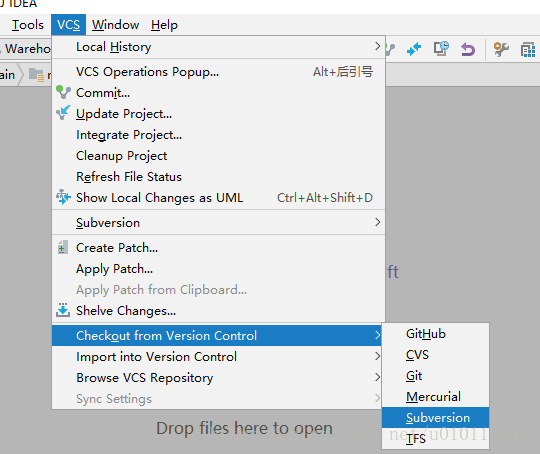
2. Re open idea to automatically match svn.exe Orders.

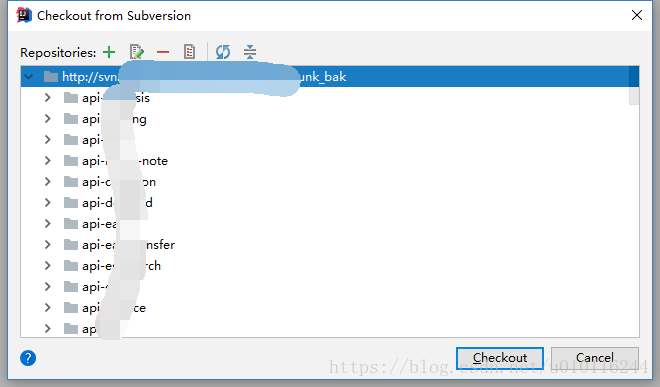
Click checkout to complete

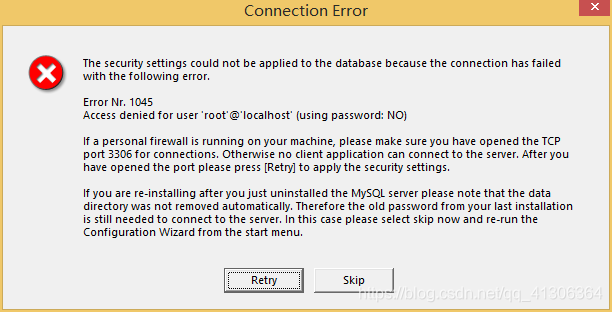
Solution of connection error report in MySQL installation

Error in finish in the last step of installation

Note: after setting, there is a common error when you press “finish”, that is, you cannot “start” The solution is to ensure that the previously installed MySQL server has been completely uninstalled; if not, check whether the previous password has been modified according to the above step, and follow the above operation; if not, back up the data folder under the MySQL installation directory, and then delete it, after the installation is completed After that, delete the data folder generated by the installation, move the backup data folder back, and restart the MySQL service. In this case, you may need to check the database and repair it once to prevent data errors.

resolvent

    uninstall the MySQL Windows XP system, delete the directory, and then install it again

Step on the pit — error reported by sqoop tool.ExportTool : Error during export

@To live better

Step on the pit — error reported by sqoop tool.ExportTool : Error during export

The error printed on the console is

19/04/19 20:17:09 ERROR mapreduce.ExportJobBase: Export job failed!
19/04/19 20:17:09 ERROR tool.ExportTool: Error during export: 
Export job failed!
	at org.apache.sqoop.mapreduce.ExportJobBase.runExport(ExportJobBase.java:445)
	at org.apache.sqoop.manager.MySQLManager.upsertTable(MySQLManager.java:145)
	at org.apache.sqoop.tool.ExportTool.exportTable(ExportTool.java:73)
	at org.apache.sqoop.tool.ExportTool.run(ExportTool.java:99)
	at org.apache.sqoop.Sqoop.run(Sqoop.java:147)
	at org.apache.hadoop.util.ToolRunner.run(ToolRunner.java:70)
	at org.apache.sqoop.Sqoop.runSqoop(Sqoop.java:183)
	at org.apache.sqoop.Sqoop.runTool(Sqoop.java:234)
	at org.apache.sqoop.Sqoop.runTool(Sqoop.java:243)
	at org.apache.sqoop.Sqoop.main(Sqoop.java:252)

finishing touch : this error indicates that the fields of MySQL and hive do not correspond or the data format is different
solution:
Step 1 : check whether the structure (field name and data type) of MySQL and hive tables are consistent.
Step 2 : check whether the data has been imported?If the data is not imported, please change the time type in MySQL and hive to string or varchar in the first step. If there is an import, but the imported data is incomplete or incorrect. It must be that your data type is inconsistent with the actual data. There are two situations. See the following three steps for details.
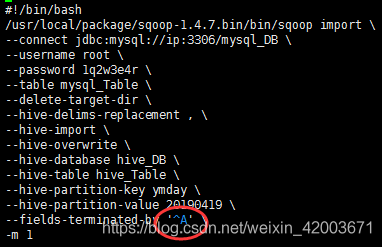
Step 3 : in MySQL to hive, please be sure to check whether your data contains the default line break for hive table creation ( lines terminated by '\ n' ). If yes, add hive delims replacement or hive drop import delims to the sqoop statement, as follows

#!/bin/bash
/usr/local/package/sqoop-1.4.7.bin/bin/sqoop import \
--connect jdbc:mysql://ip:3306/mysql_DB \
--username root \
--password 1q2w3e4r \
--table mysql_Table \
--delete-target-dir \
--hive-delims-replacement , \
--hive-import \
--hive-overwrite \
--hive-database hive_DB \
--hive-table hive_Table \
--hive-partition-key ymday \
--hive-partition-value 20190419 \
--fields-terminated-by '\t' \
-m 1

Step 4 : in MySQL to hive, please be sure to check whether your data contains the field separator commonly used in hive table creation ( Fields terminated by '\ t' ). If yes, the fields terminated by parameter cannot be used in the sqoop statement, and the code is as follows:

Step 5 : if there are many empty columns from hive to hive, sometimes the above error will be reported, then add input null string and input null non string in the sqoop statement, and the following code
remember ^ A, and use Ctrl + V and Ctrl + A in VI of Linux To generate, you can't copy the following ^ a
remember ^ a directly. In VI of Linux, you can't copy the following ^ a
remember ^ a directly. In VI of Linux, you can't copy the following ^ a directly

#!/bin/bash
/usr/local/package/sqoop-1.4.7.bin/bin/sqoop export \
--connect "jdbc:mysql://ip:3306/report_db?useUnicode=true&characterEncoding=utf-8" \
--username root \
--password 1q2w3e4r \
--table mysql_table \
--columns name,age \
--update-key name \
--update-mode allowinsert \
--input-null-string '\\N' \
--input-null-non-string '\\N' \
--export-dir "/hive/warehouse/dw_db.db/hive_table/ymday=20190419/*" \
--input-fields-terminated-by '^A' \
-m 1

====================================================================

@To live better

If you have any questions about the blog, please leave a message

Uiautomatiorviewer connect to the machine and click to report unexpected error while observing UI hierarchy


Method 1: recommend method 2

reference resources: https://www.cnblogs.com/lucky0425/p/10955252.html

Run Android uiautomatorviewer.bat , open and connect the mobile phone. The error is as follows:
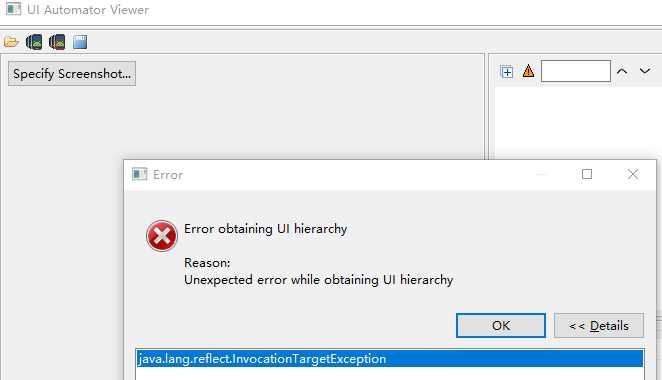
Tangled for a long time, and finally solved with the method of a great God, although I don’t understand the principle, but has solved my problem, the principle later slowly study

1. Create in the e-root directory app.png text file

2. Create in the e-root directory app.uix text file

3. Perform the following ADB naming:

                  adb shell uiautomator dump /sdcard/ app.uix

                  adb pull /sdcard/ app.uix E:/ app.uix

                  adb shell screencap -p /sdcard/ app.png

                  adb pull /sdcard/ app.pngE :/ app.png

4. Operation uiautomatorviewer.bat , import file
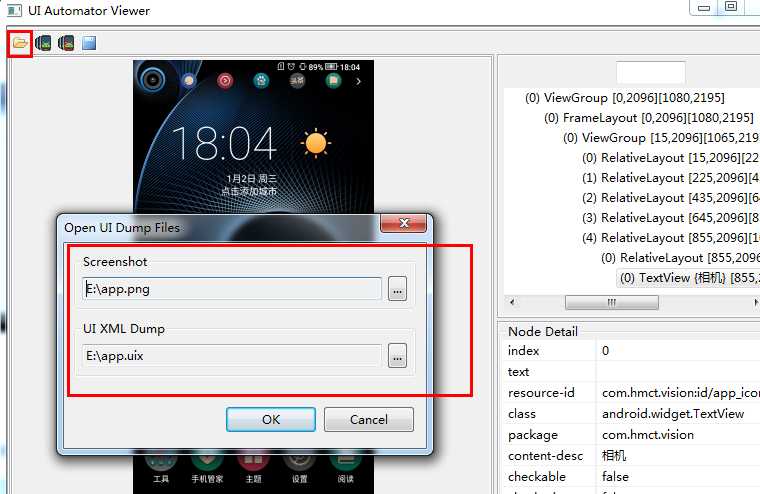
5. Connect the mobile phone again, you can see the screen capture page of the mobile phone, but there is only one picture, which can’t run the app completely


Method 2

reference resources: https://blog.csdn.net/qq_ 42559334/article/details/83862323

1. In the directory of installing Android SDK, find the SDK Manager.exe , click to enter
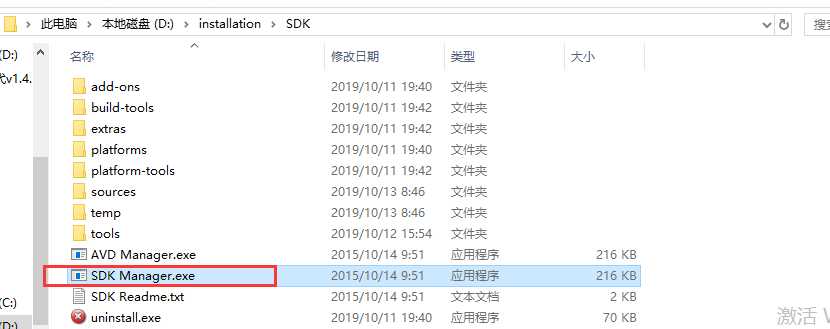


2. Select the Android version number of the real machine, check the installation package, and click Install
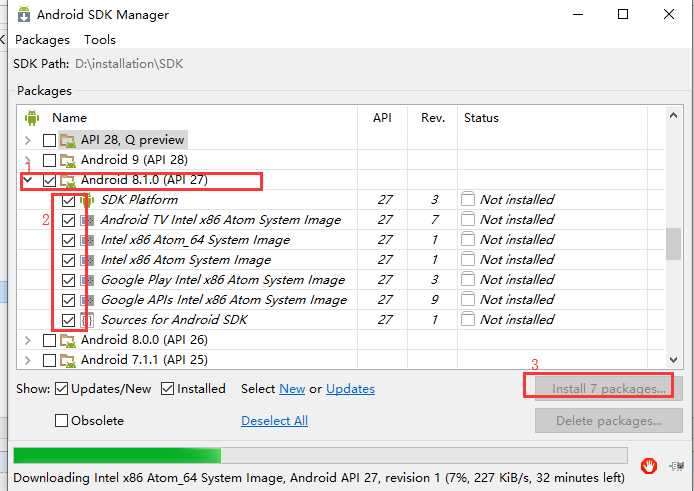
 

3. After installation, restart uiautomatorviewer.bat

http://www.shangdixinxi.com/detail-1098954.html  

https://github.com/yaming116/uiautomatorview
PIP installation error: Microsoft Visual C + + 14.0 is required perfect solution

In the process of using Python development, we often need to install various modules, but we often encounter various errors in the installation process, such as: error: Microsoft Visual C + + 14.0 is required, this error is due to the lack of C + + compiler components.

There are two solutions to this problem

One is to directly download the corresponding wheel file for installation, providing three download addresses:

Tsinghua download (domestic site, fast speed) https://pypi.tuna.tsinghua.edu.cn/simple/pip/

Official download: https://pypi.org/project/face-recognition/1.0.0/#files

Python package https://www.lfd.uci.edu/~gohlke/pythonlibs/

Another solution is to install the missing components.

As for the second solution, I believe most people will download a visual studio 201x and install it as I used to. However, installing a vs takes up a lot of space, not to mention the key. Some people find it useless after installation, which is really irritating.

After all kinds of search, it was found that the C + + runtime provided by the government can be directly installed, which can be solved perfectly. The address is Microsoft Visual C + + build tools 2015


After downloading, double-click run to install with default settings. After the installation, go to PIP install XXX to show that the installation is successful.


Welcome to my personal blog: the road of machine learning

Error: Command ‘/ usr / bin / clang’ failed with exit status 1 solution for Mac OS installation

1、 Scene description

The error of installing scrapy (PIP3 install scrapy) in terminal on Mac OS system is as follows

error: command '/usr/bin/clang' failed with exit status 1

2、 Scene analysis

Since clang is used in the compiler for C at the bottom of Mac OS system, Xcode needs to be installed

3、 Solutions

Do the following in terminal

xcode-select --install

Then install scrapy

Note: I use Python 3, so I use PIP3 install sketch

Idea running error running ‘application’: solution to command line is too long

There are other idea error reporting tutorials in the personal blog. Students who need them can click the link below

https://www.itqiankun.com/article/100983585

When a new project is started in idea, it sometimes reports error running ‘application’: command line is too long. Short command line for application or aalso for spring boot default configuration. The error message is as follows

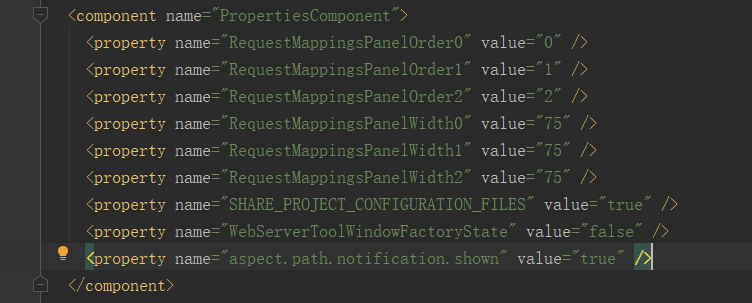
how to solve it?First, find the idea in the project/ workspace.xml File, and then find & lt; Component name = "propertiescomponent" & gt; & lt; & component & gt; tag, as shown below

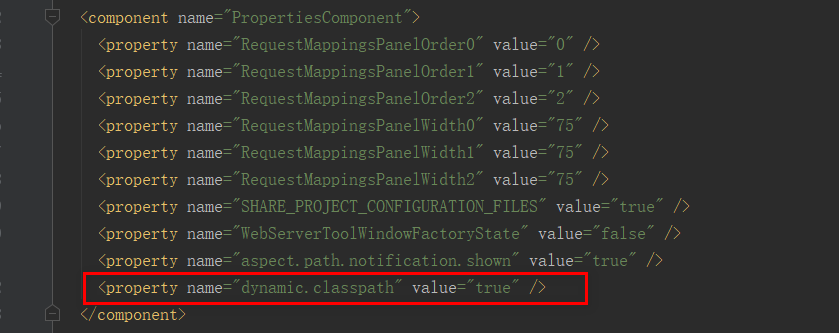
and then add a line & lt; property name> to the component tag=“ dynamic.classpath "Value =" true "/ & gt; , that is to say,

in this way, when starting a project, there will be no error ☝ What's going on ☝ ؏؏