Use Jinfo command to check the error of remotemaven server (a process of idea)
Error attaching to process: sun.jvm.hotspot.runtime.VMVersionMismatchException: Supported versions are 25.101-b13. Target VM is 25.152-b28
sun.jvm.hotspot.debugger.DebuggerException: sun.jvm.hotspot.runtime.VMVersionMismatchException: Supported versions are 25.101-b13. Target VM is 25.152-b28
        at sun.jvm.hotspot.HotSpotAgent.setupVM(HotSpotAgent.java:435)
        at sun.jvm.hotspot.HotSpotAgent.go(HotSpotAgent.java:305)
        at sun.jvm.hotspot.HotSpotAgent.attach(HotSpotAgent.java:140)
        at sun.jvm.hotspot.tools.Tool.start(Tool.java:185)
        at sun.jvm.hotspot.tools.Tool.execute(Tool.java:118)
        at sun.jvm.hotspot.tools.JInfo.main(JInfo.java:138)
        at sun.reflect.NativeMethodAccessorImpl.invoke0(Native Method)
        at sun.reflect.NativeMethodAccessorImpl.invoke(NativeMethodAccessorImpl.java:62)
        at sun.reflect.DelegatingMethodAccessorImpl.invoke(DelegatingMethodAccessorImpl.java:43)
        at java.lang.reflect.Method.invoke(Method.java:498)
        at sun.tools.jinfo.JInfo.runTool(JInfo.java:108)
        at sun.tools.jinfo.JInfo.main(JInfo.java:76)
Caused by: sun.jvm.hotspot.runtime.VMVersionMismatchException: Supported versions are 25.101-b13. Target VM is 25.152-b28
        at sun.jvm.hotspot.runtime.VM.checkVMVersion(VM.java:227)
        at sun.jvm.hotspot.runtime.VM.<init>(VM.java:294)
        at sun.jvm.hotspot.runtime.VM.initialize(VM.java:370)
        at sun.jvm.hotspot.HotSpotAgent.setupVM(HotSpotAgent.java:431)
        ... 11 more
Solution:
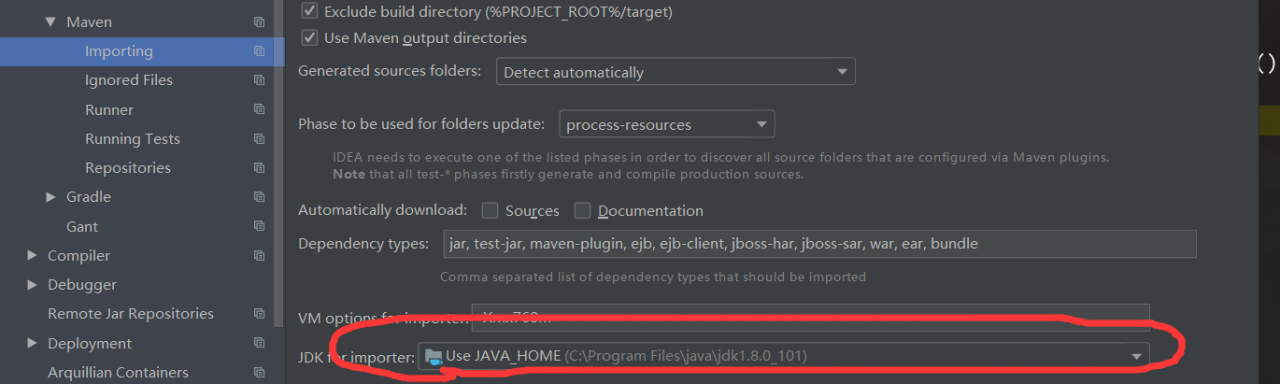
the reason is that the JDK version does not match. Just change the JDK version of Maven in idea. The method is as follows
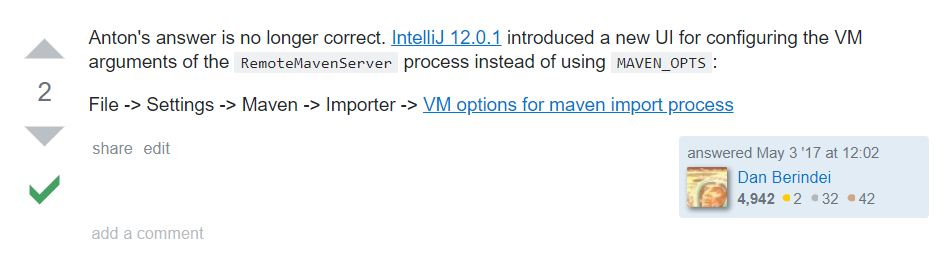
change the version here.



 (the figure above shows the error report when the server code is running in the virtual machine)