Category Archives: JavaScript

Vue modifies the value passed by props error: Avoid mutating a prop directly since the value will be overwritten whenever the par

When doing a project, you will sometimes encounter this kind of error
this sentence means to avoid changing the prop directly, because as long as the parent component is re rendered, the value will be overridden. Instead, use data or calculate properties based on the prop value
you can’t directly change the props passed by the parent component, so what can you do?You can use emit to trigger the events of the parent component
parent component

<template>
    <div class="class">
        <Student :show="isShow" @hideStudent="hideStudent" />
        <button @click="showStudent">点我显示学生</button>
    </div>
</template>

<script>
import Student from "./student";
export default {
    name: "class",
    components: { Student },
    data() {
        return {
            isShow: false,
        };
    },

    methods: {
        showStudent() {
            this.isShow = true;
        },
        hideStudent() {
            this.isShow = false;
        },
    },
};
</script>

Subcomponents

<template>
    <div class="student" v-show="show">
        <nav>Mike</nav>
        <button @click="close">点我关闭student</button>
    </div>
</template>

<script>
export default {
    name: "student",
    props: {
        show: {
            type: Boolean,
            default:false
        },
    },
    methods: {
        close() {
            this.$emit("hideStudent");
        },
    },
};
</script>

Of course, subcomponents can also write like this, using watch to listen

<template>
    <div class="student" v-show="showStudent">
        <nav>Mike</nav>
        <button @click="close">点我关闭student</button>
    </div>
</template>

<script>
export default {
    name: "student",
    props: {
        show: {
            type: Boolean,
            default:false
        },
    },
    data() {
        return {
            showStudent:false
        };
    },
    watch:{
        show(){
            this.showStudent=this.show
        },
    },
    methods: {
        close() {
            this.$emit("hideStudent");
        },
    },
};
</script>

Finally, let’s take a look at the rendering


for more details about the value transmission of vueprops, see the value transmission of Vue parent-child components

Solve Google browser font reduction to 12px

The solution of browser font less than 12px

1. Zoom through transform: scale()

<div class="box text1">The font size is 12px</div>
<! -- inside before adding the span tag, because transform:scale scales the width and height of the outer div -->
<div class="box text2">
    <span> The font size is 8px</span> 
</div>
Copy code
.box{
    width: 200px;
    height:100px;
    margin-bottom: 10px; 
    border: 1px solid red ;
}
.text1{
    font-size: 12px;
}
.text2 span{
    display: inline-block;/*transform:scale()这This attribute scales only the elements whose width and height can be defined. */
    font-size: 16px;
    transform: scale(0.5) ;/* font-size: 16*0.5=8px  */
    transform-origin: left top;/* Adjustment of position*/
}

When using iView, report: no parsing error parsing error: x-invalid-end-tag solution

When using Iview, it reports: https://google.com/#q=vue%2Fno-parsing-error Parsing error: x-invalid-end-tag Solution
Phenomenon

✘  https://google.com/#q=vue%2Fno-parsing-error  Parsing error: x-invalid-end-tag
  src\pages\TheAdminDashboard.vue:11:25
                          </MenuItem>

Solution:

There are two solutions:
1. Modify MenuItem to: menu item 2

2. Add the following in the root directory. Eslintrc.js file rules:

"vue/no-parsing-error": [2, { "x-invalid-end-tag": false }]

Use of $watch in Vue (solve rangeerror: maximum call stack size exceeded)

Problems encountered:

In a requirement, the change of a form needs a function of history recording. Because the form is very large (it is to edit an article), it is impossible to be specific to a certain attribute, so the method of watch monitoring is adopted, and {deep: true} is set. However, when previewing, I encountered the error of rangeerror: maximum call stack size exceeded . After some investigation, I found that it was caused by watch monitoring, and then I didn’t know what the problem was.

Even if nothing is written in the business code, a simple console.log will not work. As long as deep: true is set, an error will be reported, which is a headache. I didn’t find a similar case on the Internet. I thought again: since the error lies in the watch, can I dynamically monitor and cancel monitoring ?I found the answer on the official website https://cn.vuejs.org/v2/api/#vm -watch

Basic use of $watch (refer to the official website)

VM. $watch (exporfn, callback, [options]) the return value is a {function} unwatch , which returns a function to cancel the observation, which is used to stop the trigger callback option: deep, deep listening option: immediate, whether to execute once immediately

// Key Path
vm.$watch('a.b.c', function (newVal, oldVal) {
  // Do something
})

// function
var unwatch = vm.$watch(
  function () {
    // The expression `this.a + this.b` is called every time a different result is reached
    // the handler function will be called.
    // This is like listening for an undefined computed property
    return this.a + this.b
  },
  function (newVal, oldVal) {
    // Do something
  }
)

// Cancel the listener

unwatch()

My solution, for reference

// Call setWatchChapters when created, call removeWatchChapters in other cases, depending on the business case
export default {
	...
	data () {
		return {
			unWatchChapters: null
		}
	},
	created(){
		this.setWatchChapters()
	},
	methods:{
		setWatchChapters () { // Setting up a listener for chapters
			if (!this.unWatchChapters) { // prevent setting listeners more than once
				setTimeout(() => { // There are still some bugs, so use setTimeout to add to the event queue
					this.unWatchChapters = this.$watch('report.chapters', () => {
						// do something
					}, { deep: true })
				}, 0)
			}
    	},
    	removeWatchChapters () { // Unlisten to chapters
			if (this.unWatchChapters) {
				this.unWatchChapters()
				this.unWatchChapters = null
			}
		}
	}
}

[Solved] TypeError: Converting circular structure to JSON – JSON.stringify

When using the json.stringify method to convert a string, an error typeerror: converting circular structure to JSON will be reported

Reason: there is a circular reference to itself in the object;

For example:

let test = { a: 1, b: 2 };
test.c = test; // Circular references
JSON.stringify(test); // report an error

Solution:
the following JSON_ STR is the converted String of JSON. Stringify

var cache = [];
var json_str = JSON.stringify(json_data, function(key, value) {
    if (typeof value === 'object' && value !== null) {
        if (cache.indexOf(value) !== -1) {
            return;
        }
        cache.push(value);
    }
    return value;
});
cache = null;	//release cache

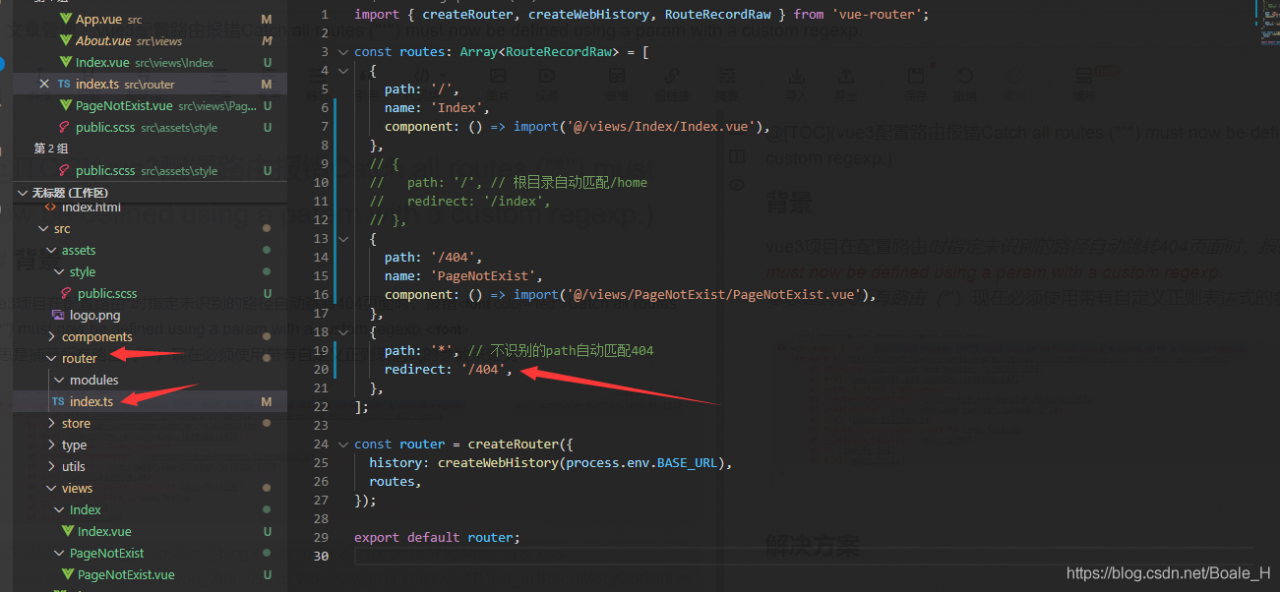
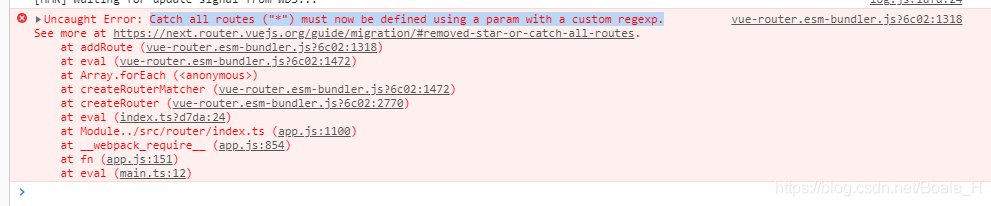
[Solved] Vue3 Configuration routing error: Catch all routes (“*“) must now be defined using a param with a custom regexp.

@[TOC] (vue3) catch all routes (“*”) must now be defined using a param with a custom regexp.)

Background

When the vue3 project specifies an unrecognized path to automatically jump to the 404 page when configuring the route, it reports an error catch all routes (“*”) must now be defined using a param with a custom regexp. </ font>
this means that all routes (“) must now be defined with a parameter with a self-defined regular expression

Solution

Change to the following configuration mode:

{
    path: "/:catchAll(.*)", // Unrecognized path automatically matches 404
    redirect: '/404',
},

Full routing configuration:

import { createRouter, createWebHistory, RouteRecordRaw } from 'vue-router';

const routes: Array<RouteRecordRaw> = [
  {
    path: '/',
    name: 'Index',
    component: () => import('@/views/Index/Index.vue'),
  },
  // {
  //   path: '/', // Root directory auto-match/home
  //   redirect: '/index',
  // },
  {
    path: '/404',
    name: 'PageNotExist',
    component: () => import('@/views/PageNotExist/PageNotExist.vue'),
  },
  {
    path: "/:catchAll(.*)", // Unrecognized path automatically matches 404
    redirect: '/404',
  },
];

const router = createRouter({
  history: createWebHistory(process.env.BASE_URL),
  routes,
});

export default router;

Vue a page is mounted to send multiple requests at the same time, and the loading is processed uniformly

Requirements: as soon as you enter the page, you have to send three requests. If the loading is not well written one by one; If the promise is not suitable,
finally, + +, – it is good to process it through computed
HTML

 <div v-loading="loading" class="dashboard-container"></div>

Computed method

 computed: {
      loading() {
        return this.loadingCount !== 0
      }
    },

Requests to be used in the lifecycle

   mounted() {
      this.yearAndQuarter = curYearAndQuarter()
      // Requesting list data
      this.getListData(this.yearAndQuarter)
      // Request a map
      this.getMapData(this.yearAndQuarter)
      // Request project list details
      this.getProlistDetails()
    },

Used in requests

 // Request project list details
      getProlistDetails() {
        this.loadingCount++
        const params = {
          'serviceId': 'data_market_screen_xmlb2_test',
         }
        queryByPage(params).then((res) => {
          this.loadingCount--
          console.log('Request item list details', res)
          // this.lightspotList = res.data
        }).catch(e => {
          this.loadingCount--
          this.$message.error(e.toString())
        })
      },
     getMapData(yearAndQuarter) {
        this.loadingCount++
        const yOrR = yearAndQuarter.split('-')
        const params = {
          'serviceId': 'data_market_screen_map_test',
        }
      queryByPage(params).then((res) => {
          this.loadingCount--
          console.log('Map', res)
          this.lightspotList = res.data
        }).catch(e => {
          this.loadingCount--
          this.$message.error(e.toString())
        })
      },

Anti card limited Drag Based on react draggable drag

Recently, a project requirement is to click the question mark to display the prompt window. The window is fixed, does not scroll with the scroll bar, and can be dragged within the scope. It does not affect the lower form input.

I think of using anti card combined with react draggable. Record the implementation code here:

import React from 'react';
import { Modal, Button, Card, Icon } from 'antd';
import Draggable from 'react-draggable';

export default class App extends React.Component {

    constructor(props) {
        super(props);
        this.state = {
            cardShow: false,
            disabled: true,
            bounds: { left: 0, top: 0, bottom: 0, right: 0 }, // Initialize drag boundary
        };
        this.draggleRef = React.createRef();
    }

    onStart = (event, uiData) => {
        const { clientWidth, clientHeight } = window.document.documentElement;
        const targetRect = this.draggleRef.current.getBoundingClientRect();
        this.setState({
            // Set the drag boundary to limit the dragging distance from the top, bottom, left and right of the initial position, the following setting is draggable in the browser window
            // If the page has a fixed display header, it must be draggable below the header, you can set top: -targetRect.top + uiData.y + height of the header.
            bounds: {
                left: -targetRect.left + uiData.x,
                right: clientWidth - 300,
                top: -targetRect.top + uiData.y,
                bottom: clientHeight - (targetRect.bottom - uiData.y),
            },
        });
    };

    onClickShow = () => {
        this.setState({
            cardShow: true,
        })
    }

    onClickClose = () => {
        this.setState({
            cardShow: false,
            bounds: { left: 0, top: 0, bottom: 0, right: 0 },
        })
    }

    render() {
        const {disabled, bounds, cardShow} = this.state;
        return (
            <div style={{width: '100%'}}>
                <Draggable
                    disabled={disabled}
                    bounds={bounds}
                    onStart={(event, uiData) => this.onStart(event, uiData)}
                >
                    <div ref={this.draggleRef}>
                        {cardShow &&
                        <Card
                            title={
                                <div
                                    style={{
                                        width: '100%',
                                        cursor: 'move',
                                    }}
                                    onMouseOver={() => {
                                        this.setState({
                                            disabled: false,
                                        });
                                    }}
                                    onMouseOut={() => {
                                        this.setState({
                                            disabled: true,
                                        });
                                    }}
                                    onFocus={() => {}}
                                    onBlur={() => {}}
                                >
                                    {'Title'}
                                </div>
                            }
                            extra={
                                <span onClick={() => this.onClickClose()}>
                                    <Icon type={'close'} style={{fontSize:'16px'}}/>
                                </span>
                            }
                            style={{ width: 300, position: 'fixed', zIndex: 999 }}>
                            <p>Conetent</p>
                        </Card>}
                    </div>
                </Draggable>
                <span >{'Help'}</span><Icon onClick={() => this.onClickShow()} type="question-circle" />
            </div>
        );
    }

}

How to Solve VUE Error: Avoid mutating a prop directly since the value will be overwritten …

1. Demand and error reporting

Requirements: the scenarios are: component a refers to component B, uses V-model to pass parameters to B, B uses props: {value} to receive content, directly modifies and assigns value according to logic in B, and sees error report in browser console after event triggering, as follows:

Avoid mutating a prop directly since the value will be overwritten whenever the parent component re-renders. 
Instead, use a data or computed property based on the prop's value. Prop being mutated: "value"

2. Analyze the reasons

In terms of the content of the error report, we have changed the variables of the parent component referenced in the child component, that is, the data in props; From the prompt information, is it feasible to use mutated ?In vue2, the data in the component props can only flow in one direction, that is, it can only pass props from the parent component through the component’s DOM attribute to the child component, and the child component can only passively receive the data from the parent component, and in the child component, the props data from the parent component cannot be modified. The value of props cannot be modified in the component, and the modified value will not be synchronized to the outer layer of the component, that is, the calling component does not know what the current state is inside the component

2.1 what causes this?

In the vue1. X version, the props binding modifiers twoway and . Sync can be used to realize the bidirectional data binding of props . Remove the bidirectional data binding function of props in vue2.0 . If bidirectional binding is needed, you need to implement it yourself
in vue2.0 , the data flow of component’s props is changed to only one-way flow, that is, it can only be transferred from (parent component) to (child component) through component’s v-bind: attributes , and the child component can only passively receive the data from the parent component, The props data passed by the parent component cannot be modified in the child component. Official document explanation:

Prop is unidirectional: when the properties of the parent component change, it is passed to the child component, but not vice versa. This is to prevent the child component from unintentionally modifying the state of the parent component – which makes the data flow of the application difficult to understand
although abandoning the two-way binding of props is beneficial and correct for the whole project, we do need to modify the requirements of props from within the component at some times

In vue2.0 , the following methods can be used to realize the bidirectional binding mode of component attributes (not binding, but asynchronous modification)

The V-model instruction or . Sync modifier will transfer the method of modifying attributes to the subcomponent call through v-bind . The subcomponent can directly use the method to transfer the method of modifying attributes to the subcomponent call through v-on , and use $emit() to implement callback modification or use this. $parent to modify

3. Solution: use v-on to realize the modification mode

It’s also for code readability

do not directly modify the props data passed from the parent component, redefine a variable in the data function, assign the props data value to the data variable, and then modify the data variable. As follows:

Component B accepts the parameters of component A

name: "B",
props: {
	father: {
		type: String,
		default: null
	}
}
data(){
  return{
    father_a : this.father
  }
}

If you want to listen to the variables passed in the a component to modify a data in the b component, you can use the watch listening function to listen. As follows:

name: "B",
props: {
	father: {
		type: String,
		default: null
	}
}
data(){
  return{
    father_a: this.father
    son: ''
  }
}
//Listening function, whenever the father variable passed from the parent component changes,
// the son variable defined in the child component will be assigned the value "son"
watch:{
  father(val, valOld){
    this.son = "Son"
  }
}

If b wants to modify the attributes passed by a , you can use $emit to modify the attributes

A

<B :father="a" @change="changeA" />

<script>
export default {
	name: 'A',
	data() {
		return {
			a: 'Variables of A'
		}
	},
	methods: {
		changeA(val) {
			this.a = val
		}
	}
}
</script>

B

<script>
export default {
	name: 'B',
	props: {
		father: {
			type: String,
			default: null
		}
	},
	data() {
	},
	watch:{
	  father(val, valOld){  // Here you can also define the variable in data and assign the father to it, and monitor the variable here
	    // This is the logic that the child component needs to handle if the father variable changes
	  }
	}, the
	methods: {
		changeAFather() { // Who calls it? It's the child component's business operation
			this.$emit('change', val)
		}
	}
}
</script>

So far, the data in the child component and the data in the parent component are bound Bi directionally, and the data inside and outside the component are synchronized: when the internal component changes, the external component decides whether to change

vue1.0 data bidirectional binding is abandoned in vue2.0 version?Through the case, it can also be found that there are many bidirectional binding props codes, which is not conducive to the data state management between components, especially in complex business. It is not easy to understand and read the logic, so we try not to use this way of bidirectional binding, and use vuex for data management in too complex data processing.


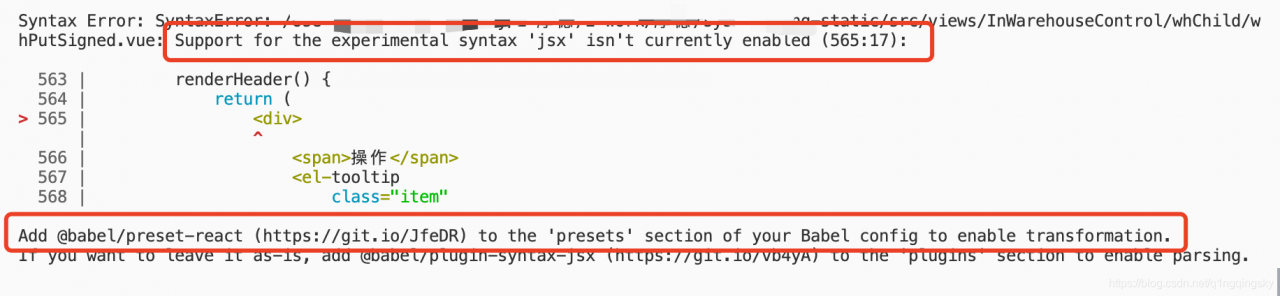
[Solved] Vue Project Start Error: Support for the experimental syntax ‘jsx‘ isn‘t currently enabled

The project is built with Vue scaffold

As shown in the figure:

According to the prompt in the red box in the figure:

I need you in. Babelrc   Just add @ Vue/Babel preset JSX to the configuration file

{
  "presets": [
    ["@babel/preset-env", { "modules": false }],
    "@vue/babel-preset-jsx" 
  ],
  "plugins": [
    "@babel/plugin-proposal-class-properties", 
    "syntax-dynamic-import",
    [
      "component",
      {
        "libraryName": "element-ui",
        "styleLibraryName": "theme-chalk"
      }
    ]
  ]

}

The problem has been solved.

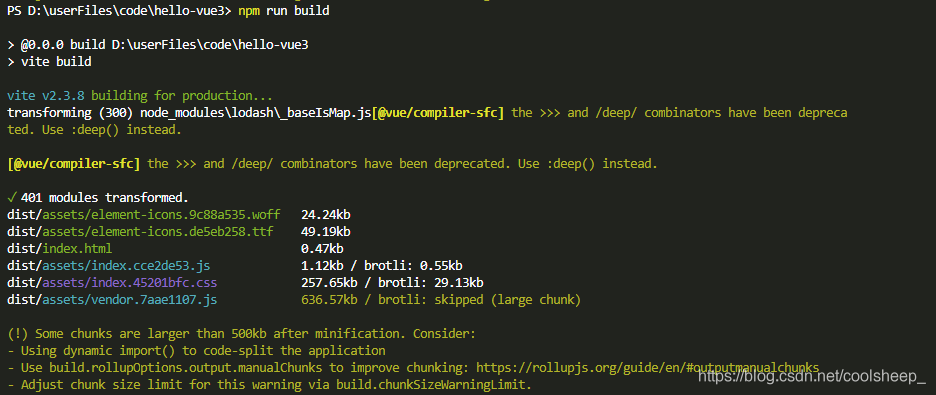
[Solved] Some chunks are bigger warning on vite packaging

Solution:

import { defineConfig } from 'vite'
import vue from '@vitejs/plugin-vue'

export default defineConfig({
	plugins: [vue()],
	build: {
		rollupOptions: {
			output: {
				//Solve Warning: Some chunks are larger
				manualChunks(id) {
					if (id.includes('node_modules')) {
						return id.toString().split('node_modules/')[1].split('/')[0].toString();
					}
				}
			}
		}
	}
})