Category Archives: JavaScript

Module not found: Error: Can‘t resolve ‘core-js/modules/es.promise.js‘ in

Core-js is not installed
In the directory where package.json is located: npm i core-js -D

ERROR in . /src/js/index.js 1:0-48
Production environment configuration \15js compatibility handling\src\js'

ERROR in ./src/js/index.js 2:0-39
Module not found: Error: Can't resolve 'core-js/modules/es.promise.js' in 'D:\Desktop\My Files\RecentlyStudy\WebPack\demo\3.webpack production environment configuration 
webpack production environment configuration \15js compatibility handling\src\js'

ERROR in ./src/js/index.js 3:0-39
Module not found: Error: Can't resolve 'core-js/modules/web.timers.js' in 'D:\Desktop\My Files\RecentlyStudy\WebPack\demo\3.webpack

3 errors have detailed information that is not shown.
Use 'stats.errorDetails: true' resp. '--stats-error-details' to show it.

Uni-app Error when assigning a value to a component: [system] TypeError: Cannot read property ‘name‘ of undefined

[system] TypeError: Cannot read property ‘name’ of undefined

This error occurs because some of the attributes in your curly brackets are undefined
1. Wrong attribute name
2. Another case: when the data is obtained asynchronously, there is no such data attribute during initialization
in my case, case 2, the value of the string is relatively deep, and the definition is only one level up
value structure:

{
    "id": 105,
    ...
    "dealer": {
        "sn": null,
        "password": null,
        "name": "xx",
        "departmentSn": null,
    },
    ...
},
		<view class="content-row">
			 <text class="cause">待处理:</text>
			 <text class="cause-detail" v-if="claim_detail_basic_list" >{{claim_detail_basic_list.dealer.name}}</text>
			</view>

This side has done error prevention processing

v-if="claim_detail_basic_list"

Because the value object has to be further “claim”_ detail_ basic_ List. Dealer. Name ”

chunk-vendors.js:3874 [Vue warn]: Error in render: "TypeError: Cannot read property 'name' of undefined"

The solution can go one step further.

<view class="content-row">
			 <text class="cause">ToDoList:</text>
			 <text class="cause-detail" v-if="claim_detail_basic_list.dealer" >{{claim_detail_basic_list.dealer.name}}</text>
			</view>

{{claim_ detail_ basic_ List. Dealer. Name}
OK! Reason: the deep object was not created and there was no attribute of the object when it was initialized.

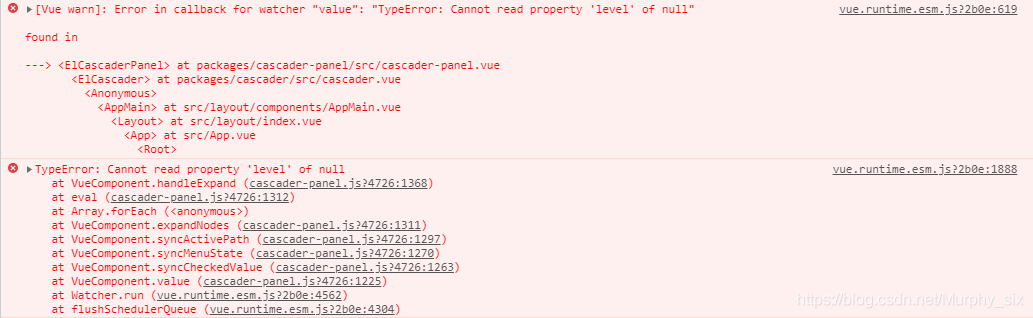
[Solved] Error in callback for watcher “value“: “TypeError: Cannot read property ‘level‘ of null“

The cascade selector selects multiple selection{   Multiple: true} and any one level option {checkstrict: true} will be invalid when you click , and an error will be reported as follows
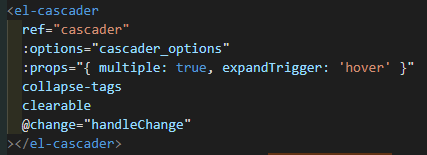

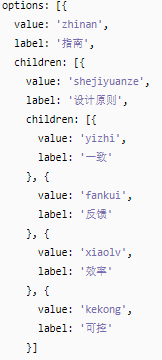
Cascade selection has strict requirements on data. Each data item contains at least two items: value and label, and the subset is children </ Font> the data styles provided on the official website are as follows:

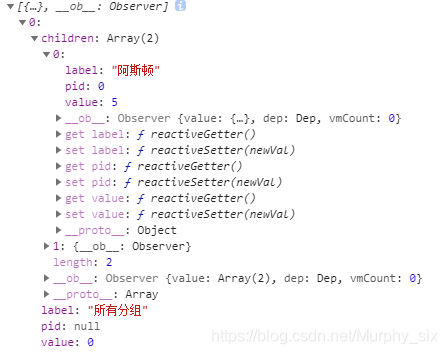
Here is my data on the console

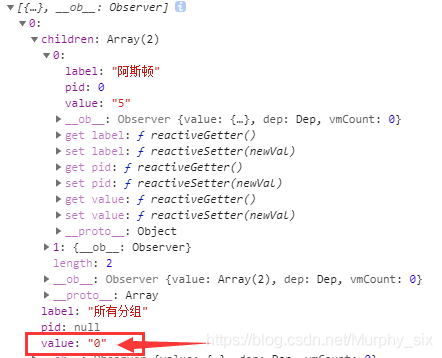
When I change the value of value from int type to string type, I will not report an error. See the figure below for details.

The simplest way is + “, when any type is added to string, it will be converted to string first

[Solved] This.getoptions is not a function when installing sass loader and less loader

After installing sass loader and less loader, we report module build failed: typeerror: this.getoptions is not a function with lang = “less” or lang = “sess”

less:

npm install [email protected] --save-dev 

Version reduced to 5.0.0

sess:

npm uninstall sass-loader // unisntall current version
 
npm install [email protected] --save-dev

Reinstall version 7.3.1

[Solved] Turf.js error: uncaught (in promise) error: the solution of invalid unit

Solution for turf.js error: Uncaught (in promise) Error: Invalid unit
Error code (npm i turf):

import turf from 'turf';

var line = turf.lineString([[-83, 30], [-84, 36], [-78, 41]]);
var options = {units: 'miles'};

var along = turf.along(line, 200, options); // Wrong

Correct code (NPMI @ turf/turf)

import * as turf from '@turf/turf';

var line = turf.lineString([[-83, 30], [-84, 36], [-78, 41]]);
var options = {units: 'miles'};

var along = turf.along(line, 200, options);

[Solved] Vue-router Error: Navigation cancelled from “/course“ to “/user“ with a new navigation.

This error occurs because a page appears in your Vue router global navigation guard, jumps to a page and then redirects to another interface

router.beforeEach((to,from,next)=>{
  if(to.matched.some(record => record.meta.requiresAuth)){
    if(!store.state.user){
      //Jump to the landing page
      next({
        name:'login',
        query:{//Pass the query string parameter via url
          redirect: to.fullPath//Tell the landing page the page that needs to be returned if the login is successful
        }
      })
    }else{
      next()
    }
  }else{
    next()
  }
  next()
})

If such code appears in Vue router, this error will occur. The solution is not to use multi-layer if and else

How to React page to achieve entry and exit animation

React animated router dependency

file: https://www.npmjs.com/package/react-animated-router
Replace the direct routing component switch with the animated router

The red mark is wrong

In the process of development (TS), we always report an error after replacement, saying that there is no necessary attribute. After looking at the source code and adding the following attributes, we report no error (enter, exit, appearance)
< AnimatedRouter enter exit appear> ... </ AnimatedRouter>

Simply record how to improve the appearance animation style

Introduce a style (‘react-animated-router/animal. CSS’) which is copied from the installation package. If you want to modify it, it is left and right animation by default

// ------Page in/out animation start-------
.animated-router-container {
  height: 100%;
}
.animated-router-in-transition {
  /* page animation in progress */
  position: relative;
  width: 100%;
  overflow: hidden;
}
.animated-router-forward-enter {
  transform: translate(-20px);
  opacity: 0;
}
.animated-router-forward-enter-active {
  transform: translate(0);
  opacity: 1;
}
.animated-router-forward-exit {
  transform: translate(0);
  opacity: 1;
}
.animated-router-forward-exit-active {
  transform: translate(100%);
  opacity: 0;
}
.animated-router-backward-enter {
  transform: translate(-20px);
  opacity: 0;
}
.animated-router-backward-enter-active {
  transform: translate(0);
  opacity: 1;
}
.animated-router-backward-exit {
  transform: translate(0);
  opacity: 1;
}
.animated-router-backward-exit-active {
  transform: translate(100%);
  opacity: 0;
}
.animated-router-forward-enter-active,
.animated-router-forward-exit-active,
.animated-router-backward-enter-active,
.animated-router-backward-exit-active {
  /* Transition time and jogging effect required for different transition phases */
  transition: all 0.4s ease-in;
}
.animated-router-forward-exit,
.animated-router-backward-exit {
  position: absolute !important;
  width: 100%;
  top: 0;
  left: 0;
}
// ------Page in/out animation end-------

When a warning appears, try to install the following two plug-ins

npm install [email protected] --save
npm install –save-dev prop-types

Another component library comes out of animation – ant motion

Full screen scrolling by Vue + Vue awesomeswiper

1. Install Vue awesomeswiper in Vue

"vue-awesome-swiper": "^3.1.3",

2. Main.js

import VueAwesomeSwiper from 'vue-awesome-swiper';


Vue.use(VueAwesomeSwiper)

3. The following code block is introduced into the. Vue file that needs to slide the page

<template>
    <div>
        <swiper id="swiperBox" :options="swiperOption" ref="mySwiper">
            <swiper-slide class="swiper-slide" v-for="(item, index) in list":key="index">
                <div class="page">
                  <h3>{{item}}</h3>
                </div>
            </swiper-slide>
        </swiper>
    </div>
</template>

<script>
import { swiper, swiperSlide } from "vue-awesome-swiper";
export default {
    data(){
        return{
            list:[1,2,3,4],
            swiperOption: {
                notNextTick: true, //if notNextTick is set to true, the component will not instantiate the swiper via NextTick, which means you can get the swiper object in the first place, if you need to just load the swiper object to do something, then this property must be true
                direction: "vertical", //move in vertical direction
                grabCursor: true, //the pointer will turn into palm shape when the mouse covers the swiper, the pointer will turn into grab hand shape when dragging
                setWrapperSize: true, //Swiper use flexbox layout (display: flex), turn on this setting will add a width or height equal to the sum of the slides on the Wrapper, may need to use in browsers that do not have good support for flexbox layout.
                autoHeight: true, //autoHeight. When set to true, the wrapper and container will change with the height of the current slide
                slidesPerView: 1, //Set the number of slides the slider container can display at the same time (carousel mode). Can be set to a number (can be decimal, decimal cannot be looped), or 'auto' will automatically set the number according to the width of the slides. loop mode if set to 'auto' also need to set another parameter loopedSlides.
                mousewheel: true, //Enable mouse wheel to control Swiper switching. You can set the mouse option, default value false
                mousewheelControl: true, //same as above
                height: window.innerHeight, // height setting, take up the full height of the device
                resistanceRatio: 0, // resistance rate. The ratio of the size of the edge resistance. The smaller the value the greater the resistance the more difficult it is to drag the slide away from the edge, 0 when it is completely impossible to drag away. The business needs
                observeParents: true, //Apply observe to the Swiper's parent element. When Swiper's parent element changes, for example window.resize, Swiper updates
            },
        }
    },
    components:{
        swiper,
        swiperSlide
    },
    computed: {
        swiper() {
            return this.$refs.mySwiper.swiper;
        }
    },
}
</script>

Vue: initialize failed: invalid DOM [How to Solve]

The problem encountered here is to
introduce ecarts, because before DOM is loaded, option gets the element, and ecarts. Init (document. Queryselect (‘# DOM’)
starts to detect Dom and tries to get it. However, in the case where ecarts is referenced in Vue,
ecarts. Init() has been executed before DOM is loaded, Therefore, an error initialization failed: invalid DOM will be reported

2. Solution:
the root cause is that DOM is not loaded, and ecarts does not detect DOM, so I will let DOM load and then get DOM, here we need to use the
promise in ES6 syntax

//Methods
function initecarts() {
was used     // New promise object
is created      let newPromise = new Promise((resolve) => {
resolve()
})
// Then the initialization function of ecarts is executed asynchronously      newPromise.then(() => {
//     This DOM displays the DOM for ecarts
icon          echarts.init(DOm)
})
}

// method
function initEcharts () {
	// Create a new Promise object
	let newPromise = new Promise((resolve) => {
		resolve()
	})
	// then asynchronously execute the initialization function of echarts
	newPromise.then(() => {
		// This dom is the echarts icon display dom
		echarts.init(DOm)
	})
}

The method is very simple, which is an asynchronous operation
operation

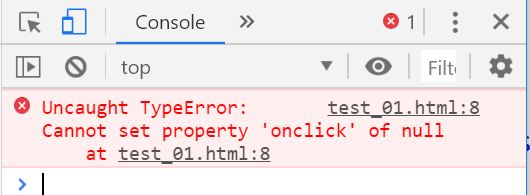
Method to solve uncaught typeerror: cannot set property ‘onclick’ of null error

Problem analysis: this error occurs when the JS file is placed in the head tag and the onclick event is bound

reason:

W3school introduces that the browser loads the button node before executing JS. When the browser parses from top to bottom, the button node bound to onclick cannot be found

For example:

<!DOCTYPE HTML>
<html>
<head>
<meta http-equiv="Content-Type" content="text/html; charset=utf-8">
<title>Events</title> 
<script>
    var Btn = document.getElementById('btn');
    Btn.onclick = function(){    
        console.log("push the button ");        
    }
</script> 
</head> 
<body> 
   <button id="btn">Calculation</button> 
</body>
</html>

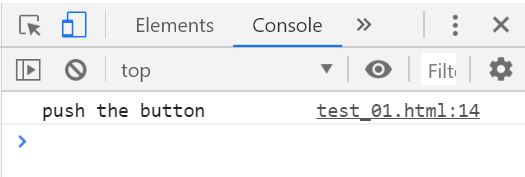
This error will appear, as shown in the following figure:

Solution 1: use the JS content in window ο nl ο Ad = function () {} wrap it up

<!DOCTYPE HTML>
<html>
<head>
    <meta http-equiv="Content-Type" content="text/html; charset=utf-8">
    <title>Events</title>
    <script>
        window.onload = function () {
            var Btn = document.getElementById('btn');
            Btn.onclick = function () {
                console.log("push the button ");
            }
        }
    </script>
</head>
<body>
    <button id="btn">Calculation</button>
</body>
</html>

Solution 2: load the JS file at the bottom

<!DOCTYPE HTML>
<html>
<head>
    <meta http-equiv="Content-Type" content="text/html; charset=utf-8">
    <title>Events</title>
</head>
<body>
    <button id="btn">Calculation</button>
    <script>
        var Btn = document.getElementById('btn');
        Btn.onclick = function () {
            console.log("push the button ");
        }
    </script>
</body>
</html>