Category Archives: JavaScript

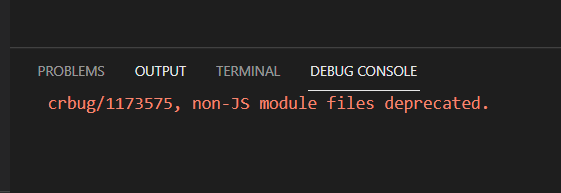
[Solved] VS Code Debug JavaScript Error: “crbug/1173575, non-JS module files deprecated”

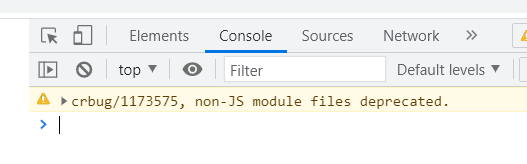
  According to the online method (VSCODE debug Javascript), after installing the debugger for Chrome extension, debug JavaScript, the result is not able to display the web page in the browser correctly, the wrong report: “crbug/1173575, non-JS module files deprecated”, as shown in the following figure:

resolvent:

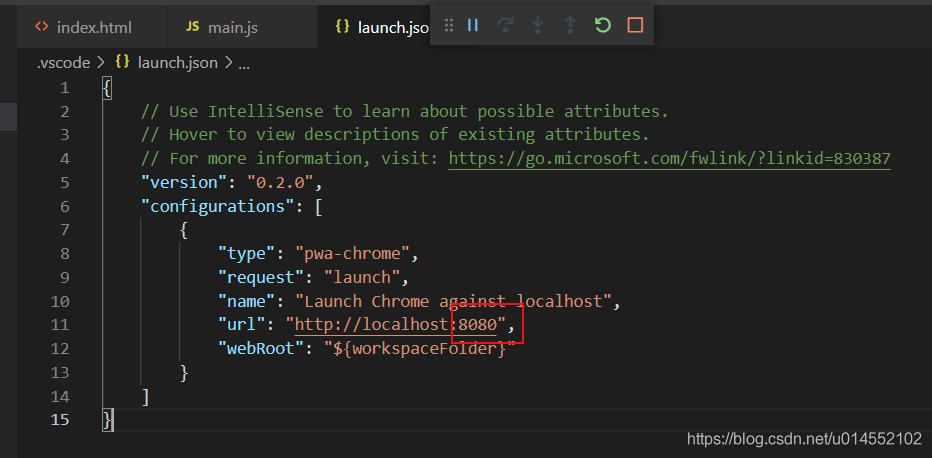
Open launch.json and change the port number in “URL” in “configurations” to the port number of live server

Save, and then press F5 again to debug normally

[Solved] Error: #error More than 1 blank line not allowed no-multiple-empty-lines

Error reporting environment

After creating Vue scaffolding,

    1. Modify/SRC/app.vue to delete code we don’t need
<template>
  <div id="app">
    my_ui
  </div>
</template>

<script>


export default {

}
</script>

<style lang="scss">

</style>

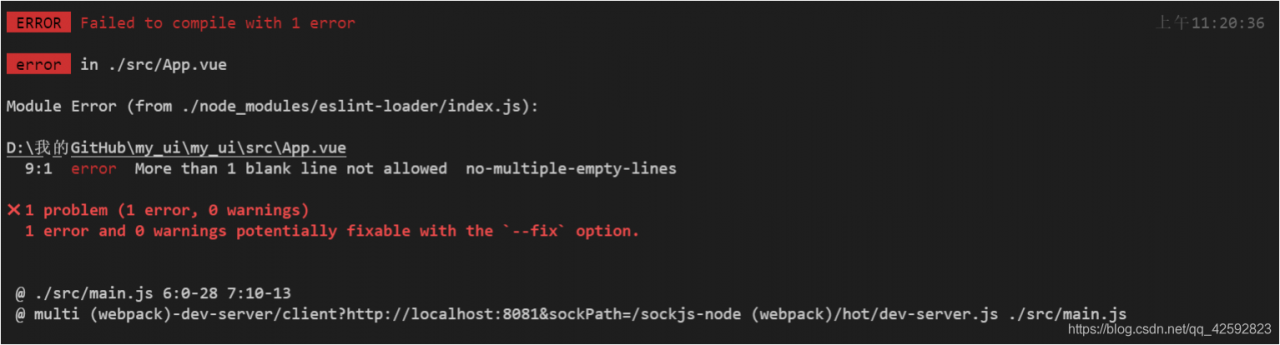
Start project: NPM run serve error: error more than 1 blank line not allowed no multiple empty lines

Screenshot of error report

Error reporting translation

Error more than 1 blank line not allowed no multiple empty lines

Error reporting solution

Method 1:

According to the error prompt, find the relevant module. Here is the app. Vue
we modified earlier. Delete the redundant blank lines in it

Method 2:

Close eslint

[Solved] Error while trying to use the following icon from the Manifest

Error while trying to use the following icon from the manifest: http://localhost:8080/img/icons/android -chrome-192×192.png (Download error or resource isn’t a valid image)

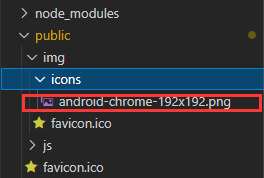
The main reason for this error is that the android-chrome-192×192.png image in the icons folder under img under public is deleted by mistake
my solution: re create the same folder and file (if you find a picture, you won’t report an error!)

[Solved] Vite packing error: some chunks are larger than 500kb after minification

Vite packing error: some chunks are larger than 500kb after minification

Solution 1: increase the size of the limit and change 500kb to 1000KB or more

chunkSizeWarningLimit:1500,

build.chunkSizeWarningLimit

Type: number Default: 500 limit of block size warning (in KBS).

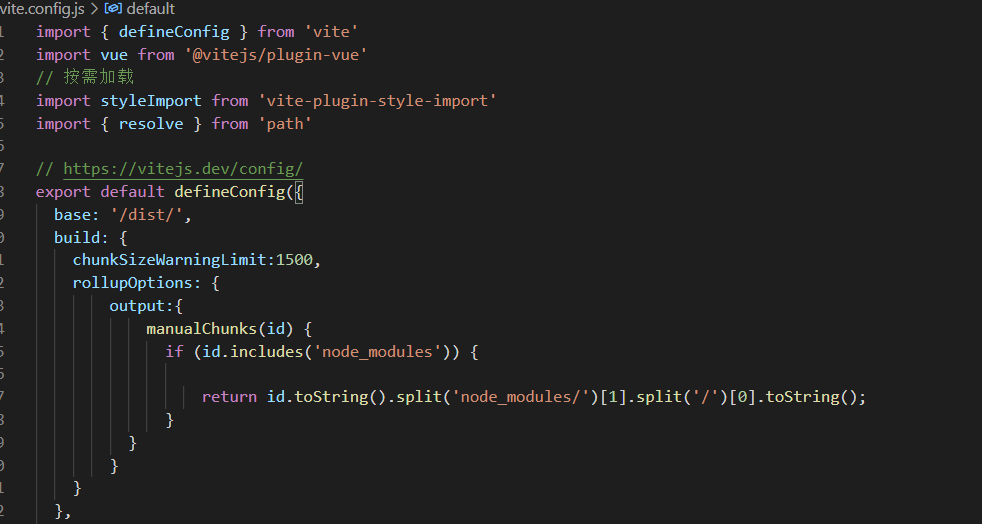
Solution 2: decompose blocks, breaking large blocks into smaller blocks

rollupOptions: {
        output:{
            manualChunks(id) {
              if (id.includes('node_modules')) {
                  return id.toString().split('node_modules/')[1].split('/')[0].toString();
              }
          }
        }
    }

build.rollupOptions

Type: rollupoptions directly customize the underlying rollup package. This is the same as the options that can be exported from the rollup configuration file and will be combined with vite’s internal rollup options. For more details, see the summary options documentation.

code:

import { defineConfig } from 'vite'
import vue from '@vitejs/plugin-vue'
import styleImport from 'vite-plugin-style-import'
import { resolve } from 'path'

// https://vitejs.dev/config/
export default defineConfig({
  base: '/dist/',
  build: {
    chunkSizeWarningLimit:1500,
    rollupOptions: {
        output:{
            manualChunks(id) {
              if (id.includes('node_modules')) {
                
                  return id.toString().split('node_modules/')[1].split('/')[0].toString();
              }
          }
        }
    }
  }
})

Solve the asynchronous execution of callback function in Axios request processing interceptor

The Axios request handles the asynchronous execution of the callback function in the interceptor, resulting in the failure to get the token refresh

https.interceptors.request.use(config => {
    if (Determine if the token is expired) {
        let promisefresh = new Promise(function (resolve, reject) {
            WebViewJavascriptBridge.callHandler(
                "getUserInfo",
                {
                    key: "111"
                },
                function (responseData) {
                    removeItem("FToken");
                    setItem("FToken", responseData);
                    config.headers["FToken"] = getItem("FToken"); 
                    config.headers["FAppType"] = "M"; 
                    resolve(config);
                }
            );
        });
        return promisefresh;
    } else {
        config.headers["FToken"] = getItem("FToken"); 
        config.headers["FAppType"] = "M"; 
        return config;
    }
}, function (error) {
    return Promise.reject(error);
});

axios.interceptors.response.use();

Such a simple serialization system.text.json.serialization also reports an error?

Consulting area

kofifus:

I am going to switch json.net in the project to the native system. Text. JSON , but I encountered an unexpected error. The test code is as follows:


using System.Text.Json.Serialization;
using Newtonsoft.Json;

public class C {
  public C(string PracticeName) { this.PracticeName = PracticeName; }
  public string PracticeName;
}

var x = new C("1");
var json = JsonConvert.SerializeObject(x); // returns "{\"PracticeName\":\"1\"}"

var x1 = JsonConvert.DeserializeObject<C>(json); // correctly builds a C

var x2 = System.Text.Json.Serialization.JsonSerializer.Parse<C>(json);

The last line of the above code will report:


Exception thrown: 'System.NullReferenceException' in System.Text.Json.dll Object reference not set to an instance of an object.

What did I do wrong?

I found that this problem can be solved by parameterless constructor , but doing so will put the cart before the horse. Is there a flexible way to realize the simple functions that can be realized by JSON. Net .

Answer area

Christian Gollhardt:

In the . Net core 3.0 stage, the development of system. Text. JSON has not been completely completed. At present, only nonparametric constructor is supported, which may be supported in the future.

If you are migrating the old version to . Net core 3.0 , I still suggest you use newtonsoft. JSON .

    MVC

Install the microsoft.aspnetcore.mvc.newtonsoftjason package from nuget and inject it into the Services container.


services.AddMvc().AddNewtonsoftJson();

    SignalR:

InstallMicrosoft.AspNetCore.SignalR.Protocols.NewtonsoftJson package from Nuget


//Client
new HubConnectionBuilder()
.WithUrl("/chatHub")
.AddNewtonsoftJsonProtocol(...)
.Build();

//Server
services.AddSignalR().AddNewtonsoftJsonProtocol(...);

In this way, you can use json.net in . Net core 3.0 .

user11400447:

To solve this problem, you must make two changes:

praccename

    1. should be made into an attribute, not a field. Use a parameterless constructor

I wrote a console program, in which C1 is converted through newtonsoft. JSON , and C2 is converted through system. Text. JSON .


using Newtonsoft.Json;

namespace TestJsonParse
{
    class Program
    {
        static void Main(string[] args)
        {
            var c1 = new C1("1");
            var json1 = JsonConvert.SerializeObject(c1); // returns "{\"PracticeName\":\"1\"}"
            var x1 = JsonConvert.DeserializeObject<C1>(json1); // correctly builds a C1

            var c2 = new C2();
            string json2 = "{\"PracticeName\":\"1\"}";
            var x2 = System.Text.Json.Serialization.JsonSerializer.Parse<C2>(json2); // correctly builds a C2
        }

        class C1
        {
            public C1(string PracticeName) { this.PracticeName = PracticeName; }
            public string PracticeName;
        }

        class C2
        {
            public C2() { }
            public string PracticeName { get; set; }
        }
    }
}

Comment area

Times have changed. I’ve finished system.text.jason, and then I used the latest. Net 5 digression code.


namespace ConsoleApp3
{
    class Program
    {
        static void Main(string[] args)
        {
            var json = "{\"PracticeName\":\"1\"}";

            //json.net
            var x1 = JsonConvert.SerializeObject(json);

            //System.Text.Json
            var x2 = System.Text.Json.JsonSerializer.Deserialize<C>(json);

        }
    }

    public class C
    {
        public C(string PracticeName) { this.PracticeName = PracticeName; }
        public string PracticeName;
    }
}

The result is…. Continue to report errors…
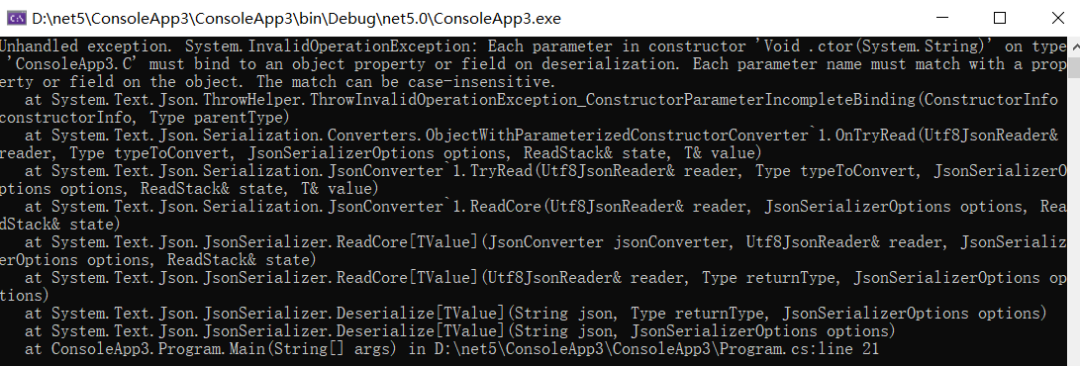
What else can I say
[Solved] Uncaught SyntaxError: Unexpected token ‘<‘

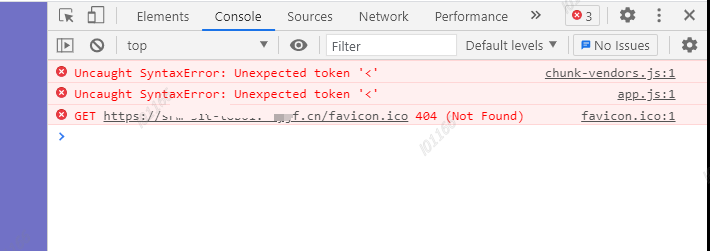
This error is sometimes reported in front-end deployment, as shown in the following figure:

it is generally caused by improper configuration. Modify the vue.config.js file

// If the application is deployed on a subpath, you will need to specify this subpath with this option. For example, if your application is deployed at https://www.baidu.vip/admin/, set the baseUrl to /admin/.

publicPath: process.env.NODE_ENV === 'production' ?'/' : '/admin/',

The solution to the failure of HTML introducing external JS

Problem Description:

JavaScript files are imported from outside the script tag, but it does not work, and the JS code is invalid

<!DOCTYPE html>
<html>
	<head>
		<meta charset="utf-8" />
		<title>Login</title>
		<script src="js/main.js" type="text/javascript"></script>
	</head>
	
	<body>
		<form action="XXXXXX" method="post" name="login">
			Username: <input type="text" name="username" id="username" /> <br>
			Password: <input type="password" name="password" id="password" /> <br>
			<input type="submit" name="login" id="login" value="登录"/>
			<input type="button" name="logon" id="logon" value="注册" />
		</form>
	</body>
</html>

Cause analysis:

The execution order of HTML code is from top to bottom. The browser parses the HTML code from top to bottom. If JS is introduced into the head, the page tag may not be loaded during JS execution, resulting in the failure of JS to find the action object

Solution:

Just import an external JS file after the body

<!DOCTYPE html>
<html>
	<head>
		<meta charset="utf-8" />
		<title>Login</title>
	</head>
	
	<body>
		<form action="http://42.192.60.64:8080/user" method="post" name="login">
			Username: <input type="text" name="username" id="username" /> <br>
			Password: <input type="password" name="password" id="password" /> <br>
			<input type="submit" name="login" id="login" value="登录"/>
			<input type="button" name="logon" id="logon" value="注册" />
		</form>
	</body>
	
	<script src="js/main.js" type="text/javascript"></script>
</html>

After Vite starts, it will prompt “network: use ` — host ` to expose”, and the service cannot be accessed through network IP

Cause

After using vite to build the project, you need to access the service debugging through the computer or mobile phone in the LAN. It is found that you can’t access it through the IP + port.


Problem recurrence

When you run the NPM run dev | serve command, the following contents will be displayed.

> [email protected] serve /Users/UserName/Workspace/vue-vite
> vite | vite preview


  vite v2.3.7 build preview server running at:

  > Local: http://localhost:3000 | 5000/
  > Network: use `--host` to expose

Cause of problem

When another device in the LAN needs to access the service, it must be accessed through the local IP + port
after trying to access, it is found that the service cannot be found because it is not exposed in the network.


resolvent

The console will display user -- host to expose (use -- host to expose the network)
usually, we will splice -- host on the back of NPM run dev | serve

After executing NPM run dev | serve -- host , the console will still display netvork: user -- host to expose

Server. Host
type: String
Default: ‘127.0.0.1’
specifies which IP address the server should listen to. If this is set to 0.0.0.0, it will listen to all addresses, including LAN and public network addresses.

So we found three solutions by consulting the documents:

1. Modify the vite. Config. JS configuration

Add the following to the vite. Config. JS file in the root directory

import vue from '@vitejs/plugin-vue'

/**
 * https://vitejs.dev/config/
 * @type {import('vite').UserConfig}
 */
export default {
  plugins: [vue()],
  server: {				// ← ← ← ← ← ←
    host: '0.0.0.0'	// ← new content ←
  }						// ← ← ← ← ← ←
}

2. Configure via vite cli

After executing the NPX vite -- host 0.0.0.0 command, you can use http://10.56.116.128:3000/ visited.

  vite v2.3.7 dev server running at:

  > Local:    http://localhost:3000/
  > Network:  http://10.56.116.128:3000/

  ready in 301ms.

3. Modify NPM script

Modify the script under the scripts node in the package. JSON file as follows:

"scripts": {
  "dev": "vite --host 0.0.0.0",
  "build": "vite build",
  "serve": "vite preview --host 0.0.0.0"
}

END