xmlHttp.open('post', './UserServer', true);
xmlHttp.setRequestHeader("Content-type", "application/x-www-form-urlencoded");
xmlHttp.send("type=1&userId=" + userId);
//Send() method will also report 405 if the wrong parameter is passed, such as missing '=' or '&' or setRequestHeader("Content-type", "application/x-www-form-urlencoded")Category Archives: JAVA
Springcloud builds a gateway and starts Error [Solved]
1.Spring MVC found on classpath, which is incompatible with Spring Cloud Gateway at this time. Please remove spring-boot-starter-web dependency.
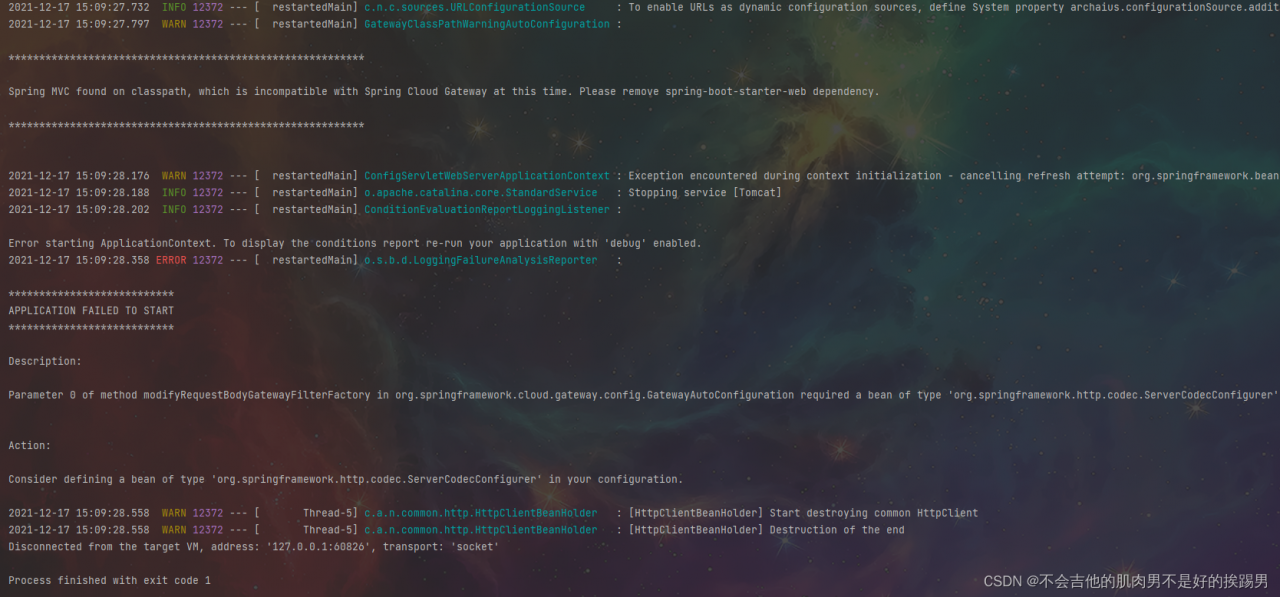
Solution:
           <exclusion>
                    <groupId>org.springframework.boot</groupId>
                    <artifactId>spring-boot-starter-web</artifactId>
                </exclusion>
2. Failed to configure a DataSource: ‘url’ attribute is not specified and no embedded datasource could be configured.
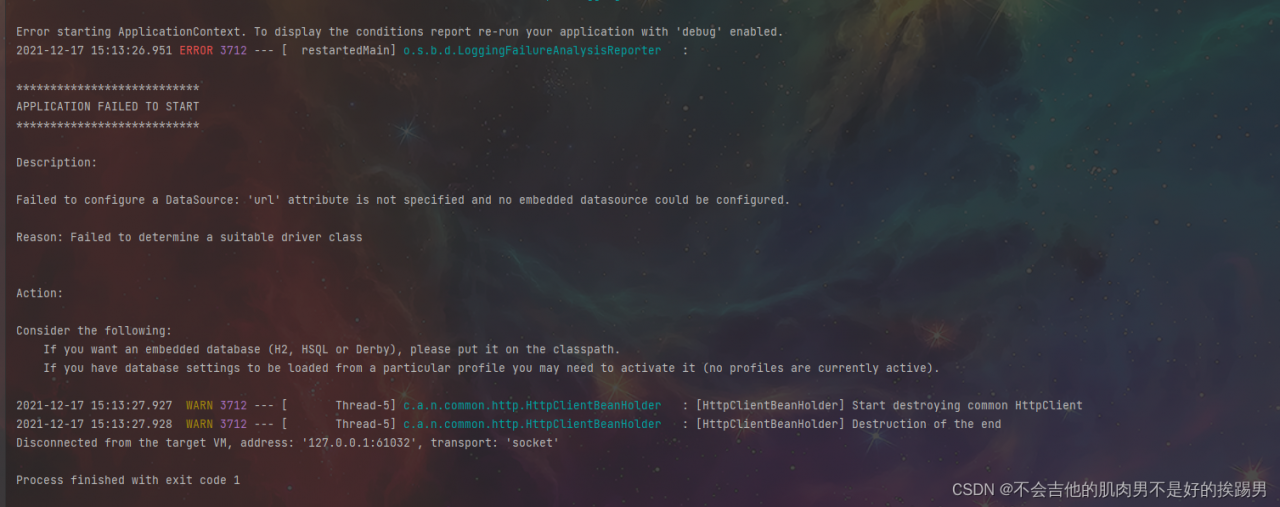
Solution:
             <exclusion>
                    <groupId>org.springframework.boot</groupId>
                    <artifactId>spring-boot-starter-jdbc</artifactId>
                </exclusion>
IDEA pom.xml dependency version error [How to Solve]
Self problem solving record, tossed all morning and finally solved:
I tried other solutions first, but there was no response. You can still try:
1. Modify the Maven version number, download the old version again, configure the environment variables, and install cleanLastUpdated.bat small script to clear the package that has not been downloaded successfully/completely. It is useless
Share this script:
Copy to Notepad and save the file as cleanLastUpdated.bat, select the file format as all file formats.
set REPOSITORY_PATH=Absolute path to your own local repository
rem is searching...
for /f "delims=" %%i in ('dir /b /s "%REPOSITORY_PATH%\*lastUpdated*"') do (
    del /s /q %%i
)
rem search completed
pause
2. Re-check other configurations in settings \ Maven and check these two again. It’s useless
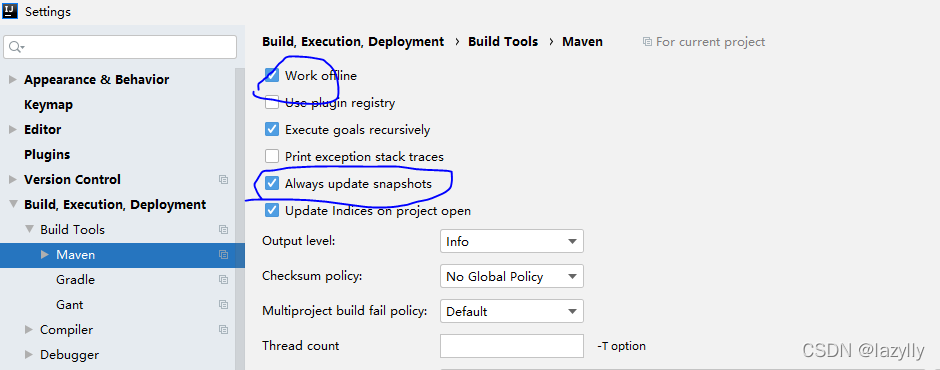
3. Final solution
I went to the local warehouse and found that the jar package had been downloaded, but it was inconsistent with the version number that my pom.xml relied on, so the modification was over.
[Solved] Spring upload file Error: Multipartfile Transferto() reported an error FileNotFoundException
When uploading files, use multipartfile Transferto() saves the file to the local path:
report errors:
java.io.IOException: java.io.FileNotFoundException: C:\Users\XXXXX\AppData\Local\Temp\tomcat. 8350081478984499756.8080\work\Tomcat\localhost\ROOT\app\file\xxxx. Xlsx (the system cannot find the specified path.)
    @Override
    public String store(MultipartFile file, String fileName) throws IOException {

        String destPath "/app/file/";
        File filePath = new File(destPath);
        File dest = new File(filePath, fileName);
        if (!filePath.exists()) {
            filePath.mkdirs();
        }
        try {
            file.transferTo(dest);
            log.info("file save success");
        } catch (IOException e) {
            log.error("File upload Error: ", e);
            throw e;
        }
        return dest.getCanonicalPath();
    }
Cause analysis:
file. When the transferto method is called, it is judged that if it is a relative path, the temp directory is used as the parent directory
so it is saved in the temporary work directory of Tomcat.
Solution:
Use absolute path: filepath.getAbsolutePath()
    @Override
    public String store(MultipartFile file, String fileName) throws IOException {

        String destPath "/app/file/";
        File filePath = new File(destPath);

        // Convert to absolute path
        File dest = new File(filePath.getAbsolutePath(), fileName);
        if (!filePath.exists()) {
            filePath.mkdirs();
        }
        try {
            file.transferTo(dest);
            log.info("file save success");
        } catch (IOException e) {
            log.error("File upload Error: ", e);
            throw e;
        }
        return dest.getCanonicalPath();
    }
Supplement:
You can also file Getbytes() gets the byte array, or file Getinputstream() performs stream data operation and writes it to disk.
Access to uploaded files
spring:
	resources:
    	static-locations: file:/app/file/  #Access external system resources and map the files in this directory to the system
or
import java.io.File;
import java.util.concurrent.TimeUnit;

import org.springframework.context.annotation.Configuration;
import org.springframework.http.CacheControl;
import org.springframework.web.servlet.config.annotation.ResourceHandlerRegistry;
import org.springframework.web.servlet.config.annotation.WebMvcConfigurer;

@Configuration
public class WebMvcConfig implements WebMvcConfigurer {

    public void addResourceHandlers(ResourceHandlerRegistry registry) {
        String absolutePath = new File("/app/file/").getAbsolutePath();

        registry.addResourceHandler("/upload/**") // External Access Addresses
                .addResourceLocations("file:" + absolutePath)// SpringBoot needs to add the file protocol prefix
                .setCacheControl(CacheControl.maxAge(30, TimeUnit.MINUTES));// set the browser cache
    }
}
OpenFeignClient Use Object to Receive text/plain Type Return Error
report errors
Could not extract response: no suitable HttpMessageConverter found for
response type [classxxxx] and content type [text/plain]
reason
The return type content type is not application/JSON, but text/plain. It cannot be deserialized into object type, as shown in the figure
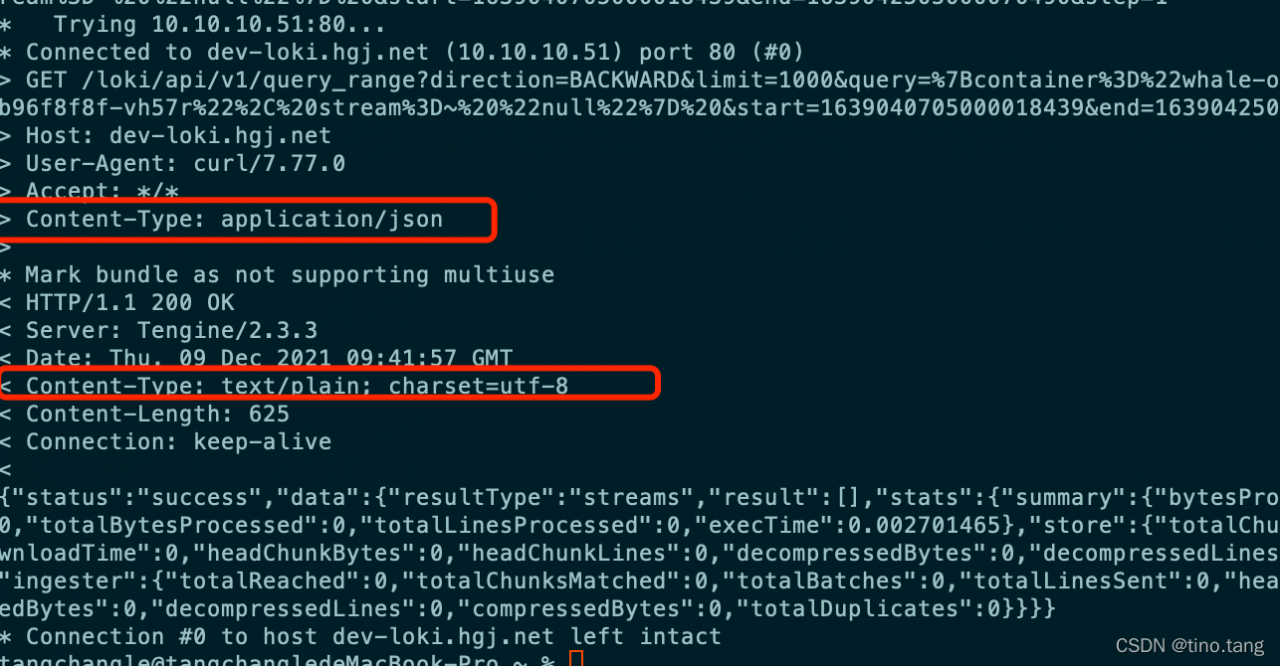
spring cloud openfeign essentially uses okhttpclient for request. If it is text/plain, it will be treated as text and cannot be deserialized automatically like JSON string, The following is my feinclient:
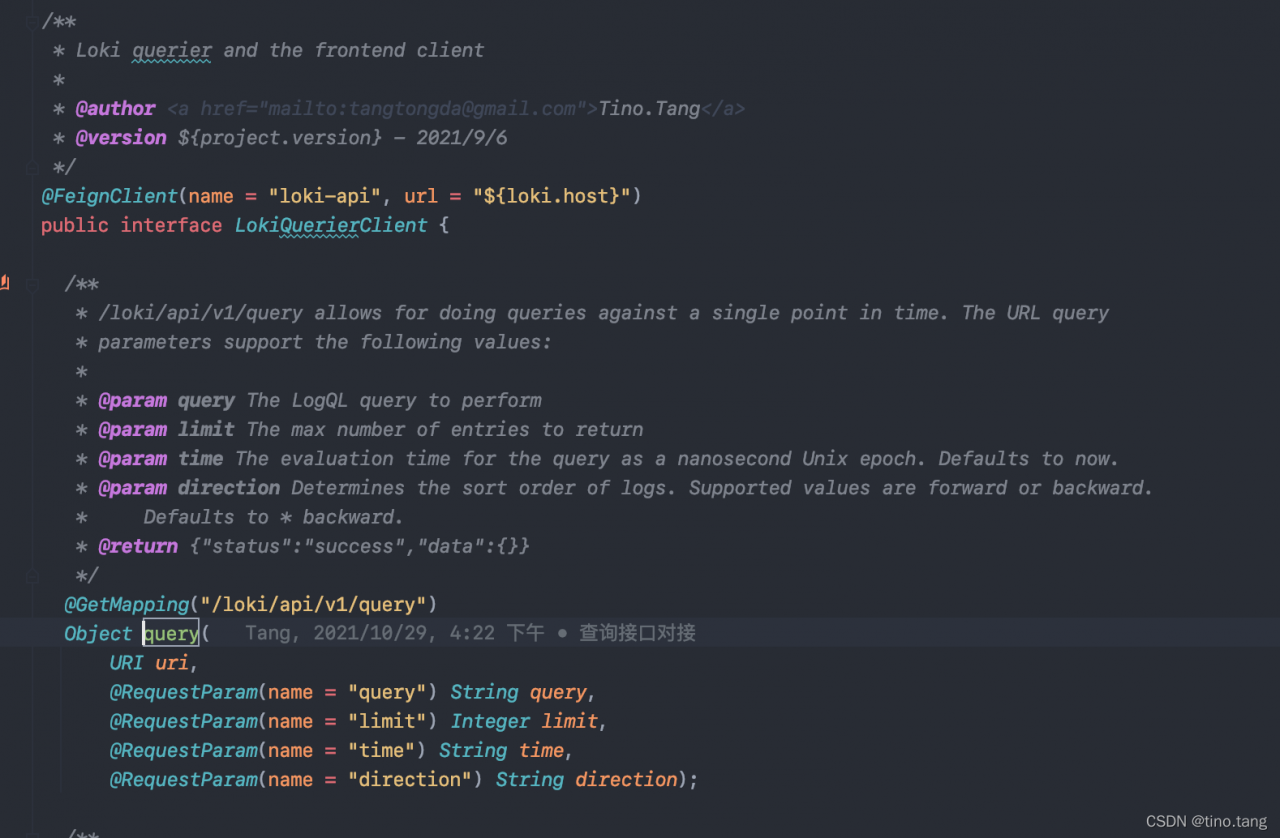
in this case, it is necessary to do compatibility processing for the return of this content type
add the jackson2httpmessageconverter conversion class, and increase the compatibility of text/plain and text/HTML return types
import org.springframework.http.MediaType;
import org.springframework.http.converter.json.MappingJackson2HttpMessageConverter;

import java.util.ArrayList;
import java.util.List;

/**
 * @author <a href="mailto:[email protected]">Tino.Tang</a>
 * @version ${project.version} - 2021/12/9
 */
public class MyJackson2HttpMessageConverter extends MappingJackson2HttpMessageConverter {

  public LokiJackson2HttpMessageConverter() {
    List<MediaType> mediaTypes = new ArrayList<>();
    mediaTypes.add(MediaType.TEXT_PLAIN);
    mediaTypes.add(MediaType.TEXT_HTML);
    setSupportedMediaTypes(mediaTypes);
  }
}
Add openfeign custom configuration and inject Decoder Bean.
import feign.Logger;
import feign.codec.Decoder;
import org.springframework.beans.factory.ObjectFactory;
import org.springframework.boot.autoconfigure.http.HttpMessageConverters;
import org.springframework.cloud.openfeign.support.SpringDecoder;
import org.springframework.context.annotation.Bean;
import org.springframework.context.annotation.Configuration;

/**
 * @author <a href="mailto:[email protected]">Tino.Tang</a>
 * @version ${project.version} - 2021/11/29
 */
@Configuration
public class OpenFeignLogConfig {

  @Bean
  public Logger.Level feignLoggerLeave() {
    return Logger.Level.FULL;
  }

  @Bean
  public Decoder feignDecoder() {
    LokiJackson2HttpMessageConverter converter = new LokiJackson2HttpMessageConverter();
    ObjectFactory<HttpMessageConverters> objectFactory = () -> new HttpMessageConverters(converter);
    return new SpringDecoder(objectFactory);
  }
}```

After processing, the call to the feign client will no longer report errors, regardless of whether the type is application/json or text/plain, it can be correctly deserialized to Object.
[Solved] tomcat Startup Error: java.lang.SecurityException: Invalid signature file digest for Manifest main attributes
Error: invalid signature file digest for manifest main attributes
The project runs normally on the local machine, but it cannot be started when deployed to the Tomcat of the server. The following error is reported:
Caused by: java.lang.SecurityException: Invalid signature file digest for Manifest main attributes
        at sun.security.util.SignatureFileVerifier.processImpl(SignatureFileVerifier.java:239) [:1.6.0_30]
        at sun.security.util.SignatureFileVerifier.process(SignatureFileVerifier.java:193) [:1.6.0_30]
        at java.util.jar.JarVerifier.processEntry(JarVerifier.java:296) [:1.6.0_30]
        at java.util.jar.JarVerifier.update(JarVerifier.java:207) [:1.6.0_30]
        at java.util.jar.JarFile.initializeVerifier(JarFile.java:342) [:1.6.0_30]
        at java.util.jar.JarFile.getInputStream(JarFile.java:410) [:1.6.0_30]
        at org.jboss.vfs.spi.JavaZipFileSystem.getFile(JavaZipFileSystem.java:159) [jboss-vfs.jar:3.0.0.GA]
        at org.jboss.vfs.VirtualFile.getPhysicalFile(VirtualFile.java:262) [jboss-vfs.jar:3.0.0.GA]
        at org.jboss.web.deployers.AbstractWarDeployer$1.visit(AbstractWarDeployer.java:853) [:6.0.0.Final]
        at org.jboss.vfs.VirtualFile.visit(VirtualFile.java:408) [jboss-vfs.jar:3.0.0.GA]
        at org.jboss.vfs.VirtualFile.visit(VirtualFile.java:410) [jboss-vfs.jar:3.0.0.GA]
        at org.jboss.vfs.VirtualFile.visit(VirtualFile.java:410) [jboss-vfs.jar:3.0.0.GA]
        at org.jboss.vfs.VirtualFile.visit(VirtualFile.java:410) [jboss-vfs.jar:3.0.0.GA]
        at org.jboss.vfs.VirtualFile.visit(VirtualFile.java:396) [jboss-vfs.jar:3.0.0.GA]
        at org.jboss.web.deployers.AbstractWarDeployer.getExplodedWarUrl(AbstractWarDeployer.java:866) [:6.0.0.Final]
        at org.jboss.web.deployers.AbstractWarDeployer.deploy(AbstractWarDeployer.java:400) [:6.0.0.Final]
        ... 47 more
Almost all the Internet queries have problems. There are files in the meta-inf folder of the packaged jar or war.JBoss is trying to process these files or doesn’t want to process them there.
However, I found that my meta-inf folder was empty and there was no * RSA,*.DSA,*.SF and other documents are hard to understand
I have also tried to repackage and replace the Tomcat version, but this problem has not been solved.
Finally, I thought that the project is divided into modules. Are there these files in the jar package generated by the referenced submodule? Finally, I checked one by one and finally found the problem:
there are these * RSA,*. DSA,*. SF files
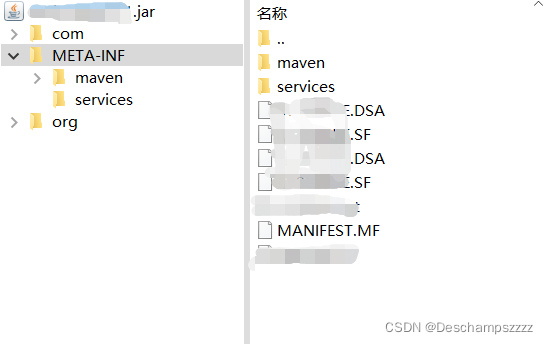
remove these files from the jar package:
zip -d <jar file name>.jar META-INF/*.RSA META-INF/*.DSA META-INF/*.SF
But this is a temporary solution but not a permanent solution. The problem will still occur in the next packaging. Finally, go to the pom.xml file to exclude META-INF/*.SF and other files
<plugin>
	<groupId>org.apache.maven.plugins</groupId>
	<artifactId>maven-shade-plugin</artifactId>
	<version>3.1.1</version>
	<executions>
		<execution>
			<phase>package</phase>
			<goals>
				<goal>shade</goal>
			</goals>
			<configuration>
				<filters>
					<filter>
						<artifact>*:*</artifact>
						<excludes>
							<!-- Exclude the following files to prevent verification errors when the program is started  -->
							<exclude>META-INF/*.SF</exclude>
							<exclude>META-INF/*.DSA</exclude>
							<exclude>META-INF/*.RSA</exclude>
						</excludes>
					</filter>
				</filters>
			</configuration>
		</execution>
	</executions>
</plugin>[Solved] Appium Error: An unknown server-side error occurred while processing the command
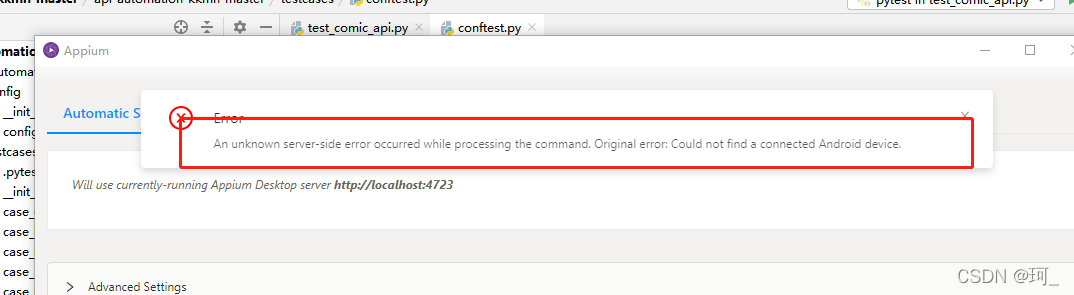
Confirm whether the mobile phone settings – Developer options – USB debugging is enabled} be sure to enable the developer options
[Solved] IDEA globally replace yml Error: you have entered malformed replacement
Problem Description: because the YML configuration file needs to be replaced uniformly in the microservice project, but the replacement string contains’ $’, the editor reports an illegal format error. 
Solution:
Just transfer the ‘$’ symbol and add the escape character ‘\’ in front of it: http://nacos-headless \.\${info.namespace}\.svc\.cluster\.local:8848
[Solved] Maven compile error: Blocked mirror for repositories
1. The following error is reported when compiling with Maven. The developer uses the same setting locally XML file compilation is OK
Could not resolve dependencies for project
Could not transfer artifact
Blocked mirror for repositories
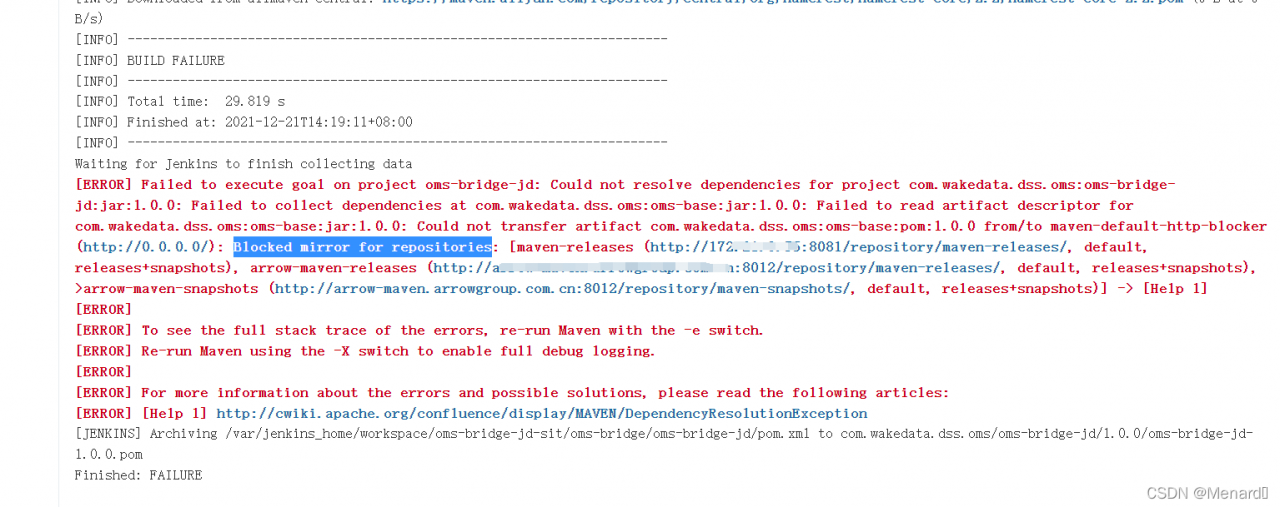
2. The solution is to find the data because it is found in 3.8.1. In later versions, all HTTP protocol repositories are lost in the block, which can be solved by setting the values of mirror of and blocked attributes in the mirror to false. In consideration of setting XML is a general-purpose file, so we do not intend to modify it, but reduce the Maven version to 3.6 three

3. After reducing the version, rebuild and solve the problem
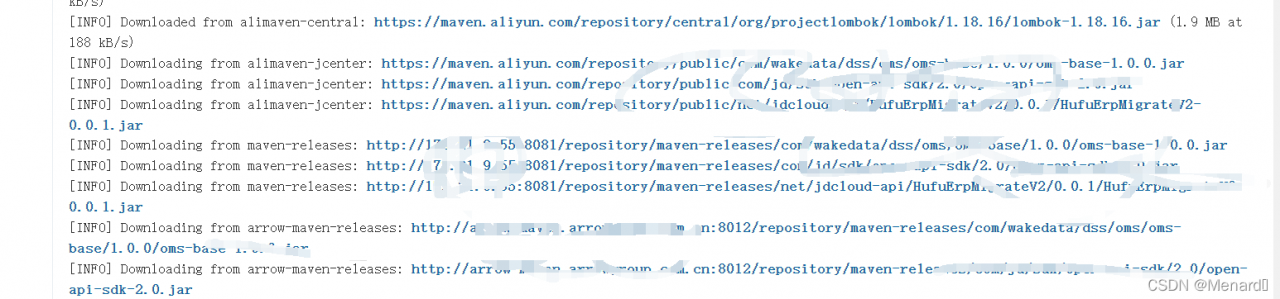
How to Solve nacos Startup Error and Connect to MYSQL
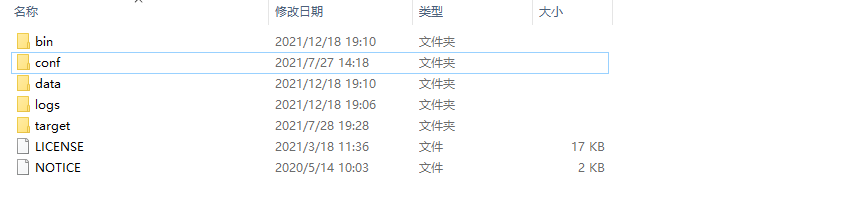
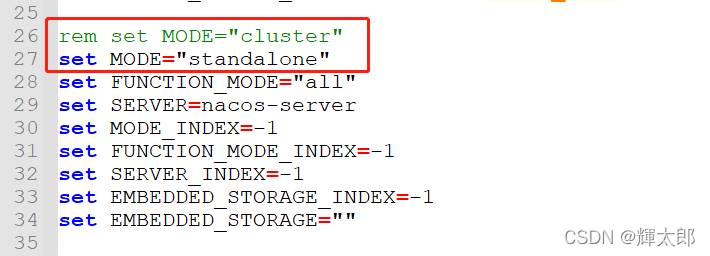
Error reason for Nacos startup: the default configuration of Nacos is cluster startup, which can be modified to stand-alone startup (after Nacos 1.3.2, the default mode of Nacos is cluster mode).
The Nacos directory structure is as follows (the version of Nacos I use is 2.0.3):
1.open the bin directory and modify startup.com script
2.connects to MySQL, executes the SQL statement
opens the conf folder, creates a Nacos database, executes the following script
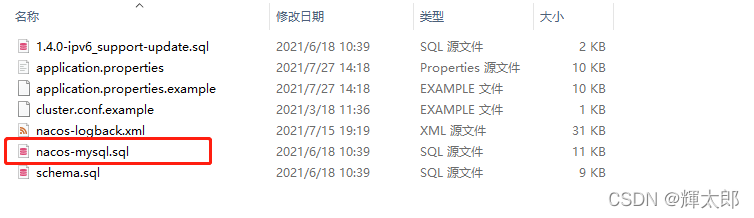
after execution, the results are as follows
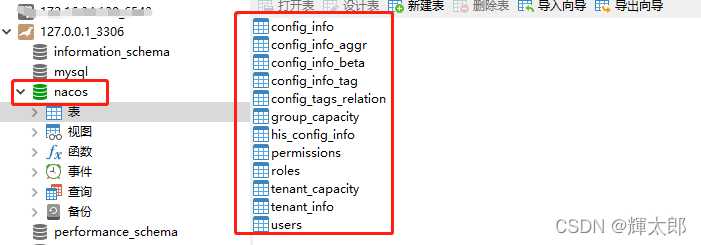
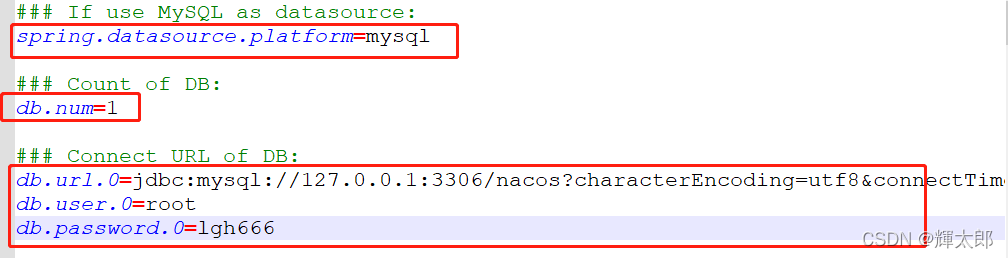
3.opens the conf folder, modifies the configuration information
finds the following configuration in the conf folder and modifies the marked configuration items
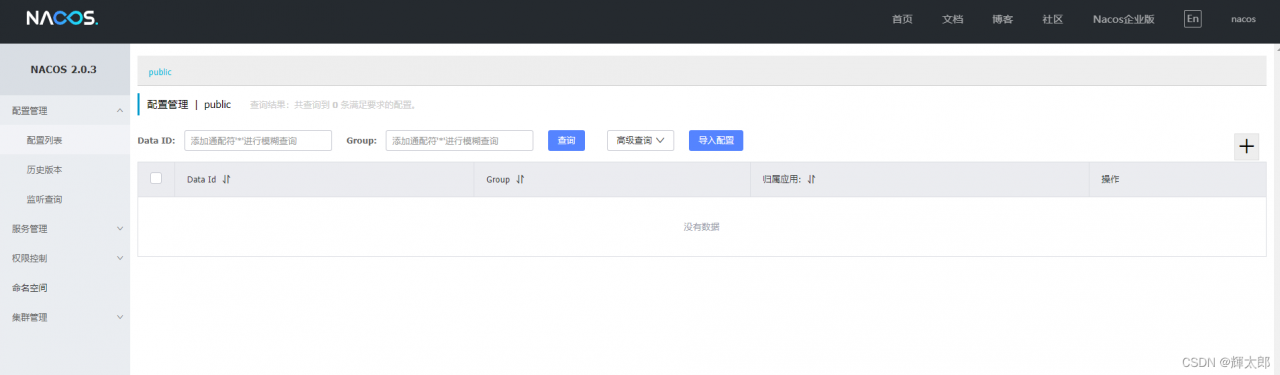
test access 127.0 0.1:8848/Nacos account/password: Nacos/Nacos successfully opened the following page
The Java class generated by protocol reports an error: cannot access
The Java class generated by protocol reports an error:

The generated template class reported an error. It was said on the Internet that the version was wrong, but I was sure that the version used was correct. Later, it was checked that a proto was introduced into the command_Path causes the generated template class to report an error
Error command:
protoc --proto_path=D:\000\hadoop-2.7.2-src\hadoop-yarn-project\hadoop-yarn\hadoop-yarn-api\src\main\proto\ --proto_path=D:\000\hadoop-2.7.2-src\hadoop-common-project\hadoop-common\src\main\proto\ --proto_path=.\ --java_out=.\ .\*.protoChange to the following command:
protoc --proto_path=D:\000\hadoop-2.7.2-src\hadoop-common-project\hadoop-common\src\main\proto\ --proto_path=.\ --java_out=.\ .\*.protoOne less — proto_Path, and then the problem is solved
How to Solve Junit Unit Test Error: “No runnable methods“
Abnormal
The errors reported by JUnit unit test are as follows:
java.lang.Exception: No runnable methods

	at org.junit.runners.BlockJUnit4ClassRunner.validateInstanceMethods(BlockJUnit4ClassRunner.java:191)
	at org.junit.runners.BlockJUnit4ClassRunner.collectInitializationErrors(BlockJUnit4ClassRunner.java:128)
	at org.junit.runners.ParentRunner.validate(ParentRunner.java:416)
	at org.junit.runners.ParentRunner.<init>(ParentRunner.java:84)
	at org.junit.runners.BlockJUnit4ClassRunner.<init>(BlockJUnit4ClassRunner.java:65)
	at org.junit.internal.builders.JUnit4Builder.runnerForClass(JUnit4Builder.java:10)
	at org.junit.runners.model.RunnerBuilder.safeRunnerForClass(RunnerBuilder.java:59)
	at org.junit.internal.builders.AllDefaultPossibilitiesBuilder.runnerForClass(AllDefaultPossibilitiesBuilder.java:26)
	at org.junit.runners.model.RunnerBuilder.safeRunnerForClass(RunnerBuilder.java:59)
	at org.junit.internal.requests.ClassRequest.getRunner(ClassRequest.java:33)
	at org.junit.internal.requests.FilterRequest.getRunner(FilterRequest.java:36)
	at com.intellij.junit4.JUnit4IdeaTestRunner.startRunnerWithArgs(JUnit4IdeaTestRunner.java:50)
	at com.intellij.rt.junit.IdeaTestRunner$Repeater.startRunnerWithArgs(IdeaTestRunner.java:33)
	at com.intellij.rt.junit.JUnitStarter.prepareStreamsAndStart(JUnitStarter.java:221)
	at com.intellij.rt.junit.JUnitStarter.main(JUnitStarter.java:54)
error code
import org.junit.Test;

public class Test01 {

    @Test
    public void test(){
        System.out.println("hello world");
    }
}
reason
There is no problem with the code @ test annotation is placed on the method, and the @test annotation is also from the package org.junit.Test
Simulate the environment where the problem code occurs: Maven project, with a main/Java/test01.Java and test/Java/test01.Java class
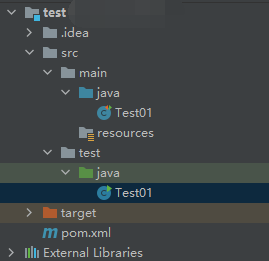
main/java/Test01.java
import org.junit.Test;

public class Test01 {
    @Test
    public void test01() {
        System.out.println("hello world - main/java/Test01.java");
    }
}
test/java/Test01.java
public class Test01 {
    public static void main(String[] args) {
        System.out.println("hello world - test/java/Test01.java");
    }
}
To solve the above problems, the following conditions must be met:
1.The same path. It means that the path of the class must be at the same level. If the test/java/Test01.javaand mian/java/Test01.javais the same level, the test/java/Test01.javaand mian/java/hello/Test01.javais not the same level , and there will be no conflict.
2.Same class name. Refer to the same class name in the same path as test/java/Test01.javathe main/java/Test01.javasame path and is both the name of the same class, test/java/Test02.javawith the main/java/Test01.javaconflict although the same path but different class name, it will not happen.
3.Use @Testcomments or not. In the case where the path and class name are the same, if main/java/Test01.javathere is an @Testannotated method in it, and test/java/Test01.javathere must be no @Testannotated method in it, this conflict will occur. If there is an @Testannotated method and the method name is different, it will be reported to use Junit Unit test error “No tests found matching Method test01(Test01) from ClassRequest@5387f9e0” .
After the above conditions are met, the above error will be reported by executing the test method with @test annotation under main/Java .
Solution:
Make their class paths different.
Make their class names different
Under test/Java, there must be methods using @test annotations
In short, it is recommended not to write test methods with @test comments under main/Java, let alone conflict them.