Category Archives: JAVA

[Solved] The main method caused an error: Could not deploy Yarn job cluster.

org.apache.flink.client.program.ProgramInvocationException: The main method caused an error: Could not deploy Yarn job cluster.

Caused by: org.apache.flink.client.deployment.ClusterDeploymentException: Could not deploy Yarn job cluster.

Caused by: org.apache.flink.yarn.YarnClusterDescriptor$YarnDeploymentException: The YARN application unexpectedly switched to state FAILED during deployment.

Diagnostics from YARN: Application application_1640140324841_0003 failed 1 times (global limit =4; local limit is =1) due to AM Container for appattempt_1640140324841_0003_000001 exited with  exitCode: 1
Failing this attempt.Diagnostics: [2021-12-22 11:23:34.422]Exception from container-launch.
Container id: container_e44_1640140324841_0003_01_000001
Exit code: 1
Shell output: main : command provided 1
main : run as user is etl_admin
main : requested yarn user is etl_admin
Getting exit code file…
Creating script paths…
Writing pid file…
Writing to tmp file /data1/yarn/nm/nmPrivate/application_1640140324841_0003/container_e44_1640140324841_0003_01_000001/container_e44_1640140324841_0003_01_000001.pid.tmp
Writing to cgroup task files…
Creating local dirs…
Launching container…


Solution:
Look is the flink version of the idea is 1.11.0, the flink version on the cluster is 1.13.1
Directly upgrade the flink version in the idea to 1.13.1, done!

[Solved] Eclipse Update Error: An error occurred while uninstalling session context was…

When updating Eclipse, the following error was reported:

An error occurred while uninstalling session context was:
(profile=D__…_…_eclipse_jee-2021-09_eclipse, phase=org.eclipse.equinox.internal.p2.engine.phases.Uninstall, operand=[R]org.eclipse.platform.ide.executable.win32.win32.x86_64 4.21.0.I20210906-0500 --> null, action=org.eclipse.equinox.internal.p2.touchpoint.natives.actions.CleanupzipAction).
Backup of file D:…eclipse.exe failed.
Can not remove : D:…eclipse.exe


Solution:

    1.Run eclipse and Rename eclipse.exe to eclipse.exe.back
    2.Run updates
    3.Updates executed successfully

简而言之就是在启动eclipse后,再把eclipse exe重命名为eclipse.exe.back然后更新。
希望能帮到更新时也有报此错误的童鞋!

[Solved] Error creating bean with name ‘mvcContentNegotiationManager‘: Lookup method resolution failed

Recently, I encountered various strange exceptions when I used idea to build an aggregation project. Here is an exception reported by the operation of its sub module:

The prompt of exception information is:

Error creating bean with name ‘mvcContentNegotiationManager’: Lookup method resolution failed; nested exception is java.lang.IllegalStateException: Failed to introspect Class [org.springframework.web.accept.ContentNegotiationManagerFactoryBean] from ClassLoader [sun.misc.Launcher$ AppClassLoader@18b4aac2 ]

Solution 1:

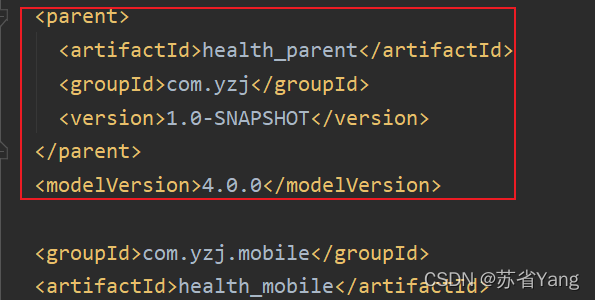
Check whether the POM file of the sub module depends on the parent class. Of course, many people will find that when wearing the submodule, the POM file of the sub module will automatically depend on the parent class (as shown in the figure below)

If the dependency in the above figure is not automatically generated after inspection, and you have the same exception as me, then the parent project dependency is added to solve the exception with a high probability

After consulting relevant posts on the Internet and repeated experiments for many times, I found that:

This bug is because we created a module with the same name before, and then we removed it. Then we automatically generate webapp module through the skeleton, so that the module generated by the skeleton will completely overwrite your original POM file!!!

Unfortunately, you need the parent project dependency to start the project, then you will have this bug!

The safest and most reliable solution to avoid problem reproduction: check the dependency of POM file every time you create a sub module. If not, solve it manually

Of course, there are various online solutions, but I have tried and found that it can temporarily solve the problem, but it will still be overwritten the next time I use the skeleton to generate a module with the same name

Solution 2 (slightly reliable):

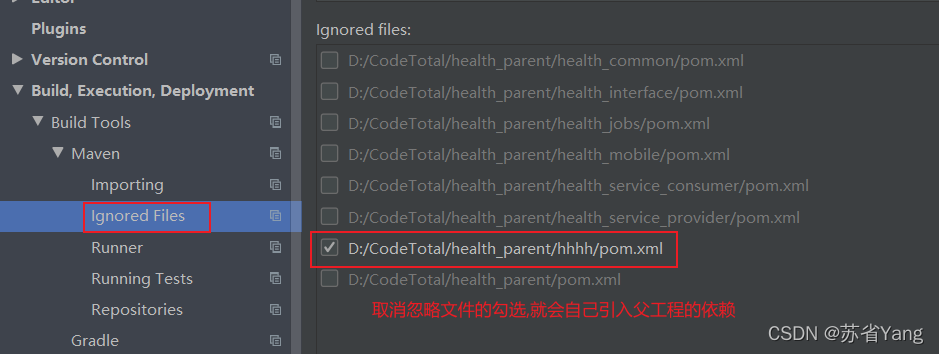
Setting — build — Maven — ignored files, cancel the ignored POM file, and the parent project dependency will be automatically added!

Summary:

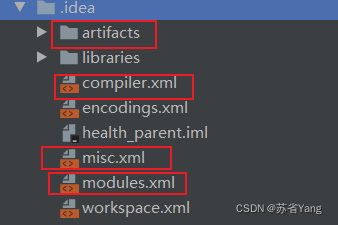
The root cause is that we have created modules with the same name before, but they are not really removed There is still a lot of information about deleting modules in the idea, so when creating a new module, the idea will automatically ignore the new module with the same name we wrote

Of course, a large part of the impact is because we use automatic skeleton generation!

[Solved] Error running ‘tomcat:run‘: Cannot run program “tomcat:run“

Error running ‘Tomcat: run’: cannot run program “Tomcat: run” (in directory “D: \ myideaproject \ springmvc \ spring \ Web”): CreateProcess error = 2, the system cannot find the specified file.

reason:

You need to use the MVN Tomcat: run command.

The following problems may occur during operation

The reason may be that there is a problem with Maven’s default Tomcat. The solution is to add a Tomcat plug-in

Add the following codes to pom.xml

<plugin>
  <groupId>org.apache.tomcat.maven</groupId>
  <artifactId>tomcat7-maven-plugin</artifactId>
  <version>2.2</version>
  <configuration>
    <port>8080</port>
    <path>/</path>
  </configuration>
</plugin>

Then start with the MVN tomcat7: run command

[Solved] Cause: org.apache.ibatis.builder.BuilderException: Error parsing SQL Mapper Configuration

org.apache.ibatis.exceptions.PersistenceException: 
### Error building SqlSession.
### The error may exist in mappers/user.xml
### Cause: org.apache.ibatis.builder.BuilderException: Error parsing SQL Mapper Configuration. Cause: org.apache.ibatis.builder.BuilderException: Error parsing Mapper XML. The XML location is 'mappers/user.xml'. Cause: org.apache.ibatis.builder.BuilderException: Error resolving class. Cause: org.apache.ibatis.type.TypeException: Could not resolve type alias ''.  Cause: java.lang.ClassNotFoundException: Cannot find class: 

This error occurs in the mybatis test for many reasons,
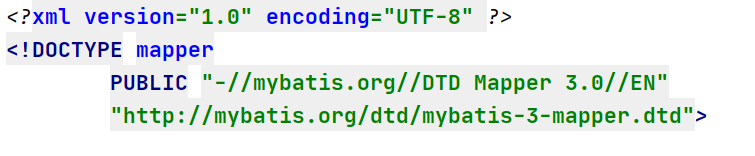
1: it may be the header information error of the mapping file. Correct:
2: there may also be an error in the label of the mapping file. Most of the errors reported in the mapping file are code errors. Just check the code
3: I made an error today because I wrote an extra tag, but the content in the tag was not written

4: The same type of error I encountered yesterday is because I wrote a comment in the where tag

<select>
	<where>
		Write comment here. This error has been encountered twice, as soon as a comment is written inside a tag, an error is reported
	</where>
</select>

These are the mistakes and solutions I met in learning mybatis.

[Solved] IDEA Start Maven Project Error: “Error starting ApplicationContext. To display the conditions report …”

When IDEA starts a maven project, it fails to start and displays an error reporting:

Error starting ApplicationContext. To display the conditions report re-run your application with ‘debug’ enabled.
2021-12-22 09:21:42.183 ERROR 14964 — [           main] o.s.b.d.LoggingFailureAnalysisReporter   :
***************************
APPLICATION FAILED TO START
***************************
Description:
Failed to configure a DataSource: ‘url’ attribute is not specified and no embedded datasource could be configured.
Reason: Failed to determine a suitable driver class

Action:
Consider the following:
If you want an embedded database (H2, HSQL or Derby), please put it on the classpath.
If you have database settings to be loaded from a particular profile you may need to activate it (the profiles local are currently active).

Cause:
The datasource related package environment is referenced, but no related configuration is performed

Solution:
1, start the class to add automatic configuration parameters: (exclude = {DataSourceAutoConfiguration.class})

@SpringBootApplication(exclude = {DataSourceAutoConfiguration.class})
public class ApiserviceApplication {

    public static void main(final String[] args) {
        SpringApplication.run(ApiserviceApplication.class, args);
    }
}

2. If the code does not use the relevant package environment, the relevant Maven package can be deleted

<!--        <dependency>-->
<!--            <groupId>org.springframework.boot</groupId>-->
<!--            <artifactId>spring-boot-starter-data-cassandra-jpa</artifactId>-->
<!--        </dependency>-->

3. If used, add relevant configurations

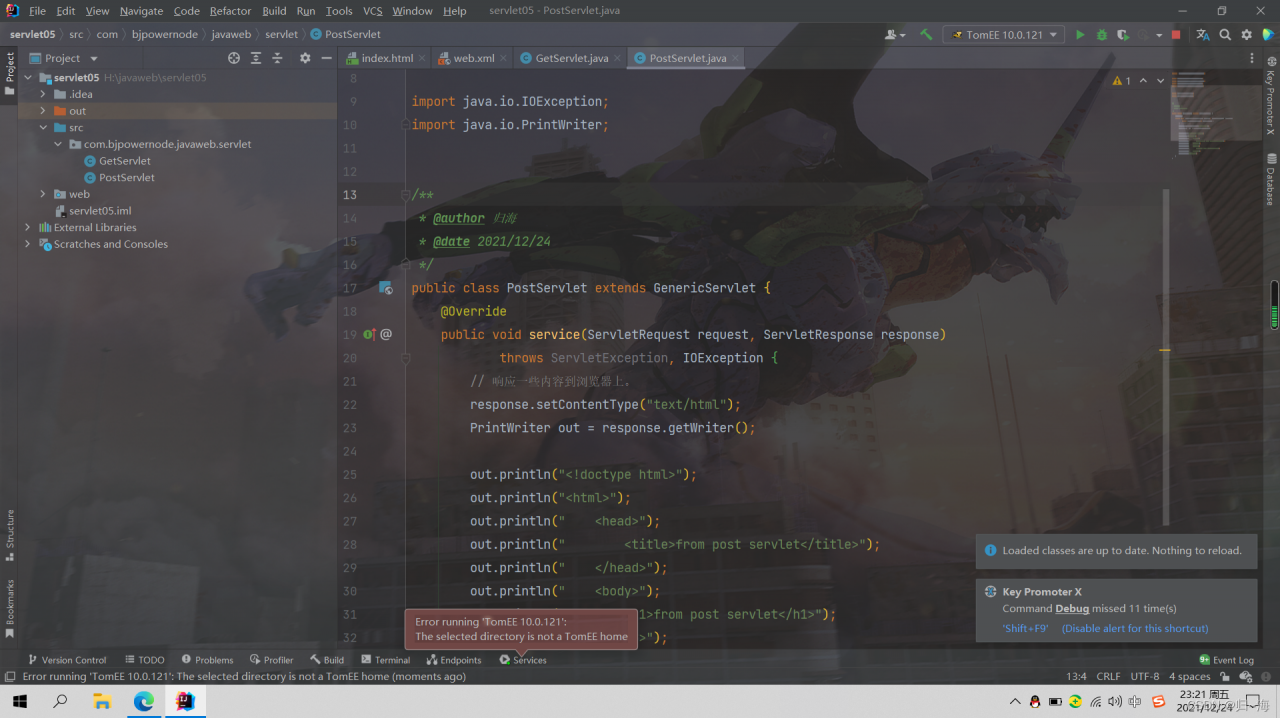
[Solved] Error running ‘TomEE 10.0.121‘: The selected directory is not a TomEE hom

Today, I watched the video of Lao Du’s servlet and tried to start the Tomcat server after typing the code. I found this: error running ‘tomee 10.0.121 ‘: the selected directory is not a tomee Hom error.

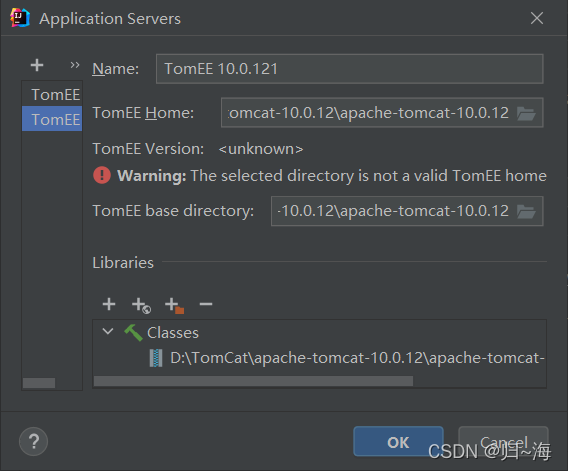
Then I didn’t look at the error carefully. Subconsciously, I thought my Tomcat path was wrong. I looked it up and found that there was no problem

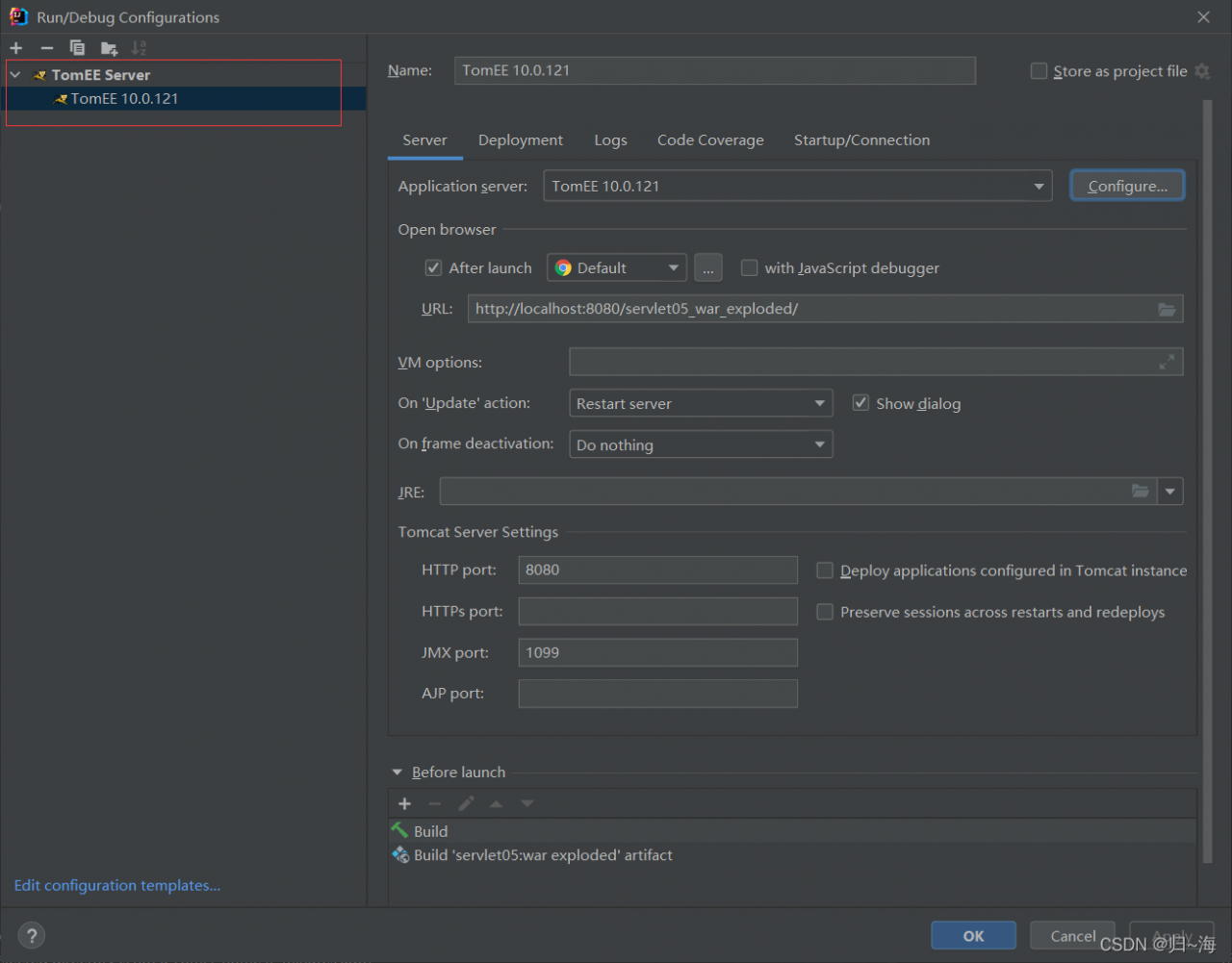
Finally, take a closer look at the good guy Tomcat created to tomcatee. No wonder it can’t be started.

Solution:

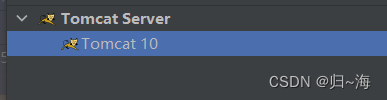
Just change back to normal Tomcat

Finally, click the servlet according to the old Du code

[Solved] Springcloud Add Eureka to Startup Error

1.Error Messages:
Correct the classpath of your application so that it contains a single, compatible version of com.google.gson.GsonBuilder

Description:

An attempt was made to call a method that does not exist. The attempt was made from the following location:
    java.lang.invoke.MethodHandleNatives.resolve(Native Method)
The following method did not exist:
    com.google.gson.GsonBuilder.setLenient()Lcom/google/gson/GsonBuilder;
The method's class, com.google.gson.GsonBuilder, is available from the following locations:
    jar:file:/E:/smallTools/maven/rep/com/google/code/gson/gson/2.1/gson-2.1.jar!/com/google/gson/GsonBuilder.class
The class hierarchy was loaded from the following locations:
    com.google.gson.GsonBuilder: file:/E:/smallTools/maven/rep/com/google/code/gson/gson/2.1/gson-2.1.jar
Action:
Correct the classpath of your application so that it contains a single, compatible version of com.google.gson.GsonBuilder
Process finished with exit code 1

2. Solution

Add gson dependency

<dependency>
    <groupId>com.google.code.gson</groupId>
    <artifactId>gson</artifactId>
    <version>2.6</version>
</dependency>

[Solved] docker Start jar package and Set JVM parameter Error

Error Messages:
Unrecognized option: -server -XX:MetaspaceSize=256m -XX:MaxMetaspaceSize=256m -Xms512m -Xmx1024m -Xmn512m -Xss256k -XX:SurvivorRatio=8 -XX:+UseConcMarkSweepGC -Dtask=true
Error: Could not create the Java Virtual Machine.
Background:
Setting JVM parameters and then using docker file to start jar package reported an error.
Solution:
Use the ENTRYPOINT exec command.
ENV jvm_opts=”-server -XX:MetaspaceSize=256m -XX:MaxMetaspaceSize=256m -Xms512m -Xmx1024m -Xmn512m -Xss256k -XX:S
urvivorRatio=8 -XX:+UseConcMarkSweepGC -Dtask=true”

ENTRYPOINT exec java -jar $jvm_opts trade-chat.jar $app_arg

[Solved] Springboot uses redis to add LocaldateTime Java 8 error

To store an object in redis, you need to serialize the object. If a field is of localdatetime type, an error will appear

com.fasterxml.jackson.databind.exc.InvalidDefinitionException: Java 8 date/time type `java.time.LocalDateTime` not supported by default: add Module "com.fasterxml.jackson.datatype:jackson-datatype-jsr310" to enable handling (through reference chain: com.gd.base.vo.redis.RedisSysUser["Corresponding fields"])

The program needs to deserialize the data in redis. The deserializer I use here is the following:

@Configuration
@EnableCaching//Allow us to use the cache
public class RedisConfig {
    /**
     * Cache expiration time (seconds)
     */
    public static final long CACHE_EXPIRE_SECEND = 3600 * 2;

    @Bean // At this point, load our redisTemplate into the context of our spring, applicationContext
    public RedisTemplate<String,Object> redisTemplate(RedisConnectionFactory factory){
        //1. Initialize a redisTemplate
        RedisTemplate<String,Object> redisTemplate=new RedisTemplate<String,Object>();
        //2. Serial words (generally used for key values)
        RedisSerializer<String> redisSerializer=new StringRedisSerializer();
        //3. Introduce the json string conversion class (generally used for value processing)
        Jackson2JsonRedisSerializer jackson2JsonRedisSerializer=new Jackson2JsonRedisSerializer(Object.class);
        ObjectMapper objectMapper=new ObjectMapper();
        //3.1 Set the access rights of objectMapper
        objectMapper.setVisibility(PropertyAccessor.ALL, JsonAutoDetect.Visibility.ANY);
        //3.2 Specify the serialized input type, that is, store the data in the database to the redis cache according to certain types.
        </objectMapper.enableDefaultTyping(ObjectMapper.DefaultTyping.NON_FINAL);// Recently upgraded SpringBoot, found that enableDefaultTyping method expired. You can use the following method instead
        objectMapper.activateDefaultTyping(LaissezFaireSubTypeValidator.instance,ObjectMapper.DefaultTyping.NON_FINAL, JsonTypeInfo.As. WRAPPER_ARRAY);
        jackson2JsonRedisSerializer.setObjectMapper(objectMapper);
        //4. Create the link
        redisTemplate.setConnectionFactory(factory);
        //4.1 redis key value serialization
        redisTemplate.setKeySerializer(redisSerializer);
        //4.2 value serialization, because most of our values are converted through objects, so use jackson2JsonRedisSerializer
        redisTemplate.setValueSerializer(jackson2JsonRedisSerializer);
        // 4.3 Serialization of value, serialization of hashmap
        redisTemplate.setHashValueSerializer(jackson2JsonRedisSerializer);
        return redisTemplate;
    }

    @Bean
    public CacheManager cacheManager(RedisConnectionFactory factory){
        // 1. Serial words (generally used for key values)
        RedisSerializer<String> redisSerializer=new StringRedisSerializer();
        //2. Introduce the json string conversion class (generally used for value processing)
        Jackson2JsonRedisSerializer jackson2JsonRedisSerializer=new Jackson2JsonRedisSerializer(Object.class);
        ObjectMapper objectMapper=new ObjectMapper();
        //2.1 Set the access rights of objectMapper
        objectMapper.setVisibility(PropertyAccessor.ALL, JsonAutoDetect.Visibility.ANY);
        //2.2 Specify the serialized input type, that is, store the data in the database to the redis cache according to a certain type.
        </objectMapper.enableDefaultTyping(ObjectMapper.DefaultTyping.NON_FINAL);// Recently upgraded SpringBoot, found that enableDefaultTyping method expired. You can use the following method instead
        objectMapper.activateDefaultTyping(LaissezFaireSubTypeValidator.instance,ObjectMapper.DefaultTyping.NON_FINAL, JsonTypeInfo.As. WRAPPER_ARRAY);
        jackson2JsonRedisSerializer.setObjectMapper(objectMapper);
        //3. Serialization configuration, garbled problem solving and timeliness of our cache
        RedisCacheConfiguration config=RedisCacheConfiguration.defaultCacheConfig().
                entryTtl(Duration.ofSeconds(CACHE_EXPIRE_SECEND)). // Cache timeliness setting
                serializeKeysWith(RedisSerializationContext.SerializationPair.fromSerializer(redisSerializer)). //key serialization
                serializeValuesWith(RedisSerializationContext.SerializationPair.fromSerializer(jackson2JsonRedisSerializer)). //value serialization
                disableCachingNullValues();//null values are not stored in the cache
        //4. Create the cacheManager link and set the properties
        RedisCacheManager cacheManager= RedisCacheManager.builder(factory).cacheDefaults(config).build();
        return cacheManager;
    }

}

Processing error reports:
① add comments to the corresponding fields

    @JsonFormat(pattern = "yyyy-MM-dd HH:mm:ss")
    @JsonDeserialize(using = LocalDateTimeDeserializer.class)
    @JsonSerialize(using = LocalDateTimeSerializer.class)

The error report is gone