Category Archives: JAVA

[Solved] Gunicorn timeout error: worker timeout

Gunicorn timeout error: worker timeout

I. Problem Description:

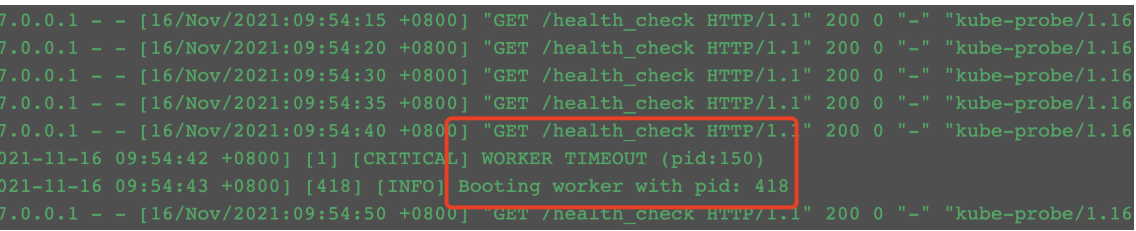
One morning, the developer suddenly reported a failure and the container restarted inexplicably. After checking the business container log, the worker timeout field was found

II. Analysis of error reporting reasons:

It can be seen from the error message that the worker process of gunicorn timed out, causing the process to exit and restart. Check the official website. The official website explains that the default timeout of gunicorn is 30s. If it exceeds 30s, the worker process will be killed and restarted.

III Solution:

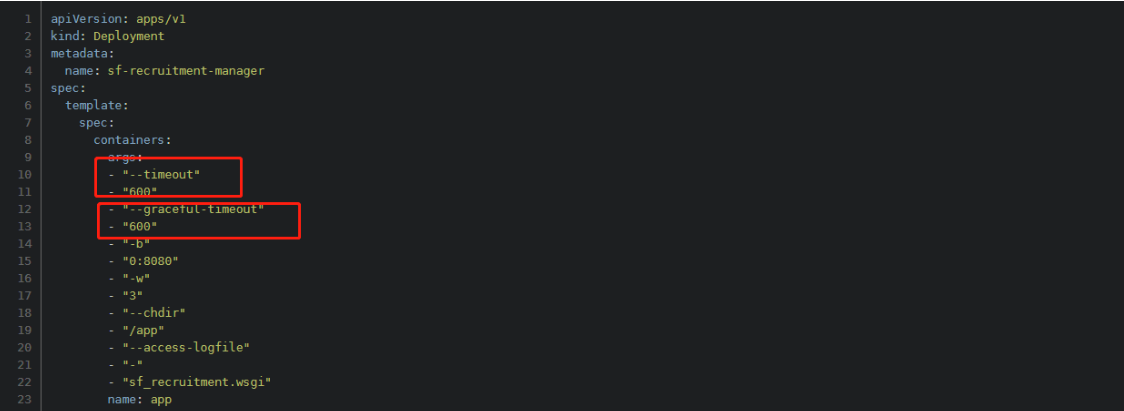
Add: -- timeout 600 to gunicorn’s startup command to set the timeout to 600 seconds– Graceful timeout 600 indicates that the graceful timeout is 600 seconds

After the setting is completed, it is verified through kustomize inspection and re-distribution. It is found that the problem does not occur in the follow-up

[Solved] spring boot integrated PageHelper Error

The error reporting information is as follows:

 Error creating bean with name 

'com.github.pagehelper.autoconfigure.PageHelperAutoConfiguration'

Description:

The dependencies of some of the beans in the application context form a cycle:

┌──->──┐
|  com.github.pagehelper.autoconfigure.PageHelperAutoConfiguration
└──<-──┘

└──<-──┘

The spring boot version is 2.6.1

<parent>
   <groupId>org.springframework.boot</groupId>
     <artifactId>spring-boot-starter-parent</artifactId>
     <version>2.6.1</version>
   <relativePath/> <!-- lookup parent from repository -->
</parent>

The page helper version is 1.2.3

<!-- pageHelper -->
<dependency>
   <groupId>com.github.pagehelper</groupId>
   <artifactId>pagehelper-spring-boot-starter</artifactId>
   <version>1.2.3</version>
</dependency>

After verification by many parties, it is found that the error is due to the conflict between the springboot version and the PageHelper version.

Solution:

    1. reduce the springboot version, such as 2.5 3 (the PageHelper version remains unchanged from 1.2.3)
<parent>
   <groupId>org.springframework.boot</groupId>
     <artifactId>spring-boot-starter-parent</artifactId>
     <version>2.5.3</version>
   <relativePath/> <!-- lookup parent from repository -->
</parent>

Increase the version of PageHelper, such as 1.4 1 (the springboot version remains unchanged from 2.6.1)

<!-- pageHelper -->
<dependency>
   <groupId>com.github.pagehelper</groupId>
   <artifactId>pagehelper-spring-boot-starter</artifactId>
   <version>1.4.1</version>
</dependency>

I hope my solution will help you a little. Good luck!!!

How to Solve Springboot configurate environment file Error

preface

When configuring multiple environment files for springboot, you need to configure multiple YML files. The configuration before version 2.4 is as follows:

spring: 
  profiles:
    active: dev

But if SpringBoot’s version 2.4 later, it’s a reward.

org.springframework.boot.context.config.InvalidConfigDataPropertyException: Property ‘spring.profiles.active[0]’ imported from location ‘class path resource [application-work.yml]’ is invalid in a profile specific resource [origin: class path resource [application-work.yml] - 9:7]


Solution:

General layout changes as follows:

spring:
  config:
    activate:
       on-profile:
          - dev

Of course, it can also be solved by returning the spring boot version to before 2.4

Spring cloud remote connect Nacos error [How to Solve]


Problem description

Spring cloud Alibaba micro service architecture is used, and Nacos is used in the service discovery and configuration center

At the beginning, Nacos was started locally, and everything was normal,

After Nacos is migrated to the cloud, change the Nacos address in the configuration file

The gateway service reports an error java.net.connectexception: no available server, because it is always connected to localhost:8848 .

The console outputs the following screenshot:

Cause location

Because the parent POM dependency is imported:

spring-cloud-starter-Alibaba-Nacos-config and spring-cloud-starter-Alibaba-Nacos-discovery

In local development, items such as testing, registration and discovery are configured in application.yml, the central configuration file bootstrap.properties is not created

Springboot automation configuration defaults to localhost:8848 , so there is no problem with the local environment.

Solution:

Remove useless dependencies (if nacos-config is not used, remove spring-cloud-starter-alibaba-nacos-config dependencies)

[Solved] Springboot connect MySQL error: errorcode 0, state 08s01

preface

For a project that has not been maintained for a long time, you need to check some data. Re run the project and find create connection sqlexception, and the specific error messages are errorcode 0, state 08s01.

Springboot version 2.5, MySQL 8.0

Error reporting details

2021-12-18 22:47:14.834 ERROR 20196 --- [reate-940563698] com.alibaba.druid.pool.DruidDataSource   : create connection SQLException, url: jdbc:mysql://localhost:3306/renrenfast?useUnicode=true&characterEncoding=UTF-8&serverTimezone=Asia/Shanghai, errorCode 0, state 08S01

com.mysql.cj.jdbc.exceptions.CommunicationsException: Communications link failure

The last packet sent successfully to the server was 0 milliseconds ago. The driver has not received any packets from the server.
	at com.mysql.cj.jdbc.exceptions.SQLError.createCommunicationsException(SQLError.java:174)
	at com.mysql.cj.jdbc.exceptions.SQLExceptionsMapping.translateException(SQLExceptionsMapping.java:64)
	at com.mysql.cj.jdbc.ConnectionImpl.createNewIO(ConnectionImpl.java:827)
	at com.mysql.cj.jdbc.ConnectionImpl.<init>(ConnectionImpl.java:447)
	at com.mysql.cj.jdbc.ConnectionImpl.getInstance(ConnectionImpl.java:237)
	at com.mysql.cj.jdbc.NonRegisteringDriver.connect(NonRegisteringDriver.java:199)
	at com.alibaba.druid.filter.FilterChainImpl.connection_connect(FilterChainImpl.java:156)
	at com.alibaba.druid.filter.FilterAdapter.connection_connect(FilterAdapter.java:786)
	at com.alibaba.druid.filter.FilterChainImpl.connection_connect(FilterChainImpl.java:150)
	at com.alibaba.druid.filter.stat.StatFilter.connection_connect(StatFilter.java:218)
	at com.alibaba.druid.filter.FilterChainImpl.connection_connect(FilterChainImpl.java:150)
	at com.alibaba.druid.pool.DruidAbstractDataSource.createPhysicalConnection(DruidAbstractDataSource.java:1572)
	at com.alibaba.druid.pool.DruidAbstractDataSource.createPhysicalConnection(DruidAbstractDataSource.java:1636)
	at com.alibaba.druid.pool.DruidDataSource$CreateConnectionThread.run(DruidDataSource.java:2550)
Caused by: com.mysql.cj.exceptions.CJCommunicationsException: Communications link failure

The last packet sent successfully to the server was 0 milliseconds ago. The driver has not received any packets from the server.
	at java.base/jdk.internal.reflect.NativeConstructorAccessorImpl.newInstance0(Native Method)
	at java.base/jdk.internal.reflect.NativeConstructorAccessorImpl.newInstance(NativeConstructorAccessorImpl.java:62)
	at java.base/jdk.internal.reflect.DelegatingConstructorAccessorImpl.newInstance(DelegatingConstructorAccessorImpl.java:45)
	at java.base/java.lang.reflect.Constructor.newInstance(Constructor.java:490)
	at com.mysql.cj.exceptions.ExceptionFactory.createException(ExceptionFactory.java:61)
	at com.mysql.cj.exceptions.ExceptionFactory.createException(ExceptionFactory.java:105)
	at com.mysql.cj.exceptions.ExceptionFactory.createException(ExceptionFactory.java:151)
	at com.mysql.cj.exceptions.ExceptionFactory.createCommunicationsException(ExceptionFactory.java:167)
	at com.mysql.cj.protocol.a.NativeProtocol.negotiateSSLConnection(NativeProtocol.java:340)
	at com.mysql.cj.protocol.a.NativeAuthenticationProvider.negotiateSSLConnection(NativeAuthenticationProvider.java:777)
	at com.mysql.cj.protocol.a.NativeAuthenticationProvider.proceedHandshakeWithPluggableAuthentication(NativeAuthenticationProvider.java:486)
	at com.mysql.cj.protocol.a.NativeAuthenticationProvider.connect(NativeAuthenticationProvider.java:202)
	at com.mysql.cj.protocol.a.NativeProtocol.connect(NativeProtocol.java:1348)
	at com.mysql.cj.NativeSession.connect(NativeSession.java:163)
	at com.mysql.cj.jdbc.ConnectionImpl.connectOneTryOnly(ConnectionImpl.java:947)
	at com.mysql.cj.jdbc.ConnectionImpl.createNewIO(ConnectionImpl.java:817)
	... 11 common frames omitted
Caused by: javax.net.ssl.SSLHandshakeException: Invalid Alert message: no sufficient data
	at java.base/sun.security.ssl.Alert.createSSLException(Alert.java:131)
	at java.base/sun.security.ssl.Alert.createSSLException(Alert.java:117)
	at java.base/sun.security.ssl.TransportContext.fatal(TransportContext.java:336)
	at java.base/sun.security.ssl.TransportContext.fatal(TransportContext.java:292)
	at java.base/sun.security.ssl.TransportContext.fatal(TransportContext.java:283)
	at java.base/sun.security.ssl.Alert$AlertMessage.<init>(Alert.java:196)
	at java.base/sun.security.ssl.Alert$AlertConsumer.consume(Alert.java:236)
	at java.base/sun.security.ssl.TransportContext.dispatch(TransportContext.java:185)
	at java.base/sun.security.ssl.SSLTransport.decode(SSLTransport.java:171)
	at java.base/sun.security.ssl.SSLSocketImpl.decode(SSLSocketImpl.java:1408)
	at java.base/sun.security.ssl.SSLSocketImpl.readHandshakeRecord(SSLSocketImpl.java:1314)
	at java.base/sun.security.ssl.SSLSocketImpl.startHandshake(SSLSocketImpl.java:440)
	at java.base/sun.security.ssl.SSLSocketImpl.startHandshake(SSLSocketImpl.java:411)
	at com.mysql.cj.protocol.ExportControlled.performTlsHandshake(ExportControlled.java:316)
	at com.mysql.cj.protocol.StandardSocketFactory.performTlsHandshake(StandardSocketFactory.java:188)
	at com.mysql.cj.protocol.a.NativeSocketConnection.performTlsHandshake(NativeSocketConnection.java:99)
	at com.mysql.cj.protocol.a.NativeProtocol.negotiateSSLConnection(NativeProtocol.java:331)
	... 18 common frames omitted

Configuration details

spring:
    datasource:
        type: com.alibaba.druid.pool.DruidDataSource
        druid:
            driver-class-name: com.mysql.cj.jdbc.Driver
            url: jdbc:mysql://localhost:3306/xxx?useUnicode=true&characterEncoding=UTF-8&serverTimezone=Asia/Shanghai

Solution:

Just add &useSSL=false

spring:
    datasource:
        type: com.alibaba.druid.pool.DruidDataSource
        druid:
            driver-class-name: com.mysql.cj.jdbc.Driver
            url: jdbc:mysql://localhost:3306/xxx?useUnicode=true&characterEncoding=UTF-8&serverTimezone=Asia/Shanghai&useSSL=false

Effect detection

It’s really running! It seems that

[Solved] IDEA plug-in jrbel hot deployment cannot be started error

The idea plug-in jrbel hot deployment fails to start, and an error is reported: jrebel JVMTI [fat] a fatal error occurred while processing the base Java classes The JVM has been shut down (1).

due to JDK charges, openjdk has been replaced. Recently, it cannot be used due to hot deployment. The reason for the error is the openjdk problem. Maybe the openjdk file has been rewritten. Just replace it with another JDK.

How to Solve Swagger error: IllegalStateException

Swagger reported an error, IllegalStateException

I encountered a novel mistake today. Take a note.

Because of the project problem, I imported the swagger dependency into the common module. Then, because common is introduced into the gateway, check the dependency tree and confirm that the gateway also introduces the swagger dependency by default.

Due to the introduction of a problem, an error is reported when starting the gateway. The error is as follows:

java.lang.IllegalStateException: Failed to introspect Class [com.tang.config.SwaggerConfiguration] from ClassLoader [sun.misc.Launcher$AppClassLoader@18b4aac2]
	at org.springframework.util.ReflectionUtils.getDeclaredMethods(ReflectionUtils.java:481)
	at org.springframework.util.ReflectionUtils.doWithMethods(ReflectionUtils.java:358)
	at org.springframework.util.ReflectionUtils.getUniqueDeclaredMethods(ReflectionUtils.java:414)
	at org.springframework.beans.factory.support.AbstractAutowireCapableBeanFactory
Caused by: java.lang.NoClassDefFoundError: springfox/documentation/spring/web/plugins/Docket
	at java.lang.Class.getDeclaredMethods0(Native Method)
	at java.lang.Class.privateGetDeclaredMethods(Class.java:2701)
	at java.lang.Class.getDeclaredMethods(Class.java:1975)
	at org.springframework.util.ReflectionUtils.getDeclaredMethods(ReflectionUtils.java:463)
	... 33 common frames omitted
Caused by: java.lang.ClassNotFoundException: springfox.documentation.spring.web.plugins.Docket
	at java.net.URLClassLoader.findClass(URLClassLoader.java:382)
	at java.lang.ClassLoader.loadClass(ClassLoader.java:424)
	at sun.misc.Launcher$AppClassLoader.loadClass(Launcher.java:349)
	at java.lang.ClassLoader.loadClass(ClassLoader.java:357)
	... 37 common frames omitted

Because the error occurred after the swagger dependency was introduced. So I preliminarily determined that the error occurred in the two swagger dependencies I imported.

        <!-- swagger -->
        <dependency>
            <groupId>io.springfox</groupId>
            <artifactId>springfox-swagger2</artifactId>
        </dependency>
        <dependency>
            <groupId>io.springfox</groupId>
            <artifactId>springfox-swagger-ui</artifactId>
        </dependency>

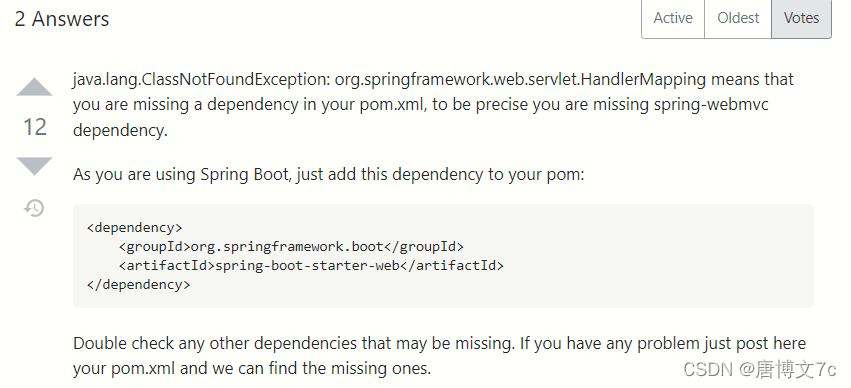
After querying the boss on stackoverflow, the answer is that swagger needs web dependency when it is started. If it does not exist, an error will be reported. I tried to add and found
A respectful error is reported on the console:

**********************************************************

Spring MVC found on classpath, which is incompatible with Spring Cloud Gateway at this time. Please remove spring-boot-starter-web dependency.

**********************************************************

Because it was an error found in the gateway. Therefore, it is obvious that the spring cloud gateway integrates weblux and thus the web. Therefore, adding spring-boot-starter-web to the project will cause the above error.

<dependency>
      <groupId>org.springframework.cloud</groupId>
      <artifactId>spring-cloud-gateway-server</artifactId>
      <version>2.2.7.RELEASE</version>
      <scope>compile</scope>
    </dependency>
    <dependency>
      <groupId>org.springframework.boot</groupId>
      <artifactId>spring-boot-starter-webflux</artifactId>
      <version>2.3.8.RELEASE</version>
      <scope>compile</scope>
    </dependency>
    <dependency>
      <groupId>org.springframework.cloud</groupId>
      <artifactId>spring-cloud-starter-loadbalancer</artifactId>
      <version>2.2.7.RELEASE</version>
      <scope>compile</scope>
      <optional>true</optional>
    </dependency>

Solution:

Because the gateway in the project does not need to integrate swagger, when introducing the basic module package with swagger in the gateway configuration, it only needs to be in POM XML settings <exclusions></exclusions>

<exclusions>
    <exclusion>
        <groupId>io.springfox</groupId>
        <artifactId>springfox-swagger-ui</artifactId>
    </exclusion>
    <exclusion>
        <groupId>io.springfox</groupId>
        <artifactId>springfox-swagger2</artifactId>
    </exclusion>
</exclusions>

Finally, because the related configuration classes of swagger are also written in the basic module. An error will also be reported because the swagger dependency is not imported. At this time, you only need to ignore the injection in the gateway gateway startup class.

@ComponentScan(excludeFilters = @ComponentScan.Filter(type = FilterType.ASSIGNABLE_TYPE, value = SwaggerConfiguration.class))