Category Archives: How to Fix

[Solved] SpringMVC Run Error: SEVERE-Servlet.service() for servlet jsp threw exception

Today, I was learning spring MVC. Everything was difficult at the beginning. I didn’t expect it to be so difficult. The most basic Hello World was trapped for half an hour. The main problem was that Tomcat 10 version didn’t adapt to and Maven relied on. The error was: servlet. Service () for servlet JSP thread exception Java. Lang. NullPointerException , and the following is the specific solution

Read the original text

At the beginning of writing dependency, I found that groupid in the book was javax , and I had suffered such a loss before. In order to adapt it to my Tomcat 10, I changed it to Jakarta . As a result, when writing controller , the method can only recognize javax , and I can’t change the source code again, There is no way to replace dependence with this

<dependency>
    <groupId>javax.servlet</groupId>
    <artifactId>javax.servlet-api</artifactId>
    <version>4.0.1</version>
</dependency>
<dependency>
    <groupId>javax.servlet.jsp</groupId>
    <artifactId>javax.servlet.jsp-api</artifactId>
    <version>2.3.3</version>
</dependency>

Not surprisingly, when the Tomcat server is executed, it always reports an error saying that org.springframework.web.servlet.dispatcherservlet in the configuration file is not a servlet, so there is no way but to change the method

I thought Maven could play Tomcat plug-in and paste the dependent code immediately

<build>
    <plugins>
        <plugin>
            <groupId>org.apache.tomcat.maven</groupId>
            <artifactId>tomcat7-maven-plugin</artifactId>
            <version>2.2</version>
        </plugin>
    </plugins>
</build>

Continue to run and report an error: servlet. Service () for servlet JSP thread exception Java. Lang. NullPointerException , go to stackoverflow and say that the range must be set to provided , and then run to display it. Later, switch back to normal tomcat operation with a try state, but the result is still not good

PS: finally switched back to Tomcat version 9.052
Linux rhel7/centos7 source code compilation and installation Emacs Error NO x toolkit could be found

Specific error reporting:

checking for libXaw… configure: error: No X toolkit could be found. If you are sure you want Emacs compiled without an X toolkit, pass –with-x-toolkit=no to configure. Otherwise, install the development libraries for the toolkit that you want to use (e.g. Gtk+) and re-run configure.

After repeatedly confirming that GTK and corresponding GTK devel files have been installed,

yum install gtk3-devel.x86_ 64 gtk3.x86_ sixty-four

yum install gtk2-devel.x86_ 64 gtk2.x86_ sixty-four

Still report the same error,

Locate libxaw found existing library files (Yum install libxaw.x86)_ 64 (or installed by default)

Finally, it was found that the corresponding devel package, libxaw-devel.x86, was not installed_ sixty-four

yum install libXaw-devel.x86_ 64 installation,

Execute./configure again. The error will disappear. If there are other errors,

Similarly, install the corresponding devel library

Qttssessionbegin failed, error code: 25000 solution for Ubuntu development of iFLYTEK voice wake-up function

        The official error code is described as “the engine is not initialized”, so please first check whether it has been initialized, and then confirm that the link to libmsc.os and libw is entered at compile time_ ivw.os。 At this time, if 25000 is still reported as initialization error, you can set variables   LD_ LIBRARY_ Path solution:

1 open the. Bashrc file

sudo ./bashrc

2 add at the end of the file

export LD_LIBRARY_PATH=$LD_LIBRARY_PATH:/PATH

Replace/path with libmsc.os and libw_ Ivw.os is the directory of two dynamic libraries. Save the changes.

Then close the command line window and reopen it to run.

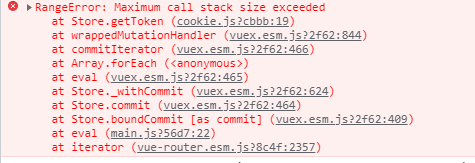
JS uses the and or operator, and an error is reported: uncaught rangeerror: maximum call stack size exceeded

The or operator is used when the routing guard of the Vue item is in progress,

router.beforeEach((to,from,next) => {
  store.commit('cookie/getToken')
  let token = store.state.cookie.token
  if(!token && to.name === 'PersonalHome'||'Edit'||'EditBlog'||'EditDraft') {
      next('login')
  } else {
      next()
  }
})

Browser error:

solution:
wrap or calculate with ()

if(!token && to.name === ('PersonalHome'||'Edit'||'EditBlog'||'EditDraft')) {
      next('login')
  } else {
      next()
  }

The idea code pushes to GitHub and reports an error fatal: unable to access

Error:

fatal: unable to access ‘ https://github.com/ …


terms of settlement:

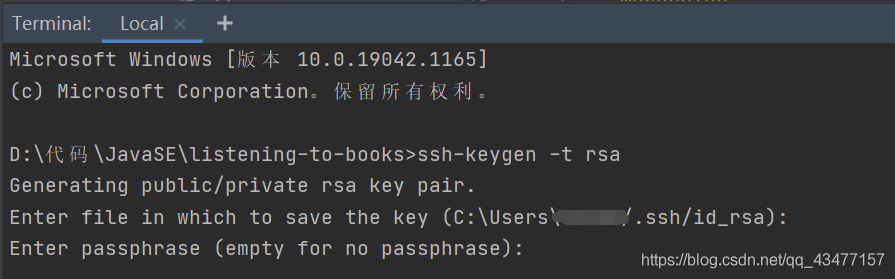
1. Execute SSH keygen – t RSA on the idea terminal and press enter to generate the public key and private key. By default, it is saved in the. SSH directory under the user directory of Disk C
2. Find settings in the GitHub homepage, as shown in the figure below. Create a new SSH
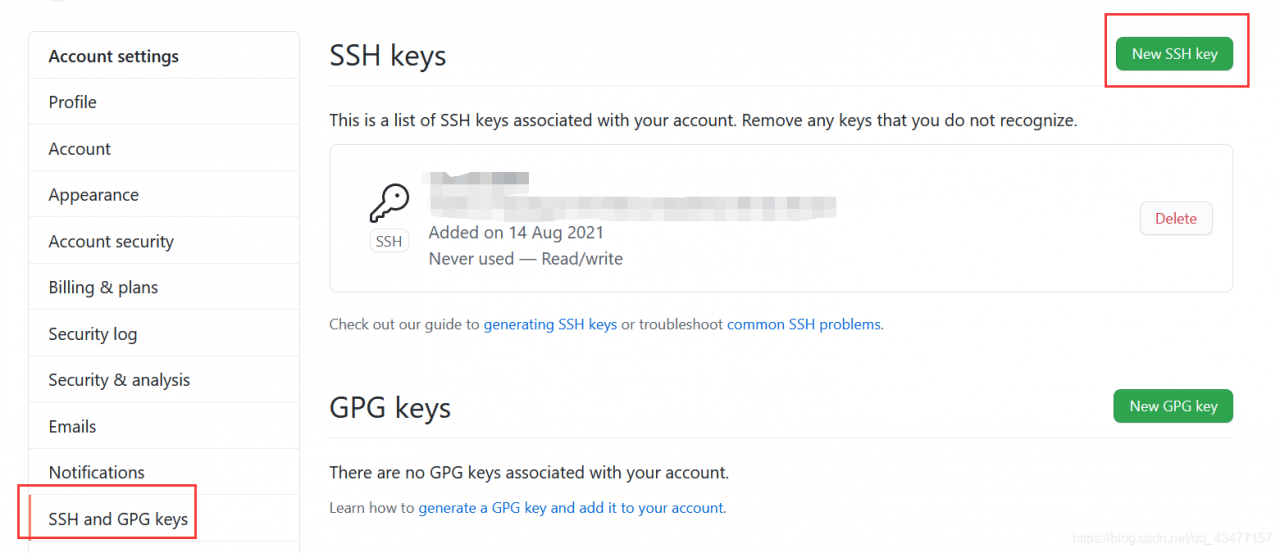
note: when creating a new SSH, fill in the ID_ Contents in rsa.pub
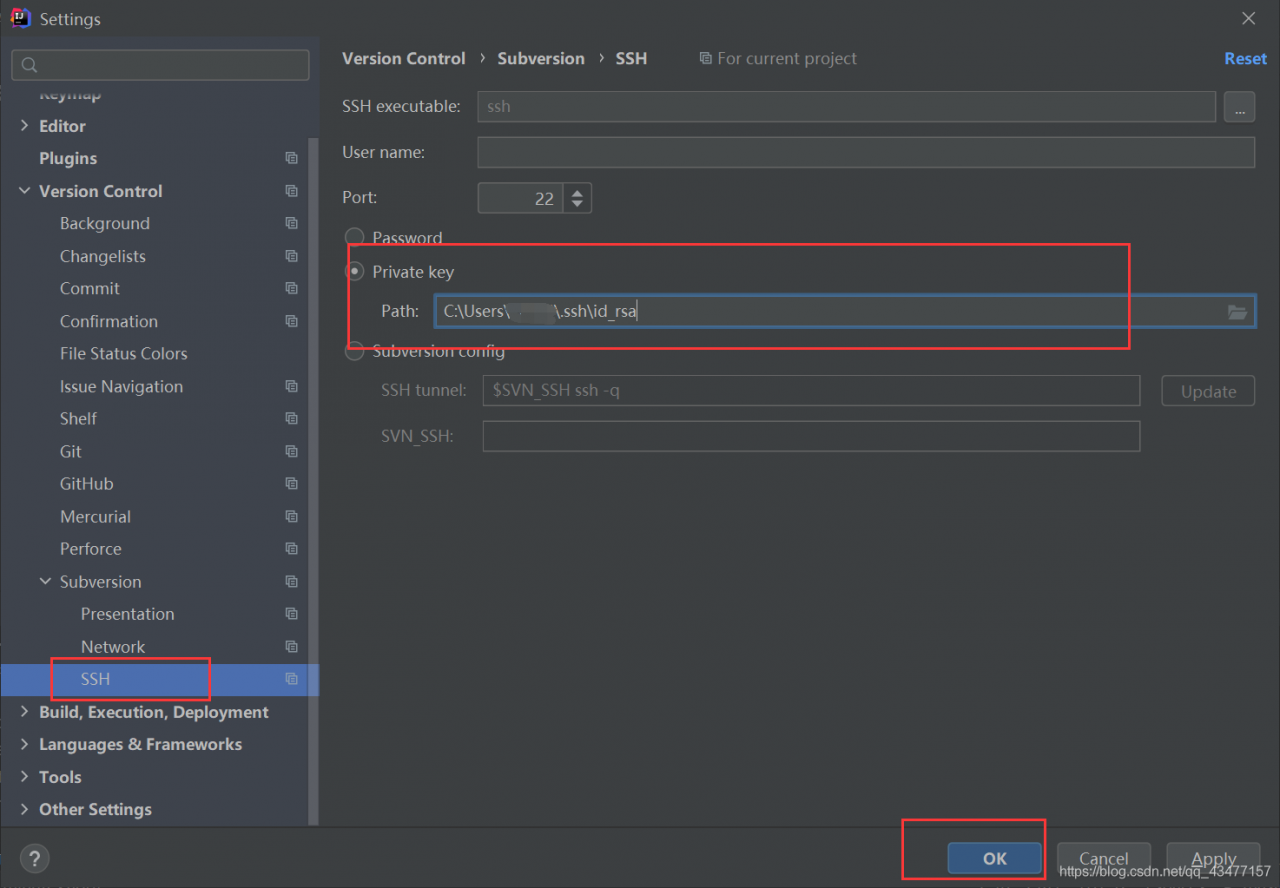
3. Set the private key in idea


Reference link: https://blog.csdn.net/qianlixiaomage/article/details/114681364

QT + MySQL generates an EXE file and reports an error “driver not loaded”. Solution steps

My environment is win10. Exe files are generated by qt5.12.6 + MySQL 5.7.29.

Run exe to find that the database cannot be connected, and the error is as follows:

QSqlDatabase:QMYSQL driver not loaded

QSqlDatabase:available drivers:

Open datatabase error:”Driver not loaded Driver not loaded”

I watched it online for two days and tried it for two days, but there was no change. But after a comprehensive analysis, it will be solved.

Specific steps:

1. Copy libmysql.dll under D: \ MySQL \ mysql-5.7.29-winx64 \ lib to the directory of. Exe;

2. Copy the D: \ QT \ qt5.12.6 \ 5.12.6 \ SRC \ qtbase \ SRC \ plugins \ sqldrivers \ plugins \ sqldrivers folder to the directory of. Exe.

The above paths are different according to the actual situation of individuals, and are based on their own local.

After completing the above steps, EXE can connect to the database.

reference resources:

weixin_ thirty million three hundred and ninety-nine thousand eight hundred and twenty-one

weixin_ forty-five million seven hundred and thirty-eight thousand two hundred and eighteen

No matching distribution found for exceptions when Python installs docx package

Python installation docx package runs with errors

ERROR: No matching distribution found for exceptions

reason

Docx package is a third-party library developed with Python 2 for Word 2007. With the upgrading of word, especially the upgrading of Python version, it is no longer applicable. You can install a new word processing package to solve the problem.

pip install python-docx

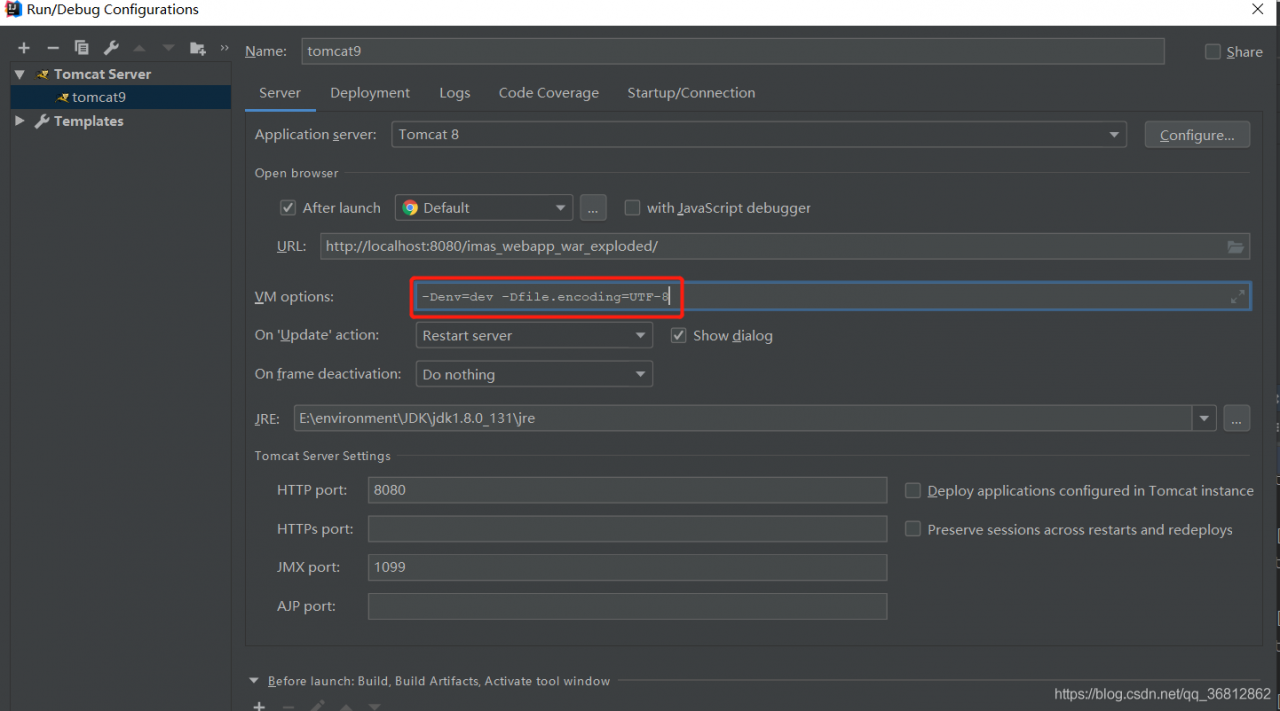
Resolve the idea error unable to Ping server at localhost: 1099 exception

Unable to Ping server at localhost: 1099
the solutions mentioned on the Internet are the first two, but mine is the third. I hope small partners can avoid the pit
1. The version of Tomcat and JDK matches
port 2 is occupied
3 check the idea configuration Tomcat. VM options cannot have spaces before and after the equals sign
(if there are spaces before and after the equals sign, there will always be an error.)