When you execute pytest on the pycharm terminal, an error is reported and the file cannot be found
because the path opened by terminal is not necessarily the directory of your current file, To switch to the directory where the file is located
Click 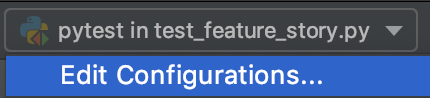

in the upper right corner of pycharm to copy the path in the working directory
enter the working directory path just copied from CD in terminal
run pytest again

Category Archives: How to Fix
How to solve the resource temporarily unavailable error of the Linux host?
Reason: the current user has limited the number of processes
solution:
Su root
(if the switch fails due to resource temporarily unavailable, you can log in with another user)
CD/etc/security/limits. D
VI 90 nproc. Conf
add a new line of current user with unlimited number of processes
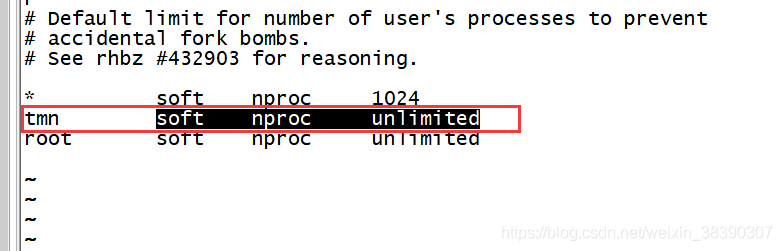 note: you need to log in again after modification
Interpreter error /com.fasterxml.jackson.databind.JavaType
In the process of rabbitmq docking, after importing the jar package, errors such as mismatch of jar package version and lack of method are reported during compilation;
Processing method: import the missing jar package
<dependency>
  <groupId>com.fasterxml.jackson.core</groupId>
  <artifactId>jackson-annotations</artifactId>
  <version>2.9.7</version>
</dependency>
<dependency>
  <groupId>com.fasterxml.jackson.core</groupId>
  <artifactId>jackson-databind</artifactId>
  <version>2.9.8</version>
</dependency>
<dependency>
  <groupId>com.fasterxml.jackson.core</groupId>
  <artifactId>jackson-core</artifactId>
  <version>2.9.8</version>
</dependency>
Dm7 Dameng database dmrman reports an error OS_ pipe2_ conn_ Server open failed solution
An error is reported when executing a command in dmrman (DMAP service background starts normally):
RMAN> BACKUP DATABASE '/dm/dmdbms/data/DAMENG/dm.ini';
BACKUP DATABASE '/dm/dmdbms/data/DAMENG/dm.ini';
checking if the database under system path [/dm/dmdbms/data/DAMENG] is running...[4].
checking if the database under system path [/dm/dmdbms/data/DAMENG] is running...[3].
checking if the database under system path [/dm/dmdbms/data/DAMENG] is running...[2].
checking if the database under system path [/dm/dmdbms/data/DAMENG] is running...[1].
checking if the database under system path [/dm/dmdbms/data/DAMENG] is running...[0].
checking if the database under system path [/dm/dmdbms/data/DAMENG] is running, write dmrman info.
EP[0] max_lsn: 155855
BACKUP DATABASE [DAMENG], execute......
os_pipe2_conn_server open failed, name:[/dm/dm_bak/DM_PIPE_DMAP_LSNR_WR], errno:2
CMD END.CODE:[-7109],DESC:[Pipe connect failure]
[-7109]:Pipe connect failure
RMAN>
resolvent:
Method (1)
Must go to DM_ Execute dmrman in the home/bin directory. Although the environment variable is configured to recognize the dmrman command, an error will be reported during execution. It is speculated that the files relied on during program execution cannot be recognized correctly. Switch to $DM_ Home/bin solves this problem.
[[email protected] bin]$ pwd
/dm/dmdbms/bin
[[email protected] bin]$ ./dmrman
dmrman V7.6.0.95-Build(2018.09.13-97108)ENT
RMAN> BACKUP DATABASE '/dm/dmdbms/data/DAMENG/dm.ini' FULL BACKUPSET '/dm/dm_bak/db_full_bak_01';
BACKUP DATABASE '/dm/dmdbms/data/DAMENG/dm.ini' FULL BACKUPSET '/dm/dm_bak/db_full_bak_01';
file dm.key not found, use default license!
Global parameter value of RT_HEAP_TARGET is illegal, use min value!
checking if the database under system path [/dm/dmdbms/data/DAMENG] is running...[4].
checking if the database under system path [/dm/dmdbms/data/DAMENG] is running...[3].
checking if the database under system path [/dm/dmdbms/data/DAMENG] is running...[2].
checking if the database under system path [/dm/dmdbms/data/DAMENG] is running...[1].
checking if the database under system path [/dm/dmdbms/data/DAMENG] is running...[0].
checking if the database under system path [/dm/dmdbms/data/DAMENG] is running, write dmrman info.
EP[0] max_lsn: 116978
BACKUP DATABASE [DAMENG], execute......
CMD CHECK LSN......
BACKUP DATABASE [DAMENG], collect dbf......
CMD CHECK ......
DBF BACKUP SUBS......
total 1 packages processed...
total 3 packages processed...
total 4 packages processed...
DBF BACKUP MAIN......
BACKUPSET [/dm/dm_bak/db_full_bak_01] END, CODE [0]......
META GENERATING......
total 5 packages processed...
total 5 packages processed!
CMD END.CODE:[0]
backup successfully!
time used: 7081.941(ms)
RMAN>
Method (2)
An error is reported in the log. The pipeline file already exists. An error is reported after deleting the pipeline file OS_ pipe2_ Server open failed, check whether the data is written without permission, modify the permission, and then report an error. The pipeline connection timed out
use./dmrman use_ AP = 2 restore without pipeline DMAP succeeded.
Add PageHelper spring boot starter dependency to springboot and report an error
1、 Problem cause – dependency conflict and error reporting
 <dependency>
            <groupId>com.github.pagehelper</groupId>
            <artifactId>pagehelper-spring-boot-starter</artifactId>
            <version>1.2.10</version>
            <exclusions>
                <exclusion>
                    <groupId>org.mybatis</groupId>
                    <artifactId>mybatis</artifactId>
                </exclusion>
                <exclusion>
                    <groupId>org.mybatis</groupId>
                    <artifactId>mybatis-spring</artifactId>
                </exclusion>
            </exclusions>
 </dependency>
Exclude mybatis dependencies.
2、 Plug in configuration
Application profile
#pagehelper
pagehelper.helperDialect=mysql
pagehelper.reasonable=false
pagehelper.supportMethodsArguments=true
pagehelper.params=count=countSql
Resolve importerror: cannot import name ‘totensor’ error
PS: This article is mainly used for self collation and summary. The code involved has been successfully run on my computer. I’m not honored if I happen to help you
when I run the baseline of a competition, this importerror: cannot import name 'totensor' error appears, The solution is as follows:
the error reporting statement is defined in my code as follows: from evaluations.python import totensor
first, it should be changed to: from evaluations.python.transforms import totensor
then a new problem appears when running

According to its tips, I revised the versions of evaluations, that is, PIP install evaluations = = 0.5.2 , and finally solved the problem.
The file is generated, but an error is still reported. Error: CreateProcess failed
Remember, when using keil compiler in the past, there were such problems:
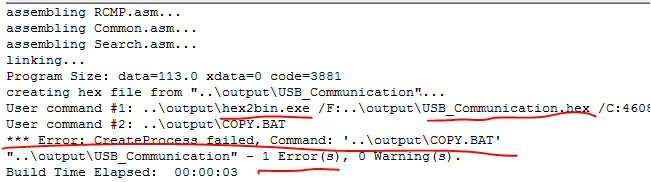
At the first glance, I saw “1 error (s)”, and subconsciously thought that my program had made a mistake. I looked for it for a long time and didn’t find it.
Later, I took a closer look and found that this error can be completely ignored because the required. Bin and. Hex files have been generated.

This error is just that the file copy.bat is not generated, and I don’t need this file.
But the bitch of OCD is itching. It’s uncomfortable to see an error hanging.
In the option, I removed the check box before “run #2”.
Just compile the unnecessary copy.bat file without parameters.
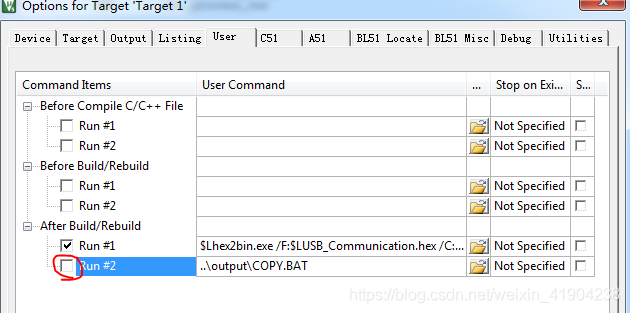
At this point, compile again and 0 error will pass.
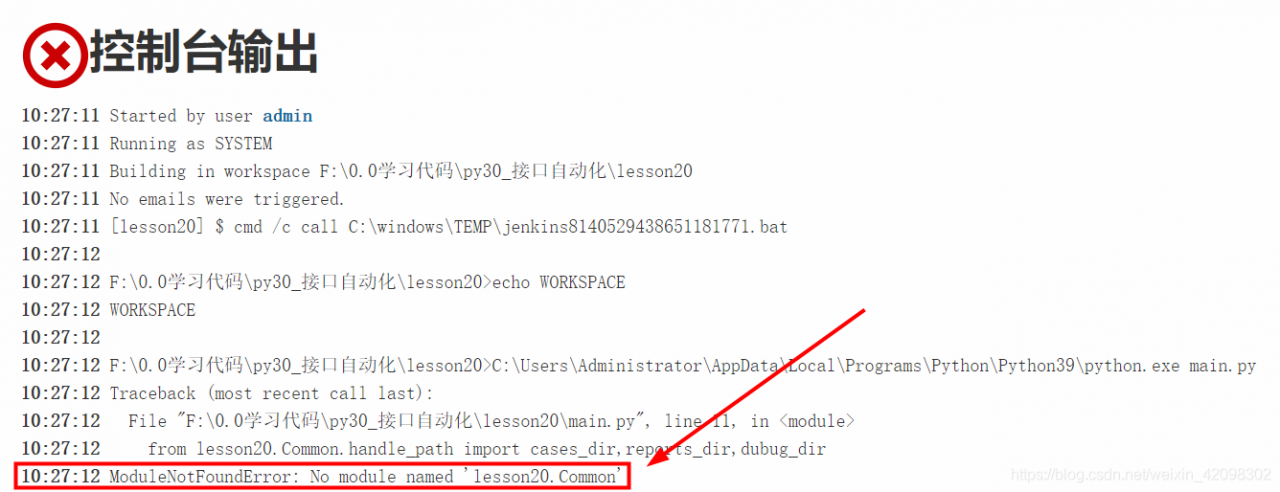
Jenkins reported an error modulenotfounderror: no module named filename solution
1、 If the name of the module is the package name created by yourself, as shown in the picture:
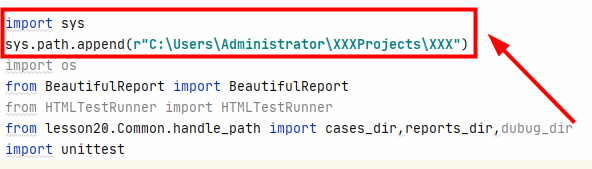
1. Add the following code at the top of the file to be run, and the content in quotation marks is the project path:
import sys
sys.path.append(r"C:\Users\Administrator\XXXProjects\XXX")
Note: be sure to write it before all the codes introduced into the module, for example:
2. Add two lines of code in 1 to all imported files, such as runmethod and get in the above figure_ Data and other files need to be added
3. Another method: create a new file base.py, add the following code, and import it before the codes of all imported modules:
import sys
import os
curPath = os.path.abspath(os.path.dirname(__file__))
rootPath = os.path.abspath(os.path.dirname(curPath) + os.path.sep + ".")
sys.path.append(rootPath)
2、 If the module name is a python module, you need to reinstall it, that is, enter the command PIP install XXX in CMD
Kotlin reported an error jsonexception using fastjason: default constructor not found
Fastjson version number: implementation ‘com. Alibaba: fastjson: 1.2.69’
Error message:
com.alibaba.fastjson.JSONException: default constructor not found
User.kt
data class User(var name: String, var age: Int) {
}
Problem analysis:
The results found on the Internet are that there are no parameter free construction methods for object classes, so add
user.kt
data class User(var name: String, var age: Int) {
    constructor() : this("", 0)
}
However, the error is still reported. By understanding the fastjason source code, it turns out that it needs to get the kotlin construction method through reflection. To use kotlin reflection, it needs to rely on [kotlin reflect]:
implementation 'org.jetbrains.kotlin:kotlin-reflect:1.5.20'
After the above dependencies are added, even if there is no parameter free construction method, it can be used normally through the test
Git error: requested URL returned error: 403
Modify config in Git folder under current project
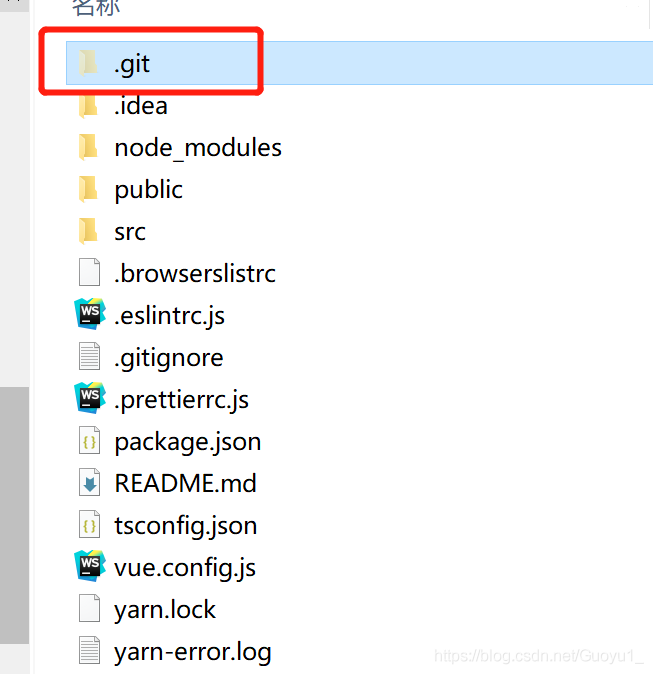
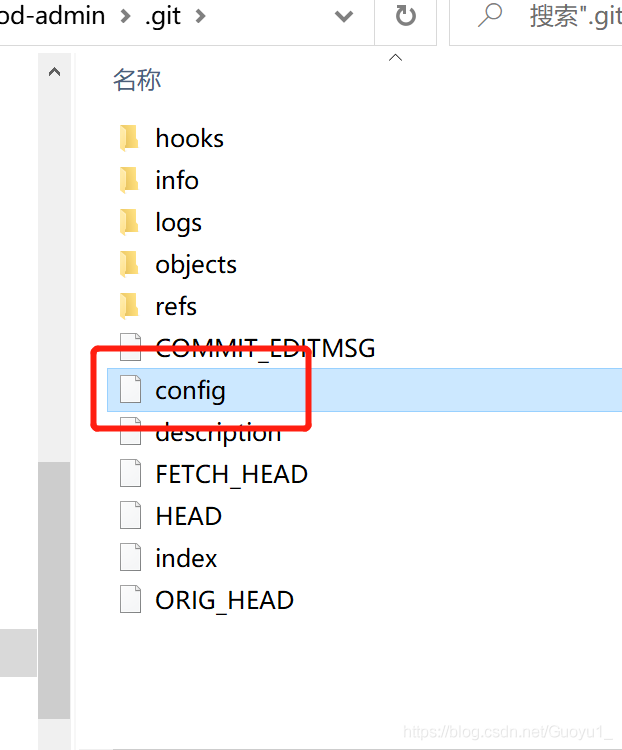
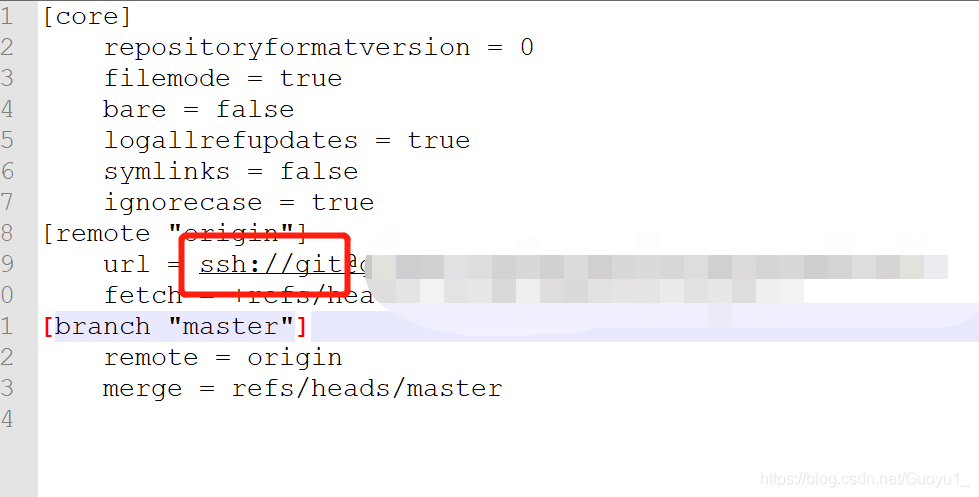
1) Edit the. Git/config file
2) Find the URL variable under [remote “origin”]
3) Modify URL= https://github.com/user/test.git , modify to URL= ssh://git @Github.com/user/test.git, save after modification
4) Synchronization through git push origin master is successful
Amend as follows:
[root@localhost learngit_2]# cat .git/config
[core]
    repositoryformatversion = 0
    filemode = true
    bare = false
    logallrefupdates = true
[remote "origin"]
    url =  ssh://[email protected]/shengleqi/gitskills.git
    fetch = +refs/heads/*:refs/remotes/origin/*
[branch "master"]
    remote = origin
    merge = refs/heads/master
Successful execution:
[root@localhost learngit_2]# git push -u origin master
The authenticity of host 'github.com (192.30.255.112)' can't be established.
RSA key fingerprint is 16:27:ac:a5:76:28:2d:36:63:1b:56:4d:eb:df:a6:48.
Are you sure you want to continue connecting (yes/no)?yes
Warning: Permanently added 'github.com,192.30.255.112' (RSA) to the list of known hosts.
Counting objects: 26, done.
Compressing objects: 100% (19/19), done.
Writing objects: 100% (26/26), 2.08 KiB, done.
Total 26 (delta 6), reused 0 (delta 0)
remote: Resolving deltas: 100% (6/6), done.
To ssh://[email protected]/shengleqi/gitskills.git
 * [new branch]      master -> master
Branch master set up to track remote branch master from origin.
Solution of Prophet error reporting when installing R package in Kubuntu virtual machine environment
Initial error reporting environment
Oracle VM VirtualBox 6.1.22
kunbuntu-21.04
memory 2048MB
storage space 20g
Error reporting and Solutions
If I directly install. Packages (‘prophet ‘) in R according to the above environment, three environment dependent errors will be reported, namely libcurl, libdev and rstan
first solve the problem that libcurl and libdev are not installed. First q() exit the R environment and install the two development tools:
sudo apt-get install libcurl4-openssl-dev
sudo apt-get install libv8-dev
Then enter the R environment and reinstall rstan. The key errors are as follows:
g++: internal compiler error: Killed (program cc1plus)
ERROR: compilation failed for package 'rstan'
In install.packages("rstan") :
  installation of package 'rstan' had non-zero exit status
There are many similar error reports and strange solutions on the Internet. In fact, most cases are caused by insufficient memory allocation. You can adjust the allocated memory to 4096mb in the virtual machine. After installing the above dependencies, reinstall. Packages (‘prophet ‘) and the installation will succeed.
Solve the error of clearing data in object.assign in Vue
If you want to clear the data in Vue, the error may be the reason why you haven’t changed the direction of this. You can try to change the direction of this with call, for example
Object.assign(this.$data, this.$options.data.call(this))
If you just want to know one of the data, you can use it
this.xxx=this.$options.data.call(this).xxxx