Category Archives: How to Fix

Error from server (alreadyexists) clusterrolebindings.rbac.authorization .k8s.io “kubelet

problem description

create bootstrap role to give permission to connect apiserver request signature error, modified as follows:

[root@localhost kubeconfig]# kubectl create clusterrolebinding kubelet-bootstrap –clusterrole=system:node-bootstrapper –user=kubelet-bootstrap
Error from server (AlreadyExists): Clusterrolebindings, rbac authorization. K8s. IO “kubelet – the bootstrap” already exists

problem analysis

this is because an incorrect signature has been created previously, the signature is occupied, and the occupied signature

needs to be deleted

problem solved

1. Delete signature

kubectl delete clusterrolebindings kubelet-bootstrap

2, recreate successfully

[root@localhost kubeconfig]# kubectl create clusterrolebinding kubelet-bootstrap –clusterrole=system:node-bootstrapper –user=kubelet-bootstrap
clusterrolebinding.rbac.authorization.k8s.io/kubelet-bootstrap created

Solve the problem that the connection between ADB and nocturnal God cannot be solved

win10, nightgod simulator v6.6.0.9, adb v1.0.41.

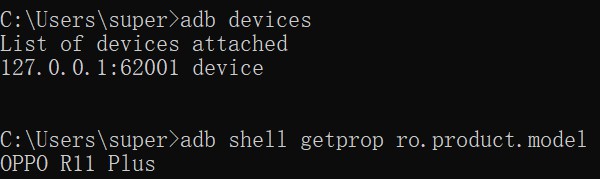
CMD opens the command line window, run adb devices display List of devices attached, could not get emulator device information . After trying many methods online, was finally solved by replacing the nox_adb.exe file with adb.exe.

steps are as follows:

1. Close adb software and nightgod simulator software, and the two exe processes can be closed directly through the task manager.
2. I install the adb.exe path: D:\Program Files (x86)\android-sdk-windows\platform-tools, copy the adb.exe file to the nightgod directory, replace the nox_adb.exe file, and rename the copied adb.exe to nox_adb.exe of course.
copy to night god’s bin directory: D:\Program Files\Nox\bin

start the simulator, run adb devices again,
display:
List of devices attached
127.0.0.1:62001 device

Result Maps collection already contains value for com.xxx.xxxMapper . baseresultmap problem solving

remove the cache first,

mybatis appear Result Maps collection already contains the value for the com. XXX. XxxMapper. R. aseResultMap mistakes,

could both be a problem with MybatisGenerator’s reverse generation.

suppose MybatisGenerator is used to reverse-engineer the code to generate the dao file and mapper.xml file,

after clearing the cache, carefully examine the mapper.xml file that was previously generated!

if the code is generated again, the generated code must be deleted first, otherwise it will be appended to the original file. Carefully check the mapper.xml file

to see if there are two resultMap with id BaseResultMap, delete the redundant ones, and keep only one to solve the problem.

or remove the mapper.xml file and regenerate.

How to login raspberry pie

HDMI
video cable connected to the monitor
2. Serial port
device crack
default, raspberry PI serial port and bluetooth connection.
try to disconnect the bluetooth connection and use the serial port for data communication
a. Watch the start process of raspberry PI, the character
b. serial login raspberry PI
usb-ttl connection raspberry PI serial
1. Please read the instructions carefully connection corresponds to a serial port
the corresponding pins connect to raspberries TXD and RXD (GPIO14 and 15), as shown in figure:
source: https://pinout.xyz/pinout/uart

modify the system configuration, Enable serial login raspberry PI
1. Open the “config.txt” file in the SD kagan directory, add the following to the end and save.

dtoverlay=pi3-miniuart-bt

this stops the bluetooth and removes the use of the serial port.
2. Then change the root directory “cmdlin.txt”, replace all the contents with the following contents, just in case, please backup the original contents of this file first.

dwc_otg.lpm_enable=0 console=tty1 console=serial0,115200 root=/dev/mmcblk0p2 rootfstype=ext4 elevator=deadline fsck.repair=yes rootwait

configuration changes are complete.
default PI
default password: raspberry
3. 1. Let raspberry PI into the network
input command:
sudo nano /etc/wpa_supplicant/wpa_supplicant. Conf

add wireless network configuration information to file :
ctrl_interface=DIR=/var/run/wpa_supplicant GROUP=netdev
update_config=1
country=CN

network = {
ssid = “of your wireless network name”
PSK = “password”
key_mgmt = WPA wpa2-psk
}

network = {
ssid =
“name your other wireless networks” PSK = “password”
key_mgmt = WPA wpa2-psk
}

can set up multiple WIFI information. Press Ctrl+O to write save, Press Enter to confirm, and Ctrl+X to exit.
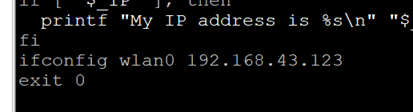
2. The IP address of the fixed raspberries pie
sudo nano/etc/rc. Local

3. 2.3.3.1 open SSH function
sudo raspi-config
select the fifth option, then select the second option, and OK is completed

if the configuration fails, check the following method:
input command:
sudo raspi-config
select the second option, then select wifi option, then CN CHINA. Enter, then enter the hot spot name, then enter the password, and restart.
sudo apt-get install XRDP (download remote desktop service)
open remote desktop connection, connect XRDP

Spring boot thymeleaf crud implements simple functions of adding, deleting, modifying and querying

introduction

this article introduces a simple CRUD application using spring boot and Thymeleaf.

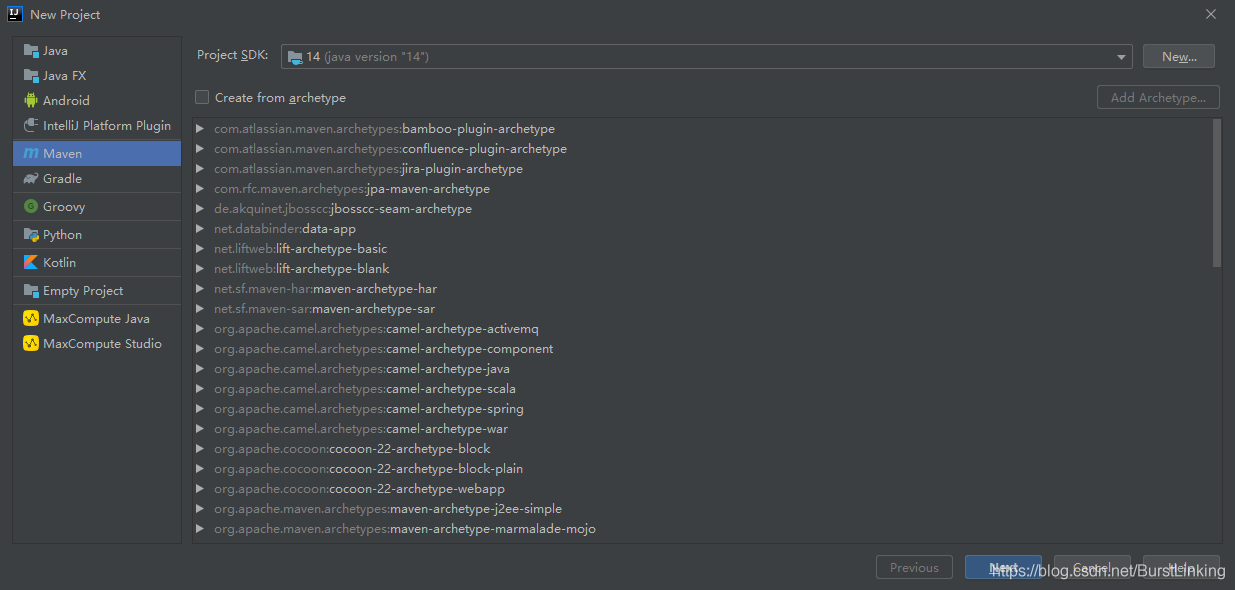
create Maven project

here to create a maven-based project using intellij community edition

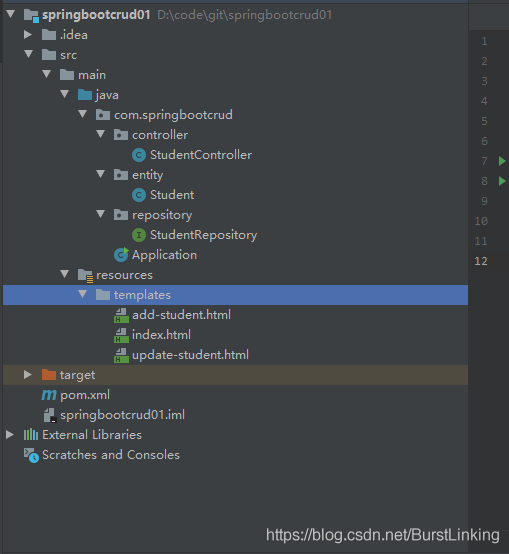
overall architecture

Add Maven dependencies

database selected H2 lightweight database, convenient configuration, default configuration data written into memory, restart service lost, configuration data can be written to the file.

  <parent>
      <groupId>org.springframework.boot</groupId>
      <artifactId>spring-boot-starter-parent</artifactId>
      <version>2.2.6.RELEASE</version>
  </parent>
  <dependencies>
      <dependency>
          <groupId>org.springframework.boot</groupId>
          <artifactId>spring-boot-starter-data-jpa</artifactId>
      </dependency>
      <dependency>
          <groupId>org.springframework.boot</groupId>
          <artifactId>spring-boot-starter-thymeleaf</artifactId>
      </dependency>
      <dependency>
          <groupId>org.springframework.boot</groupId>
          <artifactId>spring-boot-starter-web</artifactId>
      </dependency>
      <dependency>
          <groupId>org.springframework.boot</groupId>
          <artifactId>spring-boot-devtools</artifactId>
          <scope>runtime</scope>
      </dependency>
      <dependency>
          <groupId>com.h2database</groupId>
          <artifactId>h2</artifactId>
          <scope>runtime</scope>
      </dependency>
      <dependency>
          <groupId>org.springframework.boot</groupId>
          <artifactId>spring-boot-starter-test</artifactId>
          <scope>test</scope>
      </dependency>
  </dependencies>

Domain layer
The

layer defines the entity class for data interaction. Here we define the Student class.

package com.springbootcrud.entity;

import javax.persistence.*;
import javax.validation.constraints.NotBlank;

@Entity
public class Student {

    @Id
    @GeneratedValue(strategy = GenerationType.AUTO)
    private long id;

    @NotBlank(message = "Name is mandatory")
    @Column(name = "name")
    private String name;

    @NotBlank(message = "Email is mandatory")
    @Column(name = "email")
    private String email;

    @Column(name = "phoneNo")
    private long phoneNo;

    public Student() {
    }

    public Student(String name, String email) {
        this.name = name;
        this.email = email;
    }

    public long getId() {
        return id;
    }

    public void setId(long id) {
        this.id = id;
    }

    public String getName() {
        return name;
    }

    public void setName(String name) {
        this.name = name;
    }

    public String getEmail() {
        return email;
    }

    public void setEmail(String email) {
        this.email = email;
    }

    public long getPhoneNo() {
        return phoneNo;
    }

    public void setPhoneNo(long phoneNo) {
        this.phoneNo = phoneNo;
    }

    @Override
    public String toString() {
        return "Student{" +
                "id=" + id +
                ", name='" + name + '\'' +
                ", email='" + email + '\'' +
                ", phoneNo=" + phoneNo +
                '}';
    }
}

repository layer

is the persistence layer that interacts with the database. Here, the implementation of adding, deleting, modifying and checking entity classes in the database is specifically implemented. Here, we inherit the corresponding classes of the spring data framework instead of implementing the Dao layer implementation method by ourselves.

package com.springbootcrud.repository;

import com.springbootcrud.entity.Student;
import org.springframework.data.repository.CrudRepository;
import org.springframework.stereotype.Repository;

import java.util.List;

@Repository
public interface StudentRepository extends CrudRepository<Student, Long> {
    List<Student> findByName(String Name);
}

controller layer

this layer is responsible for processing the user’s input and returning the correct response back to the user.

package com.springbootcrud.controller;

import com.springbootcrud.entity.Student;
import com.springbootcrud.repository.StudentRepository;
import org.springframework.beans.factory.annotation.Autowired;
import org.springframework.stereotype.Controller;
import org.springframework.ui.Model;
import org.springframework.validation.BindingResult;
import org.springframework.web.bind.annotation.GetMapping;
import org.springframework.web.bind.annotation.PathVariable;
import org.springframework.web.bind.annotation.PostMapping;
import org.springframework.web.bind.annotation.RequestMapping;

import javax.validation.Valid;

@Controller
@RequestMapping("/students/")
public class StudentController {

    private final StudentRepository studentRepository;

    @Autowired
    public StudentController(StudentRepository studentRepository) {
        this.studentRepository = studentRepository;
    }

    @GetMapping("signup")
    public String showSignUpForm(Student student) {
        return "add-student";
    }

    @GetMapping("list")
    public String showUpdateForm(Model model) {
        System.out.println(studentRepository.findAll());
        model.addAttribute("students", studentRepository.findAll());
        return "index";
    }

    @PostMapping("add")
    public String addStudent(@Valid Student student, BindingResult result, Model model) {
        if (result.hasErrors()) {
            return "add-student";
        }

        studentRepository.save(student);
        return "redirect:list";
    }

    @GetMapping("edit/{id}")
    public String showUpdateForm(@PathVariable("id") final long id, Model model) {
        Student student = studentRepository.findById(id)
                .orElseThrow(() -> new IllegalArgumentException("Invalid student Id:" + id));
        model.addAttribute("student", student);
        return "update-student";
    }

    @PostMapping("update/{id}")
    public String updateStudent(@PathVariable("id") long id, @Valid Student student, BindingResult result, Model model) {
        if (result.hasErrors()) {
            student.setId(id);
            return "update-student";
        }

        studentRepository.save(student);
        model.addAttribute("students", studentRepository.findAll());
        return "index";
    }

    @GetMapping("delete/{id}")
    public String deleteStudent(@PathVariable("id") long id, Model model) {
        Student student = studentRepository.findById(id).orElseThrow(() -> new IllegalArgumentException("Invalid student id:" + id));
        studentRepository.delete(student);
        model.addAttribute("students", studentRepository.findAll());
        return "index";
    }

}

View layer

user sees the specific web page view, combined with Thymeleaf populated data, shown to the user

add-student.html

<!DOCTYPE html>
<html xmlns:th="http://www.thymeleaf.org">
<head>
    <meta charset="utf-8">
    <meta http-equiv="x-ua-compatible" content="ie=edge">
    <title>Add User</title>
    <meta name="viewport" content="width=device-width, initial-scale=1">
    <link rel="stylesheet" href="https://stackpath.bootstrapcdn.com/bootstrap/4.1.3/css/bootstrap.min.css" integrity="sha384-MCw98/SFnGE8fJT3GXwEOngsV7Zt27NXFoaoApmYm81iuXoPkFOJwJ8ERdknLPMO" crossorigin="anonymous">
    <link rel="stylesheet" href="https://use.fontawesome.com/releases/v5.4.1/css/all.css" integrity="sha384-5sAR7xN1Nv6T6+dT2mhtzEpVJvfS3NScPQTrOxhwjIuvcA67KV2R5Jz6kr4abQsz" crossorigin="anonymous">
    <!-- <link rel="stylesheet" href="../css/shards.min.css"> -->
</head>

<body>
    <div class="container my-5">
        <h3>Add Student</h3>
        <div class="card">
            <div class="card-body">
                <div class="col-md-10">
                    <form action="#" th:action="@{/students/add}" th:object="${student}" method="post">
                        <div class="row">
                            <div class="form-group col-md-8">
                                <label for="name" class="col-form-label">Name</label> <input type="text" th:field="*{name}" class="form-control" id="name" placeholder="Name"> <span th:if="${#fields.hasErrors('name')}" th:errors="*{name}" class="text-danger"></span>
                            </div>
                            <div class="form-group col-md-8">
                                <label for="email" class="col-form-label">Email</label> <input type="text" th:field="*{email}" class="form-control" id="email" placeholder="Email"> <span th:if="${#fields.hasErrors('email')}" th:errors="*{email}" class="text-danger"></span>
                            </div>
                            <div class="form-group col-md-8">
                                <label for="phoneNo" class="col-form-label">Phone No</label> <input type="text" th:field="*{phoneNo}" class="form-control" id="phoneNo" placeholder="PhoneNo"> <span th:if="${#fields.hasErrors('phoneNo')}" th:errors="*{phoneNo}" class="text-danger"></span>
                            </div>
                            <div class="col-md-6">
                                <input type="submit" class="btn btn-primary" value="Add Student">
                            </div>
                            <div class="form-group col-md-8"></div>
                        </div>
                    </form>
                </div>
            </div>
        </div>
    </div>
</body>

</html>

index.html

<!DOCTYPE html>
<html xmlns:th="http://www.thymeleaf.org">
<head>
    <meta charset="utf-8">
    <meta http-equiv="x-ua-compatible" content="ie=edge">
    <title>Users</title>
    <meta name="viewport" content="width=device-width, initial-scale=1">
    <link rel="stylesheet" href="https://stackpath.bootstrapcdn.com/bootstrap/4.1.3/css/bootstrap.min.css" integrity="sha384-MCw98/SFnGE8fJT3GXwEOngsV7Zt27NXFoaoApmYm81iuXoPkFOJwJ8ERdknLPMO" crossorigin="anonymous">
    <link rel="stylesheet" href="https://use.fontawesome.com/releases/v5.4.1/css/all.css" integrity="sha384-5sAR7xN1Nv6T6+dT2mhtzEpVJvfS3NScPQTrOxhwjIuvcA67KV2R5Jz6kr4abQsz" crossorigin="anonymous">
    <!-- <link rel="stylesheet" href="../css/shards.min.css"> -->
</head>

<body>
    <div class="container my-2">
        <div class="card">
            <div class="card-body">
                <div th:switch="${students}" class="container my-5">
                    <p class="my-5">
                        <a href="/students/signup" class="btn btn-primary"><i class="fas fa-user-plus ml-2"> Add Student</i></a>
                    </p>
                    <div class="col-md-10">
                        <h2 th:case="null">No Students yet!</h2>
                        <div th:case="*">
                            <table class="table table-striped table-responsive-md">
                                <thead>
                                    <tr>
                                        <th>Name</th>
                                        <th>Email</th>
                                        <th>Phone No</th>
                                        <th>Edit</th>
                                        <th>Delete</th>
                                    </tr>
                                </thead>
                                <tbody>
                                    <tr th:each="student : ${students}">
                                        <td th:text="${student.name}"></td>
                                        <td th:text="${student.email}"></td>
                                        <td th:text="${student.phoneNo}"></td>
                                        <td><a th:href="@{/students/edit/{id}(id=${student.id})}" class="btn btn-primary"><i class="fas fa-user-edit ml-2"></i></a></td>
                                        <td><a th:href="@{/students/delete/{id}(id=${student.id})}" class="btn btn-primary"><i class="fas fa-user-times ml-2"></i></a></td>
                                    </tr>
                                </tbody>
                            </table>
                        </div>
                    </div>
                </div>
            </div>
        </div>
    </div>

</body>
</html>

update-student.html

<!DOCTYPE html>
<html xmlns:th="http://www.thymeleaf.org">
<head>
    <meta charset="utf-8">
    <meta http-equiv="x-ua-compatible" content="ie=edge">
    <title>Update User</title>
    <meta name="viewport" content="width=device-width, initial-scale=1">
    <link rel="stylesheet" href="https://stackpath.bootstrapcdn.com/bootstrap/4.1.3/css/bootstrap.min.css" integrity="sha384-MCw98/SFnGE8fJT3GXwEOngsV7Zt27NXFoaoApmYm81iuXoPkFOJwJ8ERdknLPMO" crossorigin="anonymous">
    <link rel="stylesheet" href="https://use.fontawesome.com/releases/v5.4.1/css/all.css" integrity="sha384-5sAR7xN1Nv6T6+dT2mhtzEpVJvfS3NScPQTrOxhwjIuvcA67KV2R5Jz6kr4abQsz" crossorigin="anonymous">
    <!-- <link rel="stylesheet" href="../css/shards.min.css"> -->
</head>
<body>
    <div class="container my-5">
        <h3>Update Student</h3>
        <div class="card">
            <div class="card-body">
                <div class="col-md-8">
                    <form action="#" th:action="@{/students/update/{id}(id=${student.id})}" th:object="${student}" method="post">
                        <div class="row">
                            <div class="form-group col-md-6">
                                <label for="name" class="col-form-label">Name</label> <input type="text" th:field="*{name}" class="form-control" id="name" placeholder="Name"> <span th:if="${#fields.hasErrors('name')}" th:errors="*{name}" class="text-danger"></span>
                            </div>
                            <div class="form-group col-md-8">
                                <label for="email" class="col-form-label">Email</label> <input type="text" th:field="*{email}" class="form-control" id="email" placeholder="Email"> <span th:if="${#fields.hasErrors('email')}" th:errors="*{email}" class="text-danger"></span>
                            </div>
                            <div class="form-group col-md-8">
                                <label for="phoneNo" class="col-form-label">Phone No</label> <input type="text" th:field="*{phoneNo}" class="form-control" id="phoneNo" placeholder="PhoneNo"> <span th:if="${#fields.hasErrors('phoneNo')}" th:errors="*{phoneNo}" class="text-danger"></span>
                            </div>
                            <div class="form-group col-md-8">
                                <input type="submit" class="btn btn-primary" value="Update Student">
                            </div>
                        </div>
                    </form>
                </div>
            </div>
        </div>
    </div>
</body>
</html>

run springboot application

program run entry.

package com.springbootcrud;

import org.springframework.boot.SpringApplication;
import org.springframework.boot.autoconfigure.SpringBootApplication;

@SpringBootApplication
public class Application {
    public static void main(String[] args) {
        SpringApplication.run(Application.class, args);
    }
}

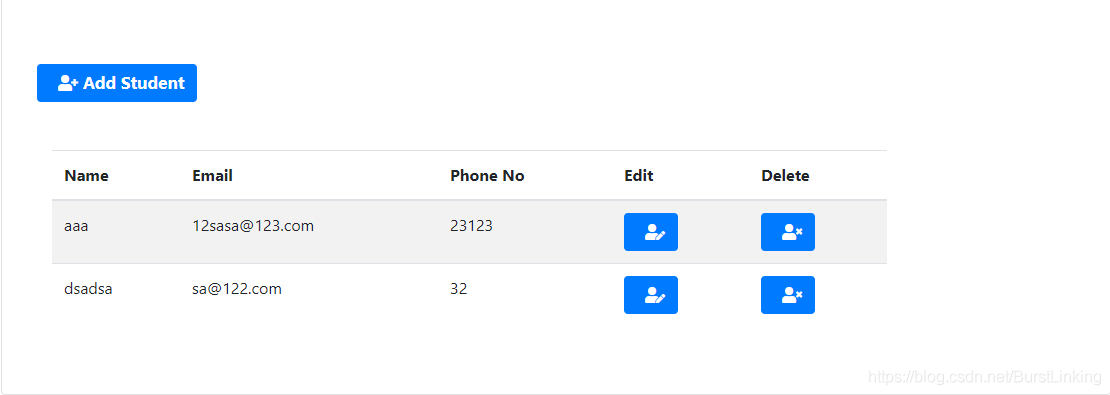
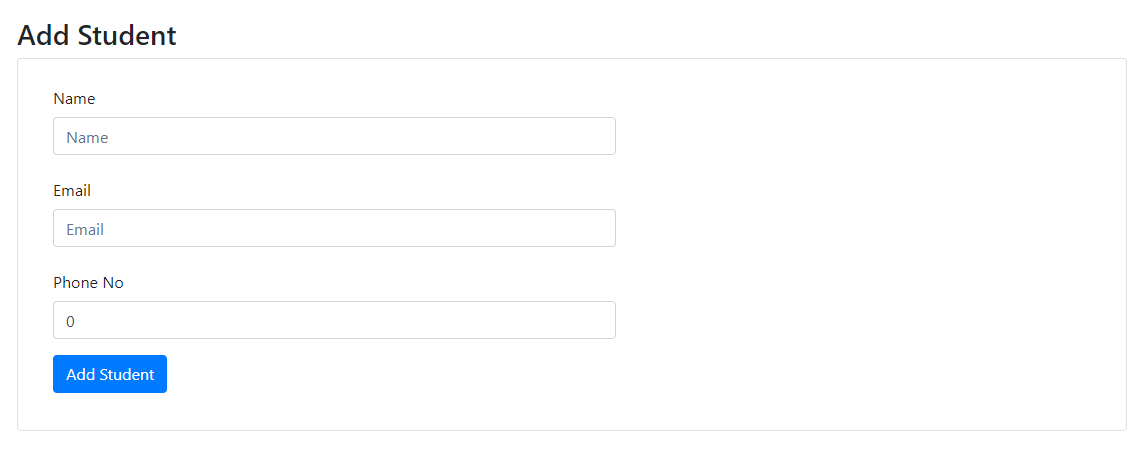
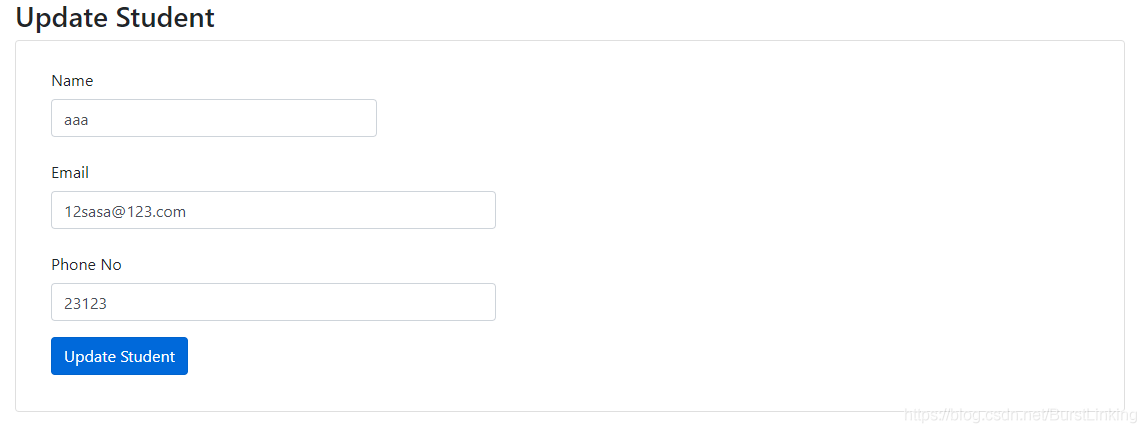
execution effect

The deployment of etcd storage and flannel network configuration for kubernetes / k8s multi node deployment

article directory

    • 1. Project requirement analysis:
    • 2. Project step deployment (master node) :
      • 5 [7] etcd binary upload
      • 6

      • 7 [8] create configuration file, command file, Certificate
      • [9] use another terminal to copy the certificate and systemctl management service script to other nodes
      • [10] and modify the configuration file under CFG
      • [11] to check whether the cluster state is healthy
  • k8s multi-node deployment of flannel network configuration
      • [1] write the allocated subnet segment to etcd, For the use of flannel
      • [2] view written information
      • [3] above all node node deployment flannel component
      • [4] create k8s working directory, copy command file
      • [5] write flannel components executing scripts to start the node node are the same 】
      • [6] open flannel component network function
      • 【 7 】 configuration docker connection flannel components [all node node a
      • [8] view bip subnet
      • [9] restart docker service
      • [10] view flannel network
      • [11] test connectivity between nodes
  • k8s multi-node deployment etcd storage deployment

    1. Project demand analysis: 192.168.60.100 is the node1 node kubelet; kubelet kube-proxy docker flannel etcd
    [3] 192.168.60.60 is the node2 node kubelet kube-proxy docker flannel etcd

    Ii. Project step deployment (master node) :

    //master master node configuration

    [1] download certificate making tool

    [root@localhost ~]# hostnamectl set-hostname master
    [root@localhost ~]# su
    [root@master ~]# cd /usr/local/bin
    [root@master bin]# chmod +x *
    [root@master bin]# ls
    cfssl  cfssl-certinfo  cfssljson
    

    [2] ca certificate

    is defined

    [root@master ~]#mkdir -p k8s/etcd-cert
    [root@master etcd-cert]#cat > ca-config.json <<EOF
    {
      "signing": {
        "default": {
          "expiry": "87600h"
        },
        "profiles": {
          "www": {
             "expiry": "87600h",
             "usages": [
                "signing",
                "key encipherment",
                "server auth",
                "client auth"     
            ]  
          } 
        }         
      }
    }
    EOF
    

    [3] realize certificate signature

    [root@master etcd-cert]#cat > ca-csr.json <<EOF 
    {   
        "CN": "etcd CA",
        "key": {
            "algo": "rsa",
            "size": 2048
        },
        "names": [
            {
                "C": "CN",
                "L": "Beijing",
                "ST": "Beijing"
            }
        ]
    }
    EOF
    

    [4] generate certificate

    [root@master etcd-cert]#cfssl gencert -initca ca-csr.json | cfssljson -bare ca -
    

    [5] specifies the communication verification between the three etcd nodes

    [root@master etcd-cert]#cat > server-csr.json <<EOF
    {
        "CN": "etcd",
        "hosts": [
        "192.168.60.10",
        "192.168.60.100",
        "192.168.60.60"
        ],
        "key": {
            "algo": "rsa",
            "size": 2048
        },
        "names": [
            {
                "C": "CN",
                "L": "BeiJing",
                "ST": "BeiJing"
            }
        ]
    }
    EOF
    

    [6] generate etcd certificate server

    [root@master etcd-cert]#cfssl gencert -ca=ca.pem -ca-key=ca-key.pem -config=ca-config.json -profile=www server-csr.json | cfssljson -bare server
    

    [7] etcd binary upload

    [root@master k8s]# ls
    etcd-cert  etcd-v3.3.10-linux-amd64  etcd-v3.3.10-linux-amd64.tar.gz
    

    [8] create configuration file, command file, certificate

    [root@master k8s]# mkdir -p /opt/etcd/{cfg,bin,ssl}
    //命令文件
    [root@master k8s]# cp etcd-v3.3.10-linux-amd64/etcd etcd-v3.3.10-linux-amd64/etcdctl /opt/etcd/bin/
    //证书
    [root@master k8s]# cp etcd-cert/*.pem /opt/etcd/ssl/
    //上传etcd.sh脚本,配置文件的生成以及systemctl管理服务文件生成
    [root@master k8s]# ls
    etcd-cert  etcd.sh  etcd-v3.3.10-linux-amd64  etcd-v3.3.10-linux-amd64.tar.gz
    [root@master k8s]#sh etcd.sh etcd01 192.168.60.10 etcd02=https://192.168.60.60:2380,etcd03=https://192.168.60.100:2380
    //查看etcd的进程是否启动
    [root@master ~]# ps -ef | grep etcd
    

    [9] use another terminal to copy the certificate and systemctl management service script to other nodes

    [root@master ~]# scp -r /opt/etcd/ [email protected]:/opt/
    [root@master ~]# scp -r /opt/etcd/ [email protected]:/opt/
    //启动脚本拷贝到其他节点
    scp /usr/lib/systemd/system/etcd.service [email protected]:/usr/lib/systemd/system/
    scp /usr/lib/systemd/system/etcd.service [email protected]:/usr/lib/systemd/system/
    

    [10] modify the configuration file under CFG in the other two nodes

    //在192.168.60.60节点修改,主要是修改name和IP地址
    [root@node1 ~]# cd /opt/etcd/cfg/
    [root@node1 cfg]# ls
    etcd
    [root@node1 cfg]# vim etcd 
    #[Member]
    ETCD_NAME="etcd02"
    ETCD_DATA_DIR="/var/lib/etcd/default.etcd"
    ETCD_LISTEN_PEER_URLS="https://192.168.60.60:2380"
    ETCD_LISTEN_CLIENT_URLS="https://192.168.60.60:2379"
    
    #[Clustering]
    ETCD_INITIAL_ADVERTISE_PEER_URLS="https://192.168.60.60:2380"
    ETCD_ADVERTISE_CLIENT_URLS="https://192.168.60.60:2379"
    ETCD_INITIAL_CLUSTER="etcd01=https://192.168.60.10:2380,etcd02=https://192.168.60.60:2380,etcd03=https://192.168.60.100:2380"
    ETCD_INITIAL_CLUSTER_TOKEN="etcd-cluster"
    ETCD_INITIAL_CLUSTER_STATE="new"
    [root@node1 cfg]# systemctl start etcd.service 
    [root@node1 cfg]# systemctl status etcd.service
    
    
    //在192.168.60.100节点修改,主要是修改name和IP地址
    [root@node2 ~]# cd /opt/etcd/cfg/
    [root@node2 cfg]# ls
    etcd
    [root@node2 cfg]# vim etcd 
    #[Member]
    ETCD_NAME="etcd03"
    ETCD_DATA_DIR="/var/lib/etcd/default.etcd"
    ETCD_LISTEN_PEER_URLS="https://192.168.60.100:2380"
    ETCD_LISTEN_CLIENT_URLS="https://192.168.60.100:2379"
    
    #[Clustering]
    ETCD_INITIAL_ADVERTISE_PEER_URLS="https://192.168.60.100:2380"
    ETCD_ADVERTISE_CLIENT_URLS="https://192.168.60.100:2379"
    ETCD_INITIAL_CLUSTER="etcd01=https://192.168.60.10:2380,etcd02=https://192.168.60.60:2380,etcd03=https://192.168.60.100:2380"
    ETCD_INITIAL_CLUSTER_TOKEN="etcd-cluster"
    ETCD_INITIAL_CLUSTER_STATE="new"
    [root@node2 cfg]# systemctl start etcd.service 
    [root@node2 cfg]# systemctl status etcd.service
    

    [11] check whether the cluster state is healthy

    [root@master etcd-cert]# /opt/etcd//bin/etcdctl --ca-file=ca.pem --cert-file=server.pem --key-file=server-key.pem --endpoint="https://192.168.60.10:2379,https://192.168.60.60:2379,https://192.168.60.100:2379" cluster-health
    member 59173e3f8aecc6c3 is healthy: got healthy result from https://192.168.60.100:2379
    member 8da25ad72397ec6e is healthy: got healthy result from https://192.168.60.10:2379
    member a21e580b9191cb20 is healthy: got healthy result from https://192.168.60.60:2379
    cluster is healthy
    [root@master etcd-cert]# 
    

    — — — — — — — — — — — — — — — — — — — —

    k8s multi-node deployment of flannel network configuration deployment

    1. Project demand analysis: 192.168.60.100 is the node1 node kubelet; kubelet kube-proxy docker flannel etcd
    [3] 192.168.60.60 is the node2 node kubelet kube-proxy docker flannel etcd

    Ii. Project step deployment:

    [1] write the allocated subnet segment into the etcd for flannel to use

    [root@master etcd-cert]# /opt/etcd/bin/etcdctl \
    --ca-file=ca.pem \
    --cert-file=server.pem \
    --key-file=server-key.pem \
    --endpoint="https://192.168.60.10:2379,https://192.168.60.60:2379,https://192.168.60.100:2379" \
    set /coreos.com/network/config '{"Network":"172.17.0.0/16","Backenf":{"Type":"vxlan"}}'
    

    [2] view the written information

    [root@master etcd-cert]# /opt/etcd/bin/etcdctl \
    --ca-file=ca.pem \
    --cert-file=server.pem \
    --key-file=server-key.pem \
    --endpoint="https://192.168.60.10:2379,https://192.168.60.60:2379,https://192.168.60.100:2379" \
    get /coreos.com/network/config
    

    [3] deploy flannel component

    on all node nodes

    //在192.168.60.60节点
    [root@node1 ~]# tar zxvf flannel-v0.10.0-linux-amd64.tar.gz 
    flanneld
    mk-docker-opts.sh
    README.md
    //在192.168.60.100节点
    [root@node2 ~]# tar zxvf flannel-v0.10.0-linux-amd64.tar.gz 
    flanneld
    mk-docker-opts.sh
    README.md
    

    [4] create k8s working directory, copy the command file

    //在192.168.60.60节点下
    [root@node1 ~]# mkdir -p /opt/kubernetes/{cfg,bin,ssl}
    [root@node1 ~]# mv flanneld mk-docker-opts.sh /opt/kubernetes/bin/
    //在192.168.60.100节点下
    [root@node2 ~]# mkdir -p /opt/kubernetes/{cfg,bin,ssl}
    [root@node2 ~]# mv flanneld mk-docker-opts.sh /opt/kubernetes/bin/
    

    [5] write the flannel component startup execution script [node node is the same]

    [root@node1 ~]# vim flannel.sh
    #!/bin/bash
    ETCD_ENDPOINTS=${1:-"http://127.0.0.1:2379"}
    cat <<EOF >/opt/kubernetes/cfg/flanneld
    FLANNEL_OPTIONS="--etcd-endpoints=${ETCD_ENDPOINTS} \
    -etcd-cafile=/opt/etcd/ssl/ca.pem \
    -etcd-certfile=/opt/etcd/ssl/server.pem \
    -etcd-keyfile=/opt/etcd/ssl/server-key.pem"
    EOF
    
    cat <<EOF >/usr/lib/systemd/system/flanneld.service
    [Unit]
    Description=Flanneld overlay address etcd agent
    After=network-online.target network.target
    Before=docker.service
    [Service]
    Type=notify
    EnvironmentFile=/opt/kubernetes/cfg/flanneld
    ExecStart=/opt/kubernetes/bin/flanneld --ip-masq \$FLANNEL_OPTIONS
    ExecStartPost=/opt/kubernetes/bin/mk-docker-opts.sh -k DOCKER_NETWORK_OPTIONS -d /run/flannel/subnet.env
    Restart=on-failure
    [Install]
    WantedBy=multi-user.target
    EOF
    
    systemctl daemon-reload
    systemctl enable flanneld
    systemctl restart flanneld
    

    [6] enable the flannel component network function

    [root@node1 ~]# sh flannel.sh https://192.168.60.10:2379,https://192.168.60.60:2379,https://192.168.60.100:2379
    

    [7] configure docker to connect flannel component [all node nodes are the same]

    [root@node1 ~]# vim /usr/lib/systemd/system/docker.service 
    14 EnvironmentFile=/run/flannel/subnet.env
    15 ExecStart=/usr/bin/dockerd $DOCKER_NETWORK_OPTIONS -H fd:// --containerd=/run/containerd/contain    erd.sock
    

    [8] view the subnet

    specified for bip startup

    //在192.168.60.60节点node1
    [root@node1 ~]# cat /run/flannel/subnet.env 
    DOCKER_OPT_BIP="--bip=172.17.39.1/24"
    DOCKER_OPT_IPMASQ="--ip-masq=false"
    DOCKER_OPT_MTU="--mtu=1472"
    DOCKER_NETWORK_OPTIONS=" --bip=172.17.39.1/24 --ip-masq=false --mtu=1472"
    //在192.168.60.100节点node2
    [root@node2 ~]# cat /run/flannel/subnet.env 
    DOCKER_OPT_BIP="--bip=172.17.85.1/24"
    DOCKER_OPT_IPMASQ="--ip-masq=false"
    DOCKER_OPT_MTU="--mtu=1472"
    DOCKER_NETWORK_OPTIONS=" --bip=172.17.85.1/24 --ip-masq=false --mtu=1472"
    

    [9] restart docker service

    [root@node1 ~]# systemctl daemon-reload 
    [root@node1 ~]# systemctl restart docker.service 
    

    [10] see flannel network

    //在node1节点192.168.60.60
    [root@node1 ~]# ifconfig 
    docker0: flags=4099<UP,BROADCAST,MULTICAST>  mtu 1500
            inet 172.17.39.1  netmask 255.255.255.0  broadcast 172.17.39.255
            ether 02:42:b1:19:5b:a1  txqueuelen 0  (Ethernet)
            RX packets 0  bytes 0 (0.0 B)
            RX errors 0  dropped 0  overruns 0  frame 0
            TX packets 0  bytes 0 (0.0 B)
            TX errors 0  dropped 0 overruns 0  carrier 0  collisions 0
    //在node2节点192.168.60.100
    [root@node2 ~]# ifconfig 
    docker0: flags=4099<UP,BROADCAST,MULTICAST>  mtu 1500
            inet 172.17.85.1  netmask 255.255.255.0  broadcast 172.17.85.255
            ether 02:42:b5:54:91:f1  txqueuelen 0  (Ethernet)
            RX packets 0  bytes 0 (0.0 B)
            RX errors 0  dropped 0  overruns 0  frame 0
            TX packets 0  bytes 0 (0.0 B)
            TX errors 0  dropped 0 overruns 0  carrier 0  collisions 0
    

    [11] test the connectivity between nodes

    // at 192.168.60.60 node

    [root@node1 ~]# docker run -it centos:7 /bin/bash
    [root@2bbac9ebdc96 /]# yum install -y net-tools
    [root@2bbac9ebdc96 /]# ifconfig 
    eth0: flags=4163<UP,BROADCAST,RUNNING,MULTICAST>  mtu 1472
            inet 172.17.39.2  netmask 255.255.255.0  broadcast 172.17.39.255
            ether 02:42:ac:11:27:02  txqueuelen 0  (Ethernet)
            RX packets 15198  bytes 12444271 (11.8 MiB)
            RX errors 0  dropped 0  overruns 0  frame 0
            TX packets 7322  bytes 398889 (389.5 KiB)
            TX errors 0  dropped 0 overruns 0  carrier 0  collisions 0
    [root@2bbac9ebdc96 /]# ping 172.17.85.2
    PING 172.17.85.2 (172.17.85.2) 56(84) bytes of data.
    64 bytes from 172.17.85.2: icmp_seq=1 ttl=60 time=1.08 ms
    64 bytes from 172.17.85.2: icmp_seq=2 ttl=60 time=0.523 ms
    64 bytes from 172.17.85.2: icmp_seq=3 ttl=60 time=0.619 ms
    64 bytes from 172.17.85.2: icmp_seq=4 ttl=60 time=2.24 ms
    

    // at 192.168.60.100 node

    [root@node2 ~]# docker run -it centos:7 /bin/bash
    [root@79995e04b320 /]# yum install -y net-tools
    [root@79995e04b320 /]# ifconfig 
    eth0: flags=4163<UP,BROADCAST,RUNNING,MULTICAST>  mtu 1472
            inet 172.17.85.2  netmask 255.255.255.0  broadcast 172.17.85.255
            ether 02:42:ac:11:55:02  txqueuelen 0  (Ethernet)
            RX packets 15299  bytes 12447552 (11.8 MiB)
            RX errors 0  dropped 0  overruns 0  frame 0
            TX packets 5864  bytes 320081 (312.5 KiB)
            TX errors 0  dropped 0 overruns 0  carrier 0  collisions 0
    [root@79995e04b320 /]# ping 172.17.39.2
    PING 172.17.39.2 (172.17.39.2) 56(84) bytes of data.
    64 bytes from 172.17.39.2: icmp_seq=1 ttl=60 time=0.706 ms
    64 bytes from 172.17.39.2: icmp_seq=2 ttl=60 time=0.491 ms
    64 bytes from 172.17.39.2: icmp_seq=3 ttl=60 time=0.486 ms
    64 bytes from 172.17.39.2: icmp_seq=4 ttl=60 time=0.528 ms
    

    IIS express failed to start

    IS Express cannot start

    1. .vs\config\applicationhost.config
    2. open. In csproject, change to False

    method 1
    use notepad or some other text editor, open the project. Csproj file, locate, clear all the IIS configuration, attributes, save to True, re-open the project with VS2015, then Ctrl+F5, success!
    principle is to have VS2015 reset the boot configuration.
    I tried this one, I guess it was an anomaly for different reasons, so it didn’t work

    method two

    delete the.vs folder in the code root and reopen it.

    Java — one of Apollo configuration centers — Introduction to Apollo

    Apollo configuration center

    Apollo (Apollo) is a distributed configuration center developed by ctrip framework department. It can centrally manage the configuration of different environments and clusters. After configuration modification, it can be pushed to the application end in real time. Details please refer to the official introduction: https://github.com/ctripcorp/apollo/wiki/Apollo%E9%85%8D%E7%BD%AE%E4%B8%AD%E5%BF%83%E4%BB%8B%E7%BB%8D

    Apollo supports four dimensions to manage the key-value format configuration:

    1. application (application)
    2. environment (environment)
    3. cluster (cluster)
    4. namespace (namespace)

      feature

      based on the particularity of configuration, so the Apollo, from the beginning of the design was determined to become a governance configuration publishing platform, currently offers the following features:

      • unified management of different environments, different cluster configuration

        • Apollo provides a unified interface centralized management environment (environment), different cluster (cluster), the configuration of different namespaces (namespace)
        • the same code deployed in different clusters, can have different configurations, such as a zookeeper address such as
        • (namespace) can be easily through the namespace support multiple different applications to share the same configuration, It also allows applications to override Shared configurations
      • configuration changes in real time (hot publish)

        • user after Apollo modified the configuration and released, the client can receive the latest configuration in real time (1 second), and notify the application
      • version release management

        • all configuration releases have a version concept, which makes it easy to support configuration rollback
      • grayscale release

        • supports the grayscale publication of configuration. For example, after clicking the publication, it only takes effect on some application instances. After the observation is ok for a period of time, it will be pushed to all application instances
      • authority management, release audit, operation audit

        • application and configuration management has a sound authority management mechanism, the management of configuration is also divided into two links, editing and publishing, so as to reduce human error
        • all operations have audit logs, can easily track the problem
      • client configuration information monitoring

        • can easily see the configuration used by which instances
        • provide. Java and.net native client

        • provides a native Java and.net client to facilitate application integration
        • supports Spring Placeholder, Annotation, and ConfigurationProperties of Spring Boot to facilitate application use (Spring 3.1.1+ is required)
        • also provides Http interface, Non-java and.net applications can also easily use
      • to provide open platform API

        • Apollo itself provides more perfect unified configuration management interface, support environment and data center configuration management, permissions, process governance features such as
        • though Apollo, for the sake of generality to configuration modifications do not too many restrictions, as long as you comply with the basic format can save
        • in our research, found that for some users, there may be more complex their configuration format, such as XML, json, need to make check in the format
        • if there are some use DAL, Not only have a specific format, but also to input the value of the need to calibrate the rear can save, such as check the database, the user name and password match
        • for such applications, Apollo application support party through an open interface configuration changes in the Apollo and release, and has perfect authorization and access control
        • simple deployment

          • configuration center as a basic service, availability requirements is very high, which requires the Apollo external dependence as far as possible little
          • the only external dependence is MySQL, so deployment is very simple, as long as the installed Java and MySQL can make Apollo run
          • Apollo also provides packaging script, a key can generate all the necessary installation package, and supports custom runtime parameters

            development guide

            once we have a basic understanding of Apollo, we will start its development. Apollo consists of two parts, the client side and the server side. Let’s first describe the server side of Apollo.

            • Apollo server
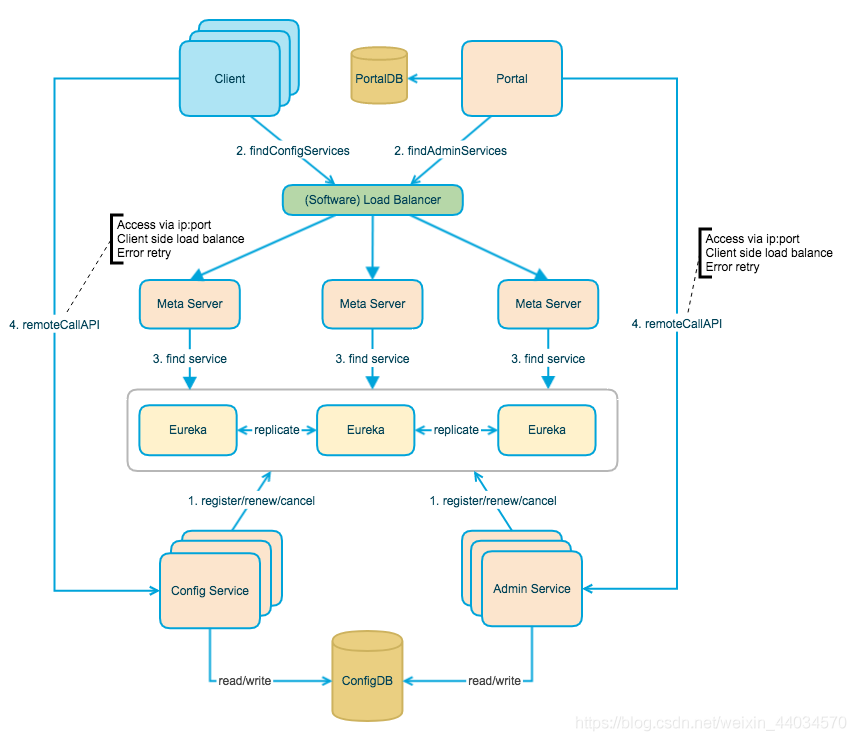
            • Apollo server is mainly composed of three parts, namely, configservice, adminservice, portal
            • configservice: provides the configuration reading, pushing and other functions, and the service object is Apollo client
            • adminservice: The Service object is Apollo Portal (management interface)
            • Portal: Portal management interface, intuitively view and publish project configuration messages
            • Config Service and Admin Service are multi-instance, stateless deployment. Therefore, we need to register ourselves in Eureka and keep the heartbeat
            • . On top of Eureka, we built a layer of Meta Server to encapsulate Eureka’s Service discovery interface.
            • Client accesses the Meta Server through the domain name to get the Config Service Service list (IP+Port), and then directly accesses the Service through IP+Port. At the same time, load balance will be performed on the Client side, and error retry
            • Portal accesses the Meta Server through the domain name to obtain the list of Admin Service services (IP+Port), and then access the Service directly through IP+Port. Meanwhile, load balance will be performed on the Portal side, and error retry
            • to simplify deployment. We will actually deploy the Config Service, Eureka, and Meta Server logical roles in the same JVM process

            • Eureka Registry

            • it provides a complete Service Registry and Service Discovery implementation, and has also withstood the test of Netflix’s own production environment. It is relatively easy to use

            • 0. At the same time, Spring Cloud also has a set of perfect open source code to integrate Eureka, so it is very convenient to use.

            • . In addition, Eureka also supports startup in the container of our application, that is to say, after our application is launched, it ACTS as Eureka and also serves as a service provider. In this way, the service availability is greatly improved

            • last point is open source, because the code is open source, so it is very easy for us to understand its implementation principle and troubleshooting problems

              Apollo client

            • 0

              1 rely on import convenience, just need to integrate apolloClient

              2
            • 3

              4

              5 client and server maintained a long connection, In this way, the push

              client will pull the latest configuration of the application regularly from the server of Apollo configuration center. The default timing frequency is to pull the latest configuration of the application every 5 minutes. After the client gets the latest configuration of the application from the server of Apollo configuration center, The client caches the configuration obtained from the server in the local file system a

            • application gets the latest configuration and subscription configuration update notification from the Apollo client

            0

    The Tomcat connector configured to listen on port 7014 failed to start

    which is the port of this project has been occupied by other projects, you cannot use it. There are two methods:

    1, in the application. Yml file in a new port

    2, force to close the occupied port

    forces you to close the occupied port

    1, open the computer process of CMP according to port to check the program number netstat ano | findstr searches take up port

    2. According to the progress of the program, see the specific program name tasklist | findstr searches process number

    3, Mandatory, recursive delete the program and its child process taskkill – f – t – im process name (Java. Exe)

    After

    execution is complete, you can use this port

    Use XMLHttpRequest of JavaScript to send data to the background

    1. Would like to send data to add to the FormData in (using XMLHttpRequest must add data to the FormData or it will protect the wrong)

    2. A new XMLHttpRequest out

    3. Use the open method to specify the way to request (post or get) and URL

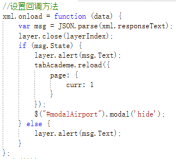
    4. Set the callback method

    5. The most important step: use the send method (data is stored in the FormData inside the parentheses) to send data

    Linux shell loop in a line for while

    for loop instance

    query whether the tomcat process exists in 5 seconds interval, if there is out of the loop, loop at most 20 times, wait 100 seconds

    for i in $(seq 1 20); do ps aux| grep tomcat | grep -v grep && break;sleep 5;done
    

    while loop instance

    query whether the tomcat process exists, if there is out of the loop, if not will wait

    while true; do ps aux | grep tomcat | grep -v grep && break;sleep 5; done