Category Archives: How to Fix

UE4 cannot save the asset. The asset uasset failed to save

sometimes, in The middle of development, it is suddenly found that some resources cannot be saved, The asset uasset fails to save… Such as tip

The asset ‘/Game/xxx/xxx/xxx’ (xxx.uasset) failed to save.

Cancel: Stop saving all assets and return to the editor.

Retry: Attempt to save the asset again.

Continue: Skip saving this asset only.

The following assets failed to save correctly:

there are many solutions on the Internet, but it turns out that UE4 with the same project to create

at this point your UE4 may only have one open, but it’s still reporting an error because the UE4 background is still stealing…

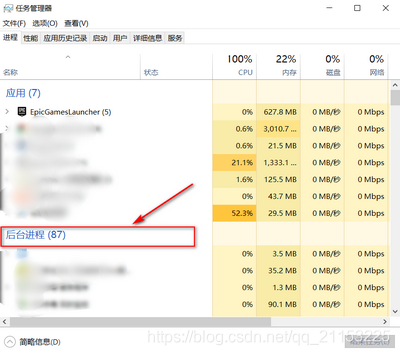
opens task manager – background process

and then you’ll notice that there’s a UE4 process running, click on it, and finish the task

back to the current project, you can save (UE4 remaining bugs)

[turn] right click to open the prompt [shellexecute failed (2): is this command correct? (fix)] with Notepad + +

error:

error: right click on notepad++ to open file

ShellExecute failed (2): Is this command Correct?.

is caused by having notepad++ ‘run as administrator’ option turned on, according to a search engine.

solution :

Find notepad++. Exe, right-click on it, go to the compatibility TAB, uncheck “run this program as administrator”, and finally “apply” and “ok”.

my environment: Windows10, Windows 7 estimation is the same method.

Notepad++ is the default software installation directory for disk C.

solution from: https://notepad-plus-plus.org/community/topic/10945/shellexecute-failed-2-is-this-command-correct-fix

Springbatch failed to execute commandlinerunner

Springbatch Failed to execute CommandLineRunner error resolution

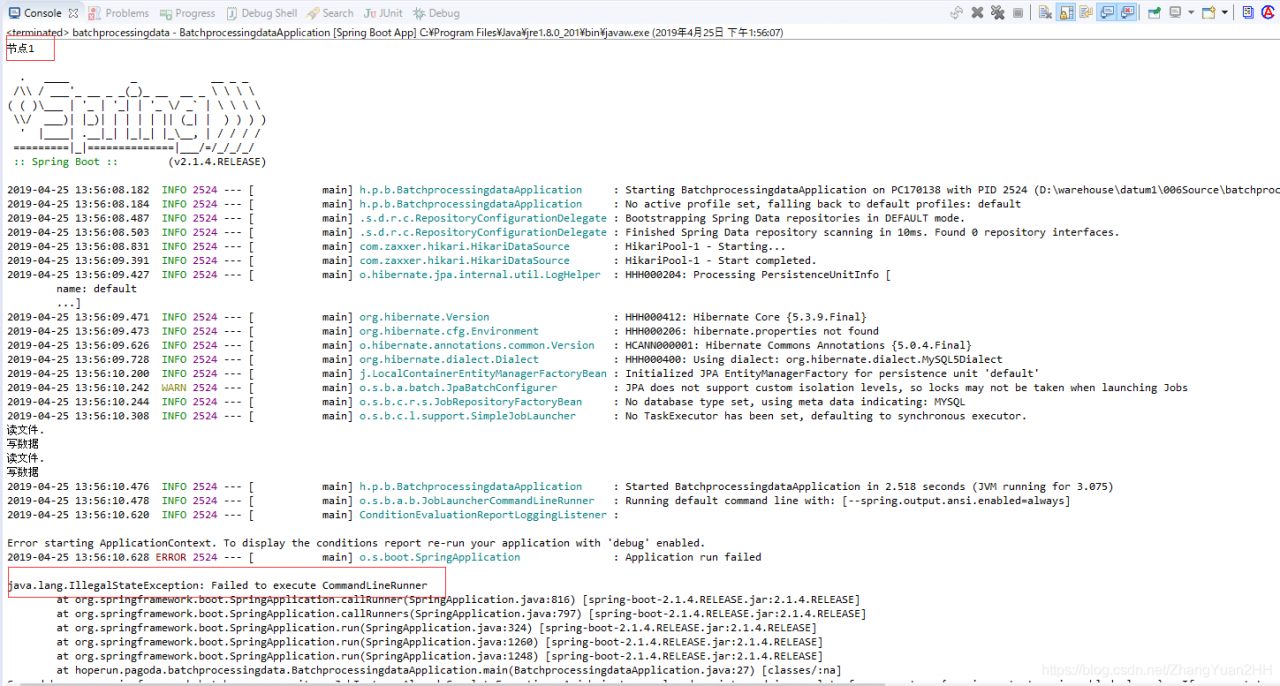
java.lang.IllegalStateException: Failed to execute CommandLineRunner
	at org.springframework.boot.SpringApplication.callRunner(SpringApplication.java:816) [spring-boot-2.1.4.RELEASE.jar:2.1.4.RELEASE]
	at org.springframework.boot.SpringApplication.callRunners(SpringApplication.java:797) [spring-boot-2.1.4.RELEASE.jar:2.1.4.RELEASE]
	at org.springframework.boot.SpringApplication.run(SpringApplication.java:324) [spring-boot-2.1.4.RELEASE.jar:2.1.4.RELEASE]
	at org.springframework.boot.SpringApplication.run(SpringApplication.java:1260) [spring-boot-2.1.4.RELEASE.jar:2.1.4.RELEASE]
	at org.springframework.boot.SpringApplication.run(SpringApplication.java:1248) [spring-boot-2.1.4.RELEASE.jar:2.1.4.RELEASE]
	at hoperun.pagoda.batchprocessingdata.BatchprocessingdataApplication.main(BatchprocessingdataApplication.java:31) [classes/:na]
Caused by: org.springframework.batch.core.repository.JobInstanceAlreadyCompleteException: A job instance already exists and is complete for parameters={-spring.output.ansi.enabled=always}.  If you want to run this job again, change the parameters.
	at org.springframework.batch.core.repository.support.SimpleJobRepository.createJobExecution(SimpleJobRepository.java:132) ~[spring-batch-core-4.1.2.RELEASE.jar:4.1.2.RELEASE]
	at sun.reflect.NativeMethodAccessorImpl.invoke0(Native Method) ~[na:1.8.0_201]
	at sun.reflect.NativeMethodAccessorImpl.invoke(Unknown Source) ~[na:1.8.0_201]
	at sun.reflect.DelegatingMethodAccessorImpl.invoke(Unknown Source) ~[na:1.8.0_201]
	at java.lang.reflect.Method.invoke(Unknown Source) ~[na:1.8.0_201]
	at org.springframework.aop.support.AopUtils.invokeJoinpointUsingReflection(AopUtils.java:343) ~[spring-aop-5.1.6.RELEASE.jar:5.1.6.RELEASE]
	at org.springframework.aop.framework.ReflectiveMethodInvocation.invokeJoinpoint(ReflectiveMethodInvocation.java:198) ~[spring-aop-5.1.6.RELEASE.jar:5.1.6.RELEASE]
	at org.springframework.aop.framework.ReflectiveMethodInvocation.proceed(ReflectiveMethodInvocation.java:163) ~[spring-aop-5.1.6.RELEASE.jar:5.1.6.RELEASE]
	at org.springframework.transaction.interceptor.TransactionAspectSupport.invokeWithinTransaction(TransactionAspectSupport.java:294) ~[spring-tx-5.1.6.RELEASE.jar:5.1.6.RELEASE]
	at org.springframework.transaction.interceptor.TransactionInterceptor.invoke(TransactionInterceptor.java:98) ~[spring-tx-5.1.6.RELEASE.jar:5.1.6.RELEASE]
	at org.springframework.aop.framework.ReflectiveMethodInvocation.proceed(ReflectiveMethodInvocation.java:186) ~[spring-aop-5.1.6.RELEASE.jar:5.1.6.RELEASE]
	at org.springframework.batch.core.repository.support.AbstractJobRepositoryFactoryBean$1.invoke(AbstractJobRepositoryFactoryBean.java:181) ~[spring-batch-core-4.1.2.RELEASE.jar:4.1.2.RELEASE]
	at org.springframework.aop.framework.ReflectiveMethodInvocation.proceed(ReflectiveMethodInvocation.java:186) ~[spring-aop-5.1.6.RELEASE.jar:5.1.6.RELEASE]
	at org.springframework.aop.framework.JdkDynamicAopProxy.invoke(JdkDynamicAopProxy.java:212) ~[spring-aop-5.1.6.RELEASE.jar:5.1.6.RELEASE]
	at com.sun.proxy.$Proxy64.createJobExecution(Unknown Source) ~[na:na]
	at org.springframework.batch.core.launch.support.SimpleJobLauncher.run(SimpleJobLauncher.java:134) ~[spring-batch-core-4.1.2.RELEASE.jar:4.1.2.RELEASE]
	at org.springframework.boot.autoconfigure.batch.JobLauncherCommandLineRunner.execute(JobLauncherCommandLineRunner.java:214) ~[spring-boot-autoconfigure-2.1.4.RELEASE.jar:2.1.4.RELEASE]
	at org.springframework.boot.autoconfigure.batch.JobLauncherCommandLineRunner.executeLocalJobs(JobLauncherCommandLineRunner.java:186) ~[spring-boot-autoconfigure-2.1.4.RELEASE.jar:2.1.4.RELEASE]
	at org.springframework.boot.autoconfigure.batch.JobLauncherCommandLineRunner.launchJobFromProperties(JobLauncherCommandLineRunner.java:172) ~[spring-boot-autoconfigure-2.1.4.RELEASE.jar:2.1.4.RELEASE]
	at org.springframework.boot.autoconfigure.batch.JobLauncherCommandLineRunner.run(JobLauncherCommandLineRunner.java:166) ~[spring-boot-autoconfigure-2.1.4.RELEASE.jar:2.1.4.RELEASE]
	at org.springframework.boot.SpringApplication.callRunner(SpringApplication.java:813) [spring-boot-2.1.4.RELEASE.jar:2.1.4.RELEASE]
	... 5 common frames omitted

springbatch second start

Failed to execute CommandLineRunner — fail to execute CommandLineRunner

A job instance already exists and is complete for the parameters = {- spring. The output. The ANSI. Enabled = always}. If you want to run this job again, change the parameters.

– job instance already exists, and completed the parameter = {- spring. The output. The ANSI. Enabled = always}. If you want to run this job again, change the parameter

look at the code:

package hoperun.pagoda.batchprocessingdata;

import java.util.Date;

import org.springframework.batch.core.ExitStatus;
import org.springframework.batch.core.Job;
import org.springframework.batch.core.JobExecution;
import org.springframework.batch.core.JobParameters;
import org.springframework.batch.core.JobParametersBuilder;
import org.springframework.batch.core.configuration.JobRegistry;
import org.springframework.batch.core.launch.JobLauncher;
import org.springframework.boot.SpringApplication;
import org.springframework.boot.autoconfigure.EnableAutoConfiguration;
import org.springframework.boot.autoconfigure.SpringBootApplication;
import org.springframework.context.ConfigurableApplicationContext;
import org.springframework.context.annotation.ComponentScan;

@SpringBootApplication
@ComponentScan
@EnableAutoConfiguration
public class BatchprocessingdataApplication {
    public static void main(String[] args) {
        //        String jobName = args[0];
        String jobName = "userMigrationJob0";
        try {
            //System.out.println("节点1");
            ConfigurableApplicationContext context = SpringApplication.run(BatchprocessingdataApplication.class, args);
            JobRegistry jobRegistry = context.getBean(JobRegistry.class);
            Job job = jobRegistry.getJob(jobName);
            JobLauncher jobLauncher = context.getBean(JobLauncher.class);
            //System.out.println("节点2:");
            JobExecution jobExecution = jobLauncher.run(job, createJobParams());
            if (!jobExecution.getExitStatus().equals(ExitStatus.COMPLETED)) {
                throw new RuntimeException(jobName +" Job execution failed.");
            }
        } catch (Exception e) {
            throw new RuntimeException(jobName +" Job execution failed.");
        }
    }

    private static JobParameters createJobParams() {
        //System.out.println("节点3");
        return new JobParametersBuilder().addDate("date", new Date()).toJobParameters();
    }
}

I clearly set return new JobParametersBuilder(). AddDate (“date”, new date ()). ToJobParameters ();

. AddDate (“date”, new date ()) is different every time!! But why still report parameter same!!

solution:

adds the configuration in application.properties:

spring.batch.job.enabled=false

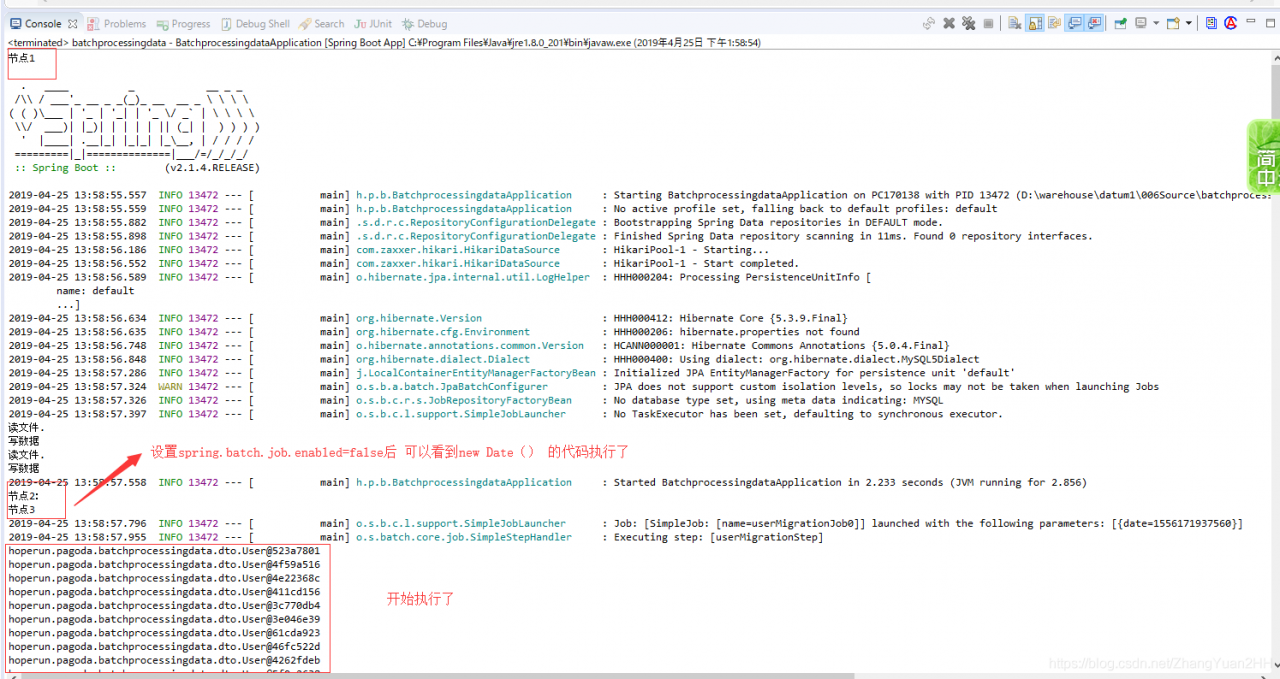
make both jobs unavailable and the program executes the job according to joblaunch.run.

error cause:

because each job is executed by default when spring batch is loaded, the default is to execute the job database first, and if the job is executed, an error is reported,

— this is printing

without spring.batch. Job.enabled =false

— this is printing

with spring.batch. Job.enabled =false

Mounting HGFs shares: [failed] solution

LInux system was installed in 0 1 VMware Tools1 3, the following error was reported: 4 5
6
7

8 VMLInux LInux0 1 VMware Tools1 3 3>4 5
6> [FAILED]
7

8

Linux 0 1
Mounting local filesystems: [FAILED]
Linux0 1 1>
Linux0 1 1 1>
1 1 1 1 1 0 1 1>
this is due to VMware Guest(VM) host( )0 1 1 Help Shared Folders Settings Panel0 1. In the VM – & gt; page, set SharedFolders, make it 0 1 enable 3. Mount Guest0 1 3/MNT/HGFS 4 5

the full transcription: http://wateraabb.blog.sohu.com/158879529.html

FTP use get command 550 failed to open file, but use the put command to solve the problem

when using the FTP anonymous service, it is ok to upload files using the PUT command, but 550 Failed to open file appears using the get command, because the downloaded file does not have permissions

problem:
ftp> Get 2.txt
local: 2.txt remote: 2.txt
. TXT
227 Entering the Mode (192,168,8,35,231,233)

solution:
CD /var/ftp/pub
chmod 777 2.txt

results :
ftp> Get 2.txt
local: 2.txt remote: 2.txt
(192,168, 35,135,27).
150 Opening BINARY Mode data connection for 2. TXT (0 bytes)

Summary of some mistakes in the development of unity ar

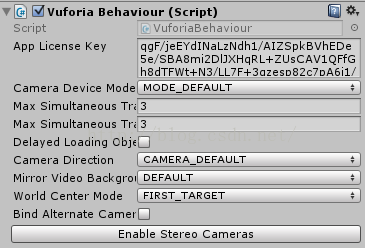
1. Vuforia initialization failed

error:

Vuforia initialization failed
UnityEngine.Debug:LogError(Object)
Vuforia.VuforiaAbstractBehaviour:Start()

Vuforia initialization failed:
UnityEngine. Debug: LogError (Object)
Vuforia. DefaultInitializationErrorHandler: SetErrorCode (InitError) (ats AR/Assets/Vuforia/Scripts/DefaultInitializationErrorHandler.cs:82)
Vuforia.DefaultInitializationErrorHandler:OnVuforiaInitializationError(InitError) (at AR/Assets/Vuforia/Scripts/DefaultInitializationErrorHandler.cs:156)
Vuforia.VuforiaAbstractBehaviour:Start()

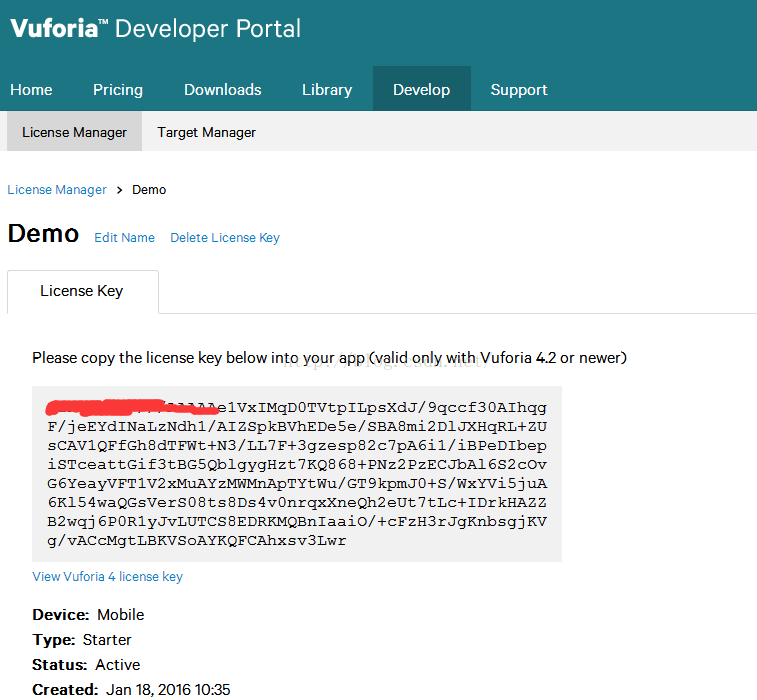
due to the App License Key filling error, to vuforia official website to apply for the correct Key filling in.

2.

R: error: package or namespace load failed for ‘rjava’:

question:

during the course of running R, you usually need to call rjava.dll to run the virtual environment. For example, when importing the package library(XLSX), an error occurs:

> Library (XLSX)
load required package: rJava
Error: package or namespace load failed for ‘rJava’ :
loadNamespace() calculate ‘rJava’. OnLoad failed,
call: inDL(x, as. Logical (local), as. Logical (now)…
error: unable to load Shared object ‘D:/Program Files (x86)/R/R – 3.4.2/library/rJava/libs/x64/rJava DLL’ :
LoadLibrary failure: can’t find the specified module.

Error: unable to load the program package ‘rJava’

. In this case, the JAVA class library rjava.dll is installed again after installing other software in the system, and the R running environment cannot call the confirmation item. Rjava.dll:

> Sys. The setenv (JAVA_HOME = “D:/Program Files (x86)/Java/jdk1.8.0 _144/jre ‘)

> run library(XLSX) again, and you’re done!

> Library (XLSX)
load needed packages: rJava
load needed packages: xlsxjars

VirtualBox Error WinVerifyTrust failed on stub executable


VirtualBox error after Windows 8.1 update:

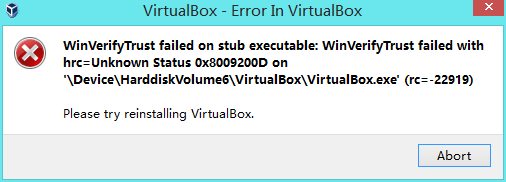
WinVerifyTrust failed on stub executable: WinVerifyTrust failed with hrc=Unknown Status 0x8009200D on ‘\Device\HarddiskVolumeX\Program Files\Oracle\VirtualBox\VirtualBox.exe’ (rc=-22919) Please try reinstalling VirtualBox

solution 1: uninstall update KB3081320

solution 2: install a new version of VirtualBox

share my teacher’s ai tutorial again. Zero basis! Easy to understand! Funny humor! And dirty jokes! I hope you will join us in the team of artificial intelligence! https://blog.csdn.net/jiangjunshow

Kafka connection abnormal org.apache.kafka . common.errors.TimeoutException : Failed to update metadata after 60000 ms.

Introduction: there are many problems about hosts on the Internet. After testing, I found out that it is not. After testing by myself, I introduced three solutions to most problems:

1. Firewall port not opened or closed

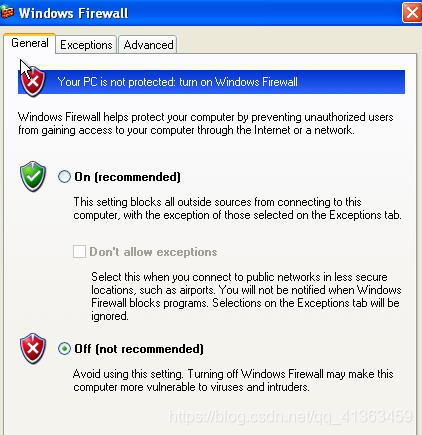
firewall generally local test will be closed, the line is generally open, it is recommended to add port

add port:

# --permanent 为永久添加,不指定此参数重启后失效
firewall-cmd --zone=public --add-port=9092/tcp --permanent

delete port:

firewall-cmd --zone=public --remove-port=80/tcp --permanent

view all ports:

 firewall-cmd --zone=public --list-ports

view specified port:

firewall-cmd --zone= public --query-port=9092/tcp

view port status:

netstat -tunlp

overload:

firewall-cmd --reload

firewall command:

#开启防火墙 
service firewalld start
#启用防火墙 
service firewalld enable (永久生效)
#关闭防火墙 
service firewalld stop (重启后失效)
#禁用防火墙 
service firewalld disable (永久生效)
#重启防火墙 
service firewalld restart
#查看状态 
service firewalld status

2. Kafka service entry address not specified

edit the server.properties in the config directory of kafka, and add the address of the service entry to the external service:

注意:此ip为kafka所在主机的ip地址
listeners=PLAINTEXT://192.168.5.228:9092

3. The kafka version in the project is inconsistent with the kafka version installed on the server

modify maven pom. XML file, specify the corresponding kafka coordinates,
I installed kafka_2.12-2.1.0, the corresponding coordinates are:

<dependency>
      <groupId>org.apache.kafka</groupId>
      <artifactId>kafka_2.11</artifactId>
      <version>0.10.0.0</version>
</dependency>

Simple solution for node sass installation failure

problem

installing node-sass encountered the following error

PS E:\phoneEmall\phone-emall> npm i node-sass

> [email protected] install E:\phoneEmall\phone-emall\node_modules\node-sass
> node scripts/install.js

Downloading binary from https://github.com/sass/node-sass/releases/download/v3.13.1/win32-x64-64_binding.node
Cannot download "https://github.com/sass/node-sass/releases/download/v3.13.1/win32-x64-64_binding.node":

HTTP error 404 Not Found

Hint: If github.com is not accessible in your location
      try setting a proxy via HTTP_PROXY, e.g.

      export HTTP_PROXY=http://example.com:1234

or configure npm proxy via

      npm config set proxy http://example.com:8080

> [email protected] postinstall E:\phoneEmall\phone-emall\node_modules\node-sass
> node scripts/build.js

Building: C:\Program Files\nodejs\node.exe E:\phoneEmall\phone-emall\node_modules\node-gyp\bin\node-gyp.js rebuild --verbose --libsass_ext= --libsass_cflags= --libsass_ldflags= --libsass_library=
gyp info it worked if it ends with ok
gyp verb cli [ 'C:\\Program Files\\nodejs\\node.exe',
gyp verb cli   'E:\\phoneEmall\\phone-emall\\node_modules\\node-gyp\\bin\\node-gyp.js',
gyp verb cli   'rebuild',
gyp verb cli   '--verbose',
gyp verb cli   '--libsass_ext=',
gyp verb cli   '--libsass_cflags=',
gyp verb cli   '--libsass_ldflags=',
gyp verb cli   '--libsass_library=' ]
gyp info using [email protected]
gyp info using [email protected] | win32 | x64
gyp verb command rebuild []
gyp verb command clean []
gyp verb clean removing "build" directory
gyp verb command configure []
gyp verb check python checking for Python executable "python2" in the PATH
gyp verb `which` failed Error: not found: python2
gyp verb `which` failed     at getNotFoundError (E:\phoneEmall\phone-emall\node_modules\which\which.js:13:12)
gyp verb `which` failed     at F (E:\phoneEmall\phone-emall\node_modules\which\which.js:68:19)
gyp verb `which` failed     at E (E:\phoneEmall\phone-emall\node_modules\which\which.js:80:29)
gyp verb `which` failed     at E:\phoneEmall\phone-emall\node_modules\which\which.js:89:16
gyp verb `which` failed     at E:\phoneEmall\phone-emall\node_modules\isexe\index.js:42:5
gyp verb `which` failed     at E:\phoneEmall\phone-emall\node_modules\isexe\windows.js:36:5
gyp verb `which` failed     at FSReqWrap.oncomplete (fs.js:153:21)
gyp verb `which` failed  python2 { Error: not found: python2
gyp verb `which` failed     at getNotFoundError (E:\phoneEmall\phone-emall\node_modules\which\which.js:13:12)
gyp verb `which` failed     at F (E:\phoneEmall\phone-emall\node_modules\which\which.js:68:19)
gyp verb `which` failed     at E (E:\phoneEmall\phone-emall\node_modules\which\which.js:80:29)
gyp verb `which` failed     at E:\phoneEmall\phone-emall\node_modules\which\which.js:89:16
gyp verb `which` failed     at E:\phoneEmall\phone-emall\node_modules\isexe\index.js:42:5
gyp verb `which` failed     at E:\phoneEmall\phone-emall\node_modules\isexe\windows.js:36:5
gyp verb `which` failed     at FSReqWrap.oncomplete (fs.js:153:21)
gyp verb `which` failed   stack:
gyp verb `which` failed    'Error: not found: python2\n    at getNotFoundError (E:\\phoneEmall\\phone-emall\\node_modules\\which\\which.js:13:12)\n    at F (E:\\phoneEmall\\phone-emall\\node_modules\\which\\which.js:68:19)\n    at E (E:\\phoneEmall\\phone-emall\\node_modules\\which\\which.js:80:29)\n    at E:\\phoneEmall\\phone-emall\\node_modules\\which\\which.js:89:16\n    at E:\\phoneEmall\\phone-emall\\node_modules\\isexe\\index.js:42:5\n    at E:\\phoneEmall\\phone-emall\\node_modules\\isexe\\windows.js:36:5\n    at FSReqWrap.oncomplete (fs.js:153:21)',
gyp verb `which` failed   code: 'ENOENT' }
gyp verb check python checking for Python executable "python" in the PATH
gyp verb `which` succeeded python C:\Users\Administrator\AppData\Local\Programs\Python\Python37\python.EXE
gyp ERR! configure error
gyp ERR! stack Error: Command failed: C:\Users\Administrator\AppData\Local\Programs\Python\Python37\python.EXE -c import sys; print "%s.%s.%s" % sys.version_info[:3];
gyp ERR! stack   File "<string>", line 1
gyp ERR! stack     import sys; print "%s.%s.%s" % sys.version_info[:3];
gyp ERR! stack                                ^
gyp ERR! stack SyntaxError: invalid syntax
gyp ERR! stack
gyp ERR! stack     at ChildProcess.exithandler (child_process.js:294:12)
gyp ERR! stack     at ChildProcess.emit (events.js:189:13)
gyp ERR! stack     at maybeClose (internal/child_process.js:970:16)
gyp ERR! stack     at Socket.stream.socket.on (internal/child_process.js:389:11)
gyp ERR! stack     at Socket.emit (events.js:189:13)
gyp ERR! stack     at Pipe._handle.close (net.js:597:12)
gyp ERR! System Windows_NT 6.1.7601
gyp ERR! command "C:\\Program Files\\nodejs\\node.exe" "E:\\phoneEmall\\phone-emall\\node_modules\\node-gyp\\bin\\node-gyp.js" "rebuild" "--verbose" "--libsass_ext=" "--libsass_cflags=" "--libsass_ldflags=" "--libsass_library="
gyp ERR! cwd E:\phoneEmall\phone-emall\node_modules\node-sass
gyp ERR! node -v v10.15.3
gyp ERR! node-gyp -v v3.8.0
gyp ERR! not ok
Build failed with error code: 1
npm WARN [email protected] requires a peer of webpack@^1.12.6 || ^2.1.0-beta but none is installed. You must install peer dependencies yourself.
npm WARN [email protected] requires a peer of webpack@^1.0.0 || ^2.0.0 || ^3.0.0 but
none is installed. You must install peer dependencies yourself.
npm WARN [email protected] requires a peer of webpack@>=1.3.0 <3 but none is installed. You must install peer dependencies yourself.

npm ERR! code ELIFECYCLE
npm ERR! errno 1
npm ERR! [email protected] postinstall: `node scripts/build.js`
npm ERR! Exit status 1
npm ERR!
npm ERR! Failed at the [email protected] postinstall script.
npm ERR! This is probably not a problem with npm. There is likely additional logging output above.

npm ERR! A complete log of this run can be found in:
npm ERR!     C:\Users\Administrator\AppData\Roaming\npm-cache\_logs\2019-07-12T03_34_51_589Z-debug.log

to find the answer

looked at the error message, and saw that there was a 404 in the file download. Then I searched for the file and found the hosts file. I thought it was a python problem, and then I reinstalled various versions of python…

took 3 hours, tried countless answers on the Internet, no solution

solution

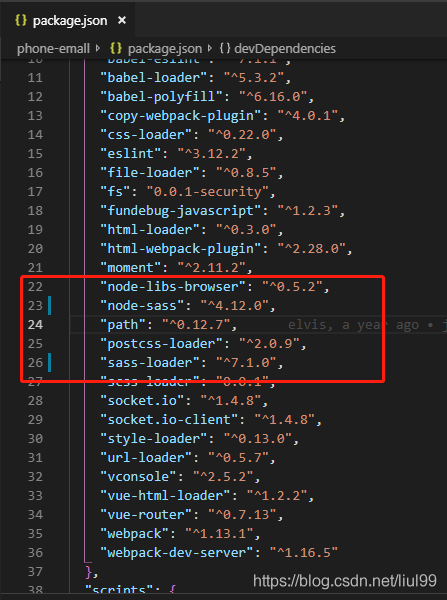
improved the version number of sass-loader and node-sass to the latest version, the current latest version is as follows (July 12, 2019)
“sass-loader” : “^7.1.0”,
“node-sass” : “^4.12.0”,

as shown in the figure, modify the package.json file
then execute the following command to install

npm i sass-loader
npm i node-sass

2020-05-06 update

the problem is often the cause of the Node – sass version problem, may be one reason for this is that: because version too old so will cause some dependencies have already can’t find it, the company has a four years ago old projects is this kind of problem, the modified Node – sass version 4.12 is not necessarily suitable for all projects, can test several versions, if the above version failed can try this version

"node-sass": "^4.13.1",
"sass-loader": "^4.1.1",

What if

still fails?

my answer may not be right for you, but you have to believe in the bright side.

a keen discussion program + financial management person, welcome to exchange ~

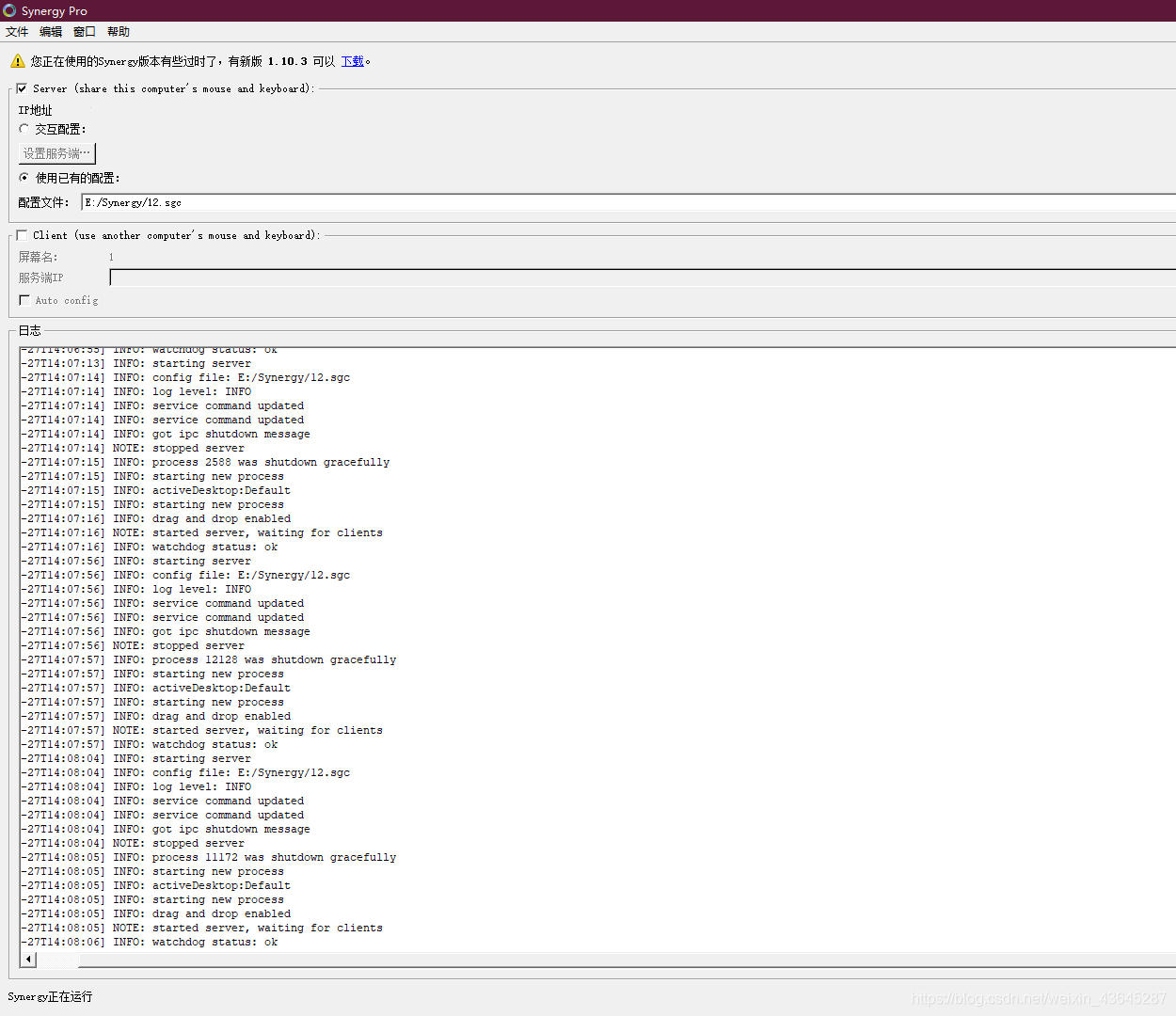
【Synergy】Error:failed to connect to server:Connection was refused

as a lazy person, I desperately want to free my hands, but I can’t seem to do it right now. When My little partner knew this artifact generally exists after the software, of course, want to do for themselves.

and then error

    primary server
  • client
    has always been in refuse
    no matter how it is installed and can not be found in the major search engines. Do you still feel that software is rather obscure

just when I was so tired that I wanted to give up, I found a huge hole
. My client and the main server have the same IP address

. The final solution is to reconfigure the IP address, successfully landed
I finally can control both computers at the same time, comfortable wow