Category Archives: How to Fix

cpickle.picklingerror can’t pickle type ‘module’ attribute lookup __builtin__.module failed

recently noticed this error while using the process pool! The following is a simplified version of the call itself. Regardless of the syntax error, the second parameter of the map function contains an iterator containing an instance of the class that contains the session

of tensorflow initialized by a model parameter

def func(net):
return net.predict()
 
class Detecter(object):
def __init__(self, file):
with tf.Graph().as_default():
self.sess = tf.Session()
tf.train.Saver(self.sess,file)
def predict(self):
self.sess.run()
 
detecter = [Detecter('./model.ckpt')]*4
for batch in range(0,4,4):
bb = multiprocessing.pool.map(func, izip(detecter[:4]))

solution: change the original “from multiprocessing import Pool” to “from multiprocessing. Pool import ThreadPool as Pool”

Failed to import package with error: couldn’t decompress package

when downloading Karting Microgame, in addition to the problem, import will report an error
correction method:
find the ~/Library/Unity/Asset store-5. X folder
in the computer delete the corresponding file
, then open Unity, after a new project, directly from the project into the Asset Store, re-download and import, prompt that the package is missing, according to the prompt installation, import success

P2V error log

[ADS] Get username failed:1332

2012-12-27T15:54:42.355+08:00 [02384 info ‘Libs’] [ADS] GetTokenInformation failed: 1312

2012-12-27T15:54:42.355+08:00 [02384 info ‘Default’] [user,874]Successfully verified user admin for this local machine (using pipe).

2012-12-27T15:54:53.135+08:00 [02148 info ‘Libs’] [ADS] failed to get username:1332

2012-12-27T15:54:53.135+08:00 [02148 info ‘Libs’] [ADS] GetTokenInformation failed: 1312

2012-12-27T15:54:53.150+08:00 [02148 info ‘Default’] [user,874]Successfully verified user admin for this local machine (using pipe)

2013-12-27t15:55 42.394+08:00] [04060 error ‘Ufa. read request failed; stream:< io_obj p:0x01517224, h:-1, pipeline’ ‘\. \Pipeline \vmware-converter-server-soap’ ‘> <

2013-12-27T15:56:08.946+08:00 [00964 info ‘Default’] [agentManager,83] [agentManager] Install Agent on 10.0.0.68

2013-12-27T15:58:10.299+08:00 error ‘Default’] [agentManager,95] [agentManager] Install Agent failed: converter.fault.

2013-12-27T15:58:28.816+08:00 [00964 info ‘Default’] [agentManager,83] [agentManager] Install Agent on 10.0.0.68

2012-12-27T15:59:49.049+08:00 [02384 info ‘Default’] [agentManager,83] [agentManager] Install Agent on 10.0.0.68

2013-12-27 t16:23 40.851+08:00 [00964 error ‘Default’] [agentManager,95] [agentManager] Install Agent failed: converter.fault.

2012-12-27 t16:29 49.059+08:00 error ‘Default’] [agentManager,100] [agentManager] Agent installation failed: operation timeout
[02384 error ‘Default’] failed to send response to client: class Vmacore::IOException(IO error: send HTTP response during system exception:

— than; error id = 232

–(The President of the General Assembly)

2013-12-27 t16:37 59.370+08:00 info ‘Default’] [agentManager,83] [agentManager] Install Agent on 10.0.0.68

2013-12-27 t16:40:22 079+08:00 [00964 error ‘Default’] [agentManager,95] [agentManager] Install Agent failed:converter.fault.

Module build failed: Error: ENOENT: no such file or directory, scandir,‘node_modules\node-sass\vend’

Module build failed: Error: ENOENT: no such file or directory, Scandir ‘F: \ node_modules \ node – sass \ vendor’
at the Object. The readdirSync (fs. Js: 790:3)
at the Object. The getInstalledBinaries (F: \ yihui \ zhejiangnongxin \ zjnx_demo \ WEB_VUE/node_modules/node – sass \ lib \ extensions js: 133:13)
the at foundBinariesList (F: \ yihui \ zhejiangnongxin \ zjnx_demo \ WEB_VUE/node_modules/node – sass \ lib \ errors js: 20:15)
the at foundBinaries (F: \ yihui \ zhejiangnongxin \ zjnx_demo \ WEB_VUE/node_modules/node – sass \ lib \ errors js: mine)
at the Object. The module. Exports. MissingBinary (F: \ yihui \ zhejiangnongxin \ zjnx_demo \ WEB_VUE/node_modules/node – sass \ lib \ errors js: area)
at the module. The exports (F: \ yihui \ zhejiangnongxin \ zjnx_demo \ WEB_VUE/node_modules/node – sass \ lib \ binding js: news)
the at Object. & lt; anonymous> (F: \ yihui \ zhejiangnongxin \ zjnx_demo \ WEB_VUE/node_modules/node – sass \ lib \ index js: soil)
at the Module. The _compile (internal/modules/CJS/loader. Js: 776:30)
at the Object. The Module. _extensions.. Js (internal/modules/CJS/loader. Js: 787:10)
at the Module. The load (internal/modules/CJS/loader. Js: 653:32)
the at tryModuleLoad (internal/modules/CJS/loader. Js: 593:12)
the at Function. The Module. _load (internal/modules/CJS/loader. Js: 585:3)
at the Module. The require (internal/modules/CJS/loader. Js: 690:17)
at the require (internal/modules/CJS/helpers. Js: bears)
the at GetDefaultSassImpl (F: \ yihui \ zhejiangnongxin \ zjnx_demo \ WEB_VUE \ node_modules \ sass – loader \ dist \ index js: 198:10)
at the Object. The loader (F:\yihui\zhejiangnongxin\zjnx_demo\WEB_VUE\node_modules\sass-loader\dist\index.js:80:29)

@./node_modules/vue – style – loader! ./node_modules/css-loader?{“sourceMap”:true}! ./node_modules/vue-loader/lib/style-compiler?{“vue”:true,”id”:”data-v-21034f6a”,”scoped”:true,”hasInlineConfig”:false}! ./node_modules/sass-loader/dist/cjs.js?{“sourceMap”:true}! ./node_modules/vue-loader/lib/selector.js?type=styles& index=0! The./SRC/pages/custservice newestProduct/newestProductQuery vue 4:14-407-17:5 and consecrated – 415
@./SRC/pages/custservice newestProduct/newestProductQuery vue.
@/SRC/router/index. The js
@ The./SRC/main js
@ multi (webpack) – dev server/client?http://0.0.0.0:7001 webpack/hot/dev – server Babel – polyfill./SRC/main js

the error in the./SRC/pages/custservice valueAddedService/valueAddedServiceManage vue
these are new to a project, NPM install run error!!

the following solution:

1. CD enters the current project node_modules directory

in CMD
2. Run NPM rebuild node-sass

3. Finally run the project

Android studio failed to resolve: junit:junit : 4.12 solutions

when importing someone else’s project in Android Studio, the project Failed to resolve: junit:junit:4.12:

solution:

1, direct comment out, this is actually a way to avoid mistakes;

2. Add maven:

to the build.gradle file under E:\android\app (project file directory)

allprojects {
    repositories {
        google()
        jcenter()
        maven { url 'http://repo1.maven.org/maven2' }
    }
}

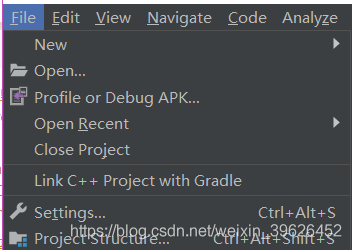
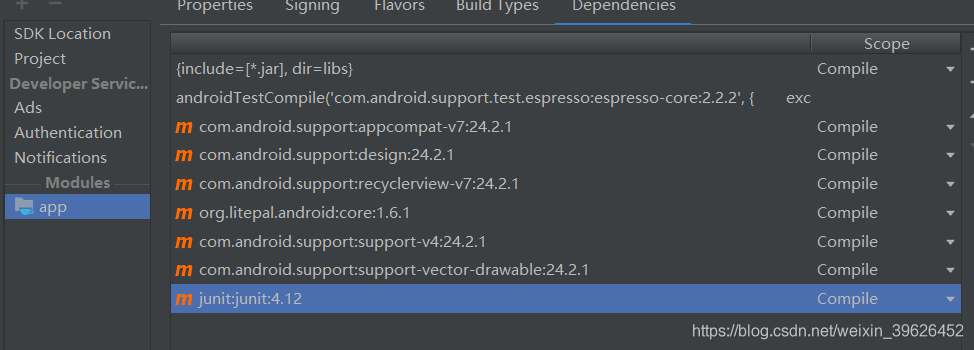
or junit was deleted in file — Project Structure and then added again:

if it still doesn’t work, it’s best to change the version to match the current SDK for good.

Unity package APK exception failed to re package resources

error:

CommandInvokationFailure:
***\android-sdk\build-tools\25.0.2\aapt. Exe package — auto-add-overoverlay -v-f-m-j “gen” -m “androidmanifest.xml” -s “res” -i “Android – * * *, platforms, android SDK – 23 \ android jar” -f bin/resources. Ap_ – extra – packages com. Google. Vr. Cardboard: com. Unity3d. Unitygvr -s “* * * Game \ Temp \ StagingArea \ android – libraries \ GVR \ res” -s “* * * Game \ Temp \ StagingArea \ android – libraries \ unitygvr \ res”

stderr[
AndroidManifest.xml:5: error: Error: String types not allowed (at ‘configChanges’ with value ‘MCC | newsun focus | locale | touchscreen | the rid_device_info_keyboard | keyboardHidden | navigation | orientation | screenLayout | uiMode | screenSize | smallestScreenSize | fontScale | layoutDirection | density).’
]

solution :

, you have to download the version API corresponding to platform-tools to solve it,

may refer to: https://unitycoder.com/blog/2017/10/20/android-build-error-error-string-types-not-allowed-at-configchanges/

Error:Execution failed for task ‘: app:transformDexArchiveWithExternalLibsDexMergerForDebug The solution

specific error message is as follows:

AGPBI: {"kind":"error","text":"Program type already present: android.support.v4.app.FragmentTransitionCompat21$1","sources":[{}],"tool":"D8"}
:app:transformDexArchiveWithExternalLibsDexMergerForDebug FAILED

there are several methods (the last one is available) :

1. Add “multiDexEnabled true” to defaultConfig

android {} :

defaultConfig {
        multiDexEnabled true
        applicationId "com.example.m1571.mycolorfulnews"
        minSdkVersion 15
        targetSdkVersion 28
        versionCode 1
        versionName "1.0"
        testInstrumentationRunner "android.support.test.runner.AndroidJUnitRunner"
    }

this method has no effect on my project

2. Add:

to gradle. Properties China

android.useAndroidX=true
android.enableJetifier=true

this method has no effect on my project

3. Remove conflicting dependencies:

implementation 'com.android.support:appcompat-v7:28.0.0'

delete the above v7 package, you can run

Failed to start Remote desktop service (VNC)

problem: after setting up the VNC, restart has been failed

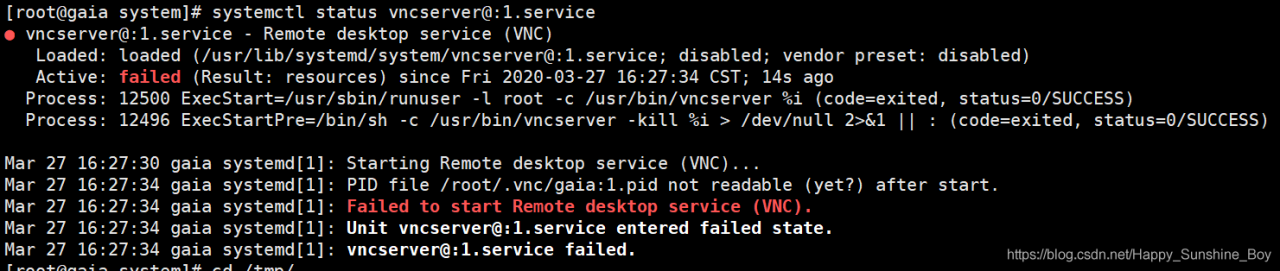
[root@gaia system]# systemctl status vncserver@:1.service
● vncserver@:1.service - Remote desktop service (VNC)
   Loaded: loaded (/usr/lib/systemd/system/vncserver@:1.service; disabled; vendor preset: disabled)
   Active: failed (Result: resources) since Fri 2020-03-27 16:27:34 CST; 14s ago
  Process: 12500 ExecStart=/usr/sbin/runuser -l root -c /usr/bin/vncserver %i (code=exited, status=0/SUCCESS)
  Process: 12496 ExecStartPre=/bin/sh -c /usr/bin/vncserver -kill %i > /dev/null 2>&1 || : (code=exited, status=0/SUCCESS)

Mar 27 16:27:30 gaia systemd[1]: Starting Remote desktop service (VNC)...
Mar 27 16:27:34 gaia systemd[1]: PID file /root/.vnc/gaia:1.pid not readable (yet?) after start.
Mar 27 16:27:34 gaia systemd[1]: Failed to start Remote desktop service (VNC).
Mar 27 16:27:34 gaia systemd[1]: Unit vncserver@:1.service entered failed state.
Mar 27 16:27:34 gaia systemd[1]: vncserver@:1.service failed.


address:
rm - rf/TMP /. * X

[root@gaia data]# systemctl daemon-reload
[root@gaia data]# systemctl restart vncserver@:1.service
[root@gaia data]# systemctl status vncserver@:1.service

Failed building wheel for SCS appears in cvxpy

when installing the above convex optimization solver, failed building wheel for XXX appeared. In this case, the installation software could not install the corresponding wheel by itself, so the corresponding wheel needed to be added manually by yourself. The solution was divided into the following steps:

1. Go to https://www.lfd.uci.edu/~gohlke/pythonlibs/#lxml, find the WHL file for XXX, and download it.

2. Punch the command line in the local folder and run PIP install XXX -… .WHL, showing the next step after successful installation.

3. Re-perform the step that went wrong.

over.