SQL Error: 17006, SQLState: 99999 invalid column name
reported an error when using hibernate for query today. This is simply recorded here.
problem description:
USES hibernate to query an entity for an error.
reason analysis:
	String sql = "select emplId,name  from employee";
	try {
		Session session = sessionFactory.getCurrentSession();
		SQLQuery query = session.createSQLQuery(sql.toString());
		query.addScalar("emplId", StringType.INSTANCE);
		query.addScalar("emplName", StringType.INSTANCE);
		query.setResultTransformer(Transformers.aliasToBean(Employee.class));
		employeeList = query.list();
		}
		......
The field for the
SQL query is name, and the field for the entity is emplName. Name inconsistency results.
solution:
	String sql = "select emplId, name as emplName from employee";
	try {
		Session session = sessionFactory.getCurrentSession();
		SQLQuery query = session.createSQLQuery(sql.toString());
		query.addScalar("emplId", StringType.INSTANCE);
		query.addScalar("emplName", StringType.INSTANCE);
		query.setResultTransformer(Transformers.aliasToBean(Employee.class));
		employeeList = query.list();
		}
		......
Renaming the column name of data frame in R language
Error type
Error: All arguments must be named
The use of rename in plyr is different from that in dplyr.
plyr::rename
rename(data, c(old=new))
dplyr::rename
rename(data, new = old)
Example
For example, the default is plyr’s rename. Run the following command, and an error will be reported :
d <- data.frame(old1=1:3, old2=4:6, old3=7:9)
d
library(tidyverse)
rename(d, c("old2"="two", "old3"="three"))
rename(d, c(old2="two", old3="three"))
result
> d <- data.frame(old1=1:3, old2=4:6, old3=7:9)
> d
  old1 old2 old3
1    1    4    7
2    2    5    8
3    3    6    9
> library(tidyverse)
> rename(d, c("old2"="two", "old3"="three"))
Error: All arguments must be named
> rename(d, c(old2="two", old3="three"))
Error: All arguments must be named
:
d <- data.frame(old1=1:3, old2=4:6, old3=7:9)
d
rename(d, two=old2, three=old3)
result:
> d <- data.frame(old1=1:3, old2=4:6, old3=7:9)
> d
  old1 old2 old3
1    1    4    7
2    2    5    8
3    3    6    9
> rename(d, two=old2, three=old3)
  old1 two three
1    1   4     7
2    2   5     8
3    3   6     9
Either
or with plyr modified in the first way :
d <- data.frame(old1=1:3, old2=4:6, old3=7:9)
d
library(tidyverse)
plyr::rename(d, c("old2"="two", "old3"="three"))
plyr::rename(d, c(old2="two", old3="three"))
result:
> d <- data.frame(old1=1:3, old2=4:6, old3=7:9)
> d
  old1 old2 old3
1    1    4    7
2    2    5    8
3    3    6    9
> library(tidyverse)
> plyr::rename(d, c("old2"="two", "old3"="three"))
  old1 two three
1    1   4     7
2    2   5     8
3    3   6     9
> plyr::rename(d, c(old2="two", old3="three"))
  old1 two three
1    1   4     7
2    2   5     8
3    3   6     9
done!!!!!!
key points, dplyr is the new name in front, the old name is placed behind, and without quotes, not c(), more convenient!!
In addition, the select in dplyr can also select + the name, directly specifying the number of columns!!
d <- data.frame(old1=1:3, old2=4:6, old3=7:9)
d
select(d,one=1,three=3)
result:
> d <- data.frame(old1=1:3, old2=4:6, old3=7:9)
> d
  old1 old2 old3
1    1    4    7
2    2    5    8
3    3    6    9
> select(d,one=1,three=3)
  one three
1   1     7
2   2     8
3   3     9
Error: Failure while executing; `git config –local –replace-all homebrew.analyticsmessage true
HomeBrew install error when installing software:
Error: Failure while executing; `git config –local –replace-all homebrew.analyticsmessage true` exited with 1.
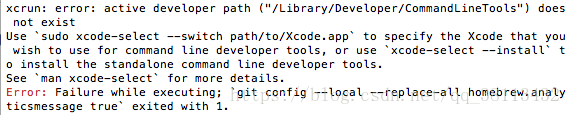
this is due to the lack of xcode plug-in;
execute xcode-select in terminal –install the plug-in to
CMake Error:Could not find CMAKE_ROOT!!!
add link description
hash -r
Error in compiling rmarkdown to PDF file` xxx.sty ‘ not found.
as: https://github.com/rstudio/rmarkdown/issues/39
error message
LaTeX Error: File 'framed.sty' not found.
LaTeX Error: File 'titling.sty' not found.
solution
method 1
USES Tex’s TLMGR package to manage the installation of the missing.sty file
tlmgr install framed
method 2
on my system, TLMGR install: package already present: framed but still reported an error, the following method successfully installed
yum install missing file
yum -y install texlive-framed
yum -y install texlive-titling
VIDEOIO ERROR: V4L: can’t open camera by index 0
1, problem description: using opencv to call the raspberry PI camera [cv2.videocapture (0)], when running the program, said can not open the camera.
2. Solution:
I looked for a method on the Internet, said to change 0 to -1, I changed, after the change, the system still said can not find the camera, let alone open.
and then I’m going to do the camera test and say
https://www.raspber rypi.org/documentation/configuration/camera.md
raspistill -v -o test.jpgfound that raspberry PI can take photos normally, indicating that there is no problem with the installation interface.
and search on the Internet, said to run the program to enter the following statement, that is, the raspberry PI system’s camera is ok, but opencv can not call. It can be called using this statement.
sudo modprobe bcm2835-v4l2
yes, the camera can be turned on after you type in this statement, but the screen will be bar by bar, for whatever reason, that’s not settled yet. Is the refresh too fast?
###############################################
https://blog.csdn.net/u012005313/article/details/70244747#C0, that’s a great blog
raspberry PI can call the camera and show the stripe instead of the original image, because the following two parameters mess up, comment out, it will work properly
# Set camera resolution
camera.set(cv2.cap_prop_frame_width, 620)
camera.set(cv2.cap_prop_frame_height, 480)
LINK : fatal error LNK1168: cannot open Debug/1.exe for writing
compile c language program, prompt “LINK: fatal error LNK1168: cannot open Debug/1.exe for writing”
reason: this program process is still running in the background, so cannot compile
again
solution: open task manager, find the program name of the process, forced shut down can
error: resource android:style/TextAppearance.Material.Widget.Button.Borderless.Colored not
after the update project appear the following error:
error: resource android: style/TextAppearance Material. The Widget. The Button. The Borderless. Colored not found.
replace build. Gradle for current version file
After installation, Ubuntu encountered [SDB] asking for cache data failed assembling drive cache: write through
the original address: http://blog.csdn.net/liufei_learning/article/details/8521221
when installing ubuntu12.10 64bit server, the following error occurs:
[11690.011238] [SDB] Asking for cache data failed
[11690.011248] [SDB], drive cache: write through
googel found the following solution, which is a bug in ubuntu: after uninstalling on my machine, there will be no problem, but there will be a problem when reinstalling. For a temporary solution, write a script to start up and run
sudo rmmod ums_realtek
http://askubuntu.com/questions/132100/errors-in-dmesg-test-wp-failed-assume-write-enabled
|
|
I’m having the same issue on the official 12.04 LTS relase I also believe it is causing the system to be less responsive. According to some sources it’s harmless. (i can apparently only post 2 links) The following thinks this is error output from an onboard card reader: https://bbs.archlinux.org/viewtopic.php?pid=1059099 It’s confirmed to be an upstream issue in https://bugs.launchpad.net/ubuntu/+source/linux/+bug/987993 Run lsusb and find the offending device nathan@Ham-Bone:~$ lsusb Bus 001 Device 001: ID 1d6b:0002 Linux Foundation 2.0 root hub Bus 002 Device 001: ID 1d6b:0002 Linux Foundation 2.0 root hub Bus 003 Device 001: ID 1d6b:0001 Linux Foundation 1.1 root hub Bus 004 Device 001: ID 1d6b:0001 Linux Foundation 1.1 root hub Bus 005 Device 001: ID 1d6b:0001 Linux Foundation 1.1 root hub Bus 006 Device 001: ID 1d6b:0001 Linux Foundation 1.1 root hub Bus 007 Device 001: ID 1d6b:0001 Linux Foundation 1.1 root hub Bus 008 Device 001: ID 1d6b:0001 Linux Foundation 1.1 root hub Bus 001 Device 002: ID 0bda:0158 Realtek Semiconductor Corp. USB 2.0 multicard reader 在我的情况下,它是Realtek多卡阅读器,快速检查 $ dmesg | grep realtek [ 4.716068] usbcore: registered new interface driver ums-realtek $ lsmod | grep realtek ums_realtek 17920 0 显示模块ums-realtek $sudo rmmod ums_realtek 为我解决了一个可逆的问题。这是 $sudo modprobe ums_realtek 再次启用读卡器。我还没有测试它是否工作,因为我从来没有使用它
tbody> <表> < |
|
7 我有同样的问题在正式12.04 LTS中继,我也相信这是导致系统反应更慢。根据一些消息来源,它是无害的。(显然我只能发布2个链接) 在 中被确认为上游问题 https://bugs.launchpad.net/ubuntu/ +源/ linux/+错误/ 987993
在我的情况下,它是Realtek多卡阅读器,快速检查 显示模块ums-realtek 为我解决了一个可逆的问题。这是 再次启用读卡器。我还没有测试它是否工作,因为我从来没有使用它 1. Failure phenomenon JIRA Startup Failed Description Jira-home.lock 2, close the jira command [note] /data/ WWW is my installation path, modified to my installation directory 3, start the jira command fault resolution. from “ITPUB blog”, link: http://blog.itpub.net/751371/viewspace-706101/, if you want to reprint, please indicate the source, otherwise will be investigated for legal responsibility. reproduced in: http://blog.itpub.net/751371/viewspace-706101/
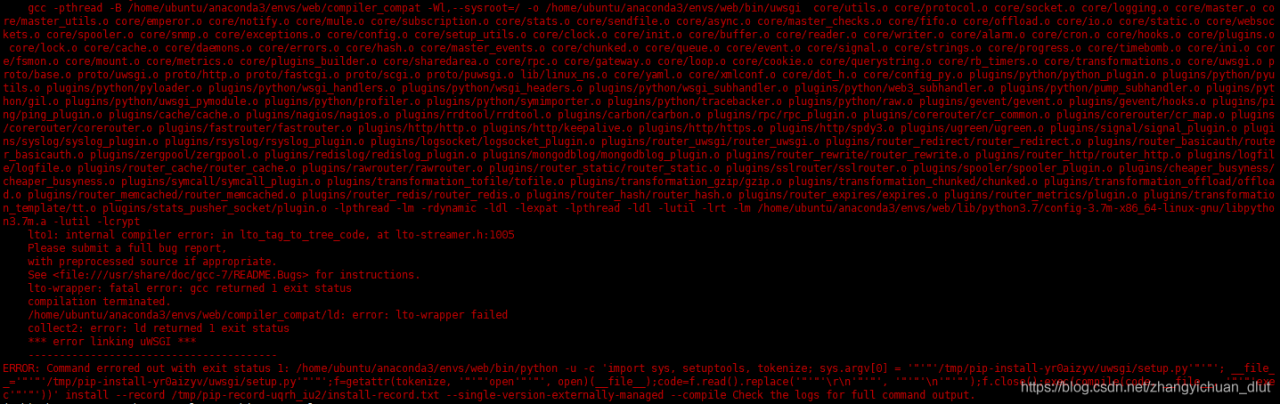
run the command pip install uwsgi error: a big red error warning, the main error is: error: lto – wrapper failed collect2: error: ld returned 1 exit status after the reason is that GCC version is high run PIP install uwsgi again successfully reference: https://blog.csdn.net/weixin_33127753/article/details/84874147
error occurs when loading the display point cloud. X Error of failed request: BadWindow (invalid Window parameter) Major opcode of failed request: 10 (X_UnmapWindow) Resource id in failed request: 0x1a00001 Serial number of failed request: 204 Current serial number in output stream: 207 well, the NVIDIA installation has chosen to turn off OPENGL. The VTK in PCL needs to use OPENGL to display the point cloud. solution: reinstall NVIDIA. |