Category Archives: How to Fix

Ineffective mark-compacts near heap limit Allocation failed – JavaScript heap out of memory

1. problem description.
At present, when compressing the front-end code, there are memory leaks in the nodes, errors as follows: invalid marker – collating nearby heap limit allocation failure – JavaScript heap memory
2. The errors are as follows.

Warning: callback based version of packager() has been deprecated and will be removed from future major releases, please convert to committed version or use nodeify module.
Packager application for win32 ia32 platform, using ev4.0.5
—last few times–>
ms: Mark-sweep 1294.7 (1425.0) -> 1294.7 (1425.5) MB, 1723.7/0.0 ms (average mu = 0.094, current mu = 0.000) last resort GC requests for old space
[23328:00000202C8E3E9D0] 11281890 ms: marker scan 1295.7 (1425.5)->1294.7 (1426.5) MB, 1734.9/0.0 ms (average mu = 0.101, current mu = 0.108) assignment failure clearance may not be successful

<- JS stacktrace ->

0: ExitFrame [pc: 000003C6B7315600]
Security context: 0x01457ba9e6e1 <JSObject>
1: access [0000031C1EB050F9] [fs]js: ~ 167] [pc = 000003 c6b7319b09] (= 0 x01dd68b04d69 & lt;object mapping = 00000232 d8c16af9>, = 0 x00b368108379 & lt;path string[737]:E: \pacs-consultation-electron-meeting \ node_modules \ stompjs \ node_modules \ websocket \\ node_modules \ es5-ext \ node_modules \ es6-iterator \ node_modules \ d\ node_modules \ es5-ext \ node_modules \ es6-iterator \ node_modules \ es6-iterator \ node_modules \ es6-iterator node__……
Fatal error: Invalid marker – failed collation nearby heap limit allocation – JavaScript heap memory
1: 00007 ff67be308aa v8: Internal:GCIdleTimeHandler: GCIdleTimeHandler + 4810
2: 00007 ff67be09c46 node:MakeCallback + 4518
3: 00007 ff67be0a630 node_module_register + 2160
4: 00007 ff67c09aa4e v8: Internal:FatalProcessOutOfMemory + 846
5: 00007 ff67c09a97f v8:Internal:FatalProcessOutOfMemory + 639
6: 00007 ff67c5d8984 v8:internal:heap:MaxHeapGrowingFactor + 11476
7:00007 ff67c5cf0e7 v8::internal::ScavengeJob::operator= + 25543
8: 00007 ff67c5cd65c v8:Internal:ScavengeJob::operator= + 18748
9: 00007 ff67c5d65d7 v8:Internal:Heap:MaxHeapGrowingFactor + 2343
10: 00007 ff67c5d6656 v8:Internal:Heap:MaxHeapGrowingFactor + 2470
11: 00007 ff67c1790db v8:Internal::Factory::AllocateRawWithImmortalMap + 59
12: 00007 ff67c17ba9d v8:Internal::Factory::NewRawOneByteString + 77
13: 00007 ff67c38fbc4 v8: Internal:Heavy:SmiPrint + 372
14:00007FF67C08DF5B v8::internal::StringHasher::UpdateIndex+219
15: 00007FF67C0B44CB v8::WriteUtf8+171
16: 00007FF67BD3F1A0 std::basic_ostream<:operator< +40912
17: 00007FF67BDC9B92 uv_loop_fork+13762
18: 000003c6b7315600
npm ERR!Code ELIFECYCLE
npm ERR!er!pac – electronic [email protected] build:win32: ‘ cross-env BUILD_TARGET=win32 node .electron-vue/build. js ‘
npm made a mistake! Exit Status 134
npm ERR!
npm ERR! In pac – electronic [email protected]构建:win32脚本中失败.
npm made an error! This may not be a problem with npm. There may be additional log output above.
npm made an error! The full log of this run can be found in the following file:
npm ERR!C:\Users\boyi08\AppData\Roaming\npm-cache\_logs\ 2020 – 02 – 25 – t04_43_09_617z debug.log
3. Solutions
Programme I.
In the package. inside the json: add this sentence:–max_old_space_size = 8192 // or max_old_space_size = 4096 (it is recommended to set to 4 g to see, if not set to 8 g)
“script”: {
“dev”: “node build/dev-server.” “start”: “node build/dev-server.” node -max_old_space_size=8192 build/build”.
“build”: “node -max_old_space_size=8192 build/build. js ”
},
Programme 2.
Delete the npmrc file (not the npmrc file in the nodejs installation directory under the npm module, but the .npmrc file in C: \\user\{account}\).

About creo 4.0 license request failed for feature solution

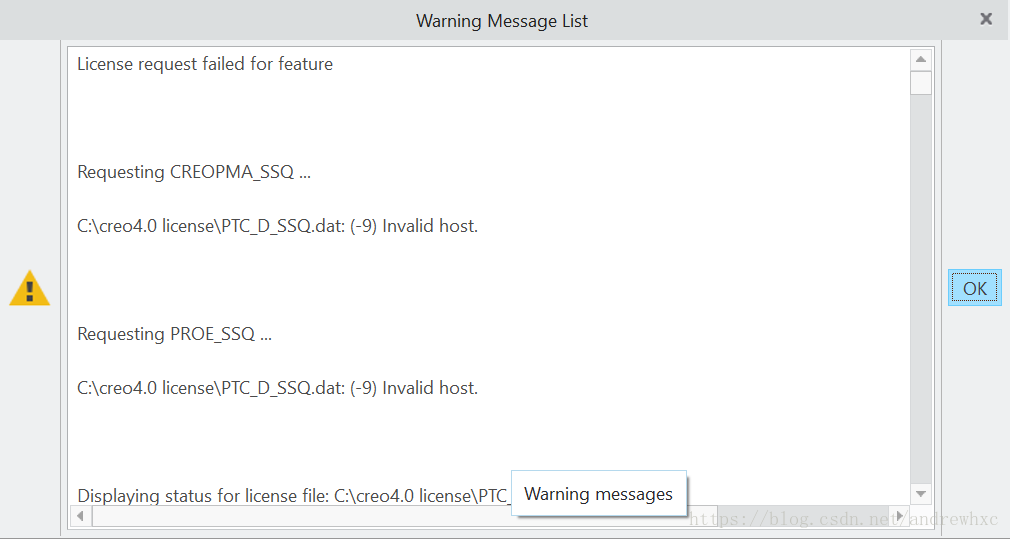
After installing CREO 4.0, the first day the software runs normally, but the second day when opening the software, a license error appears. The error message is as follows:

Solution: Reuse the registry to generate a license file and overwrite the original license file
The reason for the problem: The first day I used a mobile phone as a hot spot to connect to the computer, and the second day I used another mobile phone as a hot spot, which led to the change of the host ID, making the license file generated previously unavailable, and the host ID would also change after the network was disconnected.
Ps: There was no such phenomenon with PROE before.

Unity Android packaging error “UnityEditor.BuildPlayerWindow+BuildMethodException” solution record

I. Error reporting content:
(Sometimes 49 mistakes, then 19 again. Here’s the last one each time.)

UnityEditor. BuildPlayerWindow + BuildMethodException: 19 errors at UnityEditor. BuildPlayerWindow + DefaultBuildMethods. BuildPlayer (UnityEditor. BuildPlayerOptions options) in x00242 [0]
D:\unity\Editor\Mono\BuildPlayerWindowBuildMethods.cs:190
The at UnityEditor. BuildPlayerWindow. CallBuildMethods (System. Boolean askForBuildLocation, UnityEditor.BuildOptions defaultBuildOptions) [0x0007f] in D:\unity\Editor\Mono\BuildPlayerWindowBuildMethods.cs:95
UnityEngine.GUIUtility:ProcessEvent(Int32, IntPtr)

(There is also an error message that differs from other error messages,Gradle is a Unity packaging related tool)

CommandInvokationFailure: Gradle build failed.

 
Two. Solutions
The following four methods are all found by querying the data:
(None of the four approaches successfully solved my problem, but a similar BuildPlayerWindow+BuildMethodException error might occur if you don’t follow these Settings, where the number of errors might be different):

Method 1: File-buildsetting-PlayerSetting-Player-otherSettings-AndroidTVCompatibility disabled (Individual tried not to work)
Method 2: The release path cannot include Chinese, the path cannot be in the project, try to change the path, the release directory is placed in the same level directory as the project (individual tried, but it does not work)
Method 3: File-buildsettings-PlayerSetting-API Compatibility Level Choose Net 2.0(personal try does not work)
Step 4: Remove the plugins folder from the project’s “Assets” folder. I left a plugins/ vscode.cs in my project (I tried it personally but it didn’t work)

Tips for personal success:

Method 5: The name of the file-buildsetting-playersetting-player-productname is the same as the apK name after the file-buildsetting-build (my problem is that I try to change the following to send the package normally)

 
Three. I refer to the UNITY of the android package transmission gate configuration tutorial: https://blog.csdn.net/ChinarCSDN/article/details/79513403
There is also a portal for the error reporting solution of the great God, but I tried that my error reporting was not for this reason, so I failed to solve it.
The software version I used was different, because the time interval was long, so I used JDK-Java SE 8U231 version and SDK-3.5.2 version.


Unreal4 C++ error guidelines


I believe that students are now starting to use C++ development method to complete some functions or try to understand the internal application process of UnrealEngine4, the process is naturally indispensable
Epic
Self packaged C++ dealing.

The
Of course, C++ with UnrealEngine4 must be complied with
UE4 engineering
Rules such as the entire project configuration are basically done using the [NMaker] configuration. You need to compile the [UnrealHeaderTool] tool before compiling the code
UnrealHeaderTool to compile our own projects. Of course, the entire build process was compiled as for UnrealEngine3 using the command line (to address both platform expansion and IDE decoupling). The various \UnrealEngine\Engine\Build\ files \ folders under the BatchFiles start calling each other during the entire compilation of Windows… (Well, usually we don’t care.)

since the UnrealEngine4 has its own rules, the more problems we run into in the process of updating the UnrealEngine4. The following is a collection of problems I encountered to share with you, I hope you can quickly solve the problem, less detours.

1. compile when the following 2 errors occur, please do not question whether the UnrealEngine4 engine compilation tool has a problem or the automatically generated project configuration has a problem, there is only one problem is their own code has a problem. As follows:

 
The
EXEC: error: Failed to generate code for XXXX (XXXX is the name of our project)
The
The and

 
The
EXEC: error: UnrealHeaderTool failed for target ‘PandaEditor’ (platform: Win64, module info: C: \ Users \ User \ Documents \ UnrealProjects/Panda/Intermediate/Build \ Win64 \ PandaEditor \ Development
\UnrealHeaderTool.manifest).

 
The
this error resolution: check the.h file for cross-references to header files. If you do need to refer to each other, try [+class] before your class name and then refer to header files in.cpP.

 
The
The

 
The
of course this error is
[UnrealHeaderTool],
[UnrealHeaderTool] error detection is not strong enough to accurately prompt for compilation errors, and many problems can cause this. If you find [EXEC: error: Failed to generate code for XX], please check the code carefully

System and host port mapping under virtualbox

Environment:
Virtualbox is installed under Ubuntu and XP is installed under VirtualBox,
 
Requirements:
Accessing xp Web services under Ubuntu,
 
Methods:
To do port mapping in Ubuntu, execute the following command (turn the virtual off before executing) :
VBoxManage setextradata “xp” “VBoxInternal/Devices/pcnet/0/LUN# 0/Config/web/Protocol” TCP
VBoxManage setextradata “xp” “VBoxInternal/Devices/pcnet/0/LUN# 0/Config/web/GuestPort” 80
VBoxManage setextradata “xp” “VBoxInternal/Devices/pcnet/0/LUN# 0/Config/web/HostPort” 8888
 
The operating system name of the “XP” virtual machine; Pcnet is a network type; The Web can be anything;
 
Completed: start the xp virtual machine, and then under the ubuntu browser to access the address is: http://www.test.com:8888/, 80 service will show the xp system.
 
Just to remind you, there’s one question that’s been bothering me for a long time:
Description:

NAT#0: configuration query for “HostPort” int failed (VERR_CFGM_VALUE_NOT_FOUND).
Unknown error creating VM (VERR_CFGM_VALUE_NOT_FOUND).
 
When using VBoxManage setextradata “xp” “VBoxInternal/Devices/pcnet/0/LUN# 0/Config/web/HostPort”, 8080, the above problems;
Later: 8080 into 8888 port IS OK.

TSV_TNEW_PAGE_ALLOC_FAILED

Premise:
foreground runs the program and processes 10 million pieces of data.

status:
will extract 10 million pieces of data from the database to the inner table, if a one-time extraction will occur memory TSV_TNEW_PAGE_ALLOC_FAILED dump.
that is: select XXXX
into table XXX
where…

if the package size is adopted, 1 million pieces of data are extracted once and processed.
select XXXX
into table XXX
package size 1000000
where…

perform XXXX “processed the 1 million pieces of data.

Endselect.

service really needs under the premise, the solution can only ask basis to change the kernel parameters, either to increase the buffer, or to extend the front running time.

Nginx: recv() failed (104: connection reset by peer) troubleshooting

Recv () Failed (104: Connection reset by Peer) problem troubleshooting
In the recent project, through the Nginx reverse proxy nodejs (using nestjs framework) service, the probability of 502 Bad Gateway appears in the pressure testing process, with a low probability of around 0.005%. The specific error message in the log is recv() failed (104: Connection reset by peer) while reading the response header from upstream, through searching the data, we learned that the direct reason for the error was:

nodejs服务已经断开了连接,但是未通知到Nginx,Nginx还在该连接上收发数据,最终导致了该报错。

Considering that in Nginx we have configured to open a long connection with nodeJS Server, namely:

proxy_http_version 1.1;
proxy_set_header Connection "";

Let’s start with the Settings related to long connections. Several common parameters that Nginx USES to affect long connections are: keepalive_timeout, keepalive_requests, and keepalive
1) keepalive_timeout: set the client’s long connection timeout. If the client does not make a request beyond this time, Nginx server will actively close the long connection. Nginx defaults to keepalive_timeout 75s; . Some browsers only hold 60 seconds at most, so we usually set it to 60s. If set to 0, close the long connection. 2) keepalive_requests: set the maximum number of requests a long connection can handle with the client. If this value is exceeded, Nginx will actively close the long connection. The default value is 100. Under normal circumstances, keepalive_requests 100 can basically meet the requirements. However, in the case of high QPS, the number of continuous long connection requests reaches the maximum number of requests and is shut down. This means that Nginx needs to keep creating new long connection to handle the requests. Set the maximum number of connection to the upstream server free keepalive, the number of connections when idle keepalive exceeds this value, the least recently used connection will be closed, if this value is set too small, a certain time period the number of requests, and request processing time is not stable, may be kept closed and create a long number of connections. We usually set 1024. In special scenarios, the average response time and QPS of the interface can be estimated. 4) Open a long connection with the upstream server The default nginx access backend is a short (HTTP1.0) connection that is opened each time a request is made, closed after processing, and reopened on the next request. The HTTP protocol has supported long connections since version 1.1. Therefore, we will set the following parameters in location to open a long connection:

  http {
      server {
          location/ {
              proxy_http_version 1.1;
              proxy_set_header Connection "";
          }
      }
  }

1) and 2) are set to be long connections between client and Nginx, and 3) and 4) are set to be long connections between Nginx and server.
After checking the above parameter configuration, we started to look for the configuration related to keepalive in node. By looking up nodejs documents, we found that the default server.keepAliveTimeout is 5000ms. If you continue to send and receive data on the long connection, the above error may occur.
So we add more to the node keepAliveTimeout value (see https://shuheikagawa.com/blog/2019/04/25/keep-alive-timeout/) :


// Set up the app...
const server = app.listen(8080);

server.keepAliveTimeout = 61 * 1000;
server.headersTimeout = 65 * 1000; // Node.js >= 10.15.2 需要设置该值大于keepAliveTimeout

The purpose of lengthening the node keepAliveTimeout value is to prevent Nginx from disconnecting before node service, and the caller needs to timeout longer than the caller.
After the above modification, no error 502 Bad Gateway occurred in Nginx during the pressure test.