There are many tutorials on how to install Linux subsystem under Windows, you can baidu by yourself. I used the way of Downloading and installing Microsoft Store, but I reported the following error when launching Ubuntu:
Error: 0x800703fa – Press any key to continue
Solution: turn on service Management and restart LxssManager service solution.
Each subsystem usually has a subsystem service process and a kernel driver, in the case of Windows subsystems, the well-known CSRSS.exe and Win32k.sys, respectively. For WSL, the subsystem service process LxssManager that runs as a system service. The LXSSManager service supports running native ELF binaries. This service provides the infrastructure needed to run ELF binaries on Windows.
PS: Linux system mount location
C: \ Users \ {UserName} \ AppData \ Local \ Packages \ CanonicalGroupLimited UbuntuonWindows_79rhkp1fndgsc \ LocalState \ rootfs
Category Archives: How to Fix
Magento prompts “there has been an error processing your request”
The Magento exception log is recorded by default under Magento /var/report/.
For example, the following prompt appears on the page
For example, the following prompt appears on the page
There has been an error processing your request
Exception printing is disabled by default for security reasons.
Error log record number: 1610090137
This error is usually logged in
Magento /var/report/ 1610090137
An error occurred while starting the application

Open web.config under the website
< aspNetCore processPath=”dotnet” arguments=”.\xxx.dll” stdoutLogEnabled=”false” stdoutLogFile=”.\logs\stdout” />
Instead of
< aspNetCore processPath=”dotnet” arguments=”.\xxx.dll” stdoutLogEnabled=”true” stdoutLogFile=”.\logs\stdout” />
The logs directory is then used to see the cause and then to resolve it. If there are no logs in the root directory of the site, to create them manually, see the link in the original article.
When the record finds the cause and resolves, change the above true back to false.
Example 1: Dependency file missing
Application startup exception: System.ArgumentException: The directory name D:\wwwRoot\node_modules\ is invalid.
Example 2. Database connection error
Application startup exception: System. The Data. SqlClient. SqlException x80131904 (0) : user ‘sa’ login failed.
ats System. The Data. SqlClient. SqlInternalConnectionTds.. ctor(DbConnectionPoolIdentity identity, SqlConnectionString connectionOptions, SqlCredential credential, Object providerInfo, String newPassword, SecureString newSecurePassword, Boolean redirectedUserInstance, SqlConnectionString userConnectionOptions, SessionData reconnectSessionData, Boolean applyTransientFaultHandling)
The original link
How to troubleshoot: “An error occurred while starting the application” in ASP.NET Core on IIS
HTTP Error 502.5 – Process Failure (How to Fix)
.Netcore 2.1.4 programs deployed to IIS report the following errors:
= = = = = = = = = = = = = = = = = = = = = = = = = = = = = = = = = = = = = = = = = = = = = = = = = = = = = = =
HTTP Error 502.5-Process Failure
Common causes of this issue:
The application process failed to start
The application process started but then stopped
The application process started but failed to listen on the configured port
Troubleshooting steps:
Check the system event log for error messages
Enable logging the application process’ stdout messages
Attach a debugger to the application process and inspect
For more information visit: https://go.microsoft.com/fwlink/?LinkID=808681
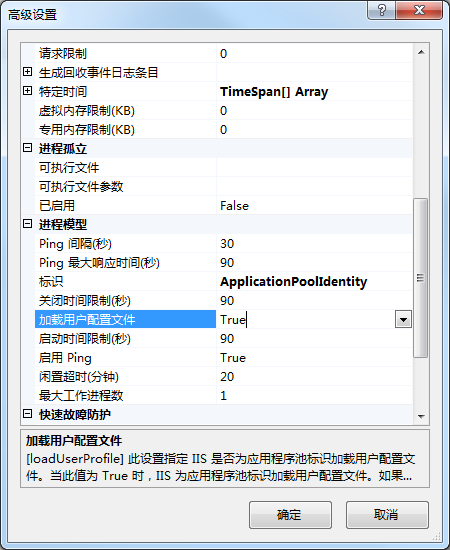
Solution, select the application pool –& GT; Advanced setting –& GT; The load user profile is set to true.
Problem: IIS defaults to not read our. Netcore configuration file AppSettings. json. Error message when executing donet path/application.dll as shown in the figure below:
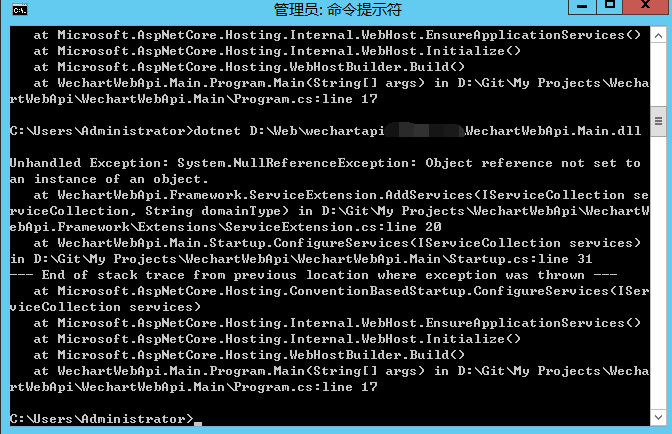
Object Reference not set to an instance of an Object is found because the corresponding configuration cannot be found.
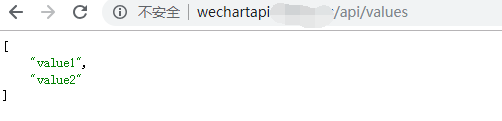
After modifying the application pool Settings, the problem is resolved.
ISO C++ forbids comparison between pointer and integer [-fpermissive]
Today, when using C++ to brush the problem, encountered this problem, blame their own carelessness.

When determining whether a character pointer points to the end of a string, the character ‘\0’ is written as a comparison error raised by ‘\0’, which in comparison represents the address of the string ‘\0’.
One thing to note from this is that string comparisons in C++ are best done with STRCMP.
When determining whether a character pointer points to the end of a string, the character ‘\0’ is written as a comparison error raised by ‘\0’, which in comparison represents the address of the string ‘\0’.
One thing to note from this is that string comparisons in C++ are best done with STRCMP.
Red rice note3 (Kenzo) is brushed into lineage OS
The red mi Note3 (kenzo) is brushed into the process of Lineage OS
For a detailed tutorial, see Install LineageOS on kenzo
for some additional additions
0 Preparation before swiping
If you have logged in to Google account, first delete the Google account of this machine (very important, otherwise the boot wizard cannot skip, people outside the wall or with *** network can ignore) if you are using mobile Authenticator, please note: “Please go to this page to close secondary verification before uninstalling the verifier and restoring the mobile phone”. I’ve turned off my secondary verification and reloading. Backup important data
1 update Recovery
The first step encountered difficulty, and the fastboot refresh TWRP prompt FAILED. After checking the reason, it turned out to be the lock problem of Xiaomi. That is to say, even if it has been unlocked once, if you see such a prompt, then download the unlock tool of Xiaomi again and just click to unlock it again.
2 Installation of Lineage OS
Put the downloaded Lineagexx.zip into SDCard, and then enter Recovery. First, the Data, including System, Data, Cache and Davik Cache, will be cleaned. Because I was updating from the CM system, so the Lineage had to be erased. Then go back to select the installation, select the package into the compression, slide to confirm the brush. Then I ran into a problem and told me “ZIP Signature Verification failed”. I tried not to select the annoying ZIP verification, but it failed again. The error was different.
xiaomi.verify.modem() failed to read current MODEM version: -2

Update process ended with ERROR: 7
See this post for an explanation of the problem. The main reasons are:
The blobs used by system are taken from MIUI Global DEV ROM expect the firmware to be from the same release too. Mismatch in that can cause issues.
The solution, some netizens suggested, was to brush the latest version of MIUI and then brush the Lineage. The method was a bit awkward, mainly because the ROM of MIUI was too big, too expensive, too, the SHU too often eight or nine hundred trillion. The solution was found by myself: Status 7 Error with CWM or TWRP Recovery on Crinum Android! . The general idea is the same as this one, with some minor changes. The unzipped upater-script begins as follows:
assert(getprop("ro.product.device") == "kate" || getprop("ro.build.product") == "kate" || getprop("ro.product.device") == "kenzo" || getprop("ro.build.product") == "kenzo" || abort("E3004: This package is for device: kate,kenzo; this device is " + getprop("ro.product.device") + "."););
assert(xiaomi.verify_modem("MSM8976.LA.1.0.c3-30041-STD.PROD-1.77504.1.83742.1") == "1");
Considering the error message when I flash for xiaomi. Verify the modem () mistake, so I'm going to the second row assert to delete, and then brush into the compressed again and again, remember not to select the zip signature check, then brush into the lineage OS the success, remember to Gapps package also brush into the boot, again has been switched on, then brush in the rear into the Gapps remember dual boot up again.
3 Skip the network connection of the boot wizard (Fxxk GFW)
After swiping Gapps and entering the boot wizard, it seems that there is still no option to skip the step of connecting to the network. The solution is as follows: first unplug the SIM card, and then select the network interface to the left and right of the four corners of a pass, you can skip. Then it successfully enters the main interface, and the swiping machine is completed.
Reproduced in: https://www.cnblogs.com/psklf/p/6956343.html
Adobe Photoshop CS6 download and installation and error:16 The solution of
Here to share a simplified version of PS download and installation, the following is the installation package of Baidu Cloud address ~~
Link: https://pan.baidu.com/s/1c3IdnZa password: q3lk
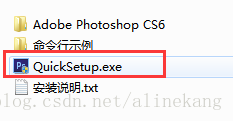
Installation method is very simple, unzip downloaded installation package, there is an installation instructions, do not see can, directly find. Exe file double-click can be installed
Link: https://pan.baidu.com/s/1c3IdnZa password: q3lk
Installation method is very simple, unzip downloaded installation package, there is an installation instructions, do not see can, directly find. Exe file double-click can be installed
One thing to note in the installation instructions: It says to turn off other Adobe products when installing Ps, or you may fail to install.
After installation, there will be a shortcut on the desktop. Double-click it. When I double-click to open it, it fails and gives me an error
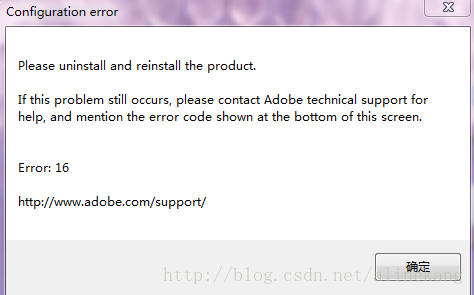
I thought there were Adobe products running during the installation process, and then I uninstalled and reinstalled, but still failed. Later, I found out that it was a configuration problem, so please remember after the installation is completed
Configure!! Hit the point!!
Right – click shortcut -& GT; Property – & gt; compatibility
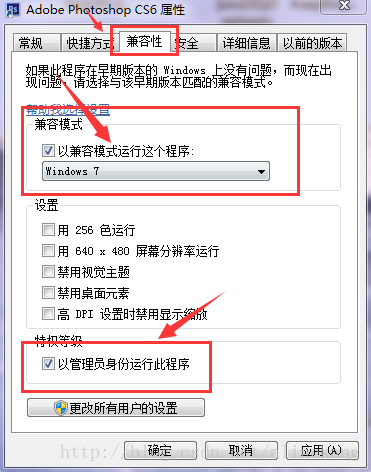
Rerun is ok ~~
Solutions to problems in SAS 9.3 x64 importing and exporting Excel
From http://bbs.pinggu.org/thread-1191302-3-1.html
SAS 9.3 x64 import and export Excel problems solution
SAS 9.3 x64 import and export Excel problems solution
you should use BBS search, actually has given a solution in the following link
http://bbs.pinggu.org/forum.php?mod=redirect& goto=findpost& ptid=1417110& pid=12754566& from^^uid=50
http://bbs.pinggu.org/forum.php?mod=redirect& goto=findpost& ptid=1417110& pid=12754704& From ^^uid=50
actually, the problem is SAS x64 version (including 9.2 and 9.3), which is not the case in SAS 9.3 x86.
SAS9.3 64 software cannot import Excel file, is the cause of import SAS software like Microsoft Office software of Excel and Access files,
is use Microsoft company provides data interface engine (Access database engine), if the Office software installation, data interface engine
will be installed at the same time, but is generally installed the 32-bit data interface engine, SAS software for 64, The Proc import program cannot borrow the 32-bit data interface engine of
Office, so it cannot import Excel and Access files. The following error occurs:
Error: Connect: Class not registered
Error: Error in the Libname statement
the solution is to download the Accessdatabaseengine_x64 program provided by Microsoft. The download address is as follows:
http://www.microsoft.com/zh-cn/download/details.aspx?Id =13255
if it cannot be installed after downloading, it is because the 32-bit Accessdatabaseengine is already installed on this machine and should be uninstalled before installing.
problem solution, see the SAS online support document:
http://support.sas.com/kb/37/412.html
IsADirectoryError: [Errno 21] Is a directory: ‘/home/user8/Desktop/low_light/Learning-Texture-Invari
The reason is that only the file path is specified, not the filename and suffix.
undertake Matlab, Python and C++ programming, machine learning, computer vision theory and guidance, undergraduate and master can, salted fish trading, professional answer please go zhihu, detailed talk please contact QQ number 757160542, if you are the one.
undertake Matlab, Python and C++ programming, machine learning, computer vision theory and guidance, undergraduate and master can, salted fish trading, professional answer please go zhihu, detailed talk please contact QQ number 757160542, if you are the one.
VxWorks parse error near int
After a period of trial and error, I found that the vxWorks compiler is very sensitive to the definition of local variables, which must be defined at the beginning of the function, or compile error: parse Error near int, etc.
As shown in the figure:
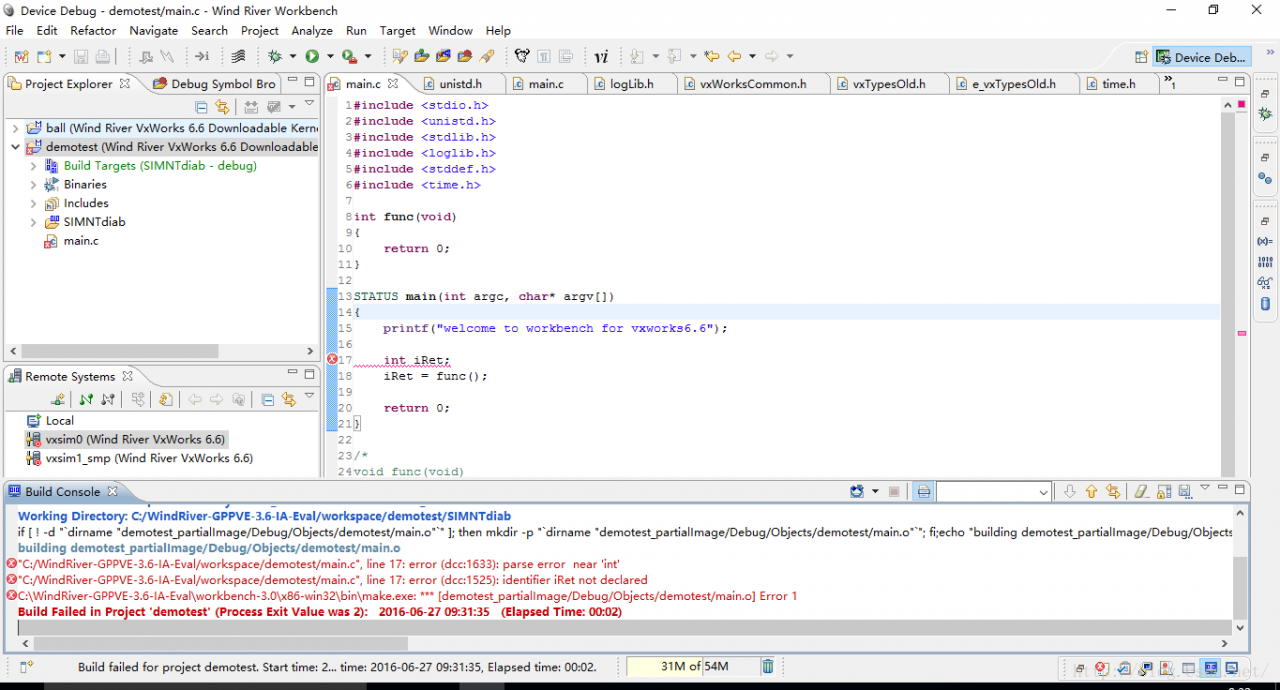
As shown in the figure:
Putting the iRet definition at the beginning solves this problem, as shown in the figure below:
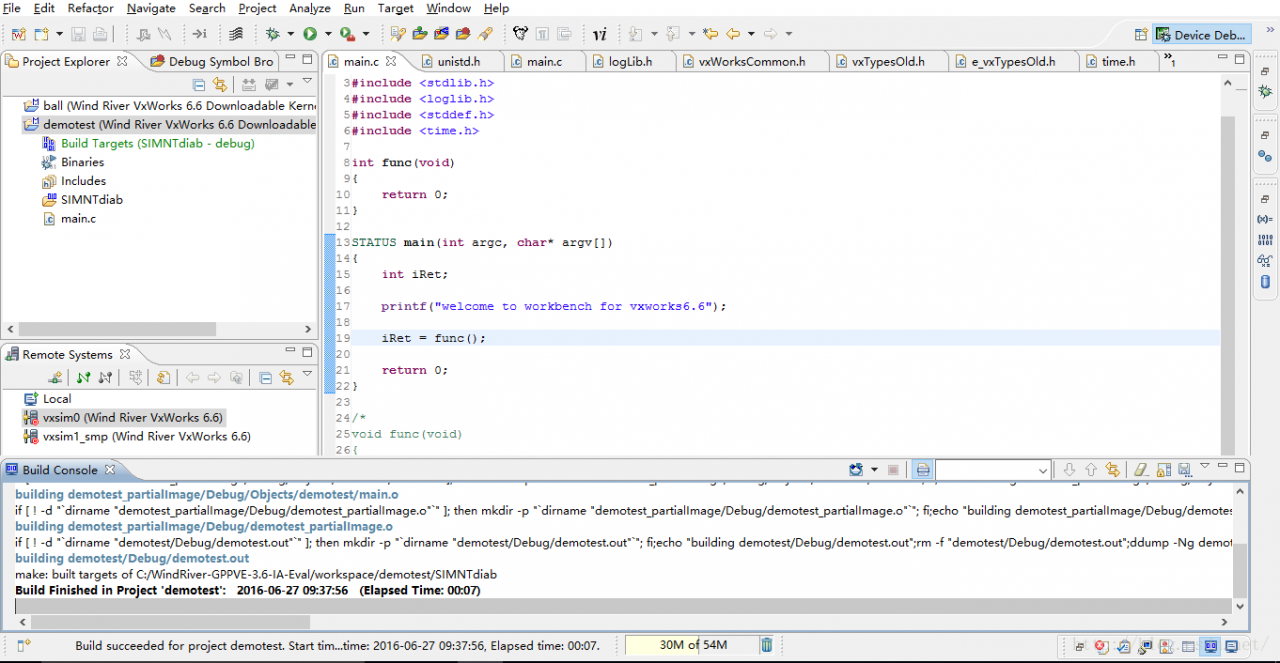
Cause check of unreachable statement exception in Java
Unsaid statement exceptions:
Reason 1:
The Java compiler flags an UnreachableStatement as a runtime error, and an unreachablestatement is when the compiler decides it will never execute it.
several things below are said to be unsaid statements:
(1) say the statement after the reutrn statement.
(2) writes the statement after the throw statement.
(3) break, continue statement after defining statement.
(4) “\u10100” // valid, equivalent to ‘\u1010’ and string ‘0’. The
(5) shift operator can be used with long int char short byte. The access control for the
(6) class can be public or nothing.
(7) goto is reserved but not key. Then it’s nothing.
(8) when casting the type of the superclass to an object assigned to a subclass, no exception is compiled, but an exception occurs at runtime.
Reason 2: the
unreachable statement is caused by a return operation that precedes the statement, or by other operations that make it impossible to execute the statement regardless of the condition.
most importantly: check to see if the previous statement returned, and see if any conditions were returned in front of the statement due to your own negligence, even without errors such as syntax.
Because of my own negligence, I have added if or for conditionals several times. Causes the following return statement not to execute any subsequent statements, but to return 1;
as shown in the picture:
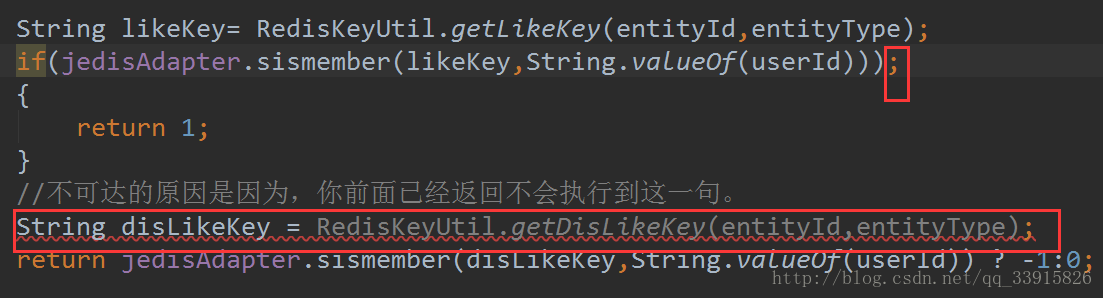
must be careful and careful again!!
Error lnk1123: failure during conversion to coff: problem solving
I encountered this problem today while building a debug version of a program. What’s strange to me is that if it’s a release version it won’t have this problem, debug will. I am very confused, the Internet to find some information, mainly there are several ways:
1. Modify the following configuration
Project Properties
-> Configuration Properties
-> Linker (General)
-> Enable Incremental Linking -> “No (/INCREMENTAL:NO)”
I tried and failed to solve the problem.
2. Rename or delete cvtres.exe file
The default path for the file in VS2010 is: C:\Program Files (x86)\Microsoft Visual Studio 10.0\VC\bin\cvtres.exe
With a pinch of salt, rename the CVtres.exe and rebuild it to find it passed. That’s strange.
1. Modify the following configuration
Project Properties
-> Configuration Properties
-> Linker (General)
-> Enable Incremental Linking -> “No (/INCREMENTAL:NO)”
I tried and failed to solve the problem.
2. Rename or delete cvtres.exe file
The default path for the file in VS2010 is: C:\Program Files (x86)\Microsoft Visual Studio 10.0\VC\bin\cvtres.exe
With a pinch of salt, rename the CVtres.exe and rebuild it to find it passed. That’s strange.