Let’s start with the context of what’s going on, but skip ahead. I am the 15-inch rMBP2012, and the day before yesterday, I was stuck in the login interface (a rare problem is that after I input the password, the loop turns endlessly, but of course the system cannot get in). As soon as I came into contact with MAC, I didn’t understand anything. I simply used the disk permission repair and disk verification, and there was no problem. So I went to the App Store to check, and there was no problem, so I reinstalled it directly. If you can reinstall the students do not go, they basically have no good solution to the software problem, except reinstall.
Environmental problem: the classmate of useful Time machine must first thoughts after the above problems is to recover from the TM, but three days ago there was a new backup, here next Time capsule, convenient wireless backup is too much, if you have it will have a backup, an hour after a problem, I immediately bought a, is in the mobile hard disk backup before. Here is to explain that if you just look for files from the TM, then into the TM copy out can be, but want to restore the full (that is, including the system), need to boot from the system disk to go in, speaking of the system disk, can be installed in the U disk or mobile hard disk in a partition. I like clean installation, so I did a bit of formatting on my my hand is out of control before TM was restored, and then the above problem occurred.
Cause of problem: Lack of recovery partition, so this problem usually occurs on a completely formatted or new hard disk.
Solution: Reinstall the system, this time will generate “restore partition” by default. Since the system will be restored during installation, there is no need to wait for the completion of the entire installation process. You just need to click option to enter TM restore in the first restart.
Category Archives: How to Fix
The build report plug-in reported an error in importing unit script (BRT_ Util.cs :error CS1525: Unexpected symbol `;’, expecting `)’, or `,’)
You’ve probably used many types of plug-ins in Unity, but here’s an error that happened when you imported Unity with the BuildReport plug-in.
The error was caused by a script in the plug-in, brt_util.cs, in line 1147. After checking various materials, a solution was found:
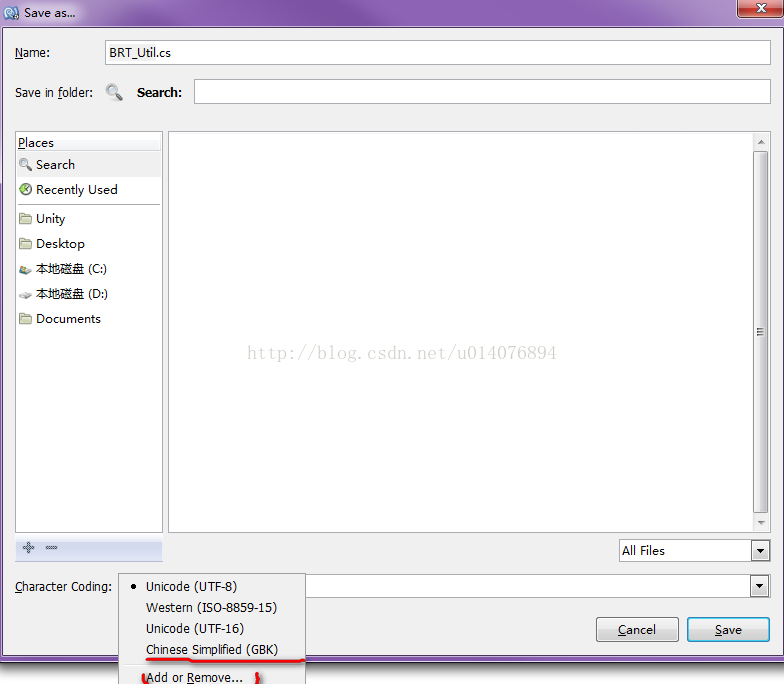
Open this script with the MOno editor that comes with Unity4.2 and save it as a copy. Note: Select “ChineseSimplified (GBK)” in the CharacterCoding area when saving. If this cannot be found
ChineseSimplified (GBK), click “Add or Remove…” Look it up (it should be said that “ChineseSimplified (GBK)” is not available in the MONO editor in some Unity versions and you can change it
Try a Unity version of MOno, here with Unity4.2.0).
Save and then replace the project in the OK.
If any resemblance is purely coincidental,
Java lossy conversion
Click on the blue words in the upper left corner and follow “Big Guy outside the pot” 
Focus on sharing the latest foreign technology content
1. An overview of the
In this quick tutorial, we’ll discuss the concept of lossy transformations in Java and the reasons behind them.
In the meantime, we’ll explore some convenient transformation techniques to avoid this error.
2. Lossy conversion
Lossy transformation is the loss of information while processing data.
In Java, this corresponds to the possibility of losing variable values or precision when converting from one type to another.
When we try to convert a variable of a high-level type to a low-level type, Java will generate an incorrect, incompatible type when compiling the code: a potentially lossy conversion.
For example, let’s try assigning a long value to an int value:
long longNum = 10;
int intNum = longNum;
When compiling this code, Java produces an error:
incompatible types: possible lossy conversion from long to intHere, Java will find that long and int are incompatible and cause lossy conversion errors. Because you can have long values outside of the int range of -2,147,483,648 to 2,147,483,647.
Similarly, we try to assign a long to a float:
float floatNum = 10.12f;
long longNum = floatNum;
incompatible types: possible lossy conversion from float to long
Because floats can represent small values that don’t have a corresponding long type. Therefore, we will receive the same error.
Similarly, converting a double to an int results in the same error:
double doubleNum = 1.2;
int intNum = doubleNum;
incompatible types: possible lossy conversion from double to int
The double value may be too large or too small for an int value, and the small value will be lost in the conversion. Therefore, this is a potentially lossy transformation.
In addition, we may encounter this error when performing a simple calculation:
int fahrenheit = 100;
int celcius = (fahrenheit - 32) * 5.0/9.0;
When a double is multiplied by an int, the result is a double. Therefore, it is also a potentially lossy transformation.
Therefore, incompatible types in lossy conversions can have different sizes or types (integer or decimal).
3. Basic data types
In Java, there are many basic data types and their corresponding wrapper classes.
Next, let’s make a list of all possible lossy transformations in Java:
short to byte or charchar to byte or shortint to byte, short or charlong to byte, short, char or intfloat to byte, short, char, int or longdouble to byte, short, char, int, long or float
Note that although short and CHAR have the same range. However, the conversion from short to char is lossy because char is an unsigned data type.
4. Transform technology
4.1. Conversion between two basic data types
The simple way to avoid lossy conversions for primitive types is by casting down; In other words, cast a high-level type to a low-level type. For this reason, it is also called a narrowing primitive conversion.
For example, let’s convert long to short using a downward cast:
long longNum = 24;
short shortNum = (short) longNum;
assertEquals(24, shortNum);
Similarly, convert a double to an int:
double doubleNum = 15.6;
int integerNum = (int) doubleNum;
assertEquals(15, integerNum);
However, we should note that casting down a high-level type with a value too large or too small to a low-level type can result in unexpected values.
We convert a long value to a value outside the range of the short type:
long largeLongNum = 32768;
short minShortNum = (short) largeLongNum;
assertEquals(-32768, minShortNum);


long smallLongNum = -32769;
short maxShortNum = (short) smallLongNum;
assertEquals(32767, maxShortNum);
If we look closely at the transformations, we see that these are not the expected values.
In other words, when Java is converting from a high-level type to a low-level type, when the maximum value of the low-level type is reached, the next value is the minimum value of the low-level type, and vice versa.
Let’s look at an example to understand this. When largeLongNum with a value of 32768 is converted to short, the value of shortNum1 is -32768. Since the maximum value of short is 32767, Java will select the next minimum value of short.
Similarly, when smallLongNum is converted to short. ShortNum2 has a value of 32767, which Java USES as the next maximum for Short.
Also, let’s look at what happens when we convert the maximum and minimum values of long to ints:
long maxLong = Long.MAX_VALUE;
int minInt = (int) maxLong;
assertEquals(-1, minInt);


long minLong = Long.MIN_VALUE;
int maxInt = (int) minLong;
assertEquals(0, maxInt);
4.2. Convert between wrapper objects and primitive types
To convert the wrapper object directly to the base type, we can use various methods in the wrapper class, such as intValue(), shortValue(), and longValue(). This is called unpacking.
For example, let’s convert a Float object to a long:
Float floatNum = 17.564f;
long longNum = floatNum.longValue();
assertEquals(17, longNum);
In addition, if we look at the implementation of longValue or similar methods, we will find the use of narrowing the original transformation:
public long longValue() {
    return (long) value;
}
However, sometimes you should avoid narrowing the original transformation to preserve valuable information:
Double doubleNum = 15.9999;
long longNum = doubleNum.longValue();
assertEquals(15, longNum);
After conversion, the value of longNum is 15. However, doubleNum is 15.9999, very close to 16.
Instead, we can use math. round() to convert to the nearest integer:
Double doubleNum = 15.9999;
long longNum = Math.round(doubleNum);
assertEquals(16, longNum);
4.3. Convert between wrapper objects
To do this, let’s use the transformation techniques we’ve already discussed.
First, we will convert the wrapper object to a base value, cast it down and convert it to another wrapper object. In other words, we will perform unboxing, downcast, and boxing techniques.
For example, let’s convert a Double object to an Integer object:
Double doubleNum = 10.3;
double dbl = doubleNum.doubleValue(); // unboxing
int intgr = (int) dbl; // downcasting
Integer intNum = Integer.valueOf(intgr);
assertEquals(Integer.valueOf(10), intNum);
Finally, we use intet.valueof () to convert the basic type int to an Integer object. This type of conversion is called boxing.
5. To summarize
In this article, we explored the concept of lossy transformations in Java through examples. In addition, we have written a handy list of all possible lossy transformations in Java.
Along the way, we’ve determined that narrowing the original transform is an easy way to transform the base type and avoid lossy conversion errors.
At the same time, we explored other convenient techniques for numeric conversion in Java.
The code implementation for this article can be found on the GitHub project.
From spring for All community Translation group
Recently, I have translated the articles into PDF.
Reply in the background of official account: 002 can get oh ~
The content of PDF will be updated continuously in the future, please look forward to it!

● Top 10 mistakes you make using the Spring Framework
● Why Spring as the Java framework?
●Solr full-text search
Top right button to share with more people ~

Here we are. Click and watch before you go

LNK2001: unresolved external symbol maincrtstartup
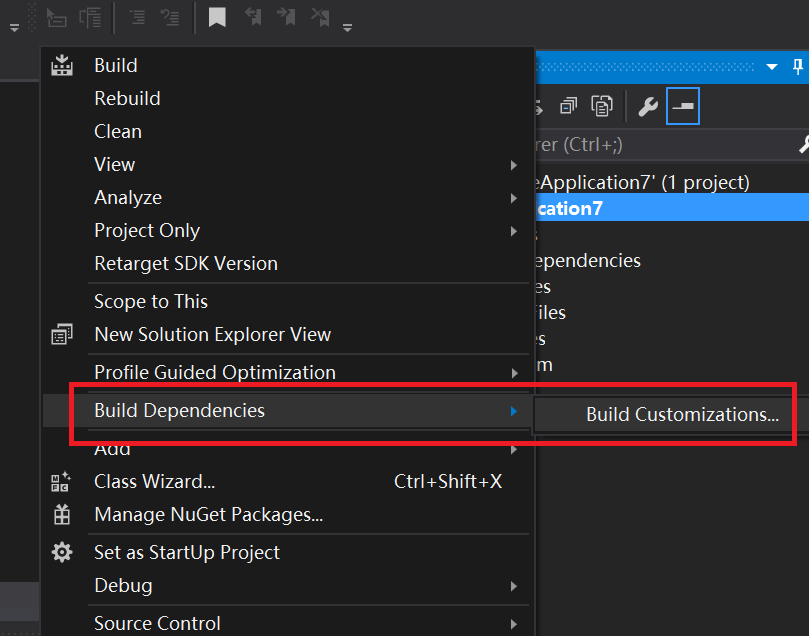
Compile 64 bit assembly under VS, create a new project, right click on the project name, select “Build Dependencies” -& GT; “Build Customizations”:
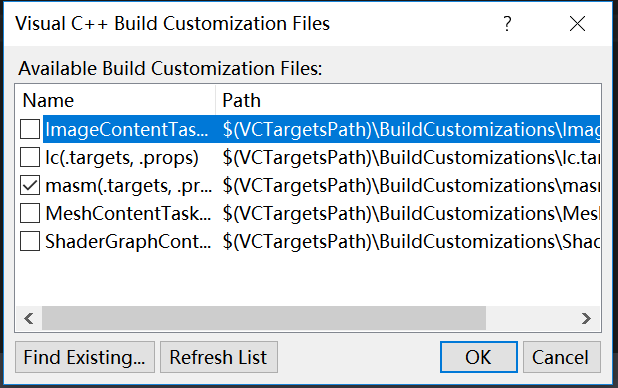
Check the masm:
Add main.asm, and the simplest piece of code is typed:
Check the masm:
Add main.asm, and the simplest piece of code is typed:
.code
main proc
	ret
main endp

end
Direct F5 run (right-click added project), annoying error:
LNK2001: unresolved external symbol mainCRTStartup

Unparsed external symbol mainCRTStartup, which is the default entry function, will call the main function we wrote, but that is the main function inC /C++, such as void main() {return 0; }, the compiler can’t find such a main function to report the above error, so we need to specify the entry function as our own main function (in this case mian is not that main; you can change it to any other name that conforms to the identifier specification).
Right-click the project name and select the last project property
Linker -> Advanced -> The Entry Point: main name needs to be the same as in the code.
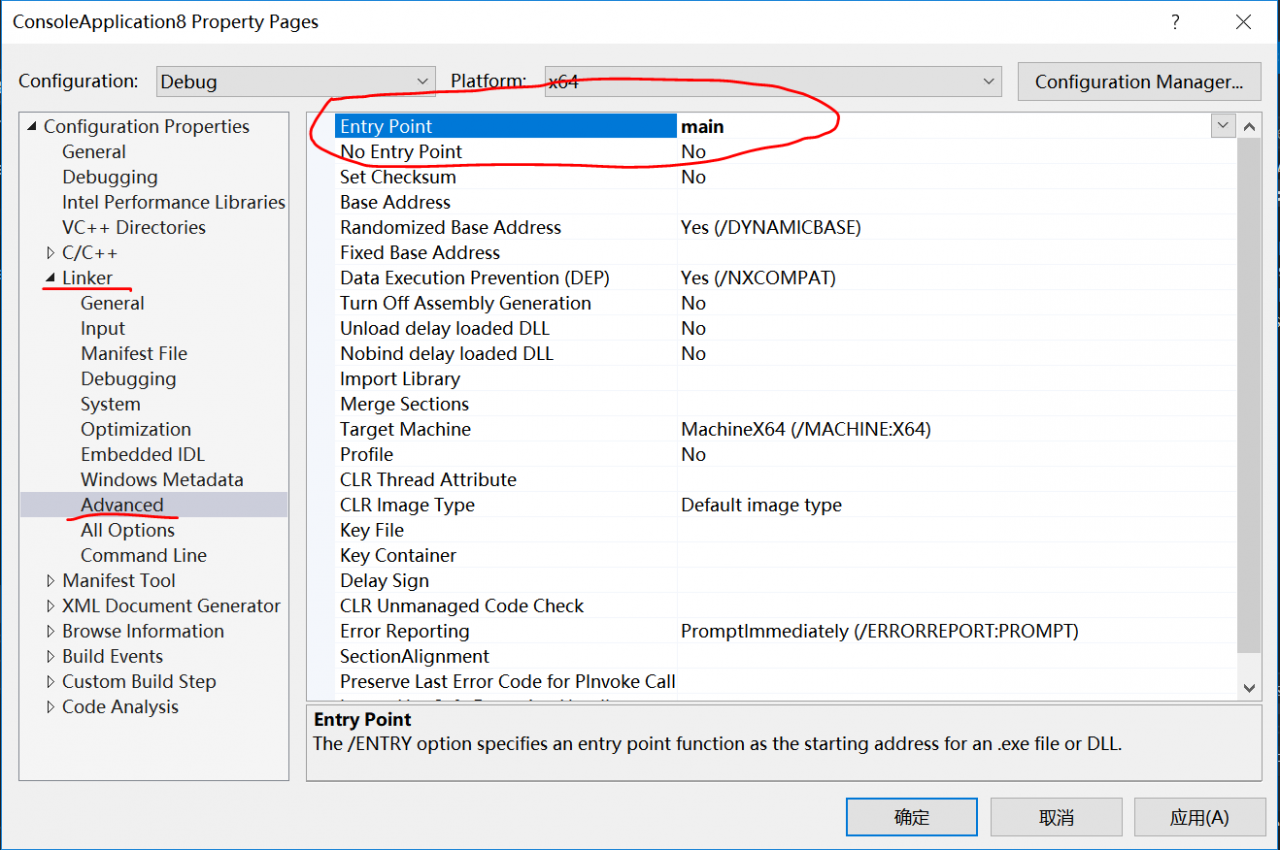
If nothing happens, you’ll be fine, but of course this code doesn’t do anything, and you won’t see anything.
Ora-00947: not enough values
Transfer: http://space.itpub.net/21213917/viewspace-607671
ORA-00947: Not enough values
This error occurred while performing the INSERT.
Insert into table 1 values (123,2423,12);
The structure of Table 1 has four columns, and obviously only three values are inserted, so this problem arises.
After the value of the column is added, OK.
If you want to insert only three values:
Insert into table 1(a,b,c) values (123,2423,12);
Just use this statement.
ORA-00947: Not enough values
This error occurred while performing the INSERT.
Insert into table 1 values (123,2423,12);
The structure of Table 1 has four columns, and obviously only three values are inserted, so this problem arises.
After the value of the column is added, OK.
If you want to insert only three values:
Insert into table 1(a,b,c) values (123,2423,12);
Just use this statement.
python SyntaxError: (unicode error) ‘unicodeescape’ codec can’t decode bytes in position 2-3: trunca
This is the error I made reading the file from the absolute path, using the following command
file = open('C:\Users\Wudl\Desktop\pi_digits1.txt','r')The result is wrong
SyntaxError: (unicode error) 'unicodeescape' codec can't decode bytes in position 2-3: truncated \UXXXXXXXX escapeBy looking up the problem, you find that \ is an escape character in Python
Encyclopaedia: Escape characters – all ASCII codes can be represented as “\” plus a number (usually in base 8). However, in C, some letters are defined with “\” before them to indicate common ASCII characters that cannot be displayed, such as \0,\t,\n, etc., which are called escape characters, because the following characters are not the original ASCII characters.
So it’s the error of \ being escaped as a character in the file, the two methods modify
1) add r before the path, the purpose of r is to prevent \ being escaped as a character, but to treat \ after r as a normal character \
file = open(r'C:\Users\Wudl\Desktop\pi_digits1.txt','r')2) Use \ instead of \
file = open('C:\\Users\\Wudl\\Desktop\\pi_digits1.txt','r')3) Use/replace \
file = open('C:/Users/Wudl/Desktop/pi_digits1.txt','r')Solution to prompt “cannot find module ‘eslint config defaults / configurations / eslint'” when submitting with Git
The problem background
Dva application code git commits, vscode tips “always find module ‘eslint – config – defaults/configurations/eslint’ Referenced from: c: \ Users \ \. XXX eslintrc
Cause analysis,
Use eslintrc syntax check module dva application in git commits vscode will from the project component and its parent directory (English ancestors) looking for local. Eslintrc file (eslint configuration file).
If the file is not found, the C: /Users/ XXX /.eslintrc file is sought (this is the global configuration file).
Let’s open a global file like this
Dva application code git commits, vscode tips “always find module ‘eslint – config – defaults/configurations/eslint’ Referenced from: c: \ Users \ \. XXX eslintrc
Cause analysis,
Use eslintrc syntax check module dva application in git commits vscode will from the project component and its parent directory (English ancestors) looking for local. Eslintrc file (eslint configuration file).
If the file is not found, the C: /Users/ XXX /.eslintrc file is sought (this is the global configuration file).
Let’s open a global file like this
{
	/* See all the pre-defined configs here: https://www.npmjs.com/package/eslint-config-defaults */
	"extends": "defaults/configurations/eslint",
	"parser": "babel-eslint",
	"ecmaFeatures": {
		"jsx": true
	},
	"plugins": [
		"react"
	],
	"env": {
		"amd": true,
		"browser": true,
		"jquery": true,
		"node": true,
		"es6": true,
		"worker": true
	},
	"rules": {

		"eqeqeq": 2,
		"comma-dangle": 1,
		"no-console": 0,
		"no-debugger": 1,
		"no-extra-semi": 1,
		"no-extra-parens": 1,
		"no-irregular-whitespace": 0,
		"no-undef": 0,
		"no-unused-vars": 0,
		"semi": 1,
		"semi-spacing": 1,
		"valid-jsdoc": [
			2,
			{ "requireReturn": false }
		],

		"react/display-name": 2,
		"react/forbid-prop-types": 1,
		"react/jsx-boolean-value": 1,
		"react/jsx-closing-bracket-location": 1,
		"react/jsx-curly-spacing": 1,
		"react/jsx-indent-props": 1,
		"react/jsx-max-props-per-line": 0,
		"react/jsx-no-duplicate-props": 1,
		"react/jsx-no-literals": 0,
		"react/jsx-no-undef": 1,
		"react/jsx-sort-prop-types": 1,
		"react/jsx-sort-props": 0,
		"react/jsx-uses-react": 1,
		"react/jsx-uses-vars": 1,
		"react/no-danger": 1,
		"react/no-did-mount-set-state": 1,
		"react/no-did-update-set-state": 1,
		"react/no-direct-mutation-state": 1,
		"react/no-multi-comp": 1,
		"react/no-set-state": 0,
		"react/no-unknown-property": 1,
		"react/prop-types":0,
		"react/react-in-jsx-scope": 0,
		"react/require-extension": 1,
		"react/self-closing-comp": 1,
		"react/sort-comp": 1,
		"react/wrap-multilines": 1
	}
}
As you can see, the file references defaults/configurations/eslint; This error is usually reported because the project does not have the module referenced in the configuration file installed.
The solution
Method 1,
Still using eslint, installing ‘eslint – config – defaults/configurations/eslint’ module;
See https://www.npmjs.com/package/eslint-config-defaults;
NPM instruction
npm install --save-dev eslint eslint-config-defaultsThere are many syntax errors when git is committed. These rules are defined by the Eslint configuration file. Just follow the change
Method 2,
Delete the global configuration file and add the local.eslintrc file in the project root. The file content can be customized to their own needs to modify the content; Such as the following is my own version; Just umi; There is no reference to the error module, while avoiding the tedious grammar check (of course, it is not recommended to do this, it helps to ensure the code style in the collaborative development process is unified and easy to maintain);
{
  "extends": "umi"
}
Install. Net Framework 3.5 error 0x800f0950 in Windows 10
Problem: The general method is to open the control panel -& GT; Program – & gt; Enable or disable Windows -& GT; Choose 3.5. At this time, download a short time to report an error.
a) Press “Windows Logo” + “R” keys on the keyboard.

b) Type “appwiz.cpl” in the “Run” command box and press “ENTER”.

c) In the “Programs and Features” window, click on the link “Turn Windows features on or off”.

d) Check if the “.NET Framework 3.5 (includes .NET 2.0 and 3.0)” option is available in it.
————————————————
Solution: Open the search, many people have this problem, most of the offline installation method is successful. I helped my classmates do many times, but yesterday my own new computer Windows 10 Home version has been stopped in the process or prompt unable to locate the “source”, but also downloaded several versions of Win10, has been unable to install, today opened the computer and tried the result of success, record this kind of metaphysics.
installation steps:
1. Win10 operating system downloaded by MSDN, corresponding version number (possible error 0x800F081F)
2. Pull out the SXS folder in the source folder and copy it to the disk you want to use. My disk is D
. 3.win+x, the administrator runs Windows PowerShell?(Maybe sometimes the problem is dism, here I use dism. Exe)
dism.exe /online /enable-feature /featurename:NetFX3 /Source:D:\sources\sxs
Note: 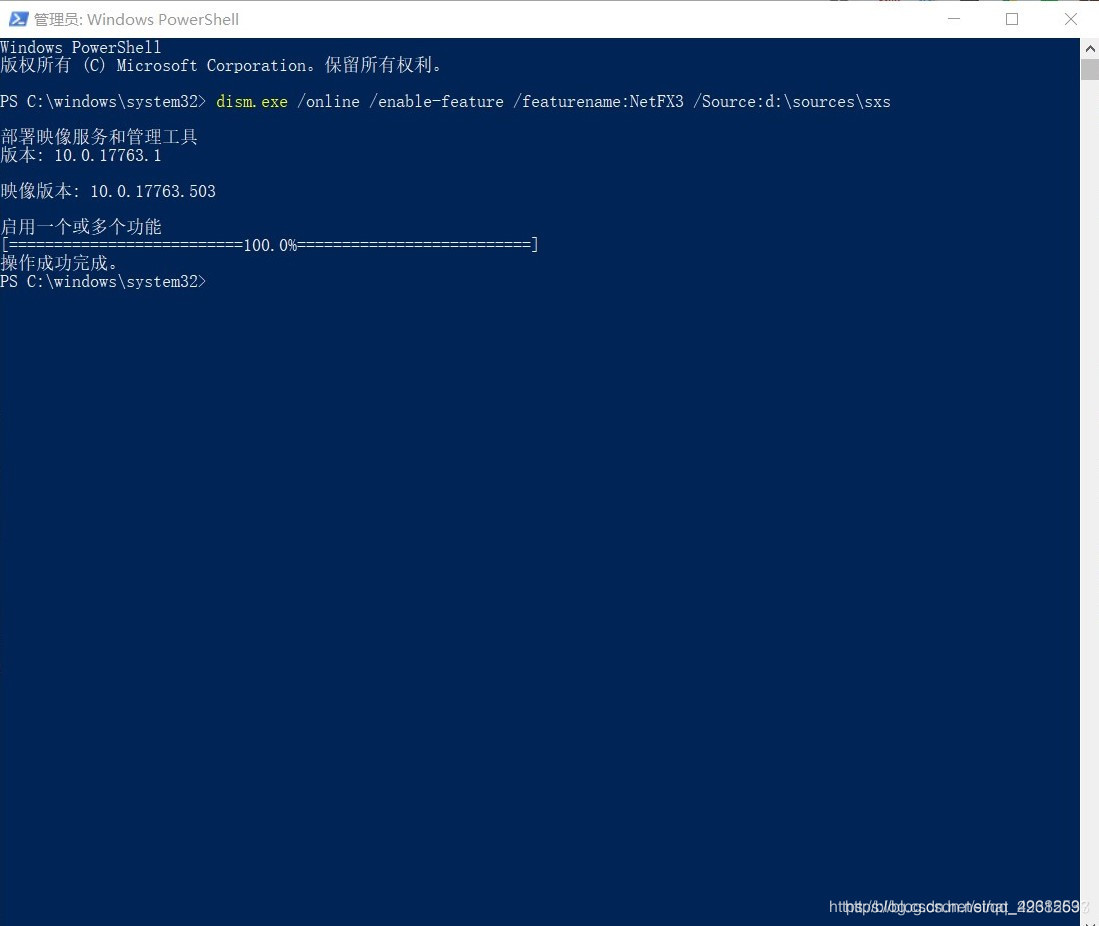
a) is likely to start with, try to restart a few times (ง ง • _ •)
b) you can also try the absolute path
dism.exe /online /add-package /packagepath:d:\sources\sxs\microsoft-windows-netfx3-ondemand-package.cab
dism.exe /online /enable-feature /featurename:NetFX3 /Source:d:\sources\sxs\microsoft-windows-netfx3-ondemand-package.cab
C) network installation command dism /online /enable-feature /featurename:NetFX3
Copyright Notice: This article is the original work of CSDN blogger “Henauchin”. It follows CC 4.0 BY-SA copyright agreement. Please attach a link to the original article and this statement.
the original link: https://blog.csdn.net/sinat_29315697/article/details/90438542
Solving the problem of can’t create temporary directory of CVS under Windows
cvs [server aborted]:
Can’t create temporary Directory C:\WINDOWS\TEMP/ CVS-SERV1320: Permission Denied problem.
The solutions to this problem are as follows:
First, modify the temporary directory of the CVS server (to restart the service after modification)
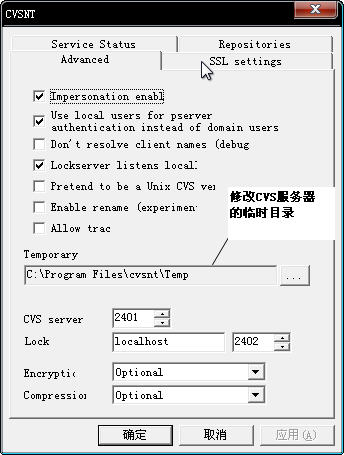
Then modify the corresponding temporary folder permissions, as follows:
1. Open any folder, click Tools – Folder Options on the menu, and select View in the popup window. As shown, unselect Use Sharing Wizard (Recommended) and click OK to close the window.
2. Open the properties of the temporary folder and modify the corresponding permissions in the security options
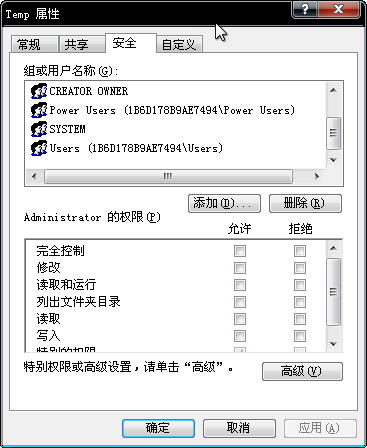
That is ok.
panic: runtime error: index out of range
Let’s start with an example to see if you can spot problems in the code.
package main

import "fmt"

func main() {
    arr := []string{"hello", "world"}
    fmt.Println(test(arr))
}

func test(arr []string) string {
    return arr[0]
}
In real life, you probably wouldn’t write this simple code, but the errors in the above code might occur in your code. As for what is wrong with the above code, the reason is that when referring to a slice that is nil, even the element with the index of 0 will cause the code to appear index out of range.
package main

import "fmt"

func main() {
    arr := []string{"hello", "world"}
    fmt.Println(test(arr))
    fmt.Println(test(nil))
}

func test(arr []string) string {
    return arr[0]
}
Execute the above code, and a panic will be triggered, causing the program to stop running. When panic occurs in a multi-layered nested function call, the program immediately aborts the execution of the current function, and all defer statements return control to the caller who received the panic. This bubbles up to the top layer, executes defer for each layer, and then crashes the program at the top of the stack.
hello
panic: runtime error: index out of range

goroutine 1 [running]:
main.test(...)
        D:/mygo/test.go:12
main.main()
        D:/mygo/test.go:8 +0xc0
exit status 2
In a practical application, this situation is not allowed, and there is no panic to stop the program. You can do this by using the recover built-in function to recover the program from panic. Where recover can only be used in the defer decorated function to get the error value passed in the panic call, if it is executed normally, the call recover returns nil and has no other effect.
package main

import "fmt"

func main() {
	arr1 := []string{"hello", "world"}
	fmt.Println(test(arr1))
	defer func() {
		if err := recover(); err != nil {
			fmt.Printf("panic %s\n", err)
		}
	}()
	fmt.Println(test(nil))
}

func test(arr []string) string {
	return arr[0]
}
Another method is to first judge the parameters in the function containing the slice parameters. Such as:
package main

import "fmt"

func main() {
    arr := []string{"hello", "world"}
    fmt.Println(test(arr))
    fmt.Println(test(nil))
}

func test(arr []string) string {
    if len(arr) != 0 {
        return arr[0]
    }else {
        return "error"
    }
}
error C2784: ‘bool std::operator <(const std::_Tre
Error 42, Error C2784: ‘bool STD ::operator < (const std::_Tree< _Traits> & ,const std::_Tree< _Traits> &) ‘ : could not deduce template argument for ‘const std::_Tree< _Traits> & ‘From ‘const STD :: String’ d:\ Program files_x86\ Microsoft Visual Studio 9.0\ VC \include\ Functional 143 Test
If the above error occurs when using STL container insert methods such as map, and there are no syntax errors elsewhere, it is likely that no header #include < is imported. string>
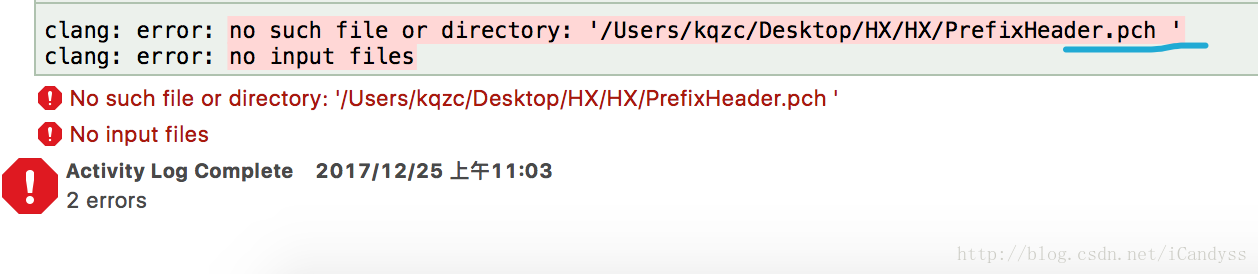
Wrong path to add PCH file. Apple llvm 9.0 – language cannot be found in the new project
The Apple LLVM 9.0 Language cannot be found in Xcode-target-build Setings. Figure
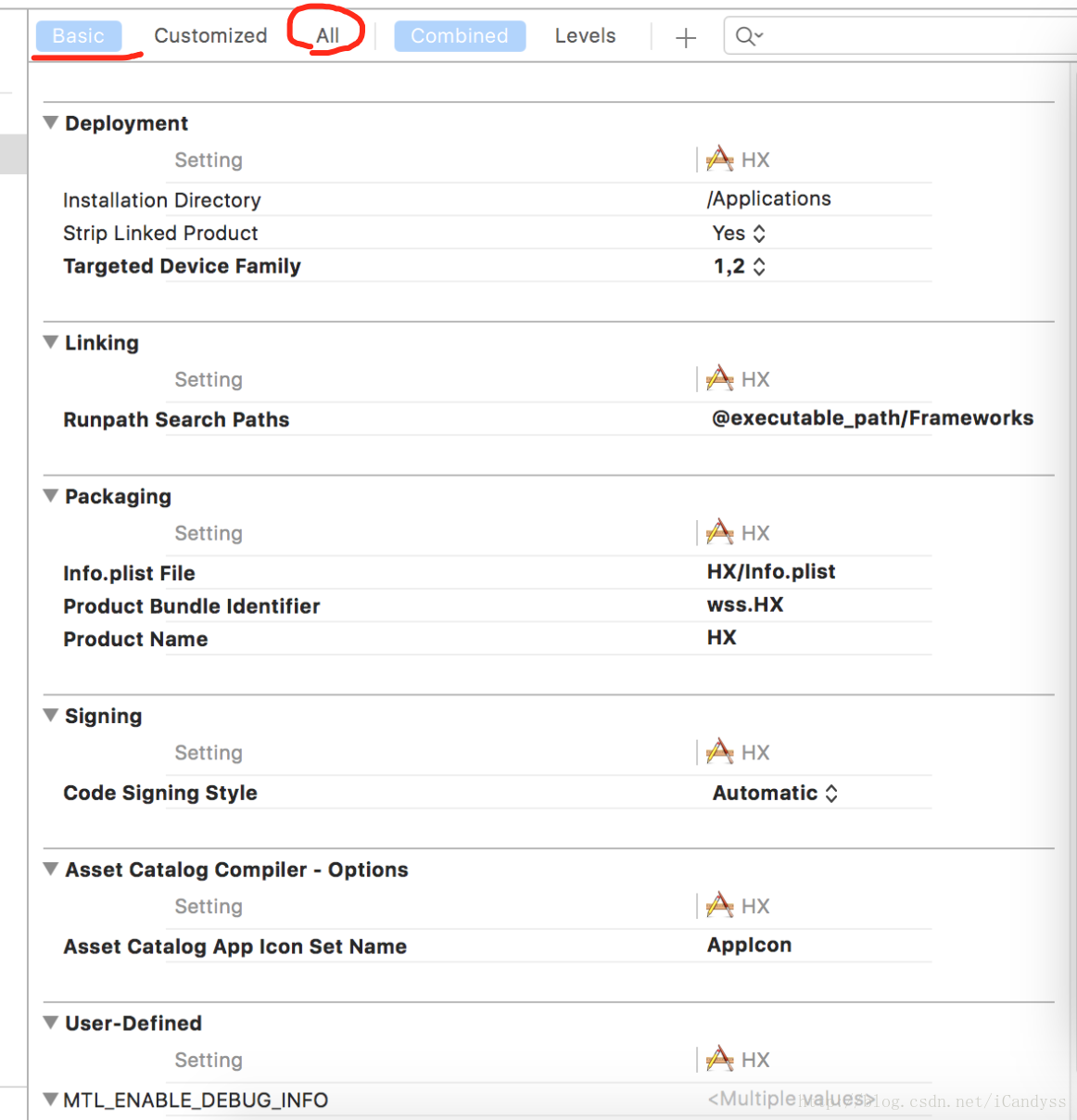
The project is new. After searching for a long time, I found that I should first look in all, find the Prefix Header and then add the PCH path. In this way, I can see the Apple LLVM 9.0 Language in Basic
The PCH path is wrong. Changed a few times the path, there is a comparison, feel the path is correct ah, can be an error, and then carefully look at the path was found to be more than a space, the path is copied down on the Internet, he revised the next, did not pay too much attention. The diagram below.