Category Archives: How to Fix

Syntax error or access violation: 1071 specified key was too long; max key length is 767 bytes

Laravel 5.4 has made a change to the default database character set and now utf8mb4 which includes support for storing emojis. This only affects new applications, and as long as you’re running MySQL V5.7.7 and later, you don’t need to do anything.
For users running MariaDB or older versions of MySQL, you may encounter this error when trying to run the migration:

[Illuminate \ Database \ QueryException] SQLSTATE[42000]: Syntax Error or Access Restriction: 1071 Specified key was too long; Max key length is 767 bytes (SQL: alter table users add uniqueusers_email_unique (email)
[PDOException]
SQLSTATE [42000] : syntax error or access conflict: 1071 specified key is too long; The maximum key length is 767 bytes

As described in the migration guide, to solve this problem, you simply edit the AppServiceProvider. PHP file and set the default string length within the boot method:

use Illuminate\Support\Facades\Schema;

public function boot()
{
    Schema::defaultStringLength(191);
}

After that, everything should work normally.
(PS: The exception explicitly indicates that the maximum length is 767 bytes, and utF8MB4 encodes 4 bytes per character, so 767/4 = 191.75, so set the default length of string to 191 characters. I hope it helps.)
IE8: this operation cannot be completed due to error 80020101


The introduction

Small make up spit bad a few words, today was originally very relaxed, open the list of bugs in the morning, unexpectedly on the 5 bugs, small make up thought it would not be easy to spend good

Is it your day?But who knows in the afternoon, suddenly test that the ledger page directly pop-up error page, simply can not enter ah, small make up immediately into the test

Environment once, no problem! The test said I use IE8, small make up at that time there was no temper, so an afternoon on this IE8 above, do not say is

Tears, here come some dry goods;

Type the above error in the console below IE8: This operation could not be completed due to an error 80020101 < body data-ui-view> <

/body> . There are no errors under Google, firefox, etc

At the beginning, I always thought my script was wrong, so I kept debugging my script. The result is that I do not solve the problem, and then I do

Step into the require.JS source file to track the error, and while monitoring caught a Chinese comment on the page, which made my dead heart burn again

Up, small make up to find the corresponding page will be all above the comment after the elimination of all, the problem was solved. In conclusion, I made a comment in the afternoon

The problem.

Share some ways to solve this problem:

1. Chinese comments on the page (all comments can be eliminated)

2. Js script format:

1) Whether the parentheses correspond one to one
2), if there is any extra punctuation match, for example, the last comma of json object is redundant: {a:’1′, b:’2′,}
3). Comments in JS scripts

3, JS script load order problem

4. Console problem,

The above is still compatible with IE8 helplessness of the painful program ape to provide a few solutions, hoping to save some time for everyone!!
  

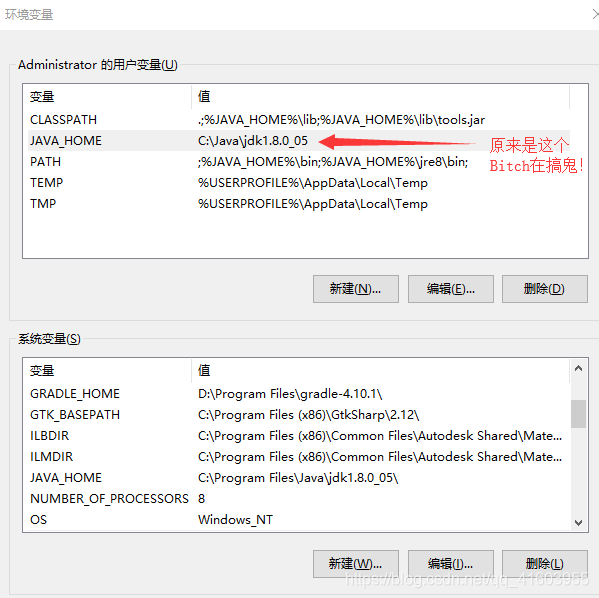
Bug001: error in gradle configuration environment variable: ERROR:JAVA_ Home is set to an invalid directory!

Gradle-v error: Error: Java_home is set to an invalid Directory :C:\Java\jdk1.8.0_05
please set the java_home variable in you environment to match the location of your java installation.
On the Internet turned over again, some people said more than a semicolon, some people said to change this change that, I erase, others try it, My zha change is not in, is really angry evil old man!
Look at the picture first:


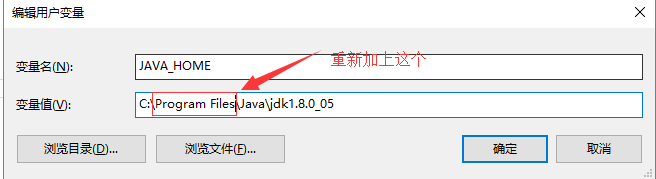
But when I looked up, My eyes were fixed on it!

Vonema, how did you automatically leave out the “Program Files “?

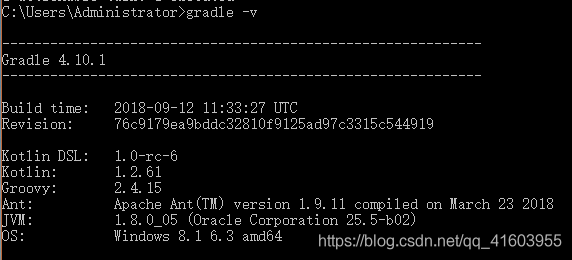
Then Windows+R, CMD, gradle-V, and sure enough! Problem solved smoothly!!


Centos 7 | mariadb/mysql | [ERROR] InnoDB: Unable to lock ./ibdata1 error: 11

The article directories
Error overview solution

Error in

2020-06-29  0:17:42 0 [Note] InnoDB: Check that you do not already have another mysqld process using the same InnoDB data or log files.
2020-06-29  0:17:43 0 [ERROR] InnoDB: Unable to lock ./ibdata1 error: 11
2020-06-29  0:17:43 0 [Note] InnoDB: Check that you do not already have another mysqld process using the same InnoDB data or log files.
2020-06-29  0:17:44 0 [ERROR] InnoDB: Unable to lock ./ibdata1 error: 11
2020-06-29  0:17:44 0 [Note] InnoDB: Check that you do not already have another mysqld process using the same InnoDB data or log files.
2020-06-29  0:17:45 0 [ERROR] InnoDB: Unable to lock ./ibdata1 error: 11
2020-06-29  0:17:45 0 [Note] InnoDB: Check that you do not already have another mysqld process using the same InnoDB data or log files.
2020-06-29  0:17:46 0 [ERROR] InnoDB: Unable to lock ./ibdata1 error: 11
2020-06-29  0:17:46 0 [Note] InnoDB: Check that you do not already have another mysqld process using the same InnoDB data or log files.
2020-06-29  0:17:47 0 [ERROR] InnoDB: Unable to lock ./ibdata1 error: 11
2020-06-29  0:17:47 0 [Note] InnoDB: Check that you do not already have another mysqld process using the same InnoDB data or log files.
2020-06-29  0:17:48 0 [ERROR] InnoDB: Unable to lock ./ibdata1 error: 11
2020-06-29  0:17:48 0 [Note] InnoDB: Check that you do not already have another mysqld process using the same InnoDB data or log files.
2020-06-29  0:17:49 0 [ERROR] InnoDB: Unable to lock ./ibdata1 error: 11
2020-06-29  0:17:49 0 [Note] InnoDB: Check that you do not already have another mysqld process using the same InnoDB data or log files.
2020-06-29  0:17:49 0 [Note] InnoDB: Unable to open the first data file
2020-06-29  0:17:49 0 [ERROR] InnoDB: Operating system error number 11 in a file operation.
2020-06-29  0:17:49 0 [ERROR] InnoDB: Error number 11 means 'Resource temporarily unavailable'
2020-06-29  0:17:49 0 [Note] InnoDB: Some operating system error numbers are described at https://mariadb.com/kb/en/library/operating-system-error-codes/
2020-06-29  0:17:49 0 [ERROR] InnoDB: Cannot open datafile './ibdata1'
2020-06-29  0:17:49 0 [ERROR] InnoDB: Could not open or create the system tablespace. If you tried to add new data files to the system tablespace, and it failed here, you should now edit innodb_data_file_path in my.cnf back to what it was, and remove the new ibdata files InnoDB created in this failed attempt. InnoDB only wrote those files full of zeros, but did not yet use them in any way. But be careful: do not remove old data files which contain your precious data!
2020-06-29  0:17:49 0 [ERROR] InnoDB: Plugin initialization aborted with error Cannot open a file
2020-06-29  0:17:49 0 [Note] InnoDB: Starting shutdown...
2020-06-29  0:17:50 0 [ERROR] Plugin 'InnoDB' init function returned error.
2020-06-29  0:17:50 0 [ERROR] Plugin 'InnoDB' registration as a STORAGE ENGINE failed.
2020-06-29  0:17:50 0 [Note] Plugin 'FEEDBACK' is disabled.
2020-06-29  0:17:50 0 [ERROR] Unknown/unsupported storage engine: InnoDB
2020-06-29  0:17:50 0 [ERROR] Aborting

The solution
Website query Error code 11
Operating System Error Codes – MariaDB Knowledge Base
https://mariadb.com/kb/en/operating-system-error-codes

Number Error Code Description
11 EAGAIN Try again

It’s no use trying again
An attempt was made to remove the deleted error file

cd /var/lib/mysql
ll

total 188492
-rw-rw---- 1 mysql mysql    16384 Jun 28 22:43 aria_log.00000001
-rw-rw---- 1 mysql mysql       52 Jun 28 22:43 aria_log_control
-rw-rw---- 1 mysql mysql     7007 Jun 28 22:43 ib_buffer_pool
-rw-rw---- 1 mysql mysql 79691776 Jun 28 22:49 ibdata1
-rw-rw---- 1 mysql mysql 50331648 Jun 28 23:18 ib_logfile0
-rw-rw---- 1 mysql mysql 50331648 Jun 22 09:17 ib_logfile1
-rw-rw---- 1 root  root  12582912 Jun 28 23:18 ibtmp1
-rw-rw---- 1 mysql mysql        0 Jun 22 09:28 multi-master.info
drwx------ 2 mysql mysql     4096 Jun 22 09:17 mysql
-rw-rw---- 1 mysql mysql      351 Jun 28 21:52 mysql-bin.000001
-rw-rw---- 1 mysql mysql      351 Jun 28 22:19 mysql-bin.000002
-rw-rw---- 1 mysql mysql      351 Jun 28 22:31 mysql-bin.000003
-rw-rw---- 1 mysql mysql      351 Jun 28 22:32 mysql-bin.000004
-rw-rw---- 1 mysql mysql      351 Jun 28 22:43 mysql-bin.000005
-rw-rw---- 1 mysql mysql       95 Jun 28 22:32 mysql-bin.index
-rw-rw---- 1 mysql mysql        0 Jun 28 22:43 mysql-bin.state
drwx------ 2 mysql mysql     4096 Jun 22 09:17 performance_schema

Remove or delete the following three files :(note the backup)

ibdata1、ib_logfile0、ib_logfile1

Restart the mariadb/mysql

Disk BLK_ update_ request: I/O error

1. Try 1:
Blk_update_request: I/O error, dev fd0, Sector 0 error resolved

Reference document:

https://bbs.archlinux.org/viewtopic.php?pid=1166918#p1166918
http://www.cyberciti.biz/faq/linux-end_request-ioerror-dev-fd0-sector0/

blk_update_request: I/O error, dev fd0, sector 0 when booting Linux on hardware with floppy drive controller on
Resolve the error message by closing the floppy drive module:
#
# /etc/modprobe.d/modprobe.conf
#
blacklist floppy
Try 2:

< strong> When dMESg occurs, the following message indicates a problem with the disk. /strong> < br> < br> Info fld=0x139066d0

end_request: I/O error, dev sda, sector 328230608

The I/O error Buffer
The on
device sda, logical block 41028826

sd 0:0:0:0: SCSI error:
The return
code = 0x08000002

sda: Current: sense key: Medium Error


Add. Sense: Unrecovered read error


Info fld=0x139066d0

end_request: I/O error, dev sda, sector 328230608

The I/O error Buffer
The on
device sda, logical block 41028826

sd 0:0:0:0: SCSI error:
The return
code = 0x08000002

sda: Current: sense key: Medium Error


Add. Sense: Unrecovered read error


Info fld=0x139066d0

end_request: I/O error, dev sda, sector 328230608

The I/O error Buffer
The on
device sda, logical block 41028826

sd 0:0:0:0: SCSI error:
The return
code = 0x08000002

sda: Current: sense key: Medium Error


Add. Sense: Unrecovered read error


Info fld=0x139066d0

end_request: I/O error, dev sda, sector 328230608

The I/O error Buffer
The on
device sda, logical block 41028826

sd 0:0:0:0: SCSI error:
The return
code = 0x08000002

sda: Current: sense key: Medium Error


Add. Sense: Unrecovered read error

1. First detect the failure
Badblock-s-v-o /root/bb.log /dev/sda save the results to bb.log

[root@logging ~]# badblocks -s -v -o /root/badblocks.log /dev/sda
Checking blocks 0 to 586061784
Checking for bad blocks (read-only test): done                                
Pass completed, 173 bad blocks found.

 
Smartctl-a /dev/sda3 (Quickly detect errors after read and write)
2. Repair method of logical bad path

, badblock-s-w /dev/sda END START (END stands for the END of the sector to be repaired, START stands for the beginning of the sector to be repaired)
, fsck-a /dev/sda
After the repair, badblock-s-v-o /root/bb.log /dev/sda will be used to monitor for bad tracks. If there are bad tracks, it is a bad hard drive. Hard disk bad way to use the isolation method, first of all, the monitoring of the hard disk bad way and then partition when the hard disk bad way in the sector is divided in a partition (size is generally greater than the size of the bad sector), the partition of the bad way partition can achieve the purpose of isolation
3. 0 Bad track and hard drive (ready to replace hard drive)
The repair method of bad track of 0 track is to isolate track of 0 track. When using FDSK to divide the area, divide the area from track of 1.
If it's a bad drive, it can only be quarantined and not repaired
 

Reproduced in: https://www.cnblogs.com/wangjq19920210/p/9238910.html

ADB connection error

ADB Connection Error
There are times when you run into an ADB Connection Error when debugging real machines, which means that the port you are debugging is occupied.
The error reporting code for the problem I encountered is as follows:
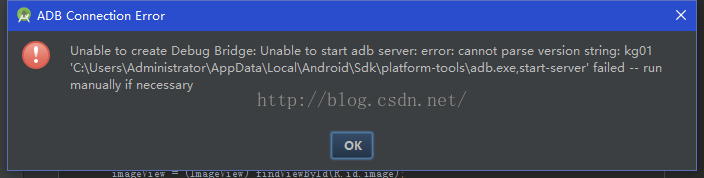
Unable to create Debug Bridge; Unable to start adb server; error; cannot parse version string ; Kg01 ‘C: \ users \ \ * * * * * * * * adb. Exe, start – server’ failed – run manually if necessary.

here is my error report picture:

Solutions:
The error message indicates that the port is occupied by an adb.exe. Then we’ll find the adb.exe file in the cool dog folder and delete it. Does not affect the use of cool dog music.
Later, I summarized other problems that occupied the port, such as the following error code:
Unable to create Debug Bridge: Unable to start ADB Server: Error: could not install * SmartSocket * Listener: cannot bind to 127.0.0.1:5037
Could not read the ok from the ADB Server
* failed to start the daemon *
error: always connect to the daemon
‘D: * * * * * \ ADB exe, start – Server’ failed – run manually if necessary
This solution is different from the previous one:
Find the corresponding pid number occupying the port number 5037 by netstat -aon|findstr “5037”. Open task manager and kill the process with the corresponding PID number. Restart ADB.
 

C ා programming encountered an object reference is required for the non-static field, method, or property error

When you create static methods in your form code, the source code looks like this

public int imageNum=0;

。。。。。。

 public static int button1_clicknum()
        {
            return imageNum;
        }

This is followed by an error such as the following. The error is caused by the fact that the static method cannot directly access the non-static member, and the non-static field needs to be referenced, which can be a private member of an instance. To correct this, change imagenum to a static member.
Public static int imageNum = 0;

PHP Fatal error: Call to a member function query() on a non-object in

Call the function $this-> _db-> Query ($SQL), PHP Fatal error: Call to a member function query() on a non-object in.
At first I thought this function would not work, but later I found out that it was myself $this-> _DB does not exist.
My problem is that static variables are called directly within the class using $DBNAME,
It should be self: : DBNAME
I’ve sorted this out before, but I can’t remember it…

How to Fix error: ‘for’ loop initial declarations are only allowed in C99 mode

During the makefile execution today, the following error occurred:

error: 'for' loop initial declarations are only allowed in C99 mode

note: use option -std=c99 or -std=gnu99 to compile your code

The reason for this is that GCC is based on the C89 standard at compile time, and the C89 standard does not support circular statements defined as follows:

 for(int i=0; i<width; i++)

I in a loop statement is not supported to be defined in a loop statement, so change it to:

 int i;
for(i=0; i<width; i++);

Reexecution will not error ~

VMware Workstation unrecoverable error: (vcpu-0) c.382

Today, I copied the virtual machine from the old machine to the new machine. I made an error starting the virtual machine:
VMware Workstation is not recoverable error: (vcpu-0)
vcpu-0:VERIFY vmcore/vmm/main/cpuid.c.382
bugNr=1036521
.
See online that there is a way to add the following content to the.vmx file of the virtual machine:
smc.version = 0
Then save and restart.
But I just couldn’t live without it, and then I found another way online, turning on CPU virtualization in my computer’s BIOS Settings.
Find the Intel Virtual Technology in the BIOS, set it to ENABLE, save the restart, and the virtual machine will open normally.