Category Archives: How to Fix

“The CC version check failed” is reported when Ubuntu installs NVIDIA graphics card driver

I have referred to the questions answered by many bloggers, but there are many problems or troubles. I recommend a better solution after I try to solve it:

The reason for this problem is that the driver may be relatively new, and the GCC version of the system kernel is inconsistent with the default GCC version of the compiler. First, GCC -v check the default GCC version of the current compiler. If it is relatively low and you have not updated the GCC version, upgrade the GCC and C + + versions: sudo apt get install gcc-9 G + ± 9 – Y

Then open the installation path to see the GCC versions: LS/usr/bin/GCC*

Generally, the GCC version has been upgraded. If there are multiple versions in this directory, set the soft connection between GCC and G + +:
CD/usr/bin

sudo ln -sf gcc-9 gcc
sudo ln -sf g+±9 g++

Finally, just update the environment:
source/etc/environment

At this time, GCC -v check the GCC version of the current compiler. If it is consistent with the version prompted by the kernel, you can install it according to the normal graphics card driver steps

Python import GDAL failed: DLL load failed. The specified module cannot be found.

Recently, after installing some libraries such as pyqt and labelme in CONDA environment, I planned to run a geotif to JPG program, but an error was reported at the beginning of running, showing that there was a problem with the sentence Import importlib. Machine in imp.py, and the last line
return_ Load (SPEC) importerror: DLL load failed: the specified module could not be found although import does not prompt syntax errors, it will report errors when running. It is speculated that there is a problem with the import of GDAL library. Because the GDAL installed before is available, it can not be used now. It took a long time to make trouble. Finally, it is directly reinstalled to solve the problem, which has nothing to do with the version
CONDA enters the environment,
PIP uninstall GDAL
then find the previous GDAL installation package. My GDAL is gdal-3.2.1-cp37-cp37m-win_ Amd64.whl, install this installation package directly
PIP install gdal-3.2.1-cp37-cp37m-win_ Amd64.whl
after successful installation, enter Python for import, and the problem is solved

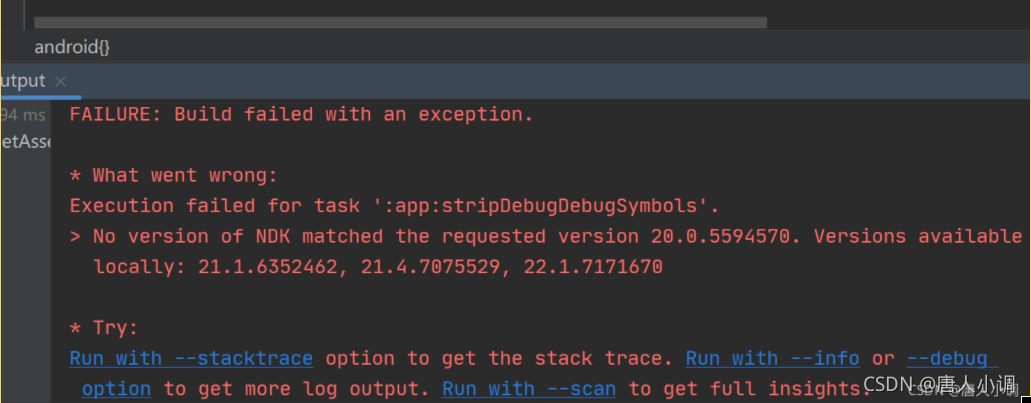
Execution failed for task ‘:app:stripDebugDebugSymbols‘.

Android compilation error

Execution failed for task ‘:app:stripDebugDebugSymbols’.

Specific:

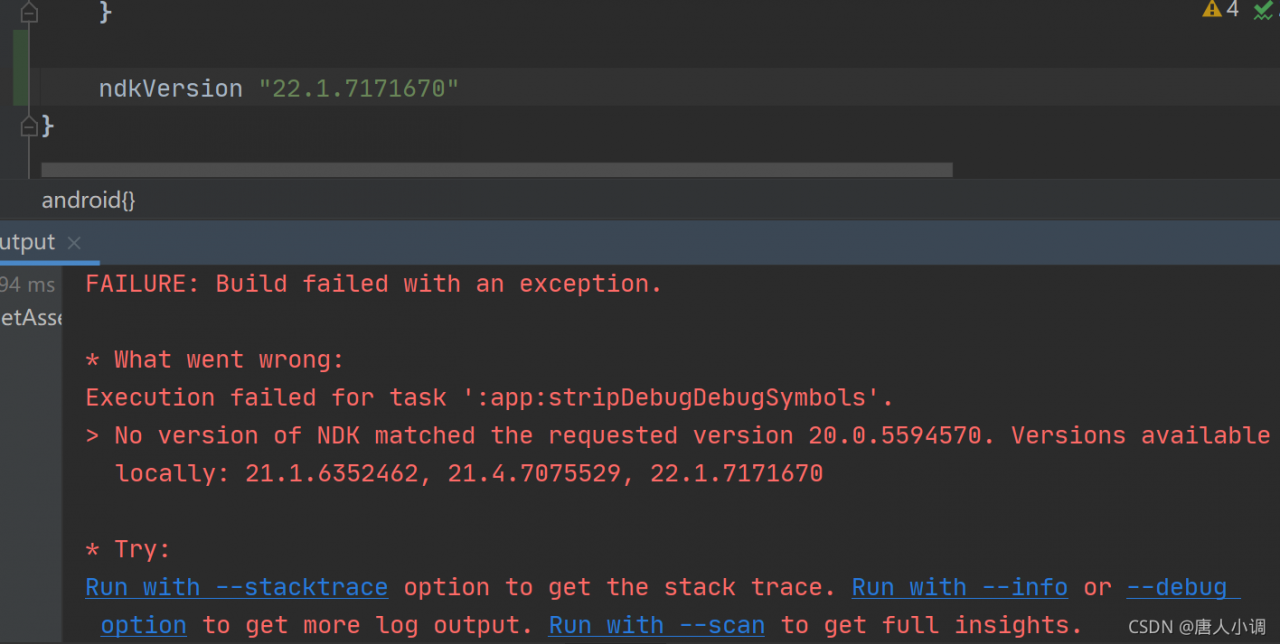
solve:

The solution is also given above, that is, an appropriate NDK version is required. Then you can specify the NDK version in build.gradle
 

android {

    ......


    ndkVersion "22.1.7171670"
} 


Then compile again and there will be no problem.

ps:

The key to this problem is that it can run normally a few days ago, but it can’t run now!

In retrospect, I upgraded NDK two days ago. It should be caused by this reason.

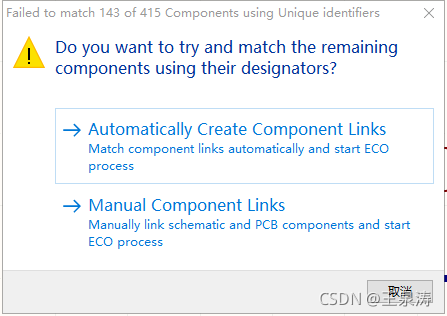
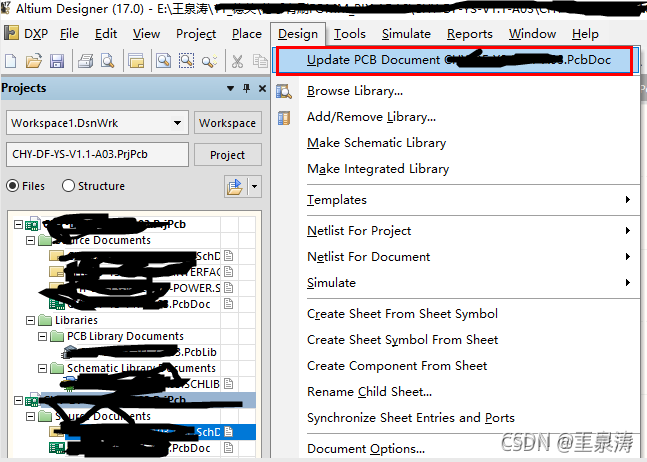
Update ad schematic to PCB, failed to match

*Background: in the process of updating the schematic to PCB, there is often a mismatch between the components on the schematic and those on the PCB, so we should be very careful and check them one by one, otherwise there will be a lesson of blood and tears (the components in the PCB are lost).

1、 Update the schematic diagram to pcb
II. Perform device matching

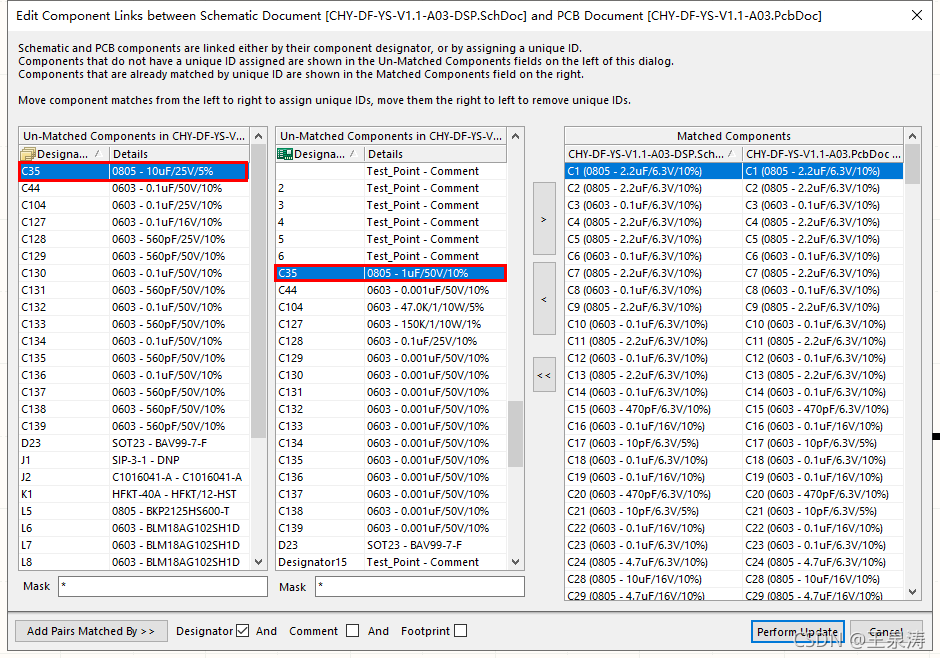
There are automatic and manual. For the time being, demonstrate manual operation

for example: C35, find the first column and the second column, then select and click & gt

perform operations similar to C35 one by one

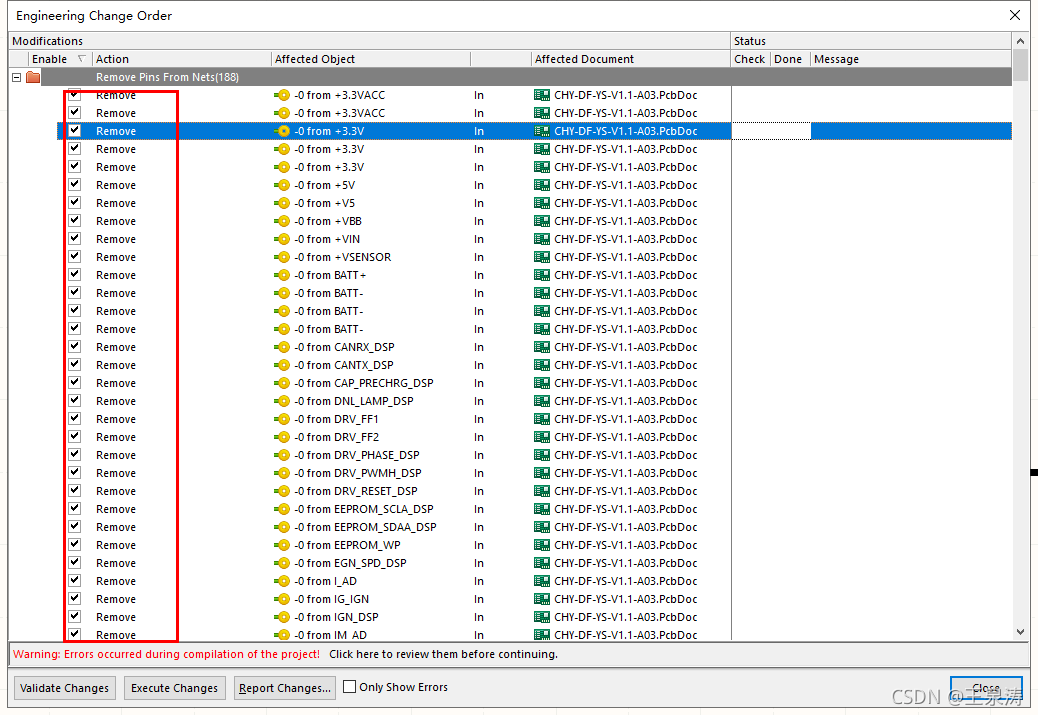
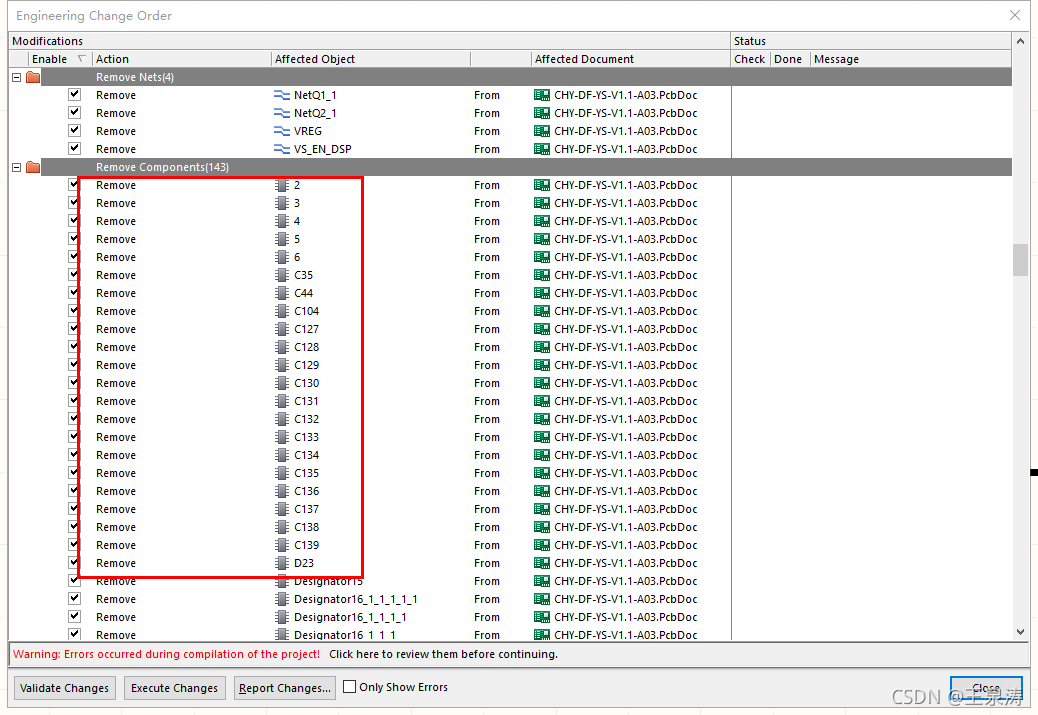
3、 Execute the change

in this figure, the remove operation is to delete the routing

in this figure, the remove operation is to delete the device

Do this carefully. You’d better take a picture, and then check whether any devices are lost one by one Is there any wiring missing!!!

Summary:
(1) this situation is generally caused by the person who changed the drawing before, just for a moment, directly changed the PCB without changing the schematic diagram or updating it
also, the PCB library path corresponding to the device is not specified.

(2) If a lot of network nodes are gone and the routing is gone as soon as the update is executed, it is the layout engineer’s method of drawing lines without nodes in pcbdoc!!!

docker service Failed to get D-Bus connection: Operation not permitted

[hadoop@hadoop03 fastdfs-docker]$ sudo docker run -d --privileged=true  a:v1
2be67a4f7e63d5277fc7bea8ca46946e40d526f93bc634166826de2bd5179554
[hadoop@hadoop03 fastdfs-docker]$ sudo docker exec -it 2b bash
[root@2be67a4f7e63 /]# service keepalived start
Redirecting to /bin/systemctl start keepalived.service
Failed to get D-Bus connection: Operation not permitted
[root@2be67a4f7e63 /]# exit
exit
[hadoop@hadoop03 fastdfs-docker]$ sudo docker stop 2b
2b
[hadoop@hadoop03 fastdfs-docker]$ sudo docker rm 2b
2b

Create a container and start with/usr/SBIN/init

######################
[hadoop@hadoop03 fastdfs-docker]$ sudo docker run -d --privileged=true  a:v1 /usr/sbin/init
2dfab2702a180537f58549457fd5993bb0ee3e6e2da72e0672af58d922286ffd
[hadoop@hadoop03 fastdfs-docker]$ sudo docker exec -it 2d bash
[root@2dfab2702a18 /]# service keepalived start

Redirecting to /bin/systemctl start keepalived.service
[root@2dfab2702a18 /]#
[root@2dfab2702a18 /]# service keepalived status
Redirecting to /bin/systemctl status keepalived.service
● keepalived.service - LVS and VRRP High Availability Monitor
   Loaded: loaded (/usr/lib/systemd/system/keepalived.service; disabled; vendor preset: disabled)
   Active: active (running) since Fri 2021-10-08 06:26:55 UTC; 4s ago
  Process: 250 ExecStart=/usr/sbin/keepalived $KEEPALIVED_OPTIONS (code=exited, status=0/SUCCESS)
 Main PID: 251 (keepalived)
   CGroup: /docker/2dfab2702a180537f58549457fd5993bb0ee3e6e2da72e0672af58d922286ffd/system.slice/keepalived.service
           └─251 /usr/sbin/keepalived -D
           ‣ 251 /usr/sbin/keepalived -D

Oct 08 06:26:55 2dfab2702a18 systemd[1]: Started LVS and VRRP High Availability Monitor.
Oct 08 06:26:55 2dfab2702a18 Keepalived_vrrp[253]: Unable to load module xt_set - not using ipsets
Oct 08 06:26:55 2dfab2702a18 Keepalived_vrrp[253]: VRRP_Instance(VI_1) removing protocol VIPs.
Oct 08 06:26:55 2dfab2702a18 Keepalived_vrrp[253]: VRRP_Instance(VI_1) removing protocol iptable drop rule
Oct 08 06:26:55 2dfab2702a18 Keepalived_vrrp[253]: Using LinkWatch kernel netlink reflector...
Oct 08 06:26:55 2dfab2702a18 Keepalived_vrrp[253]: VRRP_Instance(VI_1) Entering BACKUP STATE
Oct 08 06:26:55 2dfab2702a18 Keepalived_vrrp[253]: VRRP sockpool: [ifindex(447), proto(112), unicast(0), fd(10,11)]
Oct 08 06:26:55 2dfab2702a18 Keepalived[251]: Keepalived_healthcheckers exited with permanent error FATAL. Terminating
Oct 08 06:26:55 2dfab2702a18 Keepalived[251]: Stopping
Oct 08 06:26:56 2dfab2702a18 Keepalived_vrrp[253]: Stopped
[root@2dfab2702a18 /]#

Interrupted function call accept failed when idea starts Tomcat

idea start interrupted function call accept failed or cant write file {0}
1. Use CMD netstat - ano|findstr port number , and then taskkill - F - PID process port number to kill process
2. If the port is not found to be occupied in the above steps (this is the case for me), Try to close idea, right-click to run as administrator, and then start again

53 Command “python setup.py egg_info“ failed with error

53.1 introduction

Today, we set up the esp8266 development environment of Anxin technology in the Ubuntu environment. When we went to the configuration step, a problem occurred. We checked it online, but it was not actually solved. Later, we found that the foreign blog encountered the same problem as me. We solved it by referring to his practice. This is hereby recorded to make up for the lack of integrity of the Chinese blog’s solution to this problem.

53.2 problems

The configuration compilation problem is as follows:

qihua@qihua-virtual-machine:~/esp/setuptools-19.2$ sudo pip install setuptools -U
The directory '/home/qihua/.cache/pip/http' or its parent directory is not owned by the current user and the cache has been disabled. Please check the permissions and owner of that directory. If executing pip with sudo, you may want sudo's -H flag.
The directory '/home/qihua/.cache/pip' or its parent directory is not owned by the current user and caching wheels has been disabled. check the permissions and owner of that directory. If executing pip with sudo, you may want sudo's -H flag.
Collecting setuptools
  Downloading https://files.pythonhosted.org/packages/1e/5c/3d7b3d91a86d71faf5038c5d259ed36b5d05b7804648e2c43251d574a6e6/setuptools-58.2.0.tar.gz (2.3MB)
    100% |████████████████████████████████| 2.3MB 830kB/s 
    Complete output from command python setup.py egg_info:
    Traceback (most recent call last):
      File "<string>", line 1, in <module>
      File "setuptools/__init__.py", line 16, in <module>
        import setuptools.version
      File "setuptools/version.py", line 1, in <module>
        import pkg_resources
      File "pkg_resources/__init__.py", line 1367
        raise SyntaxError(e) from e
                                ^
    SyntaxError: invalid syntax
    
    ----------------------------------------
Command "python setup.py egg_info" failed with error code 1 in /tmp/pip-build-H1VVcQ/setuptools/
You are using pip version 8.1.1, however version 21.2.4 is available.
You should consider upgrading via the 'pip install --upgrade pip' command.

According to the above prompt, it is caused by the low version of PIP tool. As long as you run PIP related commands, an error will occur.

sudo python -m pip install --user -r $IDF_PATH/requirements.txt
The directory '/home/qihua/.cache/pip/http' or its parent directory is not owned by the current user and the cache has been disabled. Please check the permissions and owner of that directory. If executing pip with sudo, you may want sudo's -H flag.
The directory '/home/qihua/.cache/pip' or its parent directory is not owned by the current user and caching wheels has been disabled. check the permissions and owner of that directory. If executing pip with sudo, you may want sudo's -H flag.
Requirement already satisfied (use --upgrade to upgrade): setuptools in /home/qihua/esp/setuptools-19.2 (from -r /home/qihua/esp/ESP8266_RTOS_SDK/requirements.txt (line 4))
Collecting click>=5.0 (from -r /home/qihua/esp/ESP8266_RTOS_SDK/requirements.txt (line 8))
  Downloading https://files.pythonhosted.org/packages/21/83/308a74ca1104fe1e3197d31693a7a2db67c2d4e668f20f43a2fca491f9f7/click-8.0.1.tar.gz (327kB)
    100% |████████████████████████████████| 327kB 538kB/s 
    Complete output from command python setup.py egg_info:
    error in click setup command: 'install_requires' must be a string or list of strings containing valid project/version requirement specifiers; Expected version spec in colorama; platform_system == 'Windows' at ; platform_system == 'Windows'
    
    ----------------------------------------
Command "python setup.py egg_info" failed with error code 1 in /tmp/pip-build-iqFjPF/click/
You are using pip version 8.1.1, however version 21.2.4 is available.
You should consider upgrading via the 'pip install --upgrade pip' command.

However, follow the prompts to execute the upgrade instruction: PIP install — upgrade pip   After, it’s useless. It’s not updated to.

53.3 solution

After a review, the command to automatically upgrade PIP (as follows) failed. It may just match the version used in the current environment.

pip install --upgrade pip

Then, upgrade pip to a higher version by specifying the upgrade version. The command is as follows:

pip install --upgrade pip==20.3

After upgrading pip, I also upgraded the setuptools tool.

qihua@qihua-virtual-machine:~/esp/setuptools-19.2$ python -m pip install --upgrade setuptools
DEPRECATION: Python 2.7 reached the end of its life on January 1st, 2020. Please upgrade your Python as Python 2.7 is no longer maintained. pip 21.0 will drop support for Python 2.7 in January 2021. More details about Python 2 support in pip can be found at https://pip.pypa.io/en/latest/development/release-process/#python-2-support pip 21.0 will remove support for this functionality.
Defaulting to user installation because normal site-packages is not writeable
Collecting setuptools
  Downloading setuptools-44.1.1-py2.py3-none-any.whl (583 kB)
     |████████████████████████████████| 583 kB 231 kB/s 
Installing collected packages: setuptools
Successfully installed setuptools-44.1.1
WARNING: You are using pip version 20.3; however, version 20.3.4 is available.
You should consider upgrading via the '/usr/bin/python -m pip install --upgrade pip' command.
Finally, the problem is solved!!

qihua@qihua-virtual-machine:~/esp/setuptools-19.2$ sudo python -m pip install --user -r $IDF_PATH/requirements.txt
DEPRECATION: Python 2.7 reached the end of its life on January 1st, 2020. Please upgrade your Python as Python 2.7 is no longer maintained. pip 21.0 will drop support for Python 2.7 in January 2021. More details about Python 2 support in pip can be found at https://pip.pypa.io/en/latest/development/release-process/#python-2-support pip 21.0 will remove support for this functionality.
WARNING: The directory '/home/qihua/.cache/pip' or its parent directory is not owned or is not writable by the current user. The cache has been disabled. Check the permissions and owner of that directory. If executing pip with sudo, you may want sudo's -H flag.
Requirement already satisfied: setuptools in /usr/local/lib/python2.7/dist-packages/setuptools-19.2-py2.7.egg (from -r /home/qihua/esp/ESP8266_RTOS_SDK/requirements.txt (line 4)) (19.2)
Collecting click>=5.0
  Downloading click-7.1.2-py2.py3-none-any.whl (82 kB)
     |████████████████████████████████| 82 kB 207 kB/s 
Requirement already satisfied: pyserial>=3.0 in /usr/lib/python2.7/dist-packages (from -r /home/qihua/esp/ESP8266_RTOS_SDK/requirements.txt (line 9)) (3.0.1)
Collecting future>=0.15.2
  Downloading future-0.18.2.tar.gz (829 kB)
     |████████████████████████████████| 829 kB 363 kB/s 
Collecting cryptography>=2.1.4
  Downloading cryptography-3.3.2-cp27-cp27mu-manylinux2010_x86_64.whl (2.6 MB)
     |████████████████████████████████| 2.6 MB 8.0 MB/s 
Collecting pyparsing<2.4.0,>=2.0.3
  Downloading pyparsing-2.3.1-py2.py3-none-any.whl (61 kB)
     |████████████████████████████████| 61 kB 19.0 MB/s 
Collecting pyelftools>=0.22
  Downloading pyelftools-0.27-py2.py3-none-any.whl (151 kB)
     |████████████████████████████████| 151 kB 34.7 MB/s 
Collecting enum34; python_version < "3"
  Downloading enum34-1.1.10-py2-none-any.whl (11 kB)
Collecting six>=1.4.1
  Downloading six-1.16.0-py2.py3-none-any.whl (11 kB)
Collecting ipaddress; python_version < "3"
  Downloading ipaddress-1.0.23-py2.py3-none-any.whl (18 kB)
Collecting cffi>=1.12
  Downloading cffi-1.14.6-cp27-cp27mu-manylinux1_x86_64.whl (389 kB)
     |████████████████████████████████| 389 kB 12.1 MB/s 
Collecting pycparser
  Downloading pycparser-2.20-py2.py3-none-any.whl (112 kB)
     |████████████████████████████████| 112 kB 18.2 MB/s 
Building wheels for collected packages: future
  Building wheel for future (setup.py) ... done
  Created wheel for future: filename=future-0.18.2-py2-none-any.whl size=504728 sha256=b1326b708e930fd621e0c6b869c09994de1f05597255e33694647dcdb71475df
  Stored in directory: /tmp/pip-ephem-wheel-cache-lty8At/wheels/5f/11/0c/aad680baf5ef4fbcbab992c9f03e1130357e0c173a4fdabfff
Successfully built future
Installing collected packages: click, future, enum34, six, ipaddress, pycparser, cffi, cryptography, pyparsing, pyelftools
  WARNING: The scripts futurize and pasteurize are installed in '/home/qihua/.local/bin' which is not on PATH.
  Consider adding this directory to PATH or, if you prefer to suppress this warning, use --no-warn-script-location.
Successfully installed cffi-1.14.6 click-7.1.2 cryptography-3.3.2 enum34-1.1.10 future-0.18.2 ipaddress-1.0.23 pycparser-2.20 pyelftools-0.27 pyparsing-2.3.1 six-1.16.0
WARNING: You are using pip version 20.3; however, version 20.3.4 is available.
You should consider upgrading via the '/usr/bin/python -m pip install --upgrade pip' command.
Manifest merger failed with multiple errors

Androidmanifest.xml integration failed
my solution is:
build.gradle in the app

android {
    compileSdkVersion 30

    defaultConfig {
        minSdkVersion 21
        targetSdkVersion 30
        versionCode 202
   }
}

Build.gradle in the module, plus buildtoolsversion “29.0.0”

android {
    compileSdkVersion 29
    buildToolsVersion "29.0.0"

    defaultConfig {
        minSdkVersion 21
        targetSdkVersion 29
        versionCode 1
        versionName "1.0"
   }
}

Manifest merger failed with multiple errors, see logs

This problem is commonly encountered in Android Development:

Manifest merger failed with multiple errors, see logs

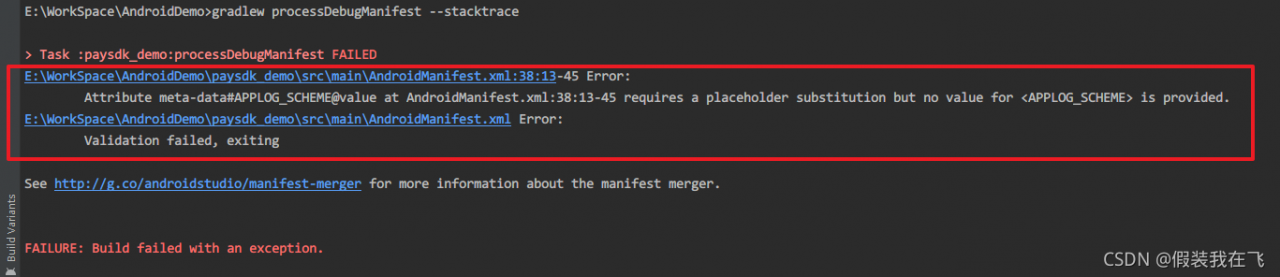
Generally, there is an error in merging resources in manifest. At this time, enter the following command on the Android studio command console:

gradlew processDebugManifest –stacktrace

Press enter to view the error log, similar to the following prompts:

E:\WorkSpace\AndroidDemo>gradlew processDebugManifest --stacktrace

> Task :paysdk_demo:processDebugManifest FAILED
E:\WorkSpace\AndroidDemo\paysdk_demo\src\main\AndroidManifest.xml:38:13-45 Error:
        Attribute meta-data#APPLOG_SCHEME@value at AndroidManifest.xml:38:13-45 requires a placeholder substitution but no value for <APPLOG_SCHEME> is provided.
E:\WorkSpace\AndroidDemo\paysdk_demo\src\main\AndroidManifest.xml Error:
        Validation failed, exiting

See http://g.co/androidstudio/manifest-merger for more information about the manifest merger.

Modify the error code at the corresponding position.


After upgrading windows 11, Wireshark can’t get list of interfaces: packetgetadapternames reports an error

Question

After win10 is upgraded to win11, Wireshark displays Wireshark can’t get list of interfaces: packetgetadapternames: the system cannot find the specified path
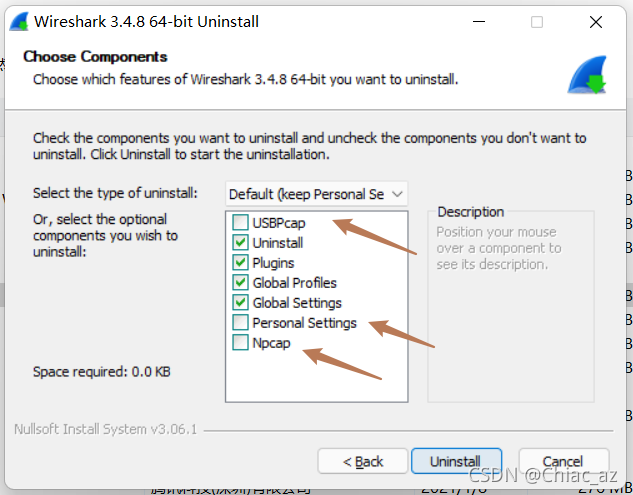
packetgetadapternames is an API of WinPcap. Wireshark captures packets based on WinPcap or npcap. When installing Wireshark, an npcap or usbpcap will be automatically installed. I guess npcap or usbpcap may disappear after upgrading the system, so uninstall Wireshark and reinstall it. Just install npcap or usbpcap

solve

Remember to check all these options when uninstalling