Category Archives: How to Fix

Vue — run ‘NPM audit fix’ to fix them, or ‘NPM audit’ for details appears when initializing the installation

Initialize NPM install, run ‘NPM Audit fix’ to fix them, or ‘NPM audit’ for details, then execute the following command:

npm audit fix
npm audit fix --force
npm audit

Specific problems and repair:

PS F:\Program Files\vue\**—vue> npm install
npm WARN deprecated [email protected]: Deprecated in favor of vinyl-ftp.
npm WARN deprecated [email protected]: gulp-util is deprecated - replace it, following the guidelines at https://medium.com/gulpjs/gulp-util-ca3b1f9f9ac5
npm WARN deprecated [email protected]: Legacy versions of mkdirp are no longer supported. Please update to mkdirp 1.x. (Note that the API surface has changed to use Promises in 1.x.)
npm WARN deprecated [email protected]: request has been deprecated, see https://github.com/request/request/issues/3142
npm WARN deprecated [email protected]: Switch to the `bfj` package for fixes and new features!
npm WARN deprecated [email protected]: Package no longer supported. Contact [email protected] for more info.
npm WARN deprecated [email protected]: core-js@<3 is no longer maintained and not recommended for usage due to the number of issues. Please, upgrade your dependencies to the actual version of core-js@3.      
npm WARN deprecated [email protected]: core-js@<3 is no longer maintained and not recommended for usage due to the number of issues. Please, upgrade your dependencies to the actual version of core-js@3.     

> [email protected] install F:\Program Files\vue\**—vue\node_modules\node-sass
> node scripts/install.js

Cached binary found at C:\Users\ww\AppData\Roaming\npm-cache\node-sass\4.13.1\win32-x64-72_binding.node

> [email protected] install F:\Program Files\vue\**—vue\node_modules\husky
> node ./bin/install.js

husky
setting up Git hooks
done


> [email protected] postinstall F:\Program Files\vue\**—vue\node_modules\core-js
> node -e "try{require('./postinstall')}catch(e){}"

Thank you for using core-js ( https://github.com/zloirock/core-js ) for polyfilling JavaScript standard library!

The project needs your help! Please consider supporting of core-js on Open Collective or Patreon: 
> https://opencollective.com/core-js 
> https://www.patreon.com/zloirock 

Also, the author of core-js ( https://github.com/zloirock ) is looking for a good job -)


> [email protected] postinstall F:\Program Files\vue\**—vue\node_modules\ejs
> node ./postinstall.js

Thank you for installing EJS: built with the Jake JavaScript build tool (https://jakejs.com/)


> [email protected] postinstall F:\Program Files\vue\**—vue\node_modules\tui-chart\node_modules\core-js
> node -e "try{require('./postinstall')}catch(e){}"


> [email protected] postinstall F:\Program Files\vue\**—vue\node_modules\node-sass
> node scripts/build.js

Binary found at F:\Program Files\vue\**—vue\node_modules\node-sass\vendor\win32-x64-72\binding.node
Testing binary
Binary is fine
npm notice created a lockfile as package-lock.json. You should commit this file.
npm WARN optional SKIPPING OPTIONAL DEPENDENCY: fsevents@^1.2.7 (node_modules\chokidar\node_modules\fsevents):
npm WARN notsup SKIPPING OPTIONAL DEPENDENCY: Unsupported platform for [email protected]: wanted {"os":"darwin","arch":"any"} (current: {"os":"win32","arch":"x64"})
npm WARN @fullcalendar/[email protected] requires a peer of vue@^2.6.6 but none is installed. You must install peer dependencies yourself.
npm WARN [email protected] requires a peer of html-webpack-plugin@^3.0.0 but none is installed. You must install peer dependencies yourself.
npm WARN [email protected] No repository field.
npm WARN optional SKIPPING OPTIONAL DEPENDENCY: [email protected] (node_modules\fsevents\node_modules\abbrev):
npm WARN enoent SKIPPING OPTIONAL DEPENDENCY: ENOENT: no such file or directory, rename 'F:\Program Files\vue\**—vue\node_modules\fsevents\node_modules\abbrev' -> 'F:\Program Files\vue\**—vue\node_modules\fsevents\node_modules\.abbrev.DELETE'
npm WARN optional SKIPPING OPTIONAL DEPENDENCY: [email protected] (node_modules\fsevents\node_modules\ansi-regex):
npm WARN enoent SKIPPING OPTIONAL DEPENDENCY: ENOENT: no such file or directory, rename 'F:\Program Files\vue\**—vue\node_modules\fsevents\node_modules\ansi-regex' -> 'F:\Program Files\vue\**—vue\node_modules\fsevents\node_modules\.ansi-regex.DELETE'
npm WARN optional SKIPPING OPTIONAL DEPENDENCY: [email protected] (node_modules\fsevents\node_modules\aproba):
npm WARN enoent SKIPPING OPTIONAL DEPENDENCY: ENOENT: no such file or directory, rename 'F:\Program Files\vue\**—vue\node_modules\fsevents\node_modules\aproba' -> 'F:\Program Files\vue\**—vue\node_modules\fsevents\node_modules\.aproba.DELETE'
npm WARN optional SKIPPING OPTIONAL DEPENDENCY: [email protected] (node_modules\fsevents\node_modules\balanced-match):
npm WARN enoent SKIPPING OPTIONAL DEPENDENCY: ENOENT: no such file or directory, rename 'F:\Program Files\vue\**—vue\node_modules\fsevents\node_modules\balanced-match' -> 'F:\Program Files\vue\**—vue\node_modules\fsevents\node_modules\.balanced-match.DELETE'
npm WARN optional SKIPPING OPTIONAL DEPENDENCY: [email protected] (node_modules\fsevents\node_modules\chownr):
npm WARN enoent SKIPPING OPTIONAL DEPENDENCY: ENOENT: no such file or directory, rename 'F:\Program Files\vue\**—vue\node_modules\fsevents\node_modules\chownr' -> 'F:\Program Files\vue\**—vue\node_modules\fsevents\node_modules\.chownr.DELETE'
npm WARN optional SKIPPING OPTIONAL DEPENDENCY: [email protected] (node_modules\fsevents\node_modules\code-point-at):
npm WARN enoent SKIPPING OPTIONAL DEPENDENCY: ENOENT: no such file or directory, rename 'F:\Program Files\vue\**—vue\node_modules\fsevents\node_modules\code-point-at' -> 'F:\Program Files\vue\**—vue\node_modules\fsevents\node_modules\.code-point-at.DELETE'
npm WARN optional SKIPPING OPTIONAL DEPENDENCY: [email protected] (node_modules\fsevents\node_modules\concat-map):
npm WARN enoent SKIPPING OPTIONAL DEPENDENCY: ENOENT: no such file or directory, rename 'F:\Program Files\vue\**—vue\node_modules\fsevents\node_modules\concat-map' -> 'F:\Program Files\vue\**—vue\node_modules\fsevents\node_modules\.concat-map.DELETE'
npm WARN optional SKIPPING OPTIONAL DEPENDENCY: [email protected] (node_modules\fsevents\node_modules\console-control-strings):
npm WARN enoent SKIPPING OPTIONAL DEPENDENCY: ENOENT: no such file or directory, rename 'F:\Program Files\vue\**—vue\node_modules\fsevents\node_modules\console-control-strings' -> 'F:\Program Files\vue\**—vue\node_modules\fsevents\node_modules\.console-control-strings.DELETE'
npm WARN optional SKIPPING OPTIONAL DEPENDENCY: [email protected] (node_modules\fsevents\node_modules\core-util-is):
npm WARN enoent SKIPPING OPTIONAL DEPENDENCY: ENOENT: no such file or directory, rename 'F:\Program Files\vue\**—vue\node_modules\fsevents\node_modules\core-util-is' -> 'F:\Program Files\vue\**—vue\node_modules\fsevents\node_modules\.core-util-is.DELETE'
npm WARN optional SKIPPING OPTIONAL DEPENDENCY: [email protected] (node_modules\fsevents\node_modules\deep-extend):
npm WARN enoent SKIPPING OPTIONAL DEPENDENCY: ENOENT: no such file or directory, rename 'F:\Program Files\vue\**—vue\node_modules\fsevents\node_modules\deep-extend' -> 'F:\Program Files\vue\**—vue\node_modules\fsevents\node_modules\.deep-extend.DELETE'
npm WARN optional SKIPPING OPTIONAL DEPENDENCY: [email protected] (node_modules\fsevents\node_modules\delegates):
npm WARN enoent SKIPPING OPTIONAL DEPENDENCY: ENOENT: no such file or directory, rename 'F:\Program Files\vue\**—vue\node_modules\fsevents\node_modules\delegates' -> 'F:\Program Files\vue\**—vue\node_modules\fsevents\node_modules\.delegates.DELETE'
npm WARN optional SKIPPING OPTIONAL DEPENDENCY: [email protected] (node_modules\fsevents\node_modules\detect-libc):
npm WARN enoent SKIPPING OPTIONAL DEPENDENCY: ENOENT: no such file or directory, rename 'F:\Program Files\vue\**—vue\node_modules\fsevents\node_modules\detect-libc' -> 'F:\Program Files\vue\**—vue\node_modules\fsevents\node_modules\.detect-libc.DELETE'
npm WARN optional SKIPPING OPTIONAL DEPENDENCY: [email protected] (node_modules\fsevents\node_modules\fs.realpath):
npm WARN enoent SKIPPING OPTIONAL DEPENDENCY: ENOENT: no such file or directory, rename 'F:\Program Files\vue\**—vue\node_modules\fsevents\node_modules\fs.realpath' -> 'F:\Program Files\vue\**—vue\node_modules\fsevents\node_modules\.fs.realpath.DELETE'
npm WARN optional SKIPPING OPTIONAL DEPENDENCY: [email protected] (node_modules\fsevents\node_modules\has-unicode):
npm WARN enoent SKIPPING OPTIONAL DEPENDENCY: ENOENT: no such file or directory, rename 'F:\Program Files\vue\**—vue\node_modules\fsevents\node_modules\has-unicode' -> 'F:\Program Files\vue\**—vue\node_modules\fsevents\node_modules\.has-unicode.DELETE'
npm WARN optional SKIPPING OPTIONAL DEPENDENCY: [email protected] (node_modules\fsevents\node_modules\inherits):
npm WARN enoent SKIPPING OPTIONAL DEPENDENCY: ENOENT: no such file or directory, rename 'F:\Program Files\vue\**—vue\node_modules\fsevents\node_modules\inherits' -> 'F:\Program Files\vue\**—vue\node_modules\fsevents\node_modules\.inherits.DELETE'
npm WARN optional SKIPPING OPTIONAL DEPENDENCY: [email protected] (node_modules\fsevents\node_modules\ini):
npm WARN enoent SKIPPING OPTIONAL DEPENDENCY: ENOENT: no such file or directory, rename 'F:\Program Files\vue\**—vue\node_modules\fsevents\node_modules\ini' -> 'F:\Program Files\vue\**—vue\node_modules\fsevents\node_modules\.ini.DELETE'
npm WARN optional SKIPPING OPTIONAL DEPENDENCY: [email protected] (node_modules\fsevents\node_modules\isarray):
npm WARN enoent SKIPPING OPTIONAL DEPENDENCY: ENOENT: no such file or directory, rename 'F:\Program Files\vue\**—vue\node_modules\fsevents\node_modules\isarray' -> 'F:\Program Files\vue\**—vue\node_modules\fsevents\node_modules\.isarray.DELETE'
npm WARN optional SKIPPING OPTIONAL DEPENDENCY: [email protected] (node_modules\fsevents\node_modules\minimist):
npm WARN enoent SKIPPING OPTIONAL DEPENDENCY: ENOENT: no such file or directory, rename 'F:\Program Files\vue\**—vue\node_modules\fsevents\node_modules\minimist' -> 'F:\Program Files\vue\**—vue\node_modules\fsevents\node_modules\.minimist.DELETE'
npm WARN optional SKIPPING OPTIONAL DEPENDENCY: [email protected] (node_modules\fsevents\node_modules\ms):
npm WARN enoent SKIPPING OPTIONAL DEPENDENCY: ENOENT: no such file or directory, rename 'F:\Program Files\vue\**—vue\node_modules\fsevents\node_modules\ms' -> 'F:\Program Files\vue\**—vue\node_modules\fsevents\node_modules\.ms.DELETE'
npm WARN optional SKIPPING OPTIONAL DEPENDENCY: [email protected] (node_modules\fsevents\node_modules\npm-normalize-package-bin):
npm WARN enoent SKIPPING OPTIONAL DEPENDENCY: ENOENT: no such file or directory, rename 'F:\Program Files\vue\**—vue\node_modules\fsevents\node_modules\npm-normalize-package-bin' -> 'F:\Program Files\vue\**—vue\node_modules\fsevents\node_modules\.npm-normalize-package-bin.DELETE'
npm WARN optional SKIPPING OPTIONAL DEPENDENCY: [email protected] (node_modules\fsevents\node_modules\number-is-nan):
npm WARN enoent SKIPPING OPTIONAL DEPENDENCY: ENOENT: no such file or directory, rename 'F:\Program Files\vue\**—vue\node_modules\fsevents\node_modules\number-is-nan' -> 'F:\Program Files\vue\**—vue\node_modules\fsevents\node_modules\.number-is-nan.DELETE'
npm WARN optional SKIPPING OPTIONAL DEPENDENCY: [email protected] (node_modules\fsevents\node_modules\object-assign):
npm WARN enoent SKIPPING OPTIONAL DEPENDENCY: ENOENT: no such file or directory, rename 'F:\Program Files\vue\**—vue\node_modules\fsevents\node_modules\object-assign' -> 'F:\Program Files\vue\**—vue\node_modules\fsevents\node_modules\.object-assign.DELETE'
npm WARN optional SKIPPING OPTIONAL DEPENDENCY: [email protected] (node_modules\fsevents\node_modules\os-homedir):
npm WARN enoent SKIPPING OPTIONAL DEPENDENCY: ENOENT: no such file or directory, rename 'F:\Program Files\vue\**—vue\node_modules\fsevents\node_modules\os-homedir' -> 'F:\Program Files\vue\**—vue\node_modules\fsevents\node_modules\.os-homedir.DELETE'
npm WARN optional SKIPPING OPTIONAL DEPENDENCY: [email protected] (node_modules\fsevents\node_modules\os-tmpdir):
npm WARN enoent SKIPPING OPTIONAL DEPENDENCY: ENOENT: no such file or directory, rename 'F:\Program Files\vue\**—vue\node_modules\fsevents\node_modules\os-tmpdir' -> 'F:\Program Files\vue\**—vue\node_modules\fsevents\node_modules\.os-tmpdir.DELETE'
npm WARN optional SKIPPING OPTIONAL DEPENDENCY: [email protected] (node_modules\fsevents\node_modules\path-is-absolute):
npm WARN enoent SKIPPING OPTIONAL DEPENDENCY: ENOENT: no such file or directory, rename 'F:\Program Files\vue\**—vue\node_modules\fsevents\node_modules\path-is-absolute' -> 'F:\Program Files\vue\**—vue\node_modules\fsevents\node_modules\.path-is-absolute.DELETE'
npm WARN optional SKIPPING OPTIONAL DEPENDENCY: [email protected] (node_modules\fsevents\node_modules\process-nextick-args):
npm WARN enoent SKIPPING OPTIONAL DEPENDENCY: ENOENT: no such file or directory, rename 'F:\Program Files\vue\**—vue\node_modules\fsevents\node_modules\process-nextick-args' -> 'F:\Program Files\vue\**—vue\node_modules\fsevents\node_modules\.process-nextick-args.DELETE'
npm WARN optional SKIPPING OPTIONAL DEPENDENCY: [email protected] (node_modules\fsevents\node_modules\safe-buffer):
npm WARN enoent SKIPPING OPTIONAL DEPENDENCY: ENOENT: no such file or directory, rename 'F:\Program Files\vue\**—vue\node_modules\fsevents\node_modules\safe-buffer' -> 'F:\Program Files\vue\**—vue\node_modules\fsevents\node_modules\.safe-buffer.DELETE'
npm WARN optional SKIPPING OPTIONAL DEPENDENCY: [email protected] (node_modules\fsevents\node_modules\safer-buffer):
npm WARN enoent SKIPPING OPTIONAL DEPENDENCY: ENOENT: no such file or directory, rename 'F:\Program Files\vue\**—vue\node_modules\fsevents\node_modules\safer-buffer' -> 'F:\Program Files\vue\**—vue\node_modules\fsevents\node_modules\.safer-buffer.DELETE'
npm WARN optional SKIPPING OPTIONAL DEPENDENCY: [email protected] (node_modules\fsevents\node_modules\sax):
npm WARN enoent SKIPPING OPTIONAL DEPENDENCY: ENOENT: no such file or directory, rename 'F:\Program Files\vue\**—vue\node_modules\fsevents\node_modules\sax' -> 'F:\Program Files\vue\**—vue\node_modules\fsevents\node_modules\.sax.DELETE'
npm WARN optional SKIPPING OPTIONAL DEPENDENCY: [email protected] (node_modules\fsevents\node_modules\semver):
npm WARN enoent SKIPPING OPTIONAL DEPENDENCY: ENOENT: no such file or directory, rename 'F:\Program Files\vue\**—vue\node_modules\fsevents\node_modules\semver' -> 'F:\Program Files\vue\**—vue\node_modules\fsevents\node_modules\.semver.DELETE'
npm WARN optional SKIPPING OPTIONAL DEPENDENCY: [email protected] (node_modules\fsevents\node_modules\set-blocking):
npm WARN enoent SKIPPING OPTIONAL DEPENDENCY: ENOENT: no such file or directory, rename 'F:\Program Files\vue\**—vue\node_modules\fsevents\node_modules\set-blocking' -> 'F:\Program Files\vue\**—vue\node_modules\fsevents\node_modules\.set-blocking.DELETE'
npm WARN optional SKIPPING OPTIONAL DEPENDENCY: [email protected] (node_modules\fsevents\node_modules\signal-exit):
npm WARN enoent SKIPPING OPTIONAL DEPENDENCY: ENOENT: no such file or directory, rename 'F:\Program Files\vue\**—vue\node_modules\fsevents\node_modules\signal-exit' -> 'F:\Program Files\vue\**—vue\node_modules\fsevents\node_modules\.signal-exit.DELETE'
npm WARN optional SKIPPING OPTIONAL DEPENDENCY: [email protected] (node_modules\fsevents\node_modules\strip-json-comments):
e\**—vue\node_modules\fsevents\node_modules\.strip-json-comments.DELETE'
npm WARN optional SKIPPING OPTIONAL DEPENDENCY: [email protected] (node_modules\fsevents\node_modules\util-deprecate):
npm WARN enoent SKIPPING OPTIONAL DEPENDENCY: ENOENT: no such file or directory, rename 'F:\Program Files\vue\**—vue\node_modules\fsevents\node_modules\util-deprecate' -> 'F:\Program Files\vue\**—vue\node_modules\fsevents\node_modules\.util-deprecate.DELETE'
npm WARN optional SKIPPING OPTIONAL DEPENDENCY: [email protected] (node_modules\fsevents\node_modules\wrappy):
npm WARN enoent SKIPPING OPTIONAL DEPENDENCY: ENOENT: no such file or directory, rename 'F:\Program Files\vue\**—vue\node_modules\fsevents\node_modules\wrappy' -> 'F:\Program Files\vue\**—vue\node_modules\fsevents\node_modules\.wrappy.DELETE'
npm WARN optional SKIPPING OPTIONAL DEPENDENCY: [email protected] (node_modules\fsevents\node_modules\yallist):
npm WARN enoent SKIPPING OPTIONAL DEPENDENCY: ENOENT: no such file or directory, rename 'F:\Program Files\vue\**—vue\node_modules\fsevents\node_modules\yallist' -> 'F:\Program Files\vue\**—vue\node_modules\fsevents\node_modules\.yallist.DELETE'

added 1812 packages from 1927 contributors and audited 24450 packages in 95.77s

26 packages are looking for funding
  run `npm fund` for details

found 11 vulnerabilities (2 low, 7 moderate, 2 high)
  run `npm audit fix` to fix them, or `npm audit` for details
npm WARN @fullcalendar/[email protected] requires a peer of vue@^2.6.6 but none is installed. You must install peer dependencies yourself.
npm WARN [email protected] requires a peer of html-webpack-plugin@^3.0.0 but none is installed. You must install peer dependencies yourself.
npm WARN [email protected] No repository field.
npm WARN optional SKIPPING OPTIONAL DEPENDENCY: [email protected] (node_modules\fsevents):
npm WARN notsup SKIPPING OPTIONAL DEPENDENCY: Unsupported platform for [email protected]: wanted {"os":"darwin","arch":"any"} (current: {"os":"win32","arch":"x64"})

+ [email protected]
+ [email protected]
+ [email protected]
added 17 packages from 47 contributors, removed 6 packages and updated 17 packages in 17.969s

25 packages are looking for funding
  run `npm fund` for details

fixed 7 of 11 vulnerabilities in 24450 scanned packages
  1 vulnerability required manual review and could not be updated
  3 package updates for 3 vulnerabilities involved breaking changes
  (use `npm audit fix --force` to install breaking changes; or refer to `npm audit` for steps to fix these manually)
PS F:\Program Files\vue\**—vue> npm atdit fix --force
npm WARN using --force I sure hope you know what you are doing.

Usage: npm <command>

where <command> is one of:
    access, adduser, audit, bin, bugs, c, cache, ci, cit,
    clean-install, clean-install-test, completion, config,
    create, ddp, dedupe, deprecate, dist-tag, docs, doctor,
    edit, explore, fund, get, help, help-search, hook, i, init,
    install, install-ci-test, install-test, it, link, list, ln,
    login, logout, ls, org, outdated, owner, pack, ping, prefix,
    profile, prune, publish, rb, rebuild, repo, restart, root,
    run, run-script, s, se, search, set, shrinkwrap, star,
    uninstall, unpublish, unstar, up, update, v, version, view,
    whoami

npm <command> -h  quick help on <command>
npm -l            display full usage info
npm help <term>   search for help on <term>
npm help npm      involved overview

Specify configs in the ini-formatted file:
    C:\Users\ww\.npmrc
or on the command line via: npm <command> --key value
Config info can be viewed via: npm help config

[email protected] C:\Users\ww\AppData\Roaming\npm\node_modules\npm

Did you mean one of these?
    audit
    edit

PS F:\Program Files\vue\**—vue> npm audit

                       === npm audit security report ===                        

# Run  npm install --save-dev [email protected]  to resolve 1 vulnerability
SEMVER WARNING: Recommended action is a potentially breaking change

  Moderate        Cross-Site Scripting                                          

  Package         webpack-bundle-analyzer                                       

  Dependency of   webpack-bundle-analyzer [dev]                                 

  Path            webpack-bundle-analyzer                                       

  More info       https://npmjs.com/advisories/826                              


# Run  npm install --save-dev [email protected]  to resolve 1 vulnerability
SEMVER WARNING: Recommended action is a potentially breaking change

  Moderate        Cross-Site Scripting                                          

  Package         serialize-javascript                                          

  Dependency of   compression-webpack-plugin [dev]                              

  Path            compression-webpack-plugin > serialize-javascript             

  More info       https://npmjs.com/advisories/1426                             


# Run  npm install --save-dev [email protected]  to resolve 1 vulnerability
SEMVER WARNING: Recommended action is a potentially breaking change

  Moderate        Cross-Site Scripting                                          

  Package         serialize-javascript                                          

  Dependency of   copy-webpack-plugin [dev]                                     

  Path            copy-webpack-plugin > serialize-javascript                    

  More info       https://npmjs.com/advisories/1426                             


                                 Manual Review                                  
             Some vulnerabilities require your attention to resolve             
                                                                                
          Visit https://go.npm.me/audit-guide for additional guidance           


  Moderate        Cross-Site Scripting                                          

  Package         serialize-javascript                                          

  Patched in      >=2.1.1                                                       

  Dependency of   uglifyjs-webpack-plugin [dev]                                 

  Path            uglifyjs-webpack-plugin > serialize-javascript                

  More info       https://npmjs.com/advisories/1426                             

found 4 moderate severity vulnerabilities in 24443 scanned packages
  3 vulnerabilities require semver-major dependency updates.
  1 vulnerability requires manual review. See the full report for details.
PS F:\Program Files\vue\**—vue>



Adobe finally launched Photoshop fix on Android, a powerful mobile phone map revision app

Super power net
The 2016-11-04 15:00

When Apple released the 12-inch iPad Pro last year, Adobe released a Photoshop Fix for it. Adobe has traditionally given priority to their apps on iOS and a little later on Android, but the Photoshop Fix didn’t arrive on Android for more than a year.

Adobe’s revised figure APP nature than like a picture show some useful, don’t have that a key facial, wrinkles to the enchanting such as silica gel, but still have provided the Photoshop Fix thin face, beautiful skin, and the function of the blur these basic skin care and other function also is stronger than general modification APP, can repair to a photograph, smooth, liquefaction, lights and other operations, this means that a lot of complex, so if you want to photos look good to have a little technology and kung fu. In addition, Photoshop Fix can save the edited content as a PSD file and put it into the computer version of Photoshop for further editing.

The Android version of Photoshop Fix requires an Android 5.0 level or above system. This year, all Android phones photographed will not be lower than this version of the system. Users who like a bit of professional style can try it and download it for free.
Google Play download: Adobe Photoshop Fix
Focus on WeChat ID expkf01, the first time to learn exciting activities and original technology information.

fix yahoo finance

Get the Yahoo data in Python

18:42:54, June 11, 2018

Reading count: 71

I learned machine learning in Python. I found a practical tutorial online. I needed to get stock data from Yahoo. The problems and solutions are given below.
Programming environment: Linux Ubuntu16, python3.6, anaconda 1.6.14, conda 4.5.4, pandas 0.23
= = = = = = = = = = = = = = = = = = = = = = = = = = = = = = = = = = = = = = = = = = = = = = = = = = = = = = = = = = = = = = = = = = = = = = = = = = = =
Problem 1: An environment interpretation error occurred while downloading Pandas _datareader
Because the Yahoo data needs to be retrieved through the Pandas _datareader module, you need to download and install the package
Environment parse error occurs with Conda Install Pandas _datareader (conda installation is used because anaconda is used to build the Python compile and edit environment) :

python@ubuntu:~$ conda install pandas_datareader
Solving environment: failed

PackagesNotFoundError: The following packages are not available from current channels:

  - pandas_datareader

Current channels:

  - https://repo.anaconda.com/pkgs/main/linux-64
  - https://repo.anaconda.com/pkgs/main/noarch
  - https://repo.anaconda.com/pkgs/free/linux-64
  - https://repo.anaconda.com/pkgs/free/noarch
  - https://repo.anaconda.com/pkgs/r/linux-64
  - https://repo.anaconda.com/pkgs/r/noarch
  - https://repo.anaconda.com/pkgs/pro/linux-64
  - https://repo.anaconda.com/pkgs/pro/noarch

To search for alternate channels that may provide the conda package you're
looking for, navigate to

    https://anaconda.org

and use the search bar at the top of the page.

Solution 1: Then change to PIP Install safari _datareader to install successfully!
Solution two: Later, I found that when I was using Conda to install the module, there were jupyter Notebook still running, so I tried to close it and then used Conda install Rebuild _datareader to find it could be successfully installed.
 
Question 2: ImportError: Cannot import name ‘is_list_like’ when using import pandas_datareader as PDR
I found many methods on the Internet, including the case column on StackFlow, but I still couldn’t find one suitable for me.
Solution one: Then give up searching for a solution online and start groping instead. Because the error message is that the module named ‘is_list_like’ cannot be imported, the code to find the error is in the first line from pandas.core.common.data import is_list_like in the fred.py module. Because the common folder and the modules under that folder cannot be found in the environment, the path to import is_list_like is wrong.
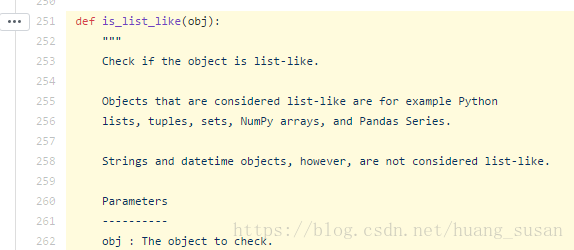
Then, Baidu search: panda IS_list_like finds the official API document of Pandas, and click Source to enter the source code module. It turns out that IS_list_like exists as a method of in the following path

Finally, I get rid of the Fred. Py the first line of the import path into: from pandas. Core. Dtype. Inference import is_list_like, import pandas_datareader modules again success!
 
Question 3: run the following code, appear ImmediateDeprecationError, namely the Yahoo! Finance no longer exists because in 2017 Yahoo! It was bought by Verizon

Yahoo Daily has been immediately deprecated due to large breaks in the API without the  
introduction of a stable replacement

The code is as follows:


    import pandas as pd


    import datetime


    import pandas_datareader.data as web


    start = datetime.datetime(
    2010,1,1)


    end = datetime.datetime(
    2017,1,1)


    df = web.get_data_yahoo(
    ‘SPY’,’yahoo’,start, end)

Baidu has found one solution in the CSDN blog: install Fix_yahoo_finance (PIP Install) and then run the following code before retrieving the data.


    import fix_yahoo_finance as fy


    fy.pdr_override()

Reproduced in: https://www.cnblogs.com/ziheIT/p/9249676.html

On NPM audit fix

Background:
The following reminder appears when NPM Install is executed

added 253 packages from 162 contributors and audited 1117 packages in 42.157s
found 5 vulnerabilities (1 low, 4 high)
  run `npm audit fix` to fix them, or `npm audit` for details html

According to the command prompted by the console, type ‘NPM Audit Fix’ and the console prompts:

1 package update for 5 vulns involved breaking changes
  (use `npm audit fix --force` to install breaking changes; or do it by hand)

After typing: ‘NPM Audit Fix — Force’, the console prompts:

added 199 packages from 111 contributors, removed 64 packages and updated 23 packages in 42.194sfixed 5 of 5 vulnerabilities in 1117 scanned packages
  1 package update for 5 vulns involved breaking changes
  (installed due to `--force` option)

Re-enter ‘NPM Audit’ :

                      === npm audit security report ===

found 0 vulnerabilities
 in 4598 scanned packages

At last everything was all right.
Out of curiosity, I read the introduction of NPM Audit Fix on the official website of NPM.
NPM audit: [email protected]& amp; NPm@6, which allows developers to analyze complex code and identify specific vulnerabilities and defects.
NPM Audit Fix: [email protected] detects vulnerabilities in project dependencies and automatically installs those that need to be updated without having to track and fix them themselves.
In the meantime, the website also provides some other commands, which are summarized as follows:
1. Run audit Fix, but only update PKglock, not Node_modules:

$ npm audit fix --package-lock-only

2. Update only the packages installed in Dependencies, and skip the packages in devDependencies:

$ npm audit fix --only=prod

3. Run the command to get the contents of the audit Fix to be updated and output the installation information in JSON format, but the update is not actually installed:

$ npm audit fix --dry-run --json

4. Get the detailed test report in JSON format

$ npm audit --json

The attached:
NPM – audit website address: https://docs.npmjs.com/cli/audit

Resolve the problem of “event ID 4107” or “event ID 11” errors recorded in the application logs of windows and windows server

Problem description
An error similar to the following was logged in the application log on a machine running Windows 7 or Windows Server 2008 R2:
Log name: application
source: microcosm-windows-capi2
date: date and time
event ID: 4107
task category: no
level: error
key words: classic
user: N/A
computer: computer name
description:
from < http://www.download.windowsupdate.com/msdownload/update/v3/static/trustedr/en/authrootstl.cab (http://www.download.windowsupdate.com/msdownload/update/v3/static/trustedr/en/authrootstl.cab) > The automatic update CAB failed to extract the third-party root list with the error: the certificate required for verification based on the current system clock or the timestamp in the signature file is not valid.
Or, an application log on a machine running Windows Vista or Windows Server 2008 records an error similar to the following:
Log name: application
source: microcosm-windows-capi2
date: date and time
event ID: 11
task category: no
level: error
key words: classic
user: N/A
computer: computer name
description:
from < http://www.download.windowsupdate.com/msdownload/update/v3/static/trustedr/en/authrootstl.cab (http://www.download.windowsupdate.com/msdownload/update/v3/static/trustedr/en/authrootstl.cab) > The automatic update CAB failed to extract the third-party root list with the error: the certificate required for verification based on the current system clock or the timestamp in the signature file is not valid.
why
The above error occurred because the Microsoft Certificate Trust List publisher certificate has expired. A copy of the CTL whose signature certificate has expired exists in the CryptnetUrlCache folder.
In addition, the event ID 4107 May be logged as a “data invalid” error rather than a “Certificate that is not valid when verified against the current system clock or timestamp in the signature file” error.
The solution
Our Fix IT team has provided you with an automated solution to help you solve this problem. You can download or run the solution directly by clicking the following picture or the “Fix it to help me solve this problem” text link:

Let Fix IT help me Fix this problem
Further reading
If you would like to learn more about this problem or try to solve it yourself manually, please refer to the technical articles on the Microsoft website:
http://support.microsoft.com/kb/2328240


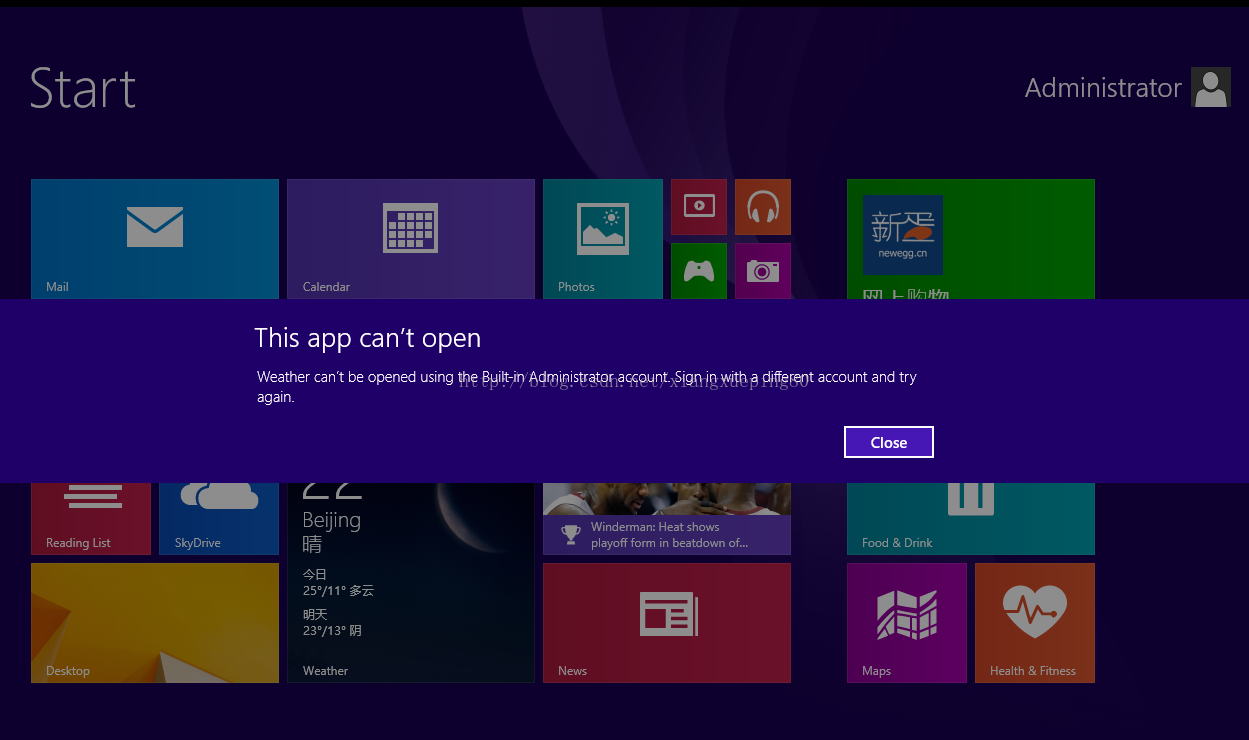
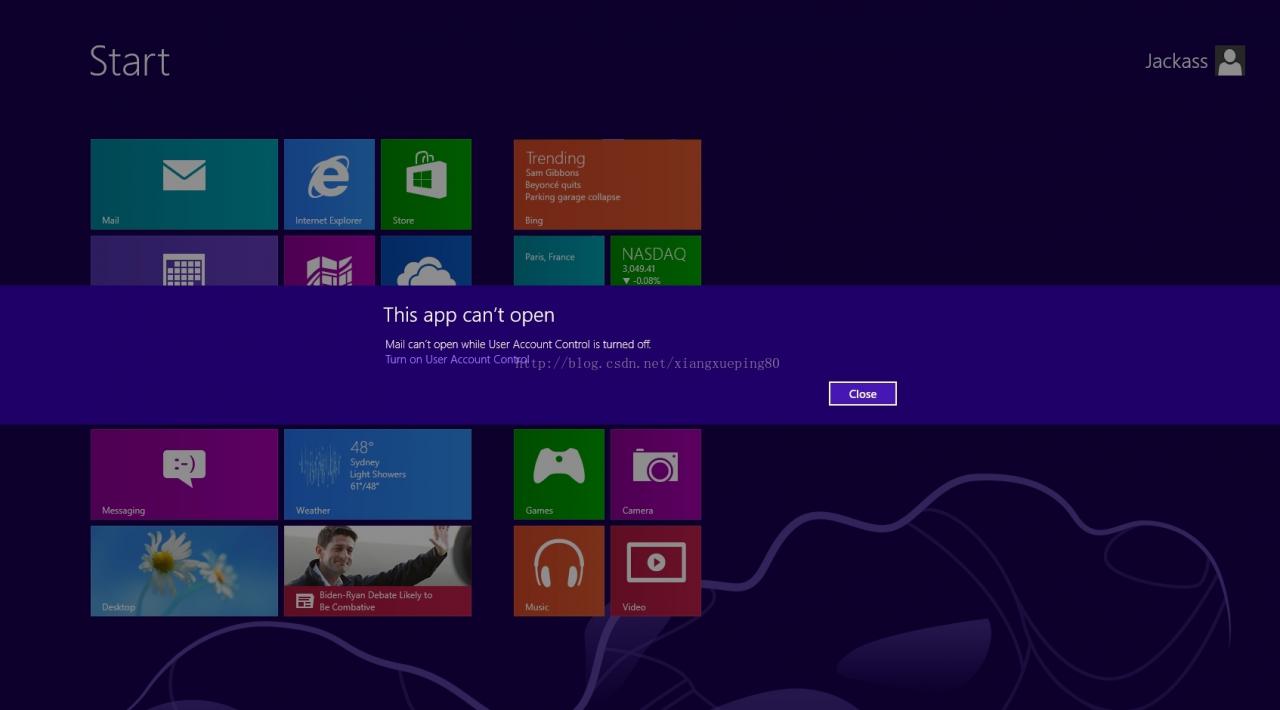
Windows 8.1 – Fix This app can’t open for Built-in Administrator account

This app can’t open can’t be opened using the Built-in Administrator account. 

This app can’t open can’t open while User Account Control is turned off. Turn on User Account Contro

Solution one: 
Sign in with a different account and try again.

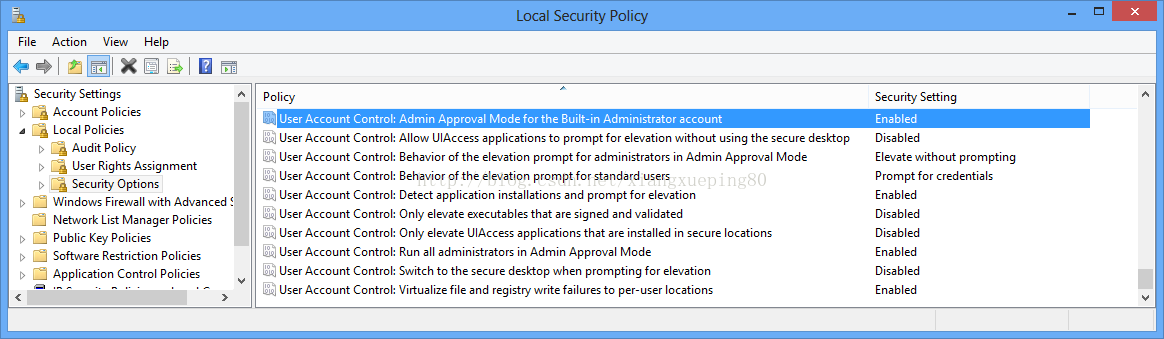
Solution two:
1. Local Security Policy – Run “secpol. msc” and modify as in screenshot 

2. Edit Registry – Run “regedit” and change the value as in screenshot

XNA 4 project running error: no suitable graphics card found

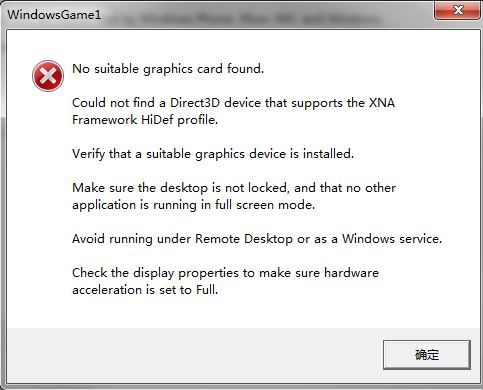
Today, I started to learn about the development of XNA Games. I created a new project to run directly and reported an error.
The error screenshot is as follows:

Later, I found a solution on the Internet. It turned out that my graphics card did not support DirectX 10. I only needed to change the GAME profile in XNA GAME Studio in the project property from Hidef to Reach, hoping that it could be helpful to friends who met the same problem with me.


QuickFIX/J100% Java Open Source FIX Engine

http://www.quickfixj.org/
The Financial Information eXchange (FIX) protocol is a messaging standard developed specifically for the real-time electronic exchange of securities transactions. FIX is a public-domain specification owned and maintained by FIX Protocol, Ltd (FPL).
QuickFIX/J is a full featured messaging engine for the FIX protocol. It is a 100% Java open source implementation of the popular C++ QuickFIX engine.
Features:
Free! It costs nothing and has a very liberal open source licence. Full source code available (also at no cost). Supports FIX versions 4.0 – 4.4, 5.0/FIXT1.1. Runs on any hardware and operating system supported by 1.4+ Java SE or compatible VM. Compatibility with QuickFIX C++ Java Native Wrapper API (easy to upgrade)Java NIO asynchronous network communications for scalability (using Apache MINA)Supports embedded SSL with Java 5+Provides standard JMX MBeans for FIX engine management Easy to embed in existing Java applications.
Choice of message processing threading strategiesCommunication transports for TCP sockets and VM pipes. Metadata-driven parsing and validation. Metadata-driven code generation of type-safe FIX message-related classes. Metadata API for use at application level (for example, FIX messaging UI). Support for protocol customizations (new messages, fields, constraints). Session state storage plugins: JDBC, File, SleepyCat/JE, In memoryLogging plugins: JDBC, File, SFL4J (supports JDK1.4 logging, Log4J, Commons Logging), Console, Composite
Failover and High Availability. Scheduling of session connections. Many automated unit and acceptance tests. Example applications: Simple Swing order entry UI and a console-based order execution simulator. Commercial support available from multiple sources.
 
About QuickFIX/J…
The Financial Information eXchange (FIX) protocol is a messaging standard developed specifically for the real-time electronic exchange of securities transactions. FIX is a public-domain specification owned and maintained by FIX Protocol, Ltd (FPL). The FPL mission is to improve the global trading process by defining, managing, and promoting an open protocol for real-time, electronic communication between industry participants, while complementing industry standards.
QuickFIX/J is a full featured messaging engine for the FIX protocol. It is a 100% Java open source implementation of the popular C++ QuickFIX engine. For more information see the QuickFIX/J web site.
Features:
Free! It costs nothing and has a very liberal open source licence. Full source code available (also at no cost). Supports FIX versions 4.0 – 4.4. Runs on any hardware and operating system supported by 1.4+ Java SE or compatible VM. Compatibility with QuickFIX C++ Java Native Wrapper API (easy to upgrade) Java NIO asynchronous network communications for scalability (using Apache MINA) Easy to embed in existing Java applications.
Choice of message processing threading strategies Communication transports for TCP sockets and VM pipes. Metadata-driven parsing and validation. Metadata-driven code generation of type-safe FIX message-related classes. Metadata API for use at application level (for example, FIX messaging UI). Support for protocol customizations (new messages, fields, constraints). Session state storage plugins: JDBC, File, SleepyCat/JE, In memory Logging plugins: JDBC, File, SFL4J (supports JDK1.4 logging, Log4J, Commons Logging), Console Failover and High Availability. Scheduling of session connections. Many automated unit and acceptance tests. Integrated SSL communications Example applications: Simple Swing order entry UI and a console-based order execution simulator. Commercial support available from multiple sources.
Building and Testing QuickFIX/J
Dependencies Building QuickFIX/J Generating the database for JDBC based store and log Testing QuickFIX/J
Using QuickFIX/J
Creating Your Application Configuration Acceptor Failover Support Dynamic Acceptor Session Definition Receiving Messages Sending Messages Repeating Groups User Defined Fields Validation Secure communications using SSL Managing QFJ Applications With JMX Configuring character sets. Customizing Message Code Generation. Example Applications Determining your QFJ version.
 

Microsoft fix 50688 [Windows 7 event ID10, WMI error resolution

The Windows7 event record has the following error message:

“Event filter with query” SELECT * FROM __InstanceModificationEvent WITHIN 60 WHERE TargetInstance ISA “Win32_Processor AND TargetInstance. LoadPercentage & gt;” ” 99″ Could not be reactivated in namespace “//./root/CIMV2″ because of error 0x80041003. Events cannot be delivered through this filter until the problem is corrected.”

as shown in the figure below:

the problem occurred after manual integration of SP1. There is a problem in the creation process caused by WMI registration left in DVD/ ISO. Microsoft says these incidents do not represent any problems in the system and can be safely ignored.

Microsoft has issued a fix “Microsoft fixit 50688.msi” for this issue.

ridicule CSDN recently came aunt zha, can not send the link, you brothers baidu download this patch bar

Reproduced in: https://www.cnblogs.com/ziyeqingshang/p/3769487.html

What can I learn from Kenshi

A two-person production team spent 12 years developing a hardcore game for a sandbox. The gameplay is still so much fun.
 
What are the implications?
Kenshi can be approximated as a combination of Riding and Chopping, the SIMS, Radiation, and The Gods: Original Sin. But I can say that there is no game like Kenshi on the market, because it is so unique.
So is there a lesson to be learned from making similar, relevant games?
 
What the hell is playfulness?
 
Open world
There is no complete goal, depending on the type, can be a lone Wolf, can be anyone you want to be. There are only hints for basic operations. The only way to upgrade skills and acquire powerful equipment is through community communication.
 
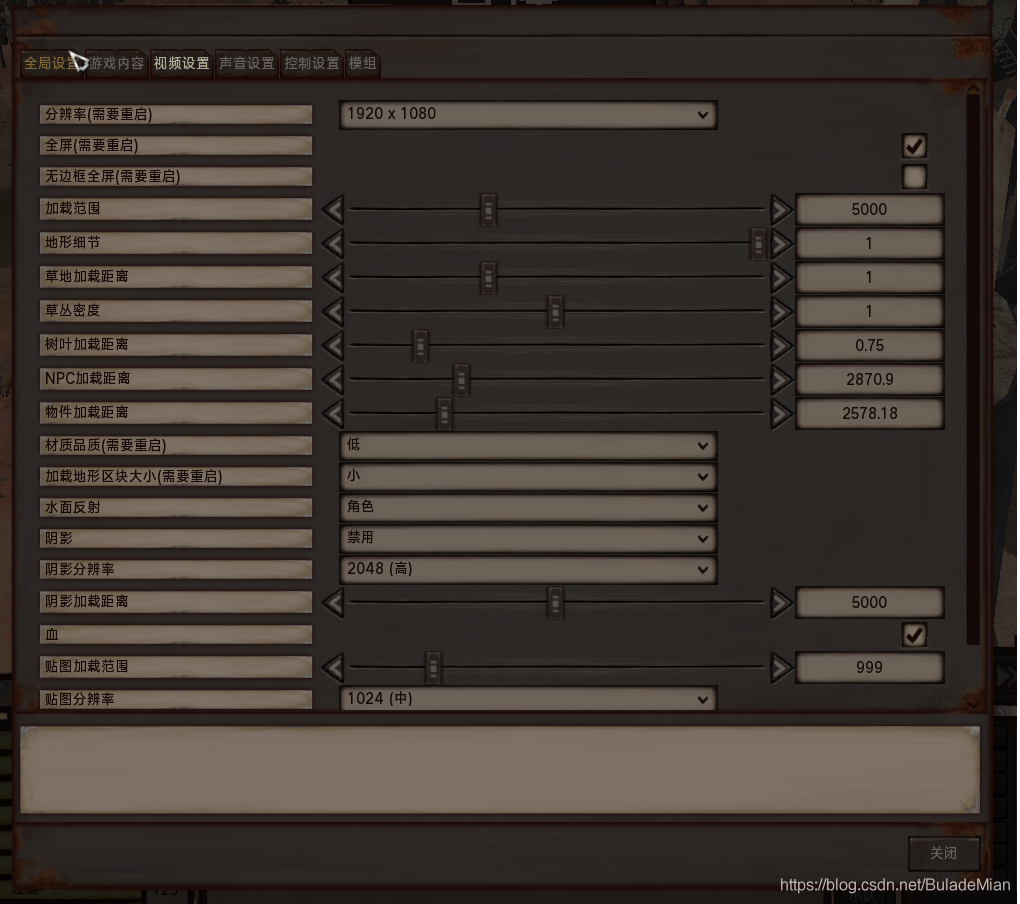
Open world, loaded NPCS, terrain, environment, objects, materials Settings, distance and range limits, does not mean that the entire game is directly loaded in memory, the current computer configuration is not supported for the time being.

NPC interaction
Not every NPC can interact and talk, guard, special dialogue to find fault with the NPC, robber, shop owner.
 
Role to develop
Almost every character can improve their abilities through training. Different RACES have different Settings, different experience for different skills, and different calculation values for different skills.
 
Characteristics of weapons
One-handed weapon, low damage, high speed
Long handled weapons. Indoor use is punishable
Giant weapon, high attack, can be broken armor, the level of the character’s skill requirements


Unable to find VBScript script engine or error 2738, could not access VBScript runtime

From: http://blog.sina.com.cn/s/blog_76af7f0f0101eoi2.html
The reason is to install some anti-virus software (such as Mcfee, Kaba, Rising, etc.), and change the DLL library of.vBS script opened by default in the registry. After uninstall anti-virus software, the registry that information has not been deleted, so lead to open. VBS script, DLL library, I’ll call the antivirus software program to appear this problem, the solution: manual methods, I integrated online methods to modify the following two registry keys (please backup before modification or setting up the system restore)

my system is Windows7 64 bit,

“start” -> “Run” – & gt; “Regedit”, find “HKEY_CLASSES_ROOT\CLSID\{b54F3741-5B07-11CF-a4B0-00AA004a55e8” \InprocServer32 “,

changes its “default” value to “C:\Windows\system32\vbscript.dll” (no quotes required, this DLL library is the program that opens. VBS scripts by default in Windows “).

before modifying, right click on the item “InprocServer32” and select “permission” to add “full control” permission to your current user, and then modify to solve this problem.  
The
value resolves the “VBScript script engine cannot be found” error on boot

when I found this method, I did not notice whether it was 64bit or 32bit, so I deleted the above values as follows.

then check HKEY_CLASSES_ROOT\CLSID\Wow6432Node\CLSID\{b54f3741-5b07-11cf-a4b0-00aa004a55e8}\InprocServer32 has the correct value C:\Windows\SysWOW64\vbscript.dll

, Error 2738, could not access vbscript runtime for custom action

needs to be resolved by modifying the following key value

HKEY_LOCAL_MACHINE\SOFTWARE\CLASSES\Wow6432Node\CLSID\{B54F3741-5B07-11cf-A4B0-00AA004A55E8}\InprocServer32.

change the value to “C:\Windows\SysWOW64\vbscript.dll” also need to set the permissions before modification

when you modify the above two items, you can see that the previous default DLL library is the residue of the McAfee that was uninstalled earlier.

there is also a method on the web that can be solved by deleting the following key values, but in my case, I did not find these two keys

Windows 64bit system delete

HKEY_Current_User\SOFTWARE\Classes\Wow6432Node\CLSID\{B54F3741-5B07-11CF-A4B0-00AA004A55E8

then enter cmd.exe enter CD %windir%\syswow64

and then enter regsvr32 vbscript.dll

Windows 32bit delete

HKEY_Current_User\SOFTWARE\Classes\CLSID\{B54F3741-5B07-11CF-A4B0-00AA004A55E8

then enter cmd.exe enter CD %windir%\system32

and then enter regsvr32 vbscript.dll

there is also an automatic fix if it is determined to be McAfee by downloading the fix:

1. Search for “McAffe Consumer Product Removal Tool” or “McPr.exe.”

2. Run MCPR. Exe.

3. Search MicrosoftFixit50842 or “MicrosoftFixit 50842.mSI “. Download the link http://go.microsoft.com/?linkid=9804433

4. Run MicrosoftFixit50842. Msi.

5. Restart and set.

above automatic method I did not use, for those who need to save the test.

reference links to http://answers.microsoft.com/en-us/windows/forum/windows_7-windows_programs/error-2738-could-not-access-vbscript-run-time-for/1a4499ae-8bc1-4534-9c6f-4d399ac70d9a

http://coldsummerwei.iteye.com/blog/940012

Pull is not possible because you have unmerged files. Please, fix them up in the work tree, and then

Note: The personal experience record of Git beginners is for reference only
 
1. Pull is not possible because you have unmerged files.
Symptoms: Pull
$ git pull
Pull is not possible because you have unmerged files.
Please, fix them up in the work tree, and then use ‘git add/rm < file> ‘
as appropriate to mark resolution, or use ‘git commit -a’
I think it’s because the local file is colliding
Solutions:
Reference –

1. Pull will use Git merge to cause conflicts. The conflicting files need to be resolved out of Git Add-u and git commit can only be pulled successfully.
2. If you want to abort local file changes, use Git reset –hard FETCH_HEAD. FETCH_HEAD represents the commit point formed after the last successful Git pull. Then git pull.
note:
Git merge forms a merge-head. Git push forms references like HEAD. A HEAD represents a local reference that has been formed after a recent successful push.

In my experience, sometimes this happens for no reason, and the Untracked files are quite many (actually I only changed one or two files), so I had to save the local changes I decided to make first, then use Git reset –hard FETCH_HEAD to go back to the point after the last successful pull, and then pull again without any problems
 
2.You are not currently on a branch.
Symptoms: During a pull, the “git reset –hard FETCH_HEAD” method fails.

$ git pull
You are not currently on a branch, so I cannot use any
'branch.<branchname>.merge' in your configuration file.
Please specify which remote branch you want to use on the command
line and try again (e.g. 'git pull <repository> <refspec>').
See git-pull(1) for details.

Solutions:
First git checkout-B temp
Second, Git Checkout Master
You can restore the master Repository state and then pull
Original: https://blog.51cto.com/halolk/1304701