A NoClassDefFoundError is an Error, while a ClassNotFoundException is an exception. In Java, an Error and an exception are handled differently. You can recover from an exception but you shouldn’t try to recover from an Error.
ClassNotFoundException causes:
Java supports dynamically loading classes using the Class.forName method. Passing the Class name of any Class as an argument to the method will cause the Class to be loaded into the JVM memory. If the Class is not found in the classpath, then a ClassNotFoundException is thrown at runtime.
ClassNotFoundException solve
Solving this problem requires ensuring that the required class, along with its dependent packages, exists in the classpath. A common problem is that the class name is misspelled.
Another cause of ClassNotFoundException is that when a class has already been loaded into memory by one class loader, another class loader tries to dynamically load the class from the same package. This can be avoided by controlling the dynamic classloading process.
NoClassDefFoundError causes:
If the JVM or ClassLoader instance tries to load a class (either through normal method calls, or by using new to create a new object), the class definition is not found. The class you are looking for exists at compile time but cannot be found at run time.
The problem may be caused by missing classes during the packaging process, or by corrupted or tampered JAR packages.
NoClassDefFoundError solve
The solution to this problem is to look for classes that are in the classpath at development time but not at run time.
Category Archives: How to Fix
Float: 99: input / output error appears in vscode SSH plug-in
Flock: 99: Input/ Output error in VSCode SSH plugin
The SSH plugin for VSCode will get lock under ~/.vscode-server by default, but on some servers mounted on NFS the flock: 99: Input/output error
Solution is to acquire the lock, under/TMP In SSH plugin Settings selected LockFiles In Temp, or search remote. SSH. LockfilesInTmp can find this setting.
Reference: http://meta.math.stackexchange.com/questions/5020/mathjax-basic-tutorial-and-quick-reference
Error LNK2019: unresolved external symbol_ Main the symbol is in the function___ Tmaincrtstartup
Error:
Error LNK2019: Unable to resolve external symbol _main, which is referenced in the function ___TMainCrtStartup
Cause analysis,
I use VS2013 debugging an MFC program when the problem occurred.
1. You built a console program with VC. Its entry function should be main, and you used WinMain.
- > You open a.c/.cpp file with vc and compile it directly, using Winmian instead of main as the entry function. VC’s default Settings at this point are for console applications.
Solutions:
1. Enter the project – & gt; setting-> C/C ++, select Preprocessor in Category, remove _CONSOLE in Processor Definitions, and add _WINDOWS
2. Enter the project – & gt; setting-> Link changes /subsystem:console to /subsystem: Windows in Projections.
3. Save Settings, Rebuild All.
Rust solves cargo build too slowly
Replace the crates repository source
- Open or create a new
er directory /.cargo/config f>to add the configuration to the>
[source.crates-io]
registry = "https://github.com/rust-lang/crates.io-index"

replace-with = 'tuna'
[source.tuna]
registry = "https://mirrors.tuna.tsinghua.edu.cn/git/crates.io-index.git"
- Save exit
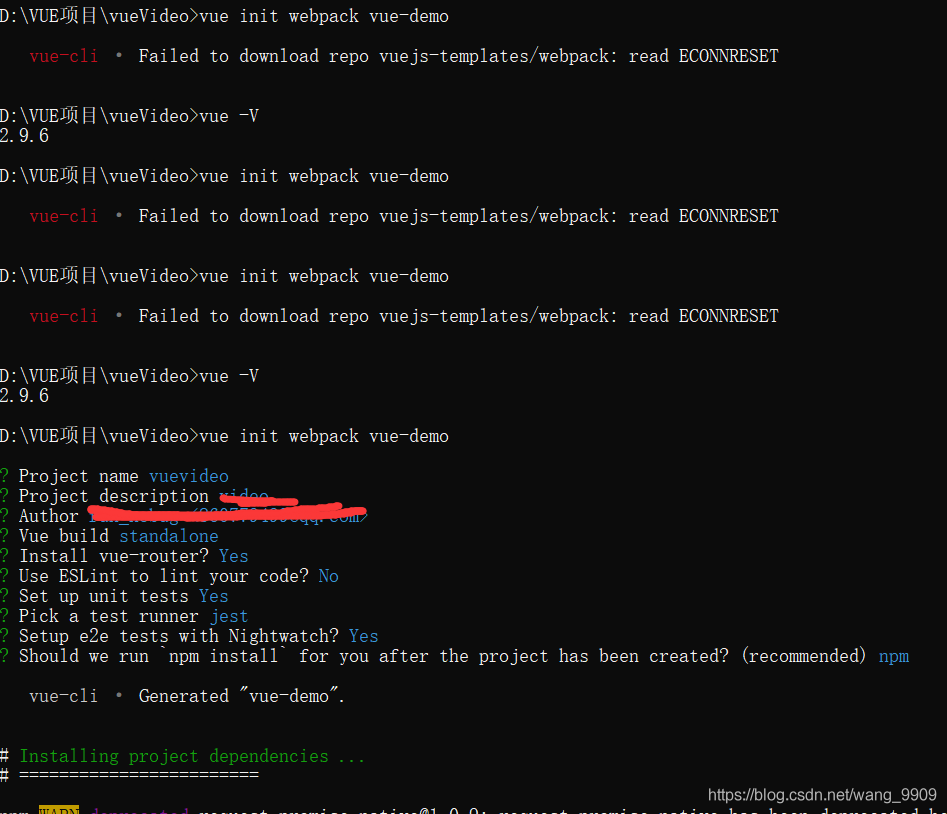
Vue cli · failed to download repo vuejs templates / webpack: read econnreset
 reported this error today while creating a new VUE project. It has been checked many times online, but there is no effective solution.
Then after many runs, suddenly found that it worked
br>
Python — magic identify file types
introduce
Magic is a python module to identify the file type
the original project address: https://github.com/ahupp/python-magic
the project integration the Windows needed libraries, directly use this one instead:
https://github.com/julian-r/python-magic
The installation
pip install python-magic-bin
Simple to use
Method 1
>>> import magic
>>> magic.from_file("testdata/test.pdf")
'PDF document, version 1.2'
>>> magic.from_buffer(open("testdata/test.pdf").read(1024))
'PDF document, version 1.2'
>>> magic.from_file("testdata/test.pdf", mime=True)
'application/pdf'
Method 2
>>> f = magic.Magic(uncompress=True)
>>> f.from_file('testdata/test.gz')
'ASCII text (gzip compressed data, was "test", last modified: Sat Jun 28 21:32:52 2008, from Unix)'
A small example of solving a real problem
This example combines the use of Zipfile and Magic
# coding:utf8

import os
from zipfile import ZipFile
import magic

m = magic.Magic()

dir_name = '/home/some_zip/'
for root, dir, files in os.walk(dir_name):
    zipnames = files
    break

for a_zip_name in zipnames:
    print '#' * 80
    print a_zip_name
    with ZipFile(dir_name + a_zip_name) as azip:
        filenames = azip.namelist()
        for i in [10, 20, 30]:
            with azip.open(filenames[i], pwd='zippassword') as afile:
                print m.from_buffer(afile.read())
Kill the specified port CMD command line taskkill in window
Two-step method: 1 query for port occupancy,2 kill the process by force
netstat -aon|findstr “8080”
taskkill /pid 4136-t -f
Execute the procedure under the Windows command line window
1. Check the specified port usage
netstat aon | findstr searches “8080”
Agreement local address external state of PID

The port is occupied by process 4136
2. Directly force kill the specified port
taskkill /pid 4136 -t -f

Ps: You can also close a process by its program name
View the corresponding process PID
tasklist | findstr searches “127704”
Image name PID will words name session # memory use

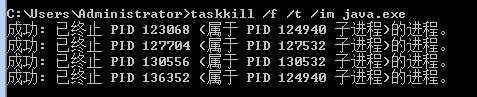
Taskkill /f /t /im java.exe
netstat -aon|findstr “8080”
taskkill /pid 4136-t -f
Execute the procedure under the Windows command line window
1. Check the specified port usage
netstat aon | findstr searches “8080”
Agreement local address external state of PID
The port is occupied by process 4136
2. Directly force kill the specified port
taskkill /pid 4136 -t -f
Ps: You can also close a process by its program name
View the corresponding process PID
tasklist | findstr searches “127704”
Image name PID will words name session # memory use
Taskkill /f /t /im java.exe
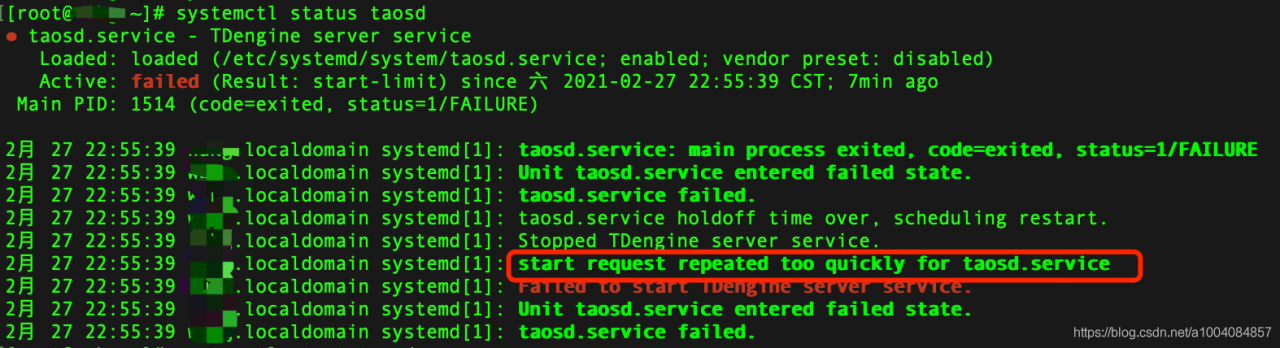
Tdengine failed to start, start request repeated too quickly for taosd.service
When you disable TDEngine, you will be presented with Start Request (as evidenced by Too Quickly for Taosd.service)
The solution
Edit taosd.service and look at the prompts. Line 3 of the image above. Loaded: Loaded follows
The solution
Edit taosd.service and look at the prompts. Line 3 of the image above. Loaded: Loaded follows
vim /etc/systemd/system/taosd.serviceModify StartLimitBurst = 0
[Unit]
Description=TDengine server service
After=network-online.target
Wants=network-online.target

[Service]
Type=simple
ExecStart=/usr/bin/taosd
ExecStartPre=/usr/local/taos/bin/startPre.sh
LimitNOFILE=infinity
LimitNPROC=infinity
LimitCORE=infinity
TimeoutStartSec=0
StandardOutput=null
Restart=always
StartLimitBurst=0
StartLimitInterval=60s

[Install]
WantedBy=multi-user.target
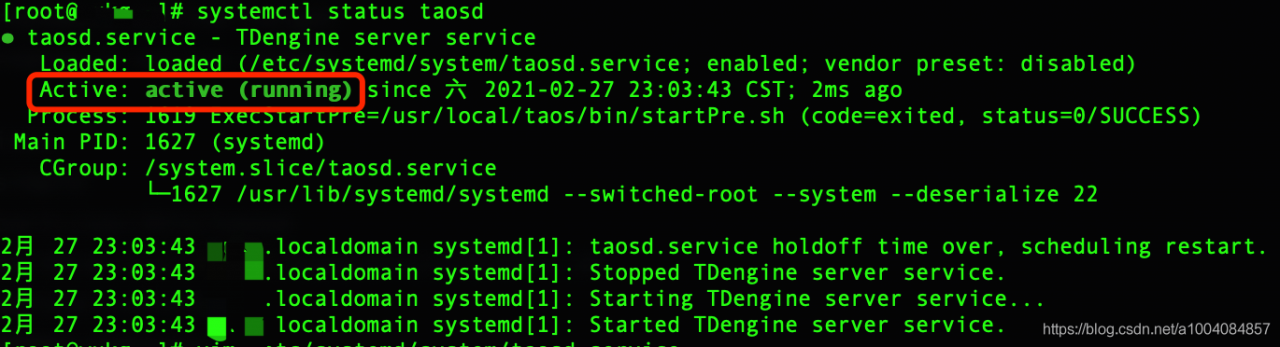
Launch OK again
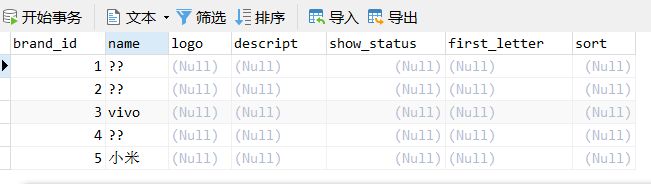
The problem of Chinese garbled data in MySQL
 =
=  =
=
solve com.mysql.jdbc . exceptions.jdbc4 .MySQLSyntaxErrorException:
Solve the com. Mysql. JDBC. Exceptions. Jdbc4. MySQLSyntaxErrorException:
1. Error content
com.mysql.jdbc.exceptions.jdbc4.MySQLSyntaxErrorException: You have an error in your SQL syntax; check the manual that corresponds to your MySQL server version for the right syntax to use near 'where userid='j2ee'' at line 1
	at java.base/jdk.internal.reflect.NativeConstructorAccessorImpl.newInstance0(Native Method)
	at java.base/jdk.internal.reflect.NativeConstructorAccessorImpl.newInstance(NativeConstructorAccessorImpl.java:62)
	at java.base/jdk.internal.reflect.DelegatingConstructorAccessorImpl.newInstance(DelegatingConstructorAccessorImpl.java:45)
	at java.base/java.lang.reflect.Constructor.newInstanceWithCaller(Constructor.java:500)
	at java.base/java.lang.reflect.Constructor.newInstance(Constructor.java:481)
	at [email protected]/com.mysql.jdbc.Util.handleNewInstance(Util.java:425)
	at [email protected]/com.mysql.jdbc.Util.getInstance(Util.java:408)
	at [email protected]/com.mysql.jdbc.SQLError.createSQLException(SQLError.java:943)
	at [email protected]/com.mysql.jdbc.MysqlIO.checkErrorPacket(MysqlIO.java:3973)
	at [email protected]/com.mysql.jdbc.MysqlIO.checkErrorPacket(MysqlIO.java:3909)
	at [email protected]/com.mysql.jdbc.MysqlIO.sendCommand(MysqlIO.java:2527)
	at [email protected]/com.mysql.jdbc.MysqlIO.sqlQueryDirect(MysqlIO.java:2680)
	at [email protected]/com.mysql.jdbc.ConnectionImpl.execSQL(ConnectionImpl.java:2501)
	at [email protected]/com.mysql.jdbc.PreparedStatement.executeInternal(PreparedStatement.java:1858)
	at [email protected]/com.mysql.jdbc.PreparedStatement.executeQuery(PreparedStatement.java:1966)
	at com.a51work6.jpetstore.dao.mysql.AccountDaolmp.findById(AccountDaolmp.java:33)
	at com.a51work6.jpetstore.ui.LoginFrame.lambda$0(LoginFrame.java:65)
	at java.desktop/javax.swing.AbstractButton.fireActionPerformed(AbstractButton.java:1967)
	at java.desktop/javax.swing.AbstractButton$Handler.actionPerformed(AbstractButton.java:2308)
	at java.desktop/javax.swing.DefaultButtonModel.fireActionPerformed(DefaultButtonModel.java:405)
	at java.desktop/javax.swing.DefaultButtonModel.setPressed(DefaultButtonModel.java:262)
	at java.desktop/javax.swing.plaf.basic.BasicButtonListener.mouseReleased(BasicButtonListener.java:279)
	at java.desktop/java.awt.Component.processMouseEvent(Component.java:6632)
	at java.desktop/javax.swing.JComponent.processMouseEvent(JComponent.java:3342)
	at java.desktop/java.awt.Component.processEvent(Component.java:6397)
	at java.desktop/java.awt.Container.processEvent(Container.java:2263)
	at java.desktop/java.awt.Component.dispatchEventImpl(Component.java:5008)
	at java.desktop/java.awt.Container.dispatchEventImpl(Container.java:2321)
	at java.desktop/java.awt.Component.dispatchEvent(Component.java:4840)
	at java.desktop/java.awt.LightweightDispatcher.retargetMouseEvent(Container.java:4918)
	at java.desktop/java.awt.LightweightDispatcher.processMouseEvent(Container.java:4547)
	at java.desktop/java.awt.LightweightDispatcher.dispatchEvent(Container.java:4488)
	at java.desktop/java.awt.Container.dispatchEventImpl(Container.java:2307)
	at java.desktop/java.awt.Window.dispatchEventImpl(Window.java:2762)
	at java.desktop/java.awt.Component.dispatchEvent(Component.java:4840)
	at java.desktop/java.awt.EventQueue.dispatchEventImpl(EventQueue.java:772)
	at java.desktop/java.awt.EventQueue$4.run(EventQueue.java:721)
	at java.desktop/java.awt.EventQueue$4.run(EventQueue.java:715)
	at java.base/java.security.AccessController.doPrivileged(AccessController.java:389)
	at java.base/java.security.ProtectionDomain$JavaSecurityAccessImpl.doIntersectionPrivilege(ProtectionDomain.java:85)
	at java.base/java.security.ProtectionDomain$JavaSecurityAccessImpl.doIntersectionPrivilege(ProtectionDomain.java:95)
	at java.desktop/java.awt.EventQueue$5.run(EventQueue.java:745)
	at java.desktop/java.awt.EventQueue$5.run(EventQueue.java:743)
	at java.base/java.security.AccessController.doPrivileged(AccessController.java:389)
	at java.base/java.security.ProtectionDomain$JavaSecurityAccessImpl.doIntersectionPrivilege(ProtectionDomain.java:85)
	at java.desktop/java.awt.EventQueue.dispatchEvent(EventQueue.java:742)
	at java.desktop/java.awt.EventDispatchThread.pumpOneEventForFilters(EventDispatchThread.java:203)
	at java.desktop/java.awt.EventDispatchThread.pumpEventsForFilter(EventDispatchThread.java:124)
	at java.desktop/java.awt.EventDispatchThread.pumpEventsForHierarchy(EventDispatchThread.java:113)
	at java.desktop/java.awt.EventDispatchThread.pumpEvents(EventDispatchThread.java:109)
	at java.desktop/java.awt.EventDispatchThread.pumpEvents(EventDispatchThread.java:101)
	at java.desktop/java.awt.EventDispatchThread.run(EventDispatchThread.java:90)
2. Problem analysis
This error is usually caused by an error in the SQL statement in my code. My code is as follows:
conn=DBHelper.getConnection();
			String sql="select userid, password,email,name,addr,userid,city,country,phone"     //userid,password,email,name,addr,city,country,phone
					+"from account where userid=?";
			pstmt=conn.prepareStatement(sql);
			pstmt.setString(1, id);
			rs=pstmt.executeQuery();
Where userid=’ J2EE ‘is an error. I thought I had a problem with id, but it turned out to be a space missing when concatenating the SQL string.
3. Summary
looked at other people’s blogs, and he made the wrong conclusion in this type of error check content:
1, check to see if the format of the SQL statement right
2, check the SQL statement whether the use of punctuation in English
3, “mark> connection, special attention to the SQL statement must add Spaces among
Mac command not found solution
MacBook Air command not found. This may have been caused by modifying the Profile when configuring Java Path.
: ls CD, vim, sudo, man command not found
1. First, enter commands so that you can use commands such as Vim temporarily
export PATH=/usr/bin:/usr/sbin:/bin:/sbin:/usr/X11R6/bin
Then open ~/.bash_profile
vim ~/.bash_profile
2. Add PATH
export PATH="/usr/bin:/bin:/usr/sbin:/sbin:/usr/local/bin:${JAVA_HOME}:${JAVA_HOME}/bin"
3. Restart Profile
source ~/.bash_profile
Exit Terminal, open it again, and type Vim to see if it works
MacOS WGet ‘command not found’ solution
input in terminal brew install wget if it is found that the brew didn't hold so first installation brewbrew installation method: ruby - e "$(curl - fsSL https://raw.githubusercontent.com/Homebrew/install/master/install)"