Category Archives: How to Fix

Duplicate modifier for the method XXX in type XXX

A very low-level error when writing code. At that time, I didn’t carefully look at the method I wrote. As a result, the constructor wrote more permission modifiers. The record is as follows:

private final ExecutionEnvironment env;
    private final String jobId;
    private final CalJobParam.JdbcParam dataSink;
	
	public public IndicatorParamFunction(ExecutionEnvironment env, String jobId, CalJobParam.JdbcParam dataSink) {
		this.env = env;
		this.jobId = jobId;
		this.dataSink = dataSink;
	}

More public………….. zero

About error:! Package natbib error: Bibliography not compatible with author year citations

When uploading an article written in latex to arXiv, it is very troublesome because the . Bib file cannot be used as a reference. The main reason is that the macro package - usepackage {natbib} will report an error With the help of overleaf, you can get an answer, that is, first download and package all the things needed for the whole latex compilation, and it’s better to compile locally, and then replace the references in . BBL with the contents in . Tex , that is

	%\bibliographystyle{unsrt}
	%\bibliography{refs}

At this time, it is OK locally, but not arXiv. The following steps are needed:
1. Comment out
2. Comment out the following part in . Sty file:

% load natbib unless told otherwise
% \if@natbib
%   \RequirePackage{natbib}
% \fi

Then you can compile on arXiv

Module ‘Seaborn’ has no attribute ‘scatterplot’ solution

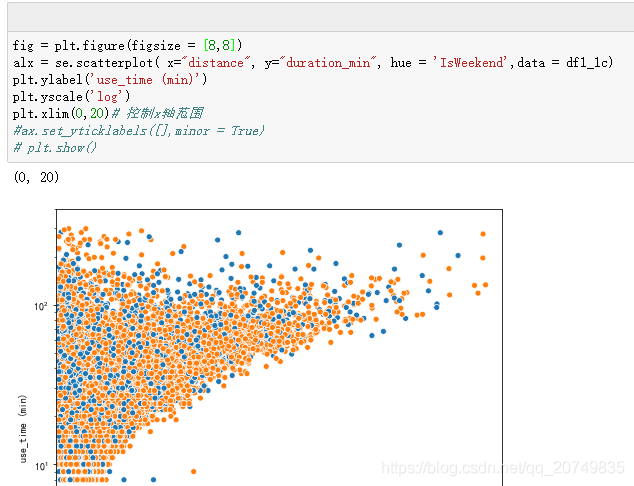
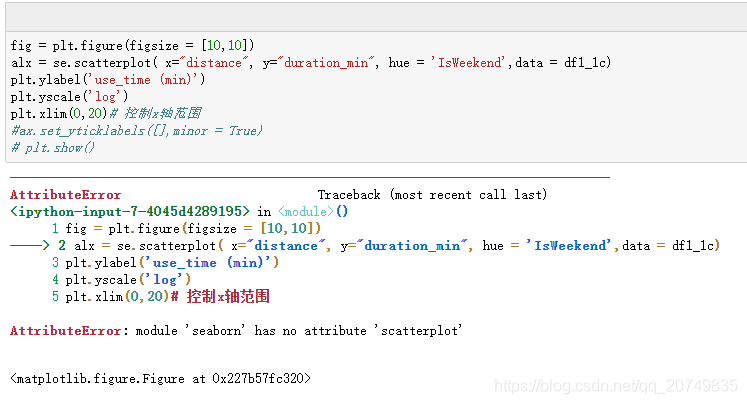
First, Seaborn contains the scatterplot module. However, running the corresponding sentence without syntax error will report an error, because the current Seaborn version is 0.8 or below.

Examples of errors are as follows:

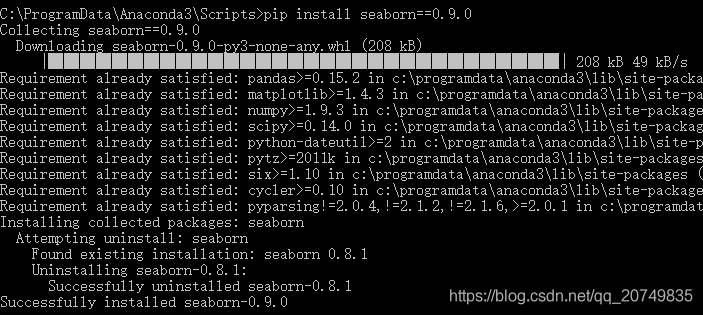
Solution: upgrade Seaborn version! The corresponding statement is: PIP install Seaborn = = number of corresponding versions, for example: PIP install Seaborn = = 0.9.0

Rerun the statement to draw a normal diagram

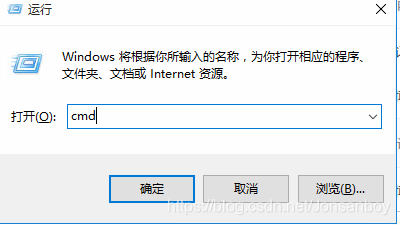
During this period, CMD may require upgrading, and run for many times: Python – M PIP install — upgrade PIP may be invalid

Error, feedback similar permission problems, specific debugging methods can refer to the following:

https://blog.csdn.net/weixin_ 43870646/article/details/90020874

If: no module named pip.basecommand

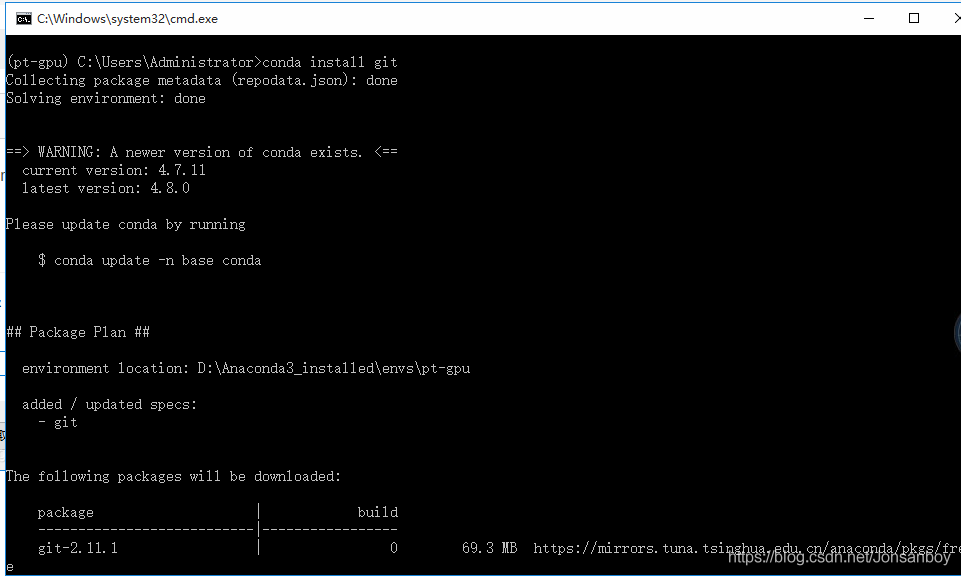
It is suggested that you can uninstall the old version and re install the new version. The corresponding steps are as follows. Or you can refer to the author’s method https://blog.csdn.net/GuaPiQ/article/details/100593848

After reloading pip, you can upgrade Seaborn according to the first step above.

How to install CONDA can refer to this article: https://www.jianshu.com/p/edaa744ea47d

Yield usage in Python


The function of yield in the function is similar to return. The difference is that the function does not exit after yield returns the result each time, but returns the result

Each time the yield keyword is encountered, the corresponding result is returned, and the current running state of the function is retained, waiting for the next call. If

A function needs to execute an action repeatedly, and the result of each execution is needed. This scenario is very suitable for using yield.

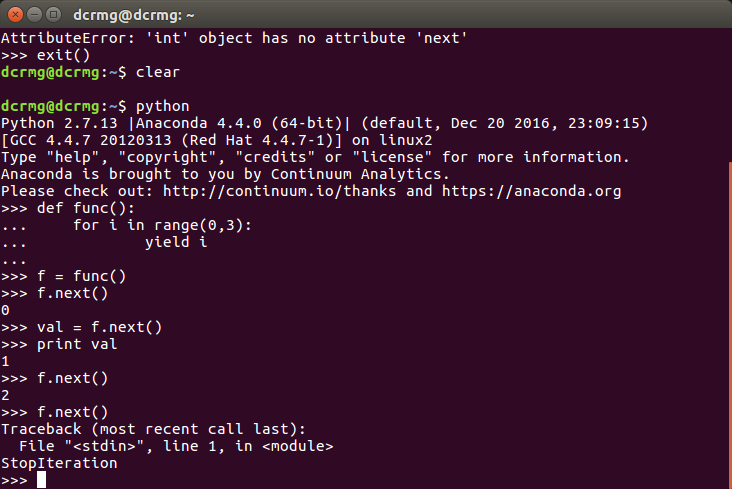
The function containing yield becomes a generator, which is also an iterator. It supports getting the next value through the next method.

Basic use of yield:

def func():
    for i in range(0,3):
        yield i

f = func()
f.next()
f.next()


For the generator, when the function next is called, the value of the expression after yield of the generator will be obtained;

When the yield statement ends after the last loop, the generator will throw stopiteration exception;

In addition to the next function, the generator also supports the send function. This function can pass parameters to the generator.

def func(n):
    for i in range(0,n):
        val = yield i        
        print val

f = func(10)
f.next()
#f.send(None)
f.send(2)
f.send(10)
print f.next()

Android artifact xposed framework user guide

1 Introduction

Xposed is known as the most powerful artifact on Android. If you don’t know what xposed is, then you are really out. This blog will let bloggers take you to understand xposed.

(1) What is xposed?
Xposed is a framework. There are many modules on it. These modules all depend on xposed. The reason why xposed is the first artifact is that these modules can complete many incredible functions, such as modifying the wechat interface, automatically grabbing red packets module, self defining the text of the program, preventing wechat messages from withdrawing, and preventing the three hooligans of bat from calling each other Wake up, chain start, lock the screen automatically after the app to prevent background operation power consumption, there are many modification app or mobile data installed B module and so on.

(2) How does xposed work?
xposed The principle is to modify the key files of the system, and then when the app calls the system API, it first goes through xposed, and these xposed based modules can selectively do some “bad” things when the app calls these APIs, or modify the returned results, so that the effect of the app will change when it runs, but the app itself is not damaged, just when it calls the system API Wait, the performance of Android system has changed. This is hook, the technical term hook. So, to put it bluntly, xposed is a powerful hook framework.

Let’s have a professional explanation

By replacing / system / bin / APP_ The precess program controls the zygote process so that it loads a jar file of the xposed framework during the system startup XposedBridge.jar So as to complete the hijacking of zygote process and its Dalvik virtual machine, and allow the development

The video cannot be played because you have disabled the cookie

Today, I suddenly want to see “happy dramatist”, Google browser Click to play, the result is “because you disable the cookie, the video can’t play…” this situation…

It’s not a big problem either. I just found out where the cookie is after a round of setting. It’s still Baidu… So it’s this

In content settings

OK, I don’t have any problem. I just didn’t know what happened before. I went back to refresh the website and came out… It’s so funny. I don’t know if I can refresh the web page before. But at least we can find something that we hope we can use in the future.

XML tag has empty body less… (Ctrl+F1) Reports empty tag body. The validation works in XML / JSP

The activity of the Android manifest file has been warned several times. The first reaction is that you can’t remember to look it up online. Just wrap it or end it with a ‘/’.

On the Internet:

It appears to have worked by getting rid of the closing tags and replacing them with the self closing tags

<activity
    android:name="com.np.npvideoserver.UserConfig"
    android:configChanges="orientation|keyboard"></activity>

Change to

<activity
    android:name="com.np.npvideoserver.UserConfig"
    android:configChanges="orientation|keyboard">
</activity>

or

<activity
    android:name="com.np.npvideoserver.UserConfig"
    android:configChanges="orientation|keyboard"/>


Prompt “XXX is” when debugging real machine busy:Processing symbol Files “and” Xcode will continue when XXX is finished“

Original address: https://www.jianshu.com/p/fdbe7ec1ec44


Related articles

1. Xcode debugging device connection has been busy—- https://blog.csdn.net/sily_ 13/article/details/52698907

2、XXX is busy: Processing symbol files—- https://blog.csdn.net/lymm000/article/details/69484083

3、xcode will continue when iPhone is finished iPhone is busy:Processing symbol files—- https://blog.csdn.net/u014599371/article/details/79970486?utm_ source=blogxgwz1

4. Xcode real machine debugging appears “is busy: Processing symbol files”—- http://www.cocoachina.com/bbs/read.php?tid-1678685.html

5. Xcode real machine debugging appears “is busy: Processing symbol files”—- https://blog.csdn.net/joker_ wlk/article/details/52299007

6. When IOS Xcode debugging device is connected, there is always a prompt “iPhone name” is busy: Processing symbol files—- https://blog.csdn.net/csdn_ hhg/article/details/79770068


Before, I met the following prompt when testing the real apple mobile phone


Later, restart the phone, restart Xcode, and even restart the Mac. In a few minutes, you can debug the real machine. At that time, I didn’t think much about it. I thought it was really the CPU of the mobile phone that was busy with other things. Recently, when cleaning up the Mac computer, I found the real reason for this prompt: install something on a mobile phone. For example, the mobile phone system is 10.3.3. If the computer has not run the debugging app on the mobile phone of the 10.3.3 system before, some things in the mobile phone will be copied to the / users / zhangxicheng / library / Developer / Xcode / IOS devicesupport directory of the computer through USB. Basically, a system takes two to three gigabytes. It’s useless for us to do anything while copying files. After copying, you can debug the app. So just wait a few minutes.

In addition: when I cleaned up the Mac, I found that there are many things in the IOS devicesupport directory. I have about a dozen systems, which account for more than 40 gigabytes. I want to delete them, but I feel that I have to copy them next time I connect. It’s rather tangled.

Author: Xiaoxi IOS
link: https://www.jianshu.com/p/fdbe7ec1ec44
Source: Jianshu
the copyright of Jianshu belongs to the author. For any form of reprint, please contact the author for authorization and indicate the source.
[solved] runtimeerror: module compiled against API version 0xc but this version of numpy is 0xb

This article records the solutions for bloggers to report errors in Import torch in Python. Updated on March 20, 2019.

This error is due to the current version of numpy does not meet the requirements.

First, run on the terminal:

python
import numpy
numpy.version

View the current version of numpy. Run after

pip3 install –upgrade numpy

Just update the numpy version. If it’s python2, use PIP .

More, welcome to the planet discussion.