Category Archives: How to Fix

[Android] ImageView setting background image error: error inflating class ImageView

(Android studio 3.1) the ImageView control is used in the layout file, and Src refers to the vector asset file created by itself. When running on Android 4.42, an error is reported as follows:
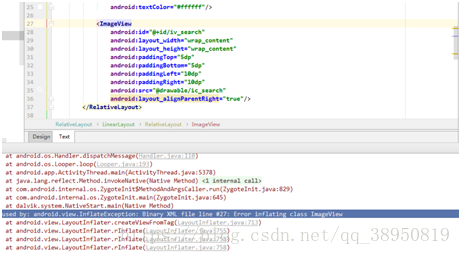
I used it on Android 8.0 mobile phone before, but it didn’t appear this problem. When I ran it on Android 4.42, I made a mistake. The first time I met this problem, I didn’t know what was wrong. Later, when I solved another problem, I suddenly realized that this problem might come from:
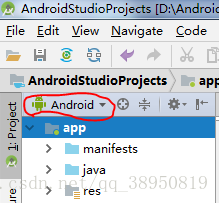
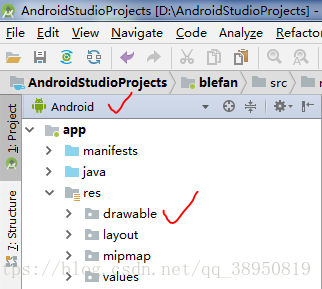


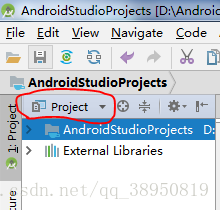
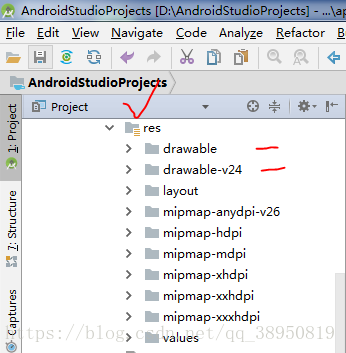
In the development process, I’m used to Android mode, and there are only a few folders in the res directory. Switch to project mode. In addition to the drawable folder, there is also the drawable-v24 folder in the res directory. I found that the vector asset file I created was actually placed in drawable-v24. Maybe that’s the problem. So I moved the vector asset file from the drawable-24 folder to the drawable directory, and then there was no running error.

Later, I went to the blog to search for information and found that Google only provided vector support when Android 5.0 was released. No wonder there was no error when I created the vector asset file to run in the drawable folder in Android 8.0. Maybe it was because vector was relatively mature in higher versions. Finally, a blog about vector written by Dashen is attached https://blog.csdn.net/eclipsexys/article/details/51838119 , I feel that I have learned a lot, which is convenient for further inquiry in the future.
 

Yard error: found incompatible module

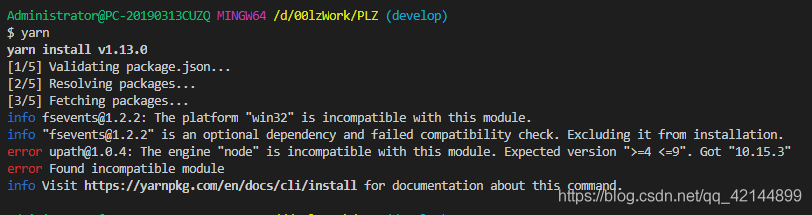
When I install the project with yarn, the error is as follows:

error [email protected] : The engine “node” is incompatible with this module. Expected version “>=4 <=9”. Got “10.15.3”
error Found incompatible module

reference resources: https://www.jianshu.com/p/5cb4f48ed11b

In addition, please refer to: http://quabr.com/53025664/error-eslint5-6-0-the-engine-node-is-incompatible-with-this-module-when-try

Set yarn as follows:

yarn config set ignore-engines true

Re install the project package and find that there are still problems.

Delete node_ Modules package and yarn.lock File, restart yarn install.

success.

IntelliJ idea startup error: error statuslogger log4j2 could not find a logging implementation

The following error occurred when starting the project:

    ERROR StatusLogger Log4j2 could not find a logging implementation. Please add log4j-core to the classpath. Using SimpleLogger to log to the console…

Reason: the jar package of log4j is not downloaded locally. Cause the startup error.

resolvent:

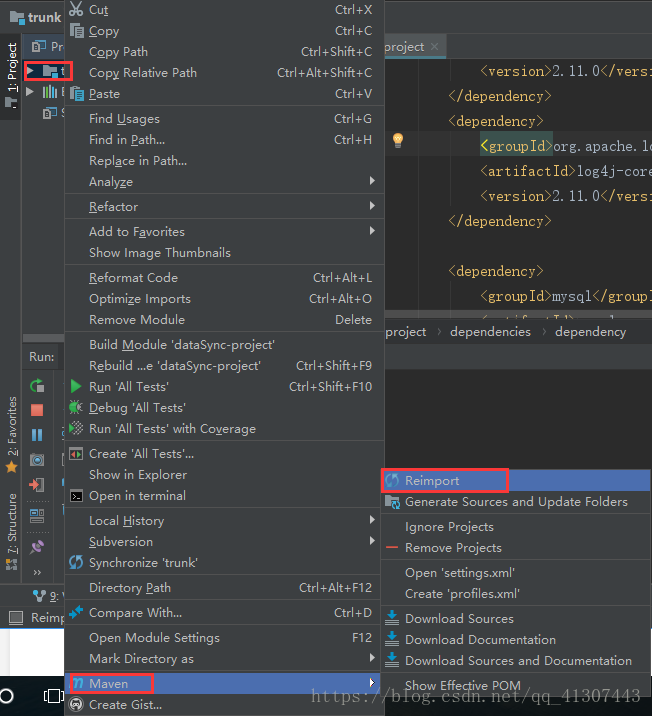
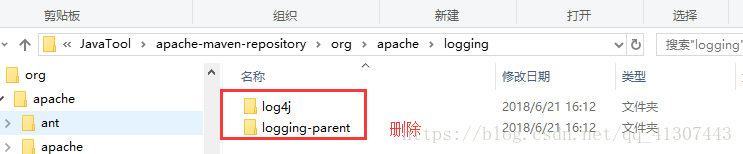
1. Find the log4j folder of local Maven warehouse and delete it.

2. Update Maven dependency and download the jar package of log4j again.

Select project — & gt; right mouse button — & gt; Maven — & gt; reimport

Upload Appstore error itms-90725

Recently, when uploading to the app store with Xcode 8, an error was reported. Error itms-90725: “SDK version issue. This app was built with the IOS’ 10.0 ‘SDK. All new IOS apps submitted to the app store must be built with the IOS’ 11.0′ SDK or later, included in Xcode [9.0] or later. Please update Xcode and rebuild your app.”

resolvent:

(1) Download an Xcode 9 and package it directly with Xcode 9

(2) Download Xcode 9 to display the content of the report. Go to IOS’ 11.0 ‘SDK through the following path

Contents/Developer/Platforms/ iPhoneOS.platform/Developer/SDKs/iPhoneOS11 . 2.sdk copy the last file to the same path of Xcode 8, delete the original 10:00 SDK, and then you can upload it successfully
0

Error: expected class name before ‘{‘ token

The error of C + + compiler is as follows:

error: expected class-name before ‘{’ token

When deriving a class, you need to confirm whether it contains the header file of the base class.

If the header file of the base class is included, an error is still reported. As mentioned above, check the header file contained in the base class header file.
For example, all the information about an error is as follows:

aarch64-himix100-linux-g++ -c ./src/base.cpp ./src/host.cpp ./src/main_test.cpp ./src/mcu.cpp ./src/uart1.cpp 
In file included from ./src/../include/main_test.h:6:0,
                 from ./src/../include/base.h:6,
                 from ./src/base.cpp:1:
./src/../include/uart1.h:10:1: error: expected class-name before ‘{’ token
 {
 ^
make: *** [main_test.o] Error 1

There are base classes in the base. H file. Uart1. H is the class to be derived. But look at all the above error information, it appears from the sixth line of base. H. Find line 6, which is the header file of the main function (test program).
Put the header file in line 6 base.cpp It’s OK.

In fact, the above situation should not appear in base. H and base.cpp The header file of the test file should not appear in.

Put the header files (such as # include & lt; pthread. H & gt;) in the corresponding header files (such as base. H).

When testing, you only need to include the base. H file to test the functions in the base.

When using idea to start a project, an error is reported: Error:java : Compilation failed: internal java compiler error

When using idea to start a project, an error is reported: Error:java : Compilation failed: internal java compiler error

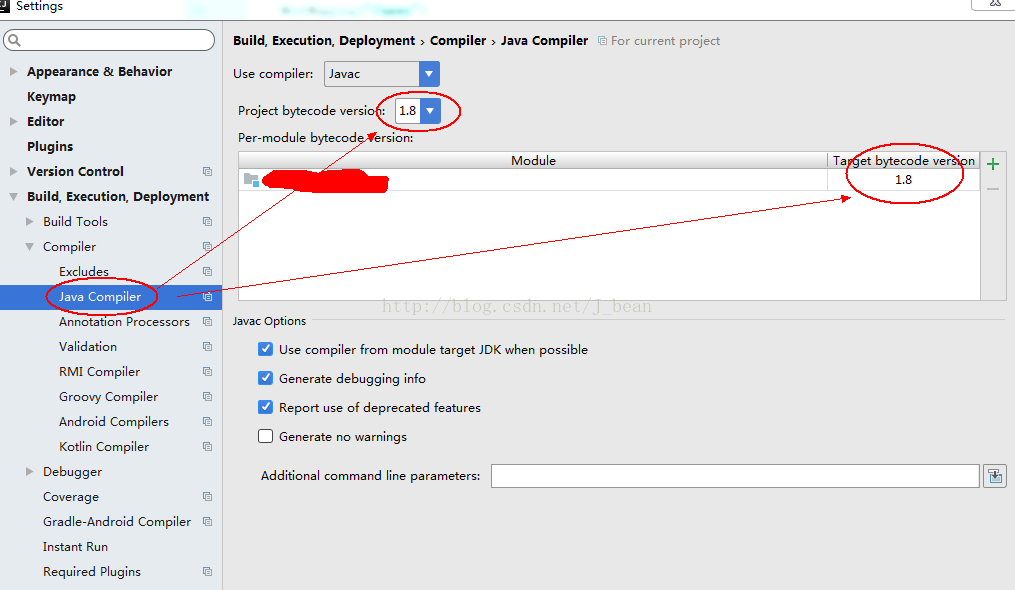
(1) Error reason: the setting in Java compiler is inconsistent with the Java version used in the current project.

(2) Solution: if Java 1.8 is used in the project, it should be set to 1.8 in Java compiler.

The settings are as follows:

References: Click to open the link

Error report on startup of rabbitmq in MAC installation error:epmd error for host xiongmindeMacBook-Pro: timeout

Error in starting rabbitmq: error:epmd error for host xiongmindeMacBook-Pro: timeout

Error in starting management console plug-in:

Applying plugin configuration to rabbit@xiongmindeMacBook-Pro… failed.
* Could not contact node rabbit@xiongmindeMacBook-Pro.
Changes will take effect at broker restart.
* Options: –online – fail if broker cannot be contacted.
–offline – do not try to contact broker

terms of settlement:

On the last line of sudo VIM/etc/hosts, add “127.0.0.1” xiaominde MacBook Pro

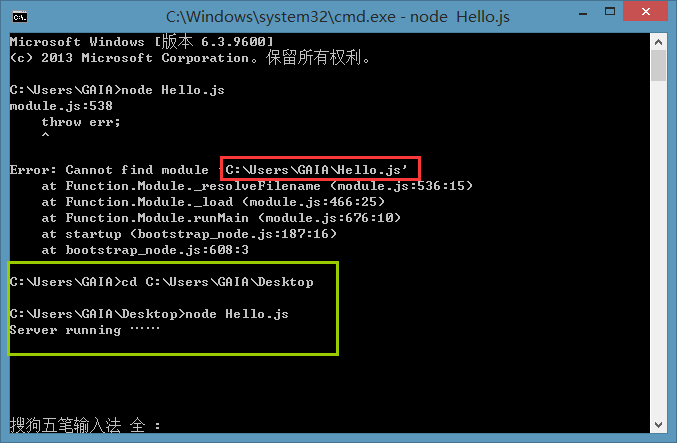
Node.js Error: cannot find module ‘xxx’

Create a new notepad on the desktop, write the familiar Hello word, and save it with the suffix JS

What I wrote is just a helloword, which doesn’t involve any package management tools, so don’t bother with NPM. This error is simply that I can’t find the file.

Simple solution: press the shift key in the blank space of the desktop without putting the right mouse button, select here to open the command window, and then edit it properly, or type the path in the DOS interface.

Conclusion: in fact, it is a problem of path~

About error statuslogger no log4j2 configuration file found

Error statuslogger no log4j2 configuration file found. Using default configuration: logging only errors to the console

Create a new resources folder in the project and add the log4j2. XML file as follows

<?xml version="1.0" encoding="UTF-8"?>
<Configuration>
    <Appenders>
        <Console name="STDOUT" target="SYSTEM_OUT">
            <PatternLayout pattern="%d %-5p [%t] %C{2} (%F:%L) - %m%n"/>
        </Console>
        <RollingFile name="RollingFile" fileName="logs/strutslog1.log"
                     filePattern="logs/$${date:yyyy-MM}/app-%d{MM-dd-yyyy}-%i.log.gz">
            <PatternLayout>
                <Pattern>%d{MM-dd-yyyy} %p %c{1.} [%t] -%M-%L- %m%n</Pattern>
            </PatternLayout>
            <Policies>
                <TimeBasedTriggeringPolicy />
                <SizeBasedTriggeringPolicy size="1 KB"/>
            </Policies>
            <DefaultRolloverStrategy fileIndex="max" max="2"/>
        </RollingFile>
    </Appenders>
    <Loggers>
        <Logger name="com.opensymphony.xwork2" level="WAN"/>
        <Logger name="org.apache.struts2" level="WAN"/>
        <Root level="warn">
            <AppenderRef ref="STDOUT"/>
        </Root>
    </Loggers>

</Configuration>

Select user entries in the classpath of the project corresponding to run – run configurations, click Advanced, and select add folder to add the Resources folder.

Installing qt5.8.0 error reporting during installation process

Error during installation process( qt.tools.perl );Execution failed:Couled not start:”{0,3010,1603,5100} misexec….

The reason for this error is that when installing QT, you select all the installation files (the hard disk is big enough ) and check the strawberry Perl under tools. If you do not check this one, you will have no problem,

In addition, when compiling vs2013 version, it is also possible that the job error 2 may be directly ignored due to the warning dialog box (this is what I did,,).

Strawberry Perl is a Perl programming tool on Windows platform. If you are not a programmer developing/testing Perl programming, and the program you use does not need Perl support, you do not need to install it.

Q & A: http://bbs.csdn.net/topics/392094375