Category Archives: How to Fix

numpy.random.rand()

numpy.random.randn (d0, d1, … , DN) is to return one or more sample values from the standard normal distribution.  
numpy.random.rand (d0, d1, … , DN) in [0,1].   


numpy.random.rand (d0,d1,… ,dn)

The rand function generates data between [0,1] according to the given dimension, including 0 and excluding 1DN table. The return value of each dimension is the array of the specified dimension

np.random.rand(4,2)
array([[0.64959905, 0.14584702],
       [0.56862369, 0.5992007 ],
       [0.42512475, 0.83075541],
       [0.75685279, 0.00910825]])

np.random.rand(4,3,2) # shape: 4*3*2
array([[[0.07304796, 0.48810928],
        [0.59523586, 0.83281804],
        [0.47530734, 0.50402275]],

       [[0.63153869, 0.19636159],
        [0.93727986, 0.13564719],
        [0.11122609, 0.59646316]],

       [[0.17276155, 0.66621767],
        [0.81926792, 0.28781293],
        [0.20228714, 0.72412133]],

       [[0.29365696, 0.53956076],
        [0.19105394, 0.47044441],
        [0.85930046, 0.3867359 ]]])

 

On the dynamic acquisition of expandedheight of sliderappbar in nestedscrollview

When using nested Scrollview to collapse a writing project, we encounter a problem. The content in flexible spacebar needs to be displayed dynamically. Some data needs to be returned, which may be hidden. As a result, the height is uncertain. However, expandedheight in slicerappbar can only be fixed, so we have to find another way to obtain the height.


    copy a copy of the code in flexible space bar and write it into a statelesswidget to set a globalkey. Now you need to process the request, write it in the successful callback, and use the first frame of the successful request to get the height

    WidgetsBinding.instance.addPostFrameCallback((_) {
          RenderBox _cardBox =
              _flexibleSpaceBarKey.currentContext.findRenderObject();
    
          Future.delayed(Duration(milliseconds: 10), () {
            setState(() {
              heightFlexibleSpaceBar = _cardBox.size.height;
            });
          });
        });

Python data analysis dataframe converts dates to weeks

When doing data analysis with Python, how to add a new column of weeks “week” and change the date, such as “2021-03-02” to the nth week of 2021?

Introduce two methods:
the dataframe of my data is called sample, which has the feature “date”. Now add a new feature “week”
1 dt.week

sample["week"]=sample["date"].dt.week

2. Use datetimeindex

df['week'] = pd.DatetimeIndex(sample['date']).week

When using CSS to write the registration page, we found that the editing effect is not effective

When using CSS to write the registration page, we found that the editing effect is not effective

Project scenario: learning the combination of CSS and HTML Problem Description: in HTML writing, the text effect is not effective

Project scenario: learning the combination of CSS and HTML

tip: here is a brief introduction of the background of the project: when learning the combination of CSS and HTML recently, I encountered a problem that I don’t know how to describe in the process of writing the registration page


Problem Description: in HTML writing, the text effect is not effective

Receiving data code in idea:

 .rg_left > p :first-child{
            color: #FFD026;
            font-size: 20px;
        }
        .rg_left > p:last-child{
            color: #A6A6A6;
            font-size: 20px;
        }

you can’t add a space between P and colon. Although you won’t report an error, the effect displayed on the web page doesn’t take effect. At first, I thought it was Google’s problem. Later, after constant attempts, I solved the problem


Carefully check whether there are spaces in the syntax during the code writing process. Although idea will not report errors, the final implementation effect will be inconsistent with the plan

Start rqt_ Graph, prompt / opt / ROS / melody / share / PR2_ motor_ diagnostic_ Under tool plugin.xml There is something wrong with the file

Question: as the title, open it plugin.xml It was found to be blank.

Solution: find the GitHub of PR2, download and copy it to/opt/ROS/melody/share/PR2_ moto_ diagnostic_ Tool/or create your own plugin.xml File, which will be installed on GitHub plugin.xml Copy in the code in.

[new problem] prompts that we do not have permission to create a file in this path, so we need to increase the permission to obtain the super user permission: $sudo Chmod 777/opt/ROS/melody/share/PR2_ motor_ diagnostic_ tool/。 Then create a new one plugin.xml File, copy the code in and save it.

The docker installation es reported an error of failed; error = – cannot allocate memory ‘(errno = 12)

The solution executes the following command to allocate memory initially. The reason for the error is that the memory is not enough.
the ES image I downloaded is 5.6.8. Modify the version number according to my own situation
docker run - D - P 9200:9200 - P 9300:9300 -- name = es_ " -e ES_ JAVA_ OPTS="-Xms256m -Xmx256m" elas ticsearch:5.6.8
after the command is executed, the pro test is available

Error type referred to is not an annotation type:RedisCache

Today, the framework wants to use annotation to implement section function, and the result is error type referred to is not an annotation type:RedisCache

The code is as follows:

Note:
the

@Target({ ElementType.METHOD })
@Retention( RetentionPolicy.RUNTIME )
@Inherited
@Documented
public @interface RedisCache {
    
    public String key() default “”;
    
    public long TTL() default 0L;

}

Section:

    @Around(“@annotation(redisCache)”)
    public void redisCache(ProceedingJoinPoint joinPoint,RedisCache redisCache){
        String targetName = joinPoint.getTarget ().getClass().getName();  
        String methodName = joinPoint.getSignature ().getName();  
        Object[] arguments = joinPoint.getArgs ();  
        Object result = null;  
        String cacheKey = getCacheKey(targetName, methodName, arguments);  
        System.out.println (“hahaha” + cachekey);
}
the original annotation must be passed in as a parameter, and the red part must be the same.

Error: child process failed, exited with error number 1

Error: child process failed, exited with error number 1

It’s usually a matter of permissions, or there is no corresponding path

Check steps: add a parameter after startup to export the log to a writable directory

./mongod –fork –logpath=/tmp/ mongod.log

Then look at the questions as follows:

2017-02-22T01:33:34.229+0800 I CONTROL  [main] ERROR: Cannot write pid file to /var/run/mongodb/ mongod.pid : No such file or directory

This means that there is no such directory (/ var/run/mongodb /)

Then create a new one, MKDIR – P/var/run/mongodb/

The normal restart is as follows:

root@sz :~/soft/mongodb342/bin# ./mongod -f  /etc/mongodb/ mongod.conf
about to fork child process, waiting until server is ready for connections.
forked process: 7482
child process started successfully, parent exiting

Mysql start slave error 1201 (HY000)

After MySQL replication is configured, an error is reported when starting slave as follows:

mysql> start slave;
ERROR 1201 (HY000): Could not initialize master info structure; more error messages can be found in the MySQL error log
mysql>

Looking for it on the Internet, it turns out that there are two files to delete. It is estimated that it was generated yesterday when other people failed in the test.

/var/lib/mysql/ master.info
/var/lib/mysql/relay- log.info

Just delete it.

mysql> start slave;
Query OK, 0 rows affected (0.01 sec)

mysql>

Refer to the following documents:

http://blog.sina.com.cn/s/blog_ 51d3553f0100j5m2.html

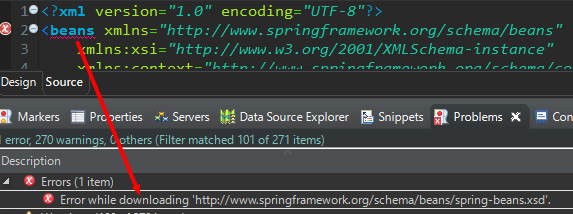
Solve the previous one bean.xml “Error while downloading” in < bean > tag http://www.springframework.org/schema/beans/sprin…

In the XML file, the error in the header is as follows

At the beginning of the query, it was said that “& lt;?XML version =” 1.0 “encoding =” UTF-8 “?& gt;” was missing in the header, but I didn’t have this problem, which may be encountered by someone.

And this error does not affect the operation of the project, of course, it may be that I did not notice or did not write the relevant reference code.

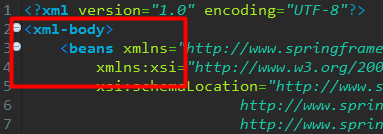
Now I know that the original reason is that the tool is relatively new and may lack tags. Just add the & lt; XML body & gt; tag

That’s good


Reproduced in: https://www.cnblogs.com/zhangyuanbo/p/11250563.html

Pull code execution NPM install error code: 128

Error:
NPM err! Code 128
NPM err! Command failed: git clone — mirror – Q git://github.com/adobe-webplatform/eve.git C:\Users\yangj\AppData\Roaming\npm-cache_ cacache\tmp\git-clone-b6120ac8.git –config core.longpaths=true
npm ERR! warning: templates not found in C:\Users\yangj\AppData\Local\Temp\pacote-git-template-tmp\git-clone-ac85a663
npm ERR! fatal: read error: Invalid argument
npm ERR!

npm ERR! A complete log of this run can be found in:
npm ERR! C:\Users\yangj\AppData\Roaming\npm-cache_ logs\2019-11-29T01_ 43_ 24_ 288Z- debug.log

Solution:
execution steps:
Step 1: git config — global URL. “HTTPS://”. Insteadof git://
Step 2: NPM install
is OK