Category Archives: Error

[Solved] Win10 Install wsl2 unbuntu Error: WslRegisterDistribution failed with error: 0x80070002

Installing, this may take a few minutes...
WslRegisterDistribution failed with error: 0x80070002
Error: 0x80070002 The system cannot find the file specified.

Press any key to continue...

Solution: don’t use wsl2 by default, use wsl1 by default (input WSL — set default version 1 after PowerShell opens)

Then install Ubuntu again.

[Solved] Triton-inference-server Start Error: Internal – failed to load all models

Error message

Start Triton server

docker run --gpus=1 --rm -p 8000:8000 -p 8001:8001 -p 8002:8002 -v /full_path/deploy/models/:/models nvcr.io/nvidia/tritonserver:21.03-py3 tritonserver --model-repository=/models

When starting tritonserver , internal – failed to load all models </ mark> error is reported. The error message is as follows

+-----------+---------+----------------------------------------------------------------------------------------------------+
| Model     | Version | Status                                                                                             |
+-----------+---------+----------------------------------------------------------------------------------------------------+
| resnet152 | 1       | UNAVAILABLE: Internal - failed to load all models features |
+-----------+---------+----------------------------------------------------------------------------------------------------+
I0420 16:14:07.481496 1 server.cc:280] Waiting for in-flight requests to complete.
I0420 16:14:07.481506 1 model_repository_manager.cc:435] LiveBackendStates()
I0420 16:14:07.481512 1 server.cc:295] Timeout 30: Found 0 live models and 0 in-flight non-inference requests
error: creating server: Internal - failed to load all models

Error analysis

This error is usually caused by the inconsistency of the version of tensorrt . The inconsistency here refers to the inconsistency between the version of tensorrt and the version of tensorrt in the docker image Triton server when we convert the model from (onnx) to tensorrt, We only need to use tensorrt which is consistent with the version in tritonserver to re transform the model to solve the problem

Solution:

Enter the image

docker run --gpus all -it --rm -v /full_path/deploy/models/:/models nvcr.io/nvidia/tensorrt:21.03-py3
#Go to the installation directory of tensorrt, there is a trtexec executable file inside
The #trition-server relies on this to load the model
cd /workspace/tensorrt/bin

The purpose of the - V parameter is to map a directory so that we don’t want to copy the model file

Test whether tensorrt can load the model successfully

trtexec --loadEngine=resnet152.engine
#output
[06/25/2021-22:28:38] [I] Host Latency
[06/25/2021-22:28:38] [I] min: 3.96118 ms (end to end 3.97363 ms)
[06/25/2021-22:28:38] [I] max: 4.36243 ms (end to end 8.4928 ms)
[06/25/2021-22:28:38] [I] mean: 4.05112 ms (end to end 7.76932 ms)
[06/25/2021-22:28:38] [I] median: 4.02783 ms (end to end 7.79443 ms)
[06/25/2021-22:28:38] [I] percentile: 4.35217 ms at 99% (end to end 8.46191 ms at 99%)
[06/25/2021-22:28:38] [I] throughput: 250.151 qps
[06/25/2021-22:28:38] [I] walltime: 1.75494 s
[06/25/2021-22:28:38] [I] Enqueue Time
[06/25/2021-22:28:38] [I] min: 2.37549 ms
[06/25/2021-22:28:38] [I] max: 3.47607 ms
[06/25/2021-22:28:38] [I] median: 2.49707 ms
[06/25/2021-22:28:38] [I] GPU Compute
[06/25/2021-22:28:38] [I] min: 3.90149 ms
[06/25/2021-22:28:38] [I] max: 4.29773 ms
[06/25/2021-22:28:38] [I] mean: 3.98691 ms
[06/25/2021-22:28:38] [I] median: 3.96387 ms
[06/25/2021-22:28:38] [I] percentile: 4.28748 ms at 99%
[06/25/2021-22:28:38] [I] total compute time: 1.75025 s
&&&& PASSED TensorRT.trtexec

If the final output passed </ mark> indicates that the model is loaded successfully, let’s take a look at a case of loading failure

[06/26/2021-22:09:27] [I] === Device Information ===
[06/26/2021-22:09:27] [I] Selected Device: GeForce RTX 3090
[06/26/2021-22:09:27] [I] Compute Capability: 8.6
[06/26/2021-22:09:27] [I] SMs: 82
[06/26/2021-22:09:27] [I] Compute Clock Rate: 1.725 GHz
[06/26/2021-22:09:27] [I] Device Global Memory: 24265 MiB
[06/26/2021-22:09:27] [I] Shared Memory per SM: 100 KiB
[06/26/2021-22:09:27] [I] Memory Bus Width: 384 bits (ECC disabled)
[06/26/2021-22:09:27] [I] Memory Clock Rate: 9.751 GHz
[06/26/2021-22:09:27] [I] 
[06/26/2021-22:09:27] [I] TensorRT version: 8000
[06/26/2021-22:09:28] [I] [TRT] [MemUsageChange] Init CUDA: CPU +443, GPU +0, now: CPU 449, GPU 551 (MiB)
[06/26/2021-22:09:28] [I] [TRT] Loaded engine size: 222 MB
[06/26/2021-22:09:28] [I] [TRT] [MemUsageSnapshot] deserializeCudaEngine begin: CPU 449 MiB, GPU 551 MiB
[06/26/2021-22:09:28] [E] Error[1]: [stdArchiveReader.cpp::StdArchiveReader::34] Error Code 1: Serialization (Version tag does not match. Note: Current Version: 43, Serialized Engine Version: 96)
[06/26/2021-22:09:28] [E] Error[4]: [runtime.cpp::deserializeCudaEngine::74] Error Code 4: Internal Error (Engine deserialization failed.)
[06/26/2021-22:09:28] [E] Engine creation failed
[06/26/2021-22:09:28] [E] Engine set up failed
&&&& FAILED TensorRT.trtexec [TensorRT v8000]
#or
[06/25/2021-19:08:23] [I] Memory Clock Rate: 9.751 GHz
[06/25/2021-19:08:23] [I] 
[06/25/2021-19:08:25] [E] [TRT] INVALID_CONFIG: The engine plan file is not compatible with this version of TensorRT, expecting library version 7.2.3 got 7.2.2, please rebuild.
[06/25/2021-19:08:25] [E] [TRT] engine.cpp (1646) - Serialization Error in deserialize: 0 (Core engine deserialization failure)
[06/25/2021-19:08:25] [E] [TRT] INVALID_STATE: std::exception
[06/25/2021-19:08:25] [E] [TRT] INVALID_CONFIG: Deserialize the cuda engine failed.
[06/25/2021-19:08:25] [E] Engine creation failed
[06/25/2021-19:08:25] [E] Engine set up failed
&&&& FAILED TensorRT.trtexec

The above error message is a typical problem caused by the version mismatch of tensorrt . There are two ways to solve this problem. the first one is to re export the engine file of the model with the matching tensorrt version , the second one is to modify the version of tritonserver to match the version of tensorrt used in the engine model file

The first method

To pull a tensorrt version that is consistent with the tritonserver version, for example

#pull tritonserver mirror
docker pull nvcr.io/nvidia/tritonserver:21.03-py3
#pull tensorrt mirror
docker pull nvcr.io/nvidia/tensorrt:21.03-py3

After the pull is completed, the model can be transformed again through the corresponding version of tensorrt image

The second method

You can go to the NVIDIA image website and pull the Triton server with the same version as tensorrt. Each version of Triton server: the list of Triton server images
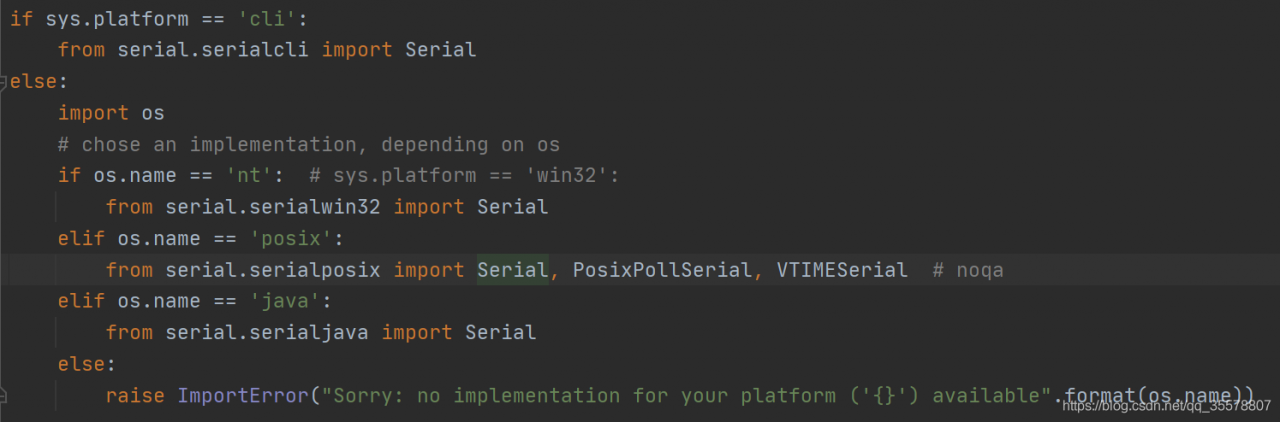
[Solved] Raspberry Pi Error: AttributeError: module ‘serial‘ has no attribute ‘Serial‘

Solution: you only need to install pyserial instead of serial. If serial has been installed, you can uninstall it.
—————————————————-
solution: open pychar on your computer and find that it can run. PIP list shows that only pyserial is installed, After importing serial, click in to see the specific method. It is found that the init.py of the serial on the computer is different from that on the raspberry pie
the raspberry pie on the computer is basically empty. You can run it after uninstalling the serial discovery program

I don’t know why all bloggers on Baidu search need to install serial and pyserial

Springboot running shows application run failed [How to Solve]

Error:

Error starting ApplicationContext. To display the conditions report re-run your application with 'debug' enabled.
2021-06-28 14:27:13.827 ERROR 7512 --- [  restartedMain] o.s.boot.SpringApplication               : Application run failed

Background

It’s time to review. The teacher asked me to write a springboot project, but I couldn’t run it. Running application shows that application cannot be run
some errors were encountered in the process. I searched Baidu, and the result is as follows:
in the annotation of application, there is @ springbootapplication , which should be replaced by @ springbootapplication (exclude = datasourceautoconfiguration. Class) , but the result still doesn’t work.

Exclude to exclude such autoconfig, that is, to prohibit springboot from automatically injecting data source configuration. In this case, the automatic injection of mybits is excluded. As a result, there is a problem in the mapper layer.

Let the teacher have a look today. There is something wrong with the YML file.

Forget to write spring keywords, which I don’t understand.

server:
  port: 5050 # tomcat port
  servlet:
    context-path: /UserModel

spring:# I forgot to write it here, so that datesource belongs to the server
  datasource:
    type: com.alibaba.druid.pool.DruidDataSource
    driver-class-name: com.mysql.cj.jdbc.Driver
    url: jdbc:mysql://localhost:3306/1202?useSSL=false&serverTimezone=Asia/Shanghai&characterEncoding=utf-8
    username: root
    password: root

An error occurred while accessing the controller

The error reported is the same as this:

would dispatch back to the current handler URL [/UserModel/queryUserById] 

The difference between @Controller and @RestController is actually confusing
@Controller, @RestController?
Forgot the difference between get and post

Written by.
http://localhost:5050/UserModel/deleteUserByIds?ids=3,4

[Solved] The version of springcloud must support the current version of springboot, otherwise the startup project will report an error: error starting ApplicationContext

Error starting ApplicationContext. To display the conditions report re-run your application with ‘debug’ enabled.
2021-06-26 15:42:31.976 ERROR 208496 — [           main] o.s.b.d.LoggingFailureAnalysisReporter   :
***************************
APPLICATION FAILED TO START
***************************
Description:
Your project setup is incompatible with our requirements due to following reasons:
– Spring Boot [2.3.0.RELEASE] is not compatible with this Spring Cloud release train

Action:
Consider applying the following actions:
– Change Spring Boot version to one of the following versions [2.4.x, 2.5.x] .
You can find the latest Spring Boot versions here [https://spring.io/projects/spring-boot#learn].
If you want to learn more about the Spring Cloud Release train compatibility, you can visit this page [https://spring.io/projects/spring-cloud#overview] and check the [Release Trains] section.
If you want to disable this check, just set the property [spring.cloud.compatibility-verifier.enabled=false]

Disconnected from the target VM, address: ‘127.0.0.1:10542’, transport: ‘socket’
Process finished with exit code 1
Follow the prompts to upgrade the SpringBoot version or lower the SpringCloud version to make both support each other.The reason for the error is that when I followed the online tutorials to write the code, the SpringBoot version of the pom in the project automatically generated by IDEA was aligned with the tutorials and the project started with an error. In order to follow less errors, I downgraded the version of SpringCloud to be consistent with the one in the tutorial.

2020.03

Amend to read

Hoxton.SR8

Restart project OK

Eslint Error:“Identifier xxx is not in camel case“

In the. Eslintrc. JS file: close the rules for verifying hump naming (camelCase: ‘off’).

// eslintrc.js

module.exports = {
  root: true,
  env: {
    node: true
  },
  extends: [
    'plugin:vue/essential',
    '@vue/standard',
    '@vue/typescript/recommended'
  ],
  parserOptions: {
    ecmaVersion: 2020
  },
  rules: {
    '@typescript-eslint/ban-types': 'off',
    '@typescript-eslint/explicit-module-boundary-types': 'off',
    '@typescript-eslint/member-delimiter-style': ['error',
      {
        multiline: {
          delimiter: 'none'
        },
        singleline: {
          delimiter: 'comma'
        }
      }],
    '@typescript-eslint/no-explicit-any': 'off',
    '@typescript-eslint/no-var-requires': 'off',
    camelcase: 'off',
    'no-console': process.env.NODE_ENV === 'production' ?'warn' : 'off',
    'no-debugger': process.env.NODE_ENV === 'production' ?'error' : 'off',
    'space-before-function-paren': ['error', 'never'],
    'vue/array-bracket-spacing': 'error',
    'vue/arrow-spacing': 'error',
    'vue/block-spacing': 'error',
    'vue/brace-style': 'error',
    'vue/camelcase': 'error',
    'vue/comma-dangle': 'error',
    'vue/component-name-in-template-casing': ['error', 'kebab-case'],
    'vue/eqeqeq': 'error',
    'vue/key-spacing': 'error',
    'vue/match-component-file-name': 'error',
    'vue/object-curly-spacing': 'error'
  },
  overrides: [
    {
      files: [
        '**/__tests__/*.{j,t}s?(x)',
        '**/tests/unit/**/*.spec.{j,t}s?(x)'
      ],
      env: {
        jest: true
      }
    }
  ]
}

openlayers — Cannot read property ‘slice‘ of null—Map cannot be loaded

When loading the GeoServer WMS service, the map could not be loaded with an error:

View.js:1552 Uncaught TypeError: Cannot read property 'slice' of null
at xs (View.js:1552)
at e.applyOptions_ (View.js:378)
at new e (View.js:330)
at test.html:115

My code to load the service is:


		var imagery = new ol.layer.Image({
	            source: new ol.source.ImageWMS({
	                ratio: 1,
	                url: 'http://localhost:8999/geoserver/dem/wms',
	                params: {
	                    'FORMAT': 'image/jpeg',//'image/jpeg',//
	                    'VERSION': '1.1.1',
	                    "STYLES": '',
	                    "LAYERS": 'dem:hhu_fill_dem',
	                    "exceptions": 'application/vnd.ogc.se_inimage',
	                },
	                crossOrigin:''
	            })
	    });
		var projection = new ol.proj.Projection({
		            code: 'EPSG:3857',
		            units: 'm',
		            global: true
		    });

       	var map = new ol.Map({
            controls: ol.control.defaults({
                attribution: false
            }).extend([mousePositionControl]),
            target: container,
            layers: [
                imagery
            ],
            view: new ol.View({
                projection: projection,
            }),
            
        });

The error is loading the view View: new ol.view ({projection: projection}), . After eliminating the problem step by step, we find that the problem is in:

var projection = new ol.proj.Projection({
		            code: 'EPSG:3857',
		            units: 'm',
		            global: true
		    });

There is a problem with Global: true , and the default attribute of Global is false . Comment it out, and the map can be loaded normally if no error is reported

Whether the projection is valid for the whole globe.

However, in the source code of GeoServer loading the service, global is set to true and loaded successfully. It is not clear why??

[Solved] Error in executing mysqld — initialize command

D:\develop\mysql-5.7.27-winx64\bin>mysqld –initialize
mysqld: Can’t create directory ‘D:\mysql-5.7.27-winx64\data’ (Errcode: 2 – No such file or directory)
2021-06-27T11:23:41.634820Z 0 [ERROR] Can’t find error-message file ‘D:\mysql-5.7.27-winx64\share\errmsg.sys’. Check error-message file location and ‘lc-messages-dir’ configuration directive.
2021-06-27T11:23:41.638039Z 0 [ERROR] Aborting

Solution:
Just modify the path in the my.ini configuration file

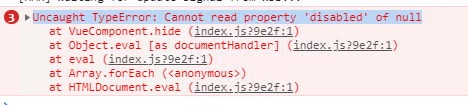
Vue ElementUI el-dropdown Error: Uncaught TypeError: Cannot read property ‘disabled‘ of null

Inadvertently shield El dropdown menu and report an error when you click the page at will, causing confusion of the whole HTML elements! Reported a very strange mistake!

Uncaught TypeError: Cannot read property ‘disabled’ of null
You have to have children….

<el-dropdown>
  <span class="el-dropdown-link">
    Dropdown menu<i class="el-icon-arrow-down el-icon---right"></i>
  </span>
  <! -- <el-dropdown-menu slot="dropdown">
    <el-dropdown-item>goldencake</el-dropdown-item>
    <el-dropdown-item>Lion's Head</el-dropdown-item>
    <el-dropdown-item> Spiral noodles</el-dropdown-item>
    <el-dropdown-item disabled>Double-skinned milk</el-dropdown-item>
    <el-dropdown-item divided>Oyster Omelet</el-dropdown-item>
  </el-dropdown-menu> -->
</el-dropdown>

How to Solve Maven Error: Failure to transfer com.thoughtworks.xstream:xstream:jar:1.3.1 from https://repo.maven.ap

Report error in full: Failure to transfer com.thoughtworks.xstream:xstream:jar:1.3.1 from https://repo.maven.apache.org/maven2 was cached in the local repository, resolution will not be reattempted until the update interval
of central has elapsed or updates are forced. Original error: Could not transfer artifact com.thoughtworks.xstream:xstream:jar:1.3.1 from/to central (https://repo.maven.apache.org/maven2): The operation
was cancelled.
Should be the time to download the package error, go to the repository to delete, re-download it!
After the deletion, maven clean, done!
Similar question.
Failure to transfer org.apache.maven.shared:maven-filtering:jar:1.0-beta-2 from https://repo.maven.apache.org/maven2 was cached in the local repository, resolution will not be reattempted until the
update interval of central has elapsed or updates are forced. Original error: Could not transfer artifact org.apache.maven.shared:maven-filtering:jar:1.0-beta-2 from/to central (https://
repo.maven.apache.org/maven2): The operation was cancelled.

The same method to solve, are half of the download interrupted, the reason for the package is not complete.