When compiling gem5, the following error was reported:
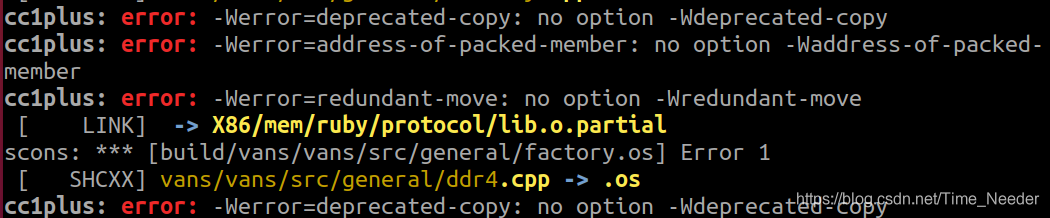
the most likely reason is that your version of GCC is not right. It is recommended to upgrade a higher version of GCC. The pro test shows that 10.2.0 is effective, and no version below 8 seems to work
Category Archives: Error
[Solved] Error: Cannot find module ‘webpack-cli/package.json‘
Solution:npm install webpack-cli -g
Error: Cannot find module 'webpack-cli/package.json'
Require stack:
- C:\Users\12987\AppData\Roaming\npm\node_modules\webpack\bin\webpack.js
    at Function.Module._resolveFilename (internal/modules/cjs/loader.js:880:15)
    at Function.resolve (internal/modules/cjs/helpers.js:94:19)
    at runCli (C:\Users\12987\AppData\Roaming\npm\node_modules\webpack\bin\webpack.js:65:26)
    at C:\Users\12987\AppData\Roaming\npm\node_modules\webpack\bin\webpack.js:154:5
    at processTicksAndRejections (internal/process/task_queues.js:93:5) {
  code: 'MODULE_NOT_FOUND',
  requireStack: [
    'C:\\Users\\12987\\AppData\\Roaming\\npm\\node_modules\\webpack\\bin\\webpack.js'
  ]
}
[Solved] hello.s:15 Error: junk at end of line, first unrecognized character valued 0x8
gccThe compiler reports the following error.
hello.s: warning: end of file, not end of line; insert new line
hello.s:1: Error: junk at end of line, first unrecognized character valued 0x7f
hello.s:1: Error: junk at end of line, first unrecognized character valued 0x3
hello.s:1: Error: junk at end of line, first unrecognized character is >' hello.s:1: Error: junk at end of line, first unrecognized character valued 0x1 hello.s:1: Error: junk at end of line, first unrecognized character is0′
hello.s:1: Error: junk at end of line, first unrecognized character is @' hello.s:1: Error: junk at end of line, first unrecognized character is(‘
hello.s:1: Error: junk at end of line, first unrecognized character is @' hello.s:1: Error: junk at end of line, first unrecognized character is8′
hello.s:1: Error: junk at end of line, first unrecognized character is @' hello.s:1: Error: junk at end of line, first unrecognized character valued 0x1b hello.s:1: Error: junk at end of line, first unrecognized character valued 0x1a hello.s:1: Error: junk at end of line, first unrecognized character valued 0x1a hello.s:1: Error. junk at end of line, first unrecognized character valued 0x6 hello.s:1: Error: junk at end of line, first unrecognized character valued 0x4 hello.s:1: Error: junk at end of line, first unrecognized character is@’
There is no correct solution on the Internet, so I studied it carefully. gcc compiler is fine, the problem is that the gcc code is typed in the wrong case!
The correct command is as follows
gcc -E hello.c -o hello.i -v
gcc -S hello.i -o hello.s -v
gcc -c hello.s -o hello.o -v
When generating the. S file, the s of GCC – s should be capitalized
otherwise, an error will occur when GCC – C generates the. O file!!
[Solved] Git Push error: File: xxx 252.15 MB, exceeds 100.00 MB.
Reason: the file size is too large and cannot exceed 100m
1. Check which file exceeds 100m
git rev-list --objects --all | grep xxx
2. Remove from cache
git filter-branch --tree-filter 'rm -f xxx' --tag-name-filter cat -- --all
XXX represents the file name returned in the first step
CMake Error: The source directory “opencv Install Catalog“ does not appear to contain CMakeLists.txt.
Cmake error: the source directory “opencv installation directory” does not appear to contain cmakelists.txt
I want to build opencv 4.5.0 in Ubuntu 20.04 this morning; In the C + + environment, I tried to learn opencv in the Linux system, but I was not familiar with the use of Linux system. I was puzzled by one step in building the environment, and the error was as follows:
Cmake error: the source directory “opencv installation directory” does not appear to contain cmakelists.txt
In Baidu search, we found many solutions provided by big men. After some attempts, we failed collectively. After carefully studying the reasons for the error and checking our opencv installation directory, we found that the specific path of our cmakelists.txt is "home"/ ××××/ Opencv/opencv master/cmakelists.txt " instead of " home/ ×××/ Opencv/cmakelists. TXT ", finally found the cause of the error and solved the problem. Therefore, I hope this article can help some beginners like me. Thank you for your support!
How to Solve Element Error: target is not existed: .page-component__scroll .el-scrollbar__wrap
The error at the top of the secondary package element UI is reported as follows:
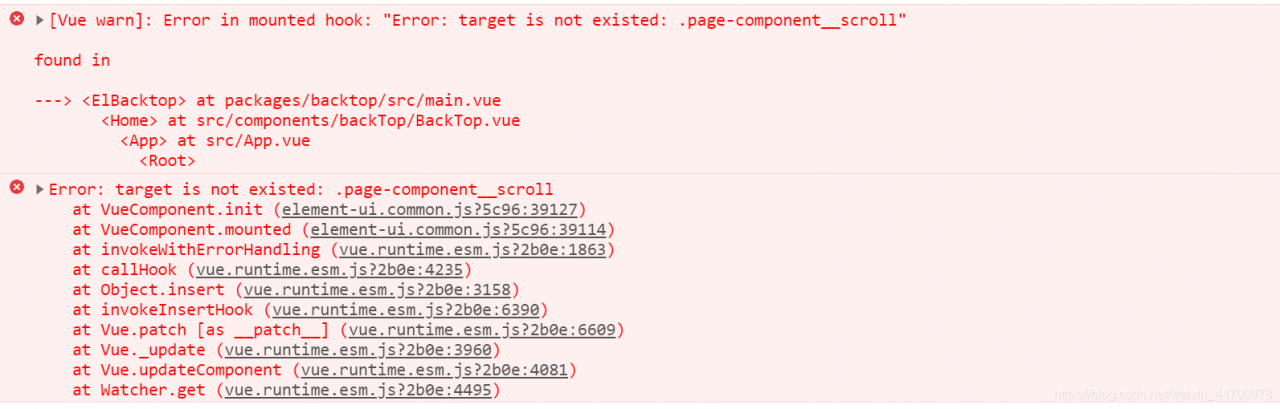
solution:
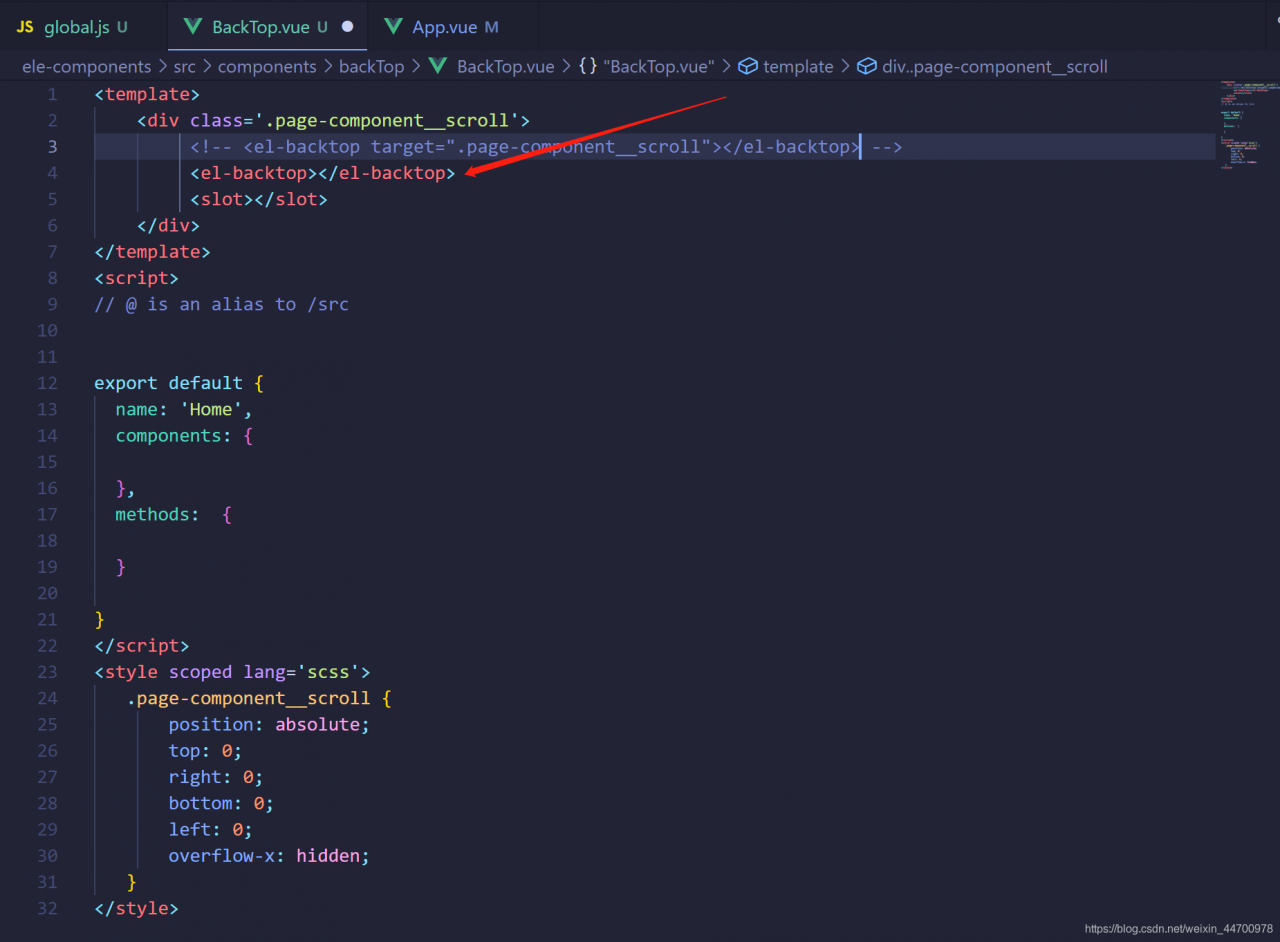
has default style, so this situation is caused
RabbitMQ:address (cannot connect to host/port) [How to Solve]
Scene
[root@taishan-atlas init.d]# service rabbitmq-server start
Failed to get D-Bus connection: Operation not permitted
ERROR: epmd error for host taishan-atlas: address (cannot connect to host/port)
Solution
Modify/etc/hosts and add 127.0.0.1 taishan-atlas
127.0.0.1       localhost
127.0.0.1       taishan-atlas
192.168.12.42   taishan-atlas
Note: here 127.0.0.1 Taishan Atlas 192.168.12.42 Taishan atlas corresponds to the IP address in front of the host name. One is the loopback IP address and the other is the real IP address of the device. If the real IP address is not configured correctly, a similar problem will occur: error: epmd error for host Taishan Atlas: address (cannot connect to host/port)
Note: the reason why you need to manually add a local domain name is that you have modified the local machine’s host name, so you need to modify it accordingly. After the system is installed, a host name will be generated by default
Rabbitmq: Erlang distribution failed solution
Preface
System version: CentOS Linux release 7.7.1908 (Core)
Adding a user to rabbitmq via the rabbitmqctl add_user admin 12345 command prompts an error.
[root@localhost perl]# rabbitmqctl add_user admin 12345
Error: unable to connect to node rabbit@localhost: nodedown
DIAGNOSTICS
===========
attempted to contact: [rabbit@localhost]
rabbit@localhost:
* connected to epmd (port 4369) on localhost
* epmd reports node ‘rabbit’ running on port 25672
* TCP connection succeeded but Erlang distribution failed
* Authentication failed (rejected by the remote node), please check the Erlang cookie
current node details:
– node name: ‘rabbitmq-cli-49@localhost’
– home dir: /root
– cookie hash: BgvEr+lGkDjLTQzT85cpyw==
Solution:
1)Search the .erlang.cookie file
[root@localhost mnesia]# find/-name *.cookie
/root/.erlang.cookie
/opt/rabbitmq_server-3.6.10/.erlang.cookie
2)Overwrite the /root/.erlang.cookie file
cp /opt/rabbitmq_server-3.6.10/.erlang.cookie /root/
Cause:
RabbitMQ’s .erlang.cookie conflicts with the user’s cookie and needs to override the user’s cookie with RabbitMQ’s cookie
[app] install and compile libimobililedevice, How to solve the error
Problem Description: 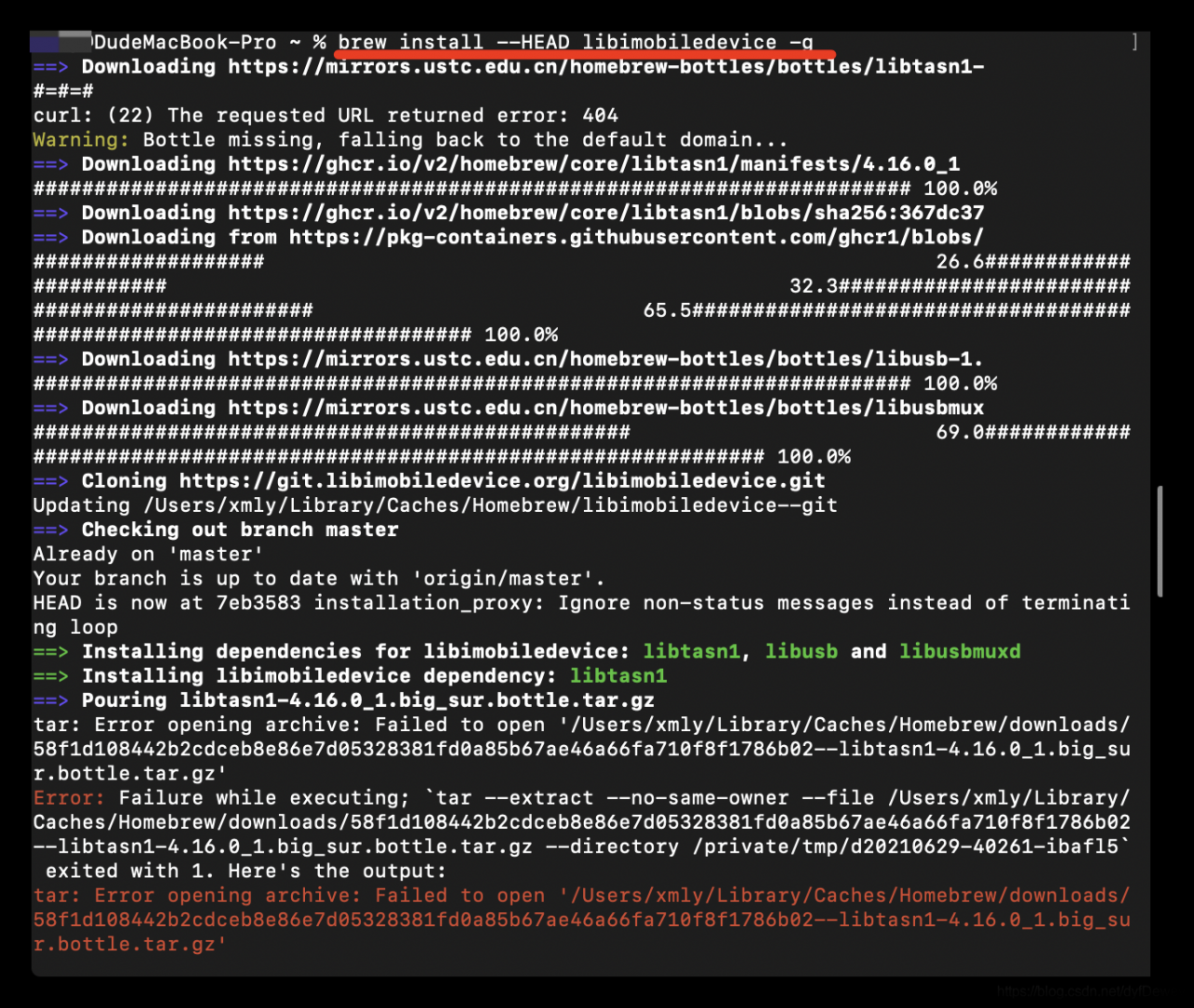
Error: Failure while executing; `tar --extract --no-same-owner --file /Users/xmly/Library/Caches/Homebrew/downloads/58f1d108442b2cdceb8e86e7d05328381fd0a85b67ae46a66fa710f8f1786b02--libtasn1-4.16.0_1.big_sur.bottle.tar.gz --directory /private/tmp/d20210629-40261-ibafl5` exited with 1. Here's the output:
tar: Error opening archive: Failed to open '/Users/xmly/Library/Caches/Homebrew/downloads/58f1d108442b2cdceb8e86e7d05328381fd0a85b67ae46a66fa710f8f1786b02--libtasn1-4.16.0_1.big_sur.bottle.tar.gz'
Cause of the problem:
Maybe some of the dependent libraries were not downloaded
later, after the installation environment was prepared, they succeeded
* brew install build-essential automake autoconf git cmake pkg-config libtool
install
* Method 1:
	git clone https://github.com/libimobiledevice/libimobiledevice.git
	cd libimobiledevice
	./autogen.sh
	make
	sudo make install

* Method 2:
	brew install --HADE libmobliedevice
	# If you do not add - HADE installation is an older version, does not support IOS 10 or above
[Solved] Failed to resolve: com.serenegiant:common:1.5.20
When using an appcloud project composed of multiple import modules, failed to resolve: com.se appears after the operation UI on the tablet side of the project is imported and synchronized renegiant:common : 1.5.20 find for many days can not solve, but today found the corresponding solution, record the first time to solve the bug excited, pro test effective.
Solution:
1. download the required common package
2. Set up an AARS folder in the root directory of the whole project, and unzip the downloaded common package and put it in it
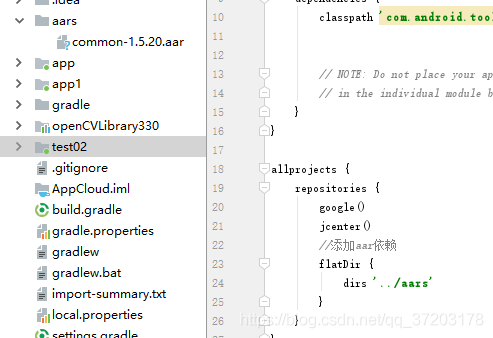
After adding the folder and common package, you need to add the corresponding AAR dependency in the build. Gradle of the root directory, as shown on the right side of the figure above.
3. AAR dependency code to be added
//Adding aar dependencies
flatDir {
    dirs '../aars'
}
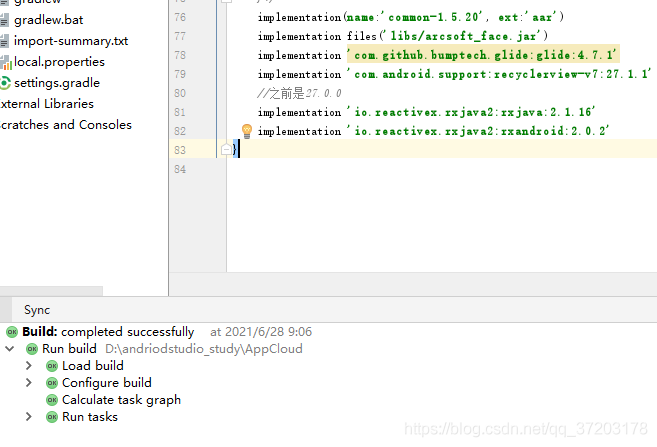
4. Set in build.gradle of the module to be referenced
implementation(name:'common-1.5.20', ext:'aar')
And note the previous code about the package, such as
implementation('com.serenegiant:common:1.5.20') {
    exclude module: 'support-v4'
}
Or
api “com.se renegiant:common :${commonLibVersion}”
5. After modification, synchronize the whole project, and then the problem is solved.
[Solved] Excel plug in installation failed: unable to resolve the value of property ‘type’
[Description of the problem]
The third party to Excel plug-in installation package as Figure 1, I have not done Excel plug-in installation package, it is estimated that the callVSTOInstaller.exe

The installation failed with the following message
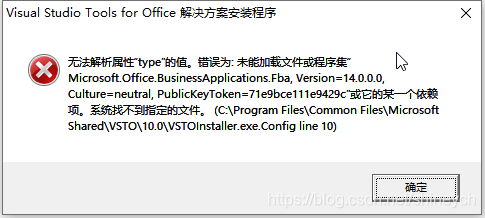
ERROR message ” The value of the property ‘type’ cannot be parsed. The error is: Could not load file or assembly ‘Microsoft.Office.BusinessApplications.Fba,Version=14.0.0.0,Culture=nutral, PublicKeyToken=71e9ce111e9429c’ or one of its dependencies. The system cannot find the file specified. (C:\Program Files\Common Files\Microsoft Shared\VSTO\10.0\VSTOInstaller.exe.Config Line 10)
[Solution]
Fixed location plugin folder
-
- C:\Program Files (x86)\Common Files\Microsoft shared\VSTO\10.0 or C:\Program Files\Common Files\Microsoft shared\VSTO\10.0.
Rename VSTOInstaller.exe.config, such as VSTOInstaller.exe.config.old. and reinstall successfully.
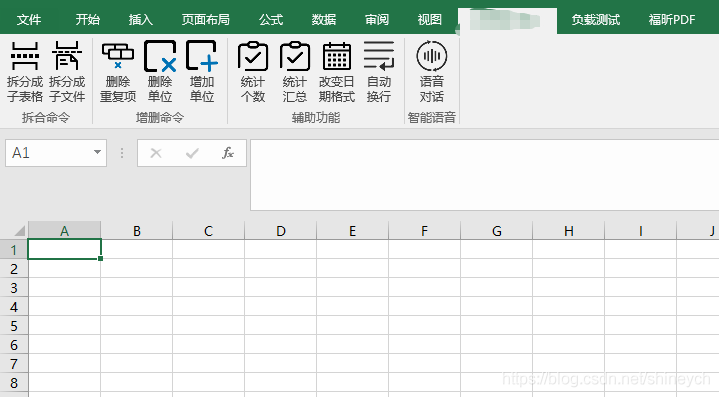
[Run Result]
After installation plug-in directory.
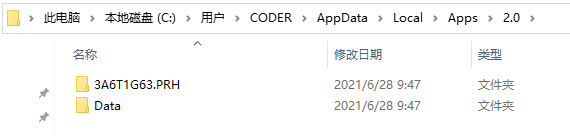
Normal operation interface.
[Solved] Tensorflow/Keras Error reading weights: ValueError: axes don‘t match array
Error information:
Traceback (most recent call last):
  File "bs.py", line 149, in <module>
    tcpserver1=MYTCPServer(('192.168.0.109',54321))
  File "wserver_bs.py", line 65, in __init__
    self.model.load_weights(weight_filepath)
  File "/home/ps/anaconda3/envs/anomaly/lib/python3.6/site-packages/tensorflow/python/keras/engine/training.py", line 162, in load_weights
    return super(Model, self).load_weights(filepath, by_name)
  File "/home/ps/anaconda3/envs/anomaly/lib/python3.6/site-packages/tensorflow/python/keras/engine/network.py", line 1424, in load_weights
    saving.load_weights_from_hdf5_group(f, self.layers)
  File "/home/ps/anaconda3/envs/anomaly/lib/python3.6/site-packages/tensorflow/python/keras/saving/hdf5_format.py", line 749, in load_weights_from_hdf5_group
    layer, weight_values, original_keras_version, original_backend)
  File "/home/ps/anaconda3/envs/anomaly/lib/python3.6/site-packages/tensorflow/python/keras/saving/hdf5_format.py", line 456, in preprocess_weights_for_loading
    weights[0] = np.transpose(weights[0], (3, 2, 0, 1))
  File "<__array_function__ internals>", line 6, in transpose
  File "/home/ps/anaconda3/envs/anomaly/lib/python3.6/site-packages/numpy/core/fromnumeric.py", line 653, in transpose
    return _wrapfunc(a, 'transpose', axes)
  File "/home/ps/anaconda3/envs/anomaly/lib/python3.6/site-packages/numpy/core/fromnumeric.py", line 58, in _wrapfunc
    return bound(*args, **kwds)
ValueError: axes don't match array
Tossed half a night, the Internet to check a variety of methods are useless
the fault lies in load_ On the weights function, it’s a matter of setting the model!
When loading the model, the default input size is used
model = cnn.CNNLikeModel()
The actual size of the input tensor is different from the default size, which leads to this error.
solve
1. Modify the default value of the function
2. Fill in the correct value when using this function.