Category Archives: Error

log4j Error: Please initialize the log4j system properly [How to Solve]

pom.xml

<dependency>
            <groupId>org.slf4j</groupId>
            <artifactId>slf4j-log4j12</artifactId>
            <version>1.7.7</version>
        </dependency>
        <dependency>
            <groupId>log4j</groupId>
            <artifactId>log4j</artifactId>
            <version>1.2.17</version>
        </dependency>

log4j.properties

 log4j.rootLogger=INFO.console
 log4j.appender.console=org.apache.log4j.ConsoleAppender
 log4j.appender.console.layout=org.apache.log4j.PatternLayout
 log4j.appender.console.layout.ConversionPattern=%d{HH:mm:ss.SSS} %-5p %-60c %X - %m%n

Errors found:

log4j:WARN No appenders could be found for logger (org.apache.flink.streaming.api.graph.StreamGraphGenerator).
log4j:WARN Please initialize the log4j system properly.
log4j:WARN See http://logging.apache.org/log4j/1.2/faq.html#noconfig for more info.

Later, it was found that the configuration was written incorrectly. Just change “log4j. Rootlogger = info. Console” to “log4j. Rootlogger = info, console”

How to Solve Nginx 413 Error (request entity too large)

Solve the error of Nginx 413 (request entity too large)

Error reporting reason:
the request body is too large. The default upload file size in the nginx configuration file is 1m. You need to modify the upload file size configuration in the configuration file
in the Nginx directory,
find the conf folder,
open the Nginx.conf file
add the following code to HTTP {…}

http{
    
    #upload the file size
    client_max_body_size 1024m;
    
}

After modifying the configuration file, restart Nginx
Restart command: Nginx – s reload

JMeter JDBC Error: No pool found named: ‘test‘ [How to Solve]

No pool found named

JMeter JDBC error reporting: no pool found named error information reason solution

JMeter JDBC reports an error: no pool found named

Error message

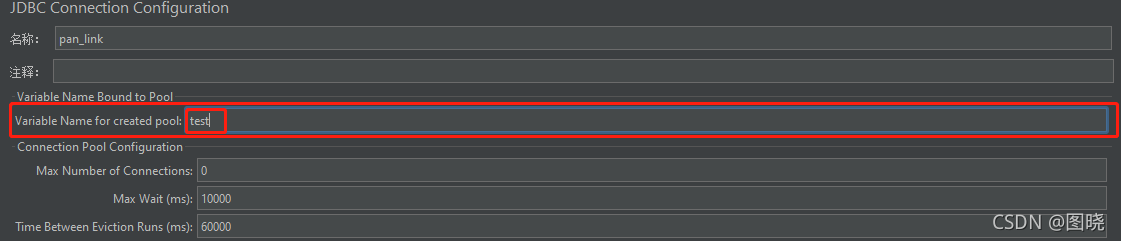
No pool found named: ‘test’, ensure Variable Name matches Variable Name of JDBC Connection Configuration

Reason

The JDBC request needs to connect to the database and needs the corresponding configuration information. If the database configuration information is not found, this error will be reported, Find the configuration information through the value filled in variable name of pool declared in JDBC connection configuration JDBC connection configuration provides the configuration information through the value filled in variable name of created pool. When there are multiple database configuration information, use variable name of pool declared in JDBC connection configuration and variable name of created pool, Ensure that the query request is not confused with the connected database

Solution

Fill the variable name of pool declared in JDBC connection configuration in the JDBC request and the variable name of created pool in the corresponding JDBC connection configuration into the same value

[Solved] PostgreSQL Remote Access Error: could not connect to server

1. Turn off the postgresql service first
. 2. If you want postgresql to support remote access, you need to modify the two configuration files in the data folder under the directory

postgresql.conf
Set the value of the listen_addresses item in the file to ‘*’
pg_hba.conf
Add the following configuration under the host all all 127.0.0.1/32 md5 line after the ipv4 configuration of the configuration file, or directly modify this line to the following configuration host all 0.0.0.0/0 trust
If you do not want to allow all IP remote access, You can set 0.0.0.0 in the above configuration items to a specific IP value.
3. Right-click management on my computer-find service-find postgresql service, right-click to start

Avpro Video Error: MediaPlayer.FileLocation [How to Solve]

Problems with avpro video

Problem Description:

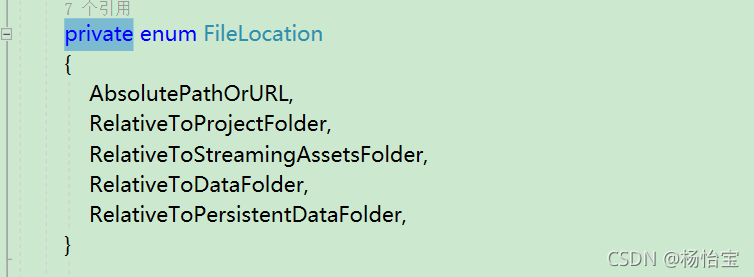
Mediaplayer.filelocation in version 2. X is red: it is inaccessible because it has a certain protection level

Solution:

Mediaplayer.filelocation encountered is inaccessible because it has a certain protection level
Press and hold Ctrl and click filelocation

just change private to public

Cmake compile cocos2d-x error [How to Solve]

Enter at the terminal:

cocos run --proj-dir .. -p mac

The error information is as follows:

-- The C compiler identification is unknown
-- The CXX compiler identification is unknown
CMake Error at CMakeLists.txt:30 (project):
  No CMAKE_C_COMPILER could be found.


CMake Error at CMakeLists.txt:30 (project):
  No CMAKE_CXX_COMPILER could be found.


-- Configuring incomplete, errors occurred!
See also "/Users/roy/Desktop/workspace/CocosProject/MyGame/mac-build/CMakeFiles/CMakeOutput.log".
See also "/Users/roy/Desktop/workspace/CocosProject/MyGame/mac-build/CMakeFiles/CMakeError.log".

Solution:

sudo xcode-select --reset

Xcode12.5 package framework error [How to Solve]

1. General

Today, Xcode was upgraded to 12.5.1. When compiling the existing project, the problem of swift incompatibility reported by referring to the framework compiled by swift appeared again. According to previous experience, just pack it again with the latest version of Xcode, but my colleague recommended a configuration to avoid the problem of swift incompatibility in the later stage, but this configuration was set, But it triggered a series of changes.

2. Project configuration and script modification

2.1. Modify the build libraries for distribution configuration item

This upgrade will ‘build settings’ – & gt` Build Options`->` Build libraries for distribution ` is set to yes, which has solved the problem of incompatibility in the later stage (it is set temporarily and needs to be verified in the later stage).
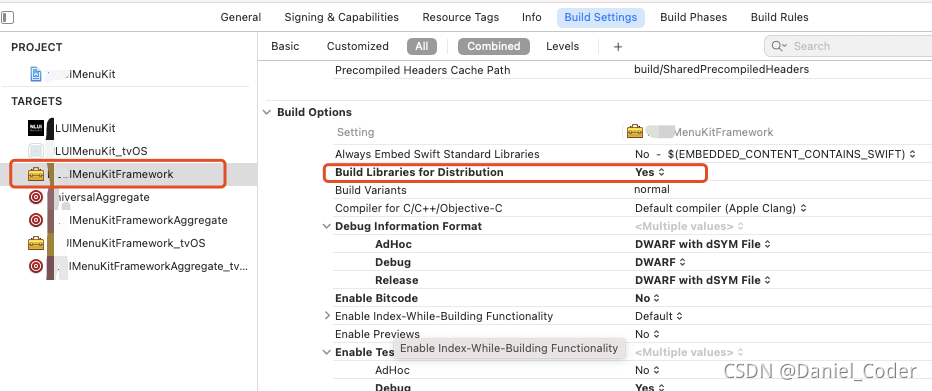
two point two   Modify project build system

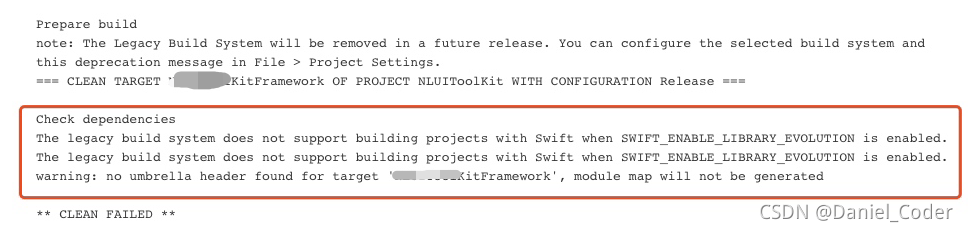
Because ‘build libraries for distribution’ is set to yes, ‘project settings’ – & gt; under’ file ‘in the Project menu` Build system needs to be changed from ‘legacy build system’ to ‘new build system (default)’. Otherwise, packaging will fail with the following error.

  two point three   Modify the universal aggregate script file

Our project uses a universalaggregate script file to execute the other two script files. One is xxxxkitaggregate of IOS_ IOS, one is xxxxkitaggregate of tvos_ tvOS。 In the universalaggregate script, add ` – usemodernbuildsystem = no ‘after the two instructions respectively. If it is set to no, it means that the build system adopts’ legacy build system’, and if it is set to yes, it adopts’ new build system (default) ‘. As follows:

xcodebuild -target "XXXXKitAggregate_iOS" BUILD_DIR="${BUILD_DIR}" -UseModernBuildSystem=NO
xcodebuild -target "XXXXKitAggregate_tvOS" BUILD_DIR="${BUILD_DIR}" -UseModernBuildSystem=NO

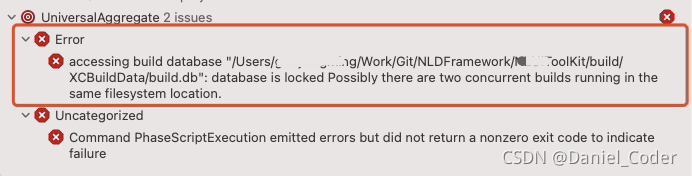
Add ` – usemodernbuildsystem = no ‘to avoid disk read-write errors caused by simultaneous packaging of IOS and tvos
the error is as follows:

--error: error: accessing build database "xxx/build/XCBuildData/build.db": disk I/O error

Or:

accessing build database "/Users/xxxx/Work/Git/NLDFramework/XXXToolKit/build/XCBuildData/build.db": database is locked Possibly there are two concurrent builds running in the same filesystem location.
2.4 modify the packaging script (xxxxkitaggregate_ios, xxxxkitaggregate_tvos)

Add ‘RM – RF ${build_dir}’ before the ‘xcodebuild – target “XXXX’ command, and remove ‘clean’ from the ‘xcodebuild’ command, as shown in the following figure:
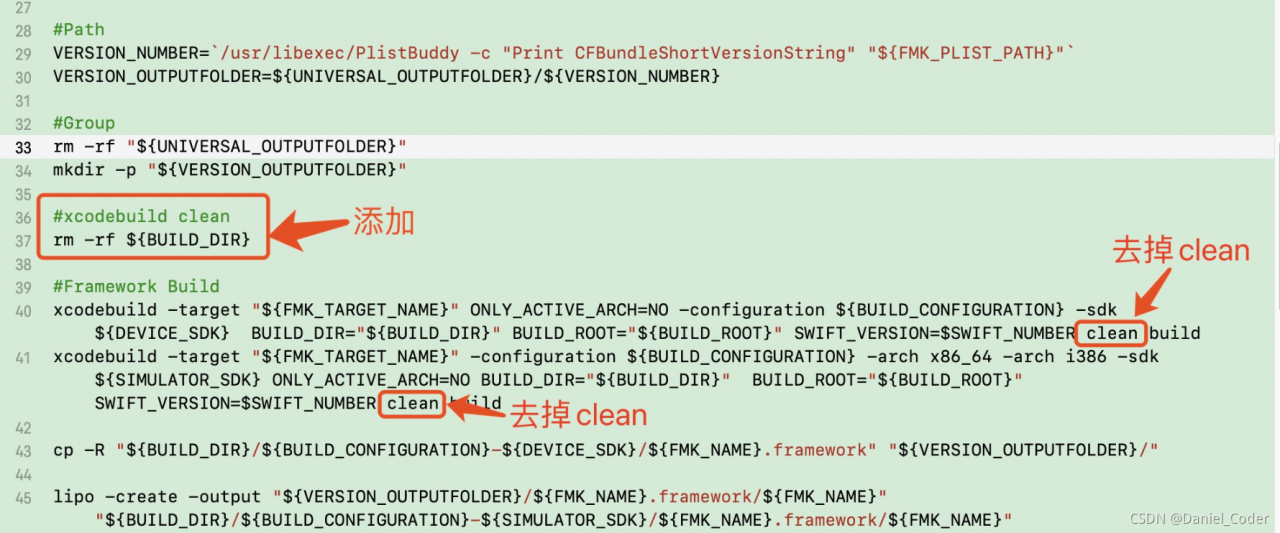
Before each build, delete the build file directory to avoid the following errors:

Could not delete `/Users/xxxx/Work/Git/NLDFramework/XXXMenuKit/build` because it was not created by the build system.

2.5 modify the configuration in Jenkins project

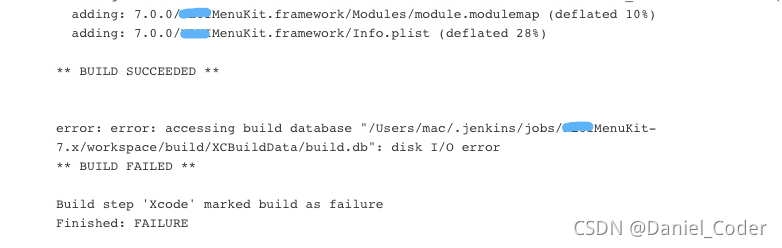
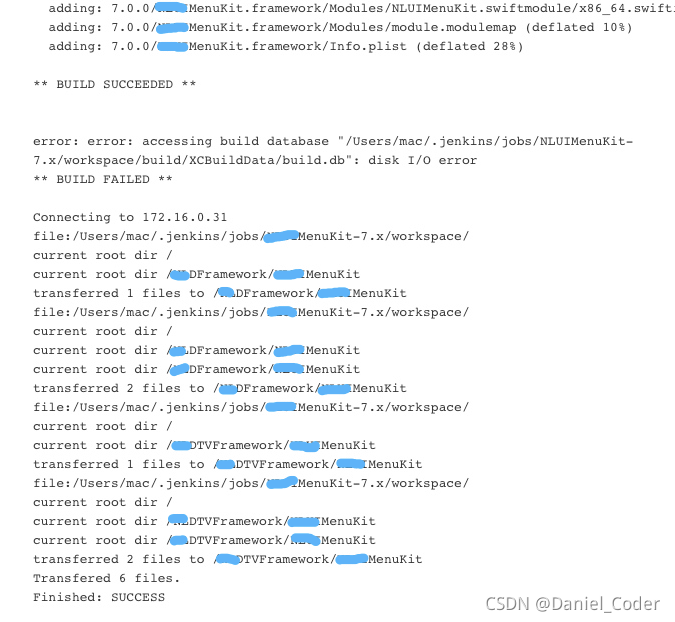
If the framework is packaged through Jenkins, you need to find the build configuration under the corresponding project configuration in Jenkins and check ‘allow failing build results’. Otherwise, Jenkins packaging will fail due to disk read-write exceptions. Check it, that is, ignore the exceptions and put the packaged framework in the specified location.
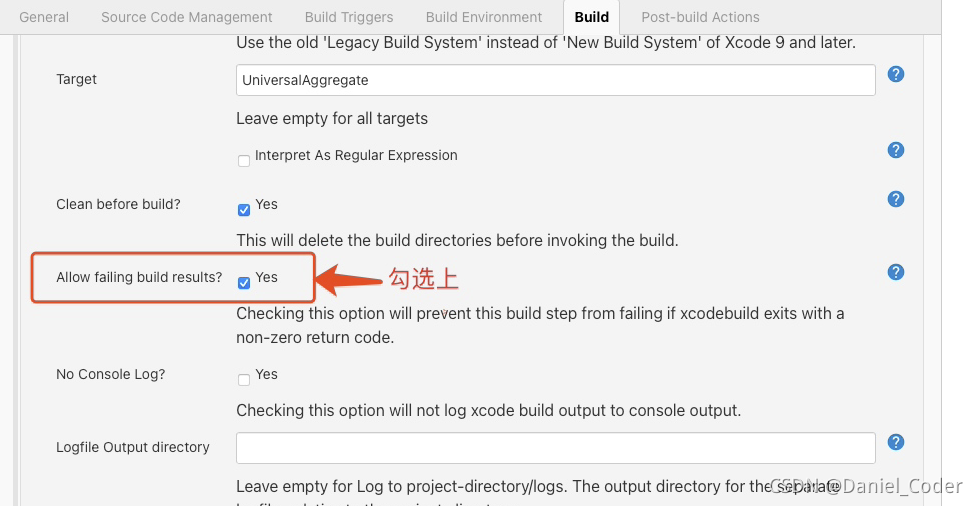
If not checked, Jenkins’s final output results are as follows:
When checked, Jenkins’s final output results are as follows:
[Solved] Flutter SDK constraint error: pub get failed (65; See…

Download a file from git, open it, run fluent pub get, and an error occurs:
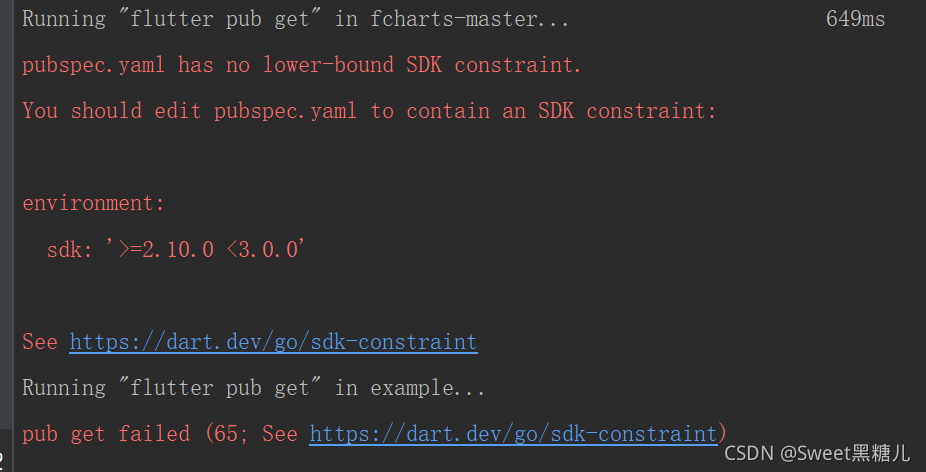
pubspec.yaml has no lower bound SDK constraint.
you should edit pubspec.yaml to contain an SDK constraint:
environment:
SDK: ‘>= 2.10.0 < 3.0.0 ‘

add to pubspec.yaml:
environment: SDK:’ >= 2.10.0 < 3.0.0 ‘
after rerunning fluent pub get, an error is still reported, indicating that the SDK constraint is not added. Later, it is found that the subfolder example of the home folder also contains a pubspec.yaml file, in which the SDK constraint is not added
after adding constraints, run fluent pub get.

Kubernetes Error: Error in configuration: unable to read client-cert* unable to read client-key*

System environment:

Ubuntu 20.04 LTSDocker 20.10.8Kubernetes 1.22.1Node: node

Execute command:

$ kubectl version

Errors are reported as follows:

Error in configuration: 
* unable to read client-cert /var/lib/kubelet/pki/kubelet-client-current.pem for default-auth due to open /var/lib/kubelet/pki/kubelet-client-current.pem: no such file or directory
* unable to read client-key /var/lib/kubelet/pki/kubelet-client-current.pem for default-auth due to open /var/lib/kubelet/pki/kubelet-client-current.pem: no such file or directory

Error reporting Description:

The token on the node has expired.

Solution:

$ kubeadm token create --print-join-command

kubeadm join 192.168.50.51:6443 --token rt43m1.b9py8ba6uxbfv7sr --discovery-token-ca-cert-hash sha256:f57a09633cf0e18cd905d41159a790704502410fd841acd63cffc8e493ad3cb2 

Regenerate the token on the Master node.

$ kubeadm join 192.168.50.51:6443 --token rt43m1.b9py8ba6uxbfv7sr --discovery-token-ca-cert-hash sha256:f57a09633cf0e18cd905d41159a790704502410fd841acd63cffc8e493ad3cb2 
$ kubectl version

Re execute on the node node.