Category Archives: Error

[Solved] Docker Startup Error: panic: runtime error: invalid memory address or nil pointer dereference

docker Startup error:

Log/var/log/messages
tail -n 200 /var/log/messages
docker.service: main process exited, code=exited, status=2/INVALIDARGUMENT
Sep 8 10:12:11 hdss7-200 systemd: Failed to start Docker Application Container Engine.
Sep 8 10:12:11 hdss7-200 systemd: Unit docker.service entered failed state.
Sep 8 10:12:11 hdss7-200 systemd: docker.service failed.
Sep 8 10:12:13 hdss7-200 systemd: docker.service holdoff time over, scheduling restart.
Sep 8 10:12:13 hdss7-200 systemd: Stopped Docker Application Container Engine.
Sep 8 10:12:13 hdss7-200 systemd: Starting Docker Application Container Engine…
Sep 8 10:12:13 hdss7-200 dockerd: time=“2021-09-08T10:12:13.165283953+08:00” level=warning msg=“The “graph” config file option is deprecated. Please use “data-root” instead.”
Sep 8 10:12:13 hdss7-200 dockerd: time=“2021-09-08T10:12:13.165505567+08:00” level=info msg=“Starting up”
Sep 8 10:12:13 hdss7-200 dockerd: time=“2021-09-08T10:12:13.168553899+08:00” level=info msg=“parsed scheme: “unix”” module=grpc
Sep 8 10:12:13 hdss7-200 dockerd: time=“2021-09-08T10:12:13.168617586+08:00” level=info msg=“scheme “unix” not registered, fallback to default scheme” module=grpc
Sep 8 10:12:13 hdss7-200 dockerd: time=“2021-09-08T10:12:13.168660657+08:00” level=info msg=“ccResolverWrapper: sending update to cc: {[{unix:///run/containerd/containerd.sock 0 }] }” module=grpc
Sep 8 10:12:13 hdss7-200 dockerd: time=“2021-09-08T10:12:13.168686536+08:00” level=info msg=“ClientConn switching balancer to “pick_first”” module=grpc
Sep 8 10:12:13 hdss7-200 dockerd: time=“2021-09-08T10:12:13.171021101+08:00” level=info msg=“parsed scheme: “unix”” module=grpc
Sep 8 10:12:13 hdss7-200 dockerd: time=“2021-09-08T10:12:13.171075188+08:00” level=info msg=“scheme “unix” not registered, fallback to default scheme” module=grpc
Sep 8 10:12:13 hdss7-200 dockerd: time=“2021-09-08T10:12:13.171115224+08:00” level=info msg=“ccResolverWrapper: sending update to cc: {[{unix:///run/containerd/containerd.sock 0 }] }” module=grpc
Sep 8 10:12:13 hdss7-200 dockerd: time=“2021-09-08T10:12:13.171129951+08:00” level=info msg=“ClientConn switching balancer to “pick_first”” module=grpc
Sep 8 10:12:13 hdss7-200 dockerd: time=“2021-09-08T10:12:13.198222339+08:00” level=info msg=“Loading containers: start.”
Sep 8 10:12:13 hdss7-200 dockerd: time=“2021-09-08T10:12:13.199003165+08:00” level=error msg=“failed to load container” container=5535e057d179bd9934787a4bf6335b2b16cc8ce66394d8079e7d9d26a35c1749 error=“open /data/docker/containers/5535e057d179bd9934787a4bf6335b2b16cc8ce66394d8079e7d9d26a35c1749/config.v2.json: no such file or directory”
Sep 8 10:12:13 hdss7-200 dockerd: time=“2021-09-08T10:12:13.199224462+08:00” level=error msg=“failed to load container” container=108ae306d2bfa1f8a9daf16831904cd7ee0917d230ccfbc85eb83420bd9bc915 error=“open /data/docker/containers/108ae306d2bfa1f8a9daf16831904cd7ee0917d230ccfbc85eb83420bd9bc915/config.v2.json: no such file or directory”
Sep 8 10:12:13 hdss7-200 dockerd: time=“2021-09-08T10:12:13.200071533+08:00” level=error msg=“failed to load container” container=3241e073c2ed6ba92bfb2420f7e6e8a974ed2650692a198b8f098a05aaa09838 error=“open /data/docker/containers/3241e073c2ed6ba92bfb2420f7e6e8a974ed2650692a198b8f098a05aaa09838/config.v2.json: no such file or directory”
Sep 8 10:12:13 hdss7-200 dockerd: time=“2021-09-08T10:12:13.200144451+08:00” level=error msg=“failed to load container” container=39ea0b14ac334796b07451b77e2d7a25a9c86c3d82b62f424ab6af7e9ae07288 error=“open /data/docker/containers/39ea0b14ac334796b07451b77e2d7a25a9c86c3d82b62f424ab6af7e9ae07288/config.v2.json: no such file or directory”
Sep 8 10:12:13 hdss7-200 dockerd: time=“2021-09-08T10:12:13.200210292+08:00” level=error msg=“failed to load container” container=61ef48f3191edfe1ed52f26a1a6f9d6e8dd349949fd140570942e31294613588 error=“open /data/docker/containers/61ef48f3191edfe1ed52f26a1a6f9d6e8dd349949fd140570942e31294613588/config.v2.json: no such file or directory”
Sep 8 10:12:13 hdss7-200 dockerd: time=“2021-09-08T10:12:13.200551515+08:00” level=error msg=“failed to load container” container=8903e29023d7fb408ccda97838258b79d5f49d7c1f0d45f72c9e428c6075b60a error=“open /data/docker/containers/8903e29023d7fb408ccda97838258b79d5f49d7c1f0d45f72c9e428c6075b60a/config.v2.json: no such file or directory”
Sep 8 10:12:13 hdss7-200 dockerd: time=“2021-09-08T10:12:13.200601149+08:00” level=error msg=“failed to load container” container=a9a77e3af76500a09c7d95569862834e164ff69a09c422591e4defabda1aff0f error=“open /data/docker/containers/a9a77e3af76500a09c7d95569862834e164ff69a09c422591e4defabda1aff0f/config.v2.json: no such file or directory”
Sep 8 10:12:13 hdss7-200 dockerd: time=“2021-09-08T10:12:13.200675372+08:00” level=error msg=“failed to load container” container=4934377693aea996348c07bddebfaa950fdb4374968d7a364bf51f408ebdc357 error=“open /data/docker/containers/4934377693aea996348c07bddebfaa950fdb4374968d7a364bf51f408ebdc357/config.v2.json: no such file or directory”
Sep 8 10:12:13 hdss7-200 dockerd: time=“2021-09-08T10:12:13.201257339+08:00” level=error msg=“failed to load container” container=d14487908117da6cc73d6c2d9fb67488ccc7f63a465cc1831db9d7ef3d25ce88 error=“open /data/docker/containers/d14487908117da6cc73d6c2d9fb67488ccc7f63a465cc1831db9d7ef3d25ce88/config.v2.json: no such file or directory”
Sep 8 10:12:13 hdss7-200 dockerd: panic: runtime error: invalid memory address or nil pointer dereference
Sep 8 10:12:13 hdss7-200 dockerd: [signal SIGSEGV: segmentation violation code=0x1 addr=0x10 pc=0x557a613cfae4]
Sep 8 10:12:13 hdss7-200 dockerd: goroutine 103 [running]:
Sep 8 10:12:13 hdss7-200 dockerd: github.com/docker/docker/vendor/github.com/containerd/fifo.(*fifo).Close(0x0, 0x0, 0x0)
Sep 8 10:12:13 hdss7-200 dockerd: /root/rpmbuild/BUILD/src/engine/.gopath/src/github.com/docker/docker/vendor/github.com/containerd/fifo/fifo.go:208 +0x44
Sep 8 10:12:13 hdss7-200 dockerd: github.com/docker/docker/vendor/github.com/containerd/containerd/cio.(*cio).Close(0xc000b19740, 0xc000acd3a8, 0xc000702a58)
Sep 8 10:12:13 hdss7-200 dockerd: /root/rpmbuild/BUILD/src/engine/.gopath/src/github.com/docker/docker/vendor/github.com/containerd/containerd/cio/io.go:203 +0x90
Sep 8 10:12:13 hdss7-200 dockerd: github.com/docker/docker/libcontainerd/remote.(*client).Restore.func1(0xc000bdd040, 0xc000011e88)
Sep 8 10:12:13 hdss7-200 dockerd: /root/rpmbuild/BUILD/src/engine/.gopath/src/github.com/docker/docker/libcontainerd/remote/client.go:86 +0x5a
Sep 8 10:12:13 hdss7-200 dockerd: github.com/docker/docker/libcontainerd/remote.(*client).Restore(0xc0003fae00, 0x557a63914e08, 0xc000132020, 0xc000b1c200, 0x40, 0xc000bdd030, 0x557a00132d00, 0xffffffffffffffff, 0x0, 0x0, …)
Sep 8 10:12:13 hdss7-200 dockerd: /root/rpmbuild/BUILD/src/engine/.gopath/src/github.com/docker/docker/libcontainerd/remote/client.go:107 +0xa07
Sep 8 10:12:13 hdss7-200 dockerd: github.com/docker/docker/daemon.(*Daemon).restore.func3(0xc0007ea210, 0xc000051bd0, 0xc00000c1e0, 0xc0007ea200, 0xc0000e9080, 0xc0000e9050, 0xc0000e9020, 0xc000333180)
Sep 8 10:12:13 hdss7-200 dockerd: /root/rpmbuild/BUILD/src/engine/.gopath/src/github.com/docker/docker/daemon/daemon.go:351 +0x46d
Sep 8 10:12:13 hdss7-200 dockerd: created by github.com/docker/docker/daemon.(*Daemon).restore
Sep 8 10:12:13 hdss7-200 dockerd: /root/rpmbuild/BUILD/src/engine/.gopath/src/github.com/docker/docker/daemon/daemon.go:319 +0x4cf
Sep 8 10:12:13 hdss7-200 systemd: docker.service: main process exited, code=exited, status=2/INVALIDARGUMENT
Sep 8 10:12:13 hdss7-200 systemd: Failed to start Docker Application Container Engine.
Sep 8 10:12:13 hdss7-200 systemd: Unit docker.service entered failed state.
Sep 8 10:12:13 hdss7-200 systemd: docker.service failed.
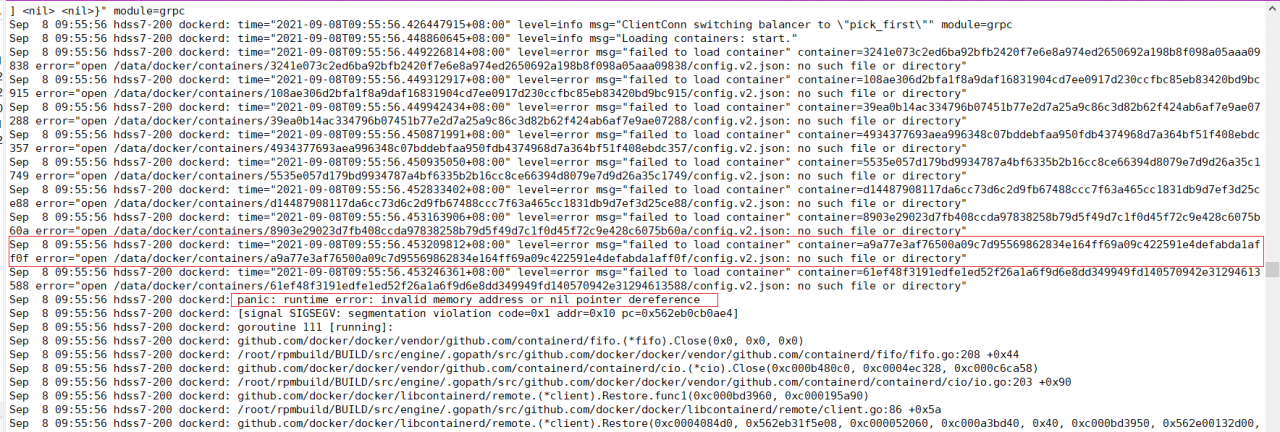


Error Message:
docker panic: runtime error: invalid memory address or nil pointer dereference

Delete the file in the path of ./data/docker will solve this error
[Solved] RuntimeError: CUDA error: invalid device ordinal

Error Message:
RuntimeError: CUDA error: invalid device ordinal

Solution:

args.device = torch.device('cuda:' + str(args.gpu_id))

Used the gpu_id exceeds that of the GPU card

My code is written in the above way. Different codes are written in different ways. In the final analysis, just change the number after CUDA: to be appropriate

Error received: error: xhr’get’to URL cross domain [How to Solve]

1. Problems encountered

There was a problem when the browser made a request to access another path:

Error received: Error: XHR 'GET' to URL 'https://widevine.eurofins-digitaltesting.com/cert-required/api/Ik0wR1ZCRUNDTkYi.YRMy4w.kgjp1ExZh2r1lcQezAm5HAfZq3J8vXQTBW-Bhdq-K5Y/cert-details'returned status HTTP 0

Knowledge points: for communication between different domains, when encountering complex requests, the client will not send the real request header first, but send the view request to check whether the two sides can communicate. If the verification is successful, send the real request, and the two sides shake hands three times to establish a connection before communication. Therefore, the server and the client have two connections. The first connection is authentication, and the second connection is to send a request to start communication.

Analysis 1: the return value 0 does not exist in the HTTP status code. The reason for the occurrence of HTTP 0 may indicate that the response is empty (or even there is no return header). Means that the connection has been accepted and then closed normally (TCP fin)

Preliminary conclusion: when sending the view request for the first time, the verification fails and returns 0.

① The reason for the verification failure may be that the client does not have a certificate, resulting in no permission to communicate;

② Possibly CORS, unable to communicate between different domains.

Verification ① 1: report bug #3724 in a3sa defect management system and obtain the certificate required for the test. Convert the certificate into the format required by the TV through OpenSSL and build it into the corresponding directory. The test still fails and the verification fails

Verification ① II: the certificate may be used incorrectly. You may need a built-in certificate to enable the browser to parse the request and conduct two-way verification of the certificate. Certificate two-way verification. If anyone is interested, you can comment and sort it out in my post blog

Verification ②: after compiling the built-in certificate, the test still fails. Viewing the log is indeed a CORS problem.

2. Solution

Add a header to the server-side configuration file:

"Access-Control-Allow-Origin"=>"xxxxx Your Link",

"Access-Control-Allow-Credentials"=>"true"

[Solved] Android7 8 Jack server SSL error: Jack server failed to (re)start, try ‘jack-diagnose’ or see Jack server log

The following error message appears when compiling Android 7 8 code
Jack server failed to (re)start, try ‘jack-diagnose’ or see Jack server log
SSL error when connecting to the Jack server. Try ‘jack-diagnose’
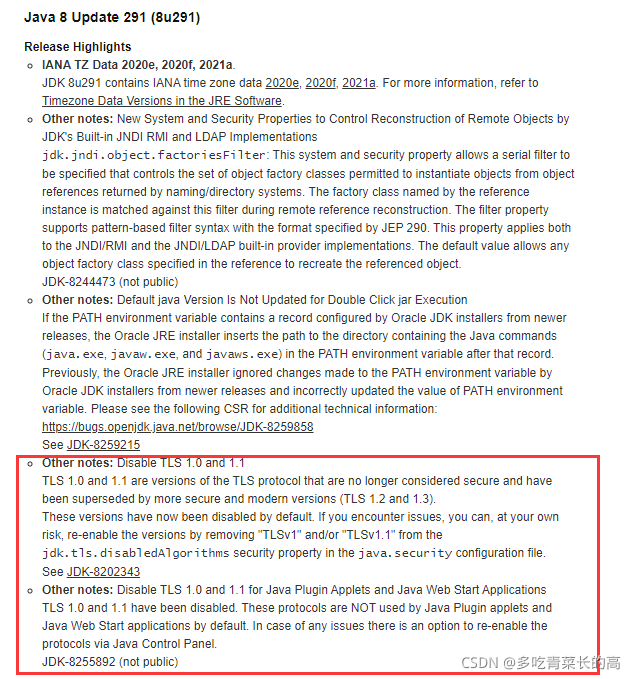
It is due to the updated version of JDK
https://java.com/en/download/help/release_changes.html
According to the JDK Release Highlights, we can find that this update disables TLSv1.0 and TLSv1.1 in jdk.tls.disabledAlgorithms

Solution:
sudo vim /usr/lib/jvm/java-8-openjdk-amd64/jre/lib/security/java.security

Change to:

Restart the server or restart jack server to compile after the modification

Attributeerror encountered when using ceilometer and gnocchi to execute commands related to gnocchi metric list: _Environ instance has no attribute ‘

AttributeError encountered when executing gnocchi metric list related commands using ceilometer and gnocchi: _Environ instance has no attribute ‘。
Control node execution: gnocchi metric list
Traceback (most recent call last):
File “/usr/bin/gnocchi”, line 10, in
sys.exit(main())
File “/usr/lib/python2.7/site-packages/gnocchiclient/shell.py”, line 252, in main
return GnocchiShell().run(args)
File “/usr/lib/python2.7/site-packages/gnocchiclient/shell.py”, line 99, in init
deferred_help=True,
File “/usr/lib/python2.7/site-packages/cliff/app.py”, line 79, in init
self.parser = self.build_option_parser(description, version)
File “/usr/lib/python2.7/site-packages/gnocchiclient/shell.py”, line 130, in build_option_parser
os.environ.set(“OS_AUTH_TYPE”, “password”)
AttributeError: _Environ instance has no attribute ‘set’


Solution:
vi keystonerc_admin
Modify
unset OS_SERVICE_TOKEN
export OS_USERNAME=admin
export OS_PASSWORD=‘openstack password’
export OS_REGION_NAME=RegionOne
export OS_AUTH_URL=http://x.x.x.x:5000/v3
export PS1=’[\u@\h \W(keystone_admin)]$ ’
export OS_PROJECT_NAME=admin
export OS_USER_DOMAIN_NAME=Default
export OS_PROJECT_DOMAIN_NAME=Default
export OS_IDENTITY_API_VERSION=3
export OS_PLACEMENT_API_VERSION=1.17
export OS_AUTH_TYPE=password
At this point the following command can be used in the terminal:

source ~/keystonerc_admin
gnocchi metric list
gnocchi metric list | grep cpu
gnocchi resource list
gnocchi resource list  --type image
gnocchi measures show 839afa02-1668-4922-a33e-6b6ea7780715

Git Error: error RPC failed; curl 56 OpenSSL SSL_read SSL_ERROR_SYSCALL, errno 10054

error: RPC failed; curl 56 OpenSSL SSL_read: SSL_ERROR_SYSCALL, errno 10054

Push times error

Push error after updating iconfont file

[the external chain image transfer fails. The source station may have an anti-theft chain mechanism. It is recommended to save the image and upload it directly (img-oz0myorq-163109850276) (C: \ users \ Kemeng \ appdata \ roaming \ typora \ user images \ image-20210907180245658. PNG)]

$ git push
Enumerating objects: 34, done.
Counting objects: 100% (34/34), done.
Delta compression using up to 8 threads
Compressing objects: 100% (19/19), done.
Writing objects: 100% (19/19), 27.61 KiB | 1.25 MiB/s, done.
Total 19 (delta 10), reused 0 (delta 0)
error: RPC failed; curl 56 OpenSSL SSL_read: SSL_ERROR_SYSCALL, errno 10054
fatal: the remote end hung up unexpectedly
Everything up-to-date

First, try to modify the upload size limit

git config --global http.postBuffer 524288000

Adjust the postbuffer to 500m

Clone error

Error trying to ignore SSL certificate

git config --global http.sslVerify "false"

Error running ‘Android Debugger (-1)‘ [How to Solve]

The Android studio attach debugger suddenly fails. Read the event log and report an error

2: 10 PM can’t bind to local – 1 for debugger

2: 10 PM error running ‘Android debugger (- 1)’: unknown error

2: 10 PM error running ‘Android debugger (- 1)’
invalid argument: argument invalid
[port]

There are similar port occupancy and other errors on the Internet, but those are basically a specific port, which is directly – 1 port. At first, I wanted to change the debugger’s port in preference to use existing manually managed server, and specify a port, so I couldn’t connect directly.

After that, I thought it was because preview and the official version were installed at the same time, and then I reinstalled Android studio.

Finally, it was solved. It turned out that the host file needs to map localhost to 127.0.0.1

127.0.0.1       localhost 

PIKA trouble02 — (error) ERR Syntax error, try CLIENT (LIST [order by [addr|idle]| KILL ip:port)

  1. Problem description

Redis was originally used, but now Pika is used. Springboot version 2.1.8 is used. ClientName is configured inside. There is no problem when starting, but the following exception information will be reported when using:

org.springframework.data.redis.RedisConnectionFailureException: Cannot get Jedis connection; nested exception is redis.clients.jedis.exceptions.JedisConnectionException: Could not get a resource from the pool] with root cause

redis.clients.jedis.exceptions.JedisDataException: ERR Syntax error, try CLIENT (LIST [order by [addr|idle]| KILL ip:port)

    @Bean
    public RedisConnectionFactory connectionFactory(RedisProperties redisProperties) {

        JedisClientConfiguration clientConfig = JedisClientConfiguration.builder()
                .clientName("zcx")
                .usePooling().poolConfig(getGenericObjectJedisPoolConfig(redisProperties)).and().readTimeout(redisProperties.getTimeout())
                .build();

        RedisStandaloneConfiguration configuration = new RedisStandaloneConfiguration(redisProperties.getHost());
        configuration.setPort(redisProperties.getPort());
        configuration.setPassword(RedisPassword.of(redisProperties.getPassword()));

        return new JedisConnectionFactory(configuration, clientConfig);
    }

  2. Solution

After searching, it is caused by the ClientName field. Just remove the ClientName configuration. The problem is found as follows:

Call creation connection in class GenericObjectPool

private PooledObject<T> create() throws Exception {
        ...

        final PooledObject<T> p;
        try {
            p = factory.makeObject();
        } catch (final Throwable e) {
            createCount.decrementAndGet();
            throw e;
        } finally {
            synchronized (makeObjectCountLock) {
                makeObjectCount--;
                makeObjectCountLock.notifyAll();
            }
        }
}

The client setname “zcx” command is called in the JedisFactory class, and an exception is thrown.

@Override
  public PooledObject<Jedis> makeObject() throws Exception {
    final HostAndPort hostAndPort = this.hostAndPort.get();
    final Jedis jedis = new Jedis(hostAndPort.getHost(), hostAndPort.getPort(), connectionTimeout,
        soTimeout, ssl, sslSocketFactory, sslParameters, hostnameVerifier);

    try {
      jedis.connect();
      if (password != null) {
        jedis.auth(password);
      }
      if (database != 0) {
        jedis.select(database);
      }
      if (clientName != null) {
        jedis.clientSetname(clientName);
      }
    } catch (JedisException je) {
      jedis.close();
      throw je;
    }

In the final analysis, pika does not support the client setname command, so when creating a connection, it cannot obtain the connection and report that the command is not supported

Failed to copy files Error processing tar file [How to Solve]

Learning content:

Dockerfile build image

[root@lms tomcat]# docker build -t mytomcat:0.1 .
Sending build context to Docker daemon  186.5MB
Step 1/15 : FROM centos
 ---> 300e315adb2f
Step 2/15 : MAINTAINER lms<[email protected]>
 ---> Running in 518a2a24a366
Removing intermediate container 518a2a24a366
 ---> 6e71bc54b0f9
Step 3/15 : COPY readme.txt /usr/local/tomcat/readme.txt
 ---> a2522531c257
Step 4/15 : ADD  jdk-8u161-linux-x64.tar.gz /usr/local/tomcat/
failed to copy files: Error processing tar file(exit status 1): unexpected EOF


the above error occurs. It is likely that an error occurred when uploading the tar file. Therefore, you can upload the file again!

error: resource android:attr/lStar not found [Pefect Solution]

Today, the following errors suddenly appear in the project, and the compilation will report an error

D:\AndroidProjects\XXXXX\app\build\intermediates\incremental\mergeDebugResources\
merged.dir\values\values.xml:10858: AAPT: error: resource android:attr/lStar not found.

No one submitted the code. I could still run yesterday, but I suddenly couldn’t do it today. Then there were all kinds of tosses. I tried the common methods for difficult and miscellaneous problems in the development process. Clean project, clear the studio cache and restart, restart the computer, etc. the problems still exist. I searched for a circle and didn’t find the corresponding solutions.

Problem:

The project or third-party library relies on androidx.core: core KTX: + , and there is no limited version. Therefore, the latest core KTX version 1.7.0 is used, and the above compilation error is reported, and it is still sudden.


Solution:

The specific version number depends on the project, not necessarily 1.3.2. I understand that it can be lower than 1.7.0

Method 1: project reference and directly set the specific version number. For example, my project:
implementation "Android. Core: core KTX: 1.3.2"
method 2: the version number is not set in the third-party dependency library. You can add the following code in build.gradle of APP module:
at the same level as Android {}

configurations.all {
    resolutionStrategy {
        force 'androidx.core:core-ktx:1.3.2'
    }
}

Note: the specific version number of remote dependency must be set. Never use the + end. This compilation will pull the corresponding latest remote dependency. Maybe there will be an inexplicable problem that day.

error: resource android:attr/lStar not found [How to Solve]

error: resource android:attr/lStar not found…….

After searching for a long time, there is nothing related to LSTAR under my attr directory. The project has not added LSTAR related fields from the beginning to the end, but the project inexplicably reported this error, that is, it can’t run. It can run in the first minute. Suddenly it can’t run. Do you say it’s annoying or not

To get down to business, the reason is that Android. Core: core KTX: + is referenced in the third-party library, and then the system automatically updates to version 1.6.0, resulting in an error: resource Android: attr/LSTAR not found. Change the version to Android. Core: core KTX: 1.6.0, synchronize and compile it.