Error log
Gazebo[Err][REST.cc:205] Error in REST request
Problem-solving
nano ~/.ignition/fuel/config.yaml
# Modify url: https://api.ignitionrobotics.org
Error log
Gazebo[Err][REST.cc:205] Error in REST request
Problem-solving
nano ~/.ignition/fuel/config.yaml
# Modify url: https://api.ignitionrobotics.org
The error report is inexplicable, but in fact, the dependency package imported by idea has multiple options, and it is wrong.
The required dependencies are as follows:
import org.apache.flink.api.common.serialization.SimpleStringSchema;
import org.apache.flink.streaming.api.environment.StreamExecutionEnvironment;
import org.apache.flink.streaming.connectors.kafka.FlinkKafkaConsumer;

import java.util.Collections;
import java.util.List;
import java.util.Properties;
Shardingsphere integrates mybatis plus and reports an error. Java.lang.illegalargumentexception: sharding value must implements comparable.
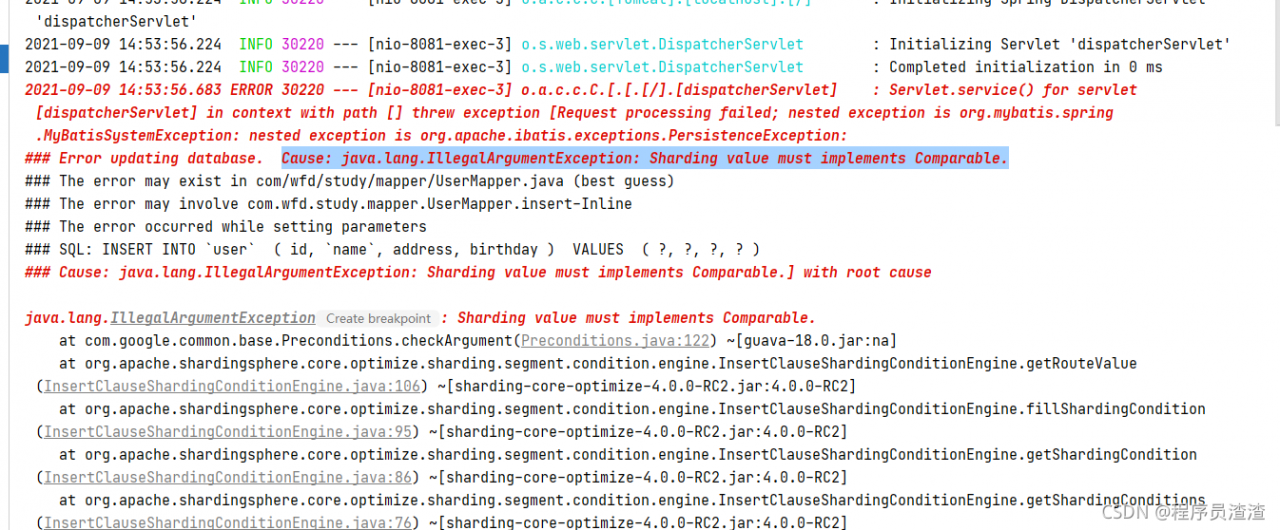
error reason
because shardingsphere’s ID generation strategy is configured in the configuration file, ID is used as the partition key here, and shardingsphere will automatically generate ID value when saving data.
spring.shardingsphere.sharding.tables.user.key-generator.column = id
spring.shardingsphere.sharding.tables.user.key-generator.type = SNOWFLAKE
However, the annotation @tableid is pasted on the entity class, which conflicts with mybatis plus.
@Data
@AllArgsConstructor
@NoArgsConstructor
@TableName(value = "`user`")
public class User implements Serializable {
    @TableId(value = "id", type = IdType.INPUT)
    private Long id;

    @TableField(value = "`name`")
    private String name;

    @TableField(value = "address")
    private String address;

    @TableField(value = "birthday")
    private Date birthday;
}
The solution is not to paste @tableid when the primary key is used as the partition key. If you write SQL through an XML file, the primary key column does not need to be written
2021-09-13T15:41:15: PM2 log: App [kafka:1] starting in -cluster mode- 2021-09-13T15:41:15: PM2 log: App name:kafka id:2 disconnected 2021-09-13T15:41:15: PM2 log: App [kafka:2] exited with code [0] via signal [SIGINT] 2021-09-13T15:41:15: PM2 log: App [kafka:2] starting in -cluster mode- 2021-09-13T15:41:15: PM2 log: App [kafka:1] online 2021-09-13T15:41:15: PM2 log: App [kafka:2] online /bin/bash:1 ELF ^ SyntaxError: Invalid or unexpected token
Docker start use CMD["pm2-runtime","process.json"].The configuration file looks like this
{
    "apps" : [
        {
            "name": "kafka",
            "script": "node main.js --NODE_ENV=test",
            "log_date_format"  : "YYYY-MM-DD HH:mm:ss",
            "log_file"   : "/home/logs/log.log",
            "error_file" : "/home/logs/err.log",
            "out_file"   : "/home/logs/out.log",
            "instances": 3,
            "exec_mode": "cluster"
        }
    ]
  }
Start three Kafka instances in docker. But it keeps reporting errors. The reason is “exec_mode” in the configuration file. Delete it. In docker, remember to use process blocking to run in the foreground mode. Do not use the background, otherwise it will start frequently and cause error.
1. Error description
An error occurs when using gob serialization: gob: addressable value of type * big. Float
Scenario:
Serializing a data structure contains a map field, where value is the big. Float structure type
type SideBlock {
  ...
  Varphi map[string]big.Float
  ...
}


func (b *SideBlock) Serialization() []byte {
	var res bytes.Buffer
	encoder := gob.NewEncoder(&res)
	err := encoder.Encode(b)
	if err != nil {
		logger.Error("Serialization err : ", err)
	}
	return res.Bytes()
}
Go version: go version go1.16.5 Darwin/arm64
OS: Mac OS BigSur 11.5.2
2. Error reason
The answer is found in issue:
He has a problem using URL. URL as the key of map
The problem lies in the pointer receiver of marshalbinary . If we want to use this structure as a key or value, we need to implement the marshalbinary method for special fields
personal understanding: when a map field of a structure has another structure instead of a pointer to the structure, it is a copy of the structure rather than itself during serialization, so it is difficult to address </ font>
3. Solution
Method 1:
https://play.golang.org/p/dK7SsqahtAd
package main

import (
	"encoding/gob"
	"fmt"
	"io/ioutil"
)

type T struct {
}

func (t *T) String() string { return "" }

func (t T) MarshalBinary() (text []byte, err error) {
	return []byte(t.String()), nil
}

func main() {
	m := make(map[T]int)
	m[T{}] = 0
	e := gob.NewEncoder(ioutil.Discard)
	fmt.Println(e.Encode(m))
}
Method 2:
Change big. Float into a pointer, that is, the field becomes varphi map [string] * big. Float
When using mobaxterm software to run a program on the server, there are often “network error: software caused connection abort” errors. The running program will report an error and terminate the program.
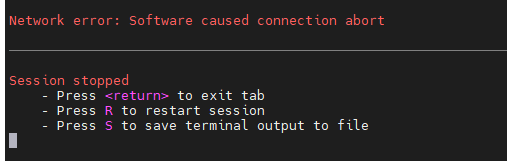
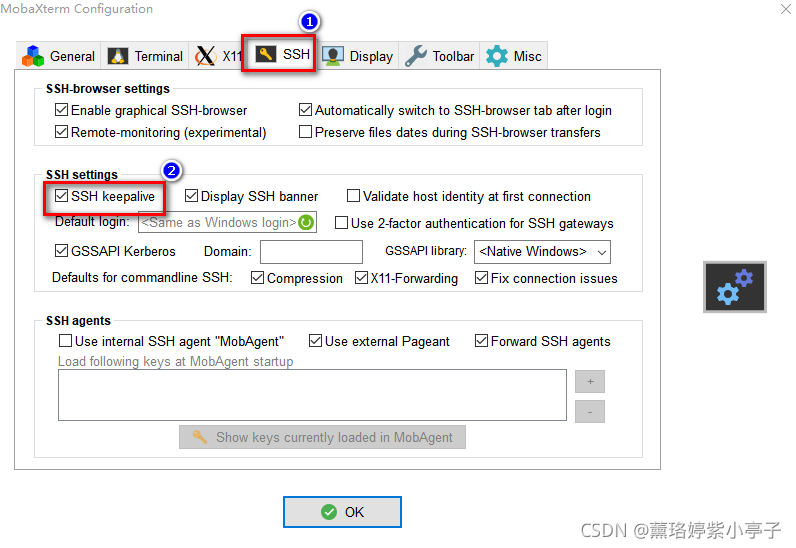
Solution:
Open mobaxterm software, find “Settings” in the menu bar, and then click “configuration”
 to the box in front of SSH keepalive, ✔ All right.
It took a long time to find the most useful way to feel
set the <?xml version=”1.0″ encoding=”UTF-8″ ?>
change to <?xml version=”1.0″ encoding=”UTF8″ ?>
that is to say, remove –
during the process, I searched a lot of methods on the Internet. If the above methods don’t work, I can try the following two methods:
1. Add configuration in pom.xml file
<properties>
       <project.build.sourceEncoding>UTF-8</project.build.sourceEncoding>
</properties>
2. Change the idea configuration
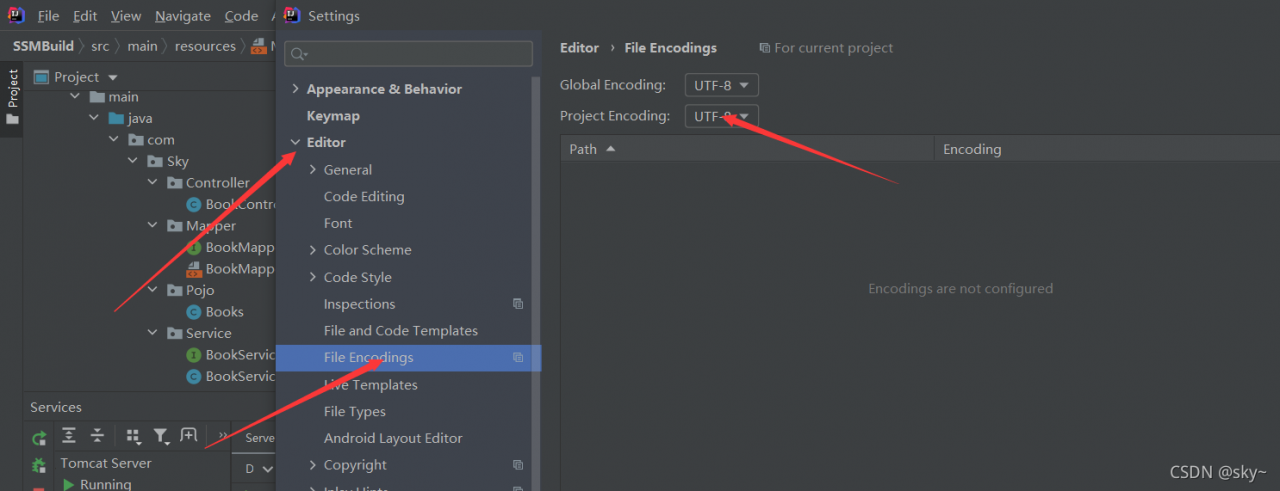
note: it is only during the process of finding that the XML annotation format is
<!-- Contents --> Right
<! --content --> wrong
To be separated by two spaces, but I do not think it has much impact, after changing the format still does not support comments
Today, after using the font library on GitHub, it is found that the control has not been recognized after the successful introduction:
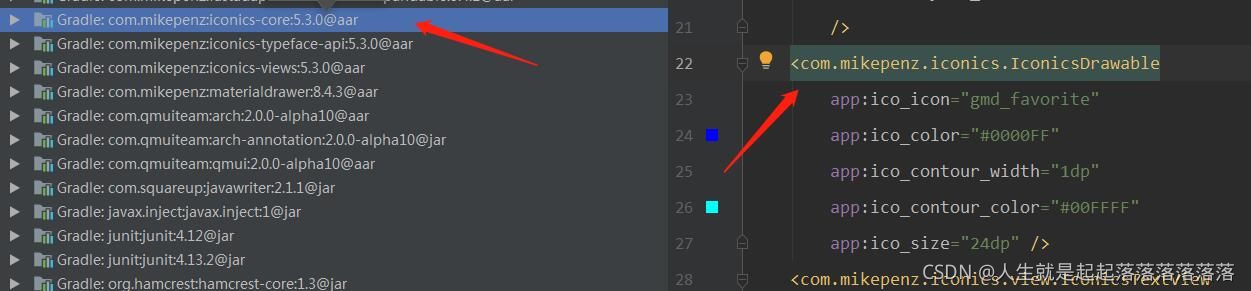
Android-Iconics
introduce:
//Font library
implementation 'com.mikepenz:iconics-core:5.3.0@aar'
//this adds all ui view widgets (IconicsButton, IconicsImageView, ...)
implementation 'com.mikepenz:iconics-views:5.3.0'
After trying several ways, I found that the problem is that the kotlin version of Android studio is too low
My original plug-in version is 1.3.6. After updating to 1.4.10, I successfully referenced it

After checking a lot of data, I finally found that there was a problem with the confusion, which prompted me that a jar package did not exist
-libraryjars libs/open_sdk_3.5.4.11_r3f56456_lite.jar.jar
After modification
-libraryjars libs/open_sdk_lite.jar
Browser error:
net::ERR_CONTENT_LENGTH_MISMATCH 200 (OK)
To view the Nginx error log:
13505#0: *1107085 pwritev() "/usr/local/nginx/proxy_temp/5/88/0000050885" failed
(28: No space left on device) while reading upstream
There is not enough space, which means the disk is full.
Because proxy_Temp is the cache folder of Nginx. My CSS and JS files are too large, so Nginx usually takes them from the cache instead of directly loading them at the original address every time.
Refer to
browser error net:: err_ CONTENT_ LENGTH_ Mismach 200 (OK) solution
Port occupancy error address already in use: bind
solution:
Open CMD
netstat -ano   View the processes and their port numbers
taskkill /PID 6272 /F Terminate the process with PID 6272
In app_config_Under of the dev.properties folder,
ipsd.port=11111
Enter netstat – ano in CMD, find out that the process corresponding to 11111 is 6272
and then enter taskkill/PID 6272/F to terminate the process with PID 6272
Solution:
git pull origin master --allow-unrelated-histories
git branch --track master origin/master
or
git branch --set-upstream-to master origin/master