[root@localhost ~]# vim /etc/docker/daemon.json

{
  "registry-mirrors": ["https://nmp74w3y.mirror.aliyuncs.com"]
}

[root@localhost ~]# sudo systemctl daemon-reload
[root@localhost ~]# sudo systemctl restart docker
Category Archives: Error
How to Solve Android Studio run main() Method Error
Solution:
1. Execute run * * main() with coverage;
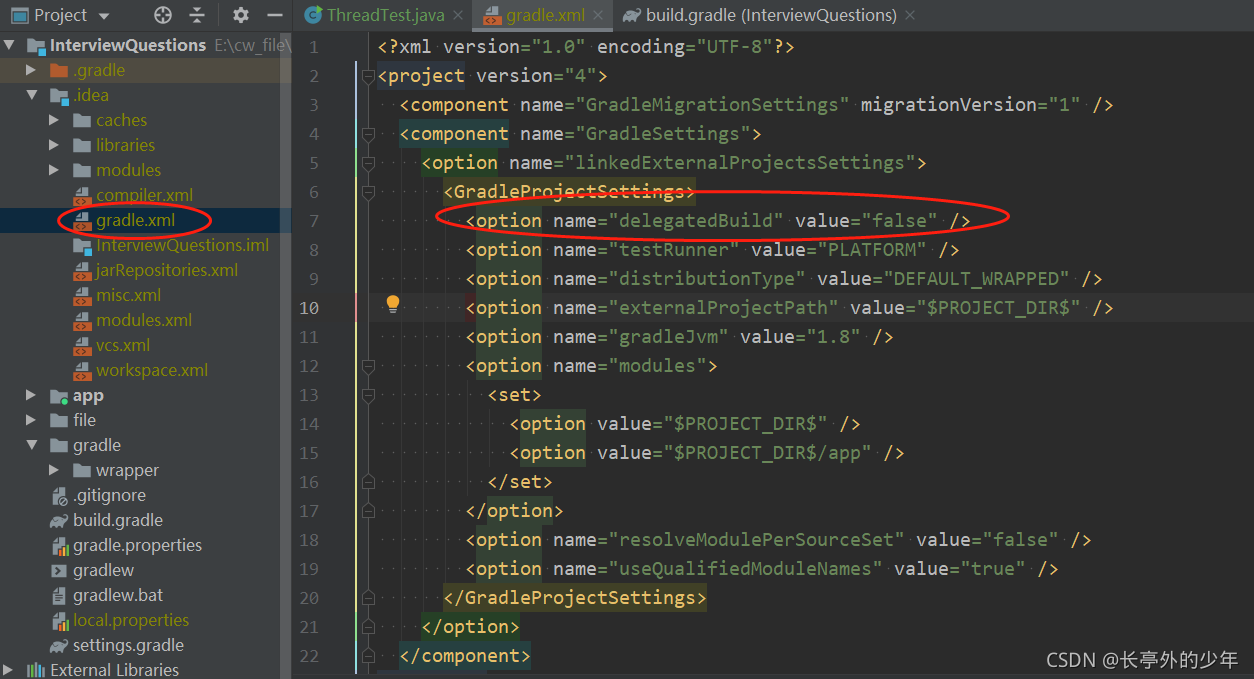
2. Modify gradle.xml under. Idea
< GradleProjectSettings> Add a row under the label node
< option name=”delegatedBuild” value=”false” />
After saving, you can use run * * with Main() and debug * * with main()
Apiserver Error: OpenAPI spec does not exists [How to Solve]
**
**
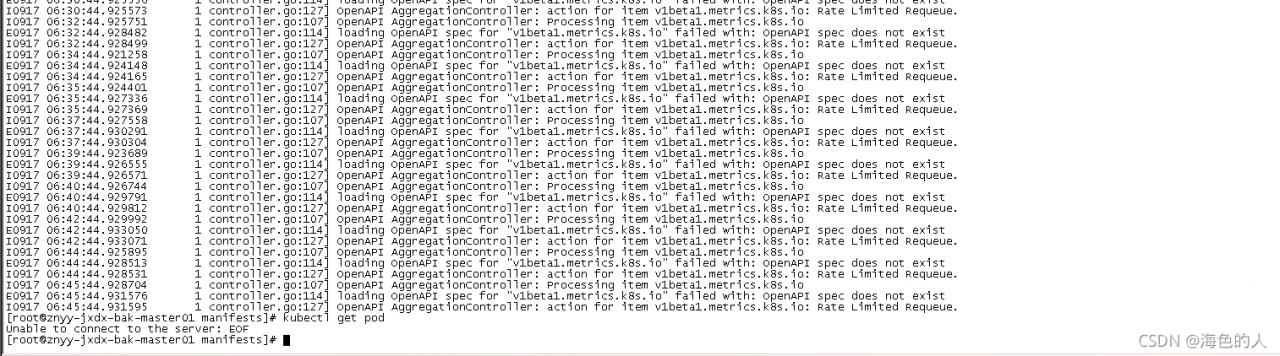 kubectl suddenly failed to obtain resources in the environment just deployed a few days ago. Check the apiserver log, as shown in the above results
then the controller manager component also reports an error
E0916 08:35:55.495444 1 leaderelection.go:306] error retrieving resource lock kube-system/kube-controller-manager: Get https://192.168.1.119:8443/api/v1/namespaces/kube-system/endpoints/kube-controller-manager?timeout=10s: EOF
This environment adopts three master deployments. Then I see that VIP drifts to the master node. Both haproxy and keepalived here are container deployments. Then I restart haproxy first
docker restart xxx
iptables failed: iptables --wait -t nat -A DOCKER -p tcp -d 0/0 --dport 8443 -j DNAT
 --to-destination 172.18.0.6:8443 ! -i docker0 iptables: No chain/target/match by that name
Haproxy doesn’t get up, so I guess there is something wrong with the iptables rules of the master 3 host. Then I restart it. Kept
at this time, the VIP drifts to master 1. At this time, kubectl can obtain resources
Finally, I restarted the docker component of Master 3
systemctl restatrt docker
Then manually drift the VIP to master3, and it is normal at this time
Amdcpu kvm & openstack virtualization nesting error [How to Solve]
Create instance error
Exceeded maximum number of retries. Exhausted all hosts available for retrying build failures for instance 82438533-1d24-417f-9e33-f98110e10160.].
nova.compute log:
ERROR nova.compute.manager [instance: 82438533-1d24-417f-9e33-f98110e10160] qemu-kvm: ../target/i386/kvm/kvm.c:2778: kvm_buf_set_msrs: Assertion `ret == cpu->kvm_msr_buf->nmsrs' failed.
Solution:
sudo tee /etc/modprobe.d/qemu-system-x86.conf << EOF
options kvm ignore_msrs=1
EOF
Reboot
the instance was created successfully
Golang Error: go get github/xxx [How to Fix]
> go get github.com/gin-gonic/gin

...
 exit status 128:
	fatal: git fetch-pack: expected shallow list
Root cause:
It’s a git problem. Please upgrade git to the latest version
Dubbo Error: HTTP method names must be tokens
Error reason 1: according to the online information, replace the HTTPS request with HTTP
Error reason 2: check the configuration file to see if the Nacos:// prefix is omitted
dubbo:
  registry:
    # Wrong address: localhost:8848
    address: nacos://localhost:8848
[Solved] Mybatis Plus 3.X injection logic delete logicsqlinjector error
Cannot resolve symbol ‘LogicSqlInjector’
    /**
     * <p> mybatis-plus sql </p>
     * <p> mybatis-plus </p>
     **/
    @Bean
    public ISqlInjector sqlInjector() {
        return new LogicSqlInjector();
    }
Reason: mybatis plus does not need to configure injection logic deletion, You do not need to write the above code
[Solved] Unity Package Error: FAILURE: Build failed with an exception.
Main error reports:
> Using multiple versions of the Android gradle plugin in the sample build is not allowed.
meaning: using multiple versions of the Android gradle plugin in the same version is not allowed.
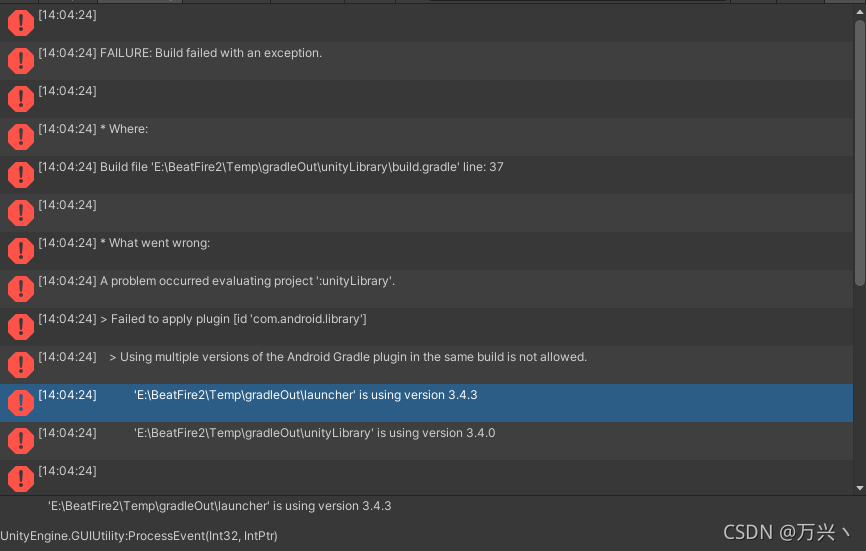
positioning:
gradle version problem in
unit
Solution:
there is a gradle version file in the project
launchertemplate
maintemplate
find a code similar to the following
buildscript {
    repositories {
        mavenCentral()
        google()
        jcenter()
    }

    dependencies {
        classpath 'com.android.tools.build:gradle:3.4.3'
**BUILD_SCRIPT_DEPS**}
If not, add
as shown in the figure
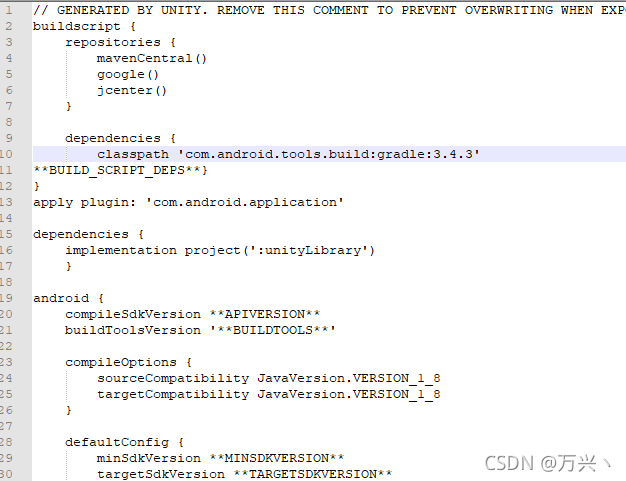
to ensure that the version numbers (3.4.3) in the two files are consistent
[Solved] Hadoop Start NameNode Error: ERROR: Cannot set priority of namenode process 2639
Project scene:
HadoopStart NameNodeReport Error: ERROR: Could not set priority of namenode process
=
Description of the question:
Hadoop Start NameNode errror: ERROR: Cannot set priority of namenode process 2639
[ atguigu@localhost333 ↓ logs]$ tail -100 [UNK]hadoop-localhost -namenode-hadoop333.log
😉
@Override public void run() { bytes = mmInStream.read(buffer); mHandler.obtainMessage(READ_DATA, bytes, -1, buffer).sendToTarget(); } Reasons analysis:
Date of First Visit: hadoop-atguigu-namenode-hadoop103.log
order as follows:
[localhost @hadoop333 logs]$ tail -100 ˚hadoop-atguigu-namenode-hadoop103.log log log log
2021-09-17 16:41:25,656 INFO org.apache.localhost.util.ExitUtil:
Exiting with status 1: org.apache.localhost.hdfs.server.common.InconsistentFSStateException:
Directory /opt/ha/hadoop-3.1.3/data/name is in an inconsistent state:
storage directory does not exist or is not accessible.
2021-09-17 16:41:25,663 INFO org.apache.hadoop.hdfs.server.namenode.NameNode:
SHUTDOWN_MSG:
/************************************************************
SHUTDOWN_MSG: Shutting down NameNode at hadoop333/192.168.1.103
Solution:
Try to restart centos7, and then re delete the data and logs in Hadoop and the files in TMP in the system root directory to re initialize Hadoop. The problem is solved.
rm -rf /opt/ha/hadoop-3.1.3/data /opt/ha/hadoop-3.1.3/logs

sudo rm -rf /tmp/*

hdfs namenode -format
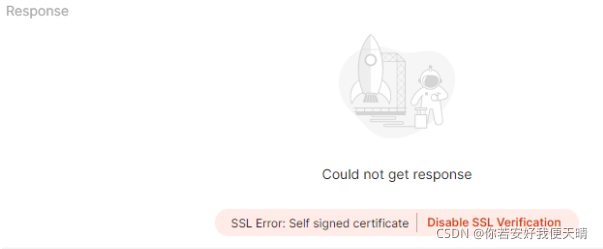
[Solved] Postman Error: SSL Error: Self signed certificate Disable SSL Verification
Postman reports an error when using: SSL error: self signed certificate disable SSL verification
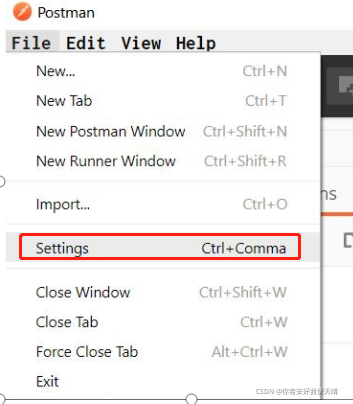
Solution
select the setting menu:
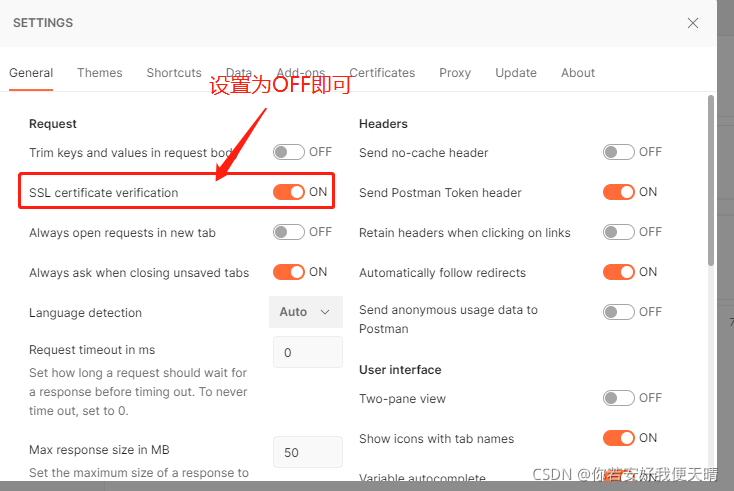
The default SSL certificate verification is on. After it is turned off, there will be no certificate error:
Error is reported after adding <router outlet> tag in angular
- If ‘router-outlet’ is an Angular component, then verify that it is part of this module.If ‘router-outlet’ is a Web Component then add ‘CUSTOM_ELEMENTS_SCHEMA’ to the ‘@NgModule.schemas’ of this component to suppress this message.
app-routing.module
@NgModule({
  declarations: [],
  imports: [
    CommonModule,
    RouterModule.forRoot(
      appRoutes,
      { enableTracing: true }
    )
  ],
  exports: [ RouterModule ]
})
MAC: How to modify the docker container error [screen is terminating]
Run in MAC:
cd /Users/xq/Library/Containers/com.docker.docker/Data/vms/0
screen tty
The following message appears: [screen is terminating]
resolvent
Step 1: pull the secondary image
Direct run command:
docker run -it --privileged --pid=host justincormack/nsenter1
This command will pull down an image: justincommack/nsenter1 latest c81481184b1b 3 years ago 101kb
After pulling, the image will be entered
Step 2: position the container
Run in the command line of the container corresponding to this image:
cd /var/lib/docker/containers
This is all the containers. The file name is the corresponding ID
Step 3: modify the container’s file
First, check the docker ID to be modified. You can use it on the command line: docker PS - a , and then use it on the command line of justincormack/nsenter1:
cd The Container ID you want to change/
Here you can modify the container file, and the modified results will be applied to the docker container.