yarn config set ignore-engines true
Solution:
In the command window, enter:
yarn config set ignore-engines trueyarn config set ignore-engines true
Solution:
In the command window, enter:
yarn config set ignore-engines truereport errors
error: No resource identifier found for attribute 'XXX' in package 'XXX'
Solution:
Save the XML file to “ http://schemas.android.com/apk/res-auto " changed to " http://schemas.android.com/apk/lib/com.app.chasebank "
other
I directly used Android killer for back compilation. There were more than 10 errors at once. It was too troublesome to change one by one, so I simply wrote a python script:
import os
import re

file = "error.txt"

def change_content(file):
    if os.path.exists(file):
        with open(file) as f:
            content = f.read()
        if "http://schemas.android.com/apk/res-auto" in content:
            print(file+":已修复")
            content = content.replace("http://schemas.android.com/apk/res-auto","http://schemas.android.com/apk/lib/com.app.chasebank")
            with open(file,"w") as f:
                f.write(content)

with open(file,encoding='utf8') as f:
    data = f.read()

result = re.findall(">W: (.*?):\d+: error: No resource identifier found for attribute",data)
for file in result:
    change_content(file)
Copy the error to the error.txt file, and then run the script to modify the XML file directly.
Sometimes, such errors will appear in the back compilation. You may need to copy the errors again and then execute the script. That is to say, some errors are not reported because the previous errors have not been solved, and all such errors cannot be reported at one time.
When building the room, there are several small problems. Record them. Basically, it is a configuration problem:
There is a problem with the query: [SQLITE_ERROR] SQL error or missing database (no such table: simple_student)。
an error is reported during compilation and the table cannot be found
you need to set the corresponding indication in the declared entity.
//Wrong
@Entity
data class StudentEntity
//Right
@Entity(tableName = "student_table")
data class StudentEntity
Not sure how to convert a Cursor to this method’s return type (kotlinx.coroutines.flow.Flow<?extends java.util.List<com.zxf.jetpackrelated.room.liveDataOrFlow.StudentEntity>>).
When the Dao layer declares the return value as livedata, an error is reported. After a long investigation, it was found that the corresponding function was declared as a suspended function
correct use should remove the corresponding suspend modifier.
//Wrong
@Query("select * from $STUDENT_TABLE_NAME")
suspend fun obtainStudentAll(): LiveData<List<StudentEntity>>
//Right
@Query("select * from $STUDENT_TABLE_NAME")
fun obtainStudentAll(): LiveData<List<StudentEntity>>
Not sure how to convert a Cursor to this method’s return type (androidx.lifecycle.LiveData<java.util.List<com.zxf.jetpackrelated.room.liveDataOrFlow.StudentEntity>>)
Similarly, it cannot be converted to flow, and the corresponding suspend modifier is removed.
//Wrong
@Query("select * from $STUDENT_TABLE_NAME")
suspend fun obtainStudentAll(): Flow<List<StudentEntity>>
//Right
@Query("select * from $STUDENT_TABLE_NAME")
fun obtainStudentAll(): Flow<List<StudentEntity>>
If you do not need to declare the return type as livedata or flow, you can directly declare suspend.
Error message
org.apache.zeppelin.interpreter.InterpreterException: java.io.IOException: Fail to launch interpreter process:
Apache Zeppelin requires either Java 8 update 151 or newer
  at org.apache.zeppelin.interpreter.remote.RemoteInterpreter.open(RemoteInterpreter.java:134)
  at org.apache.zeppelin.interpreter.remote.RemoteInterpreter.getFormType(RemoteInterpreter.java:298)
  at org.apache.zeppelin.notebook.Paragraph.jobRun(Paragraph.java:433)
  at org.apache.zeppelin.notebook.Paragraph.jobRun(Paragraph.java:75)
  at org.apache.zeppelin.scheduler.Job.run(Job.java:172)
  at org.apache.zeppelin.scheduler.AbstractScheduler.runJob(AbstractScheduler.java:130)
  at org.apache.zeppelin.scheduler.RemoteScheduler$JobRunner.run(RemoteScheduler.java:159)
  at java.util.concurrent.Executors$RunnableAdapter.call(Executors.java:511)
  at java.util.concurrent.FutureTask.run(FutureTask.java:266)
  at java.util.concurrent.ScheduledThreadPoolExecutor$ScheduledFutureTask.access$201(ScheduledThreadPoolExecutor.java:180)
  at java.util.concurrent.ScheduledThreadPoolExecutor$ScheduledFutureTask.run(ScheduledThreadPoolExecutor.java:293)
  at java.util.concurrent.ThreadPoolExecutor.runWorker(ThreadPoolExecutor.java:1142)
  at java.util.concurrent.ThreadPoolExecutor$Worker.run(ThreadPoolExecutor.java:617)
  at java.lang.Thread.run(Thread.java:745)
Caused by: java.io.IOException: Fail to launch interpreter process:
Apache Zeppelin requires either Java 8 update 151 or newer
Solution
Step 1: upgrade JDK to JDK1.8
Step 2: modify the Java of Hadoop and other services
Step 3: modify the Java of zeppelin-env.sh
Step 4: modify the JDK path in the common.sh file in the bin directory of Zeppelin (important!!!)
function check_java_version() {
//Modify JAVA PATH to: /opt/modules/jdk1.8.0_202
    java_ver_output=$("${JAVA:-/opt/modules/jdk1.8.0_202}" -version 2>&1)

    jvmver=$(echo "$java_ver_output" | grep '[openjdk|java] version' | awk -F'"' 'NR==1 {print $2}' | cut -d\- -f1)
    JVM_VERSION=$(echo "$jvmver"|sed -e 's|^\([0-9][0-9]*\)\..*$|\1|')
    if [ "$JVM_VERSION" = "1" ]; then
        JVM_VERSION=$(echo "$jvmver"|sed -e 's|^1\.\([0-9][0-9]*\)\..*$|\1|')
    fi

    if [ "$JVM_VERSION" -lt 8 ] || { [ "$JVM_VERSION" -eq 8 ] && [ "${jvmver#*_}" -lt 151 ]; } ; then
        echo "Apache Zeppelin requires either Java 8 update 151 or newer"
        exit 1;
    fi
}
@[TOC] (error: Library \ packagecache \ com. Unity. XR [email protected] \Editor\XRGeneralBuildProcessor.cs(83,52): error CS0117: ‘BuildPipeline’ does not contain a definition for ‘GetBuildTargetName’)
Problem Description:
when unity develops oculus quest, it will report an error library \ packagecache \ com.unity.xr [email protected] \Editor \ xrgeneralbuildprocessor.cs (83,52): error cs0117: ‘buildpipeline’ doors not contain a definition for ‘getbuildtargetname’
my unit version is 2019.4
Cause analysis:
the version of the plug-in matches the version of the unity step, resulting in </ font>
Solution:
delete ar foundation, downgrade XR plug-in management to 3.2.16, downgrade ar foundation and arkit XR plug-ins to 4.1.1, and reinstall ar foundation
record the pit encountered and it has been solved
Error running docker compose file:
ERROR: for yingxue_mysql_1  Cannot create container for service mysql: invalid volume specification: 'yingxue_data:var/lib/mysql:rw': invalid mount config for type "volume": invalid mount path: 'var/lib/mysql' mount path must be absolute

ERROR: for mysql  Cannot create container for service mysql: invalid volume specification: 'yingxue_data:var/lib/mysql:rw': invalid mount config for type "volume": invalid mount path: 'var/lib/mysql' mount path must be absolute
ERROR: Encountered errors while bringing up the project.
Docker compose original file
version: "3.3"

networks:
  yingxue_network:

volumes:
  data:

services:
  nacos:
    image: nacos/nacos-server:2.0.2
    ports:
      - "8848:8848"
    environment:
      - "JVM_XMS=256m"
      - "JVM_XMX=256m"
      - "MODE=standalone"
    networks:
      - yingxue_network

  mysql:
    image: mysql:5.7
    ports:
      - "3306:3306"
    networks:
      - yingxue_network
    volumes:
      - data:var/lib/mysql
      - ./yingxue.sql:/docker-entrypoint-initdb.d/yingxue.sql
    environment:
      - "MYSQL_ROOT_PASSWORD=root"
      - "MYSQL_DATABASE=yingxue"
The problem description shows that the path is wrong. After careful inspection, it is found that the data volume data: var/lib/MySQL is missing /, which should be:
    volumes:
      - data:/var/lib/mysql
      - ./yingxue.sql:/docker-entrypoint-initdb.d/yingxue.sql
1、 The following error is reported in the single compilation systemui:
eworks/base/packages/SystemUI/SystemUI-tests/android_common/javac/srcjars"
frameworks/base/packages/SystemUI/tests/src/com/android/systemui/statusbar/phone/KeyguardBouncerTest.java:382: Error: Symbol not found
        when(mUnlockMethodCache.isUnlockingWithFacePossible()).thenReturn(true);
                               ^
  Symbol: method isUnlockingWithFacePossible()
  Location: Variable of type UnlockMethodCache mUnlockMethodCache
frameworks/base/packages/SystemUI/tests/src/com/android/systemui/utils/leaks/FakeHotspotController.java:22: Error: FakeHotspotController is not abstract, and does not override the abstract method isHotspotEnabling() in HotspotController
public class FakeHotspotController extends BaseLeakChecker<Callback> implements HotspotController {
       ^
Note: Some input files use or override deprecated APIs.
Note: For more information, please recompile with -Xlint:deprecation.
Note: Some input files use unchecked or unsafe operations.
Note: For more information, please recompile with -Xlint:unchecked.
2 errors
16:19:16 ninja failed with: exit status 1
Reason:
the error in tests may be the reason why Google has not updated it, so the whole system will not prompt an error during compilation. This error does not affect the subsequent use of
solutions:
error 1: isunlockingwithfacepossible() directly modifies the place where the method is called to false
error 2: the method is not rewritten ishhotspotenabling()
fakehotspotcontroller rewrites the ishhotspotenabling() method in this class
 @Override
    public boolean isHotspotEnabling() {
        return false;
    }
Click on the picture to see that there is something wrong with the picture
solution: just re import the picture directly
report errors:
Module not found: Can't resolve 'history/createBrowserHistory'
Solution:
// import createHistory from 'history/createBrowserHistory';
// Error: Cannot find module 'history/createBrowserHistory';

// Change to
import { createBrowserHistory  as createHistory} from 'history';

const app = dva({
  history: createHistory(),
});
***************************
APPLICATION FAILED TO START
***************************

Description:

Failed to configure a DataSource: 'url' attribute is not specified and no embedded datasource could be configured.

Reason: Failed to determine suitable jdbc url


Action:

Consider the following:
	If you want an embedded database (H2, HSQL or Derby), please put it on the classpath.
	If you have database settings to be loaded from a particular profile you may need to activate it (no profiles are currently active).


Process finished with exit code 1
Reason: Failed to configure a DataSource: ‘url’ attribute is not specified and no embedded datasource could be configured.
Solution:
There are other dependencies in pom.xml that affect
<dependency>
<groupId>org.mybatis.spring.boot</groupId>
<artifactId>mybatis-spring-boot-starter</artifactId>
<version>2.2.0</version>
</dependency>
mybatis dependency delete and rerun on it
Background
Need to perform composer removal package operation on lumen framework.
Error message
docker composer remove Fatal error: Allowed memory size of 1610612736 bytes exhausted (tried to allocate 4096 byt
Solution:
/usr/local/bin/php -d memory_limit=-1 /usr/local/sbin/composer remove xxx
Explanation: php -d memory_limit=-1 means that the php process uses unlimited memory.
Note that both php and composer need to use absolute paths.
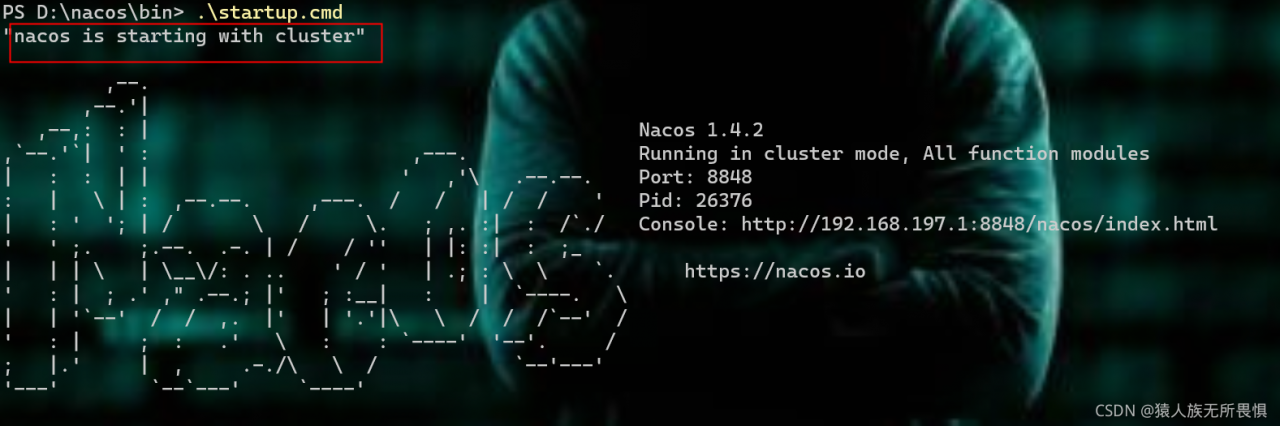
Nacos startup is divided into stand-alone or cluster. When you start in cluster mode but do not configure the data source that the cluster depends on, the error db.num is null will be reported
Solution
The operation of this paper is based on Windows environment, similar to Linux
Mode 1: single machine mode startup
startup.cmd -m standalone
Start as shown in the figure below:
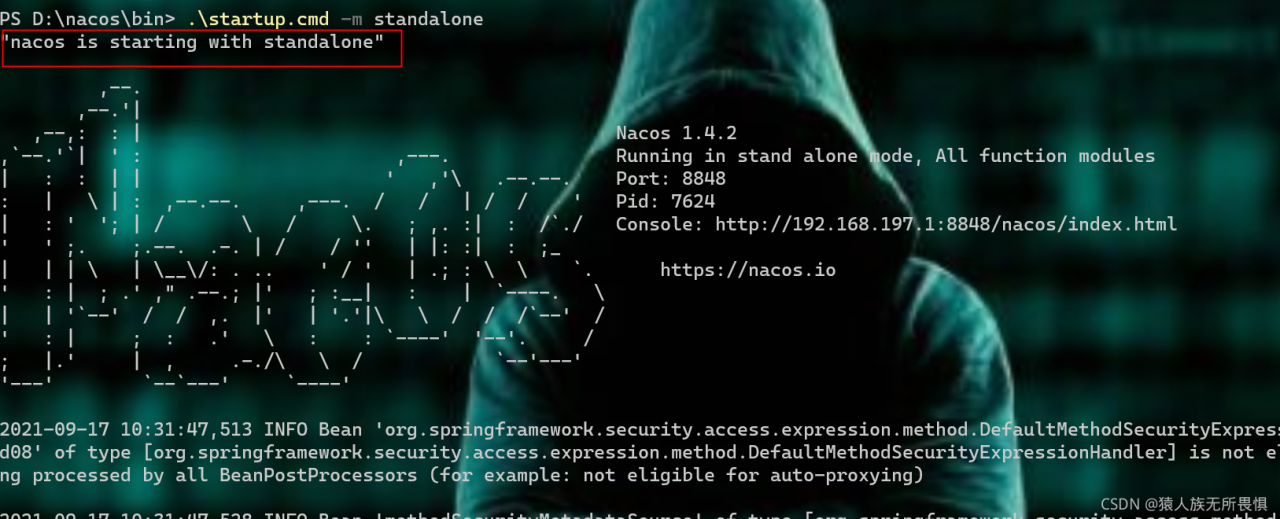
standalone: independent
at this time, Nacos starts in stand-alone mode
Mode 2: start in cluster mode and configure the data source
Use the conf/nacos-mysql.sql file to initialize the database, and modify the conf/application.properties file to add MySQL support
spring.datasource.platform=mysql
db.num=1
db.url.0=jdbc:mysql://localhost:3306/nacos?characterEncoding=utf8&connectTimeout=1000&socketTimeout=3000&autoReconnect=true
db.user=root
db.password=1234
All the above configurations exist in the original configuration. You only need to modify the parameter value
after the modification is successful, start Nacos
startup.bat