Author Archives: Robins

[sum of code] report


personal blog: http://fuxuemingzhu.cn/


directory
Double pointer list generation loop
The date of

Title address: https://leetcode.com/problems/sum-of-square-numbers/discuss/
Topic describes
Given a non-negative integer c, your task is to decide whether there’s two integers a and b such that a2 + b2 = c.
Example 1:

Input: 5
Output: True
Explanation: 1 * 1 + 2 * 2 = 5

Example 2:

Input: 3
Output: False

Subject to
Can a number consist of the sum of squares of two Numbers?
The problem solving method
Double pointer
The two Pointers are closer to the center, so it’s easier to understand.

class Solution(object):
    def judgeSquareSum(self, c):
        """
        :type c: int
        :rtype: bool
        """
        left = 0
        right = int(c ** 0.5)
        while left <= right:
            cur = left ** 2 + right ** 2
            if cur < c:
                left += 1
            elif cur > c:
                right -= 1
            else:
                return True
        return False
                      

List generation
Xrange is a spanning form, and range returns a list. Determine if the number left after removing a square is a square.

class Solution(object):
    def judgeSquareSum(self, c):
        """
        :type c: int
        :rtype: bool
        """
        def is_square(N):
            return int(N ** 0.5) ** 2 == N
        
        return any(is_square(c - a ** 2) for a in xrange(int(c ** 0.5) + 1))                

cycle
Use the loop to see if there is an A, so that c minus a squared is a perfect square.
There are a lot of ways to tell if something is a perfect square, but I’m going to use the simplest way, which is to take the square root and then square it to see if it’s equal.
The Python solution is as follows:

class Solution(object):
    def judgeSquareSum(self, c):
        """
        :type c: int
        :rtype: bool
        """
        if c == 0: return True
        for a in range(1, int(math.sqrt(c) + 1)):
            b = c - a * a
            if int(math.sqrt(b)) ** 2 == b:
                return True
        return False

C++ solution is as follows:

class Solution {
public:
    bool judgeSquareSum(int c) {
        if (c == 0) return true;
        for (int a = 1; a < (int) sqrt(c) + 1; ++a){
            double b = sqrt(c - a * a);
            if (b == (int) b){
                return true;
            }
        }
        return false;
    }
};

The date of
August 24, 2017
November 24, 2018 — starting on Sunday! A week has passed

Develop a Boolean equation for overflow detection

Overflow Detection


    Overflow ConditionBinary ArithmeticAdding Unsigned NumbersOverflow Detection Circuit for Unsigned AdditionAdding Signed NumbersThe Full Adder Truth TableAdding the Sign BitsThe Overfow OutputSigned Numbers AdditionSigned Numbers Addition, Cont.Signed Numbers Addition, Cont.Signed Numbers Addition, Cont.Signed Numbers Addition, Cont.Overflow Detection Circuit for 2’s Complement AdditionMisconceptions about Overflow

1. Overflow Condition


Arithmetic operations have a potential to run into a condition known as overflow. Overflow occurs with respect to the size of the data type that must accommodate the result. Overflow indicates that the result was too large or too small to fit in the original data type. When two signed 2’s complement numbers are added, overflow is detected if:

    both operands are positive and the result is negative, or both operands are negative and the result is positive.

When two unsigned numbers are added, overflow occurrs if
there is a carry out of the leftmost bit.


2. Binary Arithmetic


Computers don’t know the difference between signed and unsigned binary numbers. This is a good thing, because it makes logic circuits fast. This is also a bad thing, because distinguishing between signed and unsigned is our responsibility. The distinction is very important when detecting an overflow after addition or subtraction. Correct approach to detect the overflow is to consider two separate cases:

    Overflow when adding unsigned numbers.
    Overflow when adding signed numbers.


3. Adding Unsigned Numbers


    Let’s first solve the problem for addition of one-bit quntities:

         0 + 0 =  0
         0 + 1 =  1
         1 + 0 =  1
         1 + 1 = 10
    

    The last line indicates that we have a carry output. That is, one-bit quantity cannot accommodate (1 + 1). Therefore, larger data type is required for (1 + 1) to succeed. When multi-bit unsigned quantities are added, overflow occurrs if there is a carry out from the leftmost (most significant) bit.  


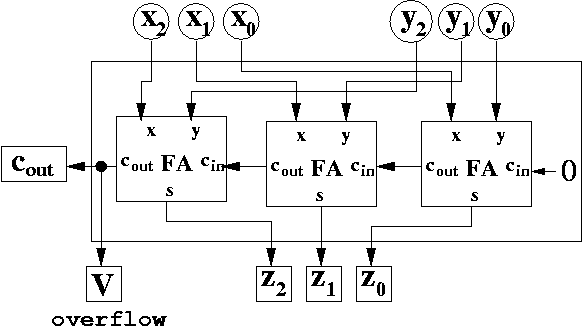
4. Overflow Detection Circuit for Unsigned Addition


Overflow detection circuit for unsigned binary addition:     


5. Adding Signed Numbers


Consider overflow detection when adding two one-bit signed quntities. Although one bit is required to represent the data, another bit has to represent the sign. Therefore, two-bit data type is required:

BINARY DECIMAL
sign bit data bit
0 0 0
0 1 1
1 1 -1
1 0 -2
Recall that to represent 2’s complement negative number, we must

    Flip all bits Add 1.


6. The Full Adder Truth Table


Recall the truth table for the 2’s complement full adder logic:  

INPUTS OUTPUTS
A B CARRY IN CARRY OUT SUM
0 0 0 0 0
0 0 1 0 1
0 1 0 0 1
0 1 1 1 0
1 0 0 0 1
1 0 1 1 0
1 1 0 1 0
1 1 1 1 1


    The truth table includes five columns with three inputs and two outputs.

    input A input B carry IN for the current column resulting carry OUT (carry-over), generated for the next column the resulting SUM.


7. Adding the Sign Bits


INPUTS OUTPUTS
Asign Bsign CARRY IN CARRY OUT SUMsign
0 0 0 0 0
0 0 1 0 1
0 1 0 0 1
0 1 1 1 0
1 0 0 0 1
1 0 1 1 0
1 1 0 1 0
1 1 1 1 1


  The full adder knows nothing about the difference between signed and unsigned numbers. In 2’s complement binary representation, the sign bit is simply the leftmost, or most significant, bit of the data type. The full adder circuit will be adding the sign bit column just as any other bit.


8. The Overfow Output


INPUTS OUTPUTS
Asign Bsign CARRY IN CARRY OUT SUMsign OVERFLOW
0 0 0 0 0 ?
0 0 1 0 1 ?
0 1 0 0 1 ?
0 1 1 1 0 ?
1 0 0 0 1 ?
1 0 1 1 0 ?
1 1 0 1 0 ?
1 1 1 1 1 ?


  Full adder truth table for the sign bit can be extended to include new output which indicates if overfow condition has occured. Our task is to populate the OVERFLOW column with corresponding values.


9. Signed Numbers Addition


Two-bit signed data type:

BINARY DECIMAL
sign bit data bit
0 0 0
0 1 1
1 1 -1
1 0 -2


  Notice that when operands have opposite signs, their sum will never overflow:

    1 + -2 = -1
    1 + -1 = 0

Therefore, overflow can only occur when the operands have the same sign:

      1 + 1 = 2
    -2 + -2 = -4
    -2 + -1 = -3

None of the results  { 2, -4, -3 }  can fit into the two-bit signed data type.


10. Signed Numbers Addition, Cont.


INPUTS OUTPUTS
Asign Bsign CARRY IN CARRY OUT SUMsign OVERFLOW
0 0 0 0 0 ?
0 0 1 0 1 ?
0 1 0 0 1 0
0 1 1 1 0 0
1 0 0 0 1 0
1 0 1 1 0 0
1 1 0 1 0 ?
1 1 1 1 1 ?


  When operands have opposite signs, their sum will never overflow.


11. Signed Numbers Addition, Cont.


INPUTS OUTPUTS
Asign Bsign CARRY IN CARRY OUT SUMsign OVERFLOW
0 0 0 0 0 0
0 0 1 0 1 ?
0 1 0 0 1 0
0 1 1 1 0 0
1 0 0 0 1 0
1 0 1 1 0 0
1 1 0 1 0 ?
1 1 1 1 1 0


  There is no overflow, if:
both operands are positive and the sum is positive. both operands are negative and the sum is negative.


12. Signed Numbers Addition, Cont.


INPUTS OUTPUTS
Asign Bsign CARRY IN CARRY OUT SUMsign OVERFLOW
0 0 0 0 0 0
0 0 1 0 1 1
0 1 0 0 1 0
0 1 1 1 0 0
1 0 0 0 1 0
1 0 1 1 0 0
1 1 0 1 0 1
1 1 1 1 1 0


  When two signed 2’s complement numbers are added, overflow is detected if:

    both operands are positive and the sum is negative, or both operands are negative and the sum is positive.


13. Signed Numbers Addition, Cont.


INPUTS OUTPUTS
Asign Bsign CARRY IN CARRY OUT SUMsign OVERFLOW
0 0 0 0 0 0
0 0 1 0 1 1
0 1 0 0 1 0
0 1 1 1 0 0
1 0 0 0 1 0
1 0 1 1 0 0
1 1 0 1 0 1
1 1 1 1 1 0


  Notice that overflow occurs only when
CARRYin ≠ CARRYout or simply
V = Cin XOR Cout where V is the overflow signal.


14. Overflow Detection Circuit for 2’s Complement Addition


Overflow detection circuit for 2’s complement addition     


15. Misconceptions about Overflow


Specific overflow detection requires knowing the operation and the representation. Overflow occurs when you do some operation to two valid representations…
… and the result can not be represented in the representation because the value is too large or too smal. Overflow detection is detecting overflow for a specific representation…
… Too often people mistake overflow condition for unsigned overflow, when the carry out is 1. Overflow detection for 2’s complement addition is different:
One way to detect it is to XOR the carry in and the carry out.

Completely uninstall node and NPM on MAC

NVM is installed under ~/. NVM is not installed with the previous one. I am a little obsessive, so I want to uninstall the previous one
Homebrew installed

brew uninstall node
The official website downloads the PKG installation package
A command
sudo rm - rf/usr/local/{bin/{node, NPM}, lib/node_modules/NPM, lib/node, share/man/*/node. *}
It was installed in another way
Make a script, the need to delete the file, a shuttle all kill
It will be called: uninstallNode. sh

#!/bin/bash
lsbom -f -l -s -pf /var/db/receipts/org.nodejs.pkg.bom \
| while read i; do
  sudo rm /usr/local/${i}
done
sudo rm -rf /usr/local/lib/node \
     /usr/local/lib/node_modules \
     /var/db/receipts/org.nodejs.*

Modify file permissions chmod 777 uninstallnodejs.sh
is executed on the command line
When you're done deleting all that stuff, you're done deleting node.
but there are a lot of node-based installed software and command-line tools that need to be reinstalled, such as react-native, supervisor,pm2 etc
need to delete the files under /usr/local/bin, actually they are just soft connections, it's all under /usr/local/lib/node_modules/.
was removed in the previous step, but you can still find it by pressing the TAB key because these soft connections still exist

On the use of NPM cache clean — force

Today, I removed node_modules and re-tried NPM Run Install with the following error:

npm ERR! Unexpected end of JSON input while parsing near '...l.com"}],"directories'

npm ERR! A complete log of this run can be found in:
npm ERR!     /Users/louyanping/.npm/_logs/2018-12-14T03_32_00_994Z-debug.log
louyanpingdeMacBook-Pro:cnpc_group_buying louyanping$

Remember that this error has occurred before, and then I do a search, and find the solution, which is to execute NPM cache clean --force (if this still doesn't work for some people, just delete package-lock.json and try again).
So the question is, why does this happen?
Take a look at how NPM Install works:

    issue the NPM install command NPM downloads the compressed package from the registry’s url, and store it in ~/. NPM (local NPM cache path) directory to unzip the compressed package to the node_modules directory

of the current project
In fact, when a module is installed, two copies are saved locally. One is the compressed package in ~/.npm and the other is the unzipped code in node_modules. However, when you run NPM install, it only checks the node_modules directory, not the ~/.npm directory. If a module has a zip package under ~./ NPM but not installed in the node_modules directory, NPM will still download a new zip package from the remote repository.
The cache mechanism that we want to implement offline module installation using modules that have been previously backed up in the cache has been overwritten in V5. The cache will be maintained globally by NPM and the developer will no longer have to worry about it. The offline installation will no longer attempt to connect to the network, but the degraded attempt to read from the cache or fail. If you offline, NPM will use your cache seamlessly.
But, in fact, After watching all this, I still feel overwhelmed… Still checked some information, but can only find that:
this is a problem with the NPM cache corruption. Although they have self-repaired in newer versions of NPM, which is usually guaranteed to be corruption-free, it doesn’t seem to work that well.

, where a Forcing clean cache could solve a similar problem.
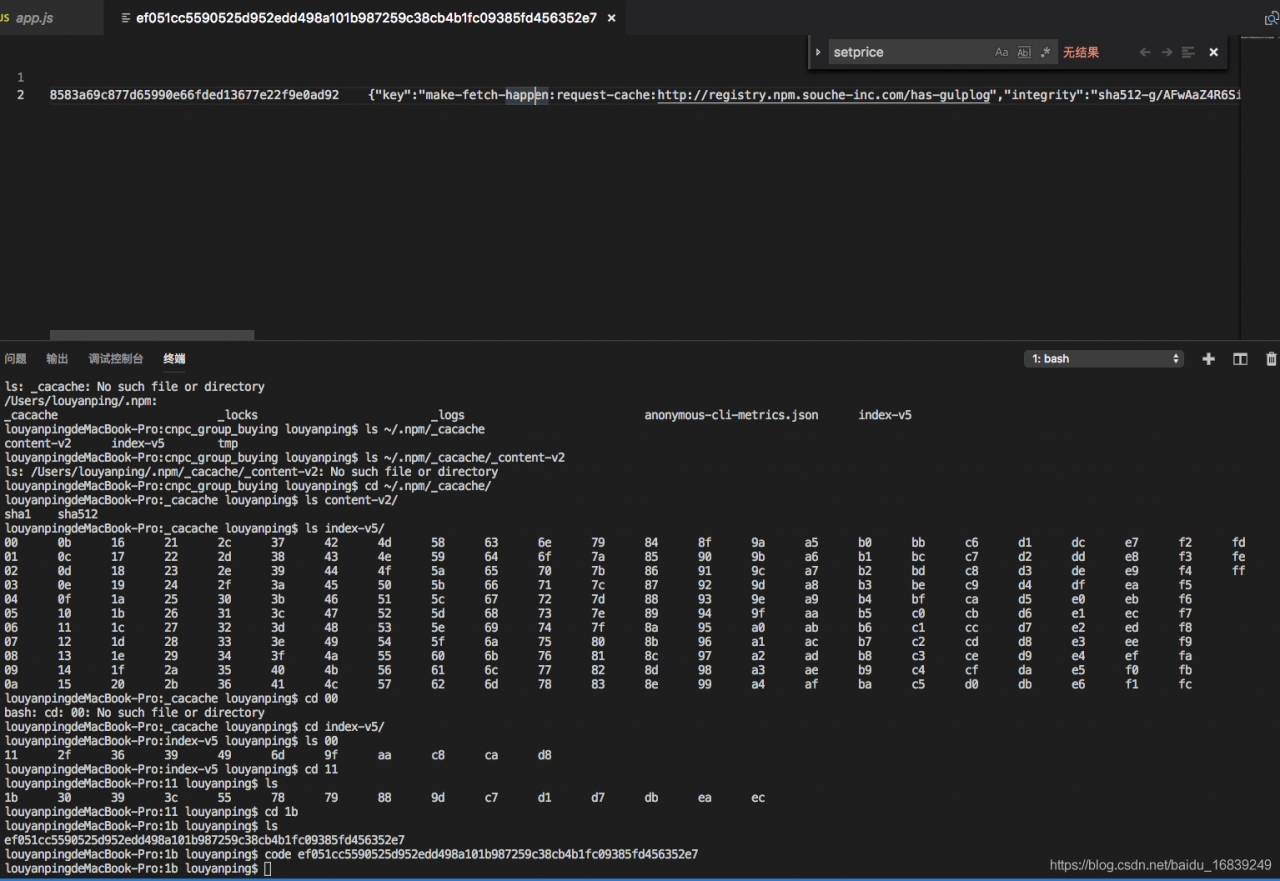
An error occurred while parsing one of the JSON-formatted cache files. Cache found in ~/.npm/_cacache (in Linux) and %AppData%/ nPm-Cache (in Windows). PS: For my current NPM release, when I check, there are 3 directories.
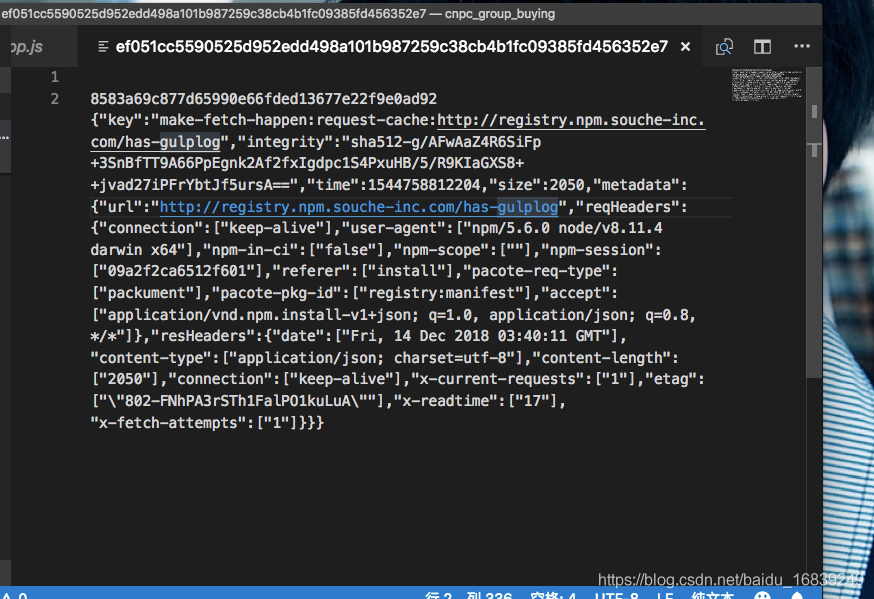
If you continue to view the first or second file, the structure looks like this:

Each cache file has a json format

This led to speculation that the files might have gone wrong when the cache was re-installed, a so-called cache corruption problem. (Welcome to correct, according to the data really can not find the exact specific reason!)

How to run Python program directly with atom

Now there is a better way, this method can only run the default py interpreter, please click [https://mp.csdn.net/mdeditor/84959016#] to check the new method
Introduction:
Atom is a very useful editor, but it can’t run a terminal, so let’s see how to run A Python program on Atom.

    open your atom editor and press CTRL +shift+p to enter setting enter or click file to select install. Click the search box to search for atom-python-run or script
    . Bye bye

On set in pandas_ Index and reset_ Usage of index

1.set_index
DataFrame can be set by the set_index method, which allows you to set both a single index and a composite index.
dataframe.set_index (keys, drop=True, append=False, inplace=False, verify_integrity=False)
append add a new index, drop is False, inplace is True, the index will be restored to the column
 

In [307]: data
Out[307]: 
     a    b  c    d
0  bar  one  z  1.0
1  bar  two  y  2.0
2  foo  one  x  3.0
3  foo  two  w  4.0

In [308]: indexed1 = data.set_index('c')

In [309]: indexed1
Out[309]: 
     a    b    d
c               
z  bar  one  1.0
y  bar  two  2.0
x  foo  one  3.0
w  foo  two  4.0

In [310]: indexed2 = data.set_index(['a', 'b'])

In [311]: indexed2
Out[311]: 
         c    d
a   b          
bar one  z  1.0
    two  y  2.0
foo one  x  3.0
    two  w  4.0

 
2.reset_index
 
Reset_index
dataframe.reset_index (level=None, drop=False, inplace=False, col_level=0, col_fill= “)
level controls the index of the specific level to be restored
drop to False, the index column will be restored to the normal column, otherwise it will be lost

In [318]: data
Out[318]: 
         c    d
a   b          
bar one  z  1.0
    two  y  2.0
foo one  x  3.0
    two  w  4.0

In [319]: data.reset_index()
Out[319]: 
     a    b  c    d
0  bar  one  z  1.0
1  bar  two  y  2.0
2  foo  one  x  3.0
3  foo  two  w  4.0


Installing the basemap package in Anaconda

Basemap is the Matplotlib subpackage and one of the most commonly used and convenient tools for geographic data visualization in Python. The traditional Python install packages (PIP Install Basemap or Conda Install Basemap) often report errors and indicate that Python 2.7 Basemap and Python 3.6 conflict (Figure). Although 2.7 is a classic and most of the world’s data is still based on 2.x, it has been officially announced that 2.x is only for maintenance until 2020 and 3.x is the future.

The following is the Windows environment Python 3.x installation of basemap to share, for your reference.
Premise: My computer is configured 64 for Win10, Anaconda 3 (64-bit), Python 3.6.
1. First of all, download Basemap and Pyproj installation files according to your computer configuration and Python version. This website mainly provides Python Extension Packages under unofficial Windows environment
Basemap download address: https://www.lfd.uci.edu/~gohlke/pythonlibs/

Pyproj download address: https://www.lfd.uci.edu/~gohlke/pythonlibs/#pyproj


Where, 1.1.0 after basemap represents the version number, cp36 represents python3.6, win represents Windows, and amd64 represents the 64-bit system. Basemap is about 120M, Pyproj is only about 3M.
2. Win +R opens the command prompt window, and the CD command sets the current directory to the folder where the download files are stored (I put it on the desktop) and then hits enter. Note: If you are using Spyder version 3.2 or above, please execute the following installation command on Anaconda Prompt (my_root), following the same steps.
3. Then start installing the two files, starting with Pyproj
PIP install pyproj 1.9.5.1 – cp36 – cp36m – win_amd64. WHL

Note that the full name of the file name and the suffix (.whl) cannot be lost, and the same command will install Basemap after successful installation
PIP install basemap – 1.1.0 – cp36 – cp36m – win_amd64. WHL
An error occurs here
You are using PIP version 9.0.1, however version 9.0.2 is available.
You should consider upgrading via the ‘python -m pip install –upgrade pip’ command.
The installation was successful using the easy_install directive:
, first go to the directory of easy_install such as C:\ProgramData\Anaconda3\Scripts
, then through the directive easy_install.exe PIP ==9.0.2 and finally install successfully.


And then install it

Successfully installing prompts you to install.
4. Then test whether the installation is successful

import numpy as np
import pandas as pd
import xarray as xy
import matplotlib.pyplot as plt
from mpl_toolkits.basemap import Basemap
import os

os.chdir(r'F:\NCEP')
temp = xy.open_dataset('air.mon.mean.v401.nc')
air = temp['air']
T30 = temp.sel(time=slice('1981-01-01', '2010-12-01'))
t_average = T30.groupby('time.year').mean(dim='time')
t = t_average.mean(dim='year')
tmp = t['air']
lon = t['lon'][:]
lat = t['lat'][:]
lon, lat = np.meshgrid(lon, lat)

def plt_map(data):
    m = Basemap(projection='mill', llcrnrlat=-90, urcrnrlat=90, llcrnrlon=-180, urcrnrlon=180,
                lat_ts=30, resolution='c')
    x, y = m(lon, lat)
    plt.xlim(-180, 180)
    plt.figure(figsize=(10, 7))
    m.drawcoastlines()
    m.drawparallels(np.arange(-90., 91., 30.))
    m.drawmeridians(np.arange(0., 361., 30))
    m.drawmapboundary(fill_color='white')
    m.contourf(x, y, data, levels=np.linspace(-25, 30, 56), extend='both')
    plt.colorbar(orientation='horizontal', pad=0.05)
plt_map(tmp)

Results:

BibTeX: How to cite a website

BibTeX: How to cite a website

With the increasing importance of the internet for scientific research, need increases for properly citing online resources. Unfortunately, when the main LaTeX citation machinery 
BibTeX was created, this was not to be foreseen; this is why there is to date no canonical way to cite, say, a website. Different workarounds have emerged, using for example some trickery with the 
@MISC type (see below), but the right way™ hasn’t been found yet.

This could change with the advent of 
biblatex. Its new entry type 
@ONLINE is supposed to contain references to web resources and doesn’t give room for confusion anymore.

With the BibTeX entry


@ONLINE{Doe:2009:Online,
author = {Doe, Ringo},
title = {This is a test entry of type {@ONLINE}},
month = jun,
year = {2009},
url = {http://www.test.org/doe/}
}

and the LaTeX file


\documentclass{article}

\usepackage{biblatex}
\bibliography{test. bib}

\title{BibTeX Website citatations with the \textsf{biblatex}~package}
\date{}

\begin{document}

\maketitle
\nocite{Doe:2009:Online}
\printbibliography

\end{document}

one gets a nicely typeset list of references.

Note that there are plenty of more options and entry types in the biblatex package, such as (the currently unused)
@AUDIO and 
@VIDEO.

Because of its supposedly large impact on the (La)TeX community, the author of biblatex still declares the package as ‘beta’ which is why it is not included in TeXlive, for example. Should you for this or some other reason be unable to install biblatex, there are (inferior) alternatives to use for URL citations in a reference list.

Alternatives
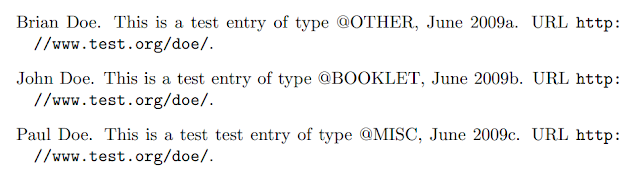
Using the natbib package The natbib package extends the functionality of regular bibtex to a certain degree, and allows for website citations as well. There is no specific entry type for online resources, but 
@MISC
@OTHER, and 
@BOOKLET work quite well.


@BOOKLET{Doe:2009:Booklet,
title = {This is a test entry of type {@BOOKLET}},
author = {Doe, John},
month = jun,
year = {2009},
url = {http://www.test.org/doe/}
}

@MISC{Doe:2009:Misc,
author = {Doe, Paul},
title = {This is a test test entry of type {@MISC}},
month = jun,
year = {2009},
url = {http://www.test.org/doe/}
}

@OTHER{Doe:2009:Other,
author = {Doe, Brian},
title = {This is a test entry of type {@OTHER}},
month = jun,
year = {2009},
url = {http://www.test.org/doe/}
}

Note that standard bibstyles (such as 
plain) will not typeset the 
url key contents of the individual entries; it is required to use one of natbib’s own entries, e.g. 
plainnat.


\documentclass{article}

\usepackage{natbib}
\bibliographystyle{plainnat}

\usepackage{url}

\title{BibTeX Website citations with the \textsf{natbib} package}
\date{}

\begin{document}

\maketitle
\nocite{Doe:2009:Other,
Doe:2009:Misc,
Doe:2009:Booklet}
\bibliography{test}

\end{document}

Using the url package The most elemental way to include web references is via the 
howpublished key of the 
@MISC entry. Use

@MISC{Doe:2009:Misc,
author = {Doe, George},
title = {This is a test test entry of type {@MISC} and `howpublished'},
month = jun,
year = {2009},
howpublished={\url{http://www.test.org/doe/}}
}

and

\documentclass{article}
\bibliographystyle{plain}

\usepackage{url}

\begin{document}

\nocite{Doe:2009:Misc}
\bibliography{mybib}

\end{document}


R language – path setting and working directory modification

Path setting in R language
Software path setting is important for memory management, working data storage, and getting to the bottom of things. Therefore, a reasonable setting of the relevant path in R can facilitate the management of relevant documents, improve the efficiency of learning R language, and establish their own habit system.
The path setting in R mainly includes the following aspects:
Path to the working directory Path to the installation package


Working directory
1. Use the geTWd () function to display the current working directory;

getwd()

2. Change the current directory using the seTWd () function;

setwd("D:/R")

Note: the
(1) function setwd() does not automatically create a directory that does not exist. If necessary, you can use the function dir. Create () to create a new directory, then use setwd() to point the working directory to the new directory.
(2) Dir. Create () in R is non-cascading, meaning that only one “/” path can be created at a time. If you need two “/” paths, you need to create them twice with dir. Create () before the file is created successfully. Then follow the example and use seTWd () to set it.
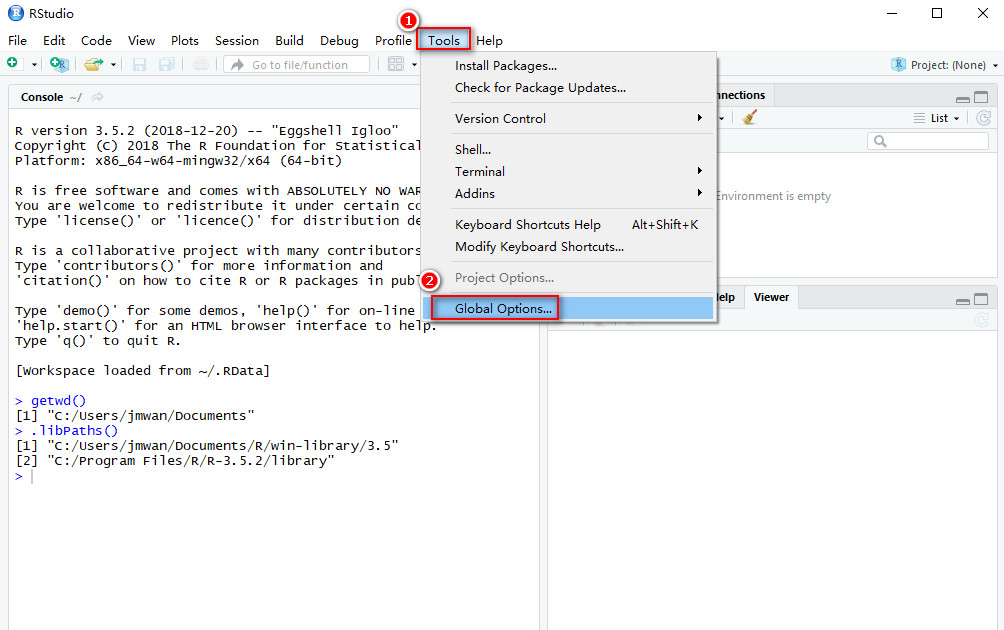
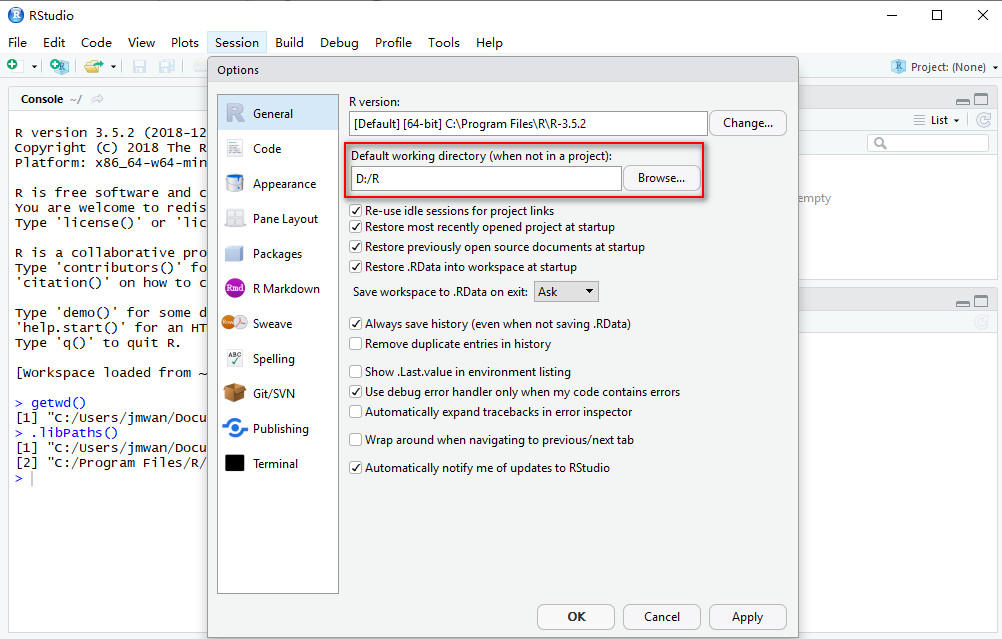
(3) The seTWd () function is to set a temporary work path. 3. Use the RStudio window to permanently change the working directory
A.
B.

 
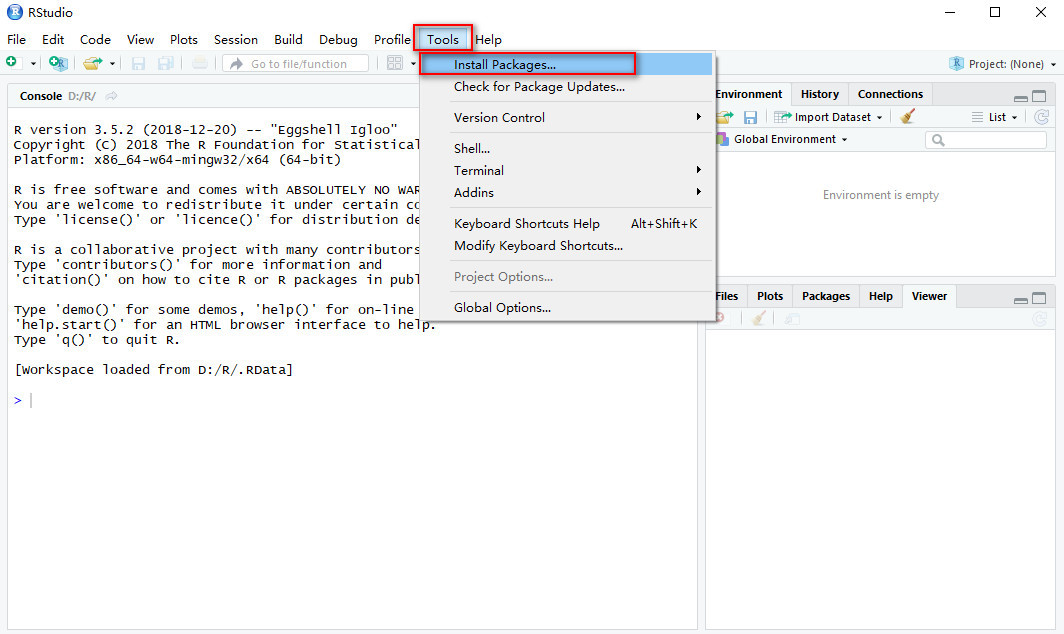
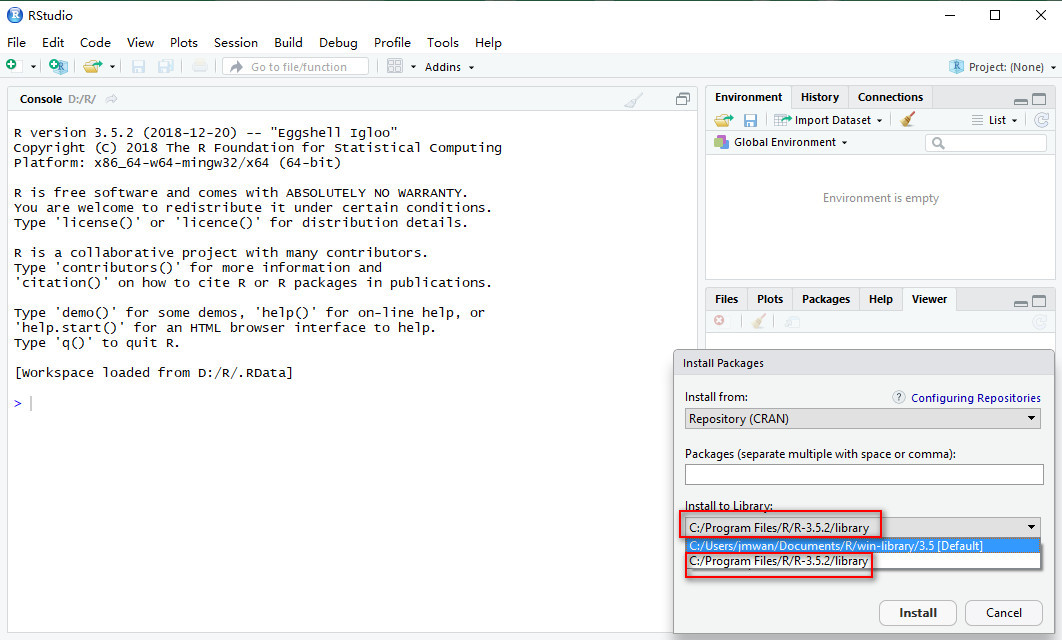
Package installation
Once and for all: (Run RStudio as administrator) write the following command in R:

.libPaths("C:/Program Files/R/R-3.5.2/library")

or
Run RStudio as an administrator


[leetcode] 926. Flip string to monotone increasing problem solving report (Python)


personal blog: http://fuxuemingzhu.cn/


directory
Prefix calculates dynamic programming. The Prefix calculates dynamic programming
Reference Date

Title address: https://leetcode.com/problems/flip-string-to-monotone-increasing/description/
Topic describes
A string of '0's and '1's is monotone increasing if it consists of some number of '0's (possibly 0), followed by some number of '1's (also possibly 0.)
We are given a string S of '0's and '1's, and we may flip any '0' to a '1' or a '1' to a '0'.
Return the minimum number of flips to make S monotone increasing.
Example 1:

Input: "00110"
Output: 1
Explanation: We flip the last digit to get 00111.

Example 2:

Input: "010110"
Output: 2
Explanation: We flip to get 011111, or alternatively 000111.

Example 3:

Input: "00011000"
Output: 2
Explanation: We flip to get 00000000.

Note:

    1 < = S.length < = 20000S only strings of ‘0’ and ‘1’ characters.

Subject to
A string has a 0 and a 1. Ask at least how many characters to flip to make the string program a monotonically increasing string.
The problem solving method
The Prefix calculation
The second problem of the week, this problem is still a little difficult to think about.
As a general rule, we use the Prefix array to store how many 1s precede each location. Because our ultimate goal is to become a string with a 0 and a 1 in front of it, so we can go through the array, and we’re going to go through all the positions that we’re going through, and we’re going to have to count how many ones we have in front of each position plus how many zeros we have after each position. Because the first 1 has to be flipped to 0, and the second 0 has to be flipped to 1.
Anyway, you just have to figure out how many ones are in front of each position, and then, again, you have to minimize the sum of the ones in front of each position and the zeros after each position.
The P array is used to hold the first 1 of each position. So the number of zeros is going to be the total number of zeros (that is, the total number minus the total number of ones) minus the number of zeros (that is, the current position index minus the number of ones).
It’s order N in time, order N in space.

class Solution(object):
    def minFlipsMonoIncr(self, S):
        """
        :type S: str
        :rtype: int
        """
        N = len(S)
        P = [0] # how many ones
        res = float('inf')
        for s in S:
            P.append(P[-1] + int(s))
        return min(P[i] + (N - P[-1]) - (i - P[i]) for i in range(len(P)))

Dynamic programming
The master on the other side of the station came up with the method, I feel inferior ah, look for a long time to consult to be able to figure it out reluctantly.
This is a bit like buying and selling stocks, both using a two-dimensional dp array that holds the minimum number of times a string ending in 0 or 1 needs to be flipped.
For convenience, I’ve added a space to the DP array, which means that I don’t have to do any flipping before the first string has even started.
So, when we traverse to the I position of the string:

    if the character in this position is '0', then:

The current dp array ending in 0 is equal to the previous DP ending in 0, that is, there is no need to do any operation, at this time, the previous dp must end in 0; The current dp array ending in 1 is equal to Min(the previous dp + 1 ending in 0, the previous DP + 1). The idea here is that there’s a situation where you end up with the previous 0 and you flip the current 0 to 1; The other case is if the previous digit ends in a 1 and the current 0 is flipped to a 1. We need to minimize these two cases. You can end it with either a 0 or a 1.

    if the character in this position is '1', then:

The current dp array ending in 0 is equal to the previous DP ending in 0 + 1, that is, the current 1 is flipped to 0, at this time, the previous one can only end in 0; The current dp array ending in 1 is equal to Min(dp ending in 0, dp ending in 1). So what that means is how many times do I have to flip this position over to end in 1?Of course, it’s the minimum number of times you can flip a 0 or a 1, because you don’t have to flip the 1, but you can flip the 1 anyway. You can end it with either a 0 or a 1.
To sum up, it is important to understand that dp array is the number of states ending in this second dimension number. For example, DP [I][0] is the number of states that need to be flipped if the ith number ends in 0. And then, the thing to understand is that if we’re traversing this character there’s no limit to whether we’re going to flip it or not, so whether we flip it or not we have to take into account how the DP is going to update when this position becomes either 1 or 0. The way to update is to look at the previous state, the previous state to the current state, what you need to do, and how many flips you have.
It’s order N in time, order N in space.

class Solution(object):
    def minFlipsMonoIncr(self, S):
        """
        :type S: str
        :rtype: int
        """
        N = len(S)
        dp = [[0] * 2 for _ in range(N + 1)]
        for i in range(1, N + 1):
            if S[i - 1] == '0':
                dp[i][0] = dp[i - 1][0]
                dp[i][1] = min(dp[i - 1][1], dp[i - 1][0]) + 1
            else:
                dp[i][0] = dp[i - 1][0] + 1
                dp[i][1] = min(dp[i - 1][1], dp[i - 1][0])
        return min(dp[N][0], dp[N][1])

Obviously, in the above approach, each DP shift is only related to the previous state, so you can optimize the spatial complexity to O(1). The code is as follows:

class Solution(object):
    def minFlipsMonoIncr(self, S):
        """
        :type S: str
        :rtype: int
        """
        N = len(S)
        dp = [0] * 2
        for i in range(1, N + 1):
            if S[i - 1] == '0':
                dp[0] = dp[0]
                dp[1] = min(dp[1], dp[0]) + 1
            else:
                dp[1] = min(dp[1], dp[0])
                dp[0] = dp[0] + 1
        return min(dp[0], dp[1])

The resources
https://leetcode.com/problems/flip-string-to-monotone-increasing/discuss/183859/Java-DP-using-O(N)-time-and-O(1)-space
The date of
October 21, 2018 — This week’s race is a bit difficult
Notepad + + has no plug-in manager solution

Recently, when I was trying to install a plug-in in Notepad++, I found that there was no plugin manager in Notepad++. I searched online for a long time and tried many methods but failed, but this method is the only one that works. Now the problem has been solved, I will post the method to avoid encountering again in the future:

Download the PM from https://github.com/bruderstein/nppPluginManager/releases (current 1.4.9)
The open np++ & amp; gt; settings & gt; import & gt; import plugin(s)
Working with np++ v7.5.1 (64-bit)

 
It’s as simple as downloading nppPluginManager on github and importing it to notepad++, or simply copying the contents of the two downloaded folders into the corresponding two files in your notepad++ installation directory. My two directories are: C:\Program Files\Notepad++\plugins and C:\Program Files\Notepad++\updater
 
Later discovered that in fact need not so trouble, notepad + + installing plug-ins can need not the plug-in manager, recommend a site: https://sourceforge.net/projects/npp-plugins/files/, download after good plug-in directly into C: \ Program Files \ notepad + + \ plugins directory.
 
Reference:
https://www.yuque.com/docs/share/b7f935f6-457c-43cd-b499-51c2894c07c4

You must restart ADB and eclipse

In Eclipse, when debugging an Android project, the following information appears:

The connection to adb is down, and a severe error has occured.

You must restart adb and Eclipse.

Please ensure that ADB is correctly located at

Open the process manager, there will be *adb.exe process, because I opened the cool dog to listen to music, so kadb.exe process appears, close it, and type adb Start-up server in the command window; With successFuly displayed, you find that you are ready to debug. After restarting Cool dog, the debugging failed, so kadb. Exe was deleted from the installation path of Kugou (cool dog can still listen to music), and the debugging will not be disturbed by cool dog in the future.  

Android in the Studio, in the debug Android project, if the pop-up
adb is not responding. You can wait more, or kill “adb. Exe” process manually and click ‘Restart’
indicates the adb (adb) response to failure, open a command window, Enter netstat -aon|findstr "5037" (adb needs to use this port), you can find the PID(right-most number) that takes up this window, open task manager, select the “process” TAB, click “view – select column” in the TAB bar, tick “PID(process identifier)”, and click ok. You’ll see that each process displays its PID. Find the corresponding process number and close the process. Just restart AS.