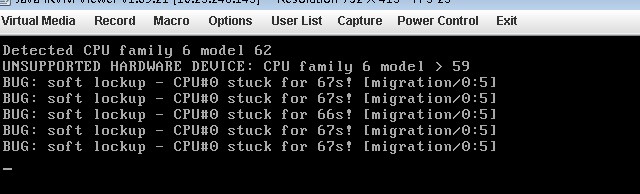
The server running normally in the network appears such as title bug, resulting in the system stuck, business is affected.
no fault cause has been found so far, please record it temporarily.
Author Archives: Robins
[Warning] incompatible implicit declaration of built-in function ‘strcat’
After watching the machine learning course today, I changed to Learn C language for a while. It was also the first time I encountered the strcat function, the string concatenation function. Its general form is strcat (character array 1, character array 2). The function concatenates the strings of two character arrays, attaches string 2 to the end of string 1, and places the result in character array 1. The function call returns a function value — the address of character array 1. Such as:
#include<stdio.h>
int main()
{
	char str1[30] = {"People's Republic of "};
	char str2[] = {"China"};
	printf("%s",strcat(str1,str2));

	return 0;
}
Output code error:
In function 'main':
[Warning] incompatible implicit declaration of built-in function 'strcat'
Baidu once reason, little added header file
#include<stdlib.h>

#include<string.h>
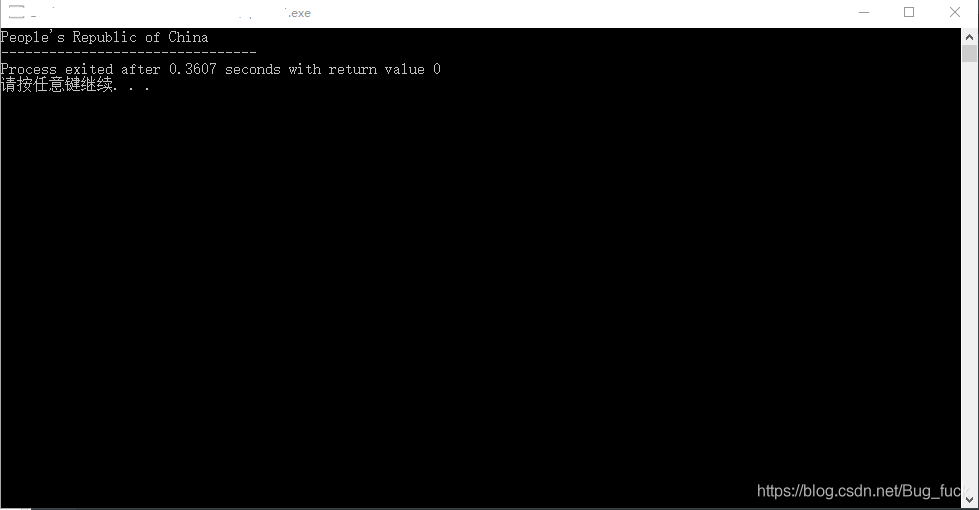
After adding, the program output is normal:
Relative path and absolute path${ pageContext.request.contextPath }
Exe
relative path: the path from the current path, if the current path is C:\ Windows
to describe the path, just type
system32\ CMD. Exe
in fact, the strict relative path should be
.\system32\ CMD. Exe
, where. Represents the current path, which can be omitted in channel cases, but not in special cases.
if the current path is c:\program files
to invoke the above command, you need to type
.. \ Windows \system32\cmd.exe
where.. Is the parent directory.
if the current path is c:\program files\common files
then you need to enter
… .\windows\system32\cmd.exe
Hold on, this should make a lot more sense than it does in the program.
The ${pageContext. Request. ContextPath} is equivalent to the & lt; %=request.getContextPath()%> or you could say < %=request.getContextPath()%> EL version of
means to remove the deployment of the application name, or the current project name
such as my project name for SpringMVC in the browser input for http://localhost:8080/SpringMVC/login.jsp
The ${pageContext. Request. ContextPath} or & lt; %=request.getContextPath()%> is to take out/for SpringMVC, and "/" represents the meaning of is http://localhost:8080
so we project should write ${pageContext. Request. ContextPath}/login JSP
Just give me some examples. I'm going to start with the relative path, and in a lot of cases I'm going to get it right.
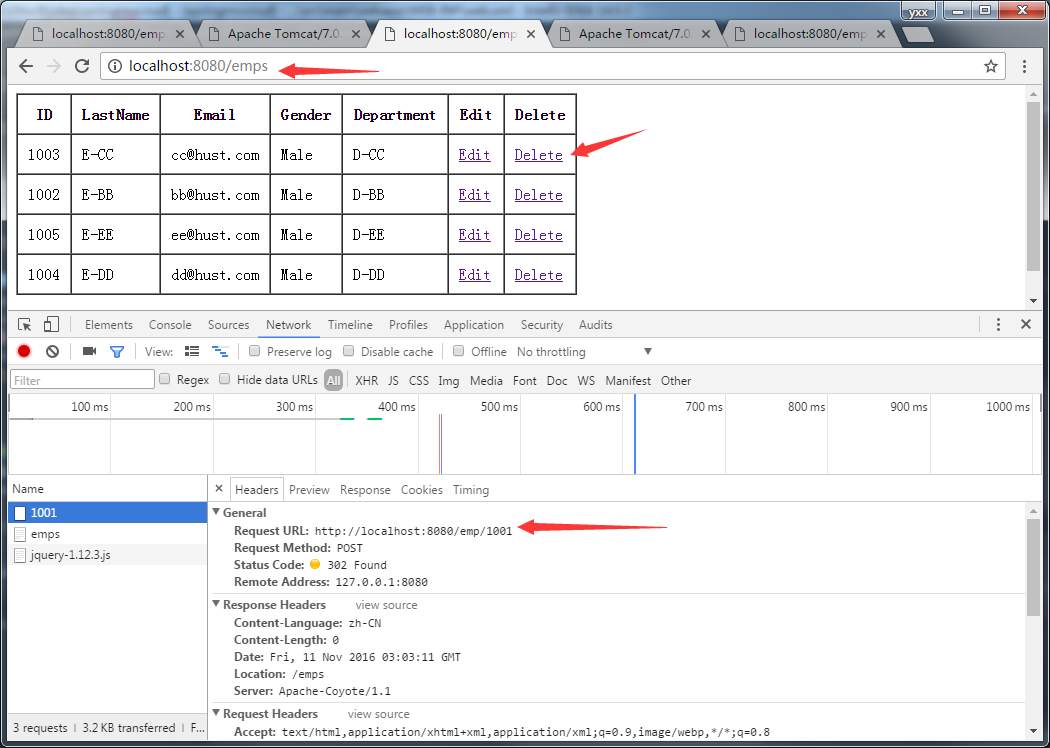
You see the delete, I also use the relative path, why it won't go wrong for me, because the request path only one layer, there is no placeholder, when converting HiddenHttpMethodFilter delete request will remove a layer, so will not go wrong, the request path into http://localhost:8080/emp/1001
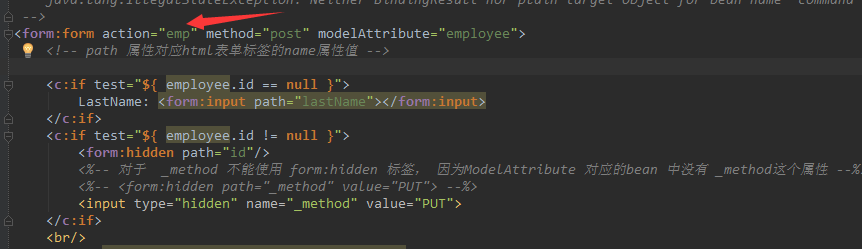
but this edit is not so optimistic.
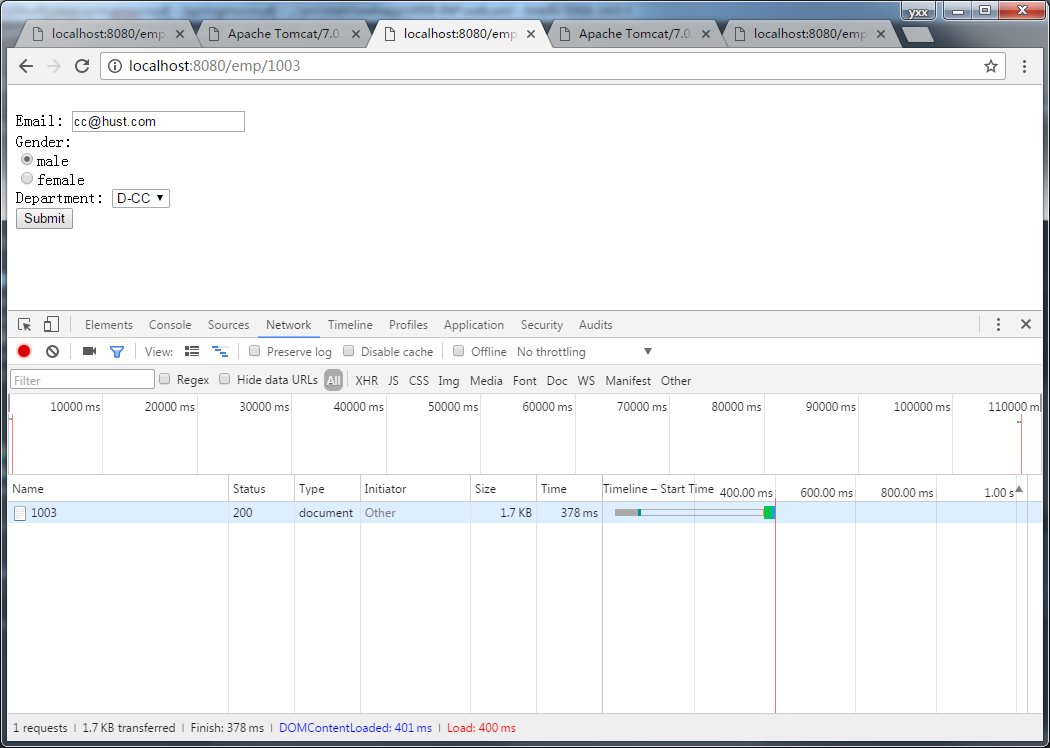
There is a placeholder in the path, so the conversion will not be complete.
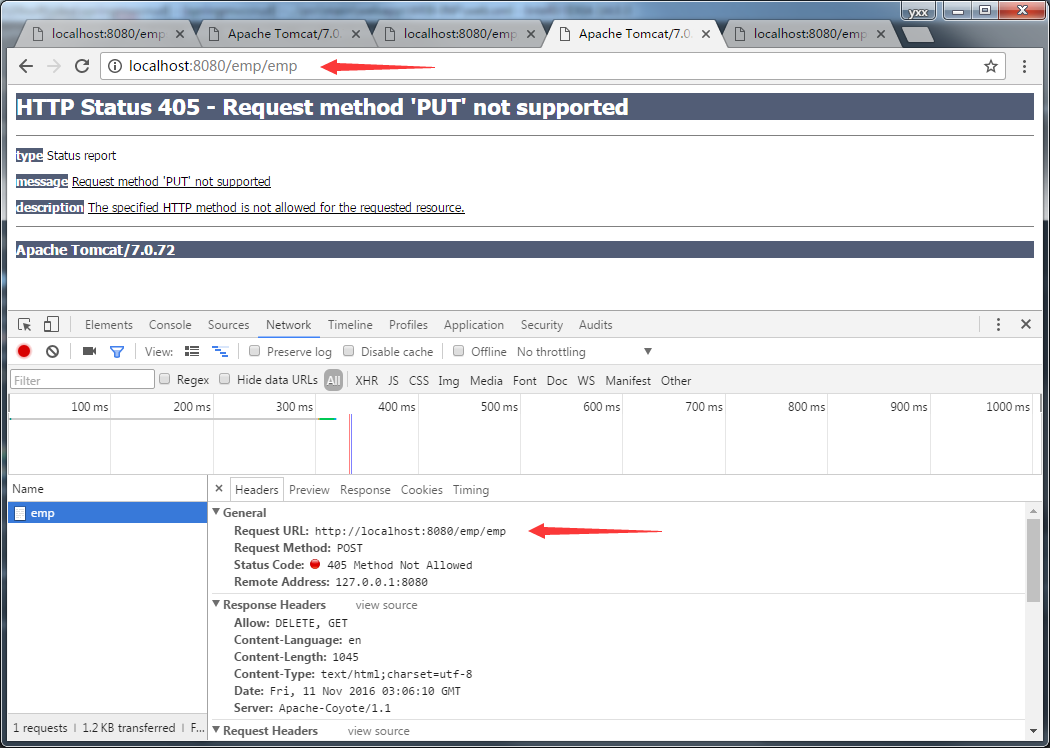
This is the kind of farce that occurs when multiple layers of requests have no path for a Handler to process in the first place.
So use relative paths as often as possible.
When NPM install, make: G + +: command not found will be prompted
When NPM install is installed, an error may appear that prompts make:g++ Command not found, as follows:
node-pre-gyp WARN Using request for node-pre-gyp https download
node-pre-gyp WARN Tried to download(404): https://github.com/yanyiwu/nodejieba/releases/download/2.4.1/nodejieba-v2.4.1-node-v72-linux-x64.tar.gz
node – pre – gyp WARN the pre – built binaries not found for [email protected] and [email protected] (node-v72 ABI, glibc) (falling back to source compile with node-gyp)
make: Entering directory /home/smart/jenkins/workspace/microservice_vue_demo/node_modules/nodejieba/build' CXX(target) Release/obj.target/nodejieba/lib/index.o make: g++: Command not found make: * * * [Release/obj. Target/nodejieba/lib/index o] make the Error 127: brigade directory /home/smart/Jenkins/workspace/microservice_vue_demo/node_modules/nodejieba/build '
gyp ERR! build error
gyp ERR! stack Error: make failed with exit code: 2
gyp ERR! stack at ChildProcess.onExit (/usr/local/nodejs/lib/node_modules/npm/node_modules/node-gyp/lib/build.js:194:23)
gyp ERR! stack at ChildProcess.emit (events.js:310:20)
gyp ERR! stack at Process.ChildProcess._handle.onexit (internal/child_process.js:275:12)
gyp ERR! System Linux 3.10.0-957.21.3. El7.x86_64 The command "/ usr/local/nodejs/bin/node" "/ usr/local/nodejs/lib/node_modules/NPM/node_modules/node - gyp/bin/node - gyp. Js" "build" fallback "- - to - build" "- the module =/home/smart/Jenkins/workspace/microservice_vue_demo/node_modules/nodejieba/build/Release/nodejieba node" "- module_name = nodejieba" "- module_path =/home/smart/Jenkins/workspace/microservice_vue_demo/node_modules/nodejieba/build/Release" "- napi_version = 5" "- node_abi_napi = for a" "- napi_build_version = 0" "- node_napi_label = node - v72"
gyp ERR! cwd /home/smart/jenkins/workspace/microservice_vue_demo/node_modules/nodejieba
gyp ERR! Node-v v12.16.3 Node-gyp-v v5.1.0
gyp ERR! not ok
node-pre-gyp ERR! build error
node-pre-gyp ERR! stack Error: Failed to execute '/ usr/local/nodejs/bin/node/usr/local/nodejs/lib/node_modules/NPM/node_modules/node - gyp/bin/node - gyp. Js build - fallback - to - build --module=/home/smart/jenkins/workspace/microservice_vue_demo/node_modules/nodejieba/build/Release/nodejieba.node --module_name=nodejieba - module_path =/home/smart/Jenkins/workspace/microservice_vue_demo/node_modules/nodejieba/build/Release - napi_version = 5 - node_abi_napi = for a - napi_build_version = 0 - node_napi_label = node - v72 (1)
' node-pre-gyp ERR! stack at ChildProcess. (/home/smart/jenkins/workspace/microservice_vue_demo/node_modules/node-pre-gyp/lib/util/compile.js:83:29)
node-pre-gyp ERR! stack at ChildProcess.emit (events.js:310:20)
node-pre-gyp ERR! stack at maybeClose (internal/child_process.js:1021:16)
install g++, switch to root, and execute
root@linx:~# yum install gcc -c++
After waiting for the package installation to complete, execute g++ -v to see that g++ has been successfully installed
root@linx:~# g++ -v
Using built-in specs.
COLLECT_GCC=g++
COLLECT_LTO_WRAPPER=/usr/libexec/gcc/x86_64-redhat-linux/4.8.5/lto-wrapper
Target: x86_64-redhat-linux
Configured with: ../configure --prefix=/usr --mandir=/usr/share/man --infodir=/usr/share/info --with-bugurl=http://bugzilla.redhat.com/bugzilla --enable-bootstrap --enable-shared --enable-threads=posix --enable-checking=release --with-system-zlib --enable-__cxa_atexit --disable-libunwind-exceptions --enable-gnu-unique-object --enable-linker-build-id --with-linker-hash-style=gnu --enable-languages=c,c++,objc,obj-c++,java,fortran,ada,go,lto --enable-plugin --enable-initfini-array --disable-libgcj --with-isl=/builddir/build/BUILD/gcc-4.8.5-20150702/obj-x86_64-redhat-linux/isl-install --with-cloog=/builddir/build/BUILD/gcc-4.8.5-20150702/obj-x86_64-redhat-linux/cloog-install --enable-gnu-indirect-function --with-tune=generic --with-arch_32=x86-64 --build=x86_64-redhat-linux
Thread model: posix
gcc version 4.8.5 20150623 (Red Hat 4.8.5-39) (GCC)
Re-run NPM Install.
HBase checkandput() method
The common method for adding (modifying) data in a table in Hbase is void put(put put), which returns no value
But if you put the same data, you get an error, which is not very friendly
So, there’s also the checkAndPut() method
But if you put the same data, you get an error, which is not very friendly
So, there’s also the checkAndPut() method
   * Atomically checks if a row/family/qualifier value matches the expected
   * value. If it does, it adds the put.  If the passed value is null, the check
   * is for the lack of column (ie: non-existance)


boolean checkAndPut(byte[] row, byte[] family, byte[] qualifier,
    byte[] value, Put put) throws IOException
If the data (Row, family, Qualifier, value) is present, then put will not be performed and false will be returned; otherwise, true will be performed
Therefore, this method is safer than the put() method.
Windows 10 startup item repair an operating system wasn’t found
Recently, in the dual systems deepin15(Ubuntu is also applicable) and Windows10, a series of problems encountered when uninstalling Deepin are recorded as follows: after installing Deepin system in
Windows, the general boot will change into Deepin boot, which will cause the boot item to disappear, and the system will not automatically restore win boot, resulting in the failure to enter the system normally. Before deleting deepin’s partition, I could use Deepin’s official unload instruction to instruct me to use. However, it was invalid, so I had to delete the partition by myself, and then started it with the U disk for repair.
(1-2 steps) needs to be made on another working computer
- download old peach or U boot or Chinese cabbage. And install. Insert the USB flash drive and make it with one click. When finished, unplug the usb flash drive. Insert the usb flash drive into the computer that cannot be started normally, press
F12 to select the entry of the usb flash drive (the name is usually the manufacturer of your usb flash drive). Select windows8 to boot your new computer. Wait for normal entry. Open DiskGenius, change the disk to the one that was in good condition before (normally, starting from the USB drive will change the initial disk character), and use the boot repair software to fix it automatically. Exit reboot. If the Win system can be started normally after 6 is completed, the latter can be ignored. Otherwise, if an operating system wasn’t found appears, press CTRL+ALT+DEL to restart something. Reboot or repeat above 3-5 (not 6). And follow the steps below to continue
- after entering the PE system, click the Windows logo in the lower left corner and find Dism++ in the folder. Open, the top bar to find the system where the partition, and click, find tools repair boot. Reboot, and that’s it.
Vue — run ‘NPM audit fix’ to fix them, or ‘NPM audit’ for details appears when initializing the installation
Initialize NPM install, run ‘NPM Audit fix’ to fix them, or ‘NPM audit’ for details, then execute the following command:
npm audit fix
npm audit fix --force
npm audit
Specific problems and repair:
PS F:\Program Files\vue\**—vue> npm install
npm WARN deprecated [email protected]: Deprecated in favor of vinyl-ftp.
npm WARN deprecated [email protected]: gulp-util is deprecated - replace it, following the guidelines at https://medium.com/gulpjs/gulp-util-ca3b1f9f9ac5
npm WARN deprecated [email protected]: Legacy versions of mkdirp are no longer supported. Please update to mkdirp 1.x. (Note that the API surface has changed to use Promises in 1.x.)
npm WARN deprecated [email protected]: request has been deprecated, see https://github.com/request/request/issues/3142
npm WARN deprecated [email protected]: Switch to the `bfj` package for fixes and new features!
npm WARN deprecated [email protected]: Package no longer supported. Contact [email protected] for more info.
npm WARN deprecated [email protected]: core-js@<3 is no longer maintained and not recommended for usage due to the number of issues. Please, upgrade your dependencies to the actual version of core-js@3.
npm WARN deprecated [email protected]: core-js@<3 is no longer maintained and not recommended for usage due to the number of issues. Please, upgrade your dependencies to the actual version of core-js@3.

> [email protected] install F:\Program Files\vue\**—vue\node_modules\node-sass
> node scripts/install.js

Cached binary found at C:\Users\ww\AppData\Roaming\npm-cache\node-sass\4.13.1\win32-x64-72_binding.node

> [email protected] install F:\Program Files\vue\**—vue\node_modules\husky
> node ./bin/install.js

husky
setting up Git hooks
done


> [email protected] postinstall F:\Program Files\vue\**—vue\node_modules\core-js
> node -e "try{require('./postinstall')}catch(e){}"

Thank you for using core-js ( https://github.com/zloirock/core-js ) for polyfilling JavaScript standard library!

The project needs your help! Please consider supporting of core-js on Open Collective or Patreon:
> https://opencollective.com/core-js
> https://www.patreon.com/zloirock

Also, the author of core-js ( https://github.com/zloirock ) is looking for a good job -)


> [email protected] postinstall F:\Program Files\vue\**—vue\node_modules\ejs
> node ./postinstall.js

Thank you for installing EJS: built with the Jake JavaScript build tool (https://jakejs.com/)


> [email protected] postinstall F:\Program Files\vue\**—vue\node_modules\tui-chart\node_modules\core-js
> node -e "try{require('./postinstall')}catch(e){}"


> [email protected] postinstall F:\Program Files\vue\**—vue\node_modules\node-sass
> node scripts/build.js

Binary found at F:\Program Files\vue\**—vue\node_modules\node-sass\vendor\win32-x64-72\binding.node
Testing binary
Binary is fine
npm notice created a lockfile as package-lock.json. You should commit this file.
npm WARN optional SKIPPING OPTIONAL DEPENDENCY: fsevents@^1.2.7 (node_modules\chokidar\node_modules\fsevents):
npm WARN notsup SKIPPING OPTIONAL DEPENDENCY: Unsupported platform for [email protected]: wanted {"os":"darwin","arch":"any"} (current: {"os":"win32","arch":"x64"})
npm WARN @fullcalendar/[email protected] requires a peer of vue@^2.6.6 but none is installed. You must install peer dependencies yourself.
npm WARN [email protected] requires a peer of html-webpack-plugin@^3.0.0 but none is installed. You must install peer dependencies yourself.
npm WARN [email protected] No repository field.
npm WARN optional SKIPPING OPTIONAL DEPENDENCY: [email protected] (node_modules\fsevents\node_modules\abbrev):
npm WARN enoent SKIPPING OPTIONAL DEPENDENCY: ENOENT: no such file or directory, rename 'F:\Program Files\vue\**—vue\node_modules\fsevents\node_modules\abbrev' -> 'F:\Program Files\vue\**—vue\node_modules\fsevents\node_modules\.abbrev.DELETE'
npm WARN optional SKIPPING OPTIONAL DEPENDENCY: [email protected] (node_modules\fsevents\node_modules\ansi-regex):
npm WARN enoent SKIPPING OPTIONAL DEPENDENCY: ENOENT: no such file or directory, rename 'F:\Program Files\vue\**—vue\node_modules\fsevents\node_modules\ansi-regex' -> 'F:\Program Files\vue\**—vue\node_modules\fsevents\node_modules\.ansi-regex.DELETE'
npm WARN optional SKIPPING OPTIONAL DEPENDENCY: [email protected] (node_modules\fsevents\node_modules\aproba):
npm WARN enoent SKIPPING OPTIONAL DEPENDENCY: ENOENT: no such file or directory, rename 'F:\Program Files\vue\**—vue\node_modules\fsevents\node_modules\aproba' -> 'F:\Program Files\vue\**—vue\node_modules\fsevents\node_modules\.aproba.DELETE'
npm WARN optional SKIPPING OPTIONAL DEPENDENCY: [email protected] (node_modules\fsevents\node_modules\balanced-match):
npm WARN enoent SKIPPING OPTIONAL DEPENDENCY: ENOENT: no such file or directory, rename 'F:\Program Files\vue\**—vue\node_modules\fsevents\node_modules\balanced-match' -> 'F:\Program Files\vue\**—vue\node_modules\fsevents\node_modules\.balanced-match.DELETE'
npm WARN optional SKIPPING OPTIONAL DEPENDENCY: [email protected] (node_modules\fsevents\node_modules\chownr):
npm WARN enoent SKIPPING OPTIONAL DEPENDENCY: ENOENT: no such file or directory, rename 'F:\Program Files\vue\**—vue\node_modules\fsevents\node_modules\chownr' -> 'F:\Program Files\vue\**—vue\node_modules\fsevents\node_modules\.chownr.DELETE'
npm WARN optional SKIPPING OPTIONAL DEPENDENCY: [email protected] (node_modules\fsevents\node_modules\code-point-at):
npm WARN enoent SKIPPING OPTIONAL DEPENDENCY: ENOENT: no such file or directory, rename 'F:\Program Files\vue\**—vue\node_modules\fsevents\node_modules\code-point-at' -> 'F:\Program Files\vue\**—vue\node_modules\fsevents\node_modules\.code-point-at.DELETE'
npm WARN optional SKIPPING OPTIONAL DEPENDENCY: [email protected] (node_modules\fsevents\node_modules\concat-map):
npm WARN enoent SKIPPING OPTIONAL DEPENDENCY: ENOENT: no such file or directory, rename 'F:\Program Files\vue\**—vue\node_modules\fsevents\node_modules\concat-map' -> 'F:\Program Files\vue\**—vue\node_modules\fsevents\node_modules\.concat-map.DELETE'
npm WARN optional SKIPPING OPTIONAL DEPENDENCY: [email protected] (node_modules\fsevents\node_modules\console-control-strings):
npm WARN enoent SKIPPING OPTIONAL DEPENDENCY: ENOENT: no such file or directory, rename 'F:\Program Files\vue\**—vue\node_modules\fsevents\node_modules\console-control-strings' -> 'F:\Program Files\vue\**—vue\node_modules\fsevents\node_modules\.console-control-strings.DELETE'
npm WARN optional SKIPPING OPTIONAL DEPENDENCY: [email protected] (node_modules\fsevents\node_modules\core-util-is):
npm WARN enoent SKIPPING OPTIONAL DEPENDENCY: ENOENT: no such file or directory, rename 'F:\Program Files\vue\**—vue\node_modules\fsevents\node_modules\core-util-is' -> 'F:\Program Files\vue\**—vue\node_modules\fsevents\node_modules\.core-util-is.DELETE'
npm WARN optional SKIPPING OPTIONAL DEPENDENCY: [email protected] (node_modules\fsevents\node_modules\deep-extend):
npm WARN enoent SKIPPING OPTIONAL DEPENDENCY: ENOENT: no such file or directory, rename 'F:\Program Files\vue\**—vue\node_modules\fsevents\node_modules\deep-extend' -> 'F:\Program Files\vue\**—vue\node_modules\fsevents\node_modules\.deep-extend.DELETE'
npm WARN optional SKIPPING OPTIONAL DEPENDENCY: [email protected] (node_modules\fsevents\node_modules\delegates):
npm WARN enoent SKIPPING OPTIONAL DEPENDENCY: ENOENT: no such file or directory, rename 'F:\Program Files\vue\**—vue\node_modules\fsevents\node_modules\delegates' -> 'F:\Program Files\vue\**—vue\node_modules\fsevents\node_modules\.delegates.DELETE'
npm WARN optional SKIPPING OPTIONAL DEPENDENCY: [email protected] (node_modules\fsevents\node_modules\detect-libc):
npm WARN enoent SKIPPING OPTIONAL DEPENDENCY: ENOENT: no such file or directory, rename 'F:\Program Files\vue\**—vue\node_modules\fsevents\node_modules\detect-libc' -> 'F:\Program Files\vue\**—vue\node_modules\fsevents\node_modules\.detect-libc.DELETE'
npm WARN optional SKIPPING OPTIONAL DEPENDENCY: [email protected] (node_modules\fsevents\node_modules\fs.realpath):
npm WARN enoent SKIPPING OPTIONAL DEPENDENCY: ENOENT: no such file or directory, rename 'F:\Program Files\vue\**—vue\node_modules\fsevents\node_modules\fs.realpath' -> 'F:\Program Files\vue\**—vue\node_modules\fsevents\node_modules\.fs.realpath.DELETE'
npm WARN optional SKIPPING OPTIONAL DEPENDENCY: [email protected] (node_modules\fsevents\node_modules\has-unicode):
npm WARN enoent SKIPPING OPTIONAL DEPENDENCY: ENOENT: no such file or directory, rename 'F:\Program Files\vue\**—vue\node_modules\fsevents\node_modules\has-unicode' -> 'F:\Program Files\vue\**—vue\node_modules\fsevents\node_modules\.has-unicode.DELETE'
npm WARN optional SKIPPING OPTIONAL DEPENDENCY: [email protected] (node_modules\fsevents\node_modules\inherits):
npm WARN enoent SKIPPING OPTIONAL DEPENDENCY: ENOENT: no such file or directory, rename 'F:\Program Files\vue\**—vue\node_modules\fsevents\node_modules\inherits' -> 'F:\Program Files\vue\**—vue\node_modules\fsevents\node_modules\.inherits.DELETE'
npm WARN optional SKIPPING OPTIONAL DEPENDENCY: [email protected] (node_modules\fsevents\node_modules\ini):
npm WARN enoent SKIPPING OPTIONAL DEPENDENCY: ENOENT: no such file or directory, rename 'F:\Program Files\vue\**—vue\node_modules\fsevents\node_modules\ini' -> 'F:\Program Files\vue\**—vue\node_modules\fsevents\node_modules\.ini.DELETE'
npm WARN optional SKIPPING OPTIONAL DEPENDENCY: [email protected] (node_modules\fsevents\node_modules\isarray):
npm WARN enoent SKIPPING OPTIONAL DEPENDENCY: ENOENT: no such file or directory, rename 'F:\Program Files\vue\**—vue\node_modules\fsevents\node_modules\isarray' -> 'F:\Program Files\vue\**—vue\node_modules\fsevents\node_modules\.isarray.DELETE'
npm WARN optional SKIPPING OPTIONAL DEPENDENCY: [email protected] (node_modules\fsevents\node_modules\minimist):
npm WARN enoent SKIPPING OPTIONAL DEPENDENCY: ENOENT: no such file or directory, rename 'F:\Program Files\vue\**—vue\node_modules\fsevents\node_modules\minimist' -> 'F:\Program Files\vue\**—vue\node_modules\fsevents\node_modules\.minimist.DELETE'
npm WARN optional SKIPPING OPTIONAL DEPENDENCY: [email protected] (node_modules\fsevents\node_modules\ms):
npm WARN enoent SKIPPING OPTIONAL DEPENDENCY: ENOENT: no such file or directory, rename 'F:\Program Files\vue\**—vue\node_modules\fsevents\node_modules\ms' -> 'F:\Program Files\vue\**—vue\node_modules\fsevents\node_modules\.ms.DELETE'
npm WARN optional SKIPPING OPTIONAL DEPENDENCY: [email protected] (node_modules\fsevents\node_modules\npm-normalize-package-bin):
npm WARN enoent SKIPPING OPTIONAL DEPENDENCY: ENOENT: no such file or directory, rename 'F:\Program Files\vue\**—vue\node_modules\fsevents\node_modules\npm-normalize-package-bin' -> 'F:\Program Files\vue\**—vue\node_modules\fsevents\node_modules\.npm-normalize-package-bin.DELETE'
npm WARN optional SKIPPING OPTIONAL DEPENDENCY: [email protected] (node_modules\fsevents\node_modules\number-is-nan):
npm WARN enoent SKIPPING OPTIONAL DEPENDENCY: ENOENT: no such file or directory, rename 'F:\Program Files\vue\**—vue\node_modules\fsevents\node_modules\number-is-nan' -> 'F:\Program Files\vue\**—vue\node_modules\fsevents\node_modules\.number-is-nan.DELETE'
npm WARN optional SKIPPING OPTIONAL DEPENDENCY: [email protected] (node_modules\fsevents\node_modules\object-assign):
npm WARN enoent SKIPPING OPTIONAL DEPENDENCY: ENOENT: no such file or directory, rename 'F:\Program Files\vue\**—vue\node_modules\fsevents\node_modules\object-assign' -> 'F:\Program Files\vue\**—vue\node_modules\fsevents\node_modules\.object-assign.DELETE'
npm WARN optional SKIPPING OPTIONAL DEPENDENCY: [email protected] (node_modules\fsevents\node_modules\os-homedir):
npm WARN enoent SKIPPING OPTIONAL DEPENDENCY: ENOENT: no such file or directory, rename 'F:\Program Files\vue\**—vue\node_modules\fsevents\node_modules\os-homedir' -> 'F:\Program Files\vue\**—vue\node_modules\fsevents\node_modules\.os-homedir.DELETE'
npm WARN optional SKIPPING OPTIONAL DEPENDENCY: [email protected] (node_modules\fsevents\node_modules\os-tmpdir):
npm WARN enoent SKIPPING OPTIONAL DEPENDENCY: ENOENT: no such file or directory, rename 'F:\Program Files\vue\**—vue\node_modules\fsevents\node_modules\os-tmpdir' -> 'F:\Program Files\vue\**—vue\node_modules\fsevents\node_modules\.os-tmpdir.DELETE'
npm WARN optional SKIPPING OPTIONAL DEPENDENCY: [email protected] (node_modules\fsevents\node_modules\path-is-absolute):
npm WARN enoent SKIPPING OPTIONAL DEPENDENCY: ENOENT: no such file or directory, rename 'F:\Program Files\vue\**—vue\node_modules\fsevents\node_modules\path-is-absolute' -> 'F:\Program Files\vue\**—vue\node_modules\fsevents\node_modules\.path-is-absolute.DELETE'
npm WARN optional SKIPPING OPTIONAL DEPENDENCY: [email protected] (node_modules\fsevents\node_modules\process-nextick-args):
npm WARN enoent SKIPPING OPTIONAL DEPENDENCY: ENOENT: no such file or directory, rename 'F:\Program Files\vue\**—vue\node_modules\fsevents\node_modules\process-nextick-args' -> 'F:\Program Files\vue\**—vue\node_modules\fsevents\node_modules\.process-nextick-args.DELETE'
npm WARN optional SKIPPING OPTIONAL DEPENDENCY: [email protected] (node_modules\fsevents\node_modules\safe-buffer):
npm WARN enoent SKIPPING OPTIONAL DEPENDENCY: ENOENT: no such file or directory, rename 'F:\Program Files\vue\**—vue\node_modules\fsevents\node_modules\safe-buffer' -> 'F:\Program Files\vue\**—vue\node_modules\fsevents\node_modules\.safe-buffer.DELETE'
npm WARN optional SKIPPING OPTIONAL DEPENDENCY: [email protected] (node_modules\fsevents\node_modules\safer-buffer):
npm WARN enoent SKIPPING OPTIONAL DEPENDENCY: ENOENT: no such file or directory, rename 'F:\Program Files\vue\**—vue\node_modules\fsevents\node_modules\safer-buffer' -> 'F:\Program Files\vue\**—vue\node_modules\fsevents\node_modules\.safer-buffer.DELETE'
npm WARN optional SKIPPING OPTIONAL DEPENDENCY: [email protected] (node_modules\fsevents\node_modules\sax):
npm WARN enoent SKIPPING OPTIONAL DEPENDENCY: ENOENT: no such file or directory, rename 'F:\Program Files\vue\**—vue\node_modules\fsevents\node_modules\sax' -> 'F:\Program Files\vue\**—vue\node_modules\fsevents\node_modules\.sax.DELETE'
npm WARN optional SKIPPING OPTIONAL DEPENDENCY: [email protected] (node_modules\fsevents\node_modules\semver):
npm WARN enoent SKIPPING OPTIONAL DEPENDENCY: ENOENT: no such file or directory, rename 'F:\Program Files\vue\**—vue\node_modules\fsevents\node_modules\semver' -> 'F:\Program Files\vue\**—vue\node_modules\fsevents\node_modules\.semver.DELETE'
npm WARN optional SKIPPING OPTIONAL DEPENDENCY: [email protected] (node_modules\fsevents\node_modules\set-blocking):
npm WARN enoent SKIPPING OPTIONAL DEPENDENCY: ENOENT: no such file or directory, rename 'F:\Program Files\vue\**—vue\node_modules\fsevents\node_modules\set-blocking' -> 'F:\Program Files\vue\**—vue\node_modules\fsevents\node_modules\.set-blocking.DELETE'
npm WARN optional SKIPPING OPTIONAL DEPENDENCY: [email protected] (node_modules\fsevents\node_modules\signal-exit):
npm WARN enoent SKIPPING OPTIONAL DEPENDENCY: ENOENT: no such file or directory, rename 'F:\Program Files\vue\**—vue\node_modules\fsevents\node_modules\signal-exit' -> 'F:\Program Files\vue\**—vue\node_modules\fsevents\node_modules\.signal-exit.DELETE'
npm WARN optional SKIPPING OPTIONAL DEPENDENCY: [email protected] (node_modules\fsevents\node_modules\strip-json-comments):
e\**—vue\node_modules\fsevents\node_modules\.strip-json-comments.DELETE'
npm WARN optional SKIPPING OPTIONAL DEPENDENCY: [email protected] (node_modules\fsevents\node_modules\util-deprecate):
npm WARN enoent SKIPPING OPTIONAL DEPENDENCY: ENOENT: no such file or directory, rename 'F:\Program Files\vue\**—vue\node_modules\fsevents\node_modules\util-deprecate' -> 'F:\Program Files\vue\**—vue\node_modules\fsevents\node_modules\.util-deprecate.DELETE'
npm WARN optional SKIPPING OPTIONAL DEPENDENCY: [email protected] (node_modules\fsevents\node_modules\wrappy):
npm WARN enoent SKIPPING OPTIONAL DEPENDENCY: ENOENT: no such file or directory, rename 'F:\Program Files\vue\**—vue\node_modules\fsevents\node_modules\wrappy' -> 'F:\Program Files\vue\**—vue\node_modules\fsevents\node_modules\.wrappy.DELETE'
npm WARN optional SKIPPING OPTIONAL DEPENDENCY: [email protected] (node_modules\fsevents\node_modules\yallist):
npm WARN enoent SKIPPING OPTIONAL DEPENDENCY: ENOENT: no such file or directory, rename 'F:\Program Files\vue\**—vue\node_modules\fsevents\node_modules\yallist' -> 'F:\Program Files\vue\**—vue\node_modules\fsevents\node_modules\.yallist.DELETE'

added 1812 packages from 1927 contributors and audited 24450 packages in 95.77s

26 packages are looking for funding
  run `npm fund` for details

found 11 vulnerabilities (2 low, 7 moderate, 2 high)
  run `npm audit fix` to fix them, or `npm audit` for details
npm WARN @fullcalendar/[email protected] requires a peer of vue@^2.6.6 but none is installed. You must install peer dependencies yourself.
npm WARN [email protected] requires a peer of html-webpack-plugin@^3.0.0 but none is installed. You must install peer dependencies yourself.
npm WARN [email protected] No repository field.
npm WARN optional SKIPPING OPTIONAL DEPENDENCY: [email protected] (node_modules\fsevents):
npm WARN notsup SKIPPING OPTIONAL DEPENDENCY: Unsupported platform for [email protected]: wanted {"os":"darwin","arch":"any"} (current: {"os":"win32","arch":"x64"})

+ [email protected]
+ [email protected]
+ [email protected]
added 17 packages from 47 contributors, removed 6 packages and updated 17 packages in 17.969s

25 packages are looking for funding
  run `npm fund` for details

fixed 7 of 11 vulnerabilities in 24450 scanned packages
  1 vulnerability required manual review and could not be updated
  3 package updates for 3 vulnerabilities involved breaking changes
  (use `npm audit fix --force` to install breaking changes; or refer to `npm audit` for steps to fix these manually)
PS F:\Program Files\vue\**—vue> npm atdit fix --force
npm WARN using --force I sure hope you know what you are doing.

Usage: npm <command>

where <command> is one of:
    access, adduser, audit, bin, bugs, c, cache, ci, cit,
    clean-install, clean-install-test, completion, config,
    create, ddp, dedupe, deprecate, dist-tag, docs, doctor,
    edit, explore, fund, get, help, help-search, hook, i, init,
    install, install-ci-test, install-test, it, link, list, ln,
    login, logout, ls, org, outdated, owner, pack, ping, prefix,
    profile, prune, publish, rb, rebuild, repo, restart, root,
    run, run-script, s, se, search, set, shrinkwrap, star,
    uninstall, unpublish, unstar, up, update, v, version, view,
    whoami

npm <command> -h  quick help on <command>
npm -l            display full usage info
npm help <term>   search for help on <term>
npm help npm      involved overview

Specify configs in the ini-formatted file:
    C:\Users\ww\.npmrc
or on the command line via: npm <command> --key value
Config info can be viewed via: npm help config

[email protected] C:\Users\ww\AppData\Roaming\npm\node_modules\npm

Did you mean one of these?
    audit
    edit

PS F:\Program Files\vue\**—vue> npm audit

                       === npm audit security report ===

# Run  npm install --save-dev [email protected]  to resolve 1 vulnerability
SEMVER WARNING: Recommended action is a potentially breaking change

  Moderate        Cross-Site Scripting

  Package         webpack-bundle-analyzer

  Dependency of   webpack-bundle-analyzer [dev]

  Path            webpack-bundle-analyzer

  More info       https://npmjs.com/advisories/826


# Run  npm install --save-dev [email protected]  to resolve 1 vulnerability
SEMVER WARNING: Recommended action is a potentially breaking change

  Moderate        Cross-Site Scripting

  Package         serialize-javascript

  Dependency of   compression-webpack-plugin [dev]

  Path            compression-webpack-plugin > serialize-javascript

  More info       https://npmjs.com/advisories/1426


# Run  npm install --save-dev [email protected]  to resolve 1 vulnerability
SEMVER WARNING: Recommended action is a potentially breaking change

  Moderate        Cross-Site Scripting

  Package         serialize-javascript

  Dependency of   copy-webpack-plugin [dev]

  Path            copy-webpack-plugin > serialize-javascript

  More info       https://npmjs.com/advisories/1426


                                 Manual Review
             Some vulnerabilities require your attention to resolve

          Visit https://go.npm.me/audit-guide for additional guidance


  Moderate        Cross-Site Scripting

  Package         serialize-javascript

  Patched in      >=2.1.1

  Dependency of   uglifyjs-webpack-plugin [dev]

  Path            uglifyjs-webpack-plugin > serialize-javascript

  More info       https://npmjs.com/advisories/1426

found 4 moderate severity vulnerabilities in 24443 scanned packages
  3 vulnerabilities require semver-major dependency updates.
  1 vulnerability requires manual review. See the full report for details.
PS F:\Program Files\vue\**—vue>Adobe finally launched Photoshop fix on Android, a powerful mobile phone map revision app
Super power net
The 2016-11-04 15:00
When Apple released the 12-inch iPad Pro last year, Adobe released a Photoshop Fix for it. Adobe has traditionally given priority to their apps on iOS and a little later on Android, but the Photoshop Fix didn’t arrive on Android for more than a year.

Adobe’s revised figure APP nature than like a picture show some useful, don’t have that a key facial, wrinkles to the enchanting such as silica gel, but still have provided the Photoshop Fix thin face, beautiful skin, and the function of the blur these basic skin care and other function also is stronger than general modification APP, can repair to a photograph, smooth, liquefaction, lights and other operations, this means that a lot of complex, so if you want to photos look good to have a little technology and kung fu. In addition, Photoshop Fix can save the edited content as a PSD file and put it into the computer version of Photoshop for further editing.

The Android version of Photoshop Fix requires an Android 5.0 level or above system. This year, all Android phones photographed will not be lower than this version of the system. Users who like a bit of professional style can try it and download it for free.
Google Play download: Adobe Photoshop Fix
Focus on WeChat ID expkf01, the first time to learn exciting activities and original technology information.
fix yahoo finance
Get the Yahoo data in Python
18:42:54, June 11, 2018
Reading count: 71
I learned machine learning in Python. I found a practical tutorial online. I needed to get stock data from Yahoo. The problems and solutions are given below.
Programming environment: Linux Ubuntu16, python3.6, anaconda 1.6.14, conda 4.5.4, pandas 0.23
= = = = = = = = = = = = = = = = = = = = = = = = = = = = = = = = = = = = = = = = = = = = = = = = = = = = = = = = = = = = = = = = = = = = = = = = = = = =
Problem 1: An environment interpretation error occurred while downloading Pandas _datareader
Because the Yahoo data needs to be retrieved through the Pandas _datareader module, you need to download and install the package
Environment parse error occurs with Conda Install Pandas _datareader (conda installation is used because anaconda is used to build the Python compile and edit environment) :
python@ubuntu:~$ conda install pandas_datareader
Solving environment: failed

PackagesNotFoundError: The following packages are not available from current channels:

  - pandas_datareader

Current channels:

  - https://repo.anaconda.com/pkgs/main/linux-64
  - https://repo.anaconda.com/pkgs/main/noarch
  - https://repo.anaconda.com/pkgs/free/linux-64
  - https://repo.anaconda.com/pkgs/free/noarch
  - https://repo.anaconda.com/pkgs/r/linux-64
  - https://repo.anaconda.com/pkgs/r/noarch
  - https://repo.anaconda.com/pkgs/pro/linux-64
  - https://repo.anaconda.com/pkgs/pro/noarch

To search for alternate channels that may provide the conda package you're
looking for, navigate to

    https://anaconda.org

and use the search bar at the top of the page.
Solution 1: Then change to PIP Install safari _datareader to install successfully!
Solution two: Later, I found that when I was using Conda to install the module, there were jupyter Notebook still running, so I tried to close it and then used Conda install Rebuild _datareader to find it could be successfully installed.
Question 2: ImportError: Cannot import name ‘is_list_like’ when using import pandas_datareader as PDR
I found many methods on the Internet, including the case column on StackFlow, but I still couldn’t find one suitable for me.
Solution one: Then give up searching for a solution online and start groping instead. Because the error message is that the module named ‘is_list_like’ cannot be imported, the code to find the error is in the first line from pandas.core.common.data import is_list_like in the fred.py module. Because the common folder and the modules under that folder cannot be found in the environment, the path to import is_list_like is wrong.
Then, Baidu search: panda IS_list_like finds the official API document of Pandas, and click Source to enter the source code module. It turns out that IS_list_like exists as a method of 
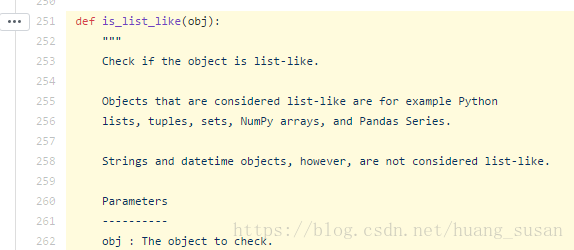
Finally, I get rid of the Fred. Py the first line of the import path into: from pandas. Core. Dtype. Inference import is_list_like, import pandas_datareader modules again success!
Question 3: run the following code, appear ImmediateDeprecationError, namely the Yahoo! Finance no longer exists because in 2017 Yahoo! It was bought by Verizon
Yahoo Daily has been immediately deprecated due to large breaks in the API without the
introduction of a stable replacement
The code is as follows:
import pandas as pd
import datetime
import pandas_datareader.data as web
start = datetime.datetime(
2010,1,1)
end = datetime.datetime(
2017,1,1)
df = web.get_data_yahoo(
‘SPY’,’yahoo’,start, end)
Baidu has found one solution in the CSDN blog: install Fix_yahoo_finance (PIP Install) and then run the following code before retrieving the data.
import fix_yahoo_finance as fy
fy.pdr_override()
Reproduced in: https://www.cnblogs.com/ziheIT/p/9249676.html
On NPM audit fix
Background:
The following reminder appears when NPM Install is executed
The following reminder appears when NPM Install is executed
added 253 packages from 162 contributors and audited 1117 packages in 42.157s
found 5 vulnerabilities (1 low, 4 high)
  run `npm audit fix` to fix them, or `npm audit` for details html
According to the command prompted by the console, type ‘NPM Audit Fix’ and the console prompts:
1 package update for 5 vulns involved breaking changes
  (use `npm audit fix --force` to install breaking changes; or do it by hand)
After typing: ‘NPM Audit Fix — Force’, the console prompts:
added 199 packages from 111 contributors, removed 64 packages and updated 23 packages in 42.194sfixed 5 of 5 vulnerabilities in 1117 scanned packages
  1 package update for 5 vulns involved breaking changes
  (installed due to `--force` option)
Re-enter ‘NPM Audit’ :
                      === npm audit security report ===

found 0 vulnerabilities
 in 4598 scanned packages
At last everything was all right.
Out of curiosity, I read the introduction of NPM Audit Fix on the official website of NPM.
NPM audit: [email protected]& amp; NPm@6, which allows developers to analyze complex code and identify specific vulnerabilities and defects.
NPM Audit Fix: [email protected] detects vulnerabilities in project dependencies and automatically installs those that need to be updated without having to track and fix them themselves.
In the meantime, the website also provides some other commands, which are summarized as follows:
1. Run audit Fix, but only update PKglock, not Node_modules:
$ npm audit fix --package-lock-only2. Update only the packages installed in Dependencies, and skip the packages in devDependencies:
$ npm audit fix --only=prod3. Run the command to get the contents of the audit Fix to be updated and output the installation information in JSON format, but the update is not actually installed:
$ npm audit fix --dry-run --json4. Get the detailed test report in JSON format
$ npm audit --jsonThe attached:
NPM – audit website address: https://docs.npmjs.com/cli/audit
Resolve the problem of “event ID 4107” or “event ID 11” errors recorded in the application logs of windows and windows server
Problem description
An error similar to the following was logged in the application log on a machine running Windows 7 or Windows Server 2008 R2:
Log name: application
source: microcosm-windows-capi2
date: date and time
event ID: 4107
task category: no
level: error
key words: classic
user: N/A
computer: computer name
description:
from < http://www.download.windowsupdate.com/msdownload/update/v3/static/trustedr/en/authrootstl.cab (http://www.download.windowsupdate.com/msdownload/update/v3/static/trustedr/en/authrootstl.cab) > The automatic update CAB failed to extract the third-party root list with the error: the certificate required for verification based on the current system clock or the timestamp in the signature file is not valid.
Or, an application log on a machine running Windows Vista or Windows Server 2008 records an error similar to the following:
Log name: application
source: microcosm-windows-capi2
date: date and time
event ID: 11
task category: no
level: error
key words: classic
user: N/A
computer: computer name
description:
from < http://www.download.windowsupdate.com/msdownload/update/v3/static/trustedr/en/authrootstl.cab (http://www.download.windowsupdate.com/msdownload/update/v3/static/trustedr/en/authrootstl.cab) > The automatic update CAB failed to extract the third-party root list with the error: the certificate required for verification based on the current system clock or the timestamp in the signature file is not valid.
why
The above error occurred because the Microsoft Certificate Trust List publisher certificate has expired. A copy of the CTL whose signature certificate has expired exists in the CryptnetUrlCache folder.
In addition, the event ID 4107 May be logged as a “data invalid” error rather than a “Certificate that is not valid when verified against the current system clock or timestamp in the signature file” error.
The solution
Our Fix IT team has provided you with an automated solution to help you solve this problem. You can download or run the solution directly by clicking the following picture or the “Fix it to help me solve this problem” text link:
An error similar to the following was logged in the application log on a machine running Windows 7 or Windows Server 2008 R2:
Log name: application
source: microcosm-windows-capi2
date: date and time
event ID: 4107
task category: no
level: error
key words: classic
user: N/A
computer: computer name
description:
from < http://www.download.windowsupdate.com/msdownload/update/v3/static/trustedr/en/authrootstl.cab (http://www.download.windowsupdate.com/msdownload/update/v3/static/trustedr/en/authrootstl.cab) > The automatic update CAB failed to extract the third-party root list with the error: the certificate required for verification based on the current system clock or the timestamp in the signature file is not valid.
Or, an application log on a machine running Windows Vista or Windows Server 2008 records an error similar to the following:
Log name: application
source: microcosm-windows-capi2
date: date and time
event ID: 11
task category: no
level: error
key words: classic
user: N/A
computer: computer name
description:
from < http://www.download.windowsupdate.com/msdownload/update/v3/static/trustedr/en/authrootstl.cab (http://www.download.windowsupdate.com/msdownload/update/v3/static/trustedr/en/authrootstl.cab) > The automatic update CAB failed to extract the third-party root list with the error: the certificate required for verification based on the current system clock or the timestamp in the signature file is not valid.
why
The above error occurred because the Microsoft Certificate Trust List publisher certificate has expired. A copy of the CTL whose signature certificate has expired exists in the CryptnetUrlCache folder.
In addition, the event ID 4107 May be logged as a “data invalid” error rather than a “Certificate that is not valid when verified against the current system clock or timestamp in the signature file” error.
The solution
Our Fix IT team has provided you with an automated solution to help you solve this problem. You can download or run the solution directly by clicking the following picture or the “Fix it to help me solve this problem” text link:

Let Fix IT help me Fix this problem
Further reading
If you would like to learn more about this problem or try to solve it yourself manually, please refer to the technical articles on the Microsoft website:
http://support.microsoft.com/kb/2328240
Windows 8.1 – Fix This app can’t open for Built-in Administrator account
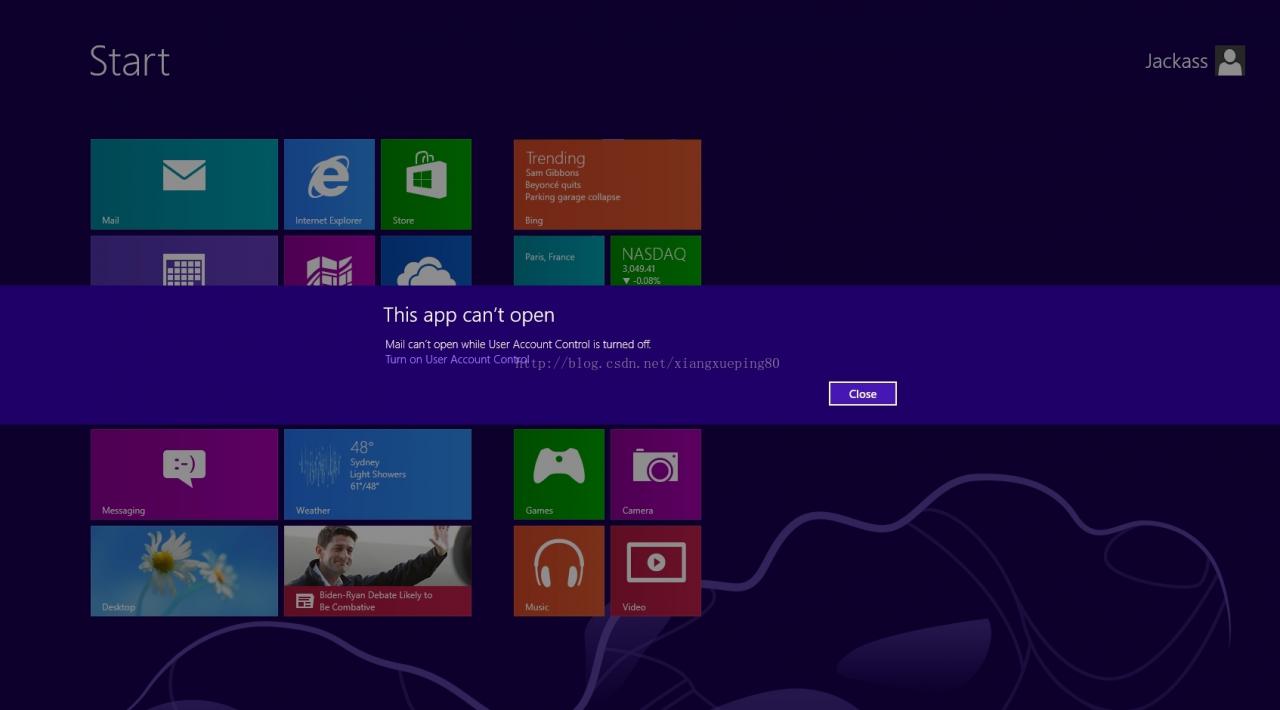
This app can’t open can’t be opened using the Built-in Administrator account.
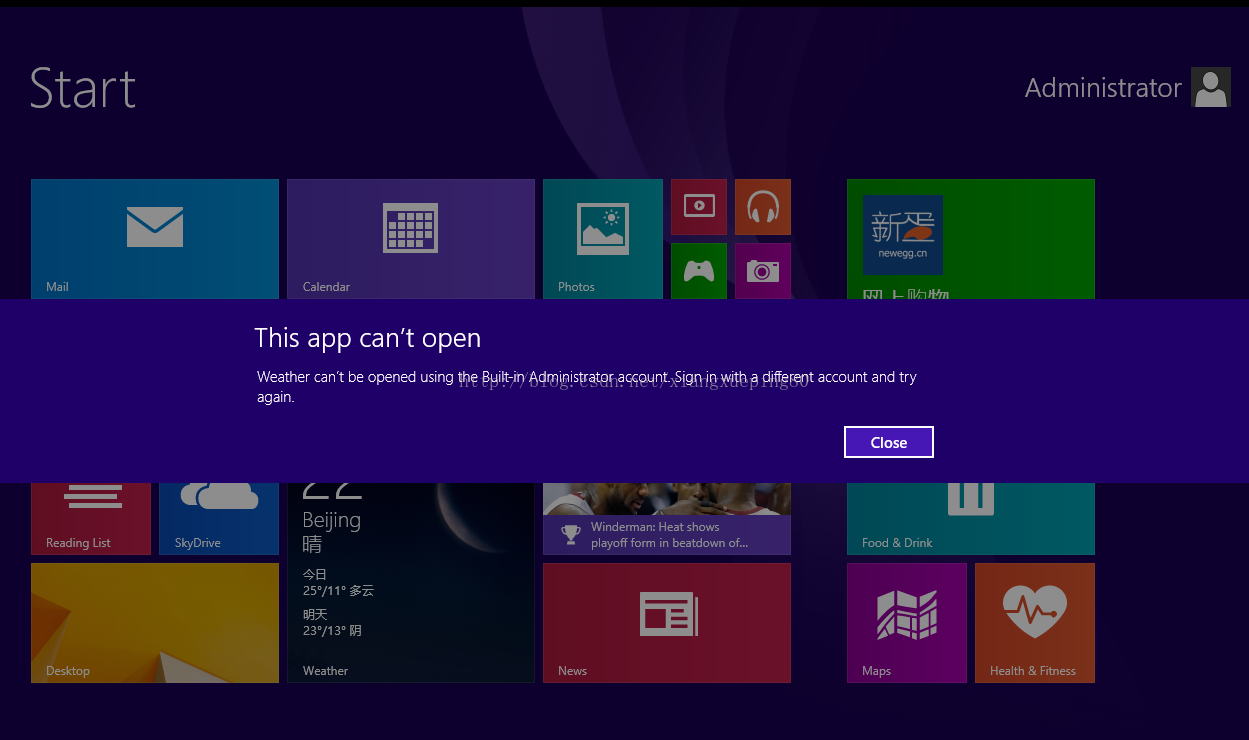
This app can’t open can’t open while User Account Control is turned off. Turn on User Account Contro
Solution one:
Sign in with a different account and try again.
Solution two:
1. Local Security Policy – Run “secpol. msc” and modify as in screenshot
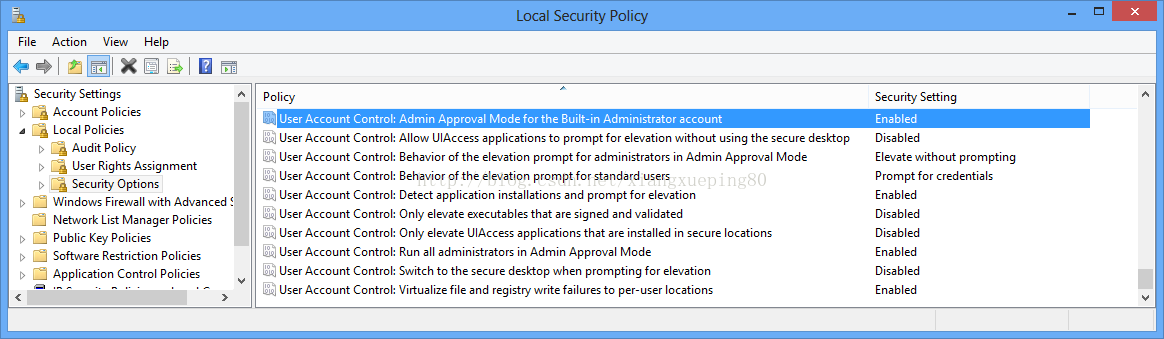
2. Edit Registry – Run “regedit” and change the value as in screenshot
